Private Instagram Accounts: What Strangers Can Still See, and How to Shut It Down
 By GuestSpy Editor · Founder and editorPublished September 1, 2020Updated October 5, 202612 min read
What does a private Instagram account actually hide? The posts, the reels and the stories — and nothing else. Private Instagram account privacy stops at the grid: the profile photo, display name, bio, link and follower counts stay visible to anyone who finds the handle, the account still appears in search and suggestions, photos other people tagged you in live on their profiles, and anything an approved follower can see, they can copy.
This page used to promise a way into private accounts. There is no such way, for a reason explained further down: Instagram serves a private account’s media only to approved followers, so a website with no approved account has nothing to fetch. The pages that claim otherwise take a login, a payment or an install instead. What follows is the useful version of the same subject — exactly what your private account still leaks, and how to close each gap.
What a stranger still loads
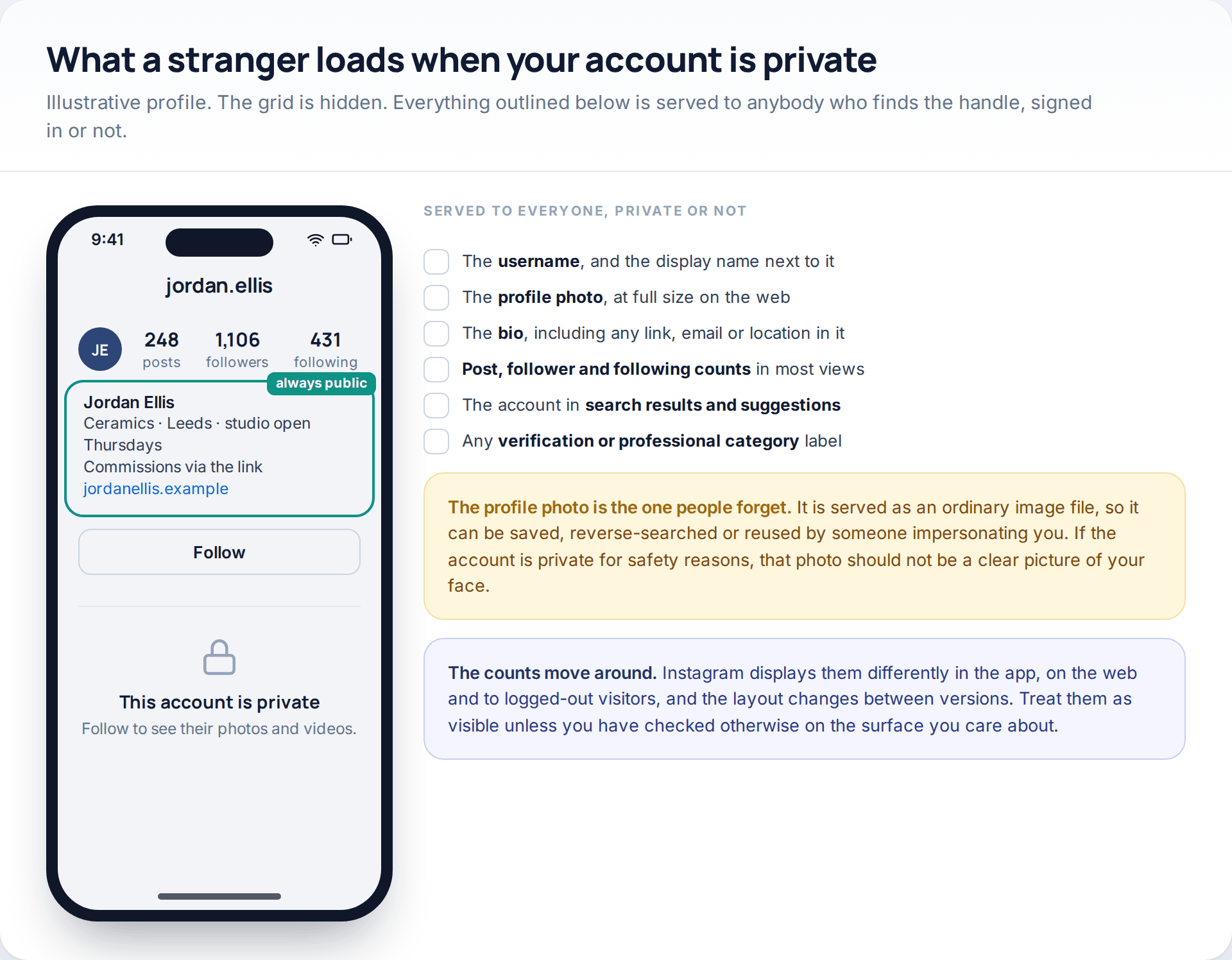
Open your own profile in a private browser window, signed out, and look at what comes back. The username, the display name, the profile photo, the bio with whatever is written in it, the external link, and in most views the post, follower and following counts. That is a reasonable amount of information about a person, and it is all available before anybody asks to follow.
The profile photo deserves a line of its own. It is delivered as an ordinary image file, at a usable size on the web, which means it can be saved, reverse-image-searched, or lifted by somebody setting up an account in your name. If the account is private because of a specific person rather than general preference, a clear photograph of your face is the wrong choice for it.
The counts are less predictable. Instagram renders them differently in the app, on the web and to logged-out visitors, and it has changed that behaviour more than once. Assume they are visible unless you have checked on the surface you care about.
Four audiences, not two
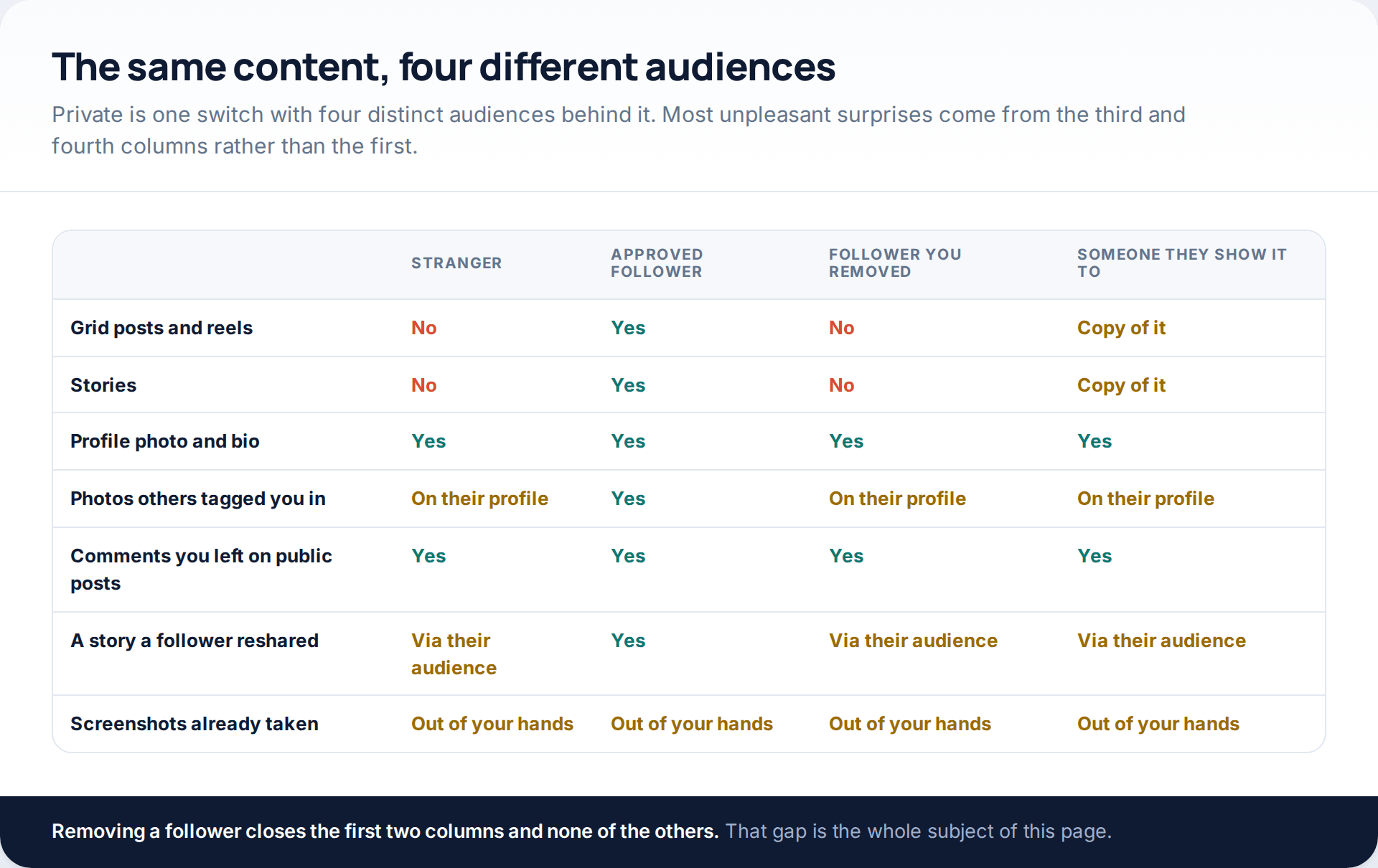
Going private feels binary — in or out — but there are four groups in practice. Strangers, who get the header and nothing else. Approved followers, who get everything. Followers you remove later, who lose the posts but keep everything they already saved. And the people those followers show things to, who were never part of the decision at all.
Reading the table that way reframes the whole exercise. The privacy setting governs the first column well. Columns three and four are governed by who you approved in the first place, which is why the audit further down matters more than the switch.
Where private content turns up in public anyway
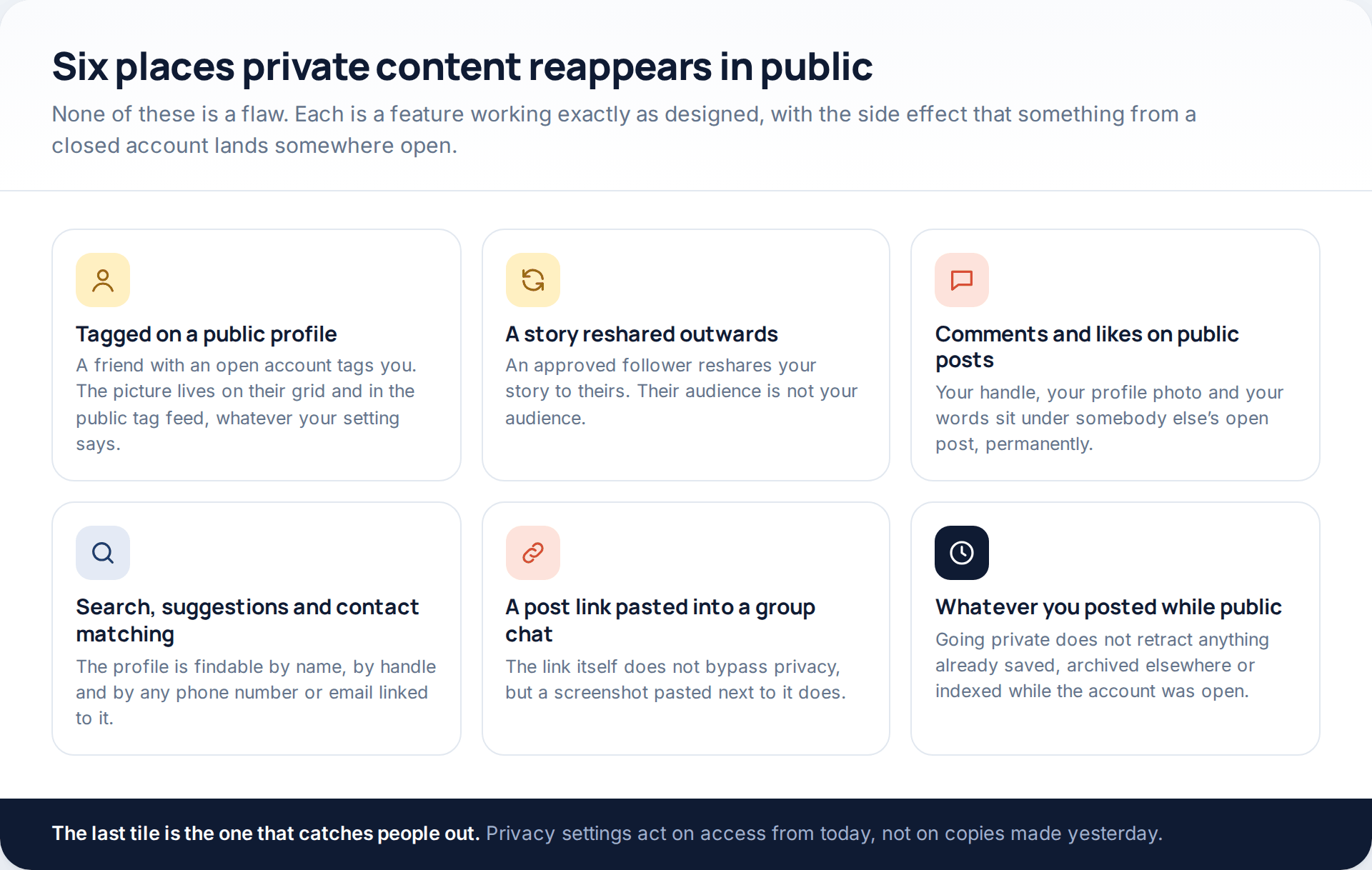
Tagging is the biggest of the six. If a friend with an open account posts a photo of you and tags you, that photo is on their public grid and in the public tag feed regardless of your setting. You can remove the tag, which detaches your name; you cannot remove the picture. Setting tags to manual approval stops anything new appearing on your own profile, which is worth doing, but it is a smaller fix than it sounds.
Story resharing is the quietest. An approved follower taps once and your story is on theirs, in front of an audience you never saw. There is a setting that turns this off, and for a private account it should probably be off by default.
Comments are the most permanent. Every comment you leave on a public post carries your handle and your profile photo, sits there indefinitely, and is visible to everyone including search engines. Many people with carefully locked accounts have a long public trail under other people’s posts without ever having thought about it.
And then there is history. Switching to private today does nothing about what was downloaded, screenshotted or indexed while the account was open. If the account spent years public, the realistic options are archiving or deleting the old posts, not the privacy toggle.
The follower audit
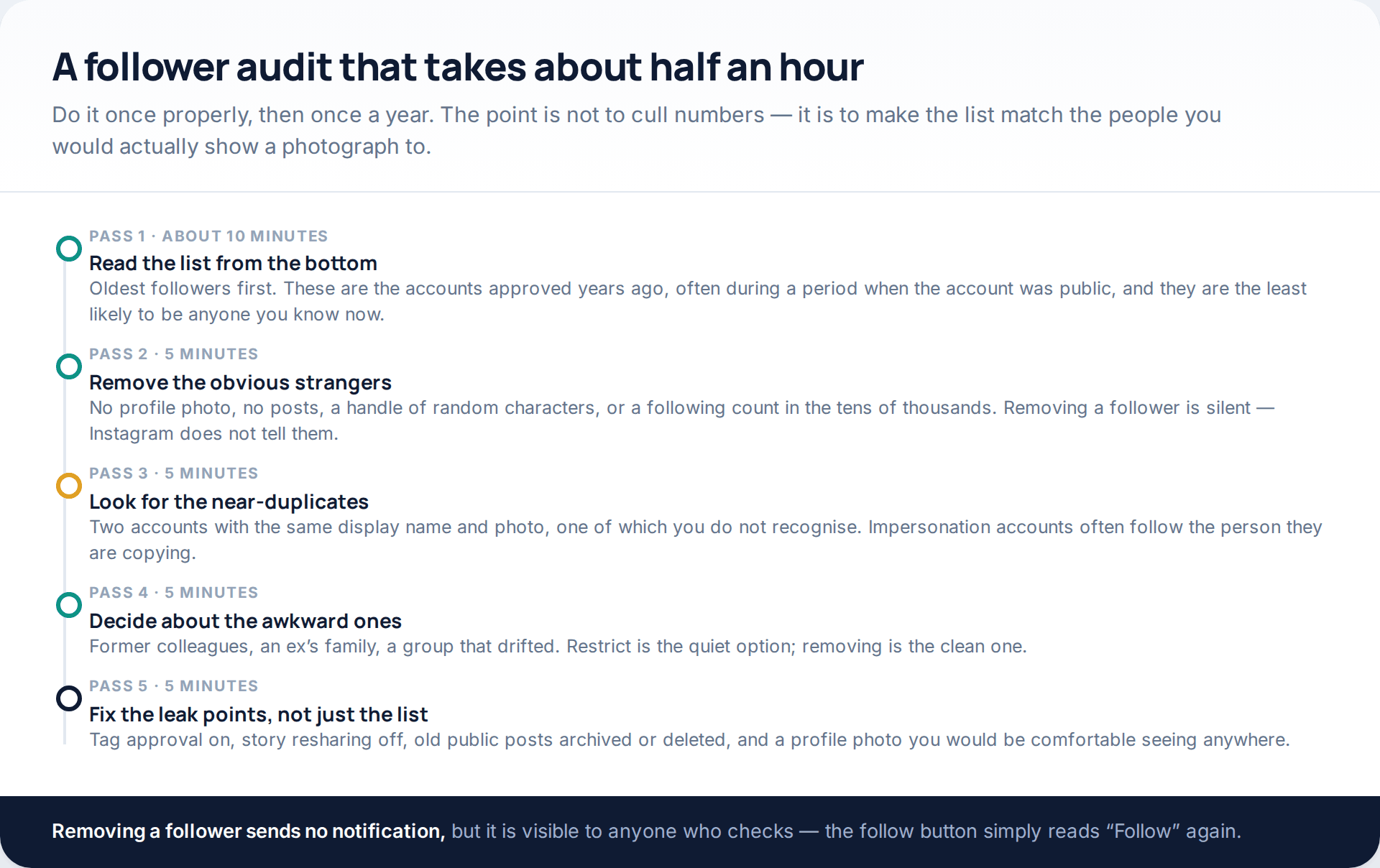
A private account with eleven hundred followers is not private in any meaningful sense; it is a medium-sized broadcast with a doorman. The audit is about making the list match the people you would actually show a photograph to.
Work from the bottom of the follower list upwards. The oldest entries were approved years ago, often during a spell when the account was public and the follow requests were accepted without much thought. Those are the ones to look at hardest. Remove the obvious non-people: no photo, no posts, a handle of random characters, or a following count in the tens of thousands. Removing a follower sends no notification, although it is visible to anyone who looks, because the button on your profile goes back to reading “Follow”.
Then look for near-duplicates. Two accounts with your friend’s name and photo, one of which you do not recognise, is the signature of an impersonation account — and impersonators very often follow the person they are copying. Report that one rather than merely removing it.
Finish by fixing the leak points rather than the list: tag approval on, story resharing off, old public posts dealt with, profile photo reconsidered. The list is only half the job.
Restrict, block, remove, mute and Close Friends
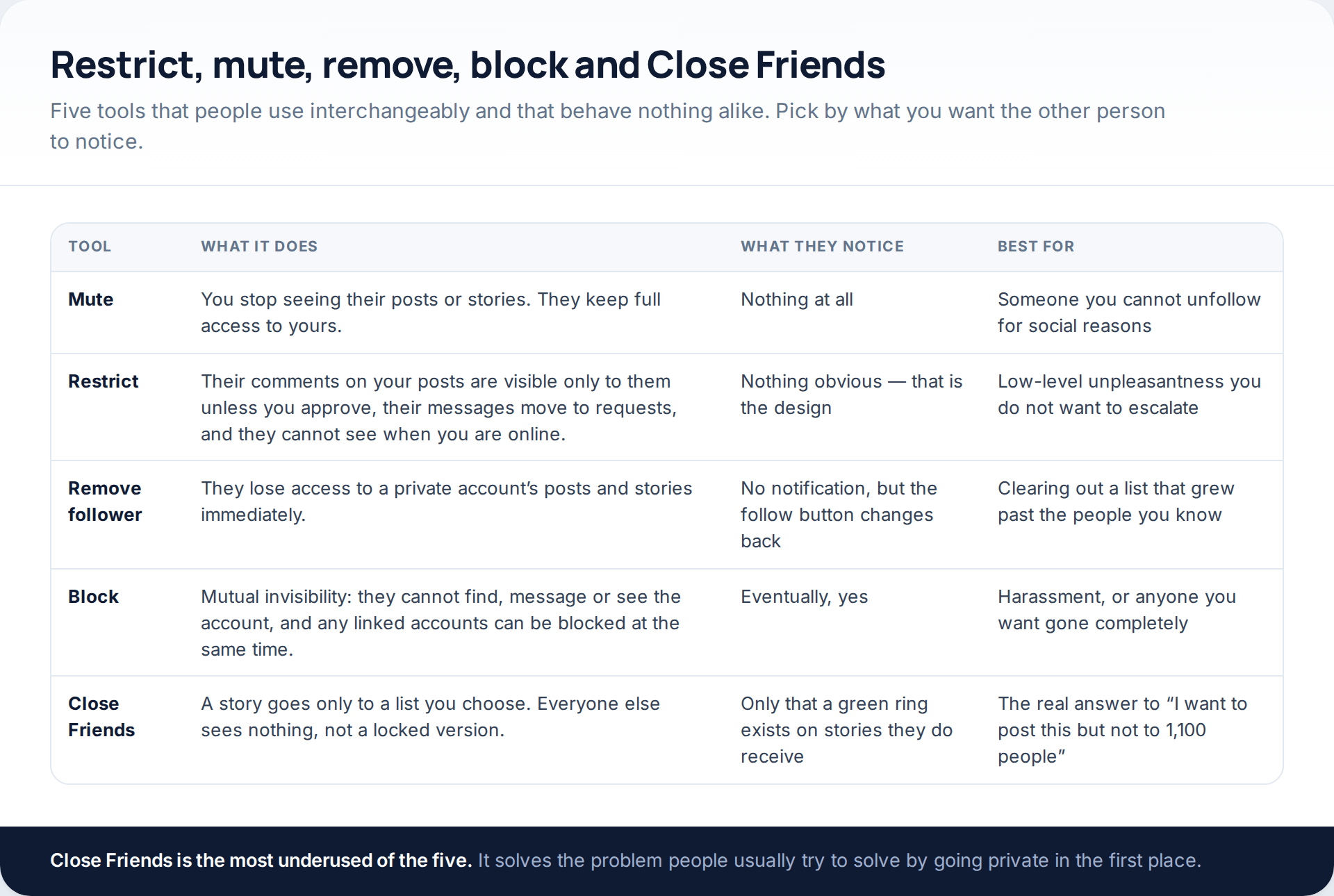
The useful distinction is what the other person perceives. Mute changes your feed and nothing on their side. Restrict is the quiet one: their comments on your posts become visible only to them unless you approve each one, their messages move into requests, and they lose sight of whether you are online — all without the confrontation a block creates. Removing a follower is clean and silent but visible on inspection. Blocking is mutual invisibility, and Instagram offers to block the other accounts associated with that person at the same time.
Close Friends is the one most people never use and probably should. A story posted to Close Friends goes to the list you choose and to nobody else — the rest of your followers see no locked version, no hint that something exists. For most people, that is the actual solution to “I want to post this, but not to everyone”, and it works better than tightening a private account further.
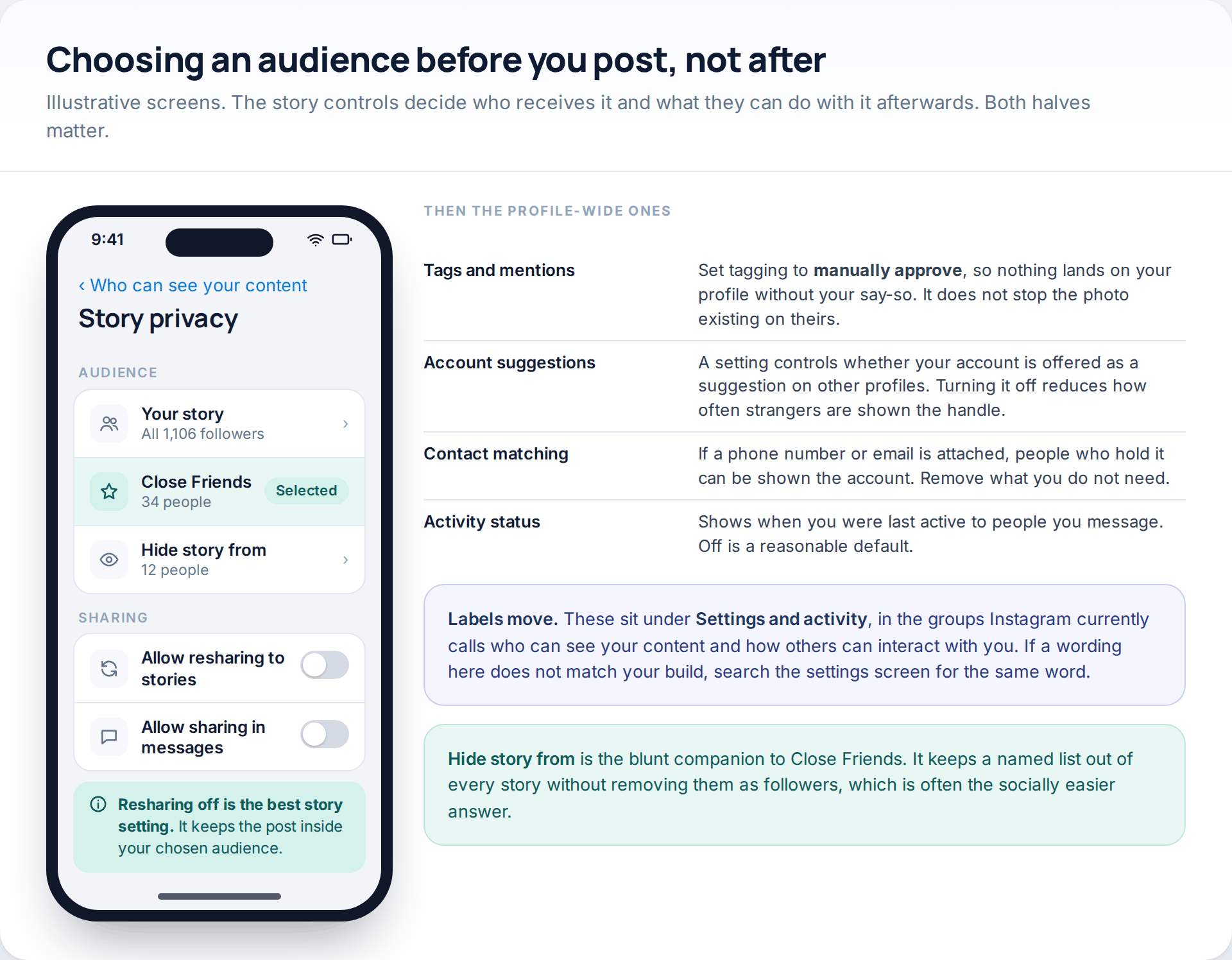
Four profile-wide settings are worth a minute each. Tags and mentions, set to manual approval. Account suggestions, which controls whether your profile is offered to strangers on other people’s pages. Contact matching, which is how people holding your phone number or email address get shown the account. And activity status, which broadcasts when you were last online to anyone you have messaged.
These live under Settings and activity, in the groups Instagram currently labels around who can see your content and how others can interact with you. Meta renames and regroups these screens regularly, so if a wording here does not match your app, search the settings screen for the same word rather than assuming the option has gone.
Hidden Words, for what gets through anyway
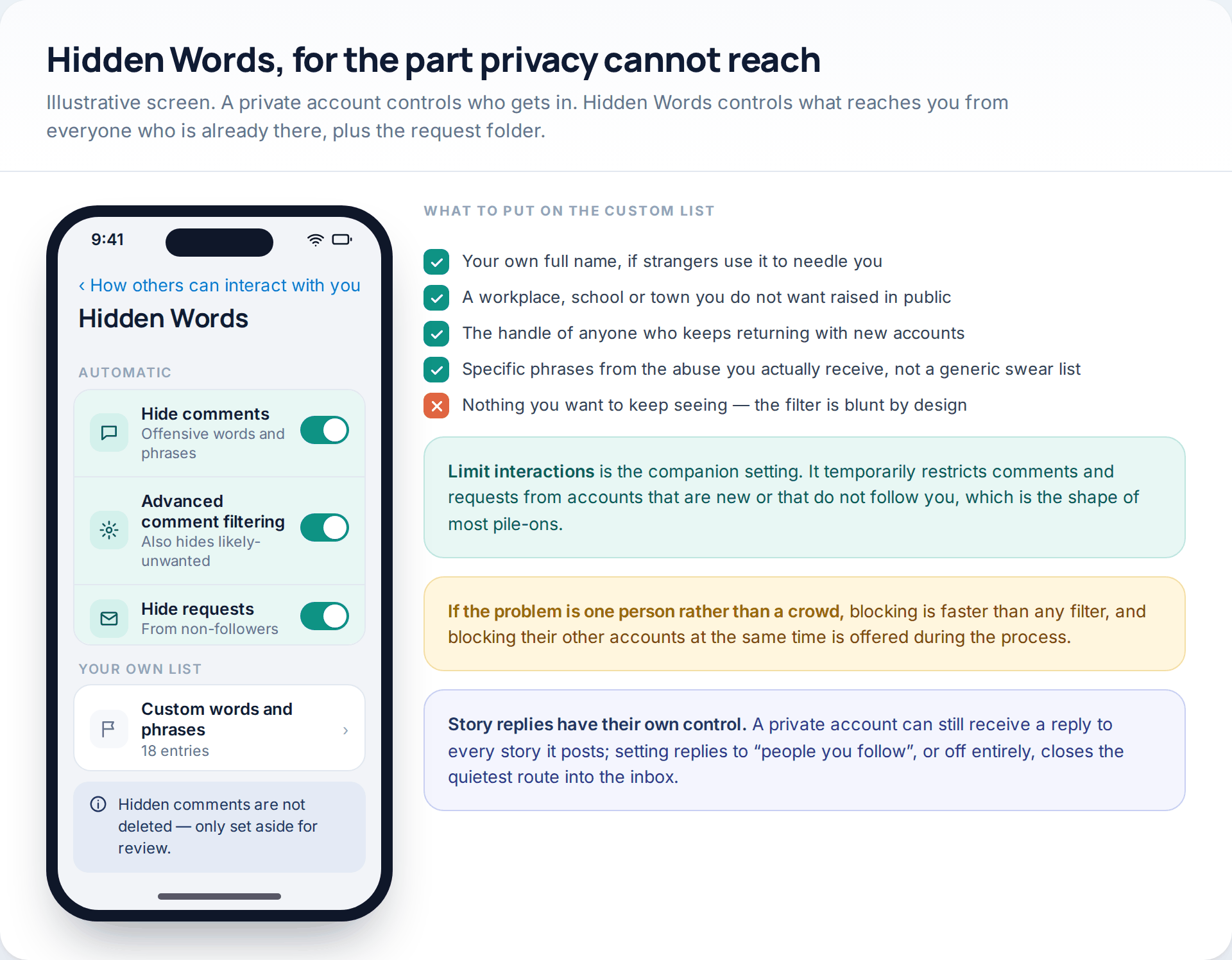
A private account still has an inbox, and strangers can still send requests to it. Hidden Words handles the overflow: it filters comments containing offensive terms, applies a broader “likely unwanted” filter if you switch that on, moves message requests from accounts you do not follow out of sight, and lets you add your own list of words and phrases.
Make the custom list specific rather than generic. Your own full name, if that is what gets used to needle you. A workplace or a town you would rather not see mentioned in public. The handle of someone who keeps coming back with new accounts. The actual phrases from the messages you actually receive. A generic list of swear words catches very little of what people are really sent.
Hidden comments are not deleted — they are set aside for you to review when you choose to, which is the point. And if the problem is one determined person rather than a crowd, blocking is faster than any filter. If the situation is more serious than nuisance, our guide to protecting a phone in an abusive situation deals with the wider picture.
The sites that promise to show you a private profile
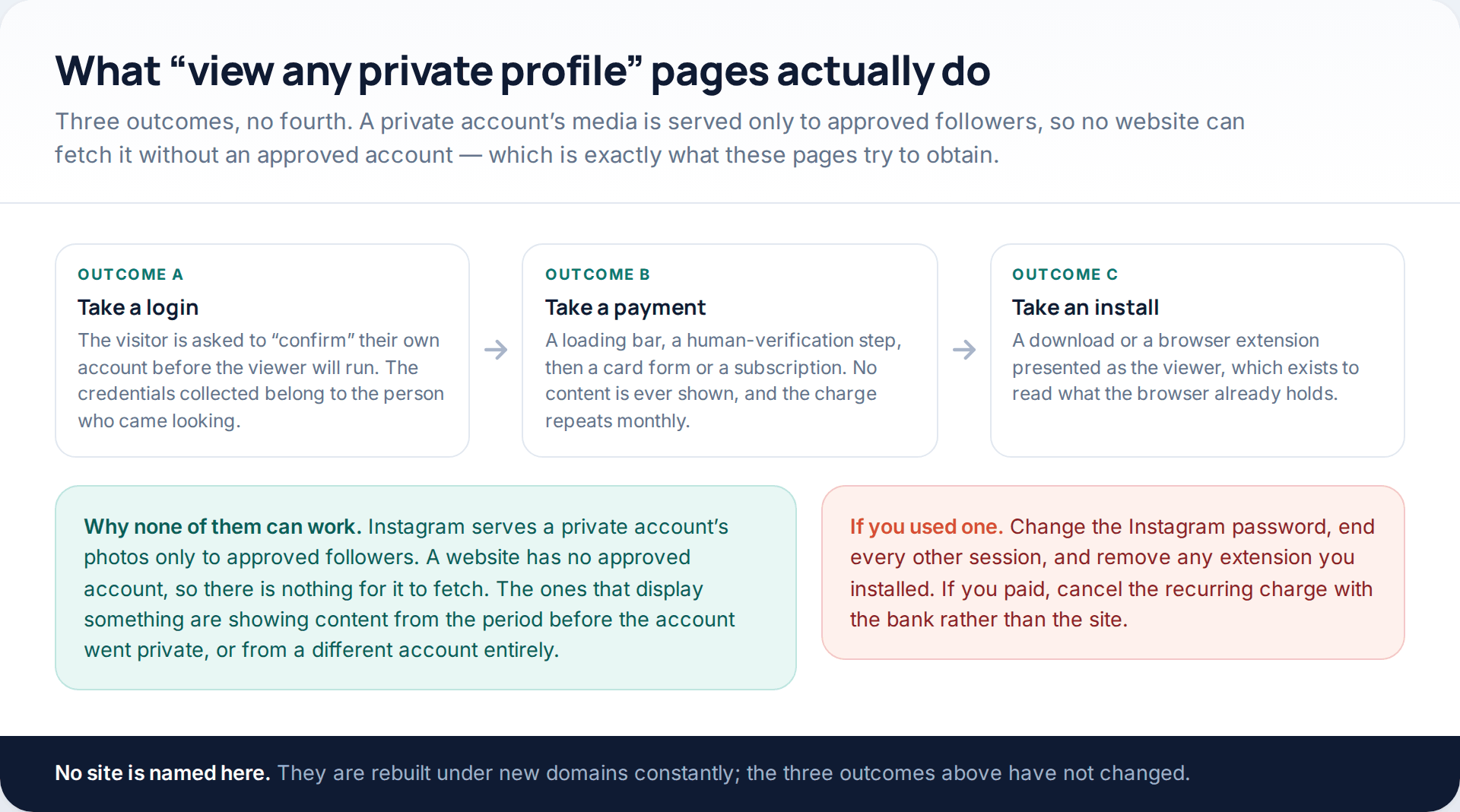
Search for a way into a private account and you will find pages offering exactly that, usually with a handle box and a progress animation. They end in one of three ways. The first asks you to “confirm” your own account before the viewer will run, and collects your login. The second runs a loading bar and a human-verification step, then asks for a card — the content never appears and the subscription renews. The third offers a download or a browser extension, which exists to read what your browser already holds.
The technical reason none of them can work is simple. Instagram serves a private account’s photos only to approved followers. A website is not an approved follower, so there is nothing on the other end for it to request. Where one of these pages does display something, it is showing content from before the account went private, or content from a different account with a similar name.
If you have already used one, change your Instagram password, end every other session from the login activity screen, and remove any extension you installed. If a payment went through, cancel the recurring charge through your bank rather than through the site. Sites built to collect card details are rarely cooperative about cancelling.
The limit that no setting removes
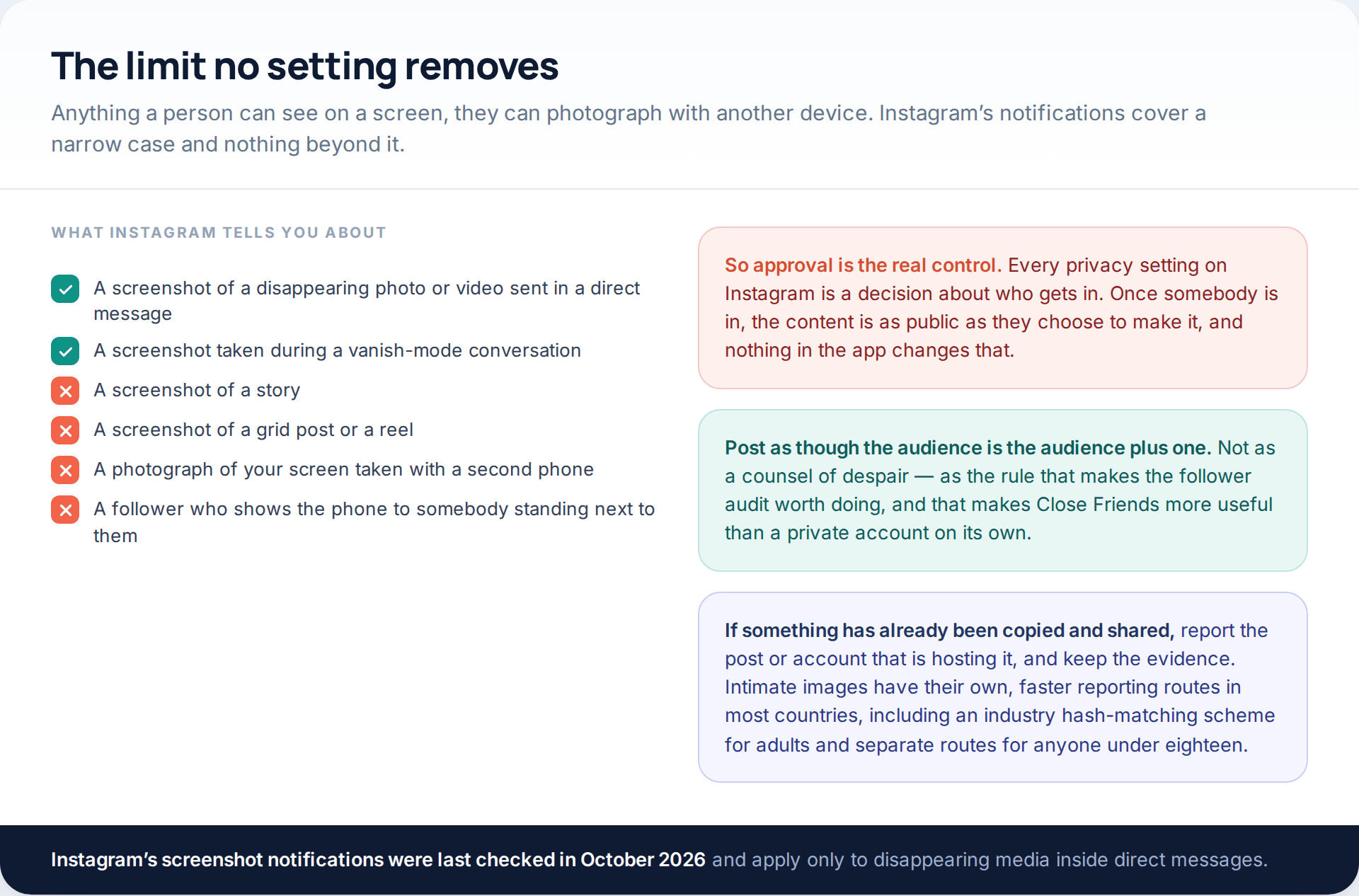
Instagram notifies you about screenshots in one narrow case: disappearing photos and videos sent inside direct messages, and conversations in vanish mode. It does not notify you about screenshots of stories, grid posts or reels. It cannot notify you about a second phone pointed at a screen, and it obviously cannot do anything about a follower holding their phone up to show somebody standing next to them.
If something has already been copied and circulated, report the post and the account hosting it and keep the evidence. For intimate images there are faster dedicated routes in most countries, including an industry hash-matching scheme for adults and separate, more urgent routes for anyone under eighteen.
The ten-minute version
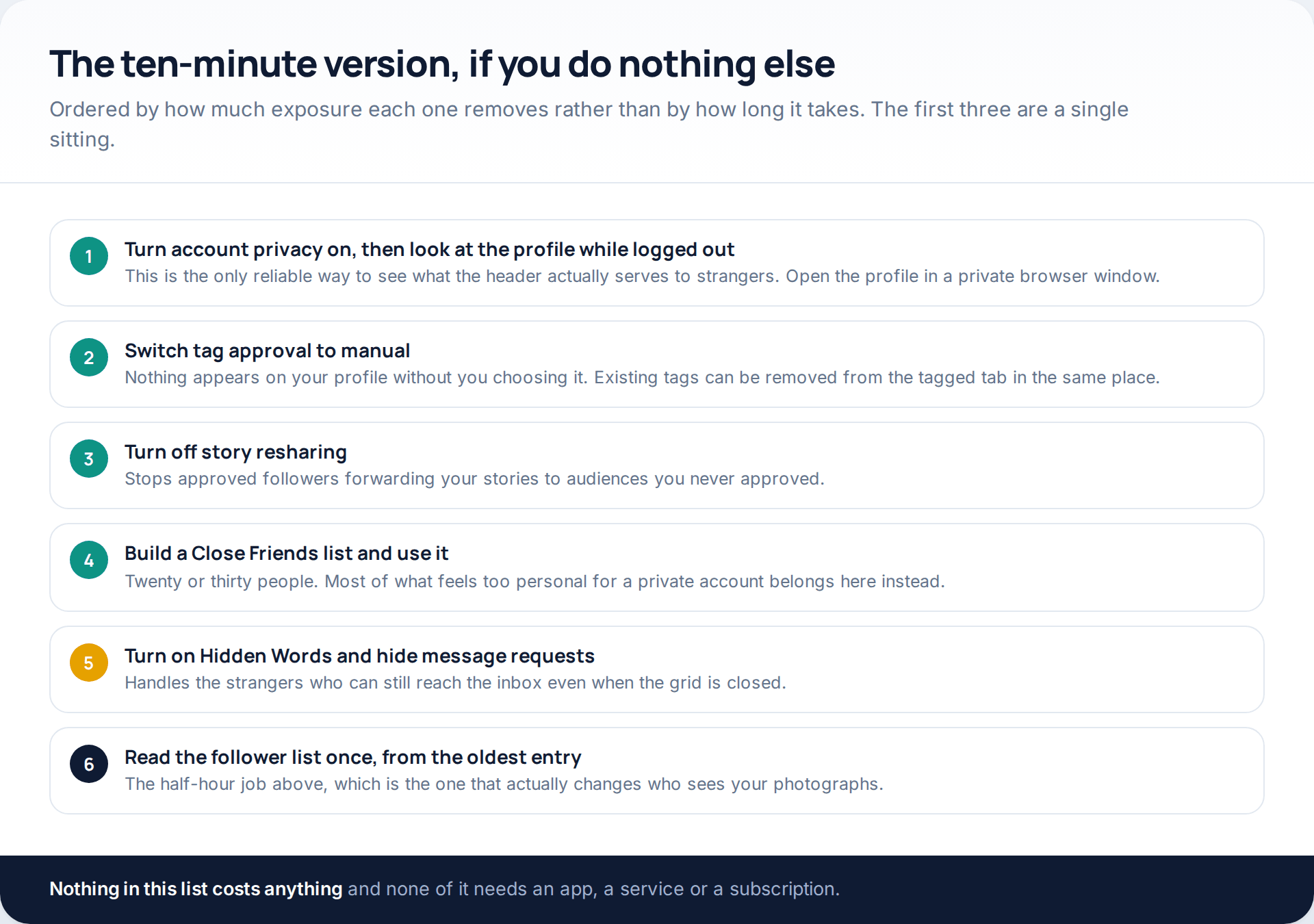
If you do nothing else on this page, do these. Check the profile logged out, set tags to manual approval, turn off story resharing, build a Close Friends list, switch on Hidden Words, and read the follower list once from the bottom. None of it costs anything and none of it needs an app.
Worth saying plainly: an account being copied is a different problem from an account being taken. If posts are appearing that you did not write, or the bio has changed, that is a compromise rather than a privacy gap, and the six routes in are covered in how accounts fall without the password.
How this page was put together
The settings, labels and behaviours described here were checked in October 2026 against the current Instagram app and against Instagram’s own help material on account privacy, story controls, Hidden Words, restricting and blocking. Meta reorganises these screens frequently — privacy options now sit in grouped sections under Settings and activity, where they were once a single flat Privacy list — so the groupings above may not match your build exactly. Where a label has clearly moved we have described what the setting does rather than quoting a path that will be wrong by spring.
We did not test any “private profile viewer” service, visit one, or name one, and we would advise against doing so: the three outcomes described are drawn from how such pages are documented by security researchers and consumer-protection bodies, not from a trial. We have given no figures for how many private accounts are scraped or screenshotted, because no reliable public measurement of that exists, and the numbers circulating are marketing from the companies selling the fix.
If you are tightening an account after a scare rather than out of general caution, the settings that actually keep an account yours are a separate short job, set out in three settings that secure an Instagram account.
Common questions
Can anyone see a private Instagram account’s photos without following?
No. Instagram serves those files only to approved followers, which is why no website or app can display them. What a stranger can see is the profile photo, name, bio, link and usually the counts, plus anything other people have tagged or reshared.
Does Instagram tell someone when I remove them as a follower?
No notification is sent. It is visible on inspection, though — the next time they look at your profile the button reads “Follow” again, and they cannot see your posts.
Will people know if I restrict them?
Not directly, which is the purpose of the feature. Their comments appear normal to them but are hidden from everyone else unless you approve them, and their messages go to your requests folder.
Can someone screenshot my story without me knowing?
Yes. Instagram only notifies about screenshots of disappearing photos and videos sent in direct messages, and in vanish mode. Stories, posts and reels produce no alert at all.
Should my profile photo be a picture of my face if the account is private?
If the account is private for safety reasons rather than preference, probably not. That image is served to everybody, at a usable size, and it is what makes an account findable and impersonatable.
Does going private remove what was posted while the account was public?
No. It changes who can access the posts from now on. Anything already saved, screenshotted or indexed stays where it is, so old posts need archiving or deleting rather than a setting change.
Is there any legitimate way to see a private account I have a real reason to see?
Send a follow request, or ask in person. For legal matters — harassment, a court process, a safeguarding concern — the route is through the police or a solicitor, who can request content formally. There is no consumer product that does this, and the ones advertising it are the traps described above.
Using a monitoring app for this? GuestSpy is parental monitoring for Android that stays visible on the child's phone and runs from any browser. If it fits your family, see the Text messages & social feature.
Related guides
5 Best Security and Network-Testing Apps for Android (Rooted and Not)
The useful security apps for Android are not the ones with “hack” in the title. They are a network scanner,…
Gmail Password Compromised? Four Recovery Routes Google Accepts
If your Gmail password was hacked, there are four routes back and the one that is open to you depends…
Facebook Account Hacked? Every Free Route Back In
If your Facebook account was hacked, five routes lead back in and all of them are free: a device of…
Monitoring your child can see.
Location, screen-time budgets, routines, app and website blocking and the alerts that matter, run from any browser and visible on the phone. Pair an Android phone in about fifteen minutes.