Where the phone is, and whether that matters today
A dot on a map with a ring that admits how accurate it is, a month of history you can scrub through, and saved Places that send one message at the moment something changes. The child's phone shows the location switch and every single request, so nobody is being followed behind their back.
Google Play build · Android 9 or newer · History kept 30 days, then deleted
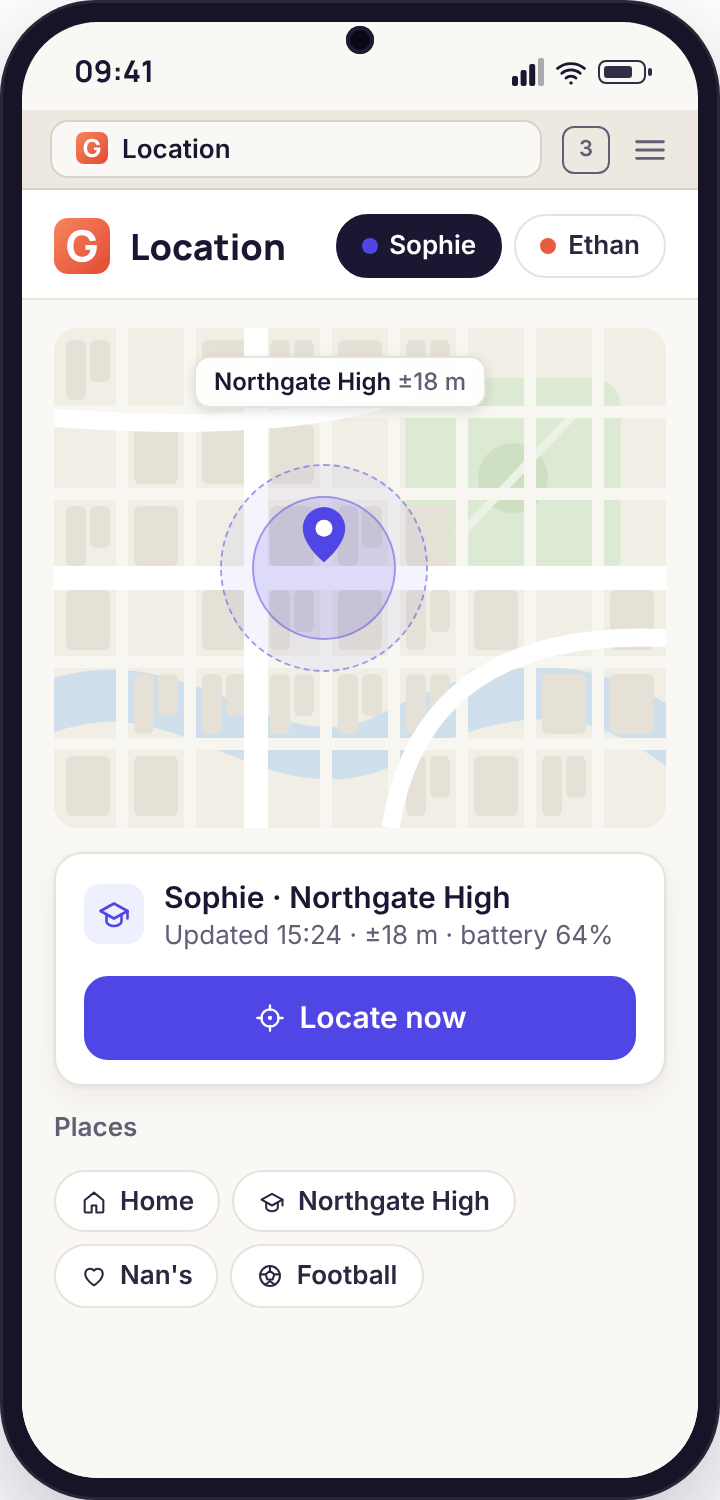
- The ring is the honest part. Every position comes with the radius the phone itself reported, so a confident fix looks different from a rough one before you have read a word.
- Places turn a map into a message. Save the handful of spots that matter and let arrive, leave and left-early tell you about them, rather than opening the map on the off-chance.
- History is a month long and no longer. Thirty days of fixes, deleted on a rolling basis. There is no longer archive to request and no way for us to make one.
- Locate now asks once. A single fresh fix, requested from the Devices page, with a notice on the child's screen. It is not a live stream and we have not built one.
- Off until you turn it on. Pairing shares nothing. The child's Transparency screen shows the location row as off until the day you flip it, and then as on.
One map, four jobs
Everything on the Places page of the panel is built around a single map. What differs is the question you bring to it: where are they right now, where were they on Thursday, tell me when they get to Nan's, and give me a fresh fix because the last one is stale.
Live location, with the accuracy drawn in
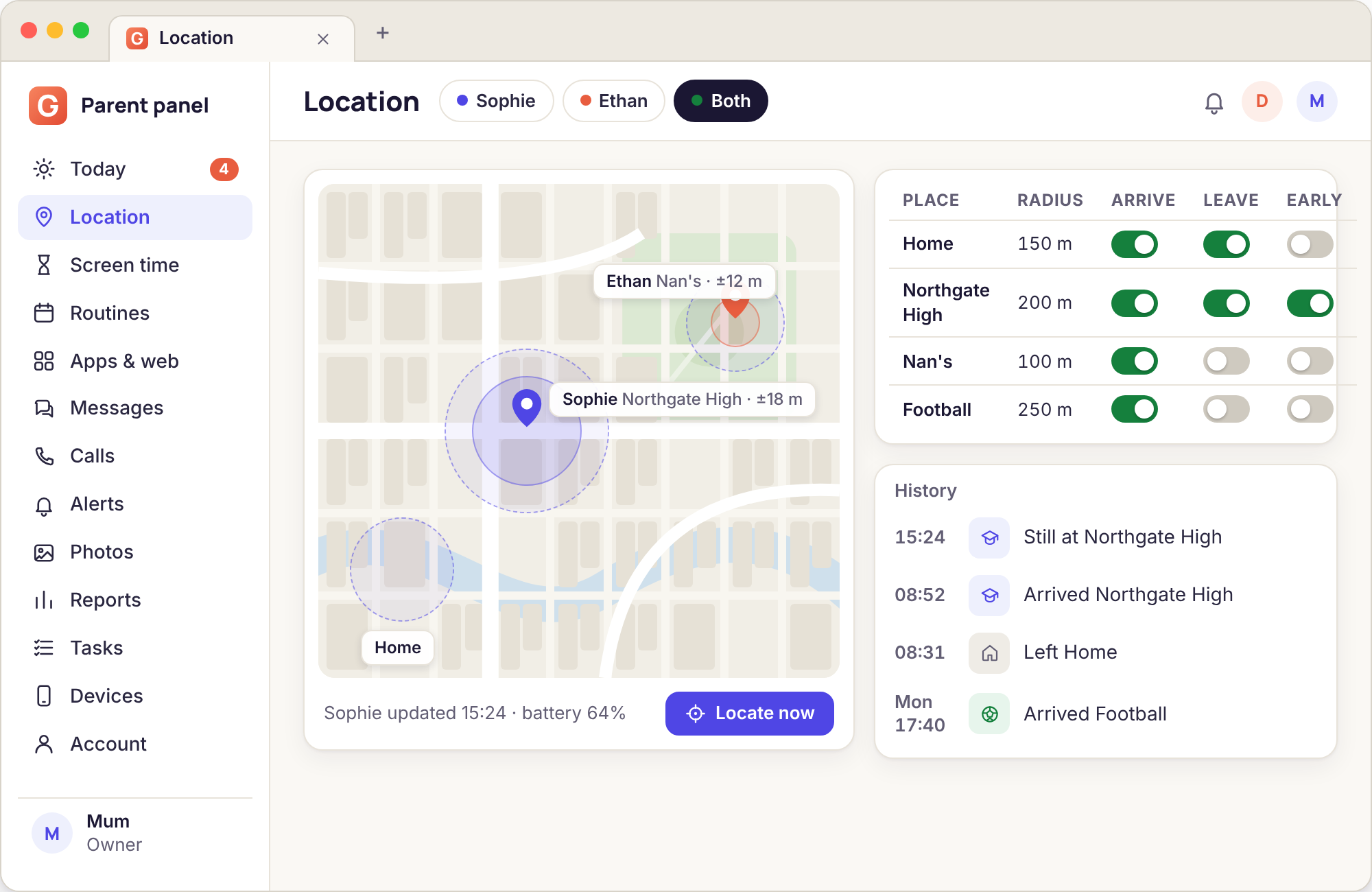
Sign in from any browser and the Places page draws a named dot for each child whose location switch is on. The pale circle around it is not decoration. It is the accuracy figure the phone attached to that fix, in metres, drawn to scale. Outdoors with a clear view of the sky it is a small ring you could cover with a fingertip. In a sports hall it can swell to cover the whole building, and that is the correct thing for it to do.
Two small numbers sit beside the dot: the time of the fix and the battery percentage. Read them together. A dot that has not moved for an hour on a phone showing 2 per cent means the phone has gone flat in a bag, which is a different situation from a dot that has not moved on a phone at 80 per cent.
- One dot per child, with the time of the last fix
- Accuracy ring in metres, taken from the phone's own estimate
- Battery level and whether the phone is charging
- Works in Safari on an iPhone, so a parent without Android is not left out
Location history for 30 days
Below the map is a date strip. Pick a day and the dot is replaced by a line of that day's fixes, each with its time. Most parents use it for ordinary questions: did the football bus really take an hour, which route did they walk home when it rained, what time did they actually get to the sleepover. It is less dramatic than it sounds and more useful.
The window is 30 days. On day 31 the oldest day is removed without anyone pressing anything, and there is no setting that extends it. If a particular day matters, export it from the panel while it is still there. Unpairing the phone stops new fixes arriving from that moment, and the remaining history ages out on the same schedule.
- A route line for any day in the last month
- Each stop shows the arrival time and how long the phone sat there
- Export a single day before it expires
- Nothing older than 30 days exists on our side
Places: arrive, leave and left-early
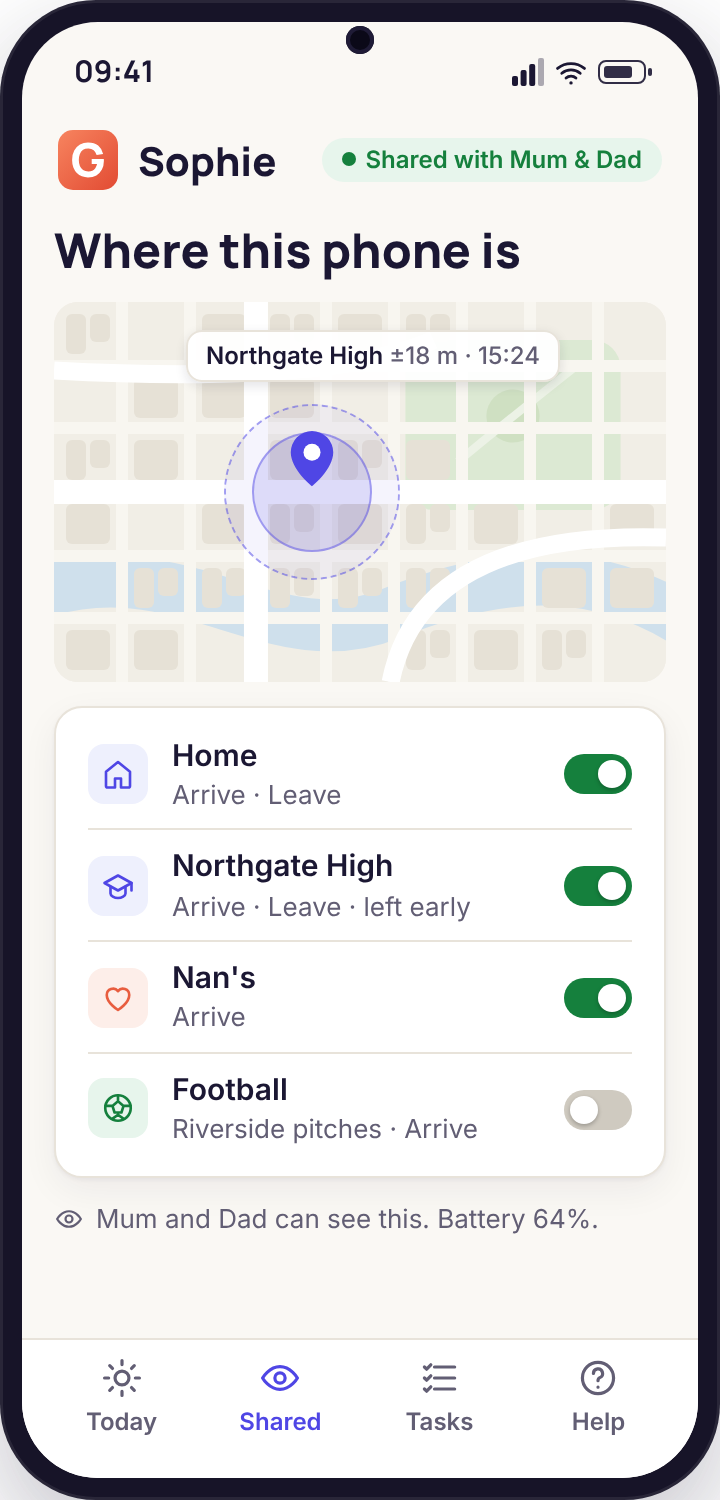
A Place is a circle you draw on the map and name: Home, School, Nan's, Football. Each one carries up to three alerts. Arrive fires when the phone enters the circle. Leave fires when it exits. Left early is the quiet one that does the real work: you tell it the time the place normally finishes, and it only speaks if the phone leaves before then. A school that ends at 15:20 produces no message at 15:25 and a message at 11:40.
The same list of Places, with the same names and radii, appears in the child's app. A rule that reads "Mum gets a message if I leave school before 15:20" is one a twelve-year-old can understand and, if they think it unfair, argue about at the kitchen table rather than discover by accident.
- As many Places as you like, each with its own radius
- Alerts by push, immediate email or the daily digest
- Left-early time set per Place and per weekday
- Every Place visible on the child's phone the moment you save it
Locate now
The phone reports its position on a rhythm it decides for itself: often while moving, rarely while still, to protect the battery. Sometimes the last fix is older than you would like. Locate now, on the Devices page, asks the phone for one new position. Outdoors it usually lands within half a minute; indoors it can take longer and come back with a wider ring.
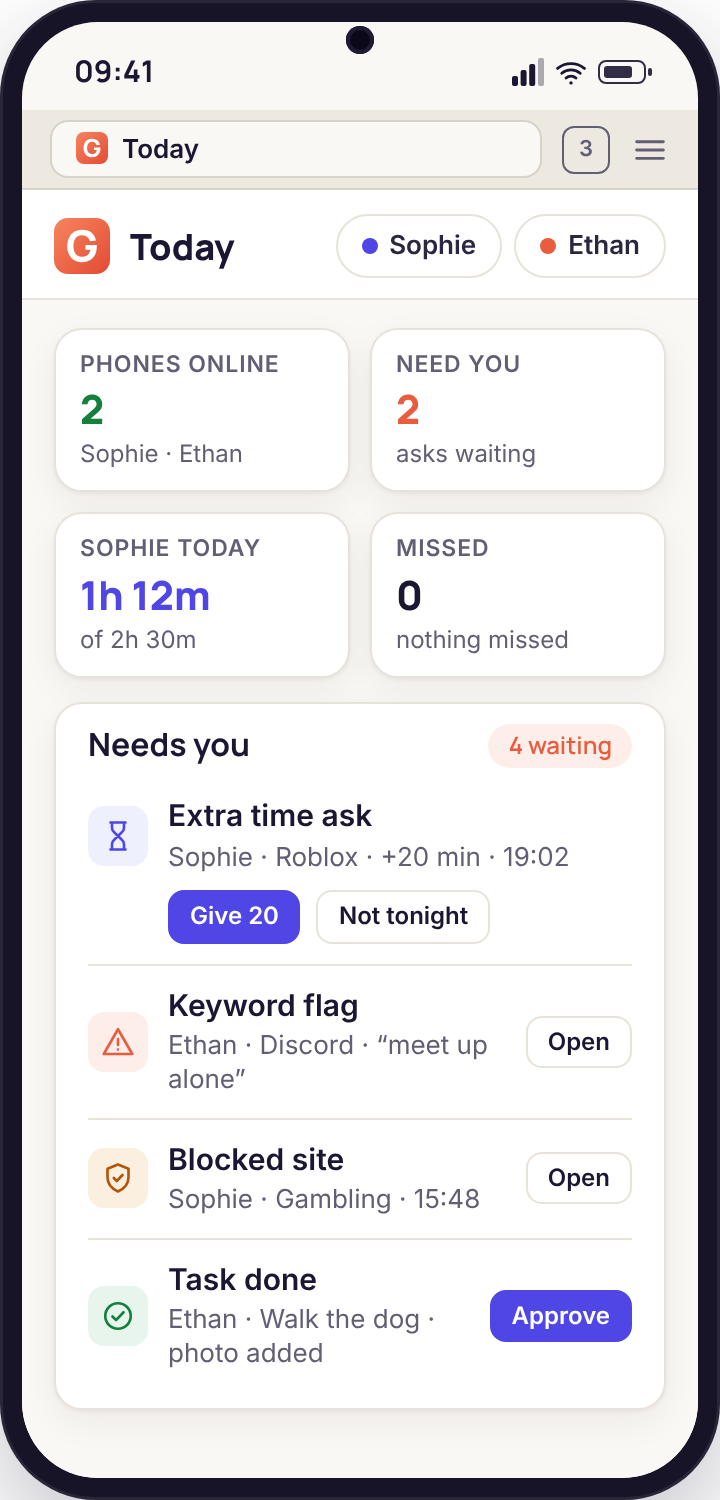
It is one fix. If you want another you press again, and each press puts a small notice on the child's screen saying a parent asked where the phone was. When the phone is out of signal the request waits in a queue and is answered when it reconnects, which is the same behaviour as Lock now and Ring loudly. The result shows up on the Today page's Needs you list as well as on the map, so you do not have to sit watching.
- A single fresh position per request
- Notice on the child's phone every time
- Queues while there is no signal, answers when there is
- Appears on Today, beside the other things that need you
GPS, Wi-Fi and cell: what each gives you, indoors and out
Android blends three sources into one position and the app has no say in the mix. Knowing which source was probably in play explains almost every odd ring you will ever see on the map.
| Source | Outdoors, open sky | Outdoors, between buildings | Indoors | What it costs the battery |
|---|---|---|---|---|
| Satellite (GPS and friends) | 5 to 15 metres once locked | 15 to 60 metres; signals bounce off walls | Usually no fix at all | Highest; the phone rations it when still |
| Wi-Fi networks nearby | 30 to 80 metres in a street with routers | 20 to 50 metres; dense housing helps | 20 to 60 metres; the workhorse in a school | Low; the phone scans anyway |
| Mobile masts | 300 metres to several kilometres | 200 to 800 metres in a town | Same as outside, roughly the right suburb | Almost nothing |
| What the ring shows | Tight ring you can cover with a fingertip | A ring the size of a few houses | A ring covering the building, sometimes the block | Larger ring usually means the cheap source won |
The practical lesson is that a wide ring is not a failure. A phone in a classroom with its satellite receiver asleep is doing its job: it reports a position from the school's Wi-Fi with a ring that honestly says "somewhere in this building". A Place radius drawn smaller than that ring will flicker, which is why the radius advice further down keeps saying 150 metres rather than 30.
The three alerts and the exact moment each one fires
Each Place can raise three events. They sound similar and behave differently, and the difference decides whether your phone buzzes twice a term or twenty times a day.
| Event | Fires when | Does not fire when | Typical use | Noise level |
|---|---|---|---|---|
| Arrive | A fix lands inside the circle after the previous fix was outside it | The phone was already inside; the phone woke up inside after being off | "They got to Nan's" without the text you would otherwise nag for | Medium: once per visit, more if the radius is tight |
| Leave | A fix lands outside the circle after at least one fix inside it | The phone powers off inside; the phone has no signal and simply stops reporting | Knowing when to put the dinner on; the walk home has started | Medium: fires at the end of every visit |
| Left early | A Leave event happens before the finish time you set for that weekday | Any Leave after the finish time; any day you have not set a time for | School on a weekday; the one event most families keep on push | Low: silent on a normal day |
| Missed arrival (from a sentence rule) | No Arrive by a time you wrote in an alert rule, such as "not at School by 08:50" | The phone arrived, even if it was late by a minute | A child who walks alone; a bus that occasionally does not turn up | Low: one check per day |
Notice that both Leave and Left-early need at least one fix inside the circle first. If the phone's morning was spent with location off, or the Arrive never registered because the radius was too small, there is nothing to leave from and the afternoon alert cannot fire either. Most "the alert didn't work" messages we get trace back to that one dependency.
What the child sees against what the parent sees
The app is visible by design and location is the feature where that matters most. This is the whole picture from both sides, with nothing left out.
| Thing | On the child's phone | In the parent's panel |
|---|---|---|
| Location switch | Shown on the Transparency screen as on or off, always | Toggled per child on the Children page |
| Current position | The app shows "sharing location" and the time of the last fix, not a map of themselves | Dot, accuracy ring, time and battery |
| 30-day history | Not shown in the app; the child can ask you to export it | Day picker, route line, export |
| Saved Places | The full list with names and radius, updated when you save | Drawn on the map and editable |
| Left-early finish times | Listed next to the Place ("School · before 15:20") | Set per weekday |
| A Locate now request | A notice at the moment it lands, naming which parent asked | The fresh fix on the map and on Today |
| Who looked at the map | Not shown; the app does not log panel views | Named actions show which of the two parents changed a rule or pressed a button |
| Alerts that fired | Not shown in the app | Alert history, with "handled by" once a parent has looked |
The two gaps on the child's side, history and the alert log, are deliberate. Showing a child their own 30-day route in the app would turn it into a tool for proving things to each other. The point of the Transparency screen is that the child always knows the category is on and what Places exist. If they want to see a specific day, the export is a conversation away.
Why a dot stops moving, and what the panel shows for each cause
A stale dot has about six explanations, and the panel leaves different fingerprints for each. Read the fingerprint before you ring the school.
| Cause | Last fix time | Battery shown | Phone online tile | Locate now result |
|---|---|---|---|---|
| Phone went flat | Stops at one moment | Under 5 per cent on the last fix | Offline | Queued until it charges and reconnects |
| No signal (basement, countryside, Tube) | Stops, then a burst of fixes arrives later | Normal | Offline | Queued; answered when signal returns |
| Location set to "only while using" | Moves only when the child opens the app | Normal | Online | Fails or returns a very old position |
| Battery saver or a "deep sleep" setting | Gaps of hours overnight or when still | Dropping slowly | Online, then offline in gaps | Works, but slowly |
| Child switched location off in Android settings | Stops | Normal | Online | Fails; Transparency screen on the phone shows the row as unavailable |
| Phone is in a locker, child is not | Keeps updating normally | Normal | Online | Returns the locker, every time |
The last row is the one worth sitting with. A phone reports where the phone is. A child who wants to be somewhere else without you knowing needs only to leave it behind, and the map will cheerfully show it exactly where it was left. That is not a flaw we can engineer away, and it is the strongest argument for treating location as a logistics tool rather than a truth machine.
Android's "Allow all the time" is the whole feature
Every other permission on the walkthrough can be revisited later. This one decides whether you have a map at all.
What the three options mean
When the child app asks for location, Android offers three answers. Allow all the time lets the app receive a position while it sits in the background, which is the only state it is ever in; nobody opens a monitoring app to stare at it. Allow only while using the app sounds reasonable and quietly breaks everything, because the app is never "in use" in Android's sense. Don't allow is at least honest. Our permissions walkthrough explains the difference on the phone in the child's own words, and the Transparency screen shows the location row as unavailable if the setting is wrong, so the child knows it is not working too.
Where it lives, and why it drifts
Settings → Apps → the child app → Permissions → Location → Allow all the time. On some phones you have to tap "Allow in settings" from inside the app first, because recent Android versions do not offer the background option in the pop-up. The setting can drift: a big Android update sometimes resets it, and a few manufacturers' battery tools downgrade it for apps they decide are idle. If the map goes quiet after a software update, check this before anything else.
There is no way for the panel to change this setting remotely, and we would not want one. A permission that a parent could flip from a website would not be consent. If it is wrong, the fix is a two-minute job on the phone with the child present.
A Tuesday with the School and Home circles switched on
Sophie is 15, walks to school, has netball on Tuesdays and a phone that is usually at 30 per cent by lunchtime. Her mother has two Places saved and left-early on push. This is what the day looks like from both sides.
Leave at Home fires, quietly
Sophie walks out of the front door and the phone's first fix outside the Home circle arrives a couple of minutes later. The Leave event goes to the daily email digest because her mother turned push off for Home months ago. Nobody's phone buzzes. The dot starts moving along the usual route with a tight ring; satellites are easy in a residential street.
Arrive at School
The dot crosses into the 200-metre School circle. Arrive is on push for School only because Sophie walks alone, so her mother's phone shows "Sophie arrived at School 08:34" and she gets on with her morning. The ring immediately widens as the phone goes indoors and switches from satellite to the school's Wi-Fi. That widening is normal and is the reason the circle is 200 metres rather than 60.
Nothing happens, which is the point
Her mother does not open the map. The phone has been still for hours, so Android has stretched the reporting interval and the last fix reads 10:52. If she did look, she would see Sophie's dot inside the School circle with a 45-metre ring and a battery of 61 per cent. A still dot with a healthy battery and a recent-ish fix needs no action.
Lunch, and a flicker that does not alert
Sophie walks to the shop across the road. The dot steps just outside the School circle for one fix and back in for the next. Leave fires. Left-early would fire too, except that the school's Tuesday finish time is set to 15:20 and lunch is an exception her mother wrote as a sentence rule: "ignore School leave between 12:50 and 13:40". The alert history records the event; no push is sent.
Leave at School, after the bell
The genuine end of the day. The phone leaves the circle at 15:22, two minutes past the finish time, so Leave fires and Left-early stays silent. Her mother has Leave at School on push on Tuesdays only, because netball means Sophie should be heading to the sports centre, not home. The notification is the cue to check the dot's direction a minute later: it is heading the right way.
The dot stops, the battery explains why
Halfway through netball the dot has not moved for 50 minutes. Her mother glances at the panel and the last fix shows 7 per cent. The sports hall has thick walls and the phone has been hunting for signal, which eats what is left. She does not press Locate now because the answer would be "the sports centre, with a wider ring", and she already knows that.
Arrive at Home, from a phone that nearly died
Sophie plugs in at the front door. The phone reconnects, uploads the handful of fixes it had saved while offline, and the Arrive at Home event fires with the correct 17:41 timestamp rather than the time the upload happened. The day's history now shows a complete route: home, school, shop, school, sports centre, home. The panel's Today page shows nothing in Needs you. It was a normal Tuesday, and the map told her mother that in two notifications.
When the map goes quiet: the five things to check, in order
The cause table above tells you how to read a stale dot. These cards tell you what to do about the ones that are actually a setting problem.
The dot only moves when my child opens the app
Location is set to "Allow only while using the app". Android gives the app a position only while it is on screen, which is almost never.
Fix: On the phone, Settings → Apps → the app → Permissions → Location → Allow all the time. The Transparency screen will change the location row from "unavailable" to "on" within a minute.
Long gaps overnight and whenever the phone sits still
A manufacturer's battery optimiser (Samsung's "sleeping apps", Xiaomi's "battery saver", Huawei's "app launch") has decided the child app is idle and is pausing it.
Fix: Mark the app as "not optimised" or "no restrictions" in the battery settings. The permissions walkthrough on the phone has a button that opens the right screen for the make of phone.
The map worked for weeks and stopped after an update
A system update reset the background location permission or re-enabled a battery restriction. Nothing in the app changed; the phone's defaults did.
Fix: Re-check the two settings above. Then press Re-send rules on the Devices page so the phone's copy of the Places list is refreshed too.
Arrive fires but Leave and Left-early never do
The radius is tighter than the indoor accuracy ring, so the phone never records a fix reliably "inside", or it records several in-and-out flickers that cancel each other.
Fix: Widen the Place to at least 150 metres for a house and 200 for a school. Check the day's history: if the dot is skipping along the edge of the circle, the circle is too small.
Locate now says "queued" and never answers
The phone is offline: flat, in airplane mode, or somewhere with no data. The request is held until the phone checks in again, which it does within a minute of reconnecting.
Fix: Look at the battery figure on the last fix. Under 5 per cent, wait for a charge. Healthy battery and still offline, try Ring loudly: if that also queues, the phone is genuinely out of signal rather than ignoring you.
The dot is at school but my child is not
The phone is in a locker, a bag or a friend's pocket. The map is right about the phone and wrong about the child, and no setting will change that.
Fix: This is a conversation, not a configuration. The guide below has a section on exactly this, and on why a visible app makes the conversation easier rather than harder.
Using location without turning into a surveillance parent
The feature is simple. Using it well in a family is not, so this is the longer read, for a quiet evening.
Which places to save
Fewer than you think. The temptation on the first evening is to pin every friend's house, the leisure centre, the bus stop and the chip shop, and by the following weekend you have a notification feed that tells you nothing because it tells you everything. The families who get the most out of Places tend to have between two and four of them, and they are chosen by one question: would I want a message at the moment this changes?
Home nearly always makes the cut, mostly for Arrive, because "they're back" is the message every parent wants and no child sends. School makes the cut for Left-early and, for a child who travels alone, Arrive. After that it depends entirely on the week's shape. A grandparent's house on the day they go there after school. The sports centre on training nights. A regular job for an older teenager. A place that is visited now and then is better left as a dot on the map than saved as a Place, because the alerts will fire on the odd visit when you were not expecting them and were not worried.
Name Places the way your family talks. "Nan's" rather than "14 Elm Road", because the name appears in the child's app and in the notification you read while doing something else, and "Sophie arrived at Nan's" needs no decoding. Keep the finish times honest: if the school day ends at 15:20 but the gates are a five-minute walk from the classroom, set the finish to 15:15 so the normal walk out does not count as leaving early.
Getting the radius right
The radius is where most of the false alerts come from, and the mistake is always the same: drawing the circle to match the building rather than to match the accuracy of the phone inside it. A house is perhaps 15 metres across. The ring on an indoor fix is routinely 40 to 60 metres. Draw a 30-metre circle around a house and the phone sitting on the kitchen table will drift in and out of it all evening, producing a Leave at 19:04, an Arrive at 19:11, a Leave at 19:30, and a parent who stops trusting the feature.
Start at 150 metres for a house and 200 for a school, then look at a week of history. If the dot lives comfortably inside the circle with room to spare, you can tighten it a little. If it skates along the edge, widen it. Schools with large grounds, playing fields or a split site may need 300 metres, and that is fine: the question Left-early answers is "has the phone gone somewhere that is not school", and a 300-metre circle around the whole site still answers it precisely.
Two Places that overlap are allowed and occasionally useful, such as a primary school that shares a boundary with the park the child walks through. In that case the park Place is usually the one to delete. One good circle beats two that argue with each other.
Talking to a teenager about it
An eleven-year-old with a first phone usually accepts location sharing without much thought; the phone itself is the exciting part. A fifteen-year-old is in a different position and deserves a different conversation, because what they are being asked to give up is real. Being unobserved for a few hours after school is one of the things adolescence is for.
The conversation goes better when it is specific. "I will not look at the map unless an alert fires or you are late" is a promise with edges, and because named actions in the panel show which parent did what, and the Transparency screen on their phone shows the switch, a teenager can see that the promise is being kept. "I just want to know you're safe" is sincere and unfalsifiable, and teenagers hear it as "I want to be able to look whenever I like".
Offer a trade and mean it. Several parents have told us they set Left-early at School and Arrive at Home, nothing else, and in return dropped the "text me when you get there" rule entirely. Others agreed a date, often a sixteenth birthday or the end of exams, when the location switch goes off for good. A visible end point turns the arrangement into a stage of growing up rather than a permanent condition, and it gives the teenager something to hold you to.
Expect to be tested on the promise. The first time your child says "did you look at the map today?" the honest answer, whatever it is, matters more than any setting in the panel.
The grandparent problem
It happens in a surprising number of families. A grandparent, an aunt, an older sibling or a childminder has the child for part of the week and asks, reasonably, whether they can see the map too. The account allows two parents, each with their own sign-in and their own named actions, and in practice the second seat is often not the second parent at all.
Before handing over the second seat, think about what the child was told. If the agreement was "Mum and Dad can see where my phone is", adding Nan quietly is a breach of it, even if Nan would never dream of checking. Tell the child, and if they object, listen. One workable compromise is to give the carer the alerts they need rather than the map: a Place at Nan's with Arrive on immediate email to Nan's own address. She finds out the child has arrived, which is what she actually wanted, without an account or a map.
Separated parents are the harder version. Both have a legitimate interest; the child has a legitimate interest in not being the subject of a dispute conducted through notifications. The two-parent account works fine technically. Whether it works for the family depends on whether both adults can agree to the same promise about when the map gets opened, and that agreement needs to exist before the second sign-in does.
A lost phone
The most common reason a parent opens the map in anger has nothing to do with the child. It is a phone left on a bus. Location history is good at this in a way that a live dot is not: scrub back to the moment the dot stopped moving on its own and you have the place and the time, which is usually enough to work out whether it is the bus, the changing rooms or the friend's house.
Then use the Devices page. Ring loudly plays for 30 seconds at full volume regardless of the silent switch, which is how a phone wedged between sofa cushions gets found. Lock now puts a message on the screen, and the message is worth writing carefully: a phone number to call and the word "reward" have reunited more phones than any amount of tracking. If the phone is flat, the last fix before it died is still on the map with the battery level beside it, which is often the clue that it is sitting somewhere warm and indoors rather than lost on the street.
What the feature cannot do is find a phone that has been switched off and kept off. The last fix is the last fix. We do not have a way to wake a dead phone and neither does anyone else, whatever a shop might tell you.
When to switch it off
Sooner than feels comfortable, usually. Location sharing earns its keep while a child is making the transition to going places alone: the first term of walking to secondary school, the first year of getting the bus into town. Once the routes are routine and the child is reliably where they said they would be, the map has done its job, and leaving it on by default starts to send a message about trust that you probably do not mean.
A good moment to review is the summer holiday, when the School Place is doing nothing anyway. Sit down with the Sunday report, which lists places visited for the week, and ask whether any of it told you something you needed. If the answer for six weeks running is no, switch it off and tell your child you have. The Transparency screen on their phone will show the row flip to off, which is a small thing that lands.
Switching it off is not final. A new school, a new town, a worrying few weeks: the switch goes back on, with the child told why, and the Places you drew are still there. The feature is a dial that follows the family's week, not a decision you make once when the phone is new.
What a sensible setup looks like at three stages
Two circles and the Arrive alert
The phone exists so they can get to school without you walking them. Home and School with Arrive on push are the two messages that let you stop hovering at the window. Show them the map on your laptop the day you set it up, so it is a thing the family does rather than a thing being done to them.
- Home 150 metres, School 200 metres or more
- Left-early rarely needed; a primary school will phone you first
- Keep the history for the lost-phone day, not for checking up
Left-early, and the arrive alerts turned down
Routes vary, friends' houses multiply, and the Arrive alerts become noise within a term. The one event still worth a push is leaving school before the bell. Everything else can go to the daily digest or the Sunday report, where you read it with a cup of tea rather than at your desk.
- Left-early at the real finish time for each weekday
- Add a friend's house only if your child suggests it
- Say out loud when you will and will not open the map
An agreement with an end date
At this age the feature is a negotiation, and that is fine. Many families settle on one Place and one alert, or on location shared only for the evenings they are out late, or on nothing at all. Whatever you agree, write down when it ends, and let the Transparency screen show them you kept to it.
- Ask what they would accept before you set anything
- Use the alert history to show the map stayed closed
- Pick the date the switch goes off, and keep it
The map is one page of the panel, and the places it records are read most usefully next to Wi-Fi and email monitoring, activity reports and alerts and keyword flags.
Setting this up is the same fifteen-minute pairing as everything else, done once with your child in the room; location tracking and Places switches on from the panel afterwards. The download page covers pairing step by step.
Two circles, one alert, and a map you rarely open
Pair the phone with your child in the room, draw Home and School together, and let left-early do the watching. No card, no subscription, and the location tools stay free for good.
Android child app · Runs in any browser · Visible on the phone