Tasks and rewards: minutes for children, days for parents
Children do chores with a photo as proof and earn screen-time minutes. Parents do small jobs for us, like a survey or a bug report, and earn days of full access. The core of the app costs nothing and never will.
Chore tasks in the Google Play build · approval from any browser · no app-store review is ever asked for
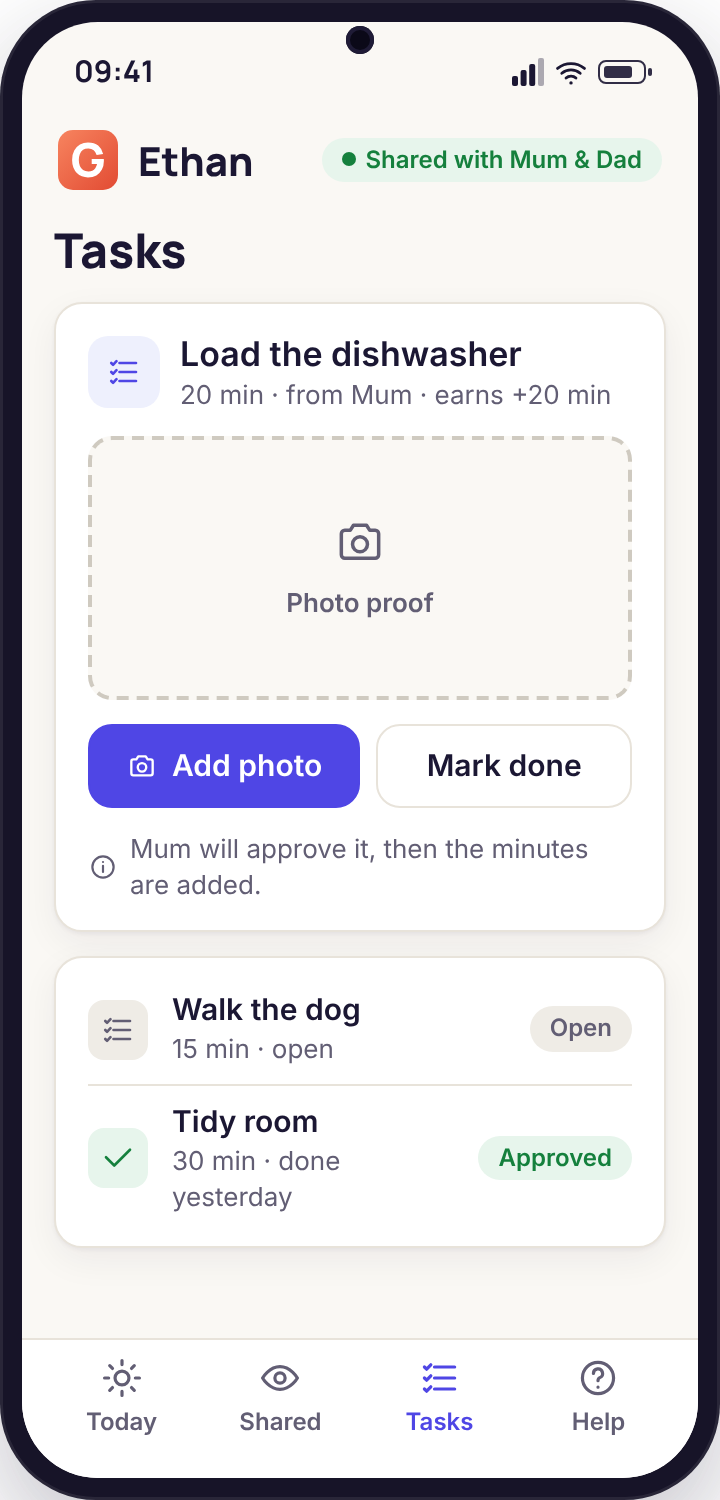
Chores that earn minutes
The screen-time budget is a wall. Tasks are the door in it. A child who has run out can earn more by doing something you were going to ask for anyway, and prove it with a photo.
Setting a chore with a value
On the Tasks page in the panel you write a chore in a few words, give it a value in minutes and decide whether it repeats. "Load the dishwasher · 20 min, any day" is the one we use in every example because it is the one most families create first. Others follow: "Empty the bins · 10 min, Tuesday and Friday", "Hoover the stairs · 25 min, weekends", "Read for half an hour · 30 min". A task can be available to one child or to both, and a task can have a cap, so that "walk the dog" does not become six walks on a Saturday.
The value is the bit to think about. A minute earned is a minute added to that day's budget, in the same categories as the rest of the budget, so twenty minutes from the dishwasher is twenty minutes of games, video, social or web, as the child chooses. We suggest keeping values small enough that a task takes longer than the time it earns. That keeps the trade honest, and stops the house turning into a currency exchange.
- Name, minutes, which child, which days, optional daily cap
- Minutes land in the same budget the phone already enforces
- Edit, pause or retire a task without losing its history
- Completed tasks appear in the Sunday report per child
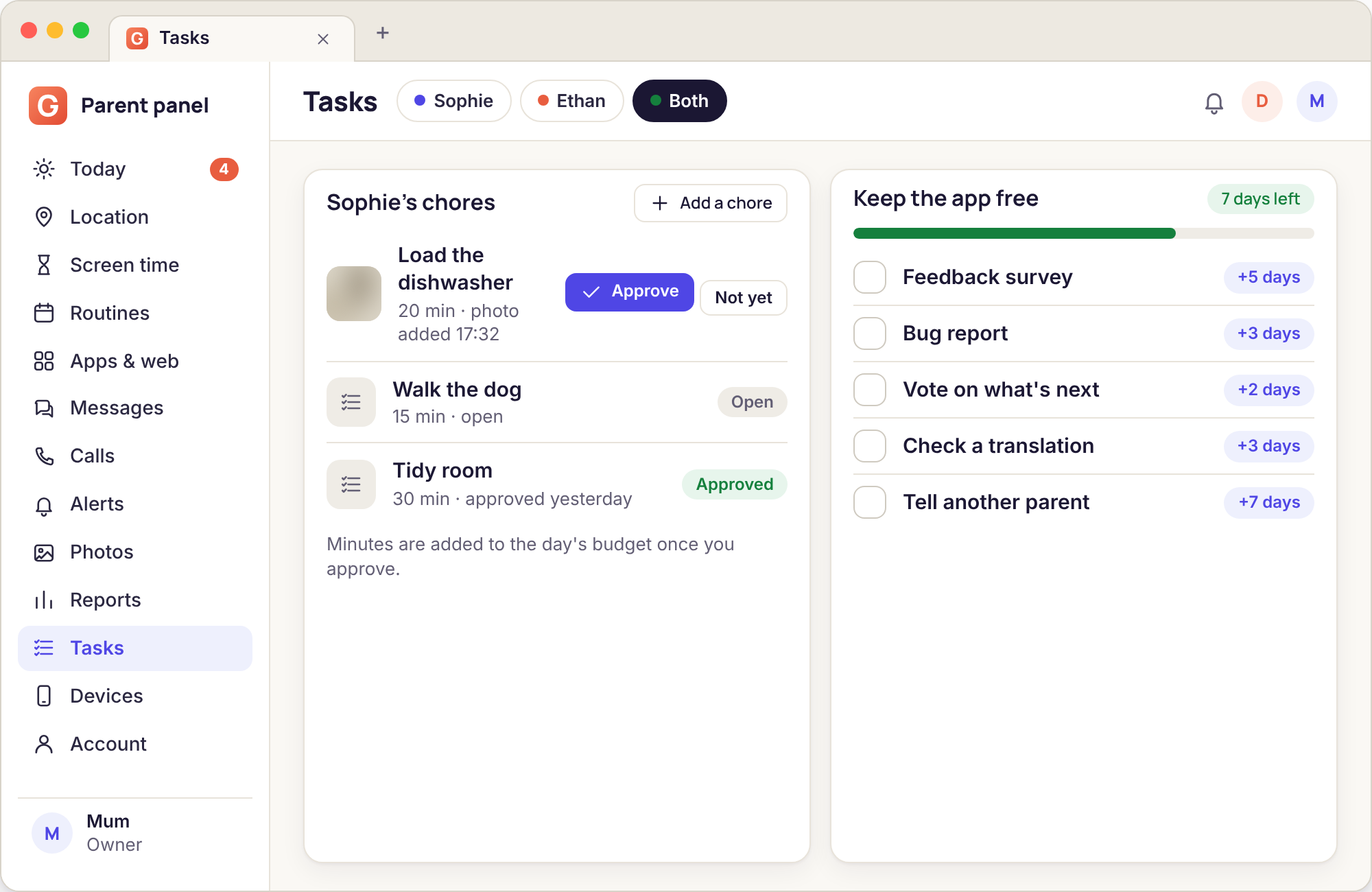
Photo proof and approval
The child opens the app, taps the chore, and takes a photo of the result. The photo is the proof: a closed dishwasher door, an empty bin, a hoovered stair. The task then appears in the panel's Needs you list as "Ethan: Load the dishwasher, awaiting approval", with the photo and the time. You tap Approve and the minutes arrive on the phone immediately, with a notice that says so. You tap Not yet and can add a short line of why, which the child sees in the app.
Approval is from any browser, so a parent at work can approve a task at 16:30 and the child has the minutes before the first episode ends. Both parents can approve, and the panel records which one did, which matters when one parent is softer on dishwasher photos than the other. The photo is kept with the task for 14 days, like other media in the panel, and then deleted.
- One photo per completion, taken in the app
- Shows in Needs you with the time and the child's name
- Approve or Not yet, with an optional reason the child reads
- Minutes applied instantly, announced on the phone
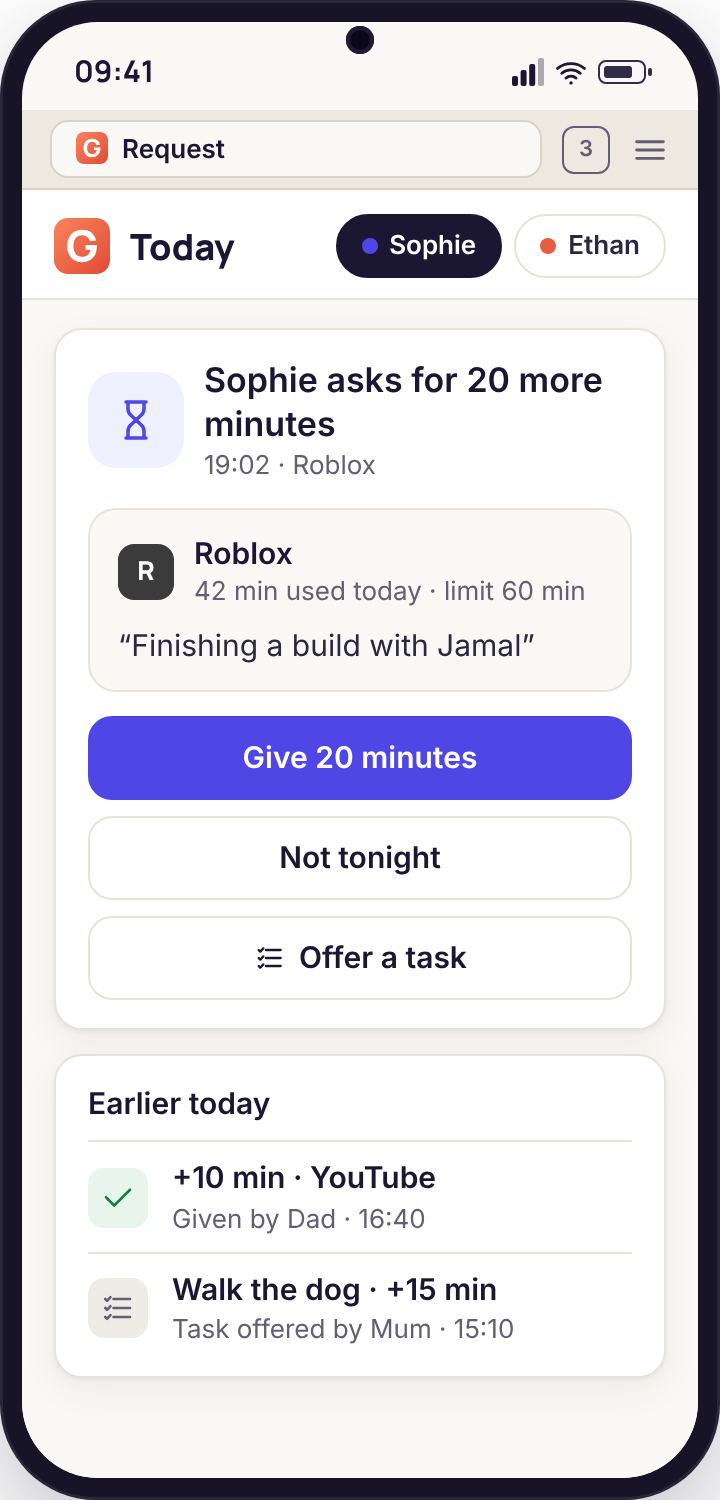
Offer a task as an answer to an ask
When the daily budget runs out the child can ask for more time with a reason, and the ask arrives in the panel with three answers: Give 20 minutes, Not tonight, and Offer a task. The third answer is where tasks earn their keep. Instead of a yes or a no, you send back a chore from the list, and the child decides. "Twenty more minutes? Empty the dishwasher first" is a conversation most parents have already had a hundred times; this puts it in the app, with a photo at the end instead of a shout up the stairs.
The ask and the offer are both recorded, so the Sunday report shows how often the budget ran out, how often you said yes, and how often a task was offered and done. Families tell us the pattern changes within a few weeks: fewer asks, more tasks done before the budget runs out, because the child has learnt that the dishwasher is the quickest route to the next episode.
- Offer a task sends one chore straight to the child's phone
- The child can accept, or let it lapse and keep the no
- Counts in the weekly report alongside asks and approvals
- Works on the Google Play build; no consent switch needed
Example chores by age, with suggested minutes
These are the values families in the feedback survey most often settle on. They are suggestions, not rules; your house will have its own going rate.
| Age | Chore | Suggested minutes | What the photo shows | Notes |
|---|---|---|---|---|
| 7 to 9 | Tidy the bedroom floor | 15 | The floor, from the door | Keep the cap at one a day or the room is tidied hourly. |
| 7 to 9 | Feed the pet | 5 | The full bowl | Small value, daily, builds the habit of the app before the bigger chores. |
| 10 to 12 | Load the dishwasher | 20 | The loaded racks, door open | The classic. Ethan's most-completed task in the demo family. |
| 10 to 12 | Empty the bins | 10 | The empty bin with a new bag in | Set to the days the bins actually need doing. |
| 10 to 12 | Twenty minutes of reading | 20 | The page they reached | Minute for minute; some families make this one unlimited. |
| 13 to 15 | Hoover the stairs and hall | 25 | The stairs from the bottom | Weekends only unless you have a very keen teenager. |
| 13 to 15 | Cook one evening meal | 45 | The plated food | The largest value most parents set, and the one they say was worth it. |
| 13 to 15 | Walk the dog | 20 | The dog, outside, on the lead | Cap at two a day. Pairs well with the Leave alert on the Home place. |
| 16+ | Laundry, washed and hung | 30 | The line or the airer | By this age many families drop minute budgets and keep tasks for the household's sake. |
How it goes in practice
Ethan's first week with the dishwasher
Monday, 18:05. Ethan's weekday budget of 90 minutes ran out at 17:50, and the ask arrives: "can I have more time, I'm in the middle of a match". His mother, on the bus, taps Offer a task and picks Load the dishwasher · 20 min. His phone shows the offer. He sighs loudly enough to be heard from the bus, loads it, photographs the open door at 18:14 and sends it. She approves at 18:16. Twenty minutes land.
Tuesday and Wednesday the ask comes at the same time and gets the same answer. Thursday there is no ask, because the dishwasher was loaded at 16:40, before the budget ran out, and the photo was already waiting in Needs you when she opened the panel. Friday is the same. The Sunday report reads: asks 3, tasks completed 5, minutes earned 100.
Outcome: a dishwasher loaded five nights out of five, three fewer arguments, and a child who has worked out that the chore is quicker done early.
Sophie and the photo that did not pass
Saturday, 11:30. Sophie submits Hoover the stairs · 25 min. The photo is of the top three steps, taken from above, in a light that makes everything look clean. Her father, who walked up those stairs ten minutes ago, taps Not yet and writes "all the way down please, and the hall". The app shows her the note.
She finishes the job at 11:50, sends a photo from the bottom step, and gets the approval and the minutes at 11:52. Nothing about this is new; it is the same conversation parents have always had about half-done chores. What is new is that it happened in two taps, with a record, and without anyone raising their voice. The Sunday report shows one task sent back and one approved, which is exactly what happened.
Outcome: a hoovered staircase, a note instead of an argument, and a fourteen-year-old who takes the photo from the bottom step now without being asked.
How parents keep the app free
There is no card to enter, no subscription to forget about and no paid tier with the good features behind it. Here is what there is instead.
Every new account starts with 10 days of full access: every feature in whichever build the phone is running, both parents, as many children as you have. The ten days are for finding out what you actually use. Most families discover that the answer is the budget, the routines, the map and the Sunday email, and that the rest is for the occasional bad week.
When the ten days end, the core stays free, forever. That means location and Places, screen-time budgets, routines, app and website blocking, alerts and keyword groups, and the weekly reports. Nothing in that list ever stops working, and nothing in it is ever degraded to push you towards paying, because there is nothing to pay for.
The advanced tools, the ones on the direct build such as message bodies, call recording, photo review, the camera and audio, together with the email headers, run on access days. You earn access days by doing small tasks for us, listed in the table below. A day of access is a day on which all of those tools work. They stack, so a parent who does three tasks in the first week might have a month in hand, and the panel shows the balance on the Account page with the date it runs out.
Why run it this way? Because a parental monitoring app paid for by subscription has an incentive to keep you worried, and an app paid for by advertising has an incentive to sell what it knows about your child. We wanted neither. What we need instead is the things a small team cannot buy: honest feedback, bug reports from real phones, translations checked by native speakers, and parents telling other parents. Those are the tasks, and they are worth more to us than a card number.
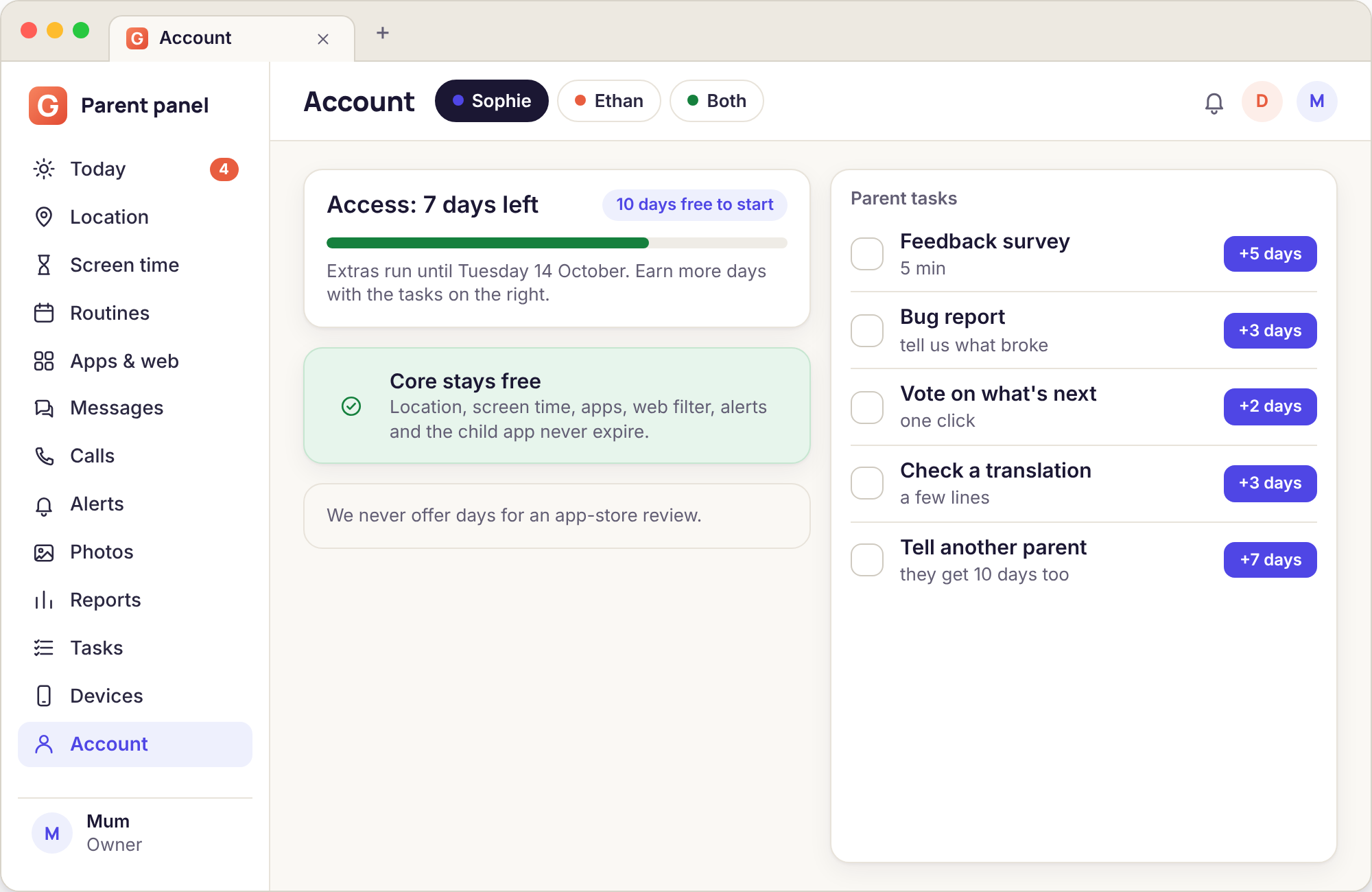
| Parent task | What it involves | Days added |
|---|---|---|
| Feedback survey | About eight minutes of questions on what you use, what confused you and what you would change. One per month, and we read every one. | 7 |
| Bug report with a screenshot | Something that went wrong, with a screenshot from the panel or the phone and the Android version. Confirmed bugs earn the days; duplicates earn a thank-you. | 10 |
| Vote on what to build next | Three candidate features, pick one, optionally say why in a sentence. Takes a minute. Opens when there is a real decision to make. | 3 |
| Check a translation | Read a screen of the app or the panel in a language you speak natively and mark anything that reads wrongly. Fifteen minutes per screen. | 7 per screen |
| Tell another parent | Share a link, and when that parent pairs a phone, you both get the days. Nothing happens until a phone is actually paired, so a shared link alone earns nothing. | 14 each |
No task asks for an app-store review, and none ever will. Reviews bought with access days are not reviews, they are adverts, and the stores forbid them for good reason. A parent choosing an app for their child deserves to read what other parents really thought, which is why we would rather have fewer stars than a single one we paid for.
Rewards that work, rewards that backfire
Two years of survey answers, boiled down. The left column is what families keep doing; the right is what they tried and stopped.
What works
Small, frequent, predictable. A 20-minute dishwasher every evening beats a 90-minute "deep clean" once a month. Children plan around things they can count on.
Tasks that help the house. If the chore is something you would have asked for anyway, the trade feels fair to both sides. A task invented to be a task feels like a punishment with extra steps.
A value below the effort. Twenty minutes for a job that takes twenty-five keeps screen time as something earned rather than something bought cheaply.
Approving quickly. Minutes that arrive within a few minutes of the photo reinforce the link. Minutes that arrive at bedtime do not.
Letting them choose. Three tasks on the list and the child picks one. The choice is most of the motivation.
What backfires
Paying for things that should be free. Minutes for homework, reading, or being kind to a sibling turn things a child should do anyway into things they do for a price, and the price only goes up.
Huge values. Two hours for washing the car means one chore a week and a budget that no longer means anything. The wind-down warning becomes a joke.
Taking minutes away. Tasks add. The app has no "deduct" button on purpose, because a reward that can be clawed back stops being a reward and starts being a threat.
Approving without looking. A child who learns that any photo passes will send any photo. The Not yet button with a kind note is the whole system.
Surprise tasks at bedtime. Offering a chore at 21:50 as a condition of ten more minutes before a 22:00 bedtime is a fight, not a trade. Leave the routine to do its job.
Tasks and rewards, answered
Is there really no paid option?
None. No card, no subscription, no paid tier, no "pro" version. The core features are free for as long as the account exists, and the advanced tools run on access days earned with the parent tasks on this page. If you run out of days the advanced tools pause until you earn more; nothing else changes.
What happens to my data if I stop doing tasks?
Nothing. The core keeps working, location history and logs keep their usual retention, and the advanced tools simply pause until the next task is done. We do not delete accounts or data for inactivity in the task list, and we do not nag by email about it.
Can my child create their own tasks?
No. Tasks are written by a parent in the panel, and the child's app only shows what is on the list. A child can ask for a task in the message that goes with an extra-time request, and parents often add one from there, but the value and the days are always set by you.
Can both parents approve?
Yes. Either parent on the account can approve or send back a completion, and the panel records which one did, with the time. Families who disagree about standards tend to agree on who approves which chore; the app does not mind either way.
Do the earned minutes carry over to tomorrow?
By default no, because the point is tonight's budget. There is a per-task option to bank minutes for the weekend instead, which some families use for bigger jobs like cooking a meal. Minutes earned always sit on top of the budget; they never replace it.
Why ask for a bug report instead of a review?
Because a bug report fixes the app and a paid review misleads the next parent. We publish the things we built from votes and surveys on the Account page so you can see the tasks had an effect. An app-store review earned with access days would be an advert, and we do not run adverts.
Tasks only make sense once a budget exists to add minutes to, so this page belongs beside screen time budgets and activity reports.
Setting this up is the same fifteen-minute pairing as everything else, done once with your child in the room; the task list switches on from the panel afterwards. The download page covers pairing step by step.
Write the first chore before the first argument
Create the account, pair the phone, and put Load the dishwasher · 20 min on the list while your child watches. Ten days of everything, then the core for free, for good.
Android child app · Runs in any browser · Visible on the phone