Who makes it
There are a handful of us. Some of us write Android code for a living and have done since the days when a notification listener was a novelty. Some of us spend most of the week on the panel, the servers and the keyword lists. All of us have children or stepchildren with phones, which is less a credential than a reason: every argument the product settles has been had at one of our kitchen tables first.
We do not put a staff photo on this page, and we do not list job titles that would mean nothing to you. The people who write the guides on this site are named on each guide, with a sentence about why they are qualified to write it and a link to a profile you can check elsewhere. Their profiles live on the editorial standards page, which also explains what we test, what we do not, and where we use software to help us write. If you want to know who answered your email, the reply will have a first name on it, and it will be the same person next time.
We are deliberately small. A product like this is easy to make worse by adding people whose job is to grow it, and most of the features we are proudest of are the ones we chose not to add. Small also means slow in places. A bug you report on Monday might be fixed on Thursday rather than overnight, and the iPhone child app we are asked about every week is still in development because the people building it are the same people keeping the Android one working.
Why it is visible by design
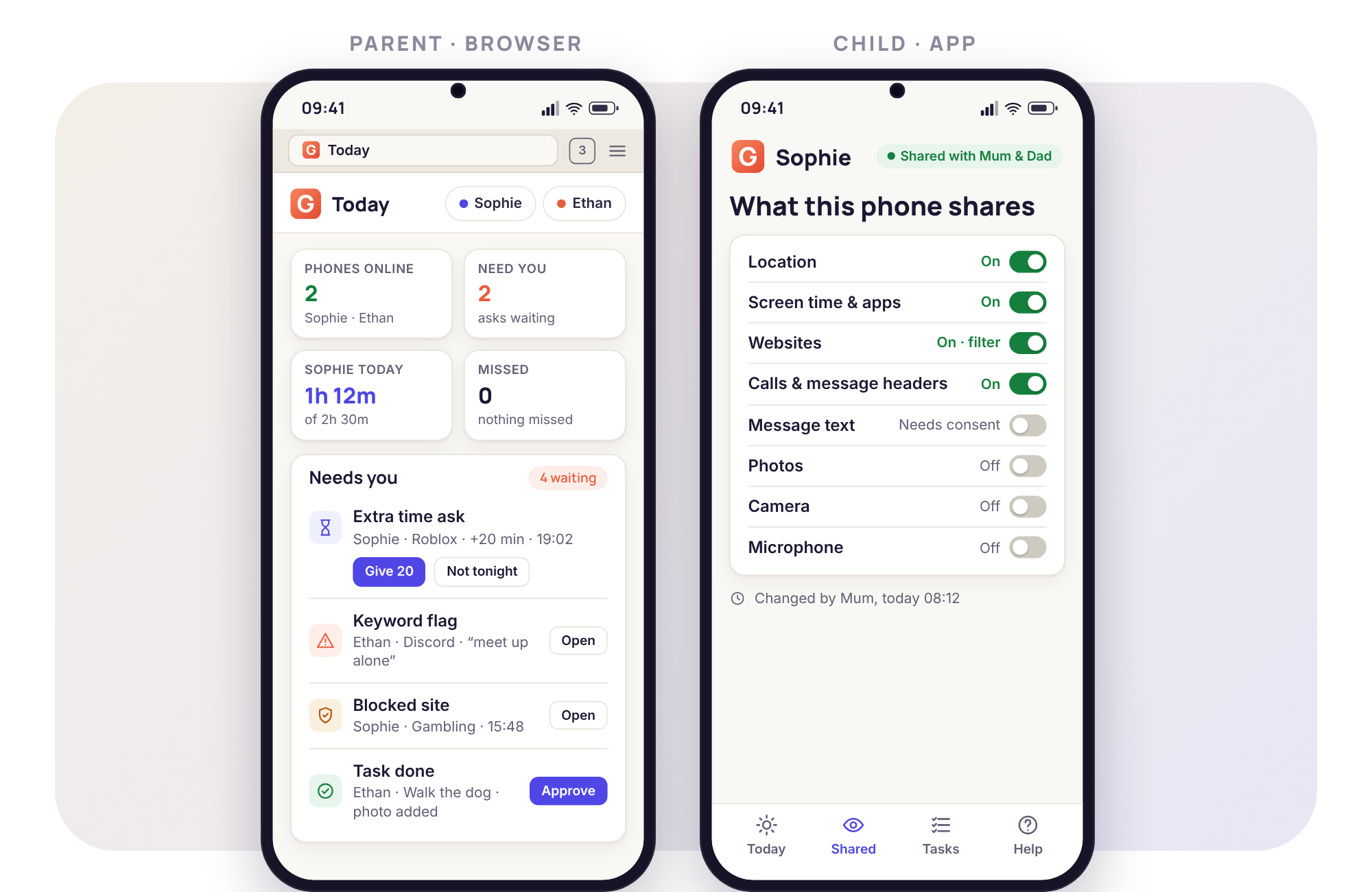
Open the child app and the first screen is called Transparency. It lists every category the phone can share with a parent, with an on or off beside each one, and the child can read it whenever they like. The icon sits on the home screen like any other. When a parent locks the phone, rings it, asks where it is or changes a rule, a notice appears on the phone at that moment with the parent's name on it. There is no setting anywhere that turns this off, and there never has been.
We arrived at this by watching what happened in our own families with the hidden kind. A child who finds covert software on their phone does not conclude that their parent cares. They conclude that their parent lies, and they get better at hiding things, which is the exact opposite of what the parent wanted. By contrast, a child who can see on their own phone that bedtime is 21:30 on school nights, and that Mum will get a notice if they leave school before 15:20, tends to behave as if someone is paying attention, because someone visibly is. The rules become something to argue about at dinner rather than something to discover at midnight.
Visibility also decides who the product is useful to. A monitoring app that announces every action on the phone is nearly worthless to someone who wants to watch a partner, an ex or an employee without their knowledge. We consider that a feature. The same design that makes GuestSpy honest with a child makes it unattractive to the people we least want as customers, and the consent switches on the child's phone finish the job: the parent panel can request access to message bodies, call recording, photos, the camera, the microphone or email, but only the person holding the phone can accept.
Three rules we will not break
We get asked for exceptions to each of these most months. They are written down here so that the answer is the same whoever asks and whatever they offer.
Nothing is hidden from the child
No hidden mode, no option to suppress the icon, no silent remote actions, no keylogger. If a future Android release made it possible to hide the app from the person holding the phone, we would not use it. A request for a "discreet" version is the request we decline most often.
Nothing is monitored until a parent switches a rule on
A freshly paired phone has no budget, no routine, no filter and no alert. The panel does not pre-fill a set of recommended restrictions, because recommended restrictions become permanent restrictions nobody remembers agreeing to. You choose one rule, and we suggest stopping there for the first week.
Nothing about your family is sold or used to sell
Location history, message headers, the call log, the flagged photos: none of it is sold, shared with advertisers, or used to build a profile of your child. The guides on this site carry adverts, and the panel does not. Those two facts sit side by side on purpose, and the privacy policy spells out the line between them.
Two sides of the same screen
The arrangement is simplest to understand side by side. On the left, a parent's browser shows Ethan's weekday budget of two hours, split between games and video, with the Needs you list empty. On the right, Ethan's phone shows the same two hours on his own Today screen, with how much is left, tonight's bedtime and the one rule that is currently on. When Ethan asks for twenty more minutes with the reason "last round", the ask appears in the browser within seconds, and the answer appears on the phone the moment his father taps it. Neither side has a view the other is unaware of.
That symmetry is the thing we check every new feature against. If a parent could see something the child could not know they were sharing, the feature does not ship until the Transparency screen has a line for it.
What we refused to build
A list of things we said no to tells you more about a product than a list of features. These are the requests that came up often enough to deserve a written answer.
- A hidden icon. The most common request, usually from a parent who worries the child will delete the app. The child can delete the app; the panel tells you the moment they do, and that is a conversation worth having rather than a problem worth hiding.
- A keylogger. Everything typed, in every app, for ever. Keyword alerts on notifications catch the useful part of that job without a transcript of a teenager's private life.
- A live camera or microphone feed. The remote camera takes one photo on request and the audio tool records one 60-second clip, both announced on the phone with the parent's name. Always-on surveillance of a child's room is not something we are prepared to make easy.
- Silent remote actions. A lock the child could not see the reason for, or a locate that did not show on the phone. Every remote action shows as it happens, and that is not configurable.
- A version for partners, employees or "a relative who is worried". We have been offered money for a white-label build more than once. The acceptable use policy says what the product is for, and the consent switches make sure it stays that way.
- Tasks that ask for an app-store review. Several people have pointed out how much faster we would grow. A rewarded review is not a review, and parents choosing software for their children deserve better than that.
How the company earns its keep
Two ways, and we would rather say both plainly than have you wonder.
The first is the task system. A new account begins with 10 days in which everything is switched on. The core features, which are location and Places, screen-time budgets, routines, app and website blocking, alerts and the weekly report, stay free for ever. The advanced tools and extra access days are earned by completing a short task for us: a feedback survey, a bug report with a screenshot, a vote on what to build next, checking a translation, or telling another parent about the app. Those tasks are worth more to a small product than the equivalent money would be, because they are the things money cannot easily buy. There is no card, no subscription, no paid tier and no plan to add one. The pricing page walks through it feature by feature, including what happens on day 11.
The second is advertising, and it is confined to the guides. The parenting articles on this site, the ones about bedtime routines and first phones and what to say when a group chat turns nasty, carry adverts placed by an ad network. The product pages do not. The parent panel does not, and never will, because the panel holds your family's data and that data is not available to anyone placing an advert. If an advert on a guide ever contradicts what the guide says, the guide is right and the advert was placed by a machine.
That is the whole model. We are not funded by investors who need a return, we do not sell data, and we do not run a premium tier that the free tier is designed to push you towards. If the arrangement ever changes, this page will change first.
The demo family
Every screenshot on this site, and the read-only demo you can open without creating an account, shows the Bennetts. Sophie is 15 and has a phone that goes everywhere with her. Ethan is 11 and has his first one. Their week in the demo is made up, but it is made up carefully: a left-early alert on Tuesday because Sophie went to a friend's house after a cancelled lesson, an extra-time ask from Ethan on Wednesday with the reason "finishing a build", an unknown number flagged on Thursday that turned out to be a classmate's new phone, a weekly report on Sunday showing that video took more of Ethan's budget than games.
We use an invented family rather than one of our own for the obvious reason, and we use a realistic week rather than a dramatic one because a dramatic week would misrepresent the product. Most real weeks in a GuestSpy panel contain nothing that needs you. The demo is built to show what the quiet days look like as well as the one alert that matters, so you can judge whether the tool fits your house before you touch your child's phone.
What we are not
We are not a safeguarding charity, a counselling service or a substitute for talking to your child. The crisis keyword group shows a helpline on the child's phone because that is the right thing for software to do in that moment, but the software is not the help. We are not a security research firm, and we do not claim that the app will catch everything; a child with a second phone, a friend's tablet or a laptop at school is outside its reach, and we say so on every feature page. We are not a tool for watching someone covertly, whatever the name might suggest to a stranger, and we do not describe the product in those terms anywhere a parent might be persuaded by them. If you want something that hides, we are the wrong choice and would prefer you knew that now.
How to reach us
Write to [email protected] for anything about setup, your account or a feature that is not behaving. Privacy requests, including export and deletion, go to [email protected]. Corrections to a guide are welcome at either address and are acted on; the contact page has a form if you would rather not open your email client, and lists how long each kind of message usually takes to answer. A real person reads all of it, which is both a promise and an explanation for why the reply is sometimes a day away.
The people whose names are on the guides
These are the writers currently publishing on this site. Each profile is a real person who can be found elsewhere; nothing here is published under a made-up name.