Ambient audio: a single 60-second clip, and the phone says so
When you ask, the handset records one minute of sound from wherever it is, shows your child a notice with your name and a countdown while it does, and sends you the clip. There is no listening mode, and the clip is deleted on a schedule.
Not in the Google Play build · announced on the phone every time · clips expire after 14 days
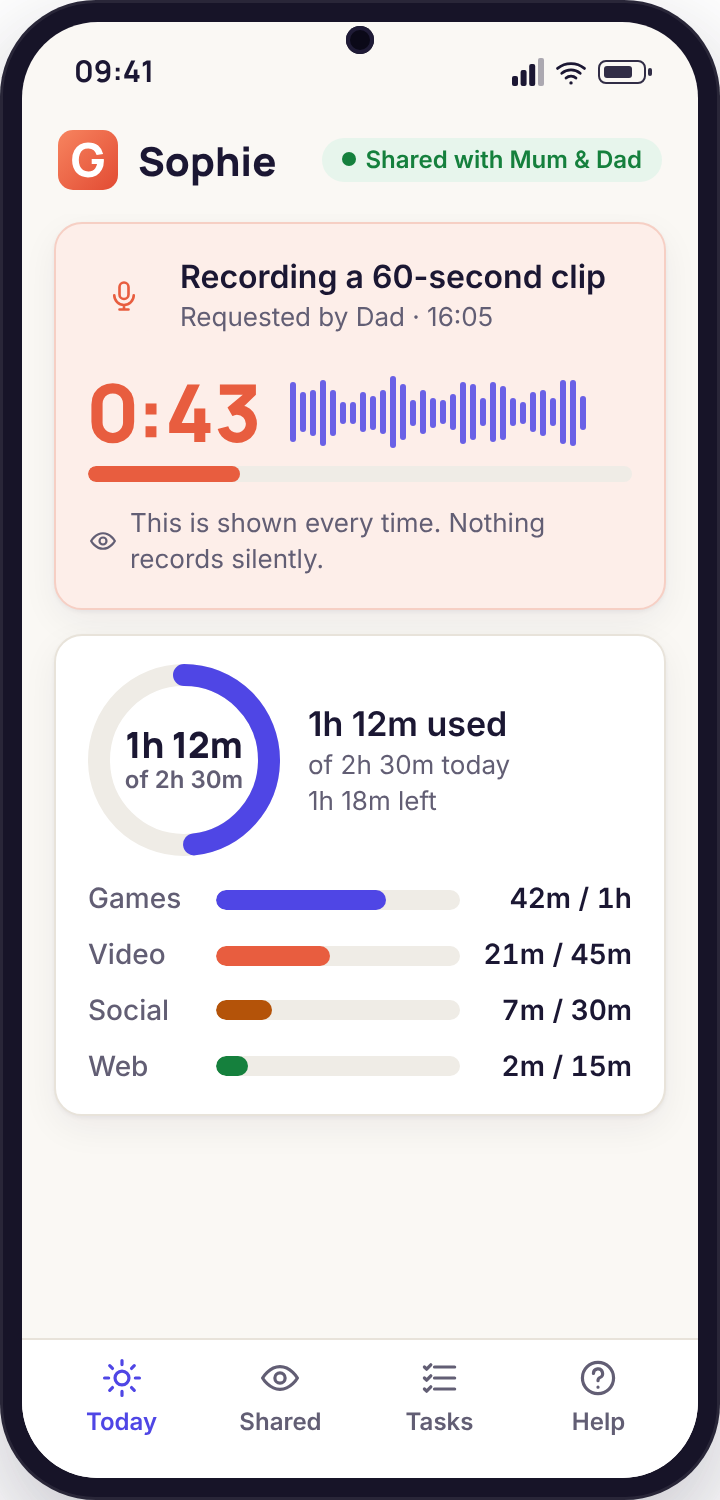
- One clip, one minute, one press. The microphone records for 60 seconds and stops. Another clip needs another press and another notice.
- The phone announces it. "Recording a 60-second clip, requested by Dad" fills the screen with a countdown. The notice cannot be suppressed.
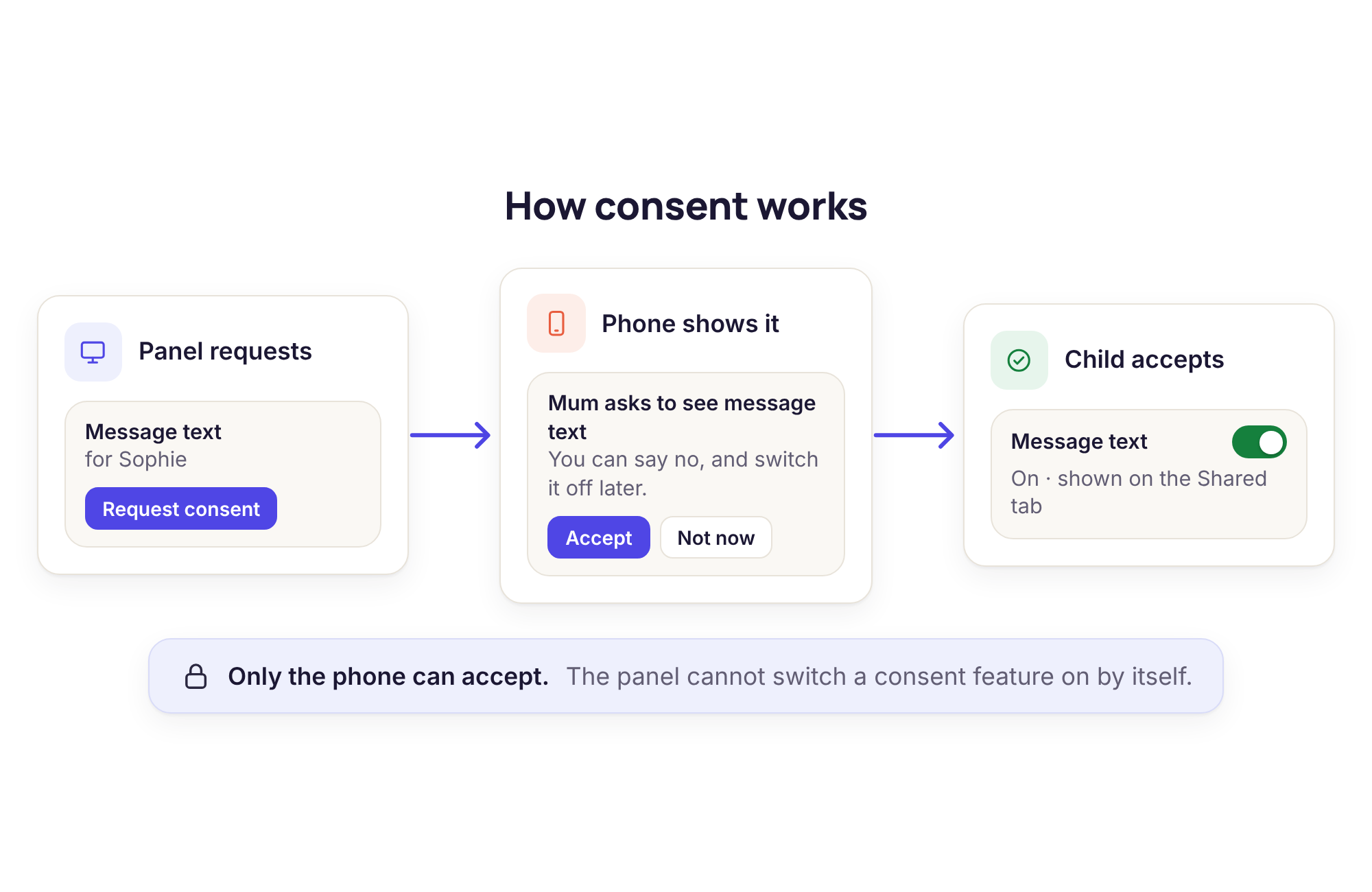
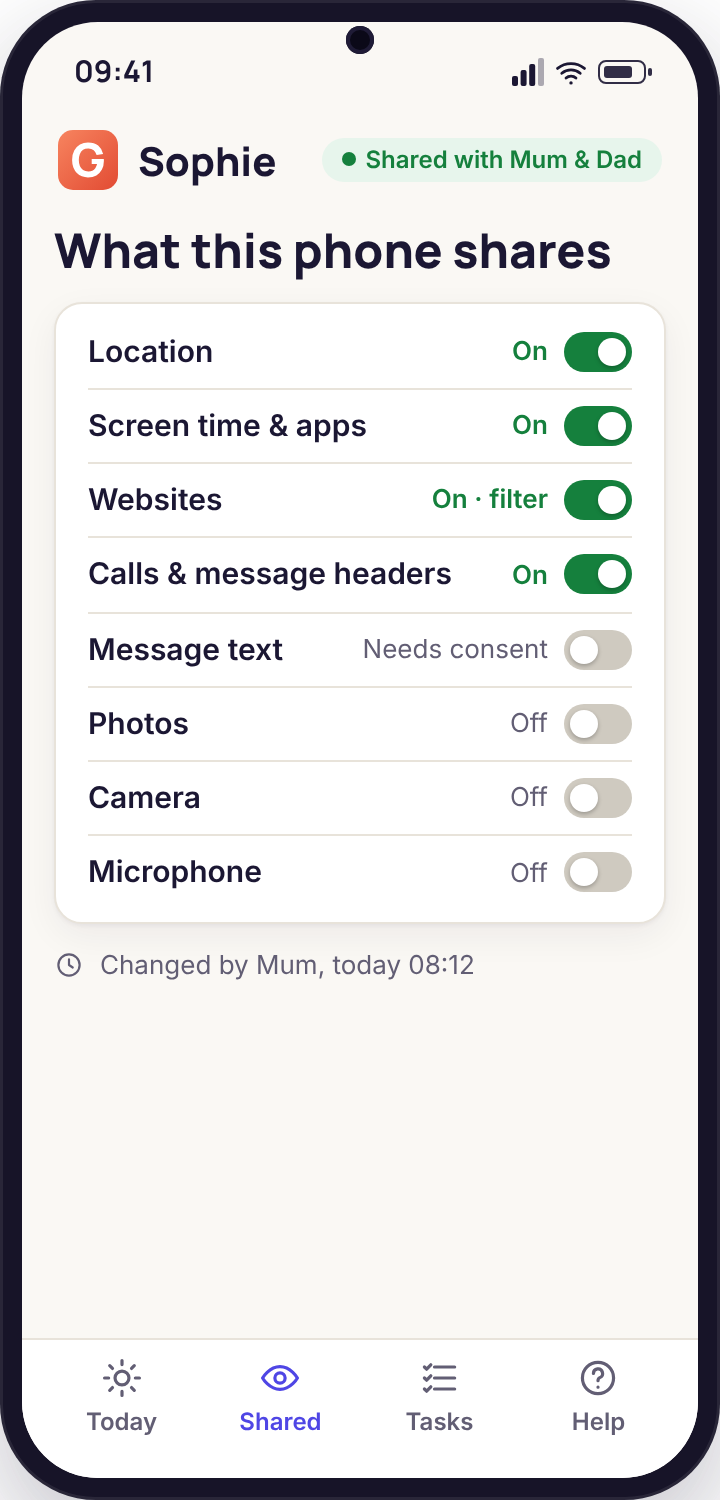
- Two gates on the handset. Android's microphone permission, and the audio consent switch accepted on the Transparency screen by the child.
- Direct build only. Google Play does not allow this in a parental app, so it ships only in the APK from our download page.
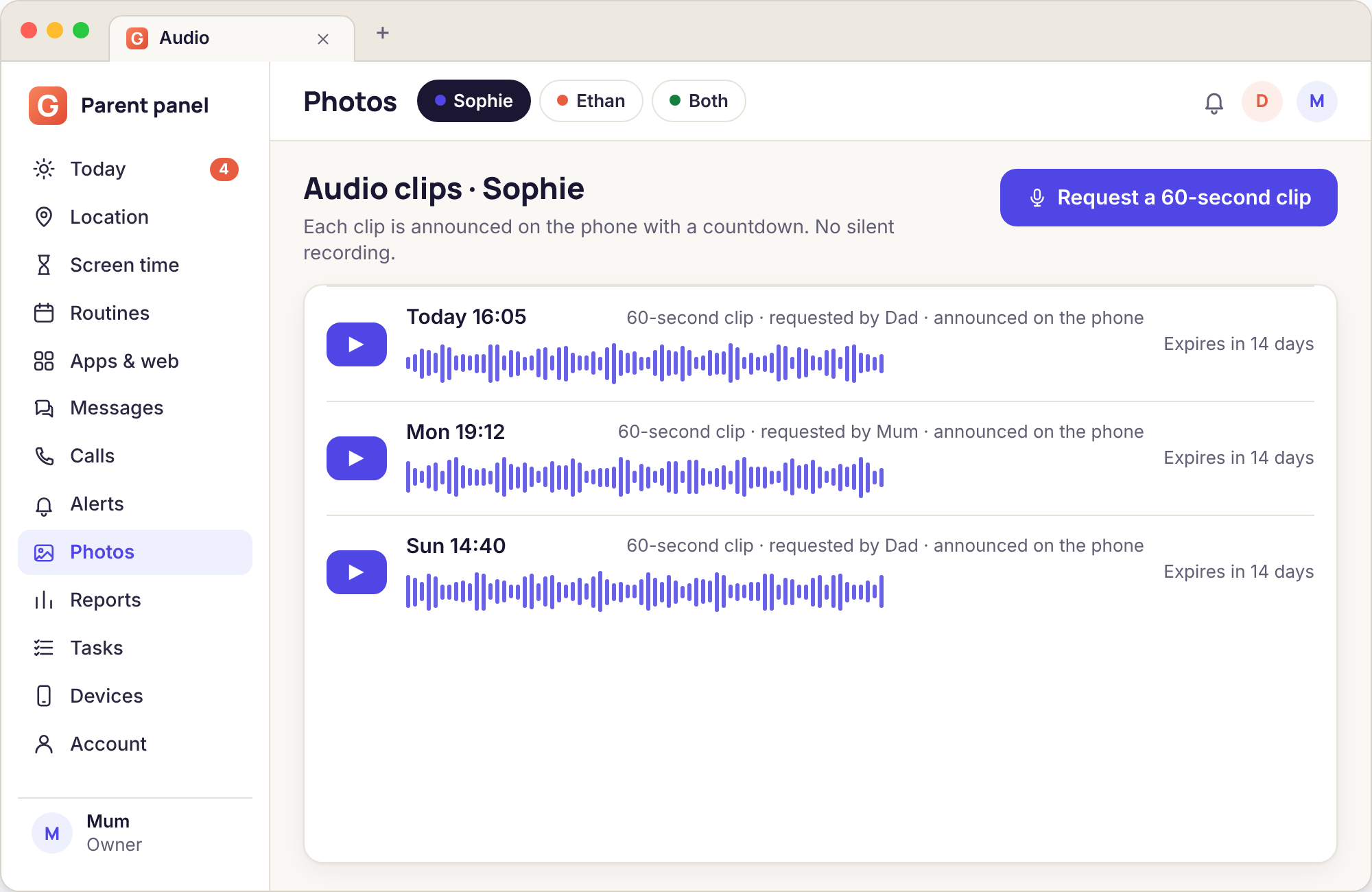
- Clips expire. Fourteen days after it arrives, a clip is deleted. Both parents can hear it until then, and the panel shows who asked for it.
Why a 60-second clip and not a microphone that stays on
The first version of this feature, on paper, was the one people ask for: a button that opened the microphone and kept it open until you closed it. We did not build that version, and the reason is not technical. An open microphone turns a child's phone into a bug, and a bug in a teenager's pocket records their friends, their teachers, the woman on the bus and the doctor in the surgery. None of those people agreed to anything. A parent's right to supervise their own child does not extend to recording everyone within earshot of that child for as long as the parent likes.
A fixed clip changes the shape of the thing. Sixty seconds is long enough to tell whether a room is a quiet bedroom or a loud party, whether the voice saying "I'm fine" sounds fine, whether the background is a bus or a house. It is not long enough to follow a conversation, and that is deliberate. You get an answer to "what does it sound like where the phone is right now", and you do not get a transcript of someone else's afternoon.
The notice does the rest. Because the phone wakes, names the parent and counts down on screen, the people in the room can see what is happening. A child can say "my dad's recording a minute, hang on" and the room can decide what to do with that. We think that is the only honest way to put a microphone in the hands of a parent, and we have turned down several requests to make it quieter.
There is a practical point too. Always-on recording is expensive in battery and in data, and Android itself fights it: the system shows a persistent indicator when a microphone is in use and kills background audio capture on most recent phones. A single clip on request works reliably on every Android 9 handset we have tested. A streaming microphone would work badly, intermittently, and dishonestly.
So the feature is narrow on purpose. If you need it twice in a year, it will be there both times. If you find yourself wanting it twice a week, the question is not how to get more audio but what has gone wrong at home that a minute of sound is standing in for.
From the button to the bin, in three parts
Requesting a clip from the panel
The Record 60 seconds button sits under Remote actions on the child's page, in the same row as Lock now, Ring loudly and Locate now. Press it and the panel immediately writes a line in the activity list with your name and the time, before the phone has even been told. The other parent sees that line too. A request cannot be made anonymously, and the history of requests is part of the child's record in the panel for 90 days.
If the phone is online, the clip usually arrives within about ninety seconds: a few seconds to deliver the request, the five-second countdown, the minute of recording, a moment to upload. If the phone is offline the request queues. When the phone reconnects it is carried out then, with the live notice, so there is never a clip recorded "in the past" without the child seeing it happen.
- One button, one clip, 60 seconds, mono, compressed for size
- Logged with the parent's name before it reaches the phone
- Queued while offline, cancellable from the panel until it fires
- Playable in any browser; downloadable before it expires
The notice and countdown on the phone
The handset wakes its screen, and a notice covers it: "Recording a 60-second clip, requested by Dad", with a five-second countdown, then a timer that runs down from 60 while the microphone is open. Android adds its own microphone indicator in the corner at the same time, because that is what Android does for any app using the microphone, and we do nothing to avoid it. When the minute is up the notice changes to "Clip sent" and a line is added to the app's activity list.
A child can put the phone in a drawer during the countdown. A minute of muffled drawer is a legitimate answer, and we would rather you got that answer than a recording your child did not know about. The feature works because it is loud about itself.
- Parent named, countdown shown, timer visible for the full minute
- Android's own microphone indicator appears as well
- The child's activity list keeps every request
- Audio appears as its own row on the Transparency screen
Clips expire
Every clip is deleted from the panel 14 days after it arrives, without asking. The panel shows the deletion date beside each one. If a clip is evidence of something, download it the same day; if it is a minute of a quiet bedroom, which most of them are, it will be gone before you remember it existed. We keep no copy after expiry, and a full account deletion removes anything still inside the window.
The switch itself is separate from the clips. Turning audio consent off on the phone does not delete clips already sent, and it does not stop the panel showing that the switch was turned off and when. Unpairing the phone stops all collection the same minute, including any queued request.
- Deleted automatically after 14 days, date shown in the panel
- Export before expiry if you need to keep one
- Switch state and change history visible to both parents and to the child
- Never used for anything except playing it back to you
Where a minute of sound helped, and where it did not
The lost phone in a bag
Saturday, 17:20. Ethan's phone has been missing since the football club finished. The map shows it somewhere near the changing rooms with an accuracy ring the size of the car park. Ring loudly plays for 30 seconds and nobody hears it over the pitch. His mother presses Record 60 seconds.
The clip is muffled fabric, a zip, and then, quite clearly, the coach's voice reading out next week's fixtures. The phone is in a kit bag in the clubhouse, in the room where the coach is talking. One call to the club secretary and it is on the table by the door when they get back.
Outcome: a phone found in ten minutes, one clip that was deleted a fortnight later, and a child who was shown the notice in his own activity list that evening.
The party that was not a study session
Friday, 22:40. Sophie is "revising at Mia's" and the map agrees she is at Mia's. The Leave alert has not fired. A friend's parent has mentioned something about a gathering. Her father presses the button, and tells himself as he does that he will say so in the morning.
The minute is music, a lot of voices, laughter, somebody shouting about a speaker. It is not a study session. He does not drive over. He texts: "sounds busy, home by midnight please, I'll pick you up at the corner". She replies "ok sorry" within a minute, because she saw the notice. In the morning they talk about the lie, and about the fact that he did not need the clip to know, and both of those are true.
Outcome: a child home by midnight and a conversation about honesty in both directions; the clip told him nothing he could not have asked.
The time it was the wrong tool
Tuesday, 16:05. Ethan has not replied to three messages. The map shows him at home. His father, at work, presses Record 60 seconds. The clip is sixty seconds of a bedroom: a fan, a game, nothing else. Ethan, meanwhile, has seen a full-screen notice saying his father is recording him, in his own room, because he did not reply to a text about dinner.
That evening is spent repairing it. A phone call would have been answered on the second try. The map had already said "home". The audio request answered a question that had an easier answer and spent trust to do it. The father says so, and later writes it in the feedback survey, which is how this scene ended up on this page.
Outcome: nothing learnt from the clip, an apology owed, and a rule the family now keeps: call first, map second, and the microphone only when neither can answer.
Audio vs location vs a phone call: which answers the question
Most worries have a cheaper answer than a recording. This table is the one to glance at before you press the button.
| The question | A phone call | The map and Places | A 60-second clip |
|---|---|---|---|
| Are they where they said? | If they answer | Yes, with an accuracy ring | Only by what it sounds like |
| Are they all right? | Yes, you hear their voice and they hear yours | No | You hear the room; they cannot hear you |
| Where is the lost phone? | Only if someone picks up | To within the ring | The sound narrows it to a room |
| Is it really a study session? | Usually, if you listen to the background | The map cannot tell a party from homework | Yes, in the first ten seconds |
| Why did they not reply? | Ask them | Shows a place, not a reason | A clip will not explain a silence |
| Who are they with? | Ask them | No | Voices you cannot identify, and people who did not consent |
| Cost in trust | Low | Low, it is always on and always shown | High, every single time |
When a request comes back with nothing useful
"Microphone permission not granted"
The Android permission was declined during the walkthrough or removed later in the phone's Settings. The app does not record without it and the panel says so in words.
Fix: grant it on the phone, from the app's Permissions screen, with the child present and the reason beside it read out loud.
"Audio switch is off on the phone"
The consent switch has not been accepted, or was switched off by the child. The panel can send a request for it, which appears on the phone as a prompt; the prompt can be ignored.
Fix: ask why before asking again. An audio switch turned off is a child telling you something, and the app will not override them.
The clip is silence or rustling
Phones live in pockets, bags and drawers. A minute of fabric is the normal result of a phone that is being carried, and a minute of silence is the normal result of a phone left on a desk in an empty room.
Fix: use Locate now to confirm where the phone is before deciding whether a second clip would say anything different. Often it would not.
The phone cut the recording short
Some recent handsets stop a background microphone when another app takes the microphone, when a call comes in, or under aggressive battery saving. The clip arrives shorter than a minute with a note saying so.
Fix: exclude the app from battery optimisation in Android Settings; the Permissions walkthrough explains where. A call arriving mid-clip is simply the end of the clip.
Ambient audio, answered
Can it listen all the time?
No. The microphone opens for one 60-second clip per request and closes. There is no continuous mode, no scheduled recording and no "listen in" button, and this is a design choice we will not reverse. Android would also fight an always-on microphone on most phones, and it would show its own indicator the whole time.
Does my child know a clip is being recorded?
Every time. The screen wakes, the notice names the parent, a countdown runs before the recording and a timer runs during it. The request then stays in the app's activity list. If a child is asleep, the notice is still shown and still logged, and they will see it when they wake.
Why is this not in the Google Play version?
Google Play does not allow remote microphone capture in this category. We do not sneak it in under another name. The direct-download build from our download page includes it, and the audio consent switch has to be accepted on the phone afterwards.
Is it legal to record my child?
Recording your own minor child, openly, is permitted in most places; recording other people without their knowledge often is not, and a 60-second clip in a crowded room captures other people. The notice on the phone exists partly so that others present can know. Check the law where you live, and read our acceptable use policy before switching it on.
How long is a clip kept?
Fourteen days, then deleted automatically. The panel shows the deletion date next to each clip. You can download or delete a clip sooner, and a full account deletion removes any that remain. Clips are never sold, analysed for advertising or listened to by us.
Could the other parent record without me knowing?
Not without you being able to see it. Every request is logged with the requesting parent's name, in the panel for both parents and in the child's own activity list. There is no way to make a request anonymous, and no way to delete the log entry.
A minute of sound is the loudest tool in the panel, and the ones most families use alongside it are remote camera, photos, videos and recordings and tasks and rewards.
There is nothing extra to install for this: ambient audio comes with the paired phone, and pairing is a fifteen-minute job with your child beside you. Each screen of it is shown in the setup guide.
Sixty seconds, announced, and then nothing
Install the direct build together, watch the notice appear on your child's screen once so you both know what it looks like, and then keep the button for the day the phone goes missing.
Android child app · Runs in any browser · Visible on the phone