Photos, videos and recordings, reviewed by the phone first
The camera roll stays on the handset. The app checks each new photo locally, sends you only the ones that cross a threshold, and keeps a plain list of videos and voice notes so you know what exists without watching any of it.
Android 9 or newer · switched on by the child on the phone · flagged items deleted after 14 days
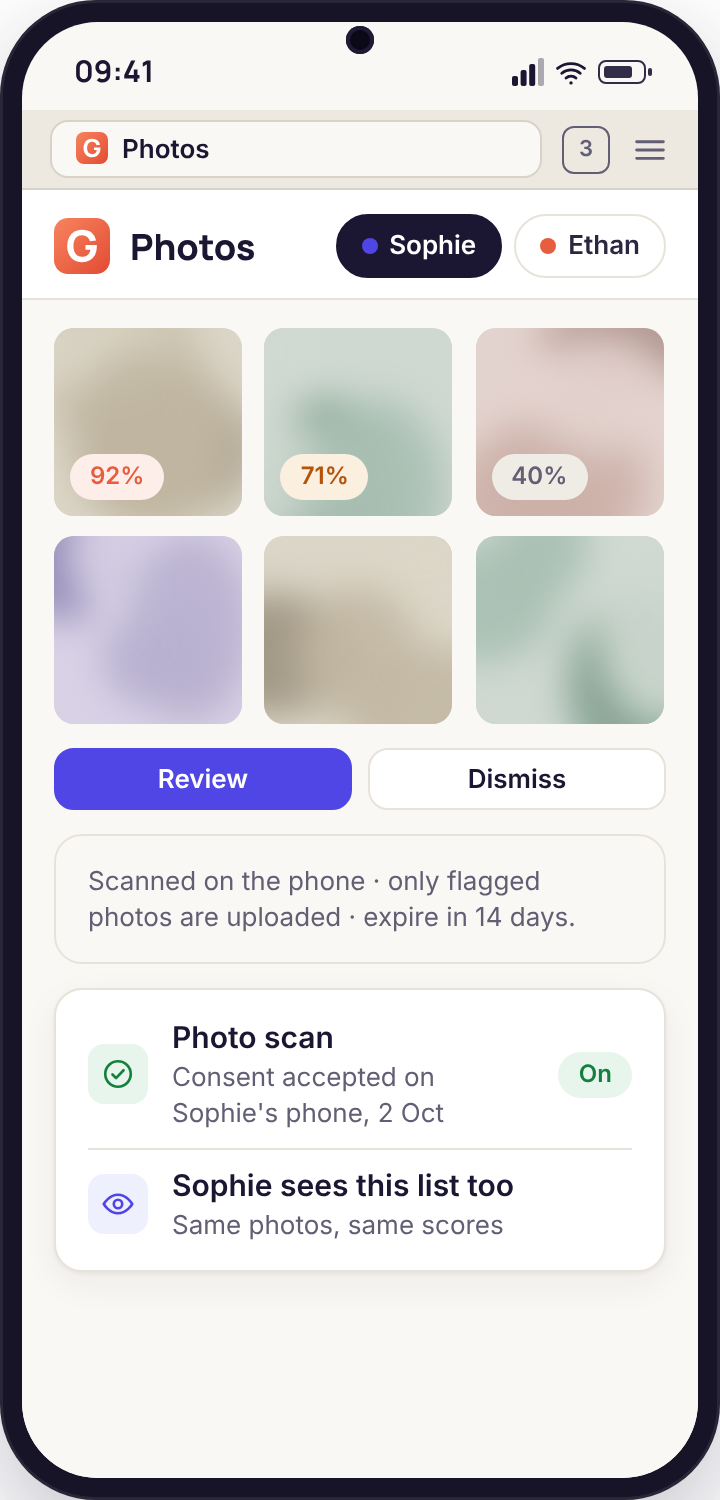
- Three separate lists, not a gallery. Flagged photos with a score, an index of videos, and an index of short recordings. You never see the full camera roll.
- Scanning happens on the handset. A new photo is checked by the app on the phone itself. Only a photo that scores above the threshold is uploaded, and it arrives with its percentage attached.
- Direct build and a consent switch. Google Play does not allow camera-roll review in this category. The feature lives in the APK, and the switch for it is accepted on the phone by the child.
- Fourteen days, then gone. Every flagged item, every index entry, deleted on a rolling basis. Unpairing the phone stops collection the same minute.
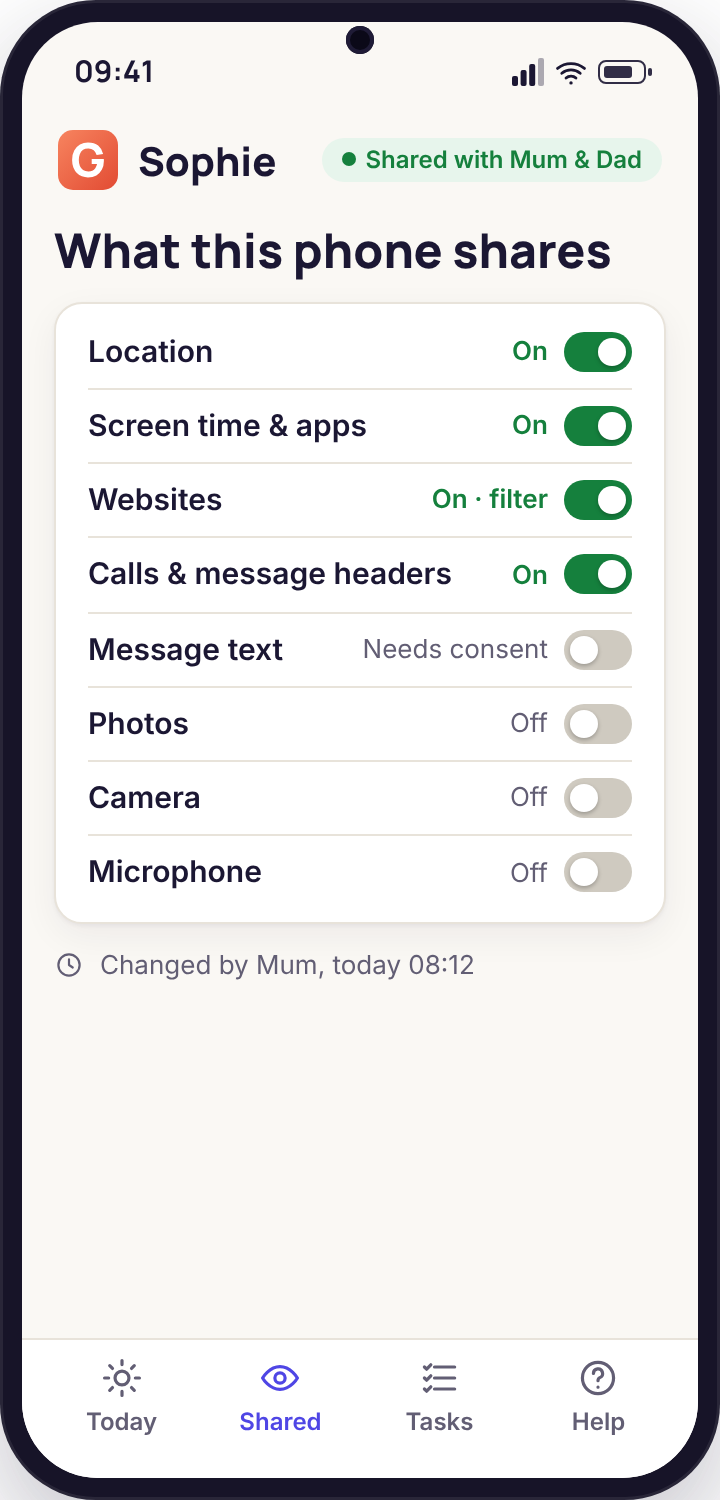
- Visible to the child throughout. The Transparency screen lists "Photos and media" with its on or off state, and a scan in progress shows there as a line while it runs.
Three lists that answer three different worries
Parents arrive at this page with one of three questions: is there anything alarming in the photos, how much video is being made and shared, and what are the voice notes. Each gets its own tool, and only the first one looks at content.
Flagged photos with a confidence score
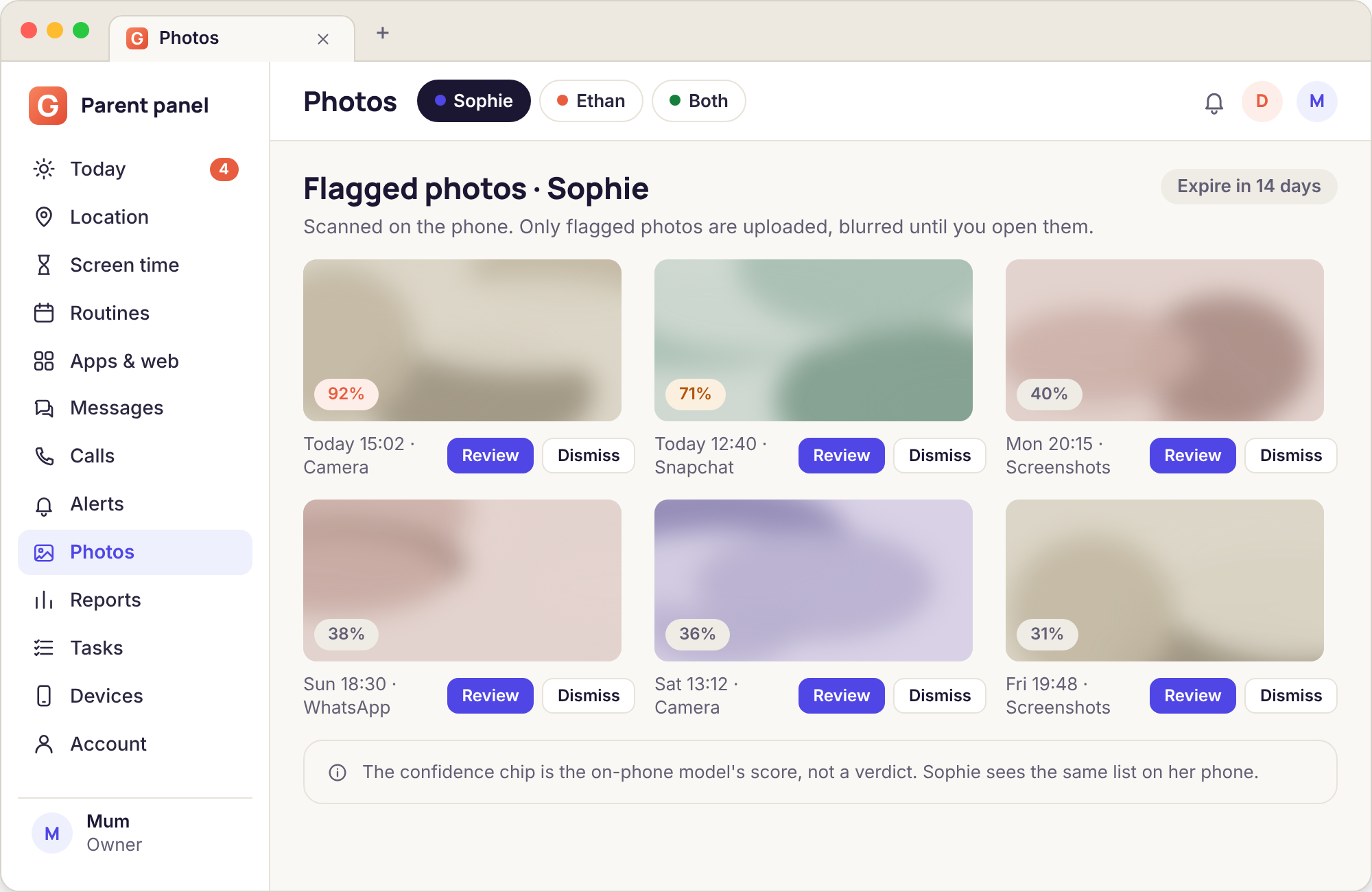
When the switch is on, each photo saved to the handset is examined by a small model that runs inside the app, on the phone, with no connection needed. It is looking for nudity and for a handful of other categories a parent of a teenager tends to worry about. The model produces a number between 0 and 100 for each category, and the app compares that number with the threshold you set in the panel.
Below the threshold, the photo is never sent anywhere. It is not stored by the app, not thumbnailed, not logged beyond a daily count of "photos checked". Above it, a reduced copy is uploaded to the panel with the score, the category, the time it was taken and whether it came from the camera or was saved from another app. The Photos page in the panel shows these in a column with the highest scores first.
The default threshold is 70. Lower it and you will see more, including more harmless pictures of beaches and bathrooms; raise it and you will see less, including possibly something you wanted to know about. The next section of this page explains how to read the number, because it is not a verdict.
- Runs on the phone; no photo leaves it unless it scores above your threshold
- Score, category and source shown beside each flagged item
- A daily count of photos checked, so you can see the scan is working
- Flagged copies deleted from the panel after 14 days
The video index, not a feed
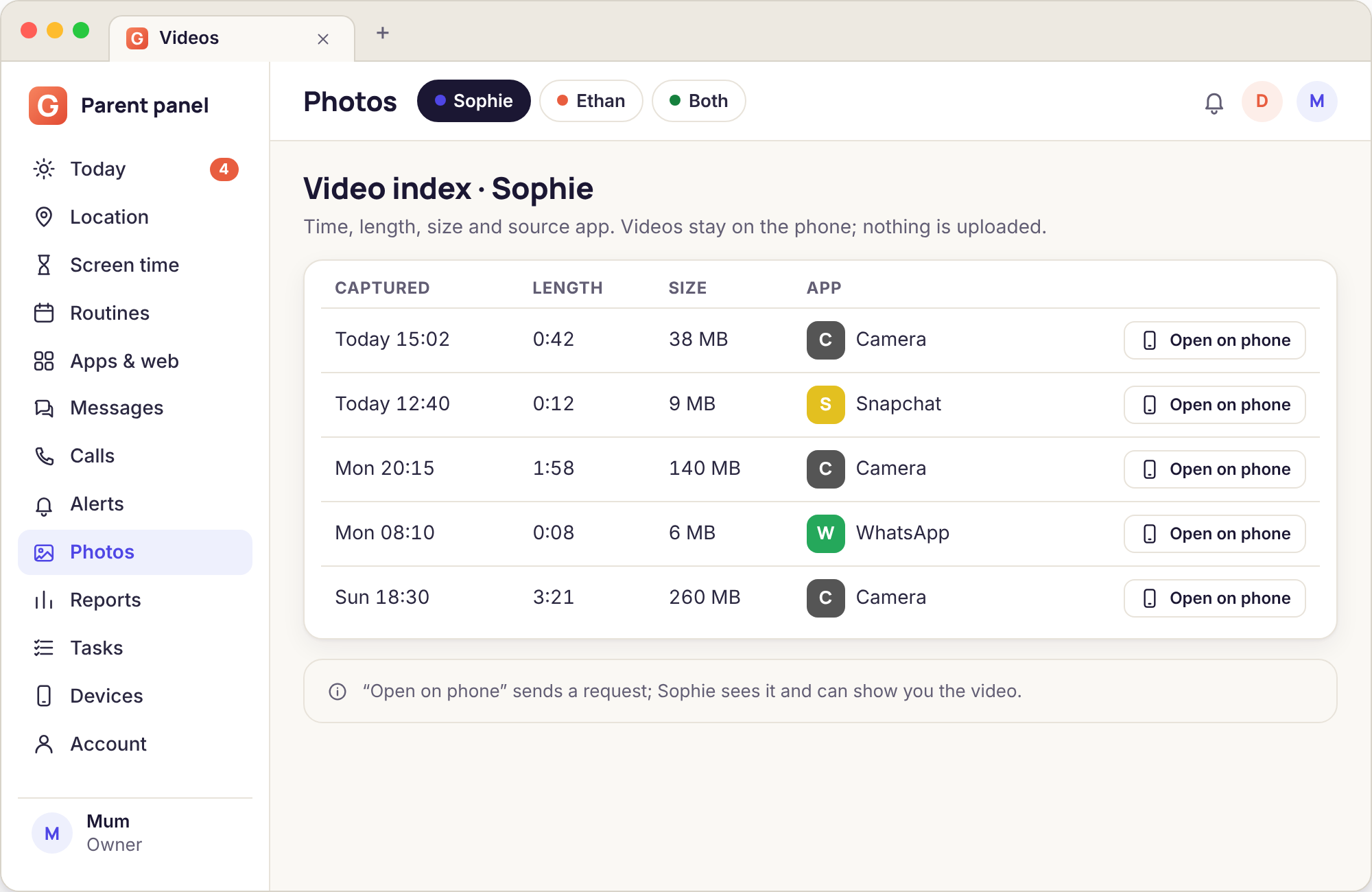
Video is different. The files are large, the content is rarely the concern, and a parent who is honest with themselves does not want to sit through a six-minute clip of a skateboard trick. So the app does not upload video at all. It keeps an index: when each clip was recorded, how long it runs, how big it is, and which app saved it. That is the whole record.
The index is useful because patterns show up in it. Forty short clips between 22:30 and 01:00 on a school night tells you something about sleep. A string of 15-second clips saved from Snapchat to the camera roll tells you that saving is happening, which is worth a conversation on its own. A single 40-minute recording at lunchtime on Thursday may be a school project or may be nothing, and the index gives you the fact without the film.
If you ever need the clip itself, the honest route is to ask your child to show you. The index tells you exactly which one to ask about, down to the minute.
- One line per clip: time, length, size, saving app
- Sortable by length and by time of day in the panel
- Weekly totals so a change in habit is obvious
- No video file is ever uploaded
Short recordings, listed the same way
Voice memos and the audio notes some chat apps save to the phone get the same treatment as video: an index of time, length and source, with nothing played back. A teenager who has started leaving long voice notes at 02:00 is showing you a change in rhythm, and that change is visible in the list without anyone hearing a word.
This index is not the same thing as the ambient audio tool, which asks the phone for one 60-second clip when you press a button and tells the child it is happening. The recordings index never captures anything; it only reads what the phone has already saved and lists the facts about it. The two are separate switches on the Transparency screen and the child can leave either one off.
- Covers voice memos and saved audio notes from chat apps
- Length and time of day, with a weekly count
- Shown on the Transparency screen as its own category
- Nothing is listened to, by the app or by you
What is uploaded, what stays on the phone, how long it is kept
This is the table to show your child before the switch goes on. It is also the table we would want to be held to.
| Item | Leaves the phone? | What the panel receives | Kept for |
|---|---|---|---|
| Photo below the threshold | No | Nothing. It is counted in the daily "photos checked" total and otherwise forgotten. | Not stored |
| Photo above the threshold | Yes | A reduced copy, the score, the category, the time and the source app. | 14 days |
| Video file | No | One index line: time, length, size, saving app. | 14 days |
| Voice note or audio file | No | One index line: time, length, source. | 14 days |
| Daily scan count | Yes | A single number per day, shown under the Photos page. | 90 days with the other logs |
| The switch state | Yes | On or off, with the date it was last changed and by whom. | While the phone is paired |
| Photos taken before the switch was on | Not by default | The scan starts from the moment of consent. A one-off scan of existing photos is a separate option the child must also accept. | 14 days if flagged |
Export and full deletion are available from the panel at any time, and nothing in this table is sold or used for advertising.
Reading a confidence score
The percentage is the model's estimate that a photo belongs to the flagged category. It is a prompt to look, calibrated so that a parent glancing at the panel knows how much to trust it.
Almost certainly what it says
At this level the model is rarely wrong about nudity, and the photo is worth your attention today rather than at the weekend. Open it in the panel, note the source app and the time, and decide how you will raise it. A 94 from the camera at 23:40 and a 94 saved from a chat app at lunchtime are two different conversations.
Look, but expect false alarms
This band catches swimming lessons, mirror selfies in a towel, a baby cousin in the bath, and medical photos. It also catches real problems that happen to be badly lit. Treat a single score here as a reason to glance, not a reason to act. Three in a week from the same app is a pattern, and patterns are what this band is good at.
Only if you lowered the threshold
Scores under 50 only reach the panel if you set the threshold that low, and we would not recommend it for a teenager. You will spend your evenings looking at ordinary photographs, and your child will reasonably feel that the list is a gallery after all. For a younger child on a first phone it can make sense for the first month.
The score is per category. A photo can score 88 for one category and 12 for another, and the panel shows the highest. A flag is never a judgement about your child; it is a statement about pixels, made by software, on a phone.
Two evenings with the Photos page
The 91 that turned out to be a request
Tuesday, 21:55. The Needs you list on the Today page shows one line: a flagged photo for Sophie, score 91, saved from Snapchat at 21:48. The thumbnail in the panel is a reduced copy and leaves no doubt about the category. It is not a photo of Sophie.
Her mother does not open the message headers first, and does not go straight into the bedroom. She waits until the morning, over breakfast, and says that something came through from Snapchat last night and asks who sent it. Sophie is embarrassed but not surprised; a boy from the year above has been sending them and asking for one back. The conversation is about him, not about her, and it ends with the account blocked and the school's safeguarding lead emailed with the time stamp from the panel.
Outcome: one flag, one breakfast, a report with an exact time, and the item deleted automatically twelve days later.
The video index on a half-term week
Half term. No photos have been flagged all week, which is the usual state of affairs. Ethan's father opens the video index out of habit on Thursday and sees 61 clips since Monday, almost all between 8 and 20 seconds, almost all saved from one game's replay feature, and a cluster of eleven between midnight and 01:30 on Wednesday.
Nothing in the list is a problem in itself, and he does not need to watch any of them. What the index gives him is a precise thing to mention: "you were saving clips at one in the morning on Wednesday, I thought you were asleep". Ethan says the tournament was in a different time zone. They agree the bedtime routine stays as it is and the next late tournament gets asked for in advance, through the app, with a reason.
Outcome: no clip watched, a specific conversation instead of a vague one, and the routine left in place by agreement.
What this tool will miss, and why
Four things parents expect it to do that it does not, with the reason and the nearest thing that does help.
It cannot see photos that were never saved
A picture viewed inside a chat app and never saved to the phone does not exist in the camera roll, so there is nothing to scan. Disappearing-message apps are built precisely so that the image is gone before anything can look at it.
What helps: the message headers and the keyword groups, which see the notification line even when the image is not on the phone.
The score is wrong sometimes, in both directions
A model that runs on a phone in under a second is not a forensic tool. Skin-coloured walls, swimwear and bad lighting push scores up; small or dark images push them down. We tune it for a teenager's camera roll, and it still errs.
What helps: keep the threshold at 70, read the band rather than the digit, and treat a single flag as a reason to glance.
Nothing is reviewed on the Google Play build
Google Play's rules for this category do not permit camera-roll scanning, and we do not try to work around them. A phone running the Play build shows the category as "not available on this build" on its Transparency screen.
What helps: install the direct-download build from our download page, with the child present, and accept the consent switch on the phone together.
The child can switch it off
Consent is accepted on the phone, and it can be withdrawn there. The app does not fight this. The panel shows the switch as off with the time it changed, and the Transparency screen shows the same to your child.
What helps: treat the switch-off as information. The conversation about why is the point, and it is one you can have in the open because nothing was hidden.
Photos and media, answered
Does my child know their photos are being checked?
Yes. The switch for it is accepted on the handset by the person holding it, the Transparency screen lists the category as on, and a scan in progress appears there as a line while it runs. We do not build a hidden version and will not.
Can I browse the whole camera roll from the panel?
No. The panel only ever receives photos that score above your threshold, and it receives a reduced copy. There is no gallery view, no thumbnails of ordinary pictures, and no way to request one. The video and recordings lists are facts about files, not the files themselves.
What does the scan look for?
Nudity first, because that is the category parents ask about, plus a small set of others relevant to teenagers. Each category gets its own score. We do not scan for faces, we do not identify people, and we do not read text inside images.
How long are flagged photos kept?
Fourteen days from the moment they arrive in the panel, then they are deleted. The index lines for videos and recordings are deleted on the same schedule. If you need to keep an item as evidence, export it before the two weeks are up.
Will it slow the phone down or drain the battery?
The check runs once per new photo and takes well under a second on a phone from the last few years. On a normal day that is a handful of checks. The app does not re-scan old photos unless you request the one-off scan of existing items, which the child must also accept.
What if the threshold flags a photo that is obviously fine?
Mark it as reviewed in the panel and it drops out of the Needs you list. If it keeps happening with the same kind of picture, raise the threshold by ten points and watch for a week. The daily scan count stays visible so you know the feature is still working.
Most parents who turn this on also use the other direct-build tools sparingly, and in the panel it sits beside remote camera, ambient audio and alerts and keyword flags.
There is nothing extra to install for this: photo, video and recording review comes with the paired phone, and pairing is a fifteen-minute job with your child beside you. Each screen of it is shown in the setup guide.
Let the phone do the looking
Install the direct build with your child beside you, set the threshold together, and most weeks the Photos page will have nothing in it. That is what it is for.
Android child app · Runs in any browser · Visible on the phone