A flag is a nudge, not a transcript
Keyword flags read the short preview line that an app hands to Android for the lock screen, match it against a list, and send you a note when a word lands. That is genuinely useful and genuinely narrow, so the first thing on this page is the list of things it will never notice.
Google Play build · Works without message bodies · Listed on the child's Transparency screen
What a keyword flag cannot see
Every row in this table is a situation parents assume a keyword tool covers. None of them is covered by matching words in a notification, and no monitoring app on Android can make it otherwise. Where another part of GuestSpy helps, the last column says which.
| The situation | Can it see it? | Why | What covers it instead |
|---|---|---|---|
| The body of an encrypted chat | No | WhatsApp, Signal, Snapchat and Messenger encrypt the conversation between the two phones. The only text that ever leaves the app is the preview it chooses to post as a notification, which is normally the opening line of the newest message. With previews turned off inside the app, the line reads "New message" and there is nothing to compare. | Nothing reads inside an encrypted chat, on any product. Headers (who, which app, when, how often) come from the text messages and social feature. |
| A voice note | No | Android is handed a line such as "Voice message (0:38)". There is no transcript, so there is nothing for a list to match against. A conversation that has shifted to voice notes has shifted out of reach of every keyword list. | The message headers still show that voice notes are arriving from a particular contact late at night, which is often the more useful fact anyway. |
| A photo, a video or a sticker | No | The notification says "Photo" or "Sent a video" or shows a single emoji. Keyword matching never opens an image and never tries to. | Photo and video review is a separate feature with its own consent switch, scanning done on the phone, and a confidence score on each flagged item. |
| A disappearing message | Only its preview | If the app posts a preview, the line is compared at that instant and the match is saved in your alert history. The message itself may have vanished from the phone by the time you open the panel. You keep the matched line, not the conversation around it. | The alert history keeps what was matched, with the time and the app. Nothing retrieves the rest. |
| A second phone, a friend's tablet or the school laptop | No | Flags are raised by the paired Android device and by nothing else. A Discord server read on a laptop in the bedroom never passes through the paired phone, so it never reaches you. | Pair the second device if it is your child's and runs Android 9 or newer. A school laptop is the school's to manage. |
| Text that was typed and never sent | No | There is no keylogger in GuestSpy and we will not add one. Typing produces no notification, so a draft that is deleted before it is sent leaves no trace anywhere. | Nothing. This is a deliberate gap, not a technical one. |
| Sarcasm, in-jokes and tone | Words only | "I'm going to kill you" between two best friends about a spoiled plot twist matches the same list as the real thing. A list sees letters, not intent. Expect false positives from the built-in groups and treat each one as a thirty-second check rather than a verdict. | You. Every flag shows the matched line and the sender so you can decide in a glance, and "handled by" lets the other parent see that you already did. |
Read that table twice before you set a single rule, because it changes what the feature is for. A keyword flag is not a way to read your child's conversations and it is not a safety net that catches everything. It is a way to hear about a small number of specific words quickly, without reading anything else. On a phone with notification previews switched on, that turns out to be worth having. On a phone with previews off, it is worth almost nothing, and the first thing to do with a child who has turned previews off is to ask why, out loud, as a parent.
The other reason to lead with the gaps is the Transparency screen. Your child can open the app and see "Keyword flags: on" with the group names listed underneath. If they ask what that means, the honest answer is the one in the table: "It tells me if certain words show up in your notifications. It does not read your chats, and it cannot see pictures or voice notes." A child who hears that from you, rather than working it out from a forum, tends to accept it.
What it can see, and how it tells you
Four pieces fit together: the notification lines that arrive on the phone, the lists they are compared with, the rules that decide when something is worth a message, and the way the message reaches you.
Notification lines and the built-in groups
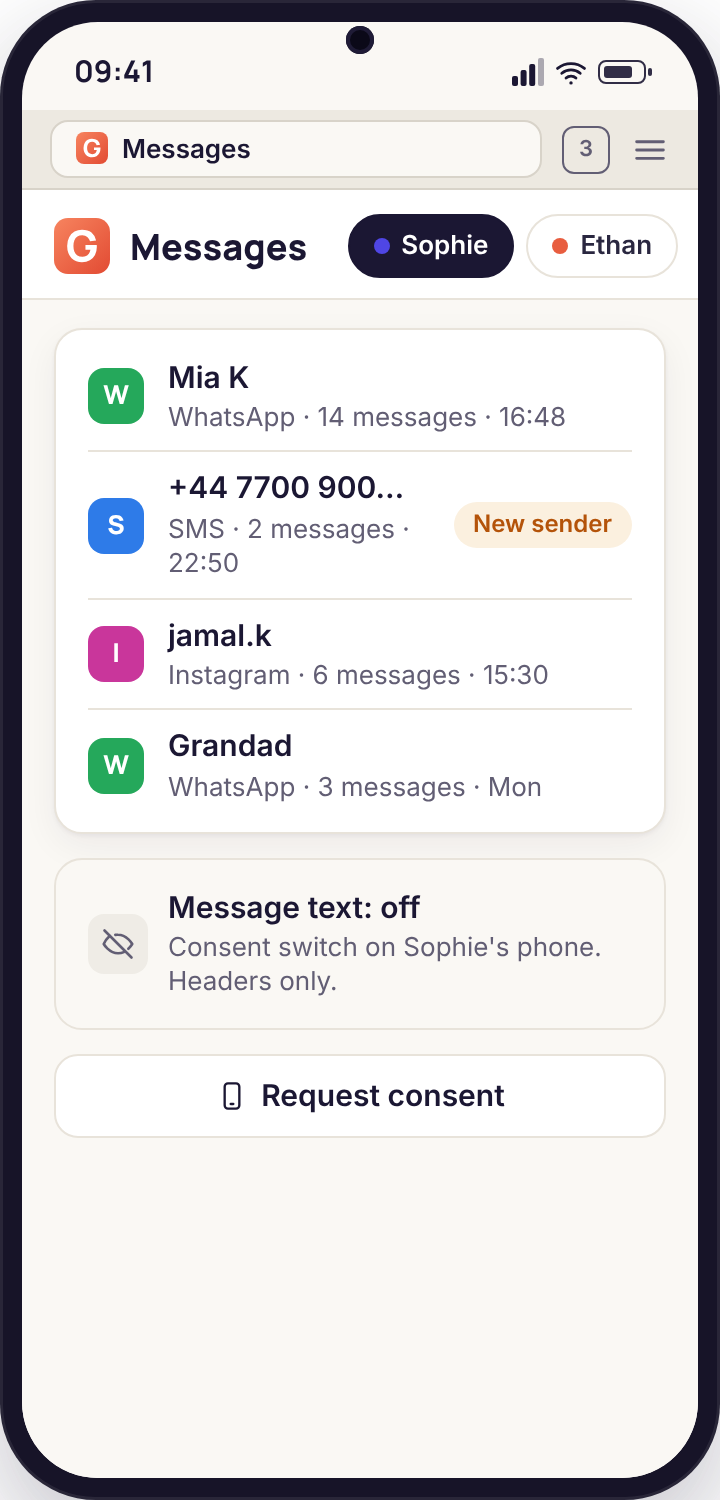
When any app on the phone posts a notification, Android keeps a short record: the app, the title (usually a contact name), the preview text and the time. The child app reads that record and compares the preview against your lists. It does not open the app, does not read the conversation behind the notification, and does not keep the preview unless something matched.
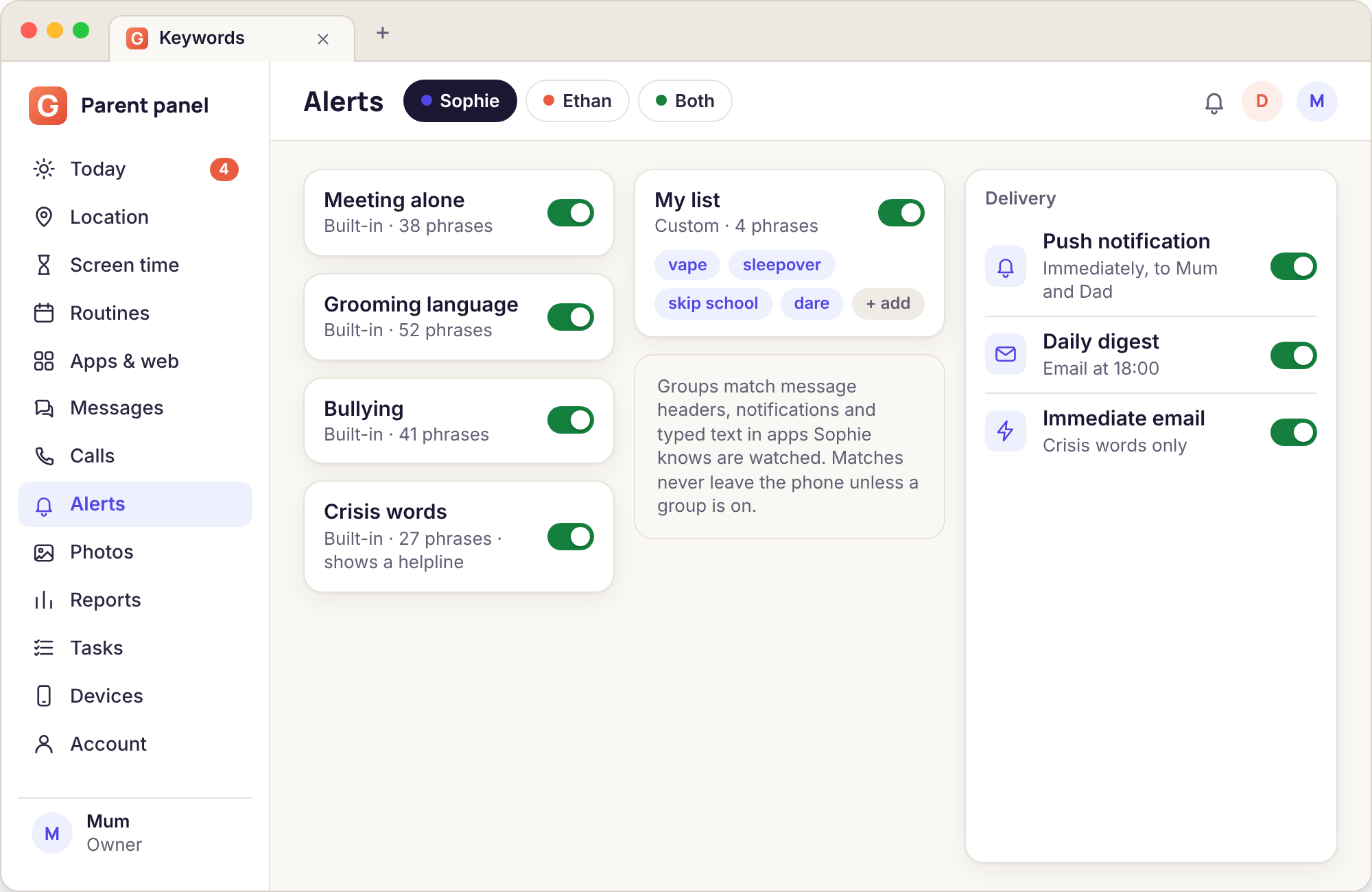
Four groups come ready made and are maintained by us: meeting alone (phrases about meeting up without telling anyone, sending a location, "don't tell your mum"), grooming language (age questions, secrecy requests, flattery patterns that online-safety teams see repeatedly), bullying (slurs, threats, exclusion phrases, and the current slang for them) and crisis words (self-harm, suicide, not wanting to be here). We revise the groups as language shifts, and the Keywords page shows the date each group was last updated so you are not trusting a list from three years ago.
- Compared on the phone, so nothing is uploaded unless it matches
- Four groups you can switch on separately per child
- Your own custom lists sit beside them, with the same controls
- Each group shows its last update date in the panel
Alert rules you write as sentences
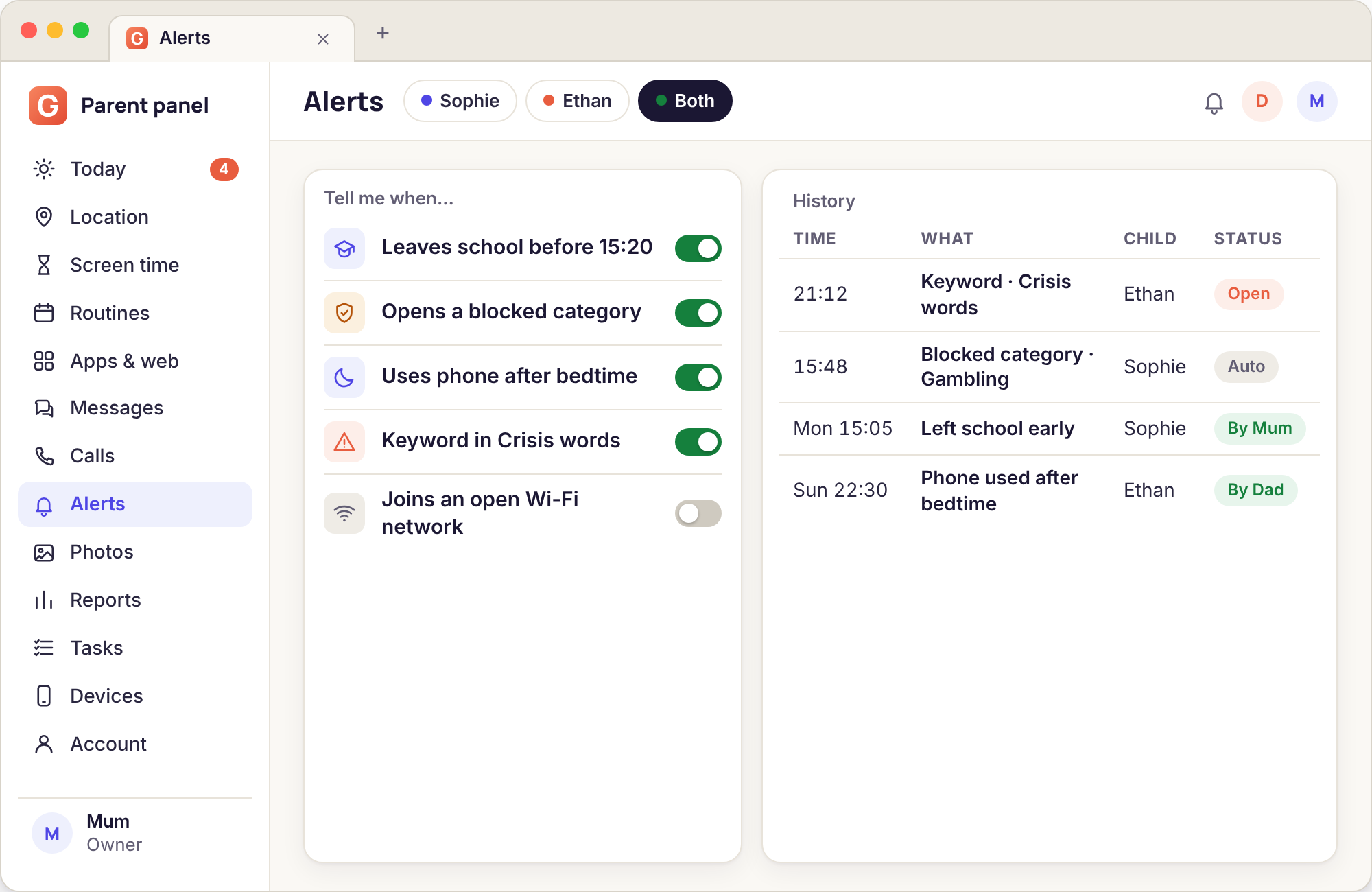
An alert rule in GuestSpy is a sentence built from drop-downs: "Sophie · bullying group · any match · push me immediately", or "Ethan · crisis words · any match · push both parents and email now". The same sentence builder makes location rules ("leaves school before 15:20") and screen-time rules ("asks for more time after 21:00"), so once you have written one you have learned all of them.
The middle part is where the tuning lives. A rule can fire on any match, on a match from an unknown number, on a match only between certain hours, or on three matches from the same sender inside a day. That last option is the one that turns a noisy bullying list into a quiet one: one slur in a group chat is Tuesday on the internet, the same account sending three in an afternoon is something else.
- Who · which list · which condition · how to tell you
- Conditions for unknown senders, time windows and repeat counts
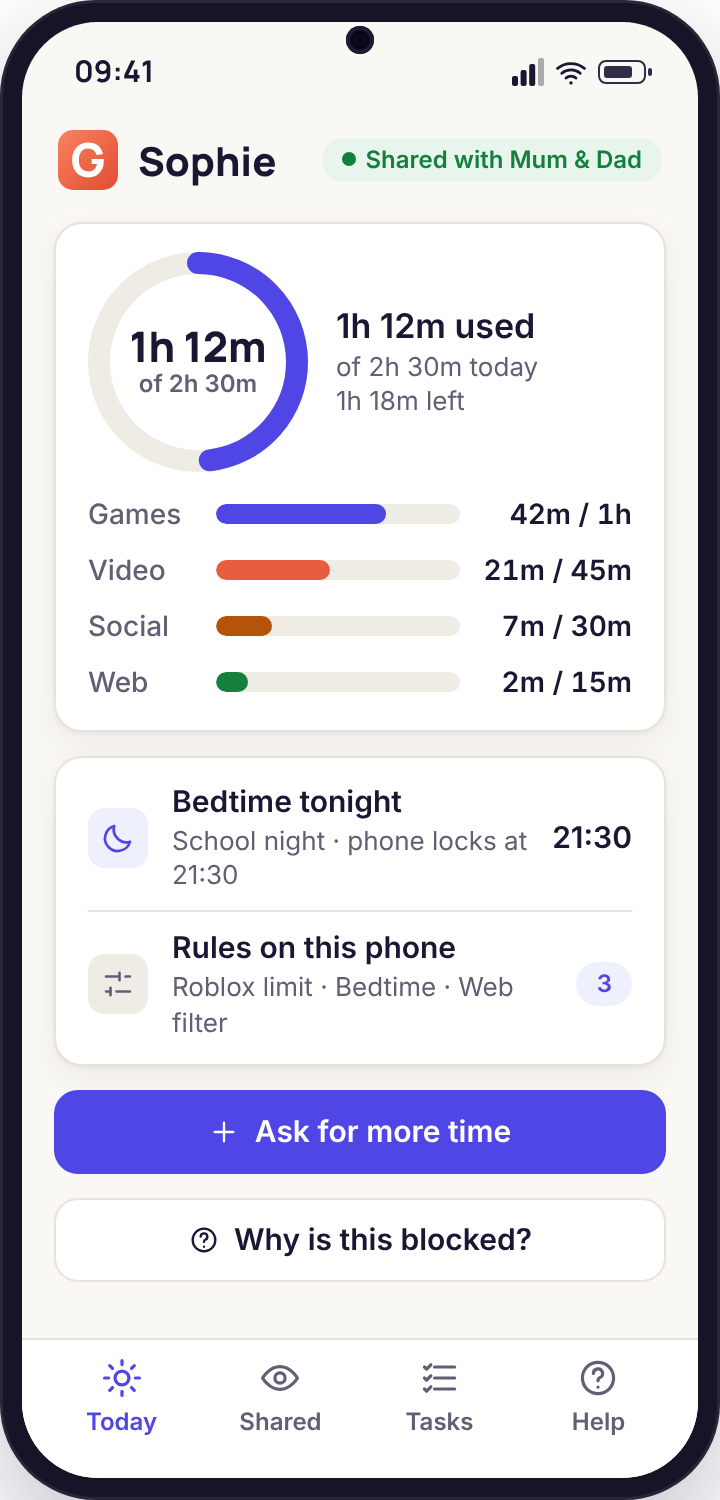
- The rule text appears on the child's phone in plain words
- Pause a rule for a day without deleting it
Delivery, and the daily digest
Each rule chooses its own channel. Push reaches whichever browser you have signed into the panel from and allowed notifications, including Safari on an iPhone, because the panel is a website rather than an app. Immediate email is for the rules you never want to miss. The daily digest is a single email at a time you pick, 19:30 for most families, listing everything that fired since the last one.
Our strong suggestion is to put almost everything on the digest. A bullying match at 11:20 on a school day is not something you can act on at 11:20 anyway, and a phone that buzzes every time a teenager's group chat gets ugly trains you to ignore it. Keep push and immediate email for the crisis group and for a custom list of two or three words that matter to your family specifically. Every alert, whatever its channel, also lands in the Needs you list on the Today dashboard and in the alert history with a "handled by" name once a parent has opened it.
- Push to any signed-in browser, no parent app required
- One digest email a day at the time you choose
- Immediate email for the rules that justify it
- History shows who handled each alert and when
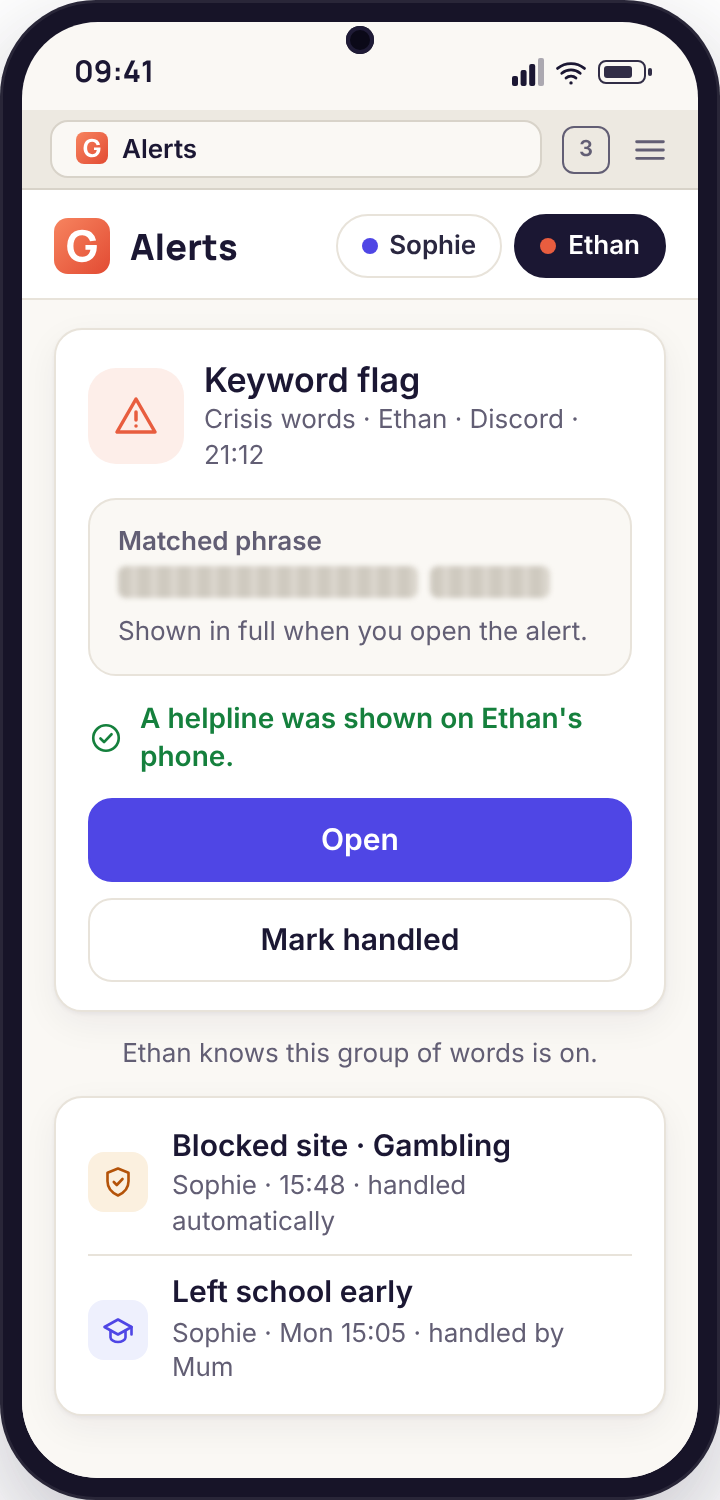
The crisis group and the helpline on the child's phone
The crisis group behaves differently from the other three in one way. When it matches, it tells you, and it also shows the child a quiet card inside their own app: the number of a helpline for their country, a text line for those who would rather not talk, and a sentence saying that someone who cares has been told. We built it this way because the person most able to help a child at 02:00 is sometimes not a parent who is asleep, and because a child who knows the card exists has one more door.
The card is not a lecture and it does not lock anything. It sits on the child's Today screen beside their screen time and tonight's bedtime until they dismiss it. Parents can see on the Keywords page that the card is part of the crisis group and cannot switch the card off while keeping the group on; the two come together, on purpose.
- Helpline and text line chosen for the phone's country
- Child sees that a parent has been notified
- Never locks the phone or blocks the app involved
- Group and card are one switch, by design
Choosing words that earn their place
The built-in groups cover what online-safety research says to cover. A custom list is for your child, your town and your family. Most parents write too many words the first time and delete half of them within a fortnight. These two boxes are the half that stay and the half that go.
Words that point at a specific situation
A named person you have agreed your child will not contact. The name of a particular park, estate or station where you have asked them not to go after dark. The brand of vape sold at the shop by the school. The street name of a drug that is doing the rounds locally, in the spelling kids actually use. Phrases that only mean one thing: "don't tell", "delete this", "are your parents home", "send a pic". A word your child has invented for a friend who worries you. Each of these fires rarely and means something when it does.
Words that appear in ordinary teenage life
"Party", "drunk", "hate", "kill", "dead", "fight", "weed" (also a garden), "pills" (also a headache), any swear word, any girlfriend's or boyfriend's first name, the word "secret" (every birthday has one), "sick" (praise), and the names of games whose chat is full of trash talk. Every one of these will match several times a day in a healthy friendship group. A list that fires six times before lunch gets muted by Thursday, and a muted list protects nobody.
The test for a candidate word is simple: imagine the phone buzzing with that word matched at 16:10 on an ordinary Wednesday, and ask what you would do. If the answer is "nothing, probably a joke", the word is noise. If the answer is "I'd want to ask about that tonight", it belongs on the digest. If the answer is "I'd ring the school", it belongs on push. Write the list with the response in mind rather than the fear.
False positives deserve a word on their own. The bullying group in particular will match things that are not bullying, because the language of banter and the language of abuse overlap heavily at fourteen. We tune the group to prefer missing a few borderline lines over flagging every "ur so dumb lol", and the repeat-count condition exists to lift the signal further. Even so, you should expect roughly two matches in three on that group to be nothing. That ratio is fine for a digest. It is a poor ratio for push, which is why the rule builder defaults the bullying group to the digest and only the crisis group to immediate delivery.
One more habit worth forming: when a word on your custom list has not matched in three months, delete it. A list is a description of what you are worried about now, not a monument to what you were worried about last spring, and a shorter list is a list your child can read on their Transparency screen without feeling accused of everything at once.
What seven days of flags look like for Sophie, 15
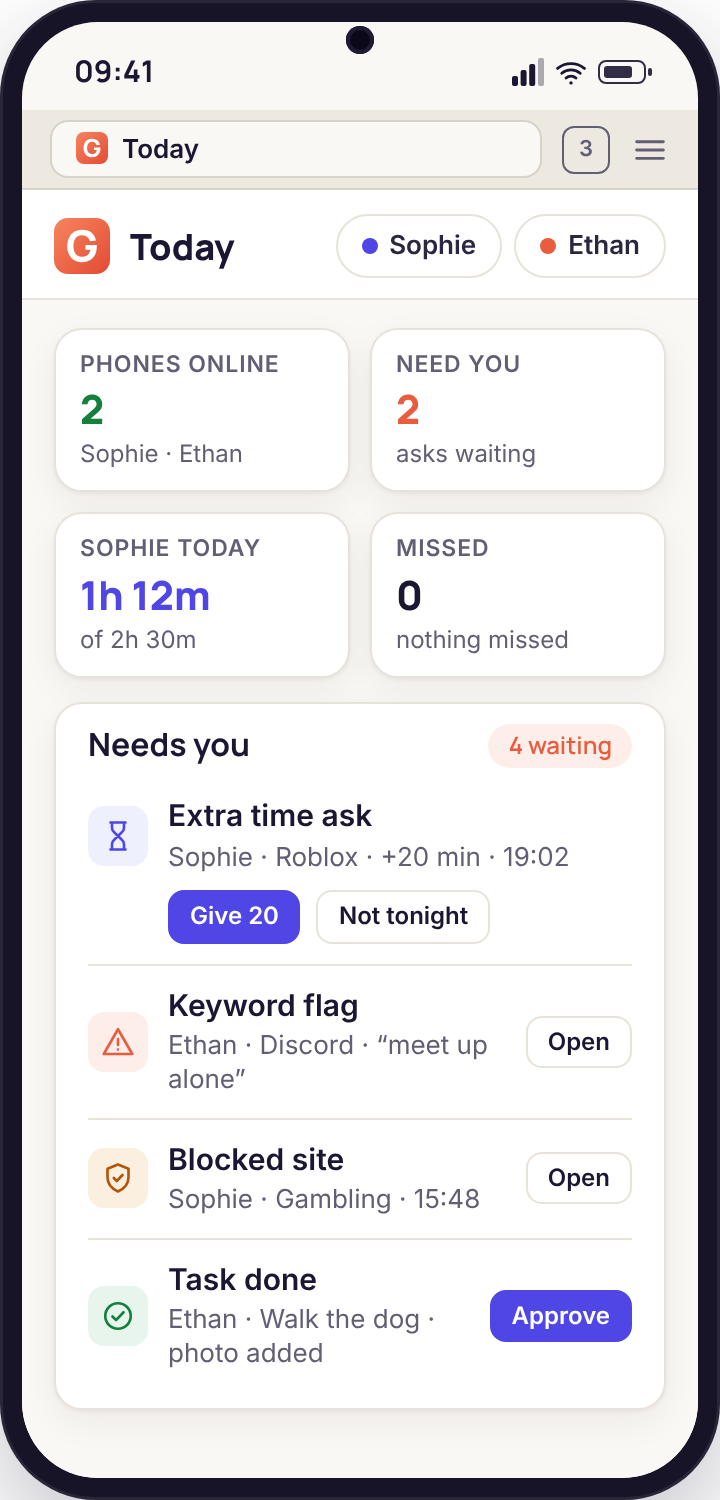
This is the Bennett family from the demo. Sophie has the four built-in groups on, a custom list of five words, the crisis group on push to both parents, and everything else on a 19:30 digest. Here is what reached her parents.
Two bullying matches, same group chat
The digest lists two lines from a WhatsApp group called "yr10 netball", both from the same account, both the word "pathetic". Mum opens the alert, sees the surrounding preview ("you're pathetic at corners lol same as me"), marks it handled with a note that says "banter" and moves on. Forty seconds.
An empty Needs you list
No lines matched. The Today dashboard shows phones online, zero needs you, screen time at 1 h 50 of a 2 h 30 budget. Most days of most weeks look like this, which is the point: a quiet panel is information too.
A custom-list word from an unknown number
Sophie's custom list includes the name of a retail park her parents have asked her to avoid after school. A text from a number not in her contacts reads "u coming to [park] after?" and the unknown-sender condition sends a push to Dad. He does not reply to the phone; he mentions it at dinner, learns it was a girl from hockey with a new number, and adds the number to the known list from the alert itself.
One grooming-language match, looked at properly
The grooming group matches "how old are you" from an Instagram account Sophie has never messaged before. The preview also shows the account's handle. This is the kind of line that justifies a real conversation rather than a note, so Mum asks Sophie to show her the chat. It turns out to be a sixth-former from a neighbouring school who followed her after a match. The alert is marked handled, with the handle recorded in the note so the other parent knows the name if it reappears.
Crisis group, false positive, still worth the ten seconds
Both phones buzz. The matched line, from a Snapchat notification, reads "I literally want to die this episode is too much". The context is obvious in the preview. Dad marks it handled before Mum has unlocked her phone; her panel shows "handled by Dad, 23:06". On Sophie's phone the helpline card appeared and she dismissed it. Nobody mentions it over breakfast and nobody needs to. The rule stays on push, because the one time it is not a television programme is the time that matters.
Another quiet day
Sophie is at a sleepover. Message counts are high, matches are zero. The parents do not open the panel.
Five alerts, four handled by name
The Sunday email summarises the week: five flags raised, four marked handled, one still open (the Monday banter that Mum handled but Dad has not looked at, which the report counts as handled anyway because one parent is enough). Mum trims the custom list from five words to four, because one of them has not matched since the summer.
How to respond to a flag without making it worse
The feature delivers a line of text. What happens next is parenting, and the way the panel is laid out tries to make the calm response the easy one.
Read the whole preview, not just the highlighted word
Every alert card shows the matched word in bold inside the full notification line that Android recorded, with the app, the sender and the time. Most false positives resolve themselves in that one line. If the line is "pathetic at corners lol same as me", you are done. Resist opening anything else until you have read it.
Check the sender against what you know
The card tells you whether the sender is a saved contact, a known number you have confirmed before, or someone new. A worrying word from a best friend of six years and the same word from an account created last week are different problems. If the sender is new and the app is one your child uses to meet people they do not know offline, that is the combination to take seriously regardless of the word.
Talk to your child before touching any rule
The temptation after a real match is to block the app or lock the phone from the Devices page. Both actions show on the child's screen as they happen, so your child will know within seconds, and the conversation that follows will be about the lock rather than the message. Say what you saw and why it worried you, in those words. Children who were already uneasy about a conversation are usually relieved to be asked. Children who were not will tell you so, loudly, and you can decide what to believe with more information than a notification line.
Mark it handled and leave a note for the other parent
Press Handled on the card and add a line of text: "banter", "spoke to her, new girl from hockey", "kept the handle, watch for it". The note is what the second parent sees instead of an open alert, and it is what you will see in three months when the same sender turns up again and you cannot remember whether you dealt with it. An alert history full of short notes is worth more than any list of words.
Five things that go wrong, and the fix for each
No flags for a week, even though the phone is busy
Almost always one of two things: notification previews have been turned off inside the chat app, so every line reads "New message", or Android's notification access permission for the child app was revoked in a system update.
Fix: on the Devices page, the phone's row shows "notification access: off" when the permission is missing; ask your child to open the app, which walks them back through granting it. For previews, ask them, out loud, to turn previews back on, and explain why.
The same word matches twenty times a day
A custom word that is ordinary vocabulary in your child's friendship group, or the bullying group on push rather than the digest.
Fix: move the rule to the daily digest and add the "three from the same sender in a day" condition. If the word is on your custom list, delete it; it is not telling you anything.
Push alerts never arrive on your phone
Push goes to a browser that has been granted notification permission for the panel. iPhones only allow this once the panel has been added to the home screen; Android browsers and desktops allow it from the normal prompt.
Fix: open the panel, go to Account, and press "Test push". If nothing arrives, the page explains what your browser needs. As a fallback, set the rule to immediate email instead.
A flag fired for a message your child says they never received
Group chats post notifications for messages addressed to everyone, and some apps notify about messages in channels your child has muted or never opens. The line was real; the "receiving" was passive.
Fix: look at the app and sender on the card. If it is a large group or a server, consider a rule that ignores that app for the bullying group and keeps it for the others.
The other parent handled it and I still see it as open
The panel refreshes the Needs you list when you open it, not in the background, so a card handled a minute ago can still show until you reload.
Fix: pull down to refresh on a phone, or press the refresh control at the top of the list. The alert history is the authoritative record and always shows the handled-by name.
Flags and alerts, answered
Does keyword matching need the direct-download build?
No. Matching reads notification lines, which Google Play permits, so the Google Play build does everything on this page. The direct build is only needed for message bodies, call recording and the media features, none of which keyword flags depend on.
Can my child tell which words are on the list?
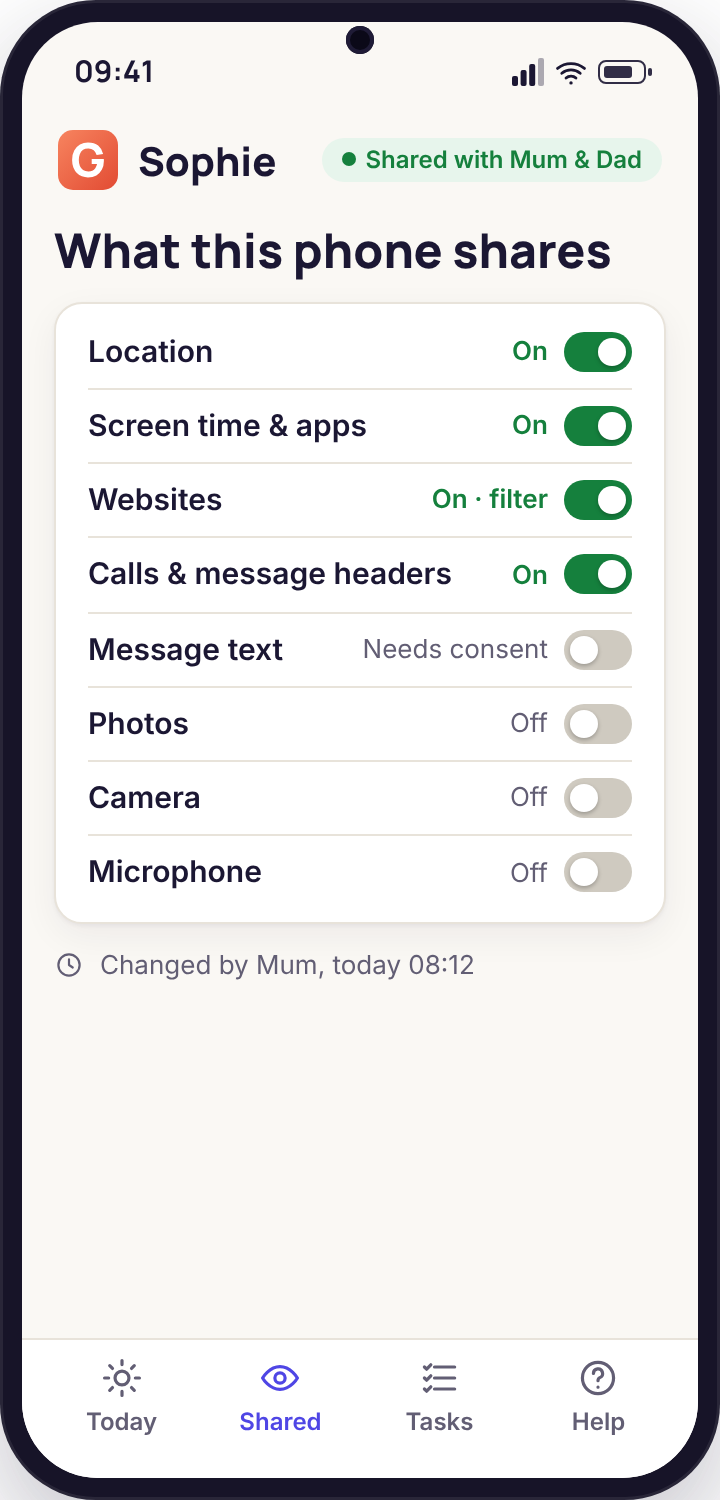
They can see which groups are on and the name of each custom list on their Transparency screen. They do not see the individual words in a custom list. The four built-in groups are described in plain language in the app ("words linked to bullying") rather than listed word by word, because a list of slurs is not something we want to put on a child's screen.
What happens to the notification lines that do not match?
They are discarded on the phone and never leave it. Only a matched line, with its app, sender and time, is uploaded to your account, and it is kept in the alert history for 90 days like other logs. Export and deletion apply to it the same as everything else.
Can I add a list in another language?
Yes. A custom list accepts any words in any script, and matching ignores case and accents. The four built-in groups are maintained in English first; several other languages are in progress and the Keywords page shows which are available for your child's phone language.
Will the crisis helpline card show the right number abroad?
The card uses the country the phone reports, not the one on your account, so a child on holiday sees the local line where we have one. Where we do not have a verified local number, the card shows an international text line and tells the child that a parent has been notified.
Does a flag block the message or the app?
No. A flag only tells you. Blocking an app is a separate decision on the Apps page, it shows on the child's phone when it happens, and we think it should be a decision you make after a conversation rather than one the software makes for you.
Can I get alerts without screen-time rules or location on?
Yes. Every category is its own switch and nothing is on until you choose it. A paired phone with only the crisis group enabled is a perfectly sensible configuration for an older teenager, and it is visible as exactly that on their Transparency screen.
A flag tells you that a word arrived; the context around it usually comes from text messages and social, call monitoring and activity reports.
There is nothing extra to install for this: keyword flagging comes with the paired phone, and pairing is a fifteen-minute job with your child beside you. Each screen of it is shown in the setup guide.
Switch on the crisis group tonight, and nothing else yet
One group, push to both parents, and a helpline card your child can see. Add the rest when you know what a quiet week looks like. No card, no subscription, the core stays free.
Android child app · Runs in any browser · Visible on the phone