Six Ways Instagram Accounts Fall Without the Password, and How to Block Each

An Instagram hacked without password guessing is the normal case, not the exception. Passwords are almost never worked out — they are handed over on a copied page, reused from another site’s breach, forwarded as a six-digit code, lifted with a browser session, intercepted after a SIM transfer, or bypassed entirely by an app you once authorised. Six routes, and each one has a single specific countermeasure.
This page used to be a list of ways to get into someone else’s account. It now describes the same six mechanisms from the other side — how accounts are lost, and the one change that closes each route — because that is useful, and because the original list never worked anyway. What those “methods” really were is the next section.
The old list, read honestly
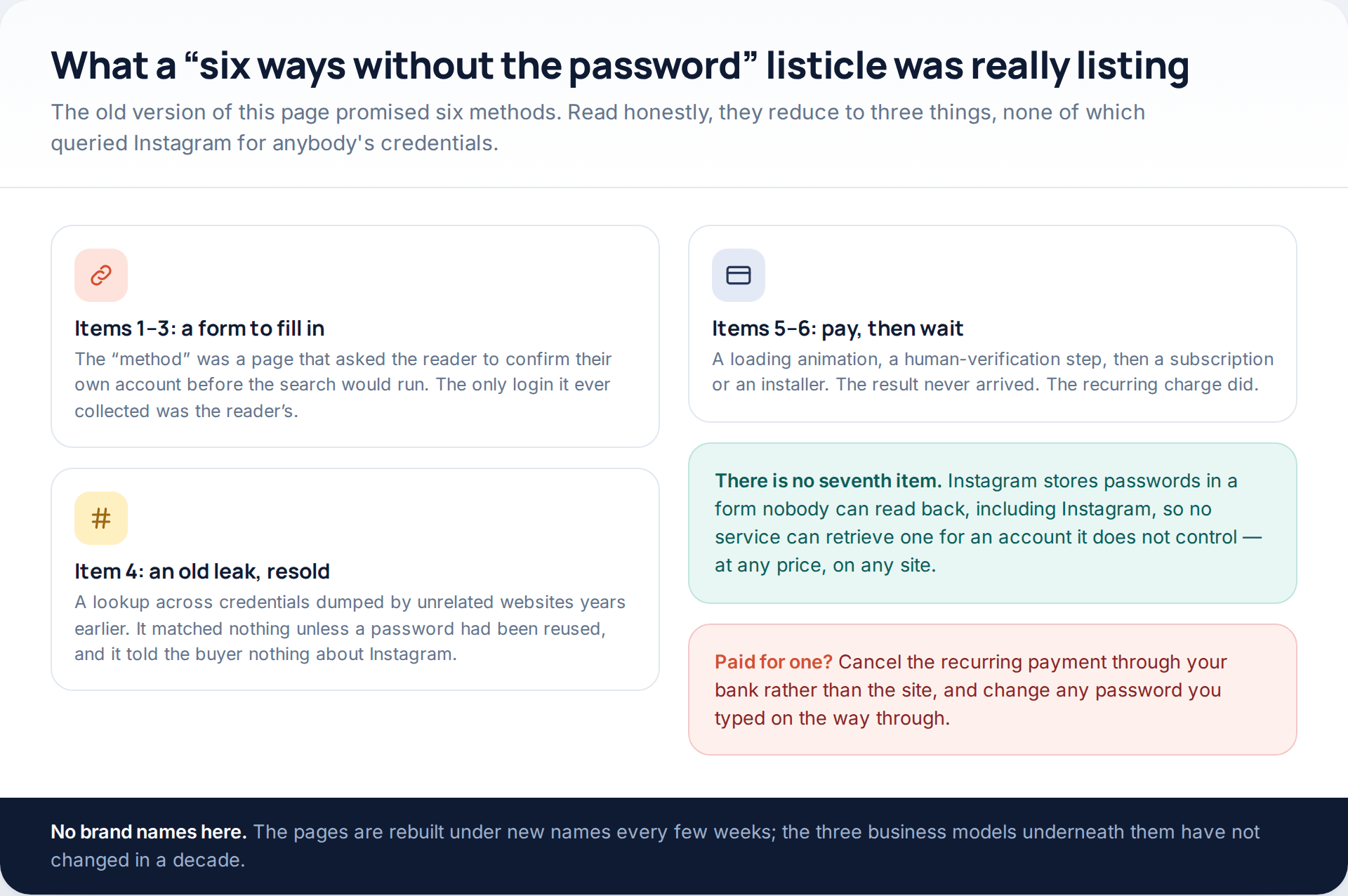
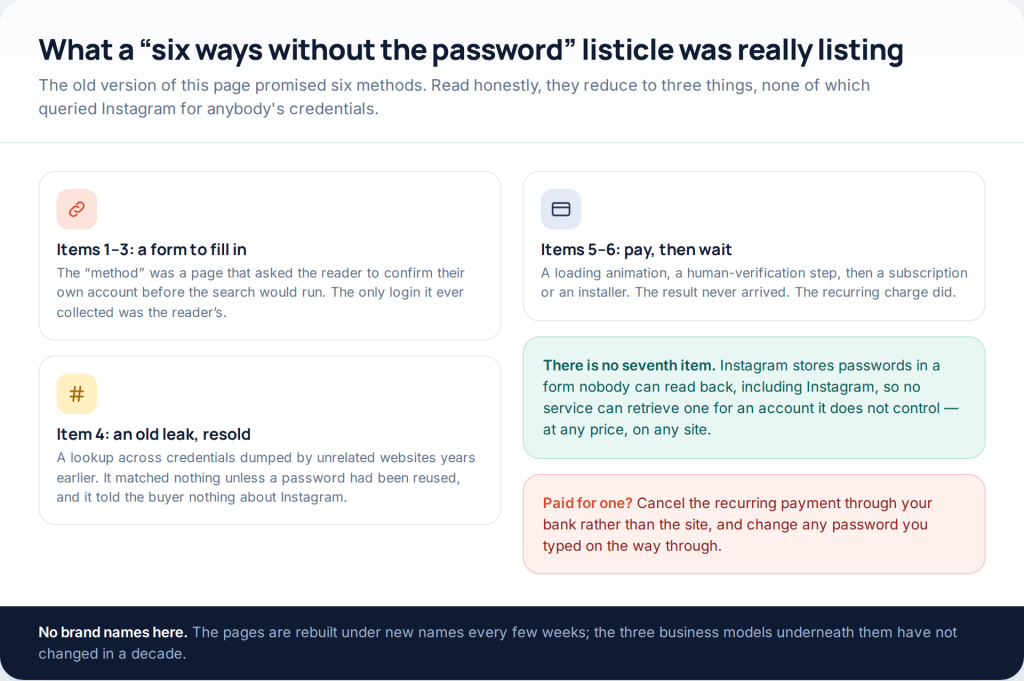
Articles like the one that used to live here always had six or ten entries, and they always collapsed into the same three. Several items were a web page that asked the reader to confirm their own account before the “search” could begin — the only credentials collected were the reader’s. One item was a lookup across old breach dumps, which matched nothing unless a password had been reused elsewhere. The remainder were a progress bar followed by a payment, a survey or an installer, with no result at the end of it.
The missing seventh item is the interesting one. Instagram does not keep passwords in a form that can be read back, by Instagram or anyone else, so there is no service that can produce the password of an account it does not control. Everything genuine happens around the password instead, which is what the six sections below are about.
The six routes at a glance
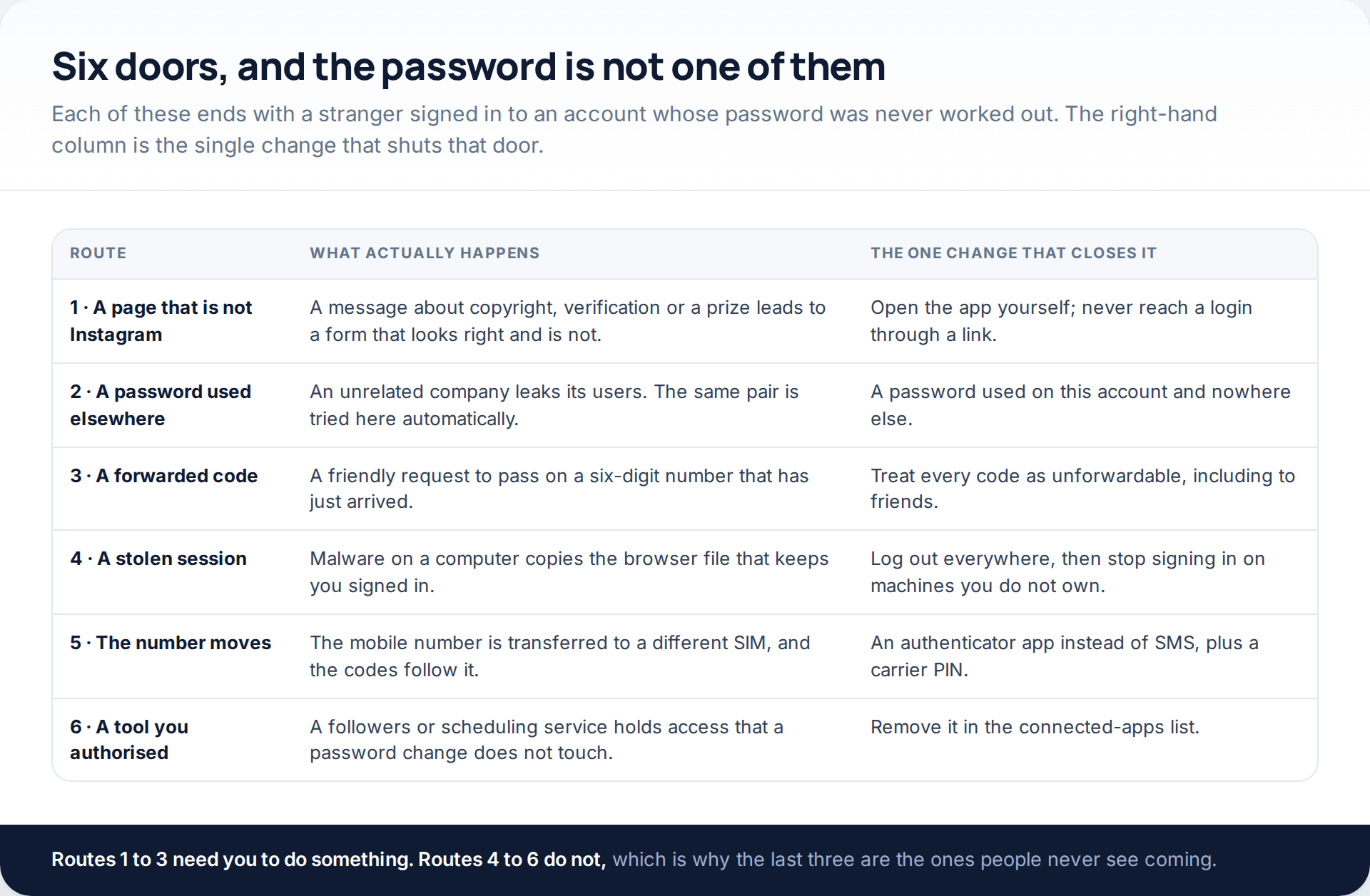
Read the right-hand column first. Not one of the six is closed by making a password longer, and two of them are not closed by anything inside Instagram at all.
Route one: a login page that was not Instagram
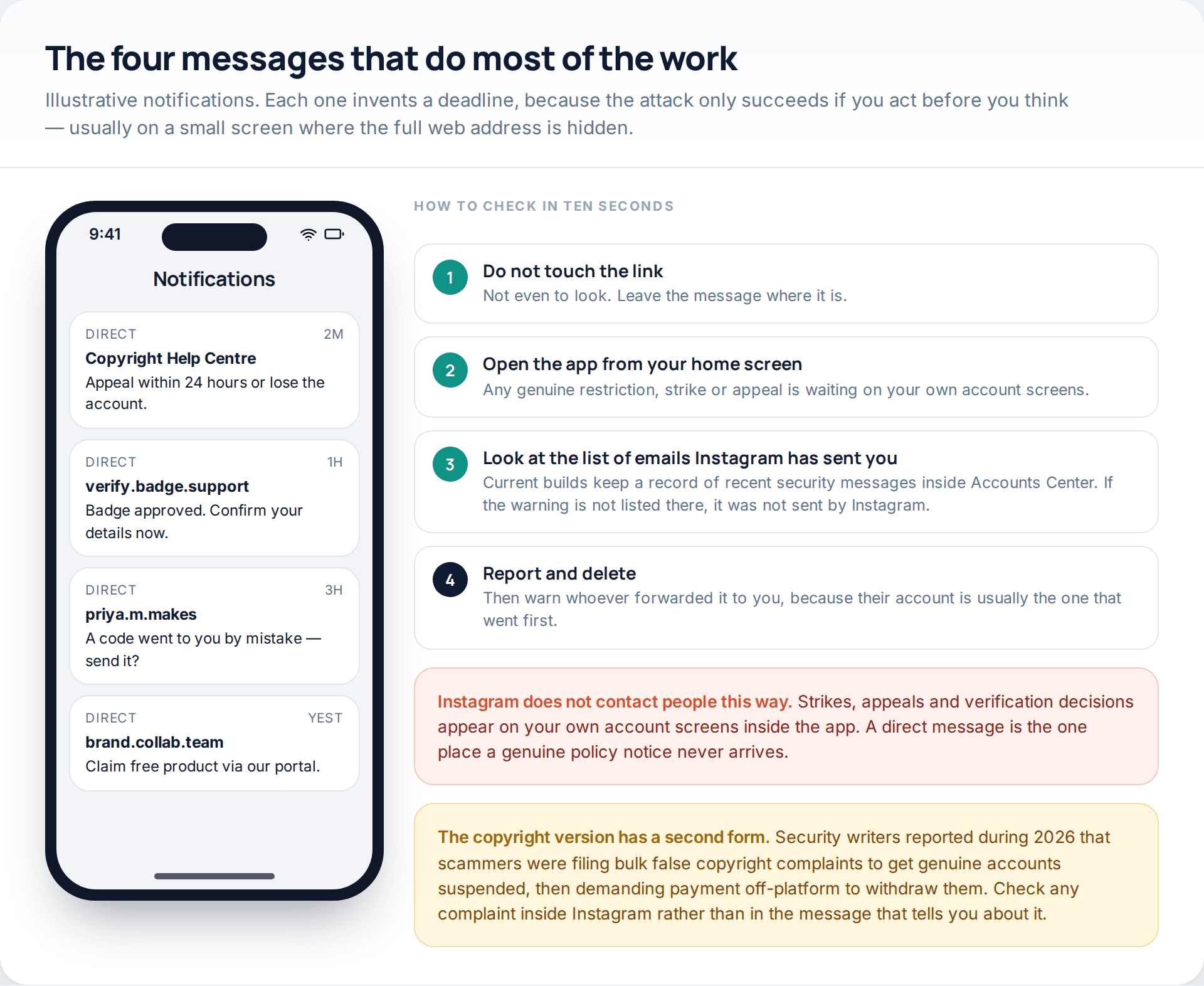
The modern version rarely looks like an obvious scam. It is a direct message from “Copyright Help Centre” telling you a post infringes somebody’s rights and you have twenty-four hours to appeal. It is a notice that your verification application has been approved and needs confirming. It is a brand offering to send you product through a partner portal. In each case the link leads to a login form that is a careful copy, and what you type arrives with whoever built it.
The defence is a habit rather than a judgement call: never reach an Instagram login through a link somebody sent you. If there is a genuine policy problem with your account, it is waiting for you inside the app when you open it from your home screen. Current builds also keep a list of the security emails Instagram has recently sent, inside Accounts Center under password and security, and anything not on that list did not come from Instagram.
There is a nastier variant worth knowing about. Security researchers reported through 2026 that some operators were filing bulk false copyright complaints against real accounts, getting them automatically restricted, and then demanding payment off-platform to withdraw the complaints. The response is the same: check any complaint inside Instagram, appeal there, and do not negotiate through a messaging app.
Route two: a password that was never only yours
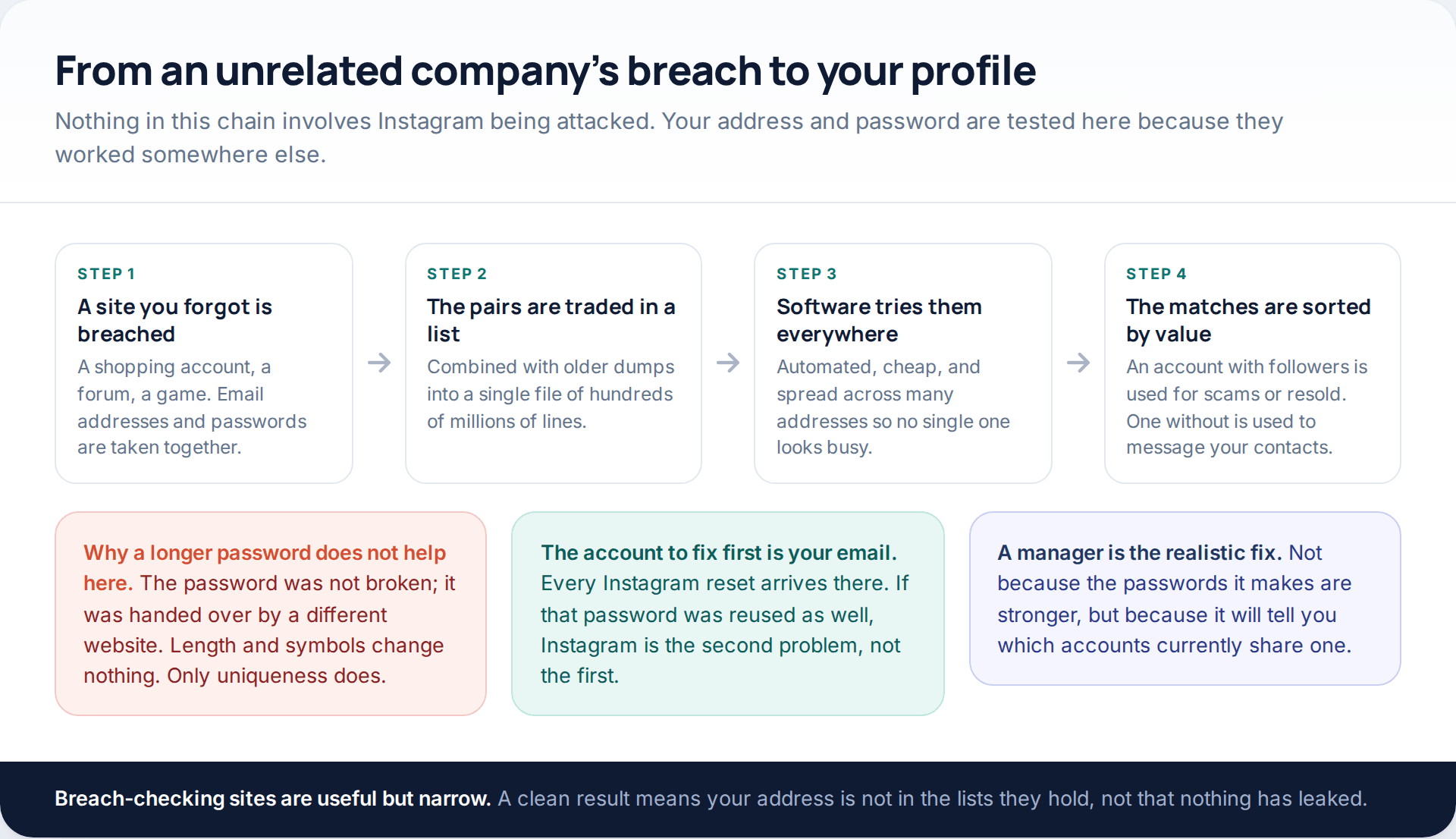
This is the quietest route and probably the commonest. An unrelated company — a shop, a forum, an old game — is breached, and the email addresses and passwords go into circulation. Software then tries those pairs against every major service in turn. Nothing is guessed, nothing is cracked; your password is simply already in the file.
Which is why password strength is beside the point here. A twenty-character passphrase leaked by a hotel booking site is exactly as useful to an attacker as “summer2019”. The property that matters is uniqueness, and the honest way to get it is a password manager — not because it generates stronger strings, but because it can tell you which of your accounts currently share one.
Fix the email account before Instagram. Every reset, every security notice and every recovery route runs through the inbox, so a reused password there undoes everything else. If an account has already gone this way, change the inbox password before you touch anything else, then work outwards to every service that resets through it.
Route three: the code you were asked to forward
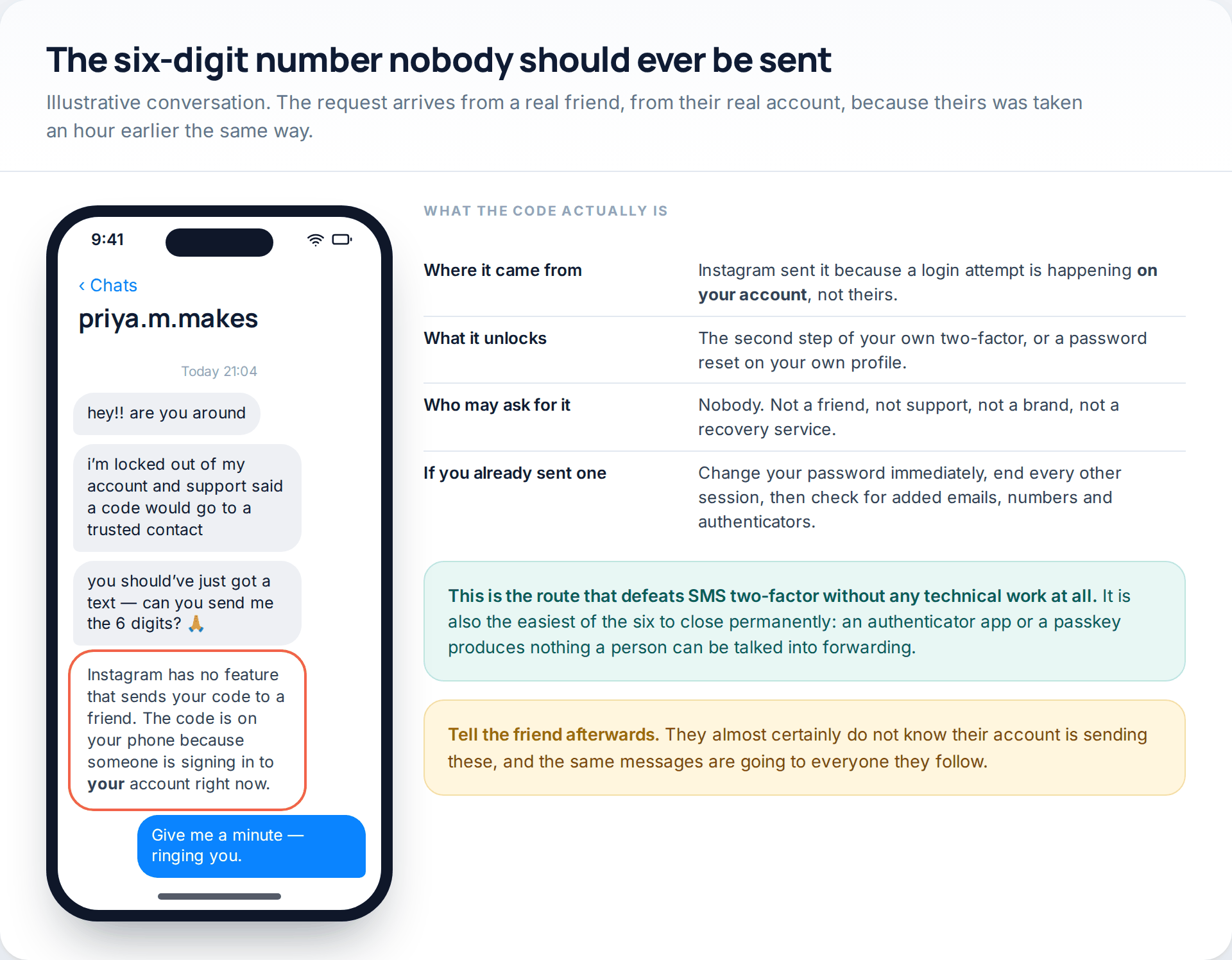
Two-factor authentication by text message adds a real barrier, and this is how it is removed: by asking. The request comes from a friend’s genuine account, it explains that Instagram has sent “your” code to a trusted contact by mistake, and it is phrased apologetically enough that passing on six digits feels like helping.
The code is on your phone for one reason only — somebody is signing in to your account at that moment. No platform sends your verification code to another person, and no support team ever asks for one. A thirty-second phone call to the friend settles it, and usually reveals that their account went the same way earlier in the day.
This route is the easiest of the six to close for good. A time-based code generated inside an authenticator app, or a passkey tied to your device, produces nothing that can be talked out of you, because nothing is delivered to you in the first place.
Route four: a session lifted from a browser
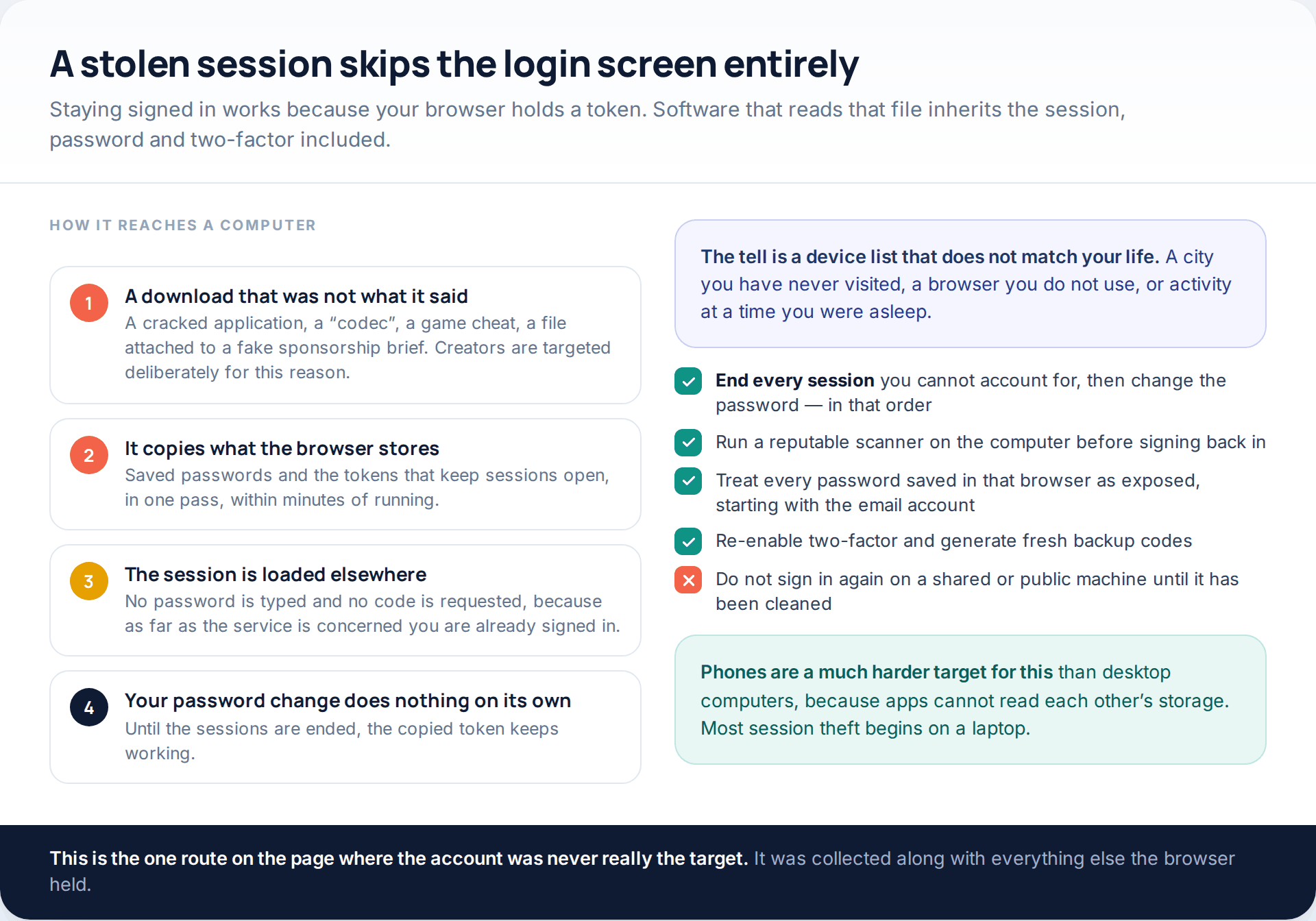
Staying signed in works because your browser stores a token. Information-stealing malware exists specifically to copy those tokens, along with whatever passwords the browser has saved, and it usually arrives as a download that claimed to be something else: a cracked application, a video codec, a game modification, a file attached to a flattering sponsorship offer. Creators are targeted with that last one on purpose.
Once the token is loaded somewhere else, the service sees an existing session. No password is typed. No second factor is requested. This is why a password change on its own often fails to evict someone: until the sessions are ended, the copied token keeps working. End sessions first, change the password second, and treat every other credential saved in that browser as exposed — starting, again, with the email account. If you want to work out whether a device is carrying something, our guide to detecting spyware covers the checks in order.
Route five: the number stops being yours
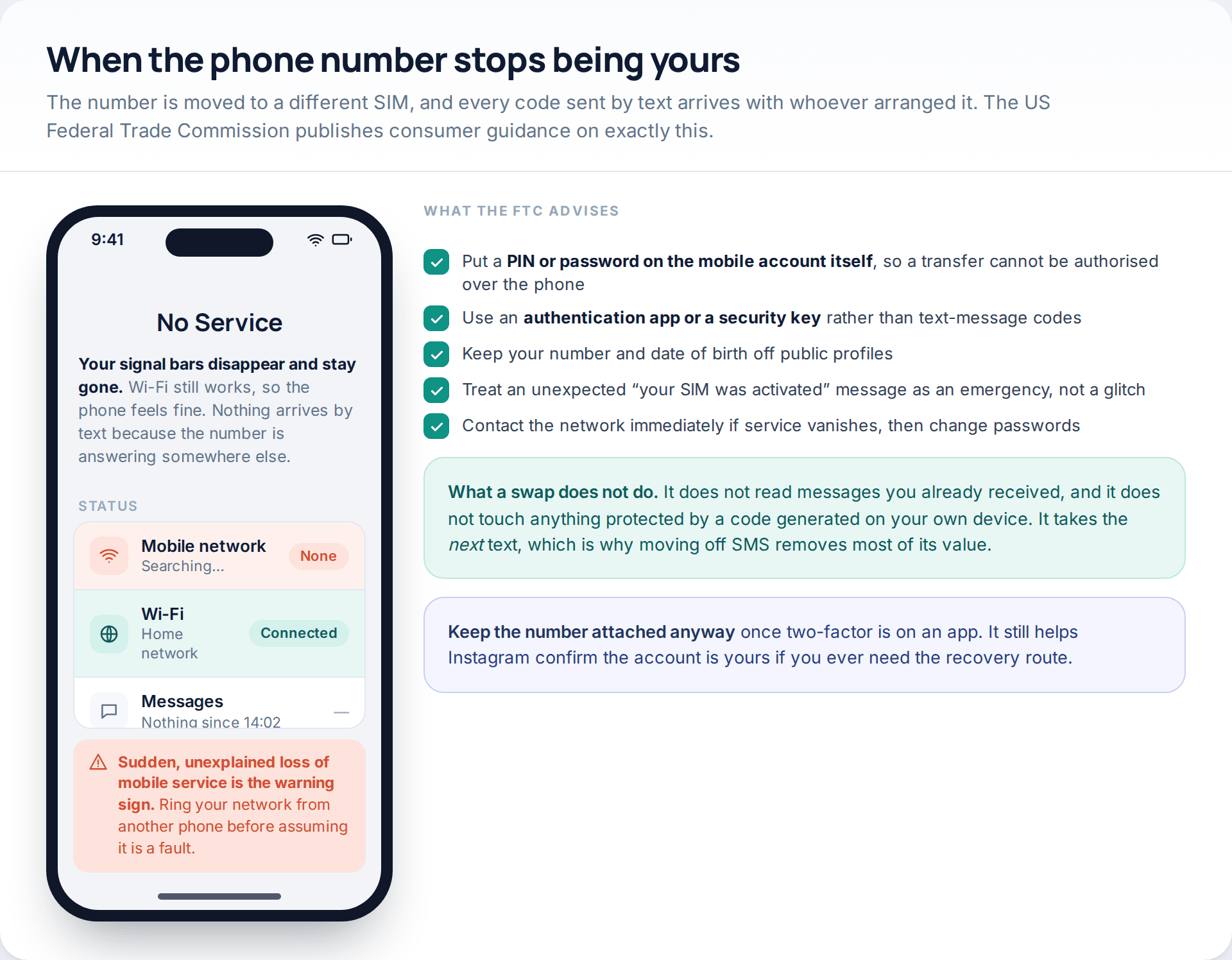
A SIM swap moves your mobile number onto a SIM card held by somebody else, usually by persuading the network that a handset was lost. From that moment every call and text goes to them, including the codes that unlock everything protected by SMS.
The US Federal Trade Commission’s consumer guidance names the warning signs — service vanishing without explanation, an unexpected message saying your SIM has been activated elsewhere, a password-change notice you did not trigger — and the protections. The two that matter most are a PIN or password set on the mobile account itself, so a transfer cannot be authorised in a phone call, and moving verification off text messages and onto an authentication app or a security key.
Keep the number attached to Instagram even so. It stops being your second factor, but it stays useful as evidence the account is yours if you ever need the recovery queue.
Route six: the tool you authorised and forgot
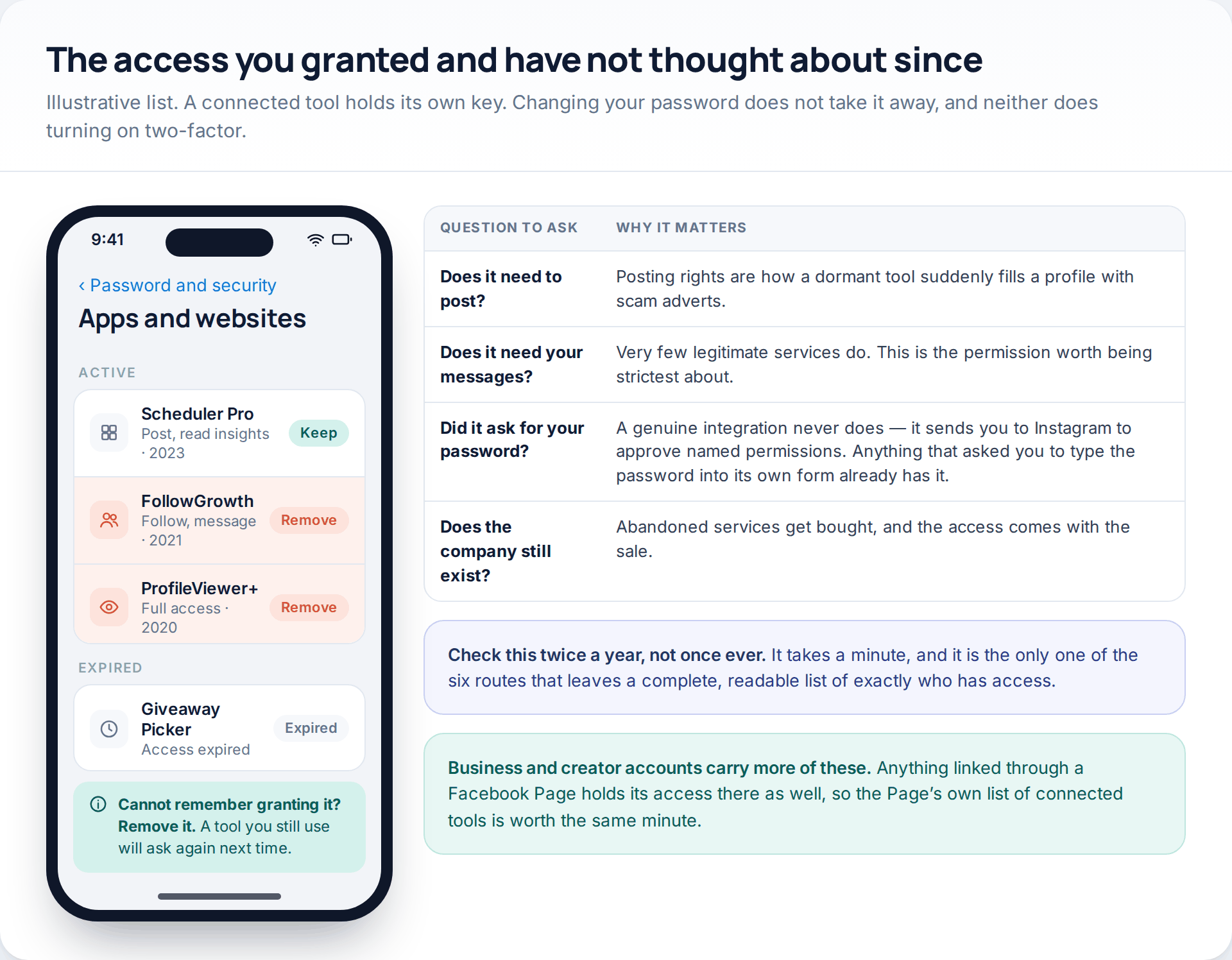
Scheduling tools, analytics dashboards, print services, follower trackers and giveaway pickers all hold access granted by you, sometimes years ago. That access is not a stored copy of your password — it is a separate key, and changing the password does not revoke it. Neither does enabling two-factor.
Open the connected-apps list and read the permissions rather than the names. Posting rights are how a dormant tool wakes up one morning and fills a profile with cryptocurrency adverts. Message access is rarely necessary and worth being strict about. And if a service ever asked you to type your Instagram password into its own form rather than sending you to Instagram to approve named permissions, it did not integrate with Instagram at all — it simply collected the password.
Closing all six, in the order that pays best
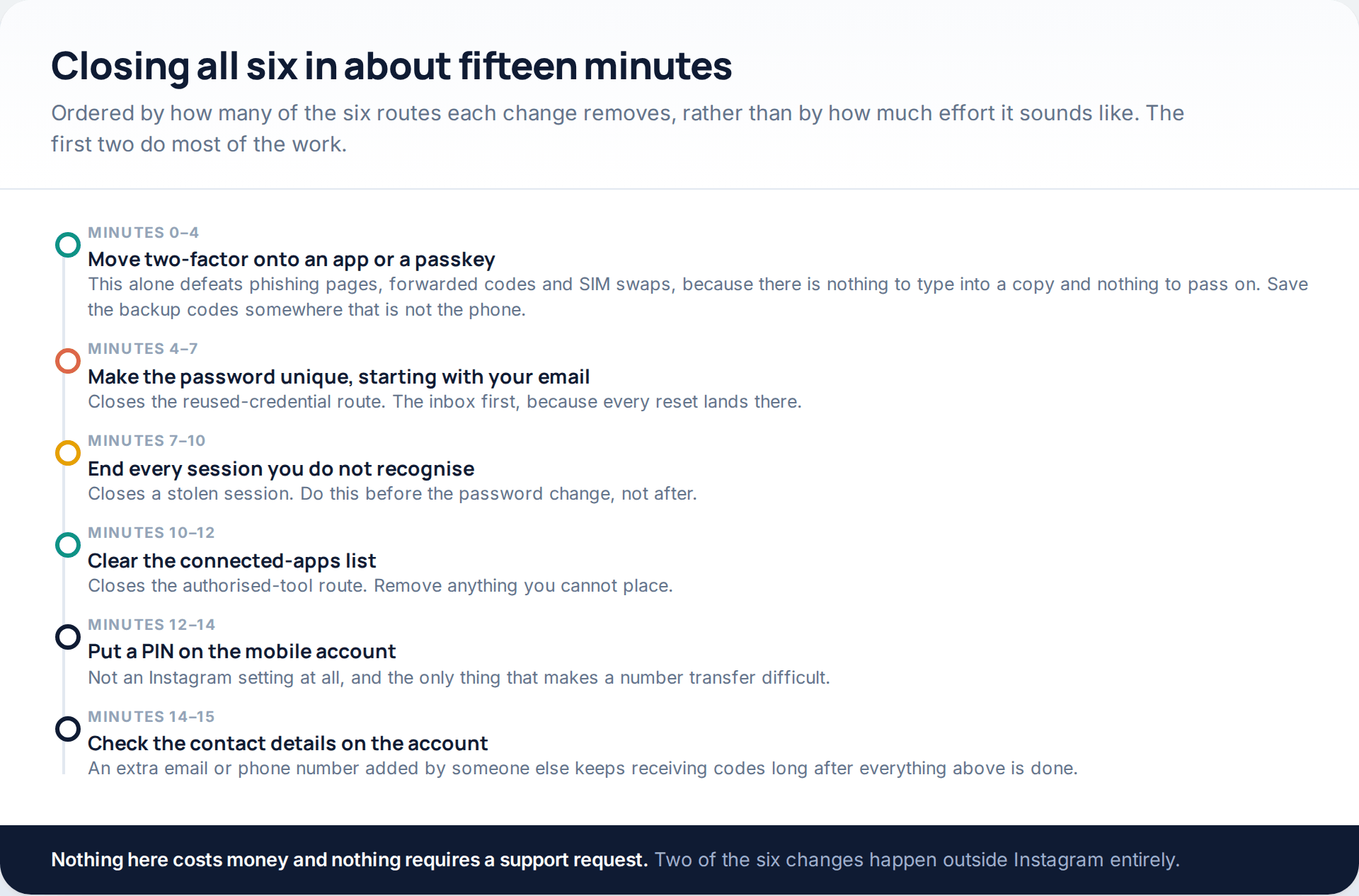
Done in this sequence, nothing has to be repeated. The first step is disproportionately valuable: moving the second factor onto an authenticator app or a passkey removes the phishing route, the forwarded-code route and most of the SIM-swap route in one go, because none of those attacks has anything left to collect.
Two of the six changes are not Instagram settings at all. A PIN on the mobile account lives with your network provider, and cleaning malware off a computer happens on the computer. People skip both for exactly that reason. If you would rather have the defensive settings laid out on their own, with the current menu paths, we have covered them in three settings that secure an Instagram account.
What this will not fix
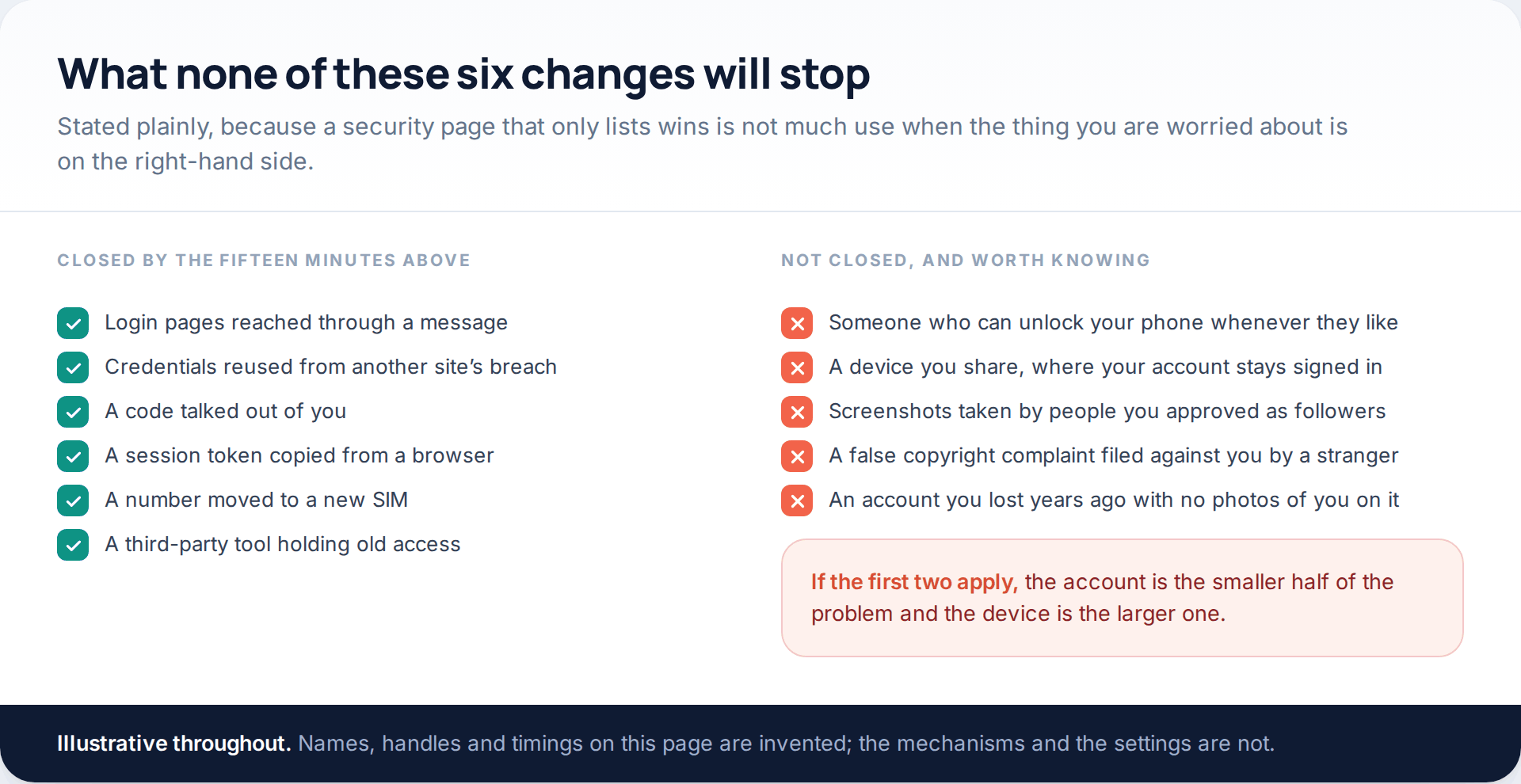
Three situations fall outside all six routes. Somebody with regular physical access to an unlocked phone does not need any of them. A shared device where your account stays signed in is a standing invitation that no setting can withdraw. And anything an approved follower can see, they can photograph — which is a privacy question rather than a security one, and a different page.
There is also a limit on recovery rather than prevention: an old account with no photos of you, no phone number attached and a replaced email address may have nothing left that proves it was yours. That is worth knowing before you spend three weeks on forms.
How this page was put together
The menu paths and labels here were checked in October 2026 against Instagram’s current app and its help material on two-factor authentication, login activity and connected apps. Meta moves these screens frequently — security settings now live inside “Accounts Center” under password and security, where they were once simply under Security — so if a label is not where we describe it, search the settings screen for the same word before concluding the option has gone. The SIM-swap section follows the US Federal Trade Commission’s consumer guidance on SIM swap scams; the copyright-complaint variant follows reporting published by security vendors during 2026.
We have not put numbers on how often each route is used. No platform publishes a breakdown of account takeovers by cause, the figures quoted elsewhere are estimates built on self-selected samples, and inventing a ranking would make this page less honest rather than more specific. The order above reflects how often each mechanism appears in incident write-ups, nothing more. We also did not test any product, name any of the sites selling access, or reproduce a phishing page: the screens in the illustrations are our own, and the handles and timings in them are invented.
If the account has already been taken rather than merely being at risk, the recovery routes are a separate job with their own order of operations, and we have written them up in the step-by-step guide to securing a hacked account.
Common questions
Can someone really get into an Instagram account without knowing the password?
Yes, and it is the normal case. A copied session, an authorised third-party tool and a forwarded verification code all produce access without the password ever being known. That is why ending sessions and clearing connected apps matter as much as changing the password.
Does two-factor authentication stop all six routes?
No, but it stops most of them if you use the right kind. An authenticator app or passkey defeats phishing pages, forwarded codes and SIM swaps. It does not stop a stolen session, because the session already passed the check, and it does not affect a connected app’s access.
Is SMS two-factor better than nothing?
Much better than nothing, and clearly weaker than the alternatives. Text codes can be forwarded by a persuasive message, intercepted after a number transfer, or typed into a convincing copy of the login page. Use it if an app is not an option, and move when it is.
I clicked a link and typed my details. What now?
Change the Instagram password immediately, then end every other session, then check for email addresses, phone numbers and authenticators added to the account. If the same password is used anywhere else — especially your email — change it there too, starting with the inbox.
How do I tell which route was used on my account?
The login activity list is the best evidence: an unfamiliar device or city suggests a session or credential route, while an unexpected two-factor prompt on your own phone suggests someone had the password and was stopped. Added contact details point to someone who had full access for a while.
Do I need to remove third-party apps if I change my password?
Yes. Connected access is separate from the password and survives any change to it. Removing the app in the connected-apps list is the only thing that ends it.
Should I take my phone number off the account entirely?
Usually not. Take it off as a two-factor method once you have an authenticator app, but leaving it attached as a contact detail helps Instagram confirm the account is yours if you ever lose access.
Using a monitoring app for this? GuestSpy is parental monitoring for Android that stays visible on the child's phone and runs from any browser. If it fits your family, see the App & website blocking feature.
Related guides
5 Best Security and Network-Testing Apps for Android (Rooted and Not)
The useful security apps for Android are not the ones with “hack” in the title. They are a network scanner,…
Gmail Password Compromised? Four Recovery Routes Google Accepts
If your Gmail password was hacked, there are four routes back and the one that is open to you depends…
Facebook Account Hacked? Every Free Route Back In
If your Facebook account was hacked, five routes lead back in and all of them are free: a device of…
Monitoring your child can see.
Location, screen-time budgets, routines, app and website blocking and the alerts that matter, run from any browser and visible on the phone. Pair an Android phone in about fifteen minutes.