Facebook Password Leaked Online? How Credentials Get Out and How to Reset

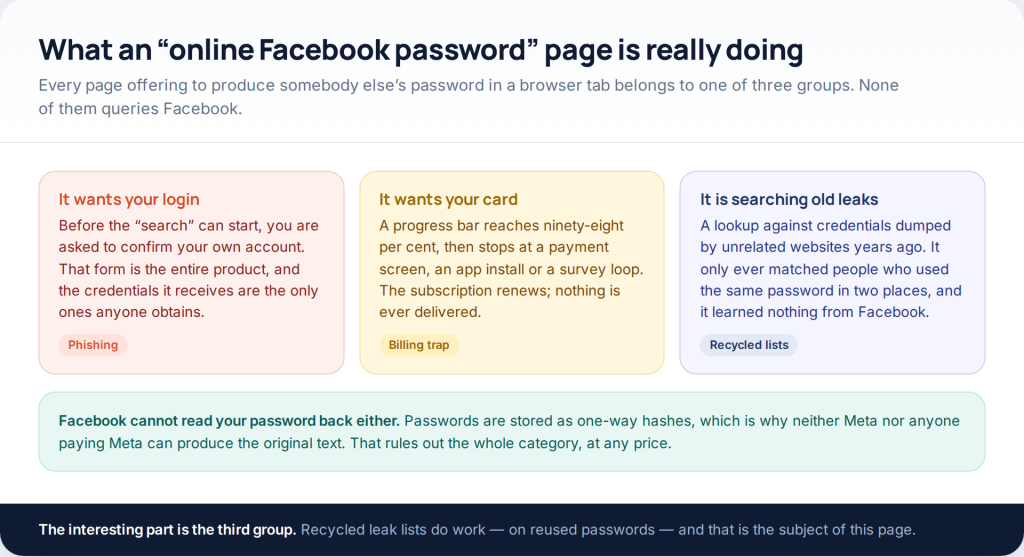
If you are worried your Facebook password leaked, the likeliest explanation is not that Facebook was breached. It is that an unrelated company was, you used the same password there, and the pair has been replayed against Facebook by software. The second likeliest is malware that read the saved logins out of a browser. Both are fixable — but only in a particular order, and a new password on its own usually is not enough.
The old version of this page was titled “How to Hack Facebook Password and Account Online”. Nothing described here helps anyone into an account that is not theirs, because no such online tool exists. What does exist is a well-worn set of routes by which ordinary people’s credentials end up on a list, and a reset sequence that closes them. That is the whole of this page.
Why “hack a Facebook password online” is not a thing
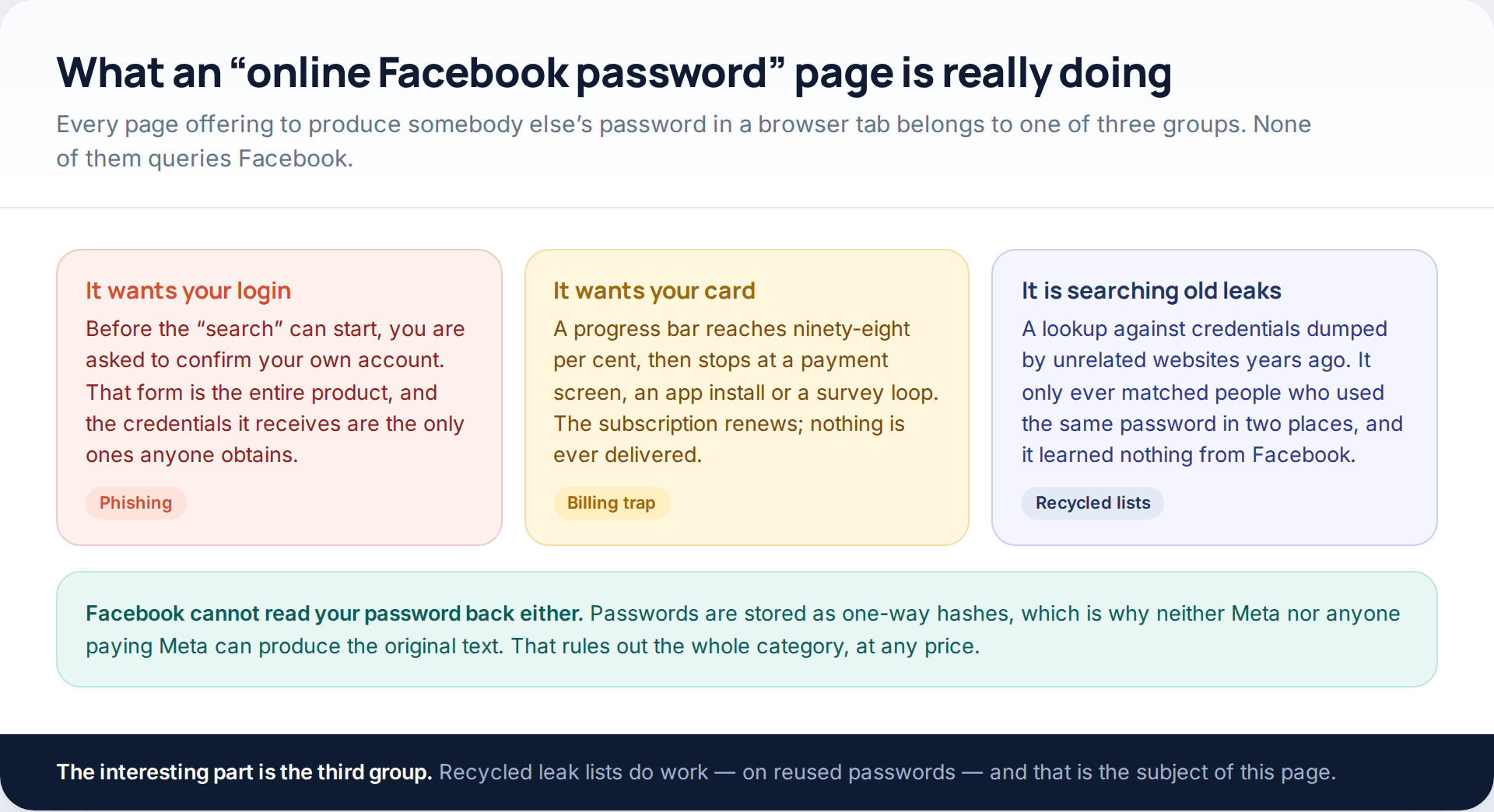
Facebook does not keep your password in a form that can be read back. It keeps a hash — a one-way transformation — which is why a reset creates a new password rather than telling you the old one. Nobody inside Meta can look it up, which settles the question of whether anybody outside can.
That leaves three business models wearing the name. One takes the visitor’s own login through a form dressed up as verification. One takes a card payment and delivers nothing. And one searches old leak lists, which does occasionally produce a working password — not because it broke anything, but because the person being searched for had reused one. That last mechanism is the honest subject of this page, so let us take it seriously.
Five ways a password actually gets out
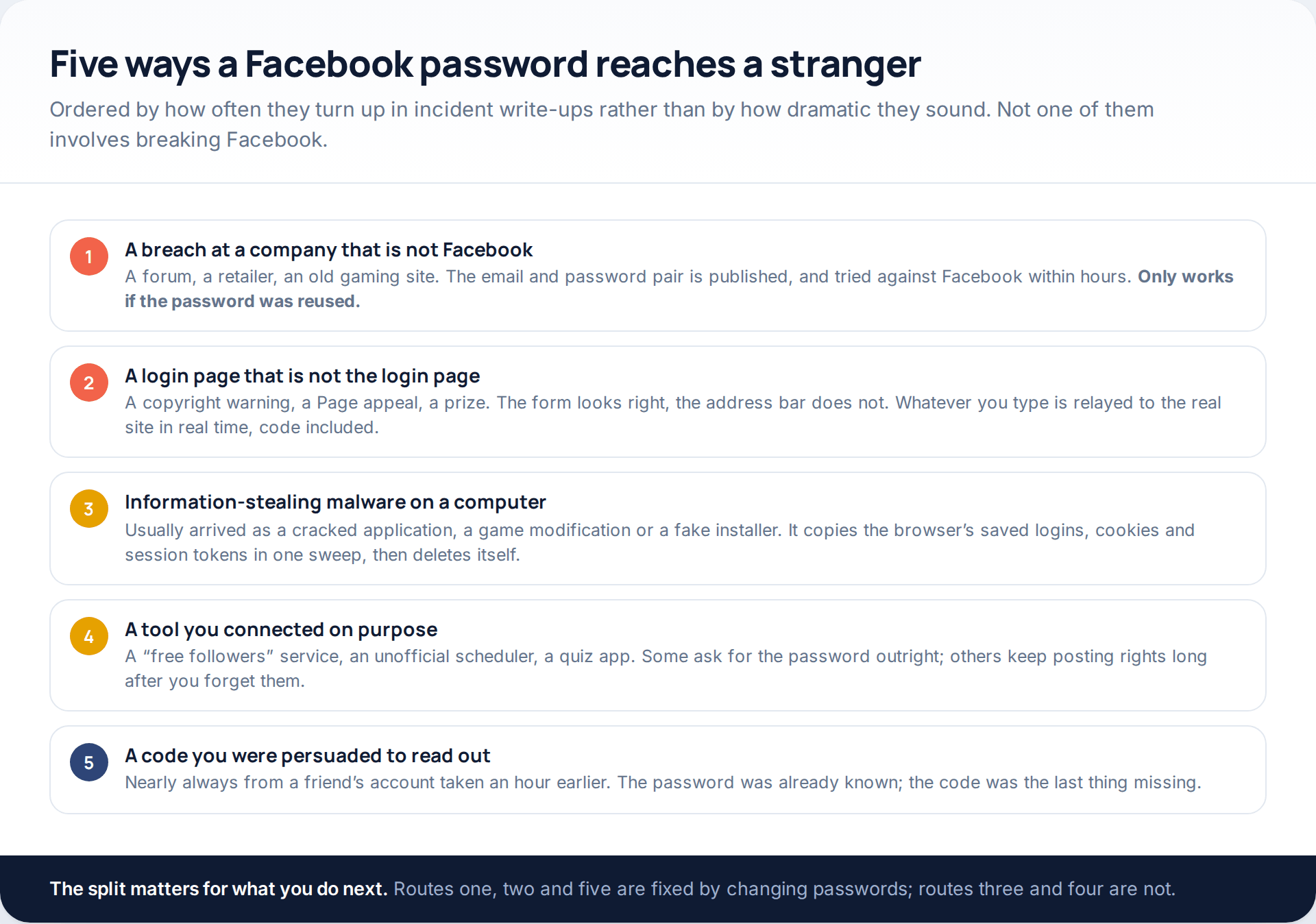
Knowing which of these happened is not academic. It decides whether a password change is sufficient, whether your computer needs cleaning, and what else of yours is exposed.
A breach at a company that has nothing to do with Facebook
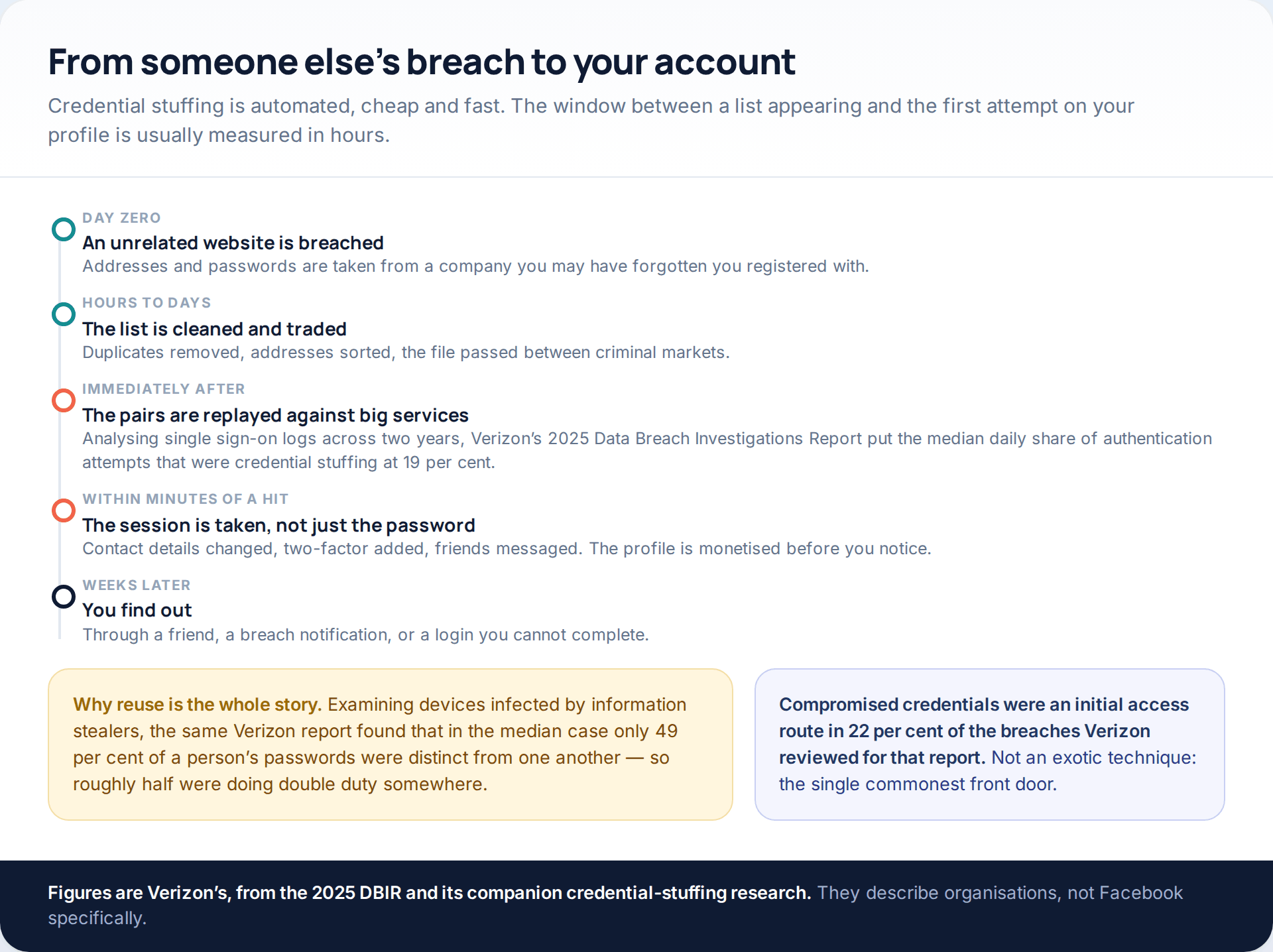
This is the volume route. A shop, a forum or a service you registered with once is breached; the addresses and passwords are published; software replays every pair against the large consumer platforms. Verizon’s 2025 Data Breach Investigations Report, looking at single sign-on logs over two years, put the median daily share of authentication attempts that were credential stuffing at 19 per cent, rising to around a quarter at enterprise scale and peaking at 44 per cent on one observed day. Separately, the same report found compromised credentials were an initial access route in 22 per cent of the breaches it reviewed.
The reason it works is reuse, and reuse is normal rather than rare. Analysing machines infected by information stealers, Verizon’s researchers found that in the median case only 49 per cent of a person’s passwords were distinct from each other. Half of a typical password set is doing double duty somewhere.
A login page that is not the login page
Phishing has moved on from bad spelling. The current pattern is a notice with a deadline — a copyright complaint, a Page restriction, an advertising policy breach — and a link to appeal it. The page that opens is a faithful copy, and increasingly it relays what you type to the real Facebook as you type it, so your two-factor code is used within seconds of you entering it. The only reliable defence is the address bar, and the only reliable habit is refusing to reach a login screen through a link at all.
Information-stealing malware
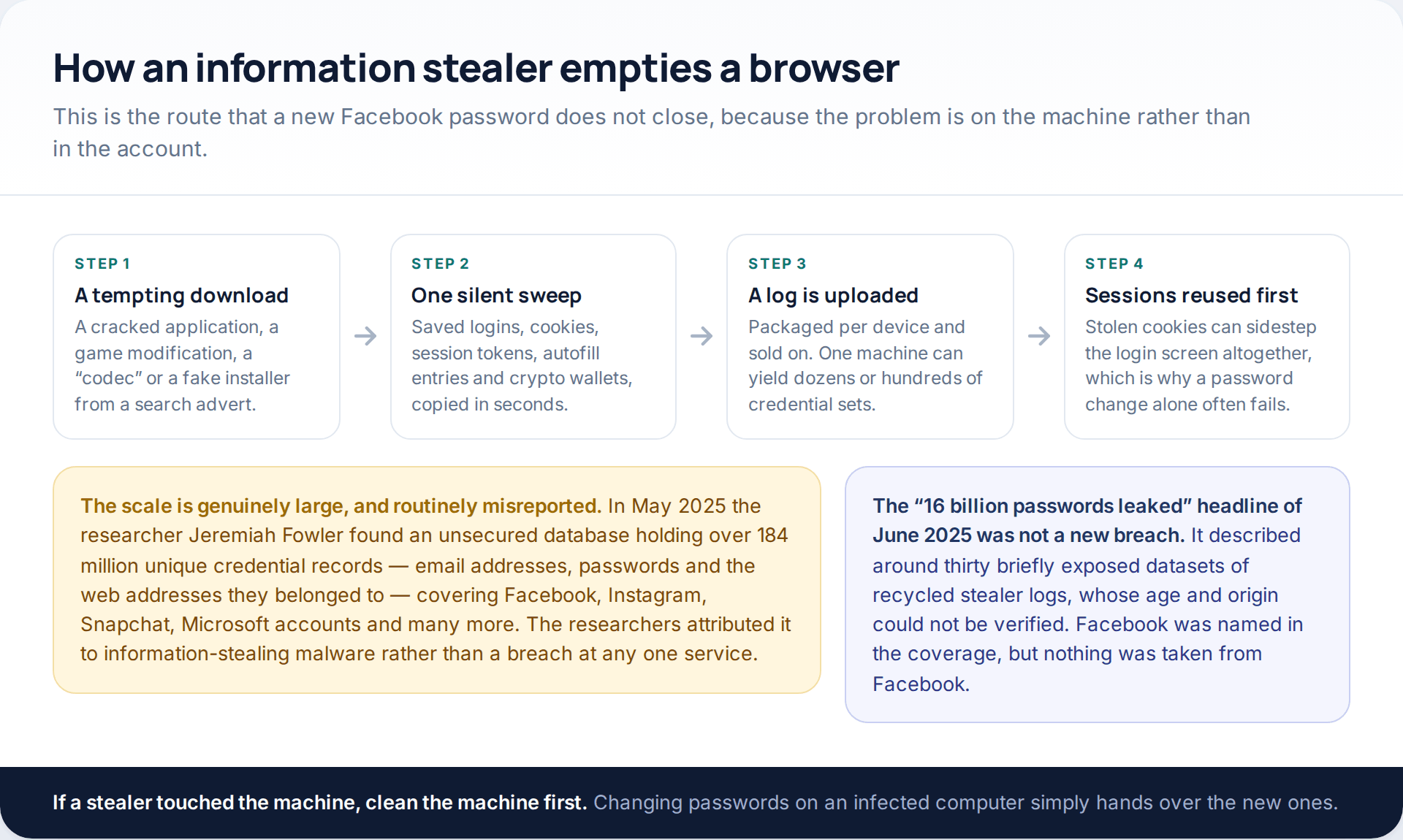
This is the route most people underestimate, because it needs no mistake on Facebook at all. A cracked application or a fake installer runs once, copies the browser’s saved logins, cookies, autofill entries and session tokens, and uploads the lot. Session cookies are the dangerous part: they can be replayed to land inside an account without ever meeting the login screen.
The scale is real, and routinely misreported. In May 2025 the researcher Jeremiah Fowler found an unsecured database of more than 184 million unique credential records — addresses, passwords and the sites they belonged to — spanning Facebook, Instagram, Snapchat, Microsoft accounts and many others, which researchers attributed to stealer malware rather than to any single breach. A month later, headlines about “16 billion leaked passwords” described roughly thirty briefly exposed collections of recycled stealer logs whose age and origin could not be verified. Neither story was a Facebook breach, and treating either as one sends people looking in the wrong place.
Tools you connected yourself
Follower services, unofficial schedulers, analytics dashboards and quiz apps. The worst of them ask for the password directly. The rest hold a token that keeps working after you change it, which is why revoking app access is a separate step from resetting.
A code read out to someone
“I’ve accidentally sent a code to your number, can you forward it?” — almost always from a friend whose own account went the same way an hour earlier. By this point the password is already known; the code is the final missing piece. No service ever needs you to pass a code to a person.
Finding out whether yours is already circulating
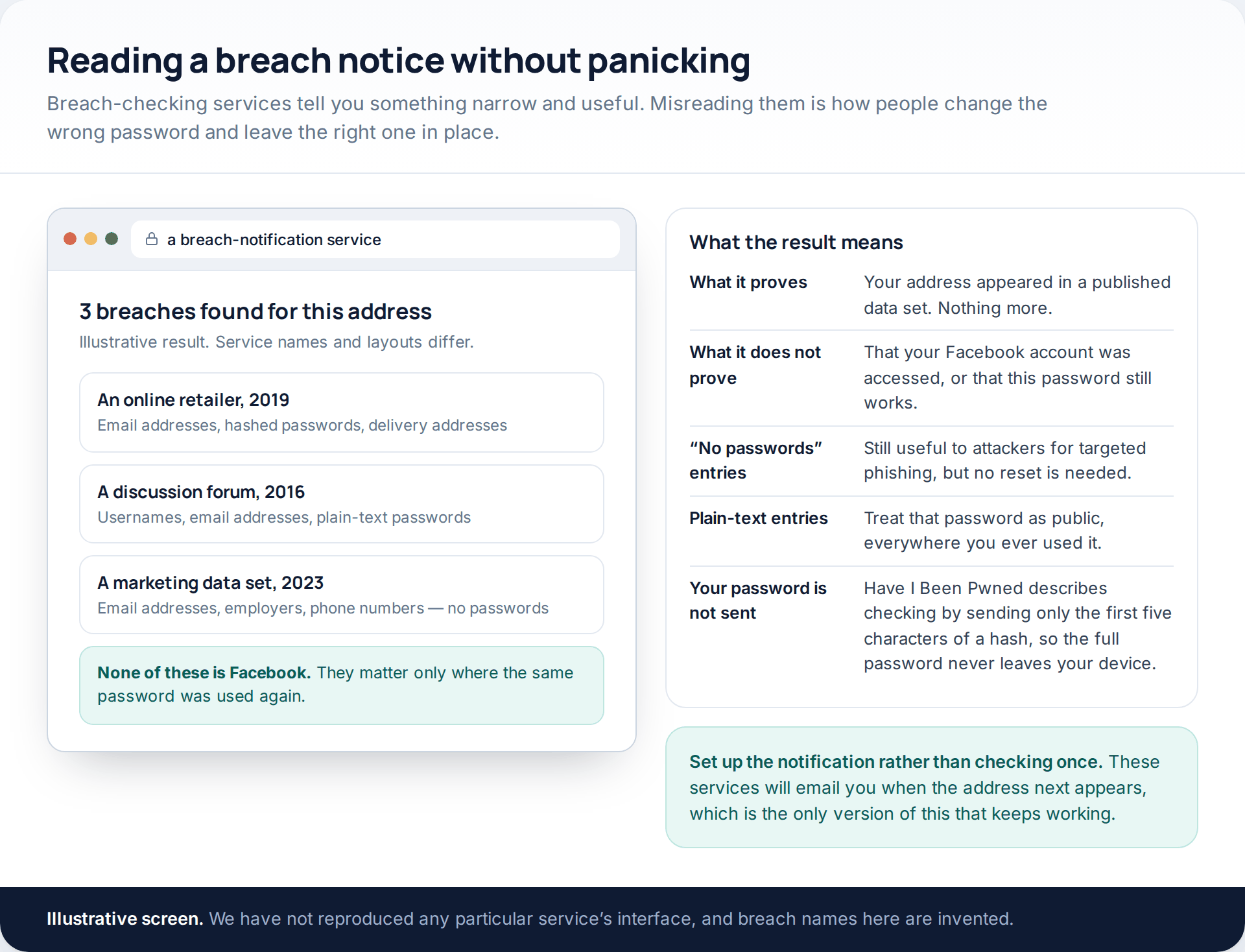
Two kinds of check are worth doing, and they answer different questions.
A breach-notification service tells you whether your email address has appeared in published data. Read the entries carefully: a 2016 forum breach that exposed plain-text passwords matters enormously if you reused that password, and not at all if you did not. An entry listing only addresses and phone numbers needs no reset, though it does explain why the targeted phishing arrived. Have I Been Pwned describes checking passwords by sending only the first five characters of a hash, so the password itself never leaves your device — a detail worth knowing before you type one into any checker.
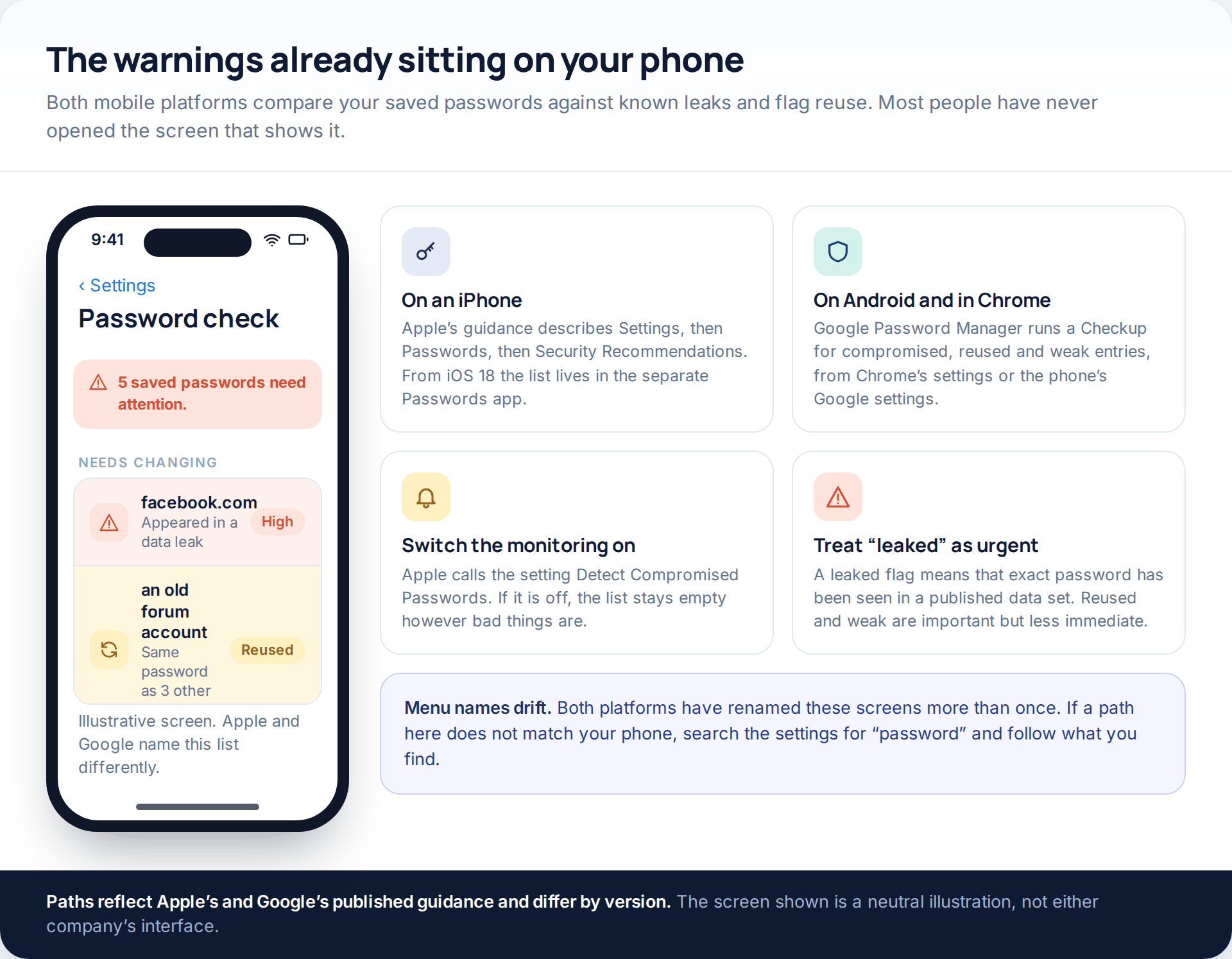
The second check is already on your phone. Apple’s guidance describes Settings, then Passwords, then Security Recommendations, listing reused, weak and leaked entries separately, with a Detect Compromised Passwords setting that has to be on for any of it to populate; from iOS 18 the same list lives in the standalone Passwords app. Google Password Manager runs the equivalent Checkup from Chrome’s settings or from the Google settings on an Android phone. Both have been renamed more than once, so if a path does not match, search your settings for “password” and follow what appears.
Finally, Facebook itself keeps a record of the security notifications it has sent you, inside the security settings. That list is the simplest way to tell a genuine warning from a convincing copy, because a message that is not in it did not come from Facebook.
Resetting in an order that holds
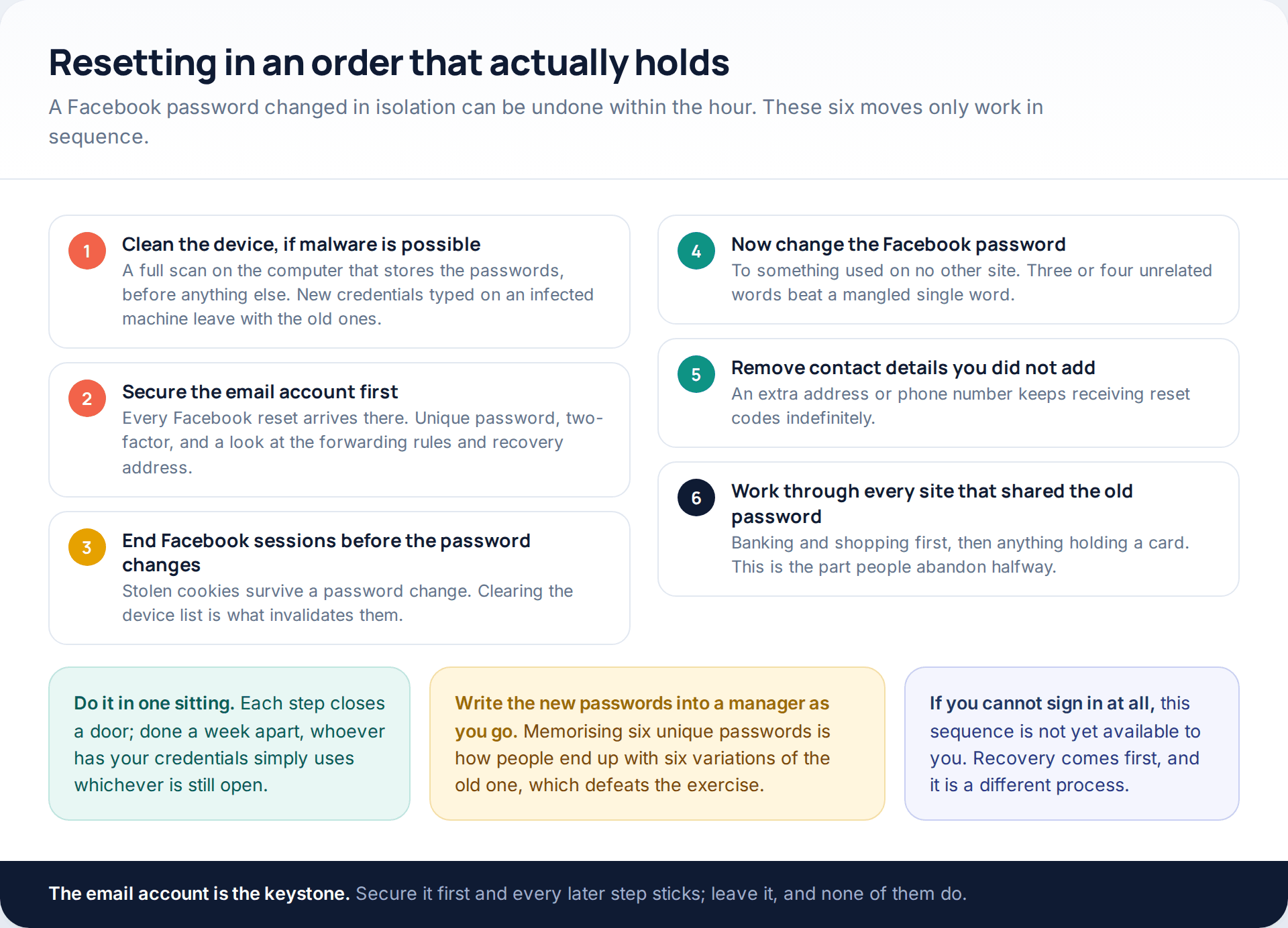
Two points in that sequence are the ones people get wrong. The email account comes before Facebook, because every reset message lands there and an attacker reading your inbox can undo anything you do. And sessions are cleared before the password changes, not after, because a stolen cookie is not invalidated by a new password — ending the session is what kills it.
If a stealer is plausible — a cracked download, a strange installer, a browser suddenly full of unfamiliar extensions — scan and clean that machine before you type anything new into it. Our walkthrough on detecting spyware and stalkerware on a device covers what to look for and what the scanners genuinely catch.
What a password change does not undo
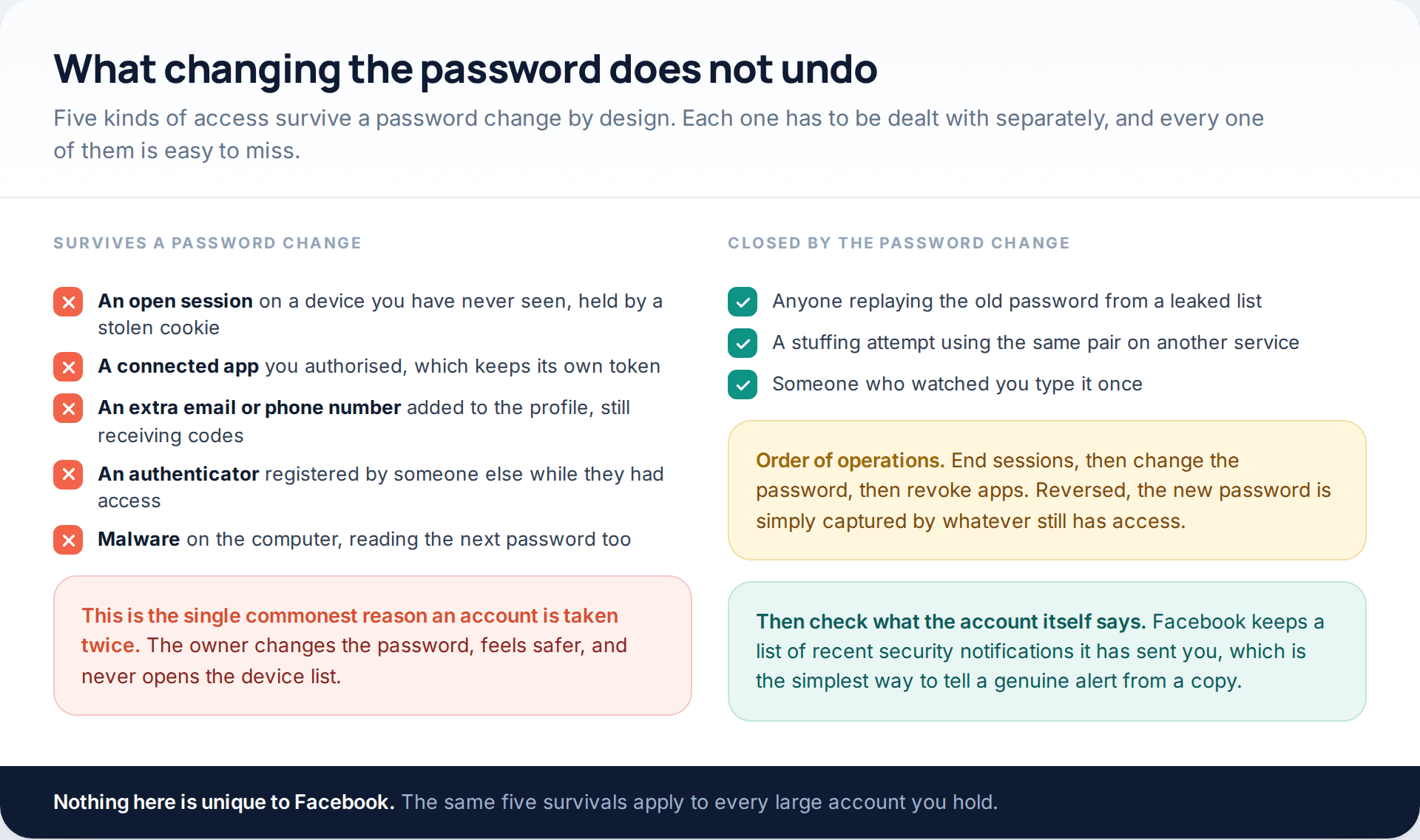
If you only read one section, read this one. A password change evicts nobody who already holds a session, revokes no third-party token, removes no extra recovery address, and deletes no authenticator that somebody else registered. All four have to be handled individually, and all four are in separate places.
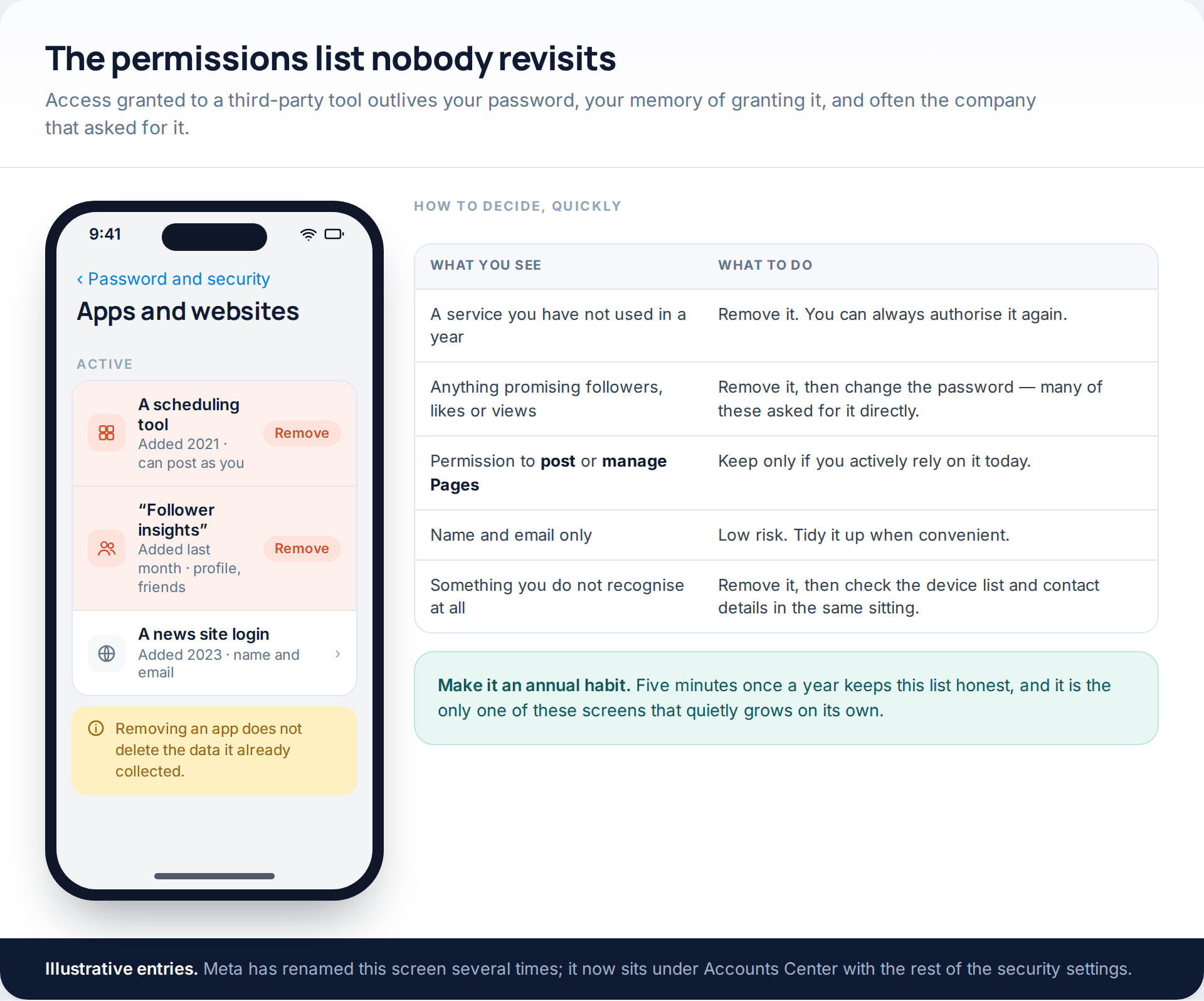
The permissions list is the one that grows quietly. Scheduling tools from a job you left, a login you used once to read an article, something that promised followers in 2019. Remove anything you do not actively use; you can always authorise it again, and nothing of value is lost by being brisk about it.
Making the next leak a non-event
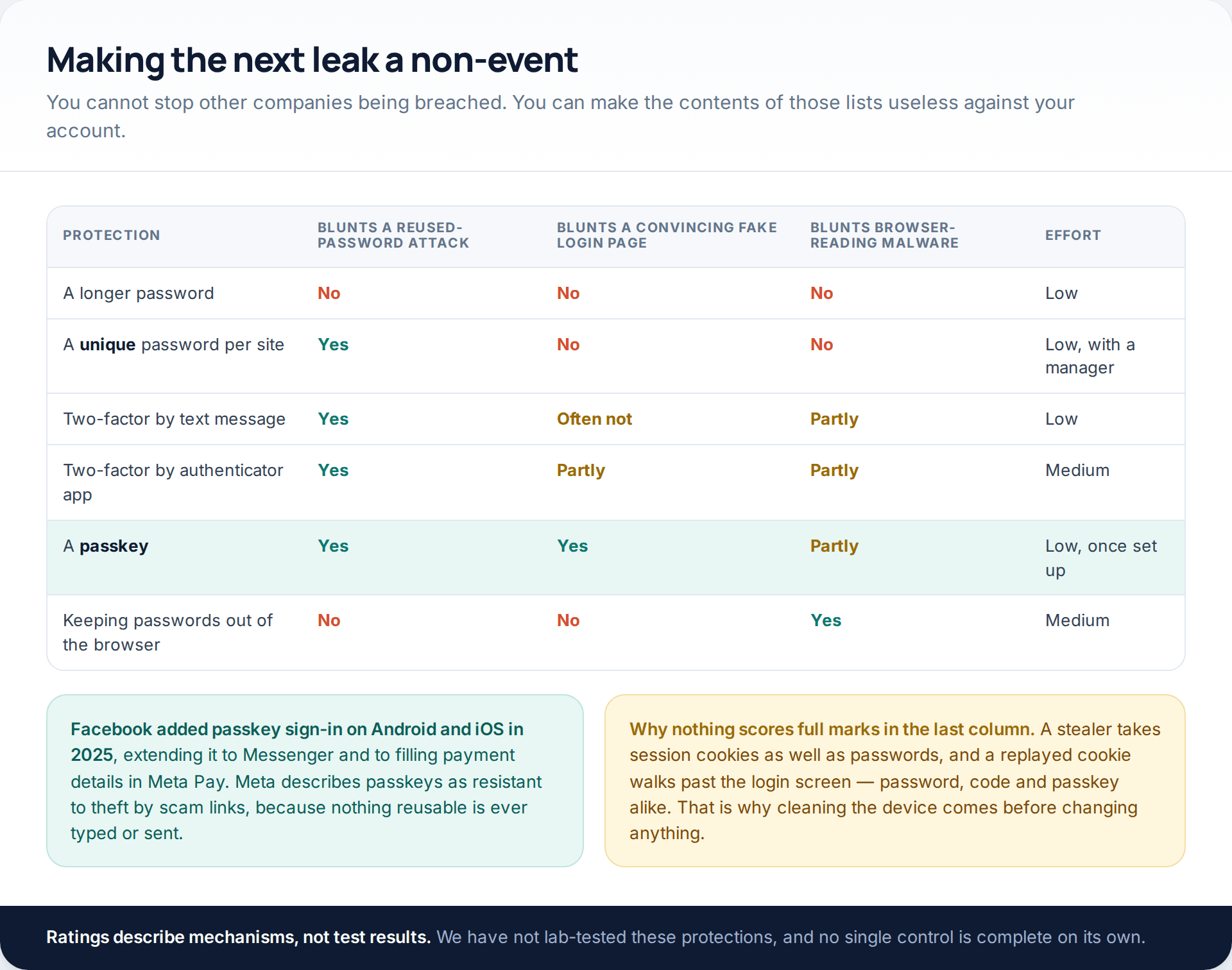
You cannot prevent other companies being breached, and you will not find out about most of them. What you can do is make the contents of those lists worthless against your account. A unique password per site removes the reuse that makes stuffing work. Two-factor authentication, even by text message, defeats a stuffing attempt outright. And a passkey removes the reusable secret altogether: Facebook added passkey sign-in on Android and iOS in 2025, extending it to Messenger and to filling payment details in Meta Pay, and Meta describes the approach as resistant to theft by scam links precisely because nothing is typed that can be replayed.
If the account has already been taken rather than merely exposed, resetting is the wrong first move — recovery comes first. We cover the five free routes back in, including what to do when both contact details have been swapped, in our guide to getting back into a hacked Facebook account.
How this page was put together
The figures on credential stuffing and password reuse come from Verizon’s 2025 Data Breach Investigations Report and the credential-stuffing research Verizon published alongside it; they describe organisations in that data set rather than Facebook specifically, and we have not extrapolated beyond what the report states. The two stealer-log stories are dated and attributed in the text because both were widely reported as “Facebook breaches”, which neither was. The password-manager paths follow Apple’s and Google’s published guidance as of October 2026.
Facebook’s own help pages block automated retrieval, so menu paths quoted here were cross-checked against independent walkthroughs rather than taken from one source, and the screens illustrated are neutral drawings rather than reproductions. Labels move between versions and countries: treat them as a description of where the setting lives, not a promise about the wording. We have deliberately not estimated how many Facebook passwords are in circulation, because no credible figure exists and the published guesses are built on duplicate-heavy data sets.
For the habits that hand a password over in the first place, rather than the leaks that do it behind your back, see our companion piece on the three mobile habits that give a Facebook password away.
Common questions
Has Facebook itself ever been breached?
Facebook has had data exposures involving profile information, but the large credential collections that make headlines are compiled from malware logs and from breaches at other companies. If a service tells you your password appeared in a leak, the leak was almost certainly somewhere you reused it.
Is it safe to type my password into a breach-checking site?
Only into one that explains how it protects the query. Have I Been Pwned describes sending just the first five characters of a hash, so the password never leaves your device. A site that asks for the full password with no such explanation should be treated as a collection point rather than a checker.
I changed my password and they got back in. How?
Almost always an open session held by a stolen cookie, a connected app with its own token, or malware still running on the computer. Clear the device list, revoke third-party access and scan the machine, in that order, before setting another password.
Are password managers safe if they are the thing being stolen?
Information stealers target browser-stored passwords, which is a weaker arrangement than a dedicated manager behind a separate unlock. No manager survives malware running with your privileges, which is why the device clean-up comes first — but a manager is still a very large improvement on reuse.
Should I change my password every few months?
Routine rotation on a schedule tends to produce predictable variations, which helps nobody. Change it when there is a reason: a breach notice, a leaked flag in your password manager, a login you do not recognise, or a device you no longer control.
What is a passkey, in plain terms?
A key stored on your device and unlocked by your face, fingerprint or screen lock. The website never receives anything reusable, so there is nothing to leak, nothing to replay from a list and nothing a fake page can collect. Facebook supports them on Android and iOS.
My email address is in a leak but no password was exposed. Do I need to do anything?
No reset is needed, but expect better-targeted phishing: whoever has the list knows where you shop or which forum you joined. Treat unexpected messages referring to that service with extra suspicion for a while.
Using a monitoring app for this? GuestSpy is parental monitoring for Android that stays visible on the child's phone and runs from any browser. If it fits your family, see what the app does.
Related guides
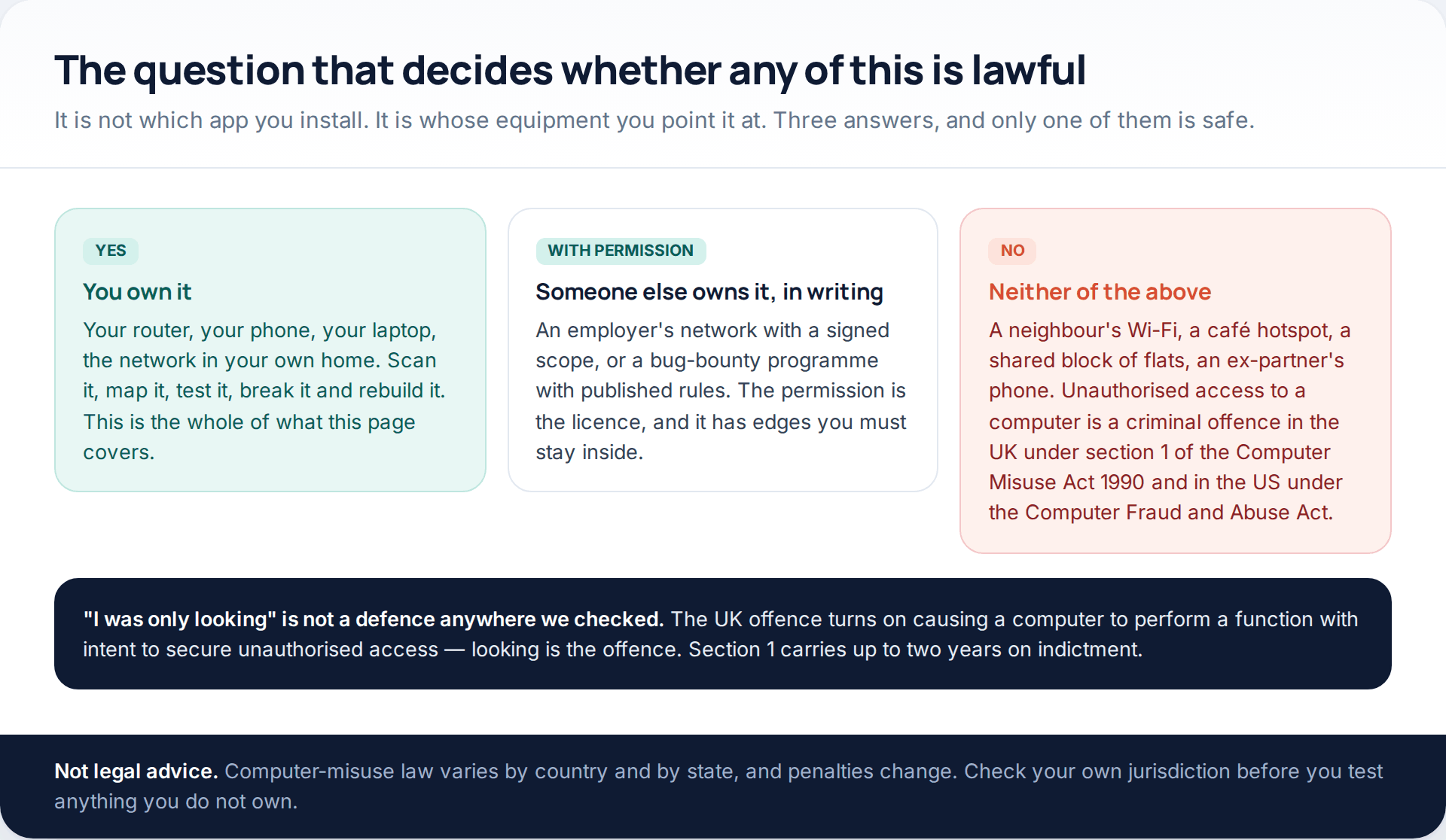
5 Best Security and Network-Testing Apps for Android (Rooted and Not)
The useful security apps for Android are not the ones with “hack” in the title. They are a network scanner,…
Gmail Password Compromised? Four Recovery Routes Google Accepts
If your Gmail password was hacked, there are four routes back and the one that is open to you depends…
Facebook Account Hacked? Every Free Route Back In
If your Facebook account was hacked, five routes lead back in and all of them are free: a device of…
Monitoring your child can see.
Location, screen-time budgets, routines, app and website blocking and the alerts that matter, run from any browser and visible on the phone. Pair an Android phone in about fifteen minutes.