How to Protect Your Phone in an Abusive Situation (Safely)
If you think your phone is being used to monitor or control you, how you check matters as much as what you find. A calm, careful guide to doing this safely.
 By GuestSpy Editor · Founder and editorPublished September 12, 2026Updated September 14, 202611 min read
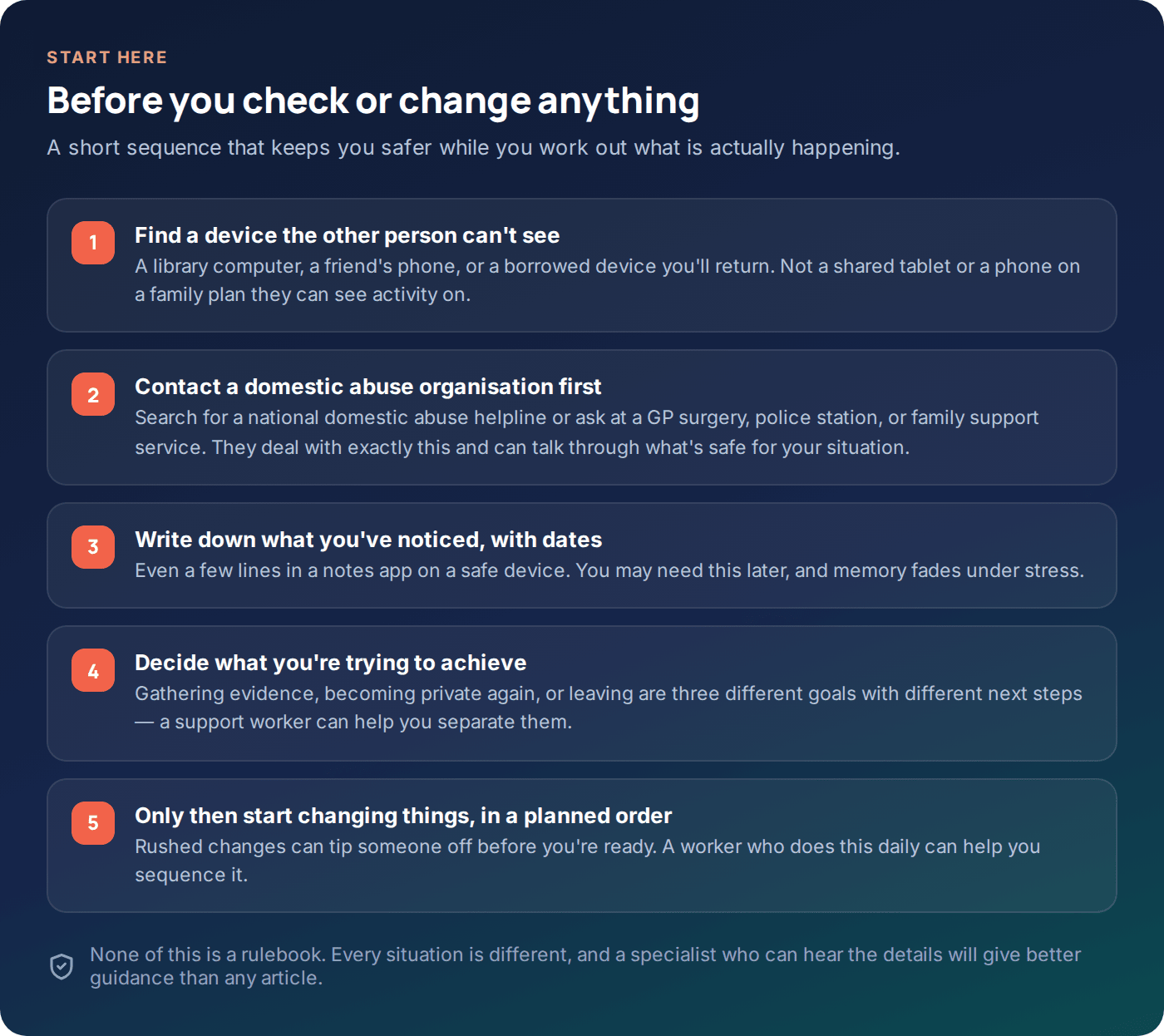
If you’re reading this because you think your phone is being watched or controlled by someone in your life, the most important thing to know is this: checking or changing your phone can sometimes make things more dangerous, not less. Go carefully, and don’t do this alone if you can help it.
This page is general information about protecting your phone in an abusive situation. It is not a personal safety plan, and it is not legal advice — every situation is different, and the right next step depends on details a website can’t see. If you are in immediate danger, contact emergency services. Otherwise, please consider talking to a domestic abuse support organisation before you act on anything below; search for a national domestic abuse helpline, or ask at a GP surgery, police station, or family support service. They do this every day and can help you think through what’s safe for you specifically.
- Why caution comes before action
- Using a safer device to check things
- Shared accounts and family plans
- Location sharing you may not know about
- Apps, permissions and device admin access
- Trackers in a bag, car or gift
- Keeping a record, without putting yourself at risk
- Planning ahead
- Questions people ask
Why caution comes before action
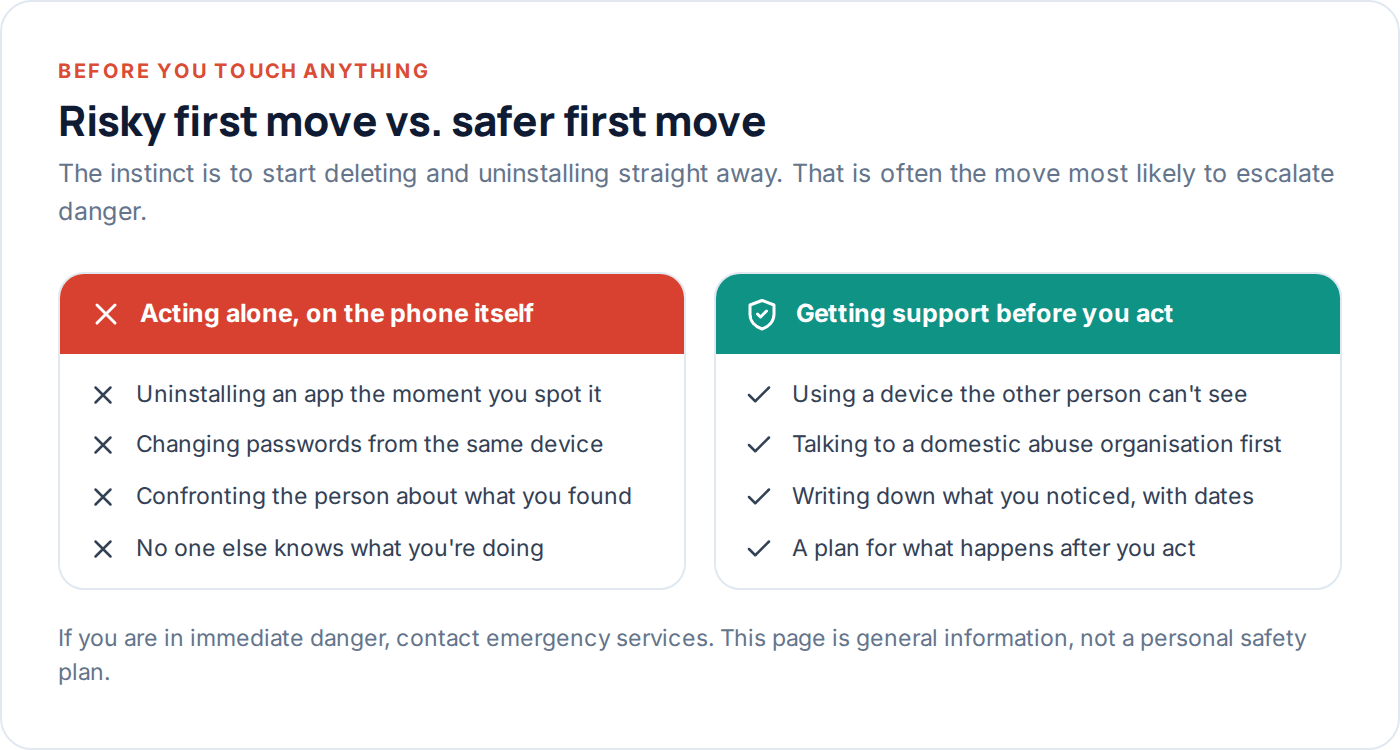
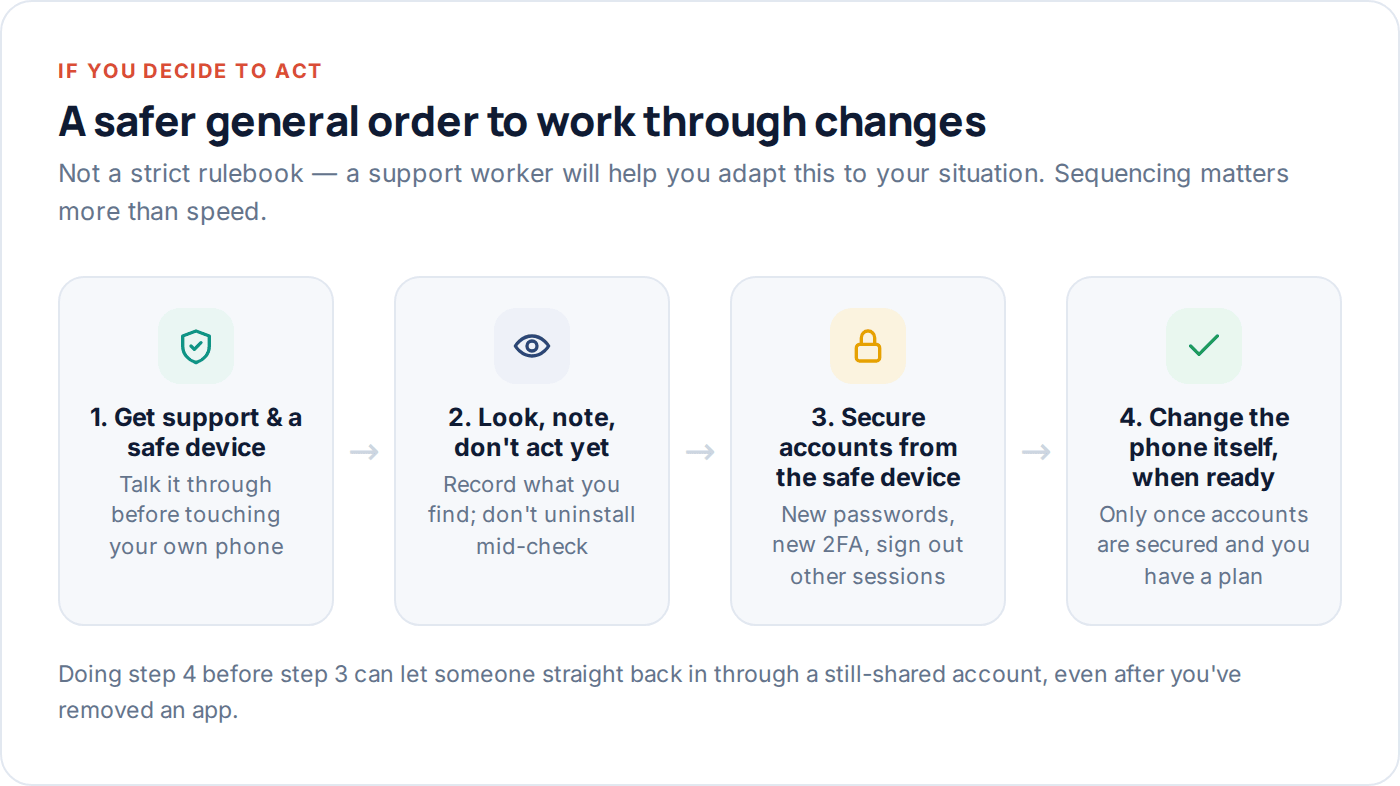
It feels natural to want to fix the problem the moment you notice something. Uninstall the app. Change the password. Confront the person. In an abusive or controlling relationship, any of those can tip someone off before you’ve had a chance to think through what happens next — and the period right after someone realises they’ve lost visibility or control is, by many accounts from support organisations, one of the higher-risk points in a relationship like this.
That’s not a reason to do nothing. It’s a reason to slow down for a moment and get support before you make changes, rather than after.
Using a safer device to check things
If you suspect your phone is being monitored, your phone is not a safe place to research this, message a support organisation, or make a plan. Use a device the other person doesn’t have access to and wouldn’t think to check: a computer at a public library, a friend’s or family member’s phone (ideally someone the other person doesn’t know you’re close to), or a work computer if that’s genuinely private.
A few practical points about safer browsing on any shared or potentially monitored device, including your own phone if you have no other option for now:
- Private/incognito browsing hides history from someone glancing at the browser later — but it does nothing against a monitoring app already installed on the device, which can see what happens regardless of browser mode.
- Clearing history after visiting a support site can itself look suspicious if someone checks regularly and notices a gap. A safer device avoids this problem entirely rather than trying to cover tracks on a compromised one.
- Voice assistants and shared smart speakers can log what’s said aloud nearby. If you’re making calls or having conversations about this, consider where those devices are.
If a safer device genuinely isn’t available
Some people don’t have easy access to another device, particularly if movement or money is also being controlled. If that’s you, a support organisation can still help — many offer secure webchat, text-based contact, or advice on using a device as safely as possible in the meantime. Don’t let “I can only use this phone” stop you from reaching out.
Shared accounts and family plans
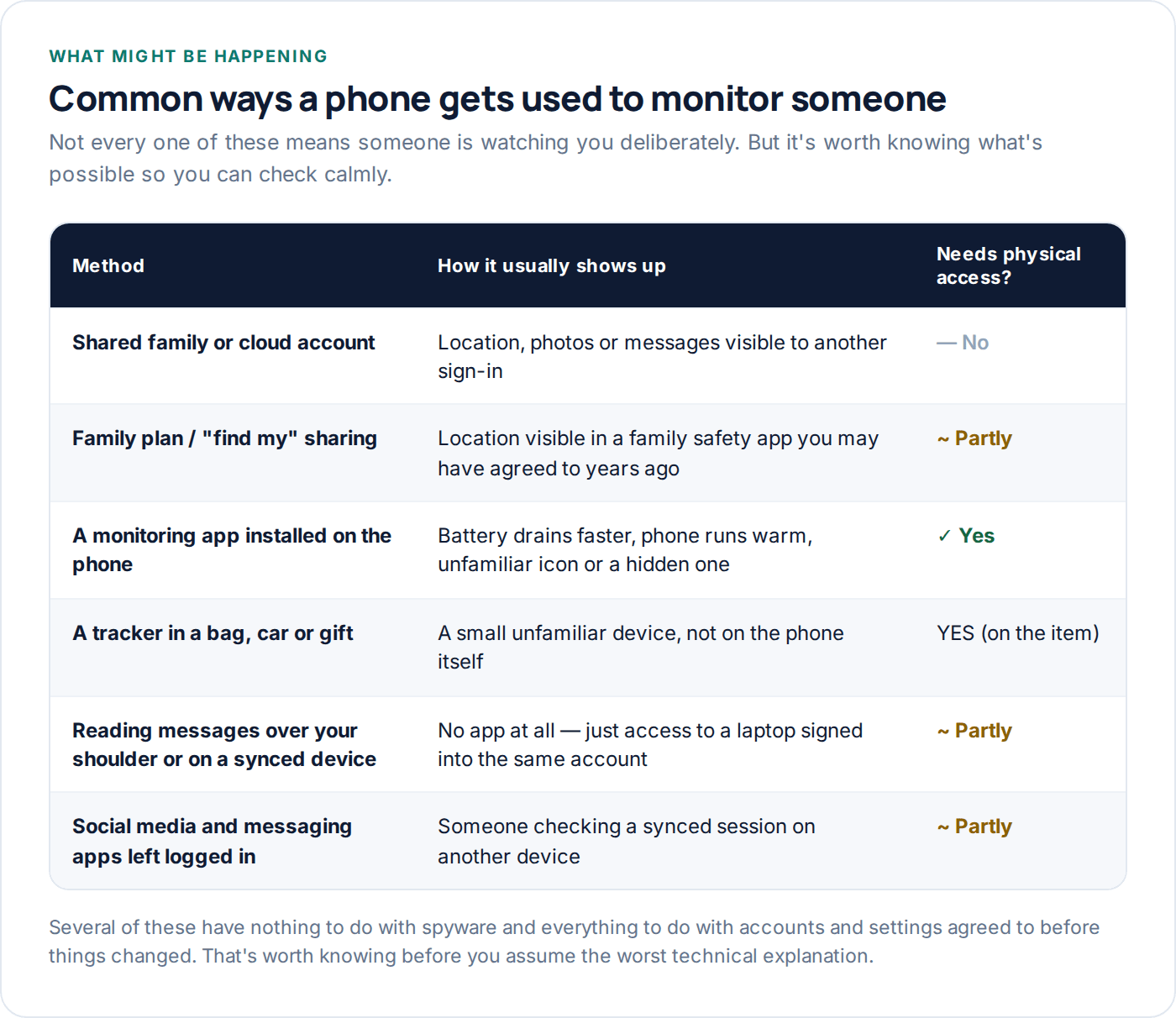
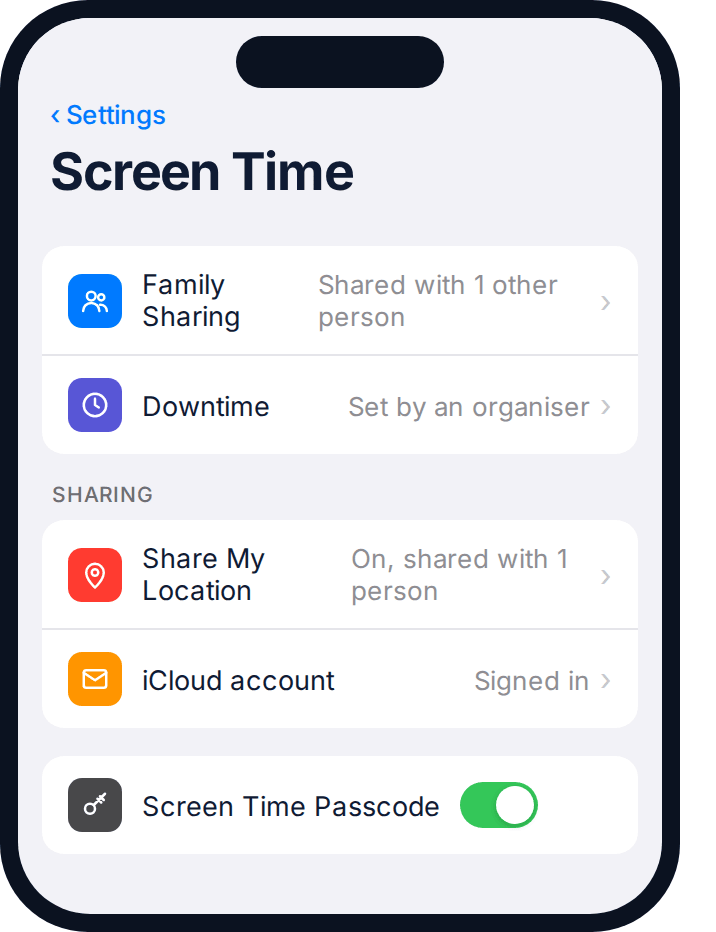
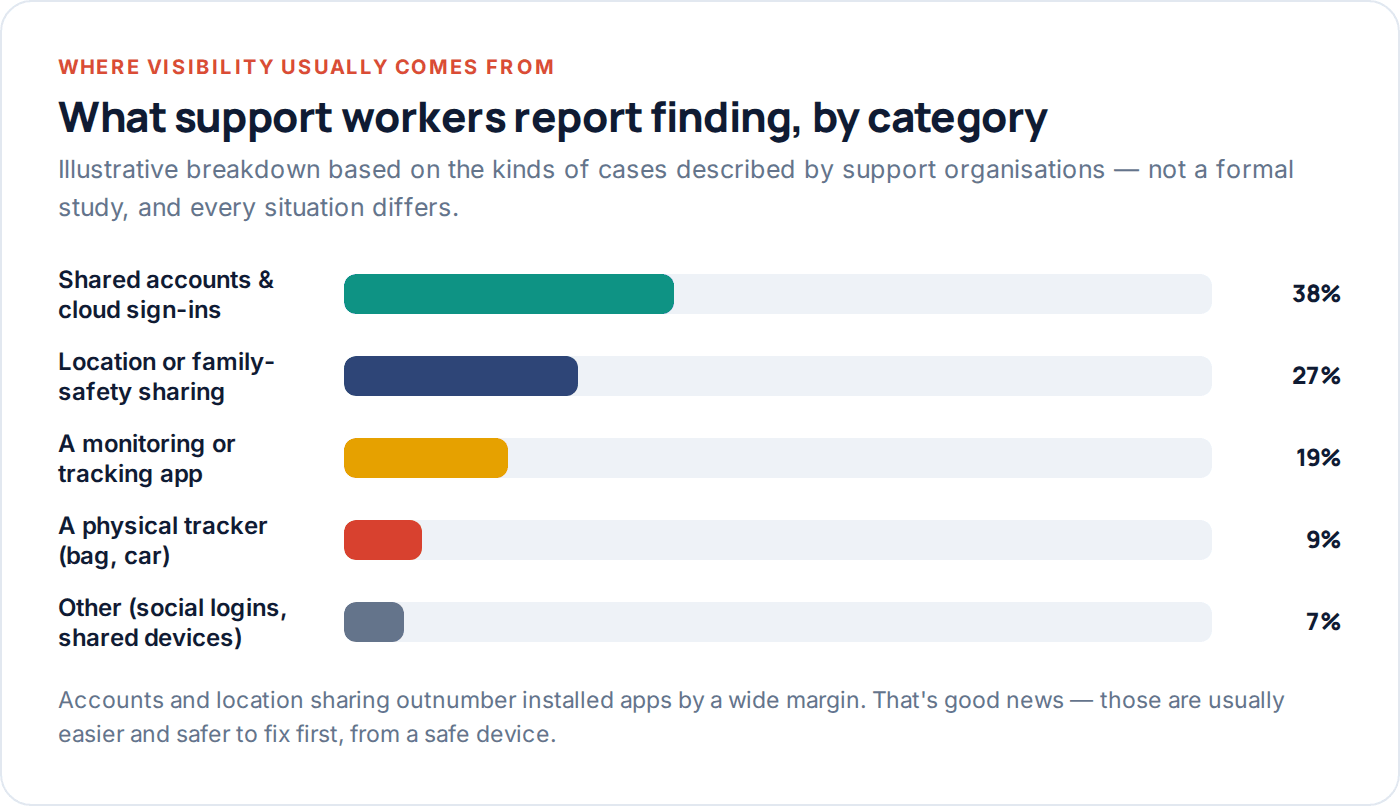
Before assuming a hidden spy app, it’s worth checking the far more common explanation: accounts and sharing features set up together, sometimes years ago, that quietly still work. A family phone plan, a shared streaming or cloud account, a “find my family” app installed when things were fine — these often give one person visibility into another’s phone that neither of you thinks about day to day.
On a safe device, it’s worth reviewing (not necessarily changing yet — see the ordering note below):
| Check | Where to look | What it might reveal |
|---|---|---|
| Family Sharing / Family Link group membership | Phone account settings, on a safe device | Whether your location, screen time or purchases are visible to someone else |
| Signed-in devices on your main email account | Account security page, on a safe device | Whether your email — and anything that resets through it — is also accessible elsewhere |
| Shared cloud photo or backup account | Cloud storage settings | Whether photos or messages back up somewhere another person can open |
| Mobile carrier account and billing portal | Carrier’s website or app | Some carriers let an account holder see call and text logs, or even location, for lines on the plan |
None of this means you did anything wrong by setting these up. Most of it was set up for entirely ordinary reasons — a family plan to save money, a shared photo album, a “let’s know we’re both safe” location app. It’s simply worth knowing what’s actually enabled before deciding what, if anything, needs to change.
Location sharing you may not know about
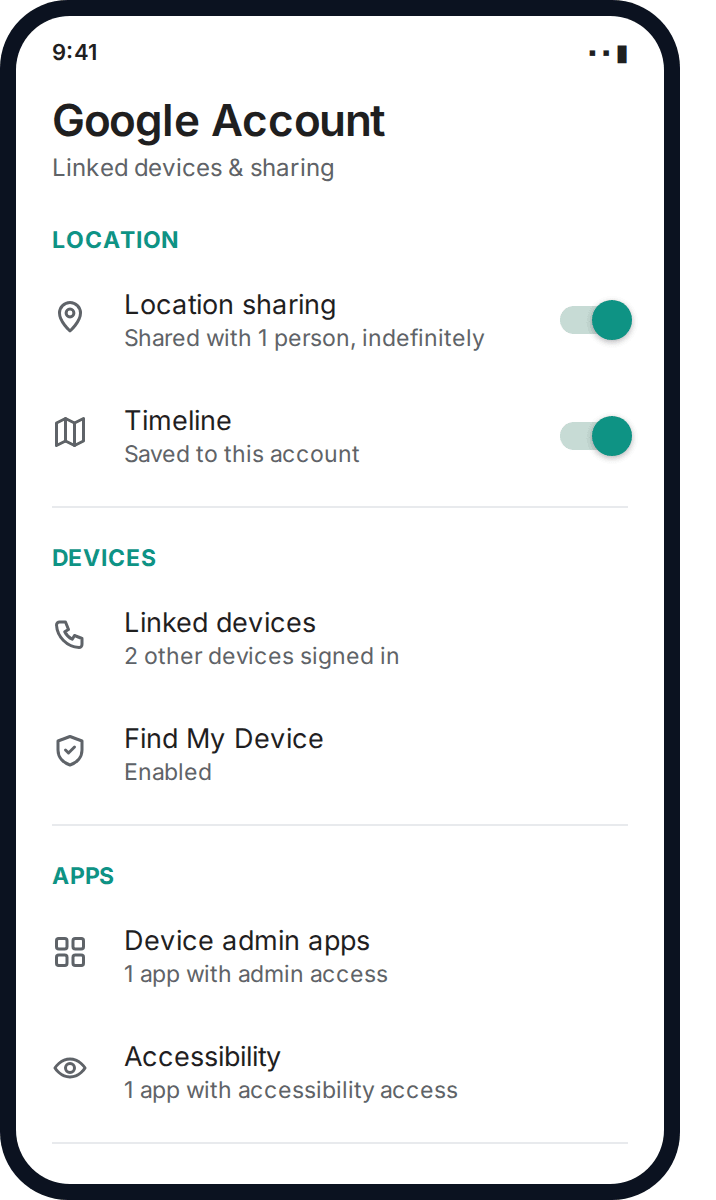
Location is often the most immediately concerning thing to check, and also the easiest to overlook, because it’s frequently buried inside a feature that sounds harmless — a family safety app, a “find my phone” feature, or even a fitness or delivery app that asks to share location with a linked account.
On a safe device, it can help to work through: built-in “find my phone” style features and who they’re shared with; any family-safety or parental-style app that might have been installed on your phone (sometimes originally for a different reason, like keeping track of a teenager, and later repurposed); location sharing inside messaging or social apps, which is easy to turn on by accident and easy to forget is still active; and any car, fitness tracker or wearable account that also reports location and might be linked to a shared account.
A note on what “checking” safely looks like
If you’re worried that opening a settings menu on your own phone might itself be visible to the other person — some monitoring apps do log this kind of activity — this is exactly the sort of thing worth asking a support worker about before you start clicking through menus. They may suggest checking from the account side on a safe device instead of on the phone itself.
Apps, permissions and device admin access
If accounts and sharing don’t explain what you’re seeing, the next possibility is an app installed directly on the phone. A genuine monitoring or tracking app is usually granted deep permissions to work — things like accessibility access, notification access, or “device admin” status — because those are the permissions that let an app see activity across the whole phone rather than just its own screen.
Signs that can point to this, though none of them are proof on their own: the battery draining noticeably faster than before, the phone running warm even when you’re not using it, data usage higher than usual, or an unfamiliar app — sometimes disguised with a generic name or icon — that you don’t remember installing and can’t fully close or uninstall.
Trackers in a bag, car or gift
Not every tracking concern is about the phone itself. Small location trackers — the kind designed for finding keys or luggage — are inexpensive and easy to slip into a bag, a car door pocket, or even a gift. Many phones now have some ability to alert you to an unknown tracker travelling with you, but this feature varies by phone and isn’t guaranteed to catch every device.
If you’re checking a car, a physical search with someone else present (a friend, a mechanic, a support worker) is often safer and more thorough than trying to do it alone and in a hurry. If you genuinely believe a tracker is present and you’re in danger, this is a good moment to involve the police rather than handling it entirely by yourself.
A tracker found doesn’t automatically mean removing it right away is the safest move, for the same reason as an app found on a phone: it can signal that you know, at a moment you may not be ready for that. If you’re not in immediate danger, this is worth raising with a support worker before you act, so the timing is something you’ve chosen rather than something forced on you by the discovery itself.
Keeping a record, without putting yourself at risk
If you might need to show someone else — a support worker, a solicitor, the police — what’s been happening, a simple written record can matter more than people expect. Note dates, what you noticed, and what you did about it, in plain language. You don’t need to prove anything technical; a support worker or investigator can do that part if it becomes necessary.
Keep this record somewhere the other person can’t see: a notes app on a safe device, an email account they don’t know about, or written down and kept somewhere physical and private. Don’t keep it on the phone you believe is being monitored.
Planning ahead
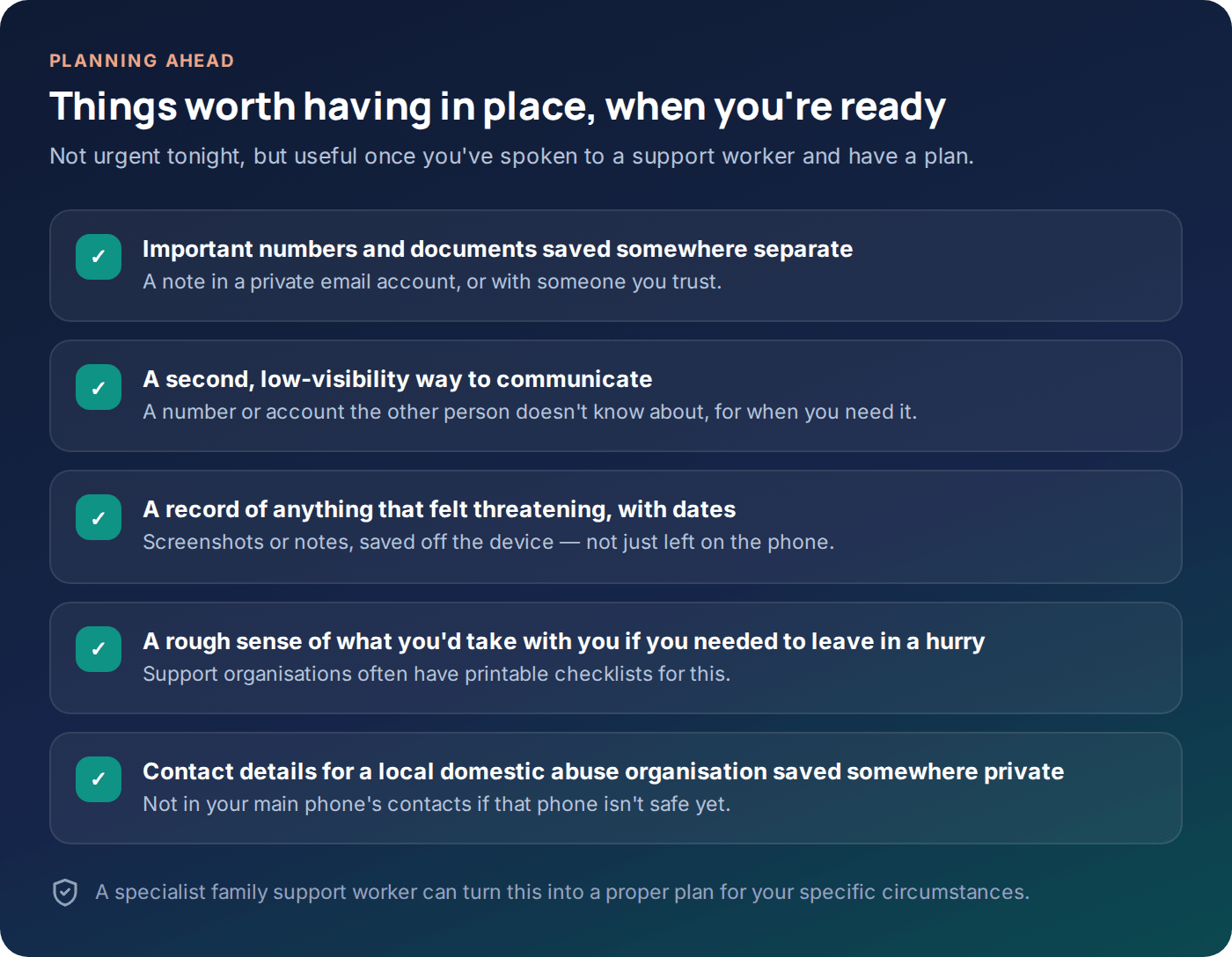
Once you’ve spoken to a support organisation and have a sense of what’s realistic for your situation, it can help to think a little further ahead — not because anything is necessarily about to happen, but because having a rough plan reduces panic if it does. This might include a way to communicate that isn’t tied to the phone you’re worried about, a note of important numbers kept somewhere separate, and a general sense of what you’d want to take with you if you ever needed to leave quickly.
Support organisations frequently have printed or downloadable safety-planning resources built specifically for this, and they’re usually far more thorough and tailored than anything a general article can offer. If you haven’t already, this is worth asking about when you make contact.
Questions people ask
Should I just factory-reset my phone if I think it’s monitored?
Not as a first move. A factory reset can remove an app but won’t fix a shared cloud account, and it can also destroy evidence you might later want. It’s usually better to talk to a support worker first — they can help you weigh whether a reset makes sense for your situation and when.
Is it illegal for someone to install a tracking app on my phone without me knowing?
In many places, yes — installing monitoring software on an adult’s device without their knowledge and consent can be a criminal offence, separate from any relationship between you. Laws vary by country and state, so this is a good question to raise with the police or a solicitor rather than assuming one answer applies everywhere.
What if I can’t afford a new phone or a private computer?
Domestic abuse organisations are often able to help with this directly, or point you to services that can — including, in some areas, phone or device schemes specifically for people leaving abusive situations. It’s worth asking; this is a common enough need that many organisations have a process for it.
Can a monitoring app read my messages even if I have a passcode on my phone?
If it’s already installed and has the permissions it needs, potentially yes — a passcode protects against someone picking up your phone, not against software already running on it. This is exactly the kind of situation where checking from a safe device, rather than assuming the passcode is enough, matters.
What should I do if I think someone can see this webpage in my browsing history?
Ideally, don’t read pages like this on a device you think is monitored — use a safer one where possible. If that’s genuinely not an option right now, many support organisations offer a quick-exit button on their own sites, and general browsing history can sometimes be managed, though this doesn’t help against software already logging activity directly.
Do I need proof before I contact a domestic abuse organisation?
No. You don’t need evidence, certainty, or even a clear sense of what’s happening to reach out. Support workers regularly help people who are just starting to piece things together, and talking it through is often how people work out what they’re actually dealing with.
A calmer next step
If there’s one thing worth taking from this page, it’s that you don’t have to work this out alone or immediately. Reaching out to a domestic abuse support organisation — by phone, text, or webchat, on a device that’s safe for you — is usually a better first step than any technical change you could make tonight. They can help you go through the rest of this at a pace and in an order that fits your actual situation.
If part of what brought you here is wondering how family monitoring or shared-location apps work in general — including how GuestSpy is built to be visible and consent-based rather than hidden — you can read about that on our features page or our acceptable use policy, which sets out plainly what the product is and isn’t designed for.
Using a monitoring app for this? GuestSpy is parental monitoring for Android that stays visible on the child's phone and runs from any browser. If it fits your family, see what the app does.
Related guides
How to Check App Permissions on Your Phone
A ten-minute audit of what your apps can actually access — location, microphone, camera, accessibility and more — and how…
A Step-by-Step Guide to Securing a Hacked Account
Why email comes first, the exact settings that close the door behind an attacker, and the recovery steps most guides…
How to Stop Someone From Tracking Your Location
The sharing settings people forget, the permission that matters most, how to check for a physical tracker, and a ten-minute…
Monitoring your child can see.
Location, screen-time budgets, routines, app and website blocking and the alerts that matter, run from any browser and visible on the phone. Pair an Android phone in about fifteen minutes.