Is Someone Reading Your Texts? How Interception Really Works

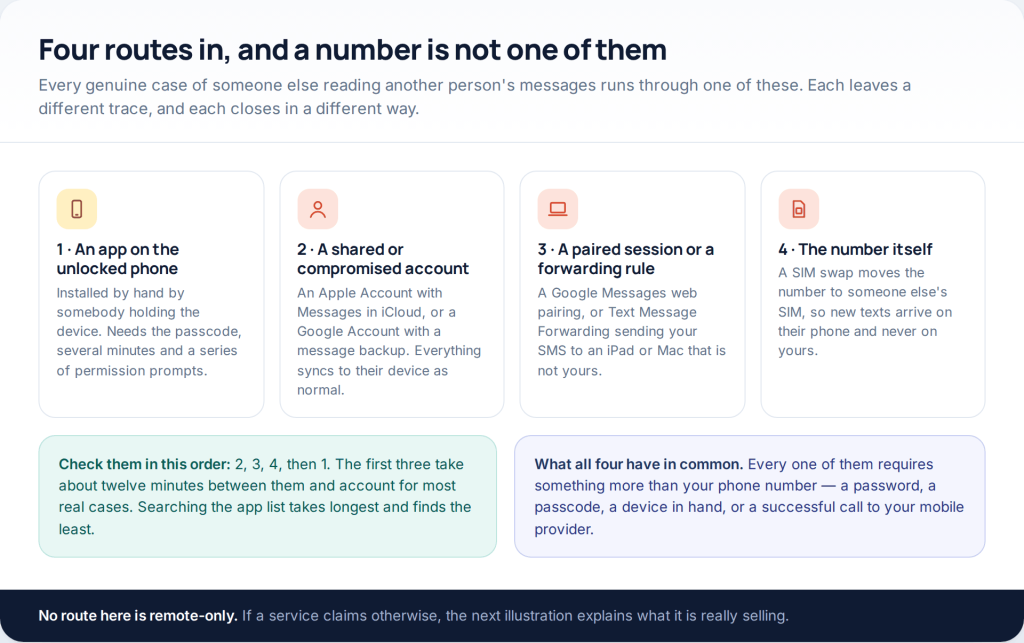
If you are asking whether your text messages are being read, there are exactly four routes that work, and a phone number on its own is not one of them. Someone needs an app installed on your unlocked phone, your account password, a device paired or forwarding to them, or control of your number at the carrier. Each leaves a different trace.
This page used to promise message interception from a number alone. That has never been a real capability. The services selling it are a form that harvests the visitor’s own login, a subscription that never delivers, or an installer aimed at the person who went looking. The rest of this page is the defensive version: the four routes that do exist, how to check each in about fifteen minutes, and how to close them.
The four routes, and nothing else
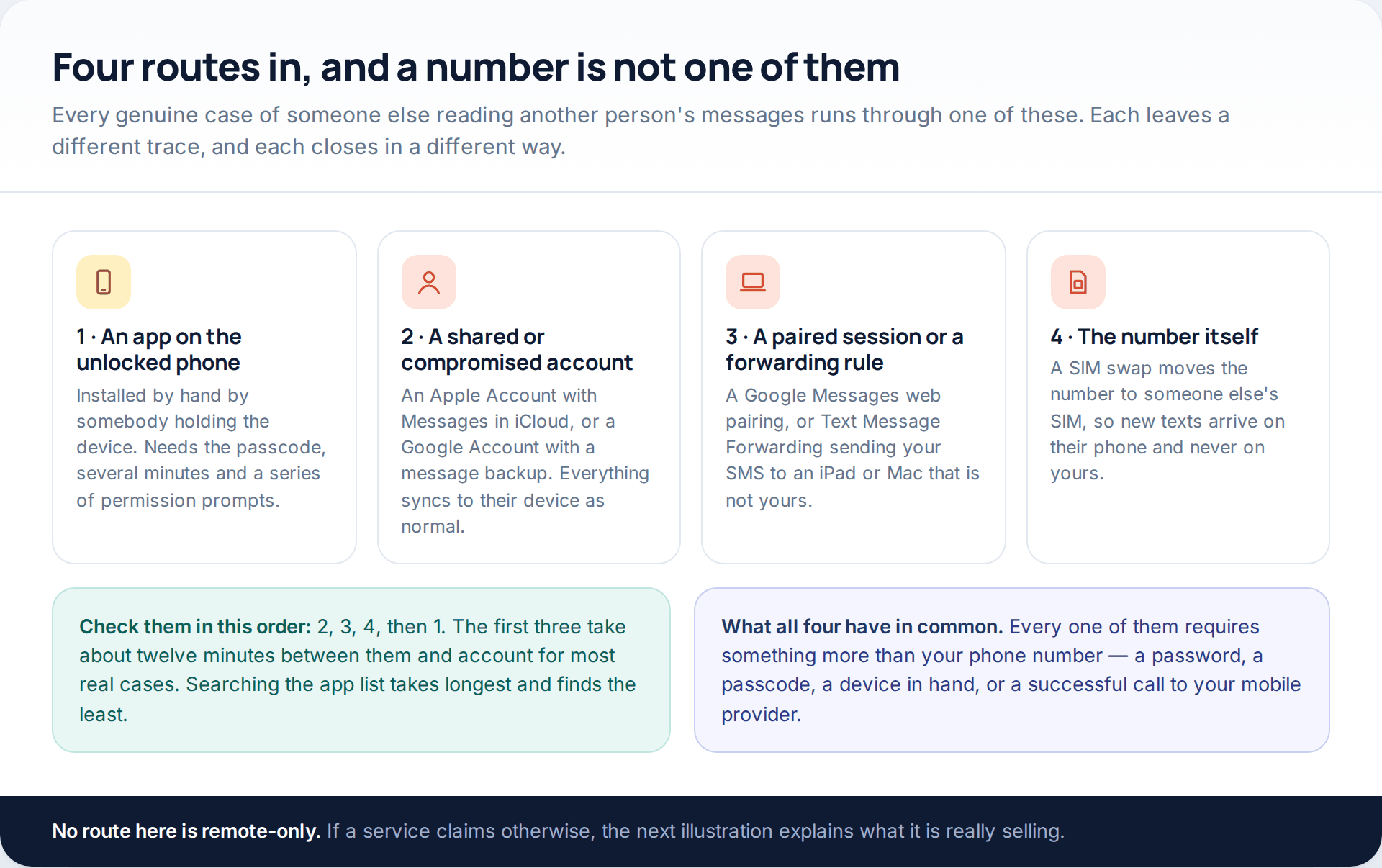
Group them by what they require and the picture clarifies immediately. One route needs physical possession of an unlocked phone. Two need a password you already share or that somebody guessed. One needs a successful phone call to your mobile provider. None of them needs anything clever, and none of them can be done from a number typed into a web form.
That last point is the whole reason the old version of this page was dishonest. A phone number is a routing address. Your messages sit in a carrier’s network for the seconds they are in flight, then on two handsets and, if the owner chose to enable it, in that owner’s own cloud account. Knowing the address opens none of those doors.
“No software, just the number” — what those services really are
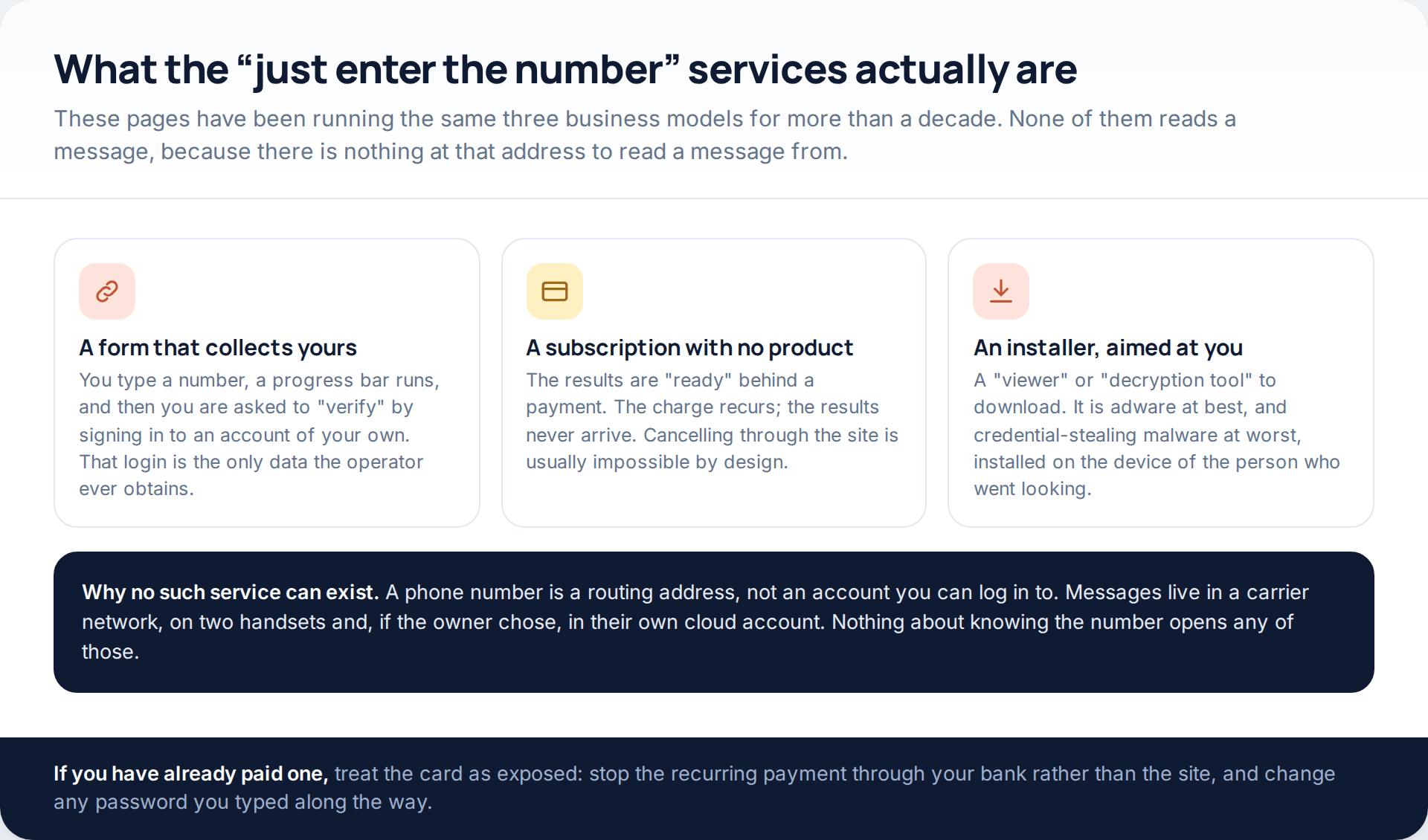
It is worth spending a paragraph on, because the pattern has been identical for over a decade and is easy to recognise once described.
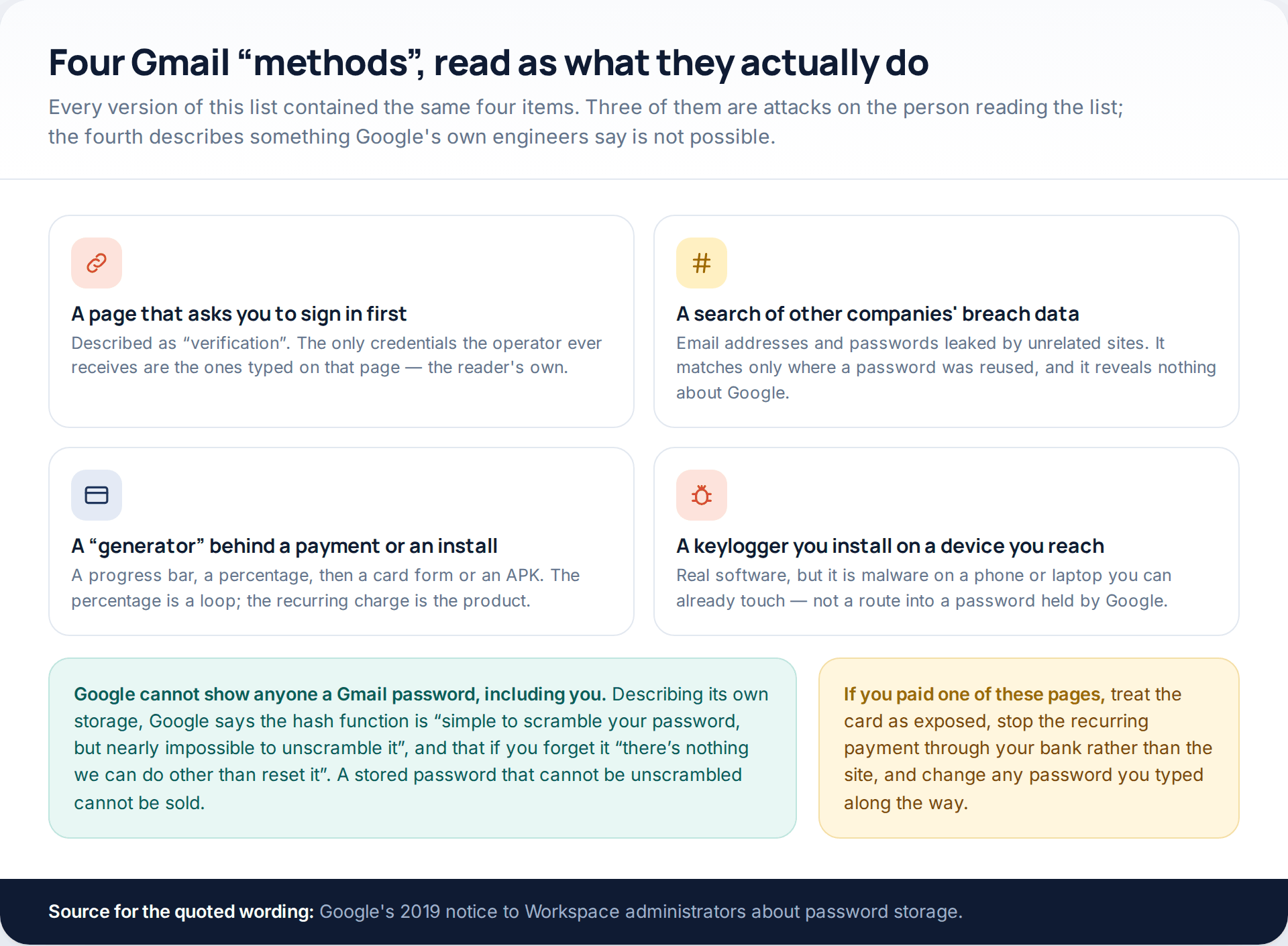
The first model asks for a number, runs a progress bar, then requires you to “verify” yourself by signing in to an account of your own before results can be released. That login is the entire product. The second takes payment for results that are permanently nearly ready, with a recurring charge and no working cancellation. The third offers a viewer or a decryption tool to download, which is adware at best and a credential stealer at worst — installed, note, on the device of the person doing the searching.
- No web service can retrieve messages from a phone number
- No app can be installed remotely on an iPhone or an Android phone you cannot physically reach
- No carrier sells message access to private individuals, at any price
If you have paid one of these sites, treat the card as compromised. Stop the recurring payment through your bank rather than the site, and change any password you typed on the way through.
Route two: a shared or compromised account
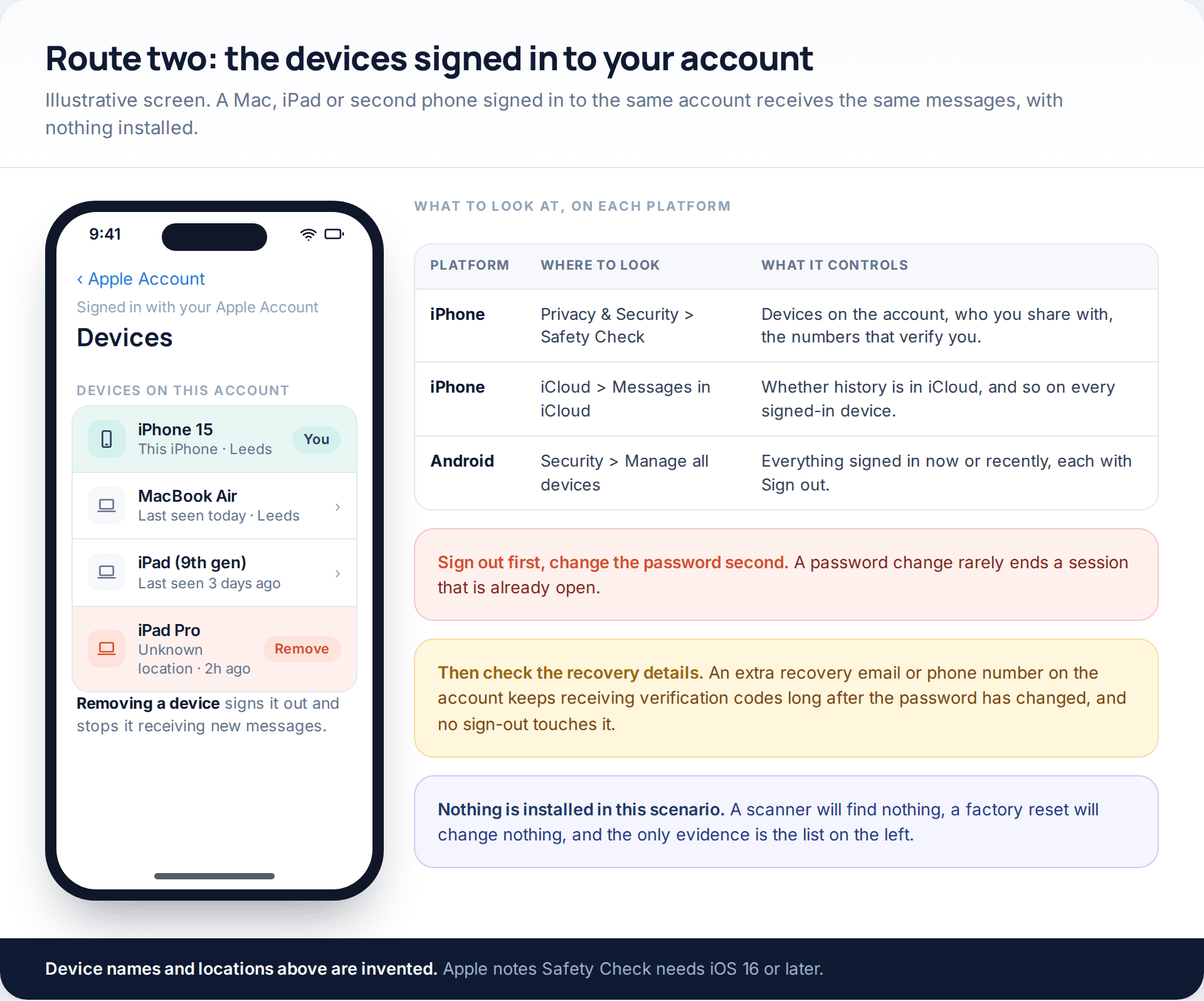
This is the commonest route by a wide margin, particularly where a specific person is involved. A Mac, an iPad or a second phone signed in to your Apple Account receives your iMessages the moment you do. A Google Account with a message backup, or a second Android handset signed in as you, works the same way. There is no app to find, no permission to revoke and no scan that will detect it.
Apple’s Safety Check, at Settings > Privacy & Security > Safety Check on iOS 16 and later, is built for exactly this. Apple describes it as letting you review the devices connected to your Apple Account, the phone numbers used to verify your identity, your emergency contacts, and the information you share with people and apps — with an Emergency Reset that stops all sharing at once. Apple also notes that some options may differ if Screen Time restrictions or a mobile device management profile are in place.
On Android the equivalent is your Google Account: Security, then Manage all devices under Your devices. Google’s help page describes this as listing devices where you are signed in now or have been in the last few weeks, with a Sign out option on each, and warns that several sessions can carry the same device name — so sign out of all of them if any look wrong.
One sequencing detail decides whether this works. Sign the devices out first, then change the password. Most services keep an existing session alive through a password change, so doing it the other way round leaves access intact and simply warns the other person.
Route three: forwarding and paired sessions
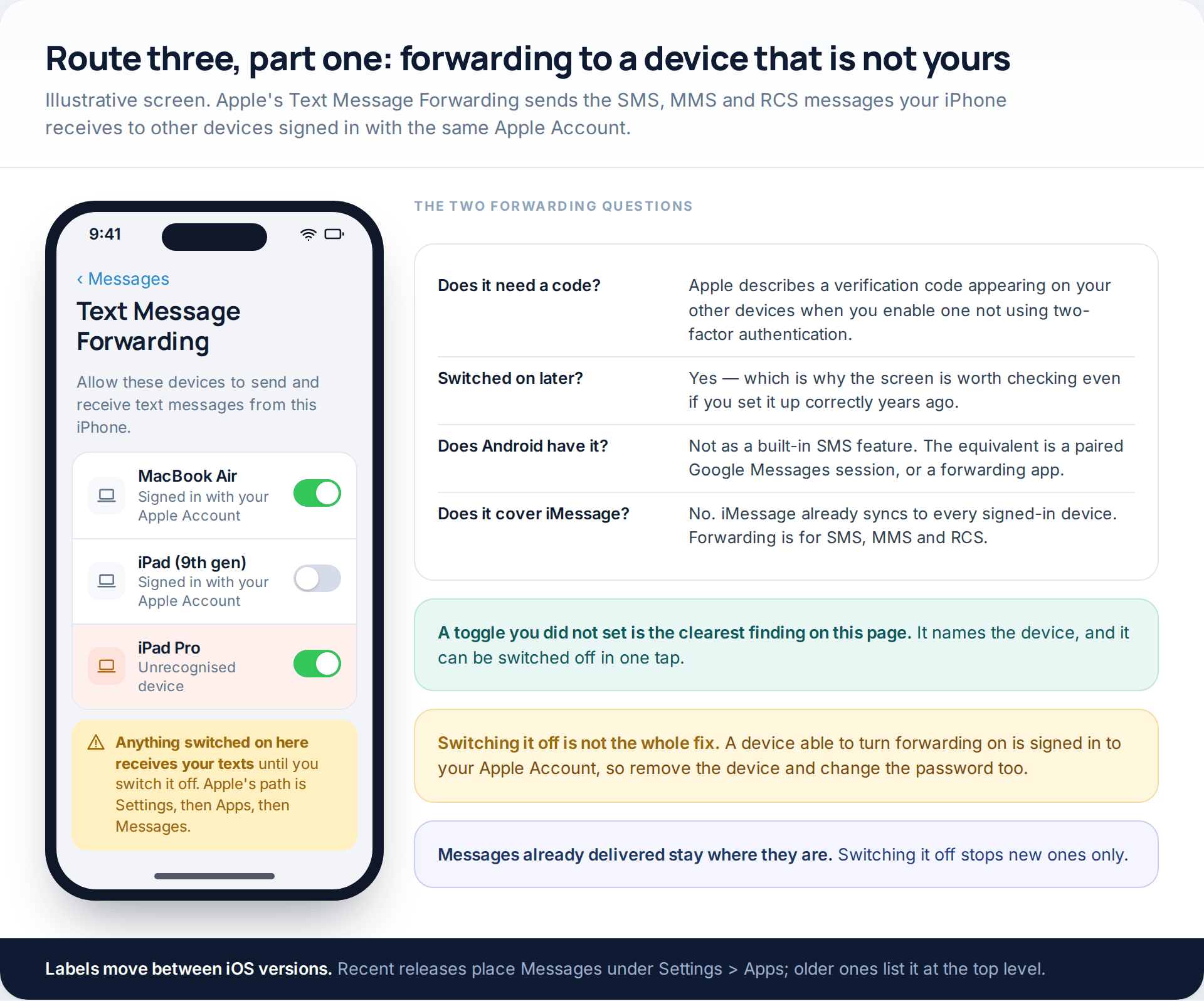
Apple’s Text Message Forwarding exists for a legitimate reason: it sends the SMS, MMS and RCS messages your iPhone receives to your Mac, iPad or Apple Vision Pro so you can carry on a conversation elsewhere. Apple’s path for it is Settings, then Apps, then Messages, then Text Message Forwarding, and it requires the devices to be signed in to iCloud with the same Apple Account. Apple also describes a verification code appearing on your other devices when you enable one that is not using two-factor authentication.
Everything that makes it useful makes it worth checking. The list names each device. Anything switched on there receives your texts until it is switched off, and switching one off takes a single tap.
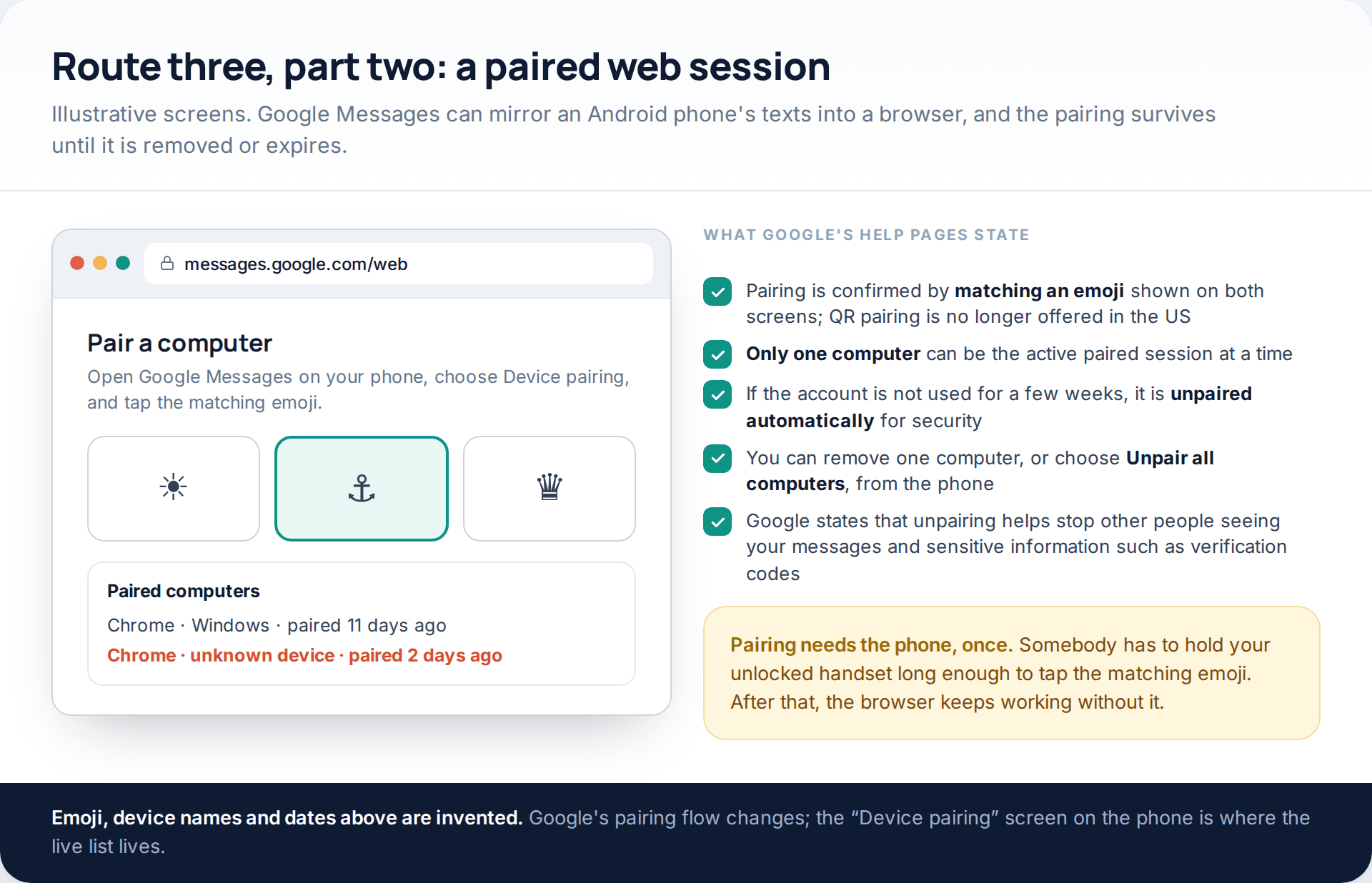
The Android equivalent is Google Messages for web. Google’s help page describes pairing by opening Device pairing in Google Messages, visiting messages.google.com/web, and tapping the emoji on the phone that matches the one on the computer screen, with QR pairing no longer offered in the US. Google also states that only one computer can be active at a time, that an unused account is unpaired automatically after a few weeks, and that unpairing helps keep other people from seeing your messages and sensitive information such as verification codes.
Both mechanisms share a quiet property worth naming: they need the phone once, unlocked, for a few seconds — and then they keep working without it. That is what makes them worth checking even if nobody has touched your phone in months.
Route four: the number moves
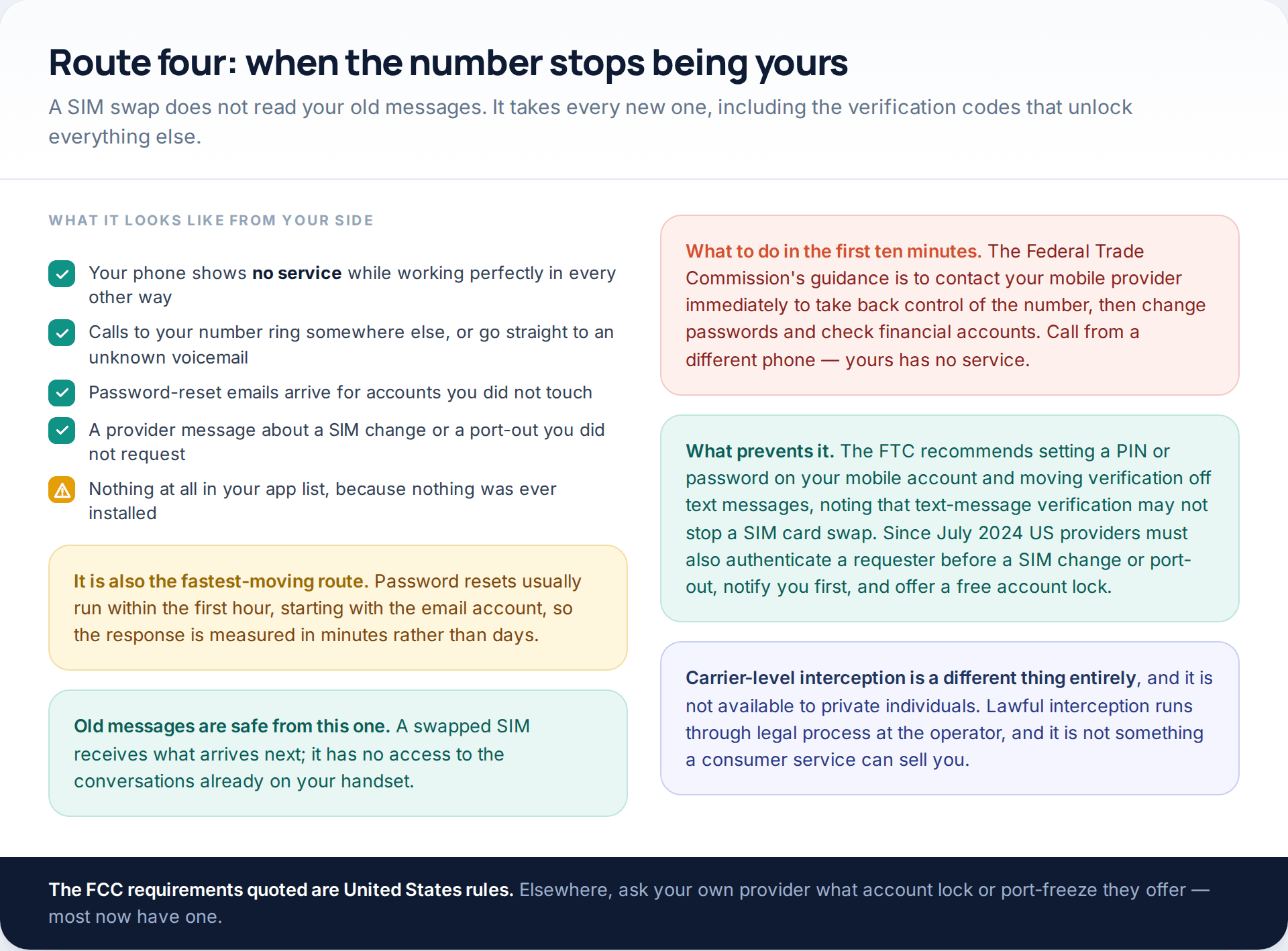
A SIM swap is the only route here that takes the messages before they ever reach you. The Federal Trade Commission describes the method directly: a scammer calls your provider, says the phone was lost or damaged, and asks for a new SIM connected to your number to be activated on a phone they own.
The signature is unambiguous and nothing else produces it. A fully working phone with no mobile service at all, which does not come back. The FTC’s advice is to contact your provider immediately to take back control of the number, then change passwords and watch your financial accounts. Prevention is a PIN or password on the mobile account, and moving verification away from text messages, because — in the FTC’s own words — text message verification may not stop a SIM card swap.
Carrier-level interception in the proper sense exists, is governed by legal process, and is not something a private individual or a website can buy. If a service implies otherwise it is describing the first illustration on this page, not a capability.
Route one: software on the phone itself
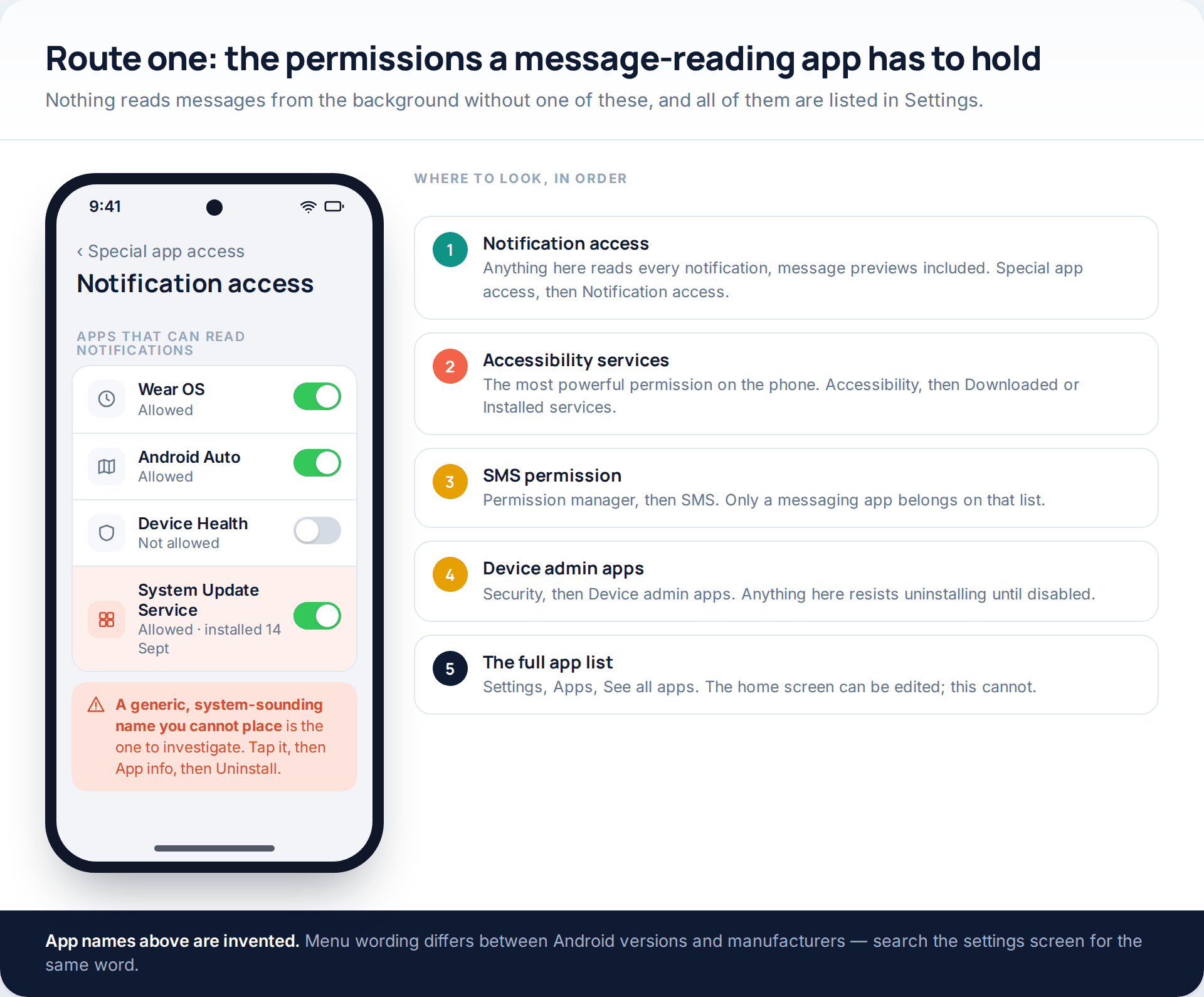
Monitoring software is real and it works, but it cannot arrive on its own. On Android the installer needs the passcode, permission to install from that specific source, and then one or more of a small set of powerful permissions. Since Android 13 the platform also blocks sideloaded apps from accessibility services and notification access until the owner explicitly lifts the restriction in Settings. That is several deliberate choices made on an unlocked phone someone is holding.
On iPhone there is no equivalent path without a jailbreak, which is precisely why products aimed at iPhones work through the Apple Account instead. If you are worried about an iPhone, route two is the one to check, not this one.
A hidden launcher icon means nothing, by the way. The full list under Settings, Apps, See all apps shows everything installed, whatever the home screen says. The wider question of what else can be reached from a compromised handset is covered in our guide to how phones are actually broken into.
The fifteen-minute check
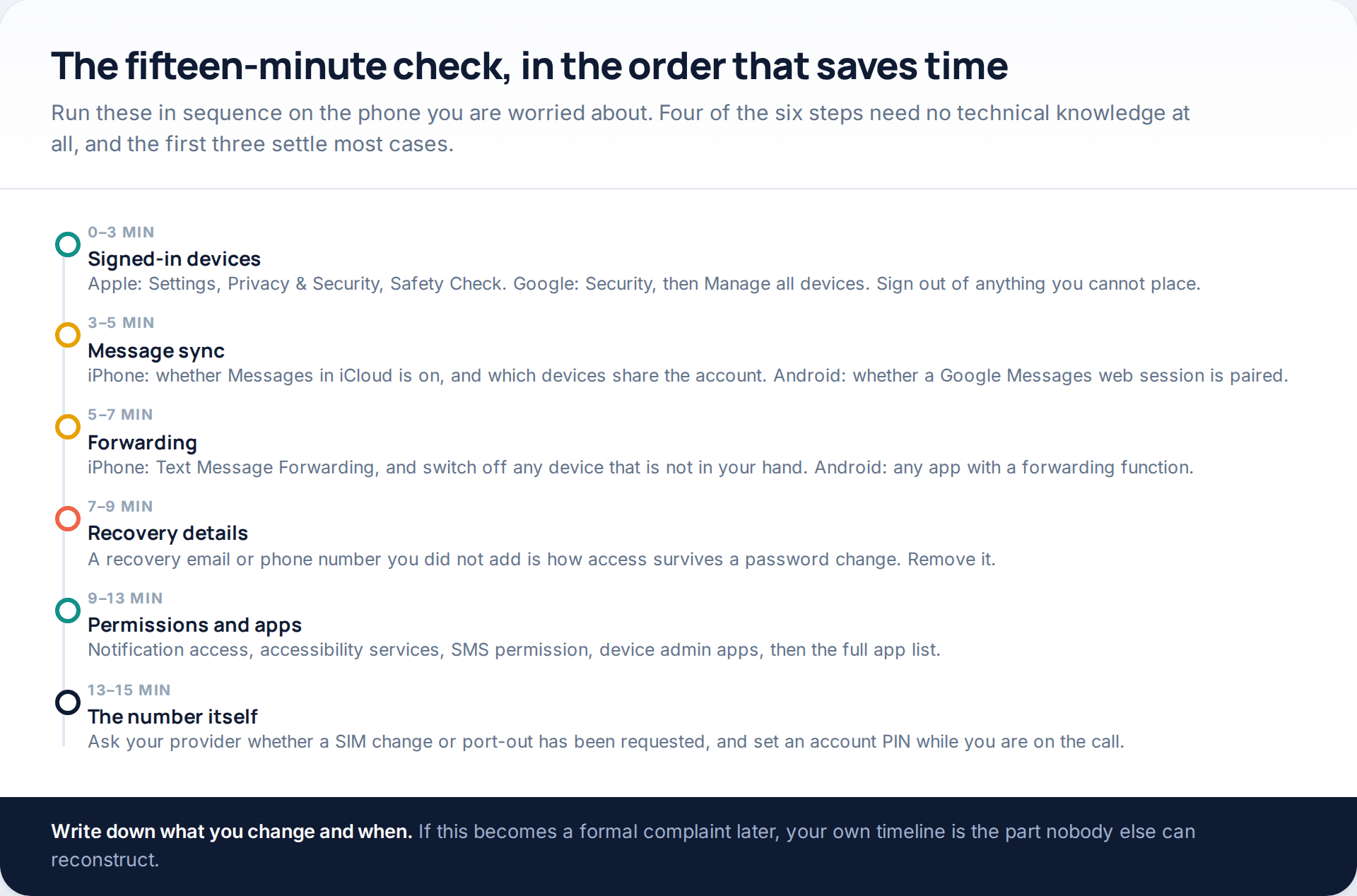
Recovery details are the step almost everyone skips, and they are the reason some people fix this twice. An extra recovery email address or phone number on an account keeps receiving verification codes indefinitely, and no password change removes it. Check that field on every account that matters.
What each kind of message is actually exposed to
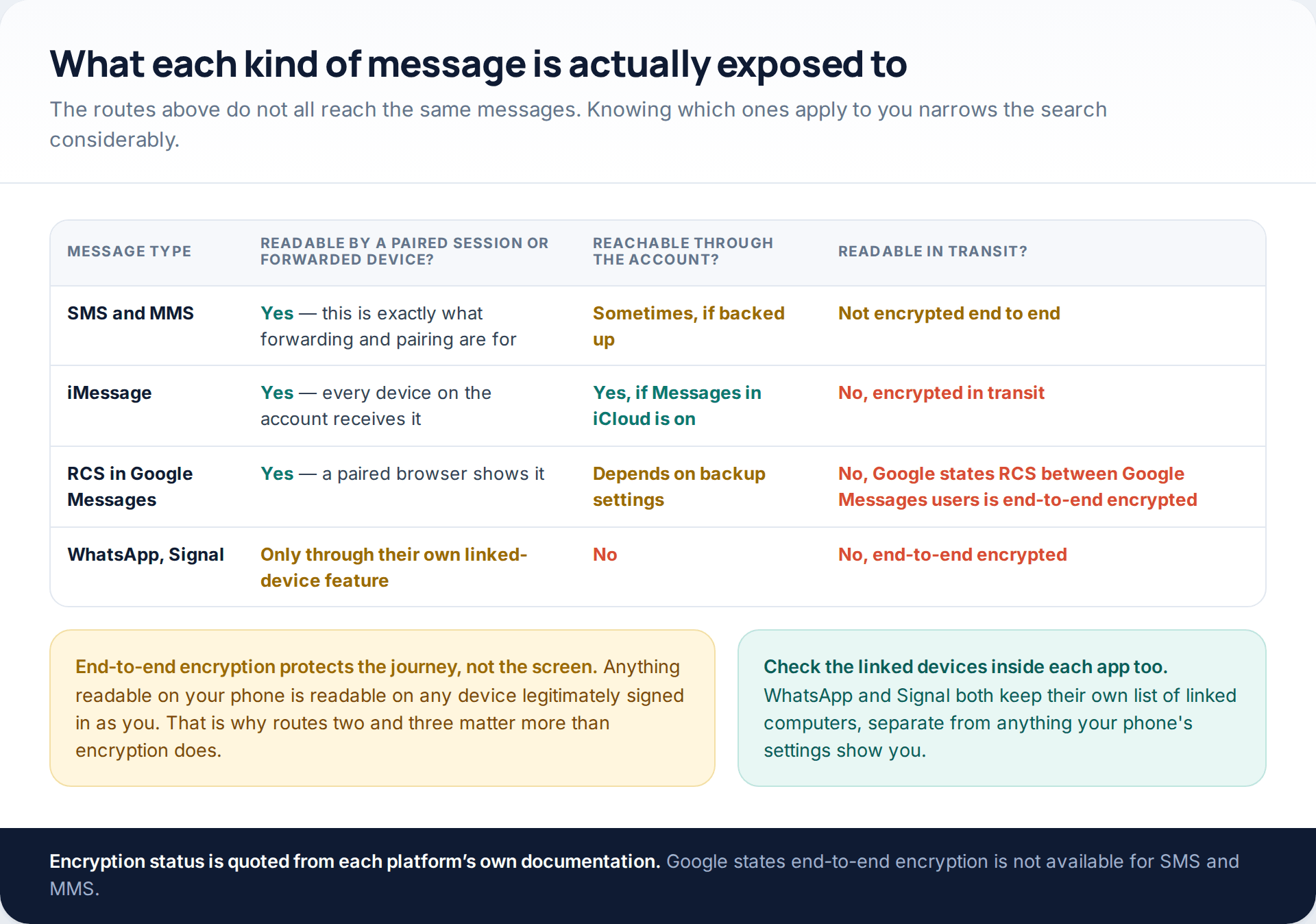
Encryption is frequently misunderstood here, so it is worth being precise. Google states that Google Messages supports end-to-end encryption over RCS between Google Messages users, that you can tell by the lock on the send button and beside the timestamp, and that end-to-end encryption is not available for SMS and MMS. iMessage is encrypted in transit between Apple devices. WhatsApp and Signal are end-to-end encrypted by design.
None of that helps against routes two and three, and that is the point. A message that is unreadable in transit is perfectly readable on any device that is legitimately signed in as you. Check the linked-device list inside WhatsApp and Signal separately as well, because those lists are their own and do not appear in your phone’s settings.
Closing each route
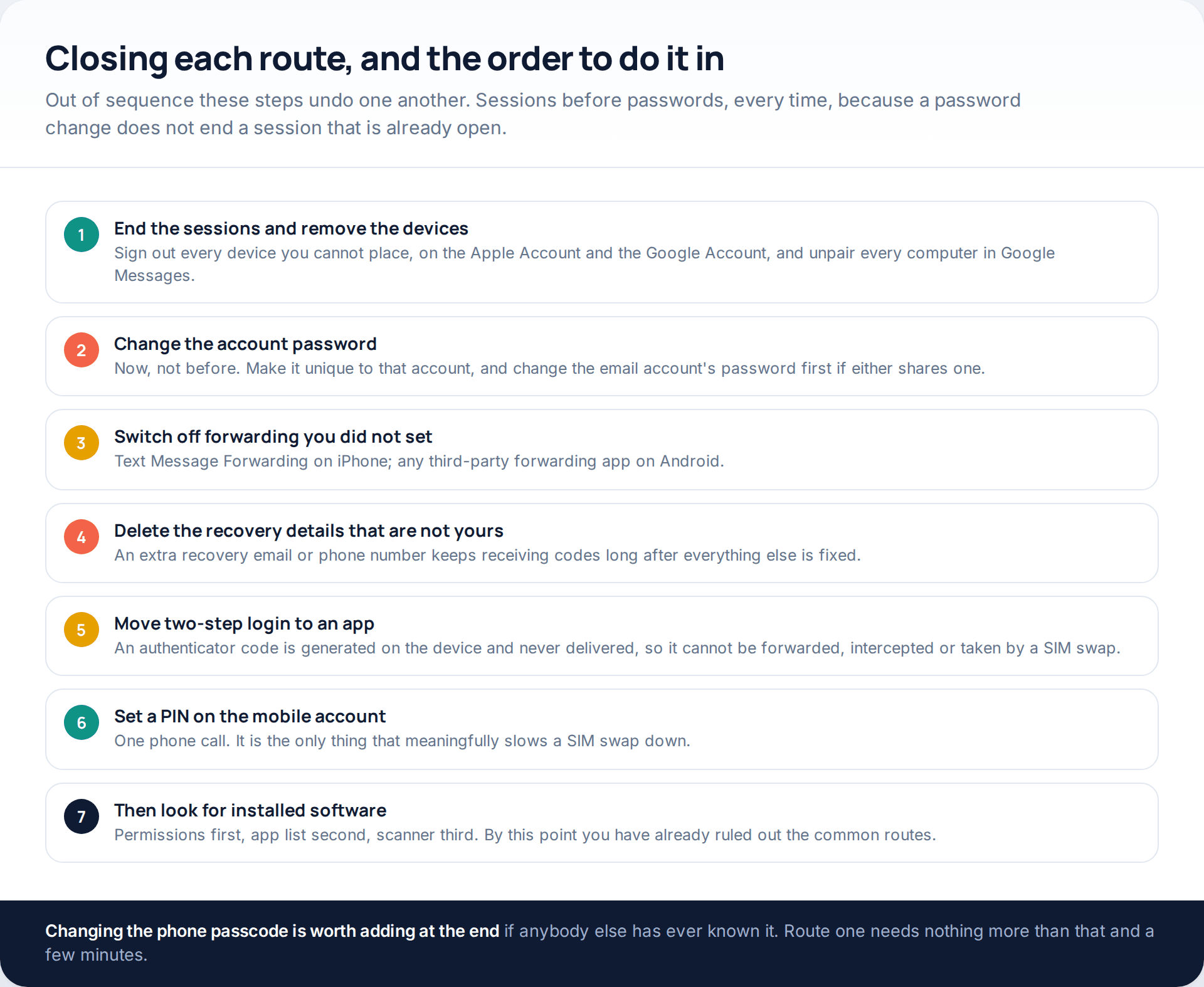
Two of those steps are worth a sentence each. Moving two-step login onto an authenticator app closes routes three and four at once: the code is generated on the device and never travels, so there is nothing to forward and nothing for a swapped SIM to receive. And setting a PIN on the mobile account is a single phone call that is the only thing meaningfully slowing a SIM swap down.
If someone else has ever known your phone passcode, change it at the end. Route one needs nothing more than that and a few quiet minutes, and a new passcode closes it permanently.
If the person you suspect lives with you or has a key. Removing a device, ending a session or switching off forwarding may be visible to them, and in some situations that escalates things. Plan the order with a specialist domestic-abuse service before changing anything; our guide on protecting a phone in an abusive situation covers what to do first and what to leave in place for now.
How this page was put together
Every menu path and platform behaviour here was read from official documentation in October 2026: Apple’s personal safety guide for Safety Check, Apple’s pages on Text Message Forwarding and iCloud for Messages, Google’s help pages on Google Messages for web pairing and on end-to-end encryption in Google Messages, Google’s page on reviewing devices with account access, the FTC’s consumer guidance on SIM swap scams, and the FCC requirements for SIM change and port-out requests that took effect in July 2024.
Where the two older pages that now redirect here promised interception without installation, or from a number alone, we have said plainly that no such capability exists rather than describing a softer version of it. We have named no service and linked to none. We have given no figures for how often each route occurs, because no reliable public data exists; the ordering reflects what is cheap and easy versus what is slow and rare.
Labels move. Apple has shifted Messages between the top level of Settings and a new Apps section; Google’s pairing flow has changed more than once and differs by country. If a screen is not where this page puts it, search the settings screen for the same word rather than assuming the feature has gone. And if your concern is tracking rather than messages, the mechanisms are different again — we cover them in how to stop someone tracking your location.
Common questions
Can someone read my texts with just my phone number?
No. A number routes messages to a SIM; it is not a login. Services claiming otherwise collect your own credentials, charge a subscription for results that never arrive, or hand you an installer. The four routes on this page all require something more than the number.
How do I tell whether it is an app or an account?
Check the signed-in device list first. If there is a device you cannot place on your Apple or Google account, it is account access and no app will be found. If that list is clean but someone has had your unlocked phone, check notification access, accessibility services and the SMS permission.
Will a factory reset stop it?
Only if software was installed on the handset. It does nothing against a signed-in device, a paired web session, a forwarding toggle or a SIM swap — and restoring the same backup can bring an installed app straight back. Do the account work first.
Does end-to-end encryption mean nobody can read my messages?
It means nobody can read them in transit. Anything displayed on your phone is also displayed on any device legitimately signed in as you, which is how routes two and three work. Encryption and device access are separate problems.
Can my mobile provider show me who has read my messages?
No. Providers can tell you whether your number has been transferred to another SIM or ported out, which is the route four question, and they can set an account PIN. They have no visibility into devices signed in to your Apple or Google account.
Is Text Message Forwarding dangerous on its own?
Not at all — it is a normal convenience feature for your own Mac or iPad. It is only worth attention because it names every device receiving your texts in one list, which makes an entry you did not add very easy to spot.
I found a paired computer I do not recognise. What now?
Unpair it from the phone, then change the Google Account password, then check which devices are signed in to that account. Pairing requires your unlocked phone once, so also think about who has had physical access and change the passcode.
What if the messages I am worried about are on WhatsApp or Signal?
Check each app’s own linked-devices list from inside the app, because it is separate from your phone’s settings and from your Apple or Google account. Both apps show when each linked device was last active and let you remove it immediately.
Using a monitoring app for this? GuestSpy is parental monitoring for Android that stays visible on the child's phone and runs from any browser. If it fits your family, see the Text messages & social feature.
Related guides
5 Best Security and Network-Testing Apps for Android (Rooted and Not)
The useful security apps for Android are not the ones with “hack” in the title. They are a network scanner,…
Gmail Password Compromised? Four Recovery Routes Google Accepts
If your Gmail password was hacked, there are four routes back and the one that is open to you depends…
Facebook Account Hacked? Every Free Route Back In
If your Facebook account was hacked, five routes lead back in and all of them are free: a device of…
Monitoring your child can see.
Location, screen-time budgets, routines, app and website blocking and the alerts that matter, run from any browser and visible on the phone. Pair an Android phone in about fifteen minutes.