Phone Hacking Explained: How Phones Are Really Broken Into, and the Signs

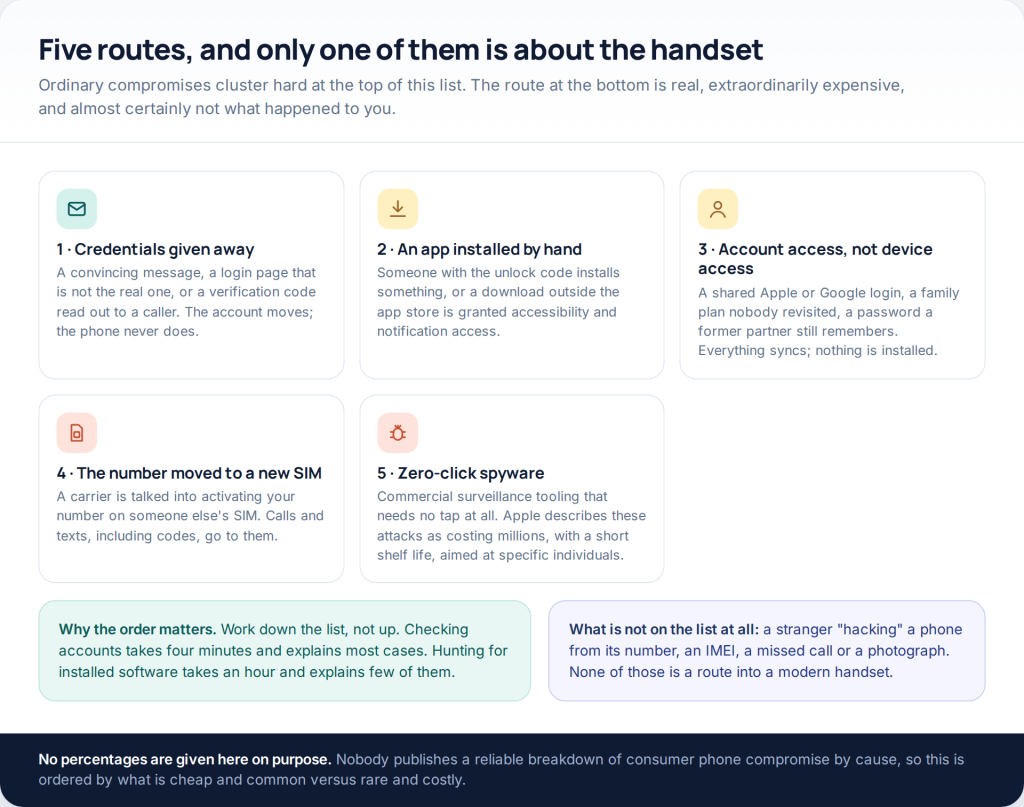
Almost nothing sold as phone hacking involves breaking into a phone. Ask “is my phone hacked” and the honest answer is usually that an account was opened, not a handset. Five routes cover nearly all of it, four run through logins rather than devices, and you can rule out the common ones in about twenty minutes.
This URL used to be a “cell phone hacking guide”. What those guides described was either a product that needed installing on an unlocked phone, a phishing page aimed at the reader, or a subscription that produced a progress bar and nothing else. None of them was a way into a stranger’s device from a number. The rest of this page is the defensive version: how compromise really happens, what the signs are worth, and the order to check in.
The five routes, in order of how often they happen
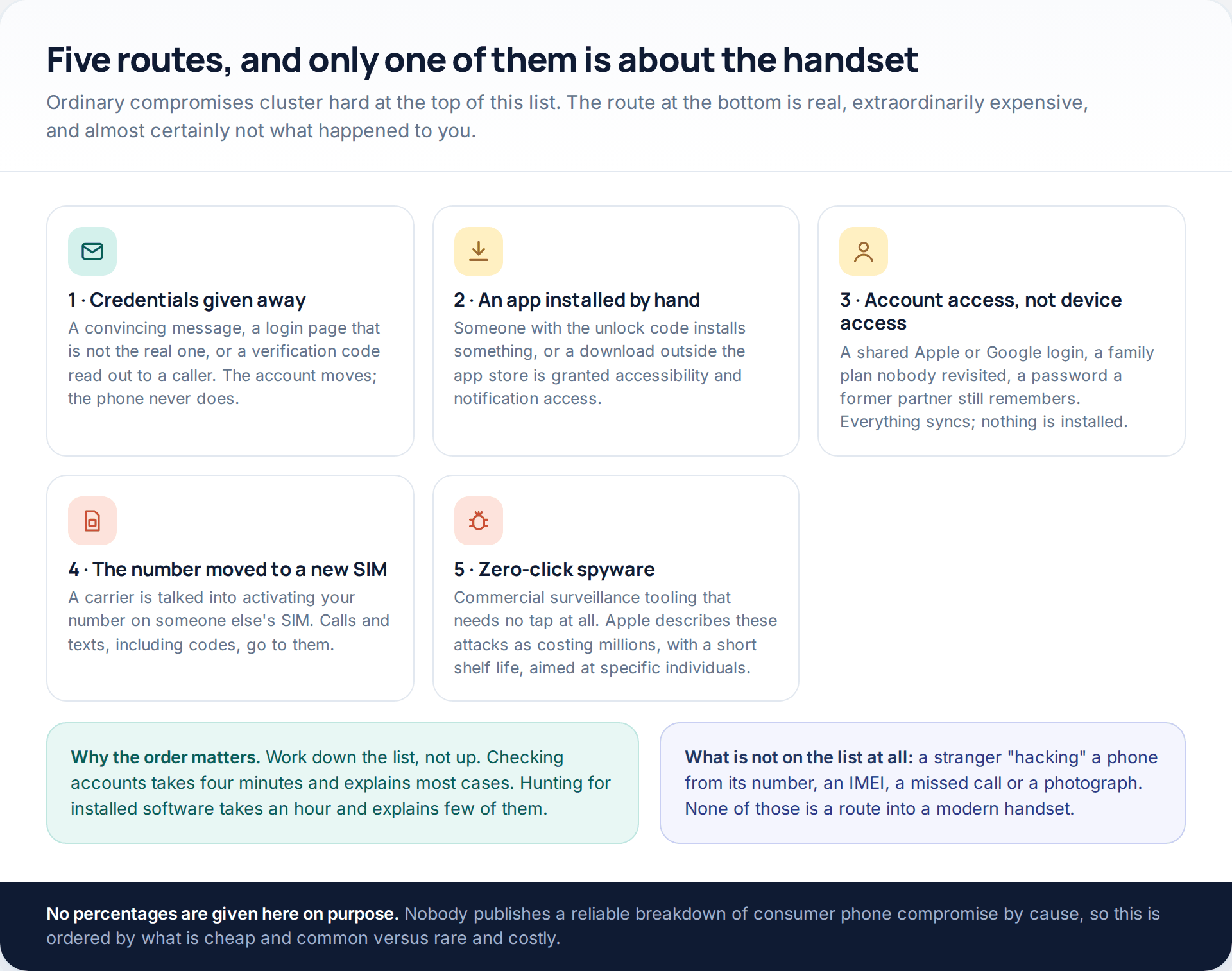
Grouping matters more than naming here. Routes one, three and four never touch the handset: they take an account, a login session or a phone number. Route two needs physical access to an unlocked device. Only route five is what people picture when they say hacking, and Apple’s own description of mercenary spyware is that these attacks cost millions, have a short shelf life, and that the vast majority of users will never be targeted by one.
So work down the list. The checks at the top are quick and free; the ones at the bottom take hours and rarely change the answer.
Route one: the credentials were handed over
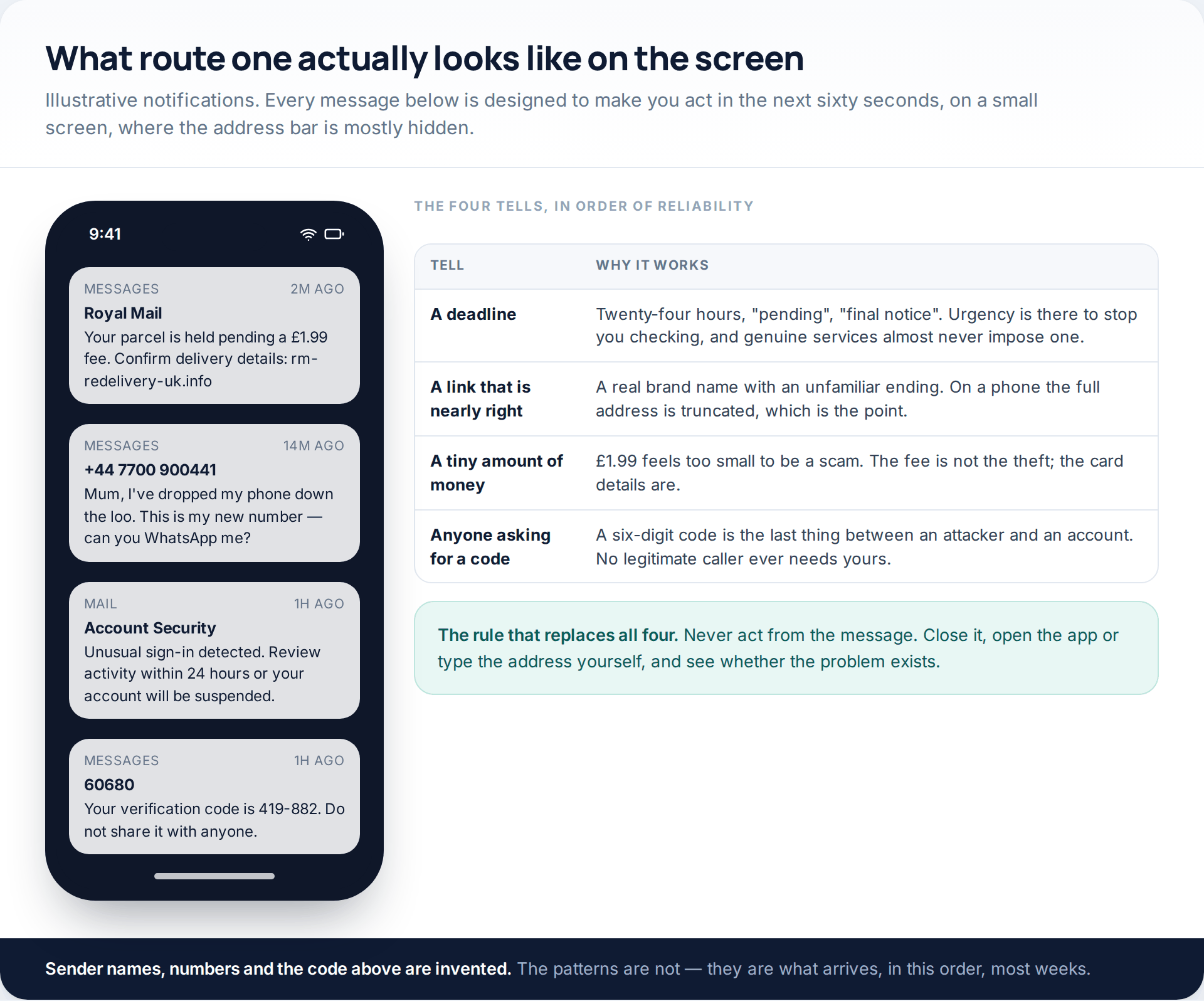
This is the mechanism behind most compromised accounts, and it does not require any technical skill. A message creates urgency, a link goes to a page that looks right, and credentials typed there arrive with somebody else. On a phone, the address bar is truncated and the whole page is one thumb-width wide, which is precisely why these campaigns run on mobile.
The variant worth naming separately is the code request. Someone calls or messages, says they need the six-digit code that just arrived “to verify you”, and uses it to complete a login or a password reset they started. The message that delivers the code usually says not to share it; the attacker’s job is to make you read the urgency instead of the warning.
- No bank, platform or delivery company asks for a verification code by phone or message
- No legitimate security warning arrives with a login link attached
- No real account suspension gives you twenty-four hours to click something
The habit that closes all of it: never act from the message. Close it, open the app or type the address in yourself, and check whether the thing it claims is even true. It almost never is.
Route two: an app somebody installed by hand
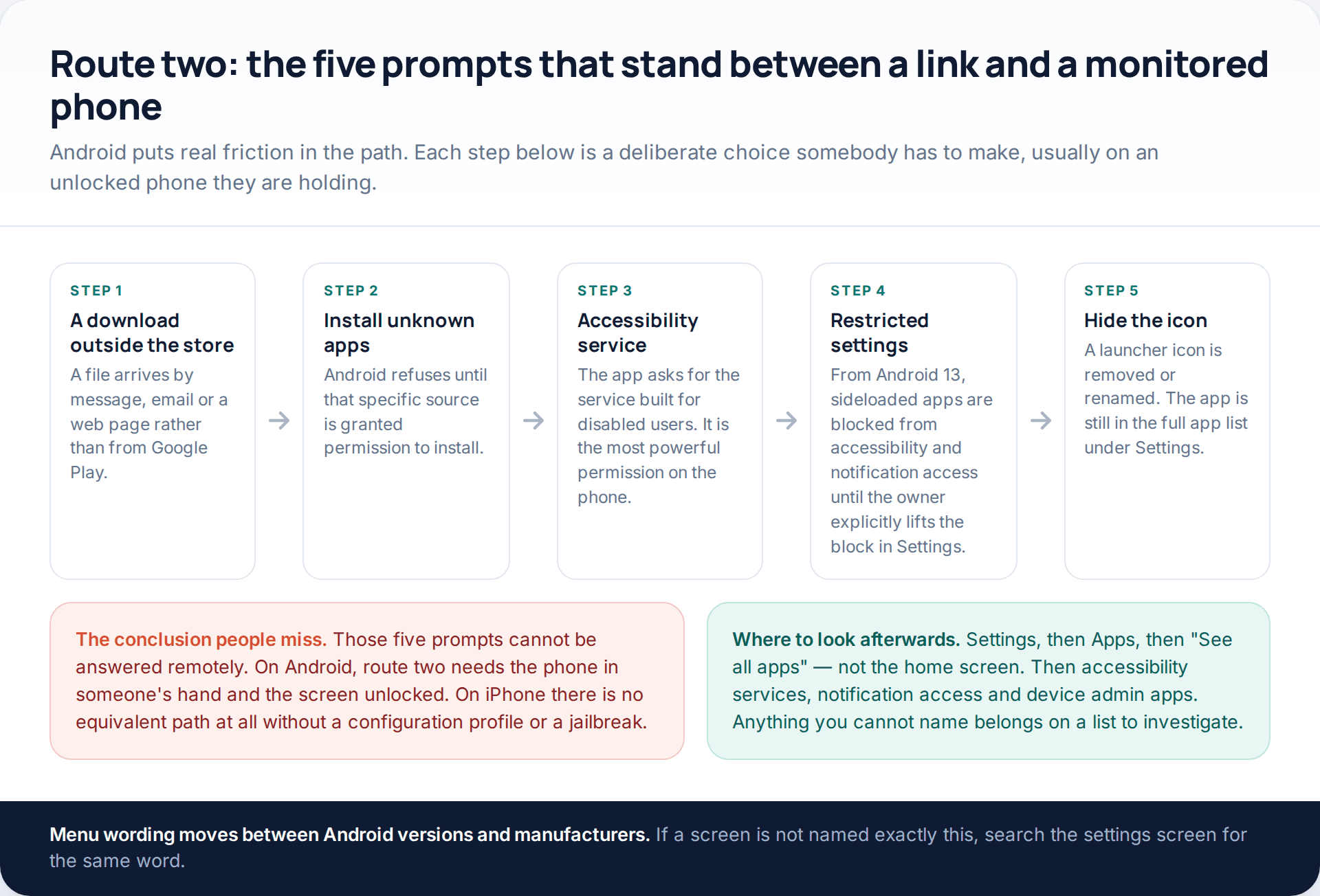
Monitoring software is real, it is sold openly, and it works. What it cannot do is arrive on its own. On Android the installation path runs through a specific sequence of refusals: Android blocks installs from an unknown source until you permit that exact source, and since Android 13 it also blocks sideloaded apps from accessibility services and notification access until the owner explicitly lifts the restriction in Settings. Each of those is a screen somebody has to answer while holding your unlocked phone.
On iPhone the position is tighter still. Without a jailbreak there is no equivalent install path at all, which is why products aimed at iPhones work through an Apple Account and its backups instead — making them route three, not route two. The one thing worth checking on a personal iPhone is Settings > General > VPN & Device Management: Apple’s own personal safety guide notes that configuration profiles and MDM tools are used by organisations to manage devices and may allow access to data or location, and tells you to select the profile, tap Delete Profile and restart. A personal phone that was never issued by a school or employer should have nothing there.
The hidden-icon question. Removing an app’s launcher icon is trivial and means nothing about how well hidden it is. The full list under Settings, Apps, “See all apps” shows everything installed regardless. That list, the accessibility services list and the device-admin list are where you actually look.
Route three: account access, which looks identical from the inside
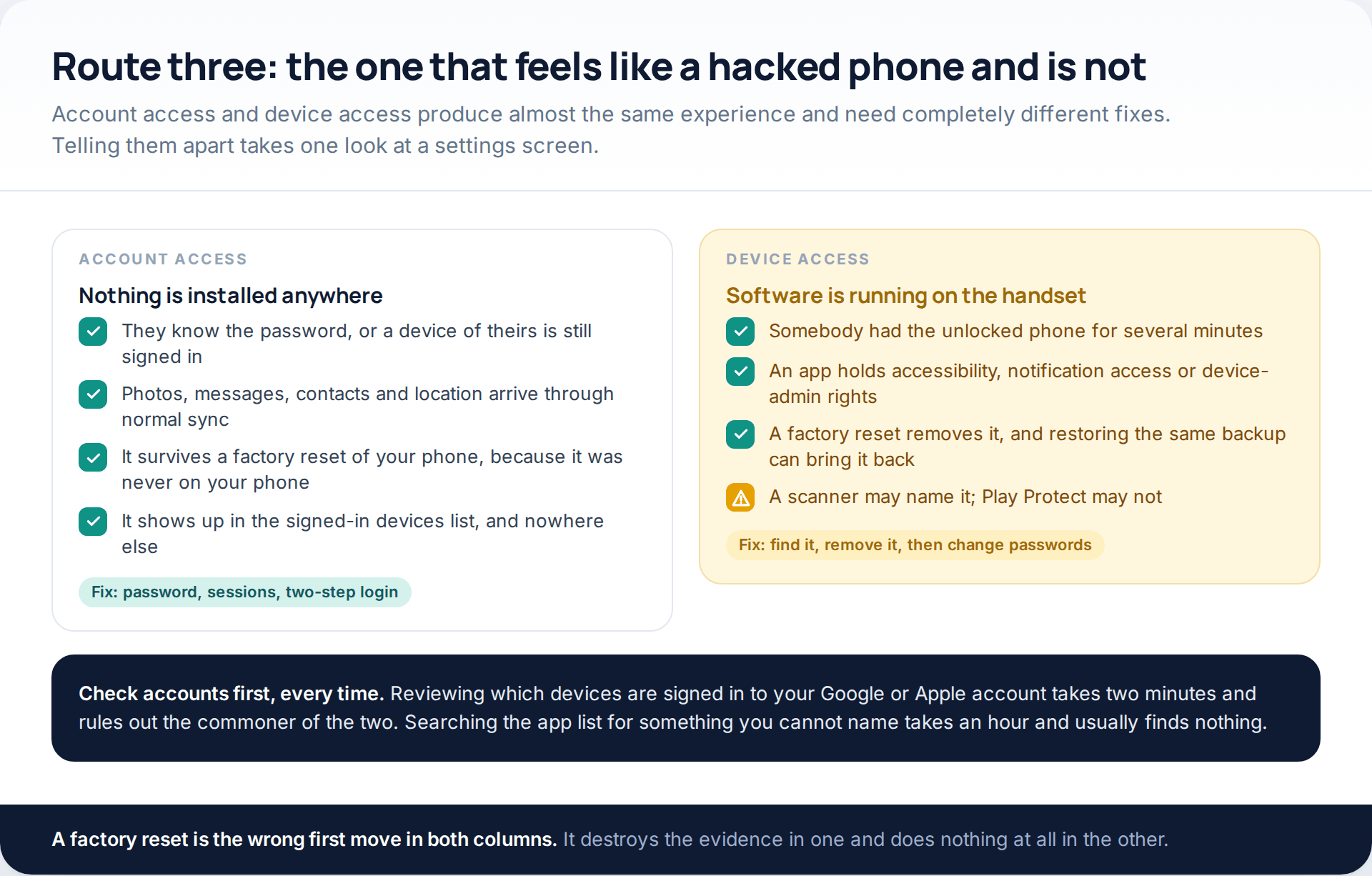
Someone who can sign in to your Google or Apple account does not need anything on your phone. Photos, messages, contacts, backups and location all sync to them through entirely normal features. There is no app to find, no permission to revoke, and a factory reset changes nothing, because nothing was ever on the device.
This is also the quiet majority of cases where a specific person is involved — a current or former partner, a family member, a flatmate. The access usually began consensually, or began with a password that was never changed, and simply never ended.
The check is fast. On Android, open your Google Account, go to Security, and use “Manage all devices” under Your devices; Google’s documentation describes this as listing devices where you are signed in now or have been in the last few weeks, with a Sign out option on each. On iPhone, Apple’s Safety Check at Settings > Privacy & Security > Safety Check (iOS 16 and later) reviews devices connected to your Apple Account, phone numbers used to verify your identity, and what you are sharing with people and apps, with an Emergency Reset that stops all of it at once. If you find something, our guide to locking an account down after a compromise sets out the order to work in.
Route four: the number itself moves
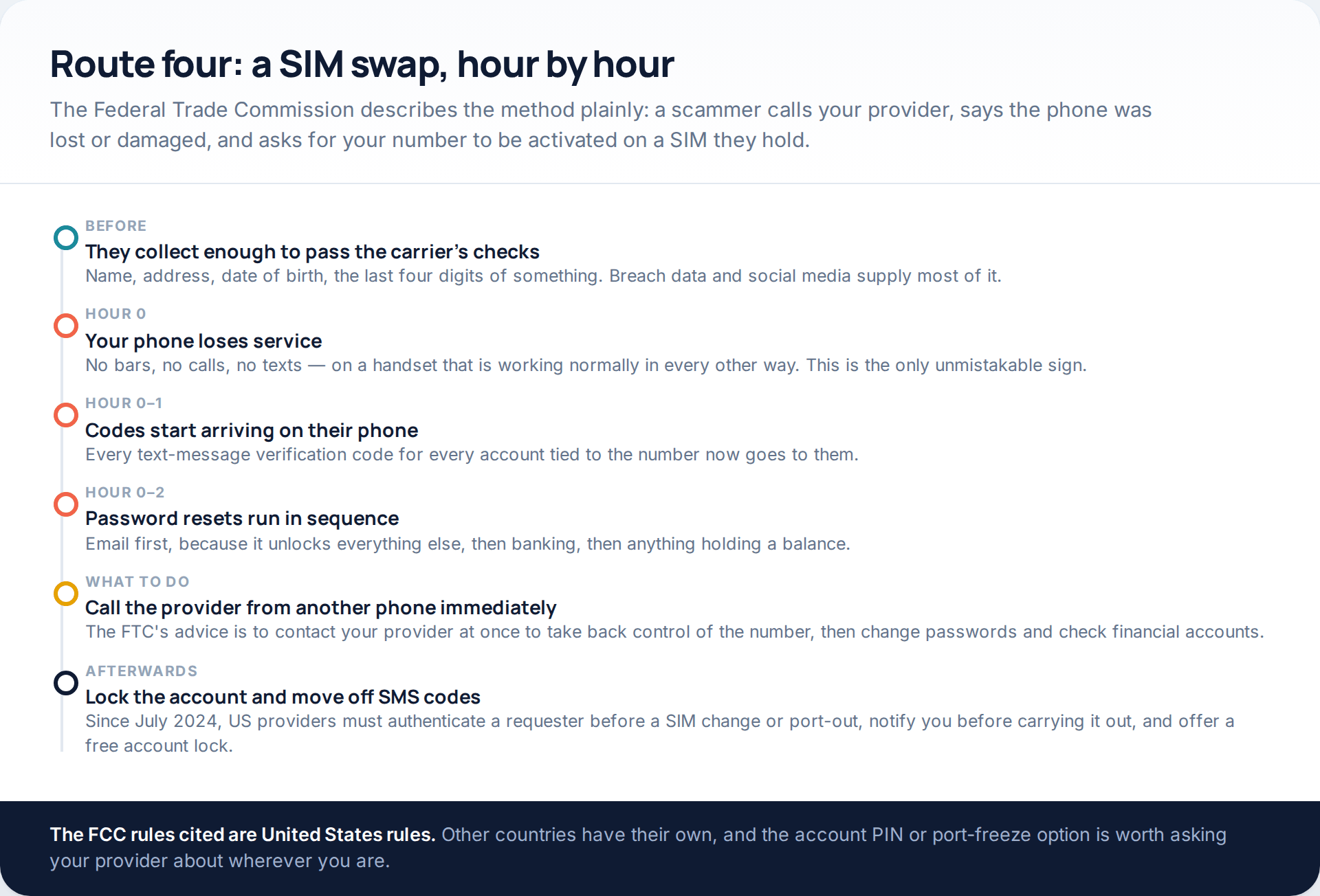
A SIM swap does not touch your handset either. The Federal Trade Commission’s description is blunt: scammers may call your provider claiming the phone was lost or damaged, and ask for a new SIM connected to your number to be activated on a phone they own. Once it is, every call and every text-message code goes to them.
The sign is unmistakable and it is the only one on this page that is. Your phone has full battery, full function and no mobile service at all, and it does not come back. If that happens, the FTC’s advice is to contact your provider immediately to take back control of the number, then change passwords and watch financial accounts.
Prevention is a phone call. The FTC recommends setting a PIN or password on your mobile account, and moving two-step verification off text messages onto an authenticator app or a security key, because text verification does not stop a SIM swap. In the United States, FCC rules effective from July 2024 require providers to authenticate a requester before a SIM change or port-out, to notify the customer before completing one, and to offer a free account lock.
Route five: zero-click spyware, and why it is probably not you
Commercial surveillance tooling that compromises a fully patched phone with no interaction does exist. Apple sends threat notifications to people it believes have been individually targeted, delivering them on the Lock Screen, by email to the Apple Account address, and as a banner on account.apple.com — and states it has notified users in over 150 countries since 2021.
Apple’s own framing is the useful part: these attacks cost millions, have a short shelf life, and target people because of who they are or what they do — journalists, activists, politicians, diplomats. If you are in one of those categories, turn on Lockdown Mode, keep the operating system current, and talk to a specialist organisation. If you are not, this is not the explanation for a hot battery.
Four beliefs, tested
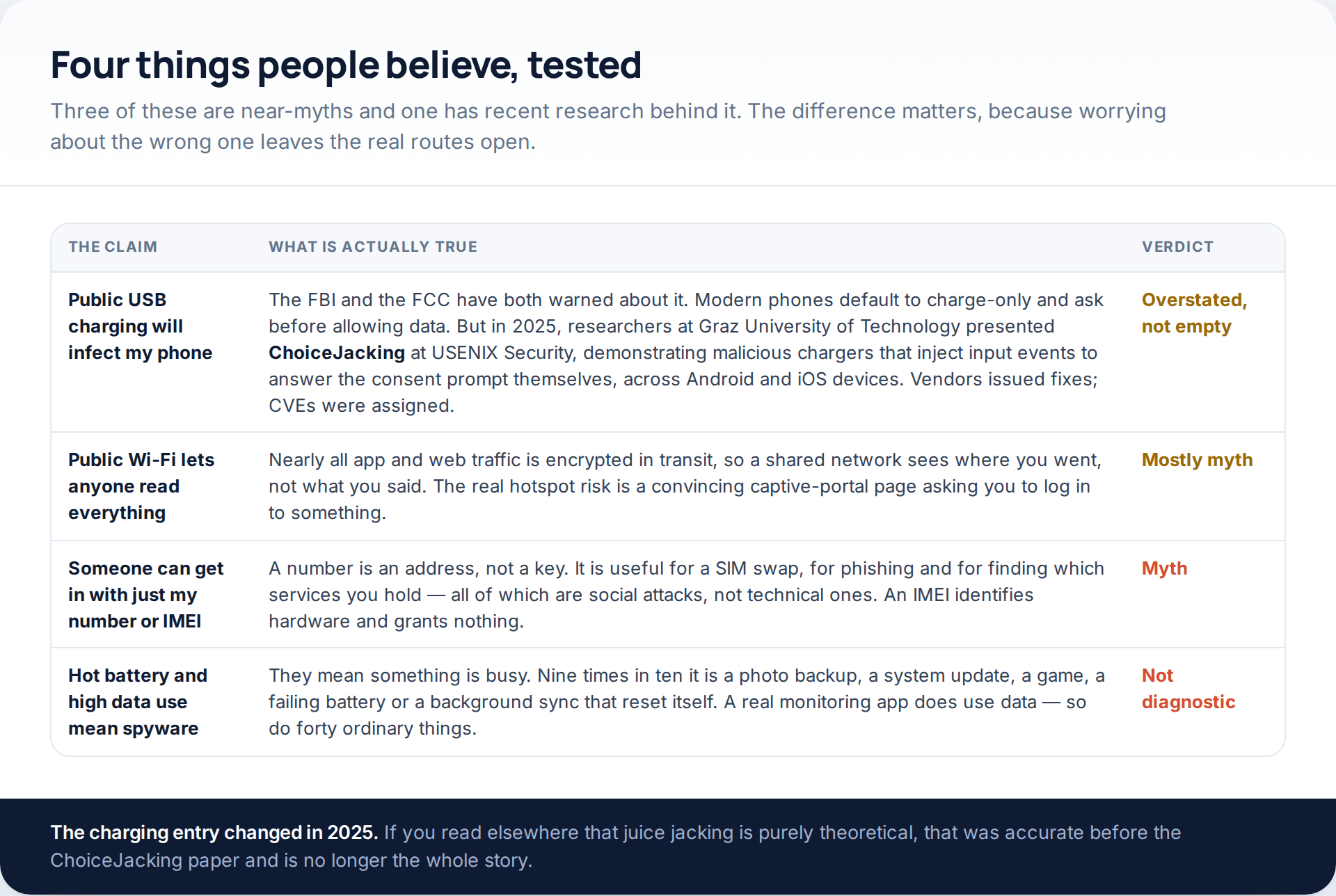
The charging one deserves its nuance. For years the honest answer was that public USB charging was a warned-about risk with almost no documented consumer cases, because phones default to charge-only and ask before permitting data. Then in 2025, researchers from Graz University of Technology presented ChoiceJacking at USENIX Security: malicious chargers that inject input events to answer the consent prompt on the device’s behalf, demonstrated across Android handsets from several manufacturers and on iOS hardware. Vendors assigned CVEs and shipped mitigations.
The practical response did not change: carry your own plug and use a mains socket, or use a cable with no data lines. But “juice jacking is a myth” is no longer the right summary, and anyone telling you it is has not read the 2025 work.
The signs that mean something
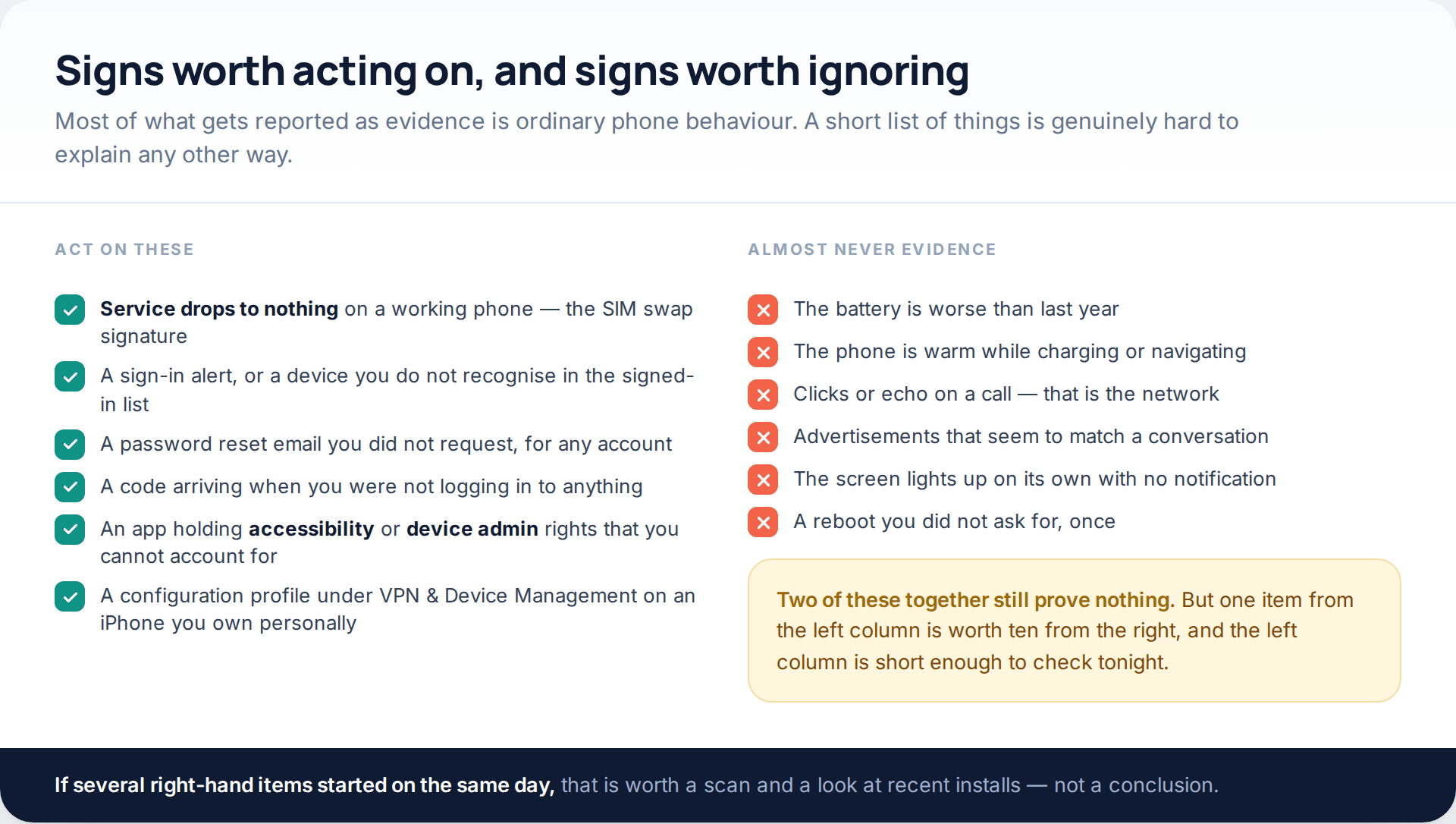
Battery drain, warmth, occasional clicks and advertisements that feel too relevant are the four things people report, and all four are produced reliably by ordinary phone behaviour. Modern monitoring apps are not especially heavy, so the drain theory fails in both directions: a clean phone can run hot, and a monitored one can look normal.
What is hard to explain innocently is an account event. A sign-in alert from a place you have never been. A password reset email you did not trigger. A verification code arriving while you are asleep. A recovery email address on your account that is not yours. Those are evidence, and each one points at a specific route above.
The check order
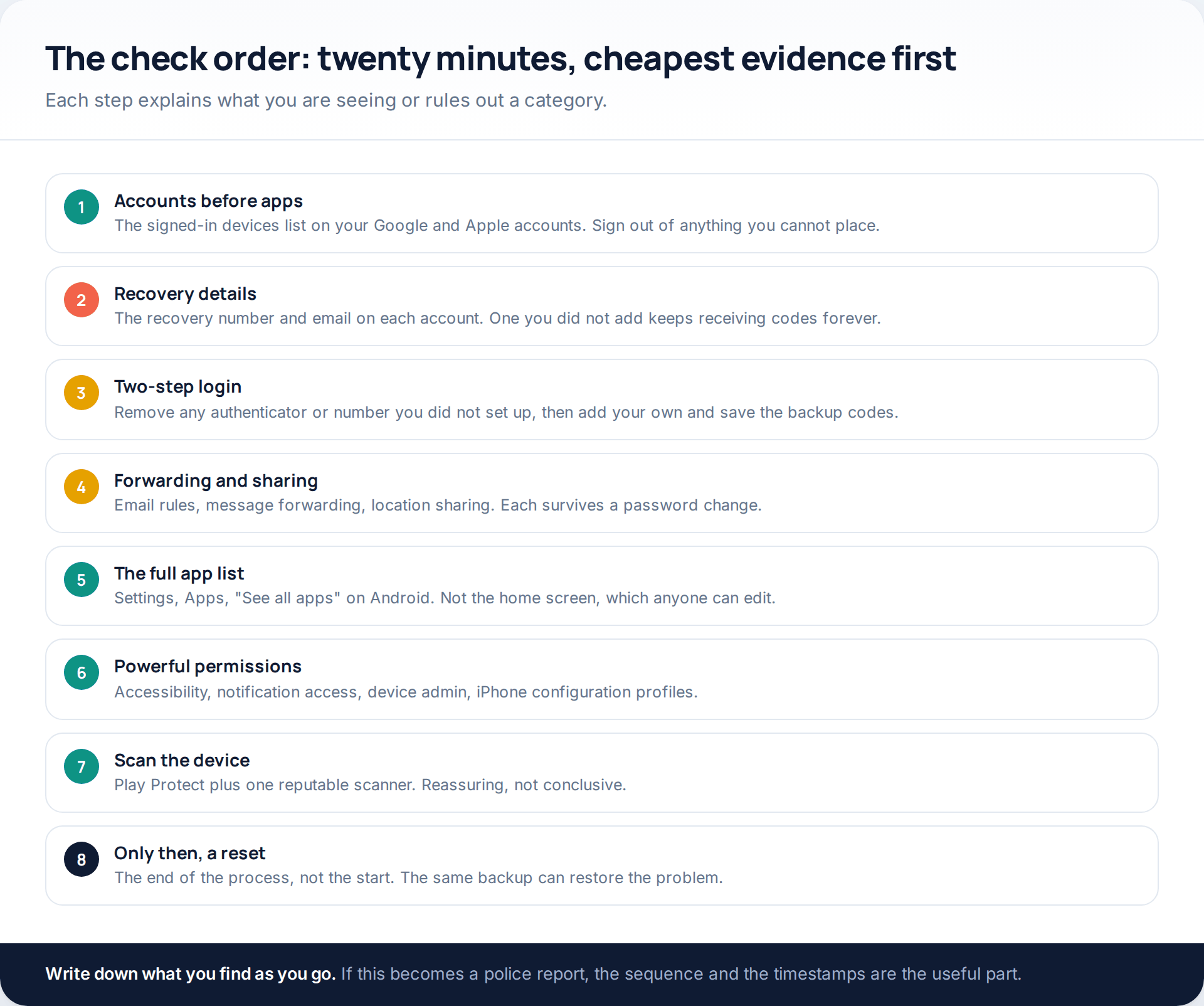
Two steps in there get skipped almost universally. Recovery details are how someone retains access after you change a password — an extra recovery address or phone number keeps receiving codes indefinitely, and no password change removes it. And forwarding rules, in email and in messaging, survive every credential change you make; a rule quietly copying your mail to another address is a textbook finding and takes thirty seconds to check.
If the trail points at messages specifically rather than the whole phone, the routes are narrower and the checks are different; we work through them in our guide to how text-message interception actually works.
What a scan can and cannot settle
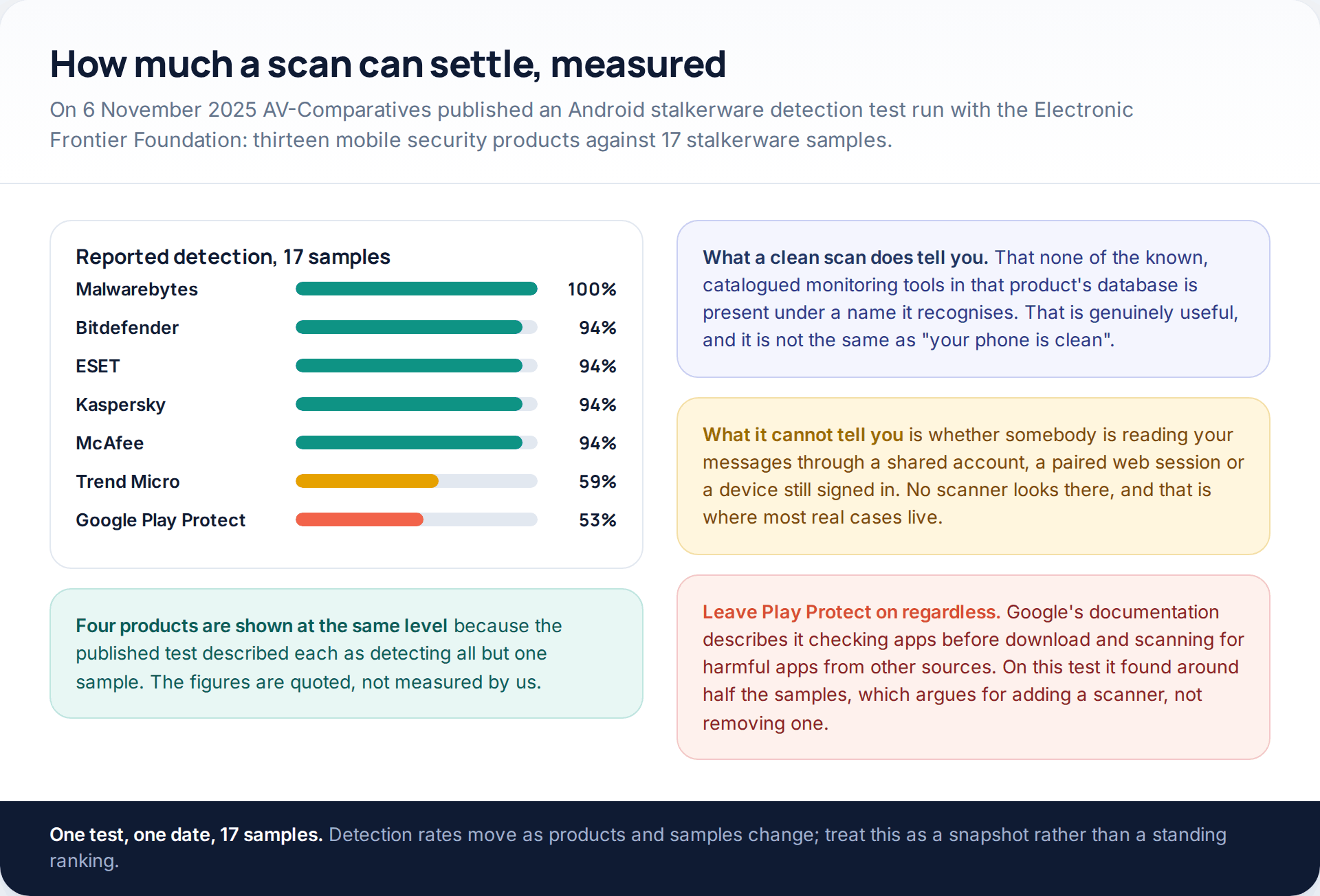
Scanning is worth doing and worth putting in proportion. In the test above, the best product found every sample and Google Play Protect found roughly half, which is a strong argument for adding a second scanner and no argument at all for turning the first one off. But detection is pattern-matching against known software, and the routes that account for most real cases involve no software at all.
Which is the reason the check order above puts the scan at step seven rather than step one. By the time you reach it, six cheaper checks have already answered the question in most households.
If you find something
How this page was put together
The platform behaviour here was checked in October 2026 against primary documentation: Apple’s personal safety guide for Safety Check and configuration profiles, Apple’s page on threat notifications and mercenary spyware, Google’s help pages on reviewing devices with account access and on Play Protect, the FTC’s consumer guidance on SIM swap scams, and the FCC rules on SIM change and port-out requests that took effect in July 2024. The charging section cites the ChoiceJacking paper presented at USENIX Security in 2025 by researchers at Graz University of Technology.
Detection figures come from a single source, named in the text: the Android stalkerware detection test AV-Comparatives published with the Electronic Frontier Foundation on 6 November 2025, covering 17 samples across thirteen products. We did not run those tests, and we have deliberately given no percentage breakdown of how often each route occurs, because no reliable public figure exists — the ordering in this article reflects cost and ease, not measured frequency.
What we did not include: any instruction that would help someone gain access to a device or account that is not theirs, any named monitoring product, and any claim that a particular symptom proves compromise. Menu paths move between operating system versions and manufacturers; where a label has changed, search the settings screen for the same word rather than assuming the option has gone.
Common questions
Can someone hack my phone just from my number?
Not directly. A number is useful for sending you phishing messages, for attempting a SIM swap with your provider, and for working out which services you hold. All three are social attacks on you or on your carrier, not technical attacks on the handset.
Will a factory reset fix it?
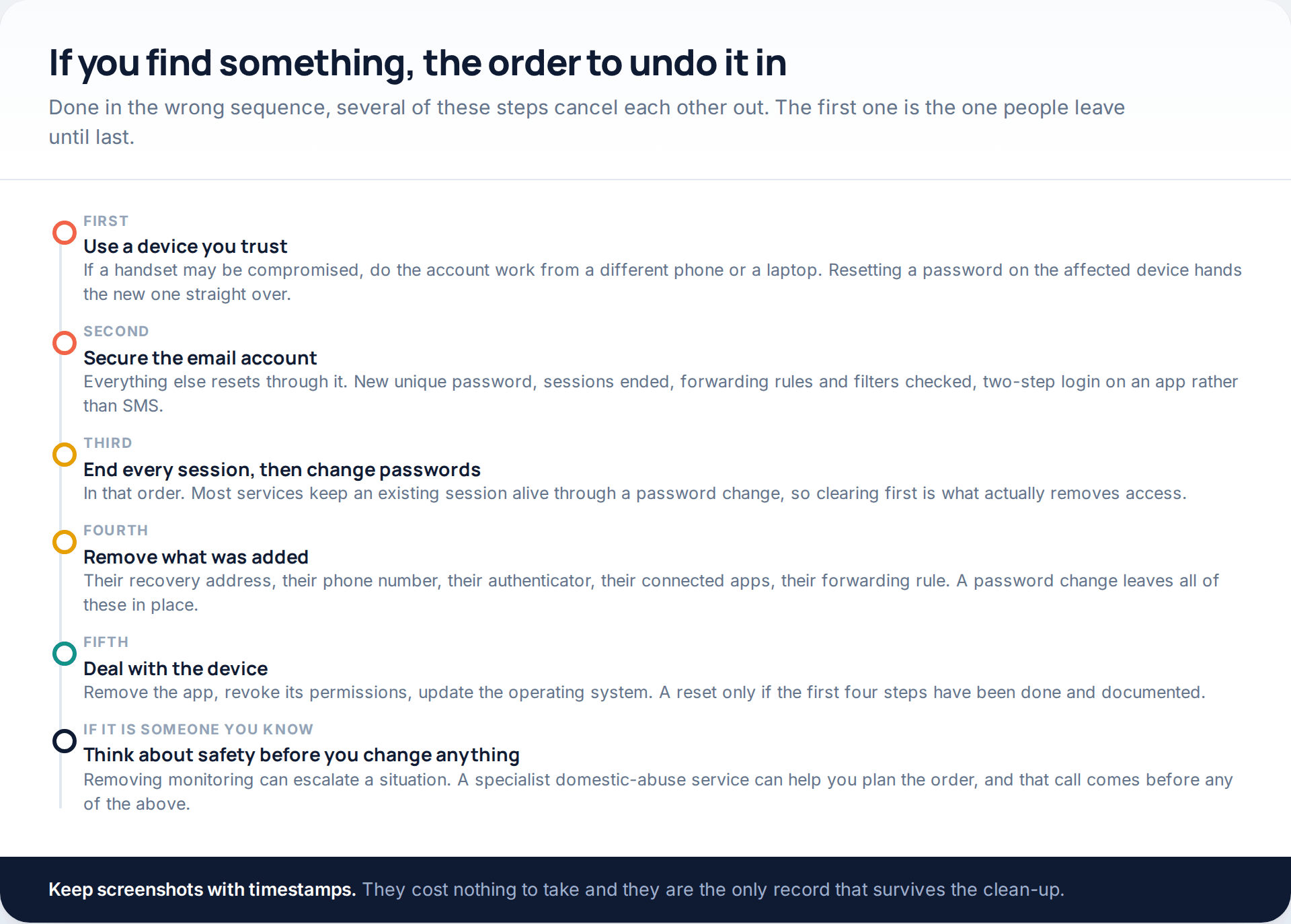
Only if the problem is software installed on the device, and even then it can be undone by restoring the same backup. It does nothing at all against account access, a signed-in session or a SIM swap, and it destroys the evidence you would need later. Keep it as the last step.
Does a hot battery mean my phone is hacked?
Almost never on its own. Battery drain and heat are produced by photo backups, updates, navigation, games, weak signal and ageing cells. If heat began on the same day as an unexplained sign-in alert or a code you did not request, treat the account event as the signal and the heat as context.
How do I know whether it is my account or my device?
Look at the signed-in devices list on your Google or Apple account first. If there is a session you cannot place, that is account access and no app will be found. If the list is clean but somebody had your unlocked phone for a while, check accessibility services, notification access and device admin apps.
Is public Wi-Fi actually dangerous?
Far less than it was. Nearly all traffic is encrypted in transit, so the network operator sees destinations rather than content. The genuine risk on a hotspot is a captive-portal page that asks you to sign in to an email or social account, which is phishing wearing a Wi-Fi costume.
Should I still avoid public USB charging points?
Use your own plug where you can. The 2025 ChoiceJacking research showed the consent prompt can be defeated by a malicious charger on both platforms, vendors have shipped fixes, and a mains socket or a charge-only cable sidesteps the question entirely.
Can a scan prove my phone is clean?
No. A scan tells you that no known, catalogued tool was recognised. That is useful evidence and not a clean bill of health, and it looks in the wrong place entirely if the access is through a shared account or a device still signed in.
My phone suddenly has no signal. What should I do first?
Treat it as a possible SIM swap until proved otherwise. From a different phone, call your mobile provider and ask whether your number has been transferred. If it has, ask them to reverse it immediately, then change your email password and check any account that uses text-message verification.
Using a monitoring app for this? GuestSpy is parental monitoring for Android that stays visible on the child's phone and runs from any browser. If it fits your family, see what the app does.
Related guides
5 Best Security and Network-Testing Apps for Android (Rooted and Not)
The useful security apps for Android are not the ones with “hack” in the title. They are a network scanner,…
Gmail Password Compromised? Four Recovery Routes Google Accepts
If your Gmail password was hacked, there are four routes back and the one that is open to you depends…
Facebook Account Hacked? Every Free Route Back In
If your Facebook account was hacked, five routes lead back in and all of them are free: a device of…
Monitoring your child can see.
Location, screen-time budgets, routines, app and website blocking and the alerts that matter, run from any browser and visible on the phone. Pair an Android phone in about fifteen minutes.