WhatsApp Taken Over Online? Re-register Your Number and Close the Gaps

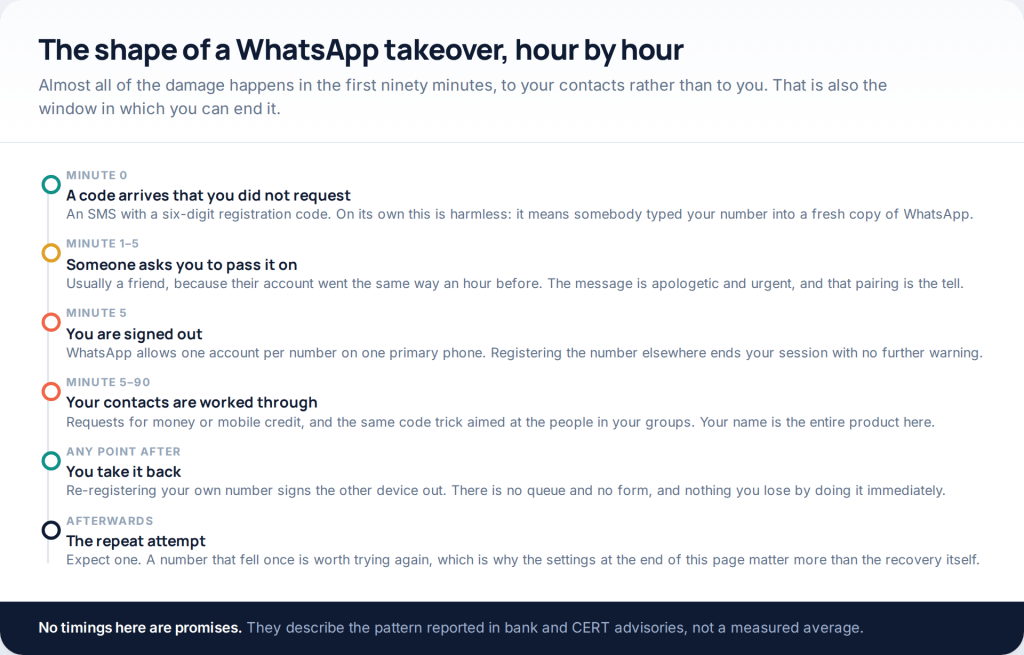
If your WhatsApp account has been hacked — you were signed out, and friends are suddenly getting money requests in your name — the fix is usually faster than the panic suggests. Install WhatsApp, enter your own number, type the six-digit code that arrives by SMS. The moment that registration completes, whoever was using the account stops being able to.
This page used to list browser tools that promised to open somebody else’s WhatsApp “without surveys”. It is now about the opposite situation, because that is what people actually arrive here with — and because no such tool has ever existed. The third section explains what those pages were really doing, and why the architecture of WhatsApp rules the advertised version out.
What has actually happened to your account
A WhatsApp account is attached to a phone number, and only one primary phone can hold it at a time. When somebody types your number into a fresh installation, WhatsApp texts the six-digit registration code to you. If that code reaches them, their copy of the app completes registration and yours stops working, without warning, in the middle of whatever you were doing.
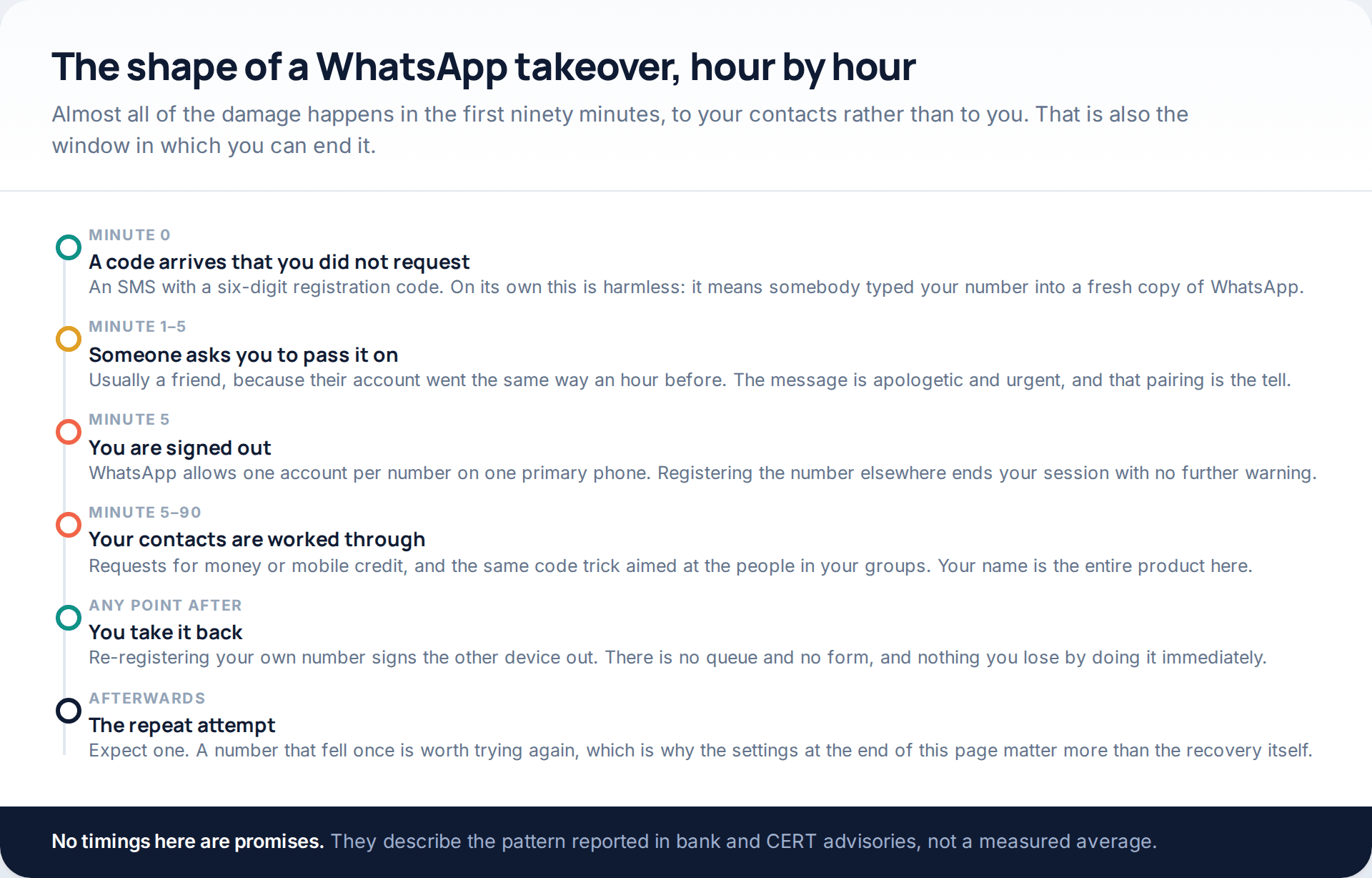
Nothing about that is clever. It is a confidence trick dressed as a technical one, and the whole of it turns on six digits that were sent to your phone and then handed over.
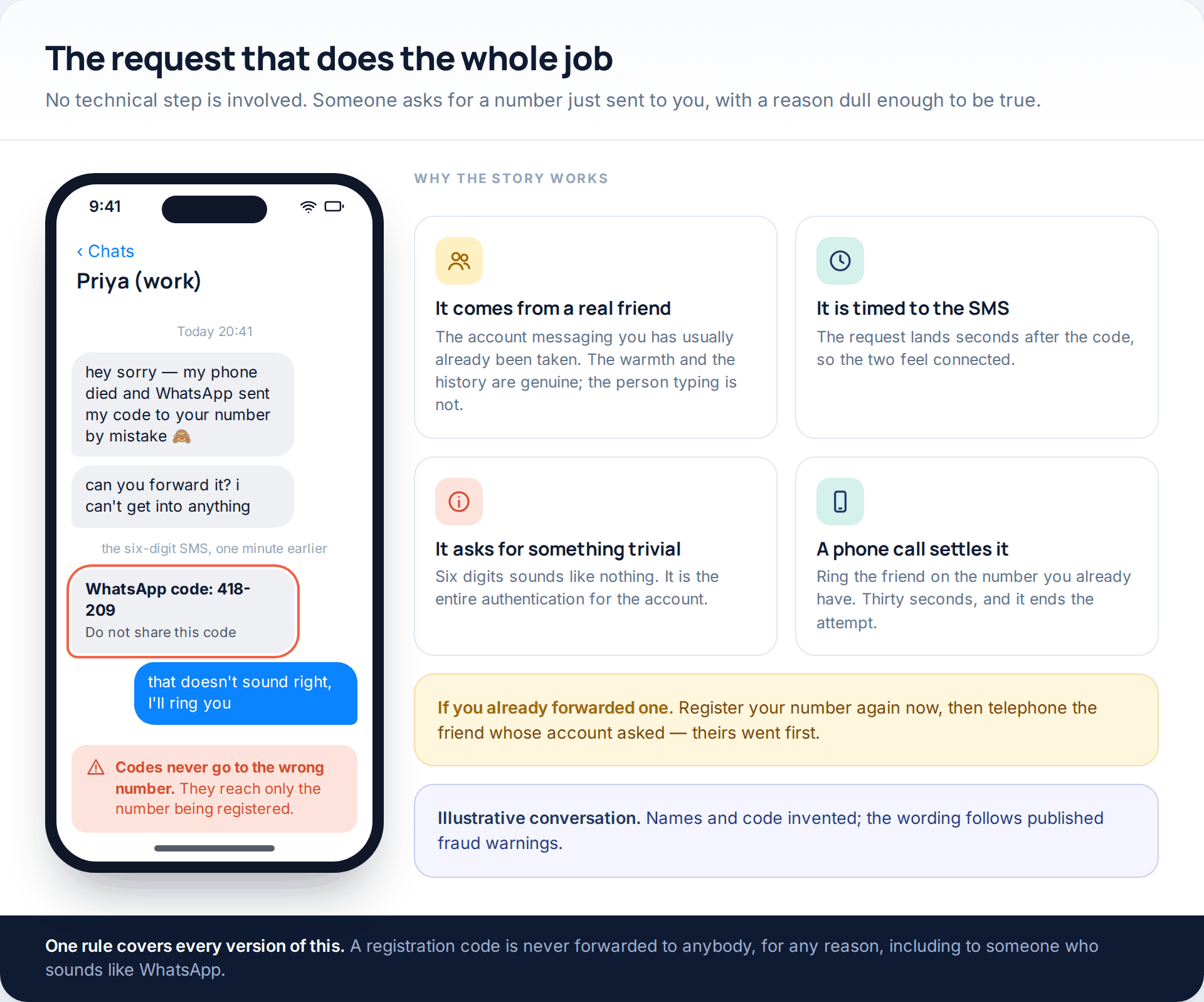
There is a second, quieter route that produces similar symptoms without signing you out at all: a device linked to your account through the Linked devices screen. We separate the two below, because they expose different things and are closed in different ways.
Do this first, before anything else
Re-registering is not an appeal to WhatsApp and there is no queue. It is the same action the attacker performed, pointed back the other way, and it takes about two minutes.
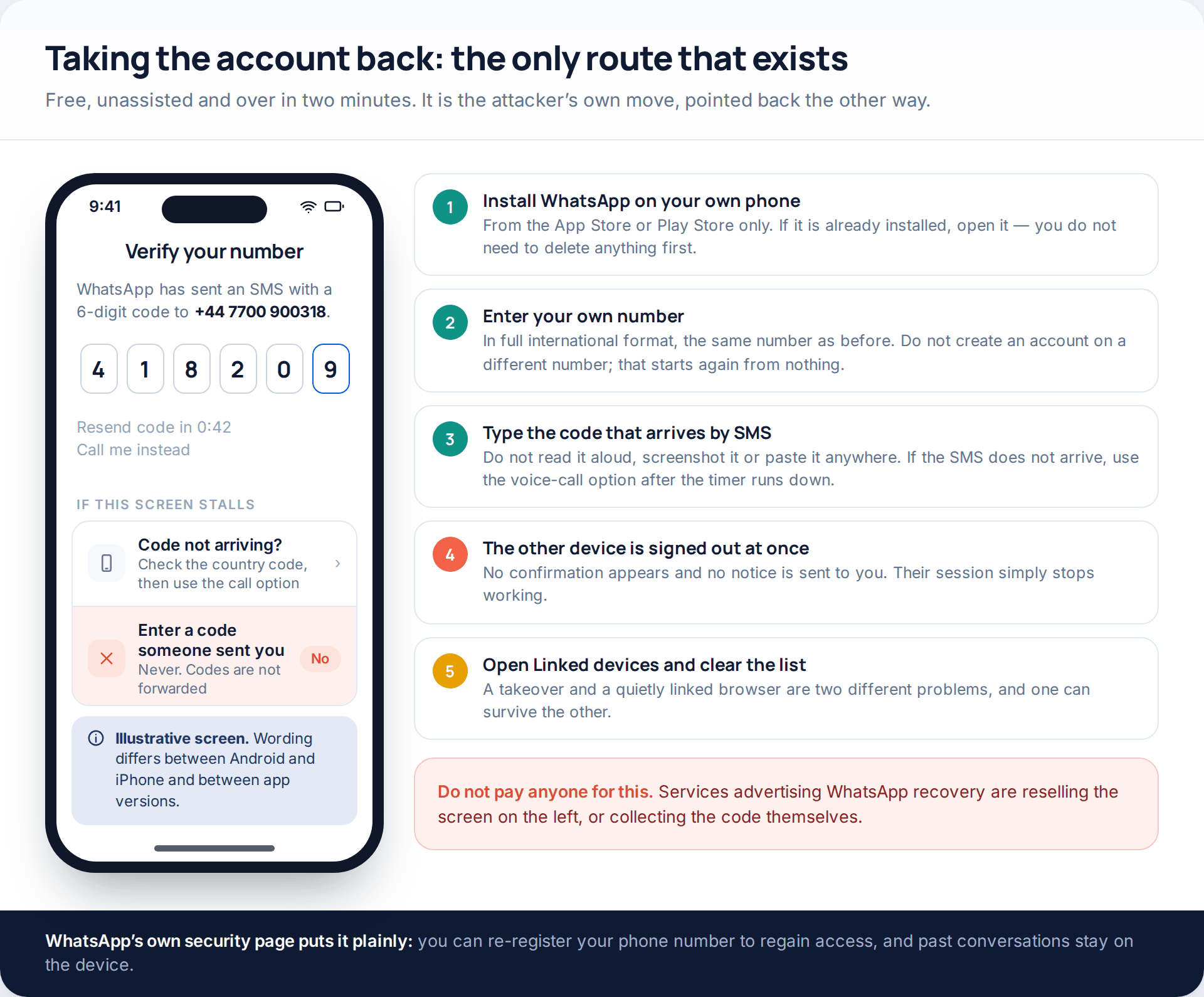
Use your own number in full international format. Do not sign up on a different number out of caution — that creates a second account and leaves the first one where it is. And once you are in, open Linked devices straight away, because a browser session someone added earlier survives a re-registration perfectly happily.
Nobody can speed this up for money. Accounts offering WhatsApp recovery for a fee are either reselling the screen above or collecting the next code from you themselves. WhatsApp charges nothing, and there is no human queue to jump.
What the “hack WhatsApp online” pages were selling
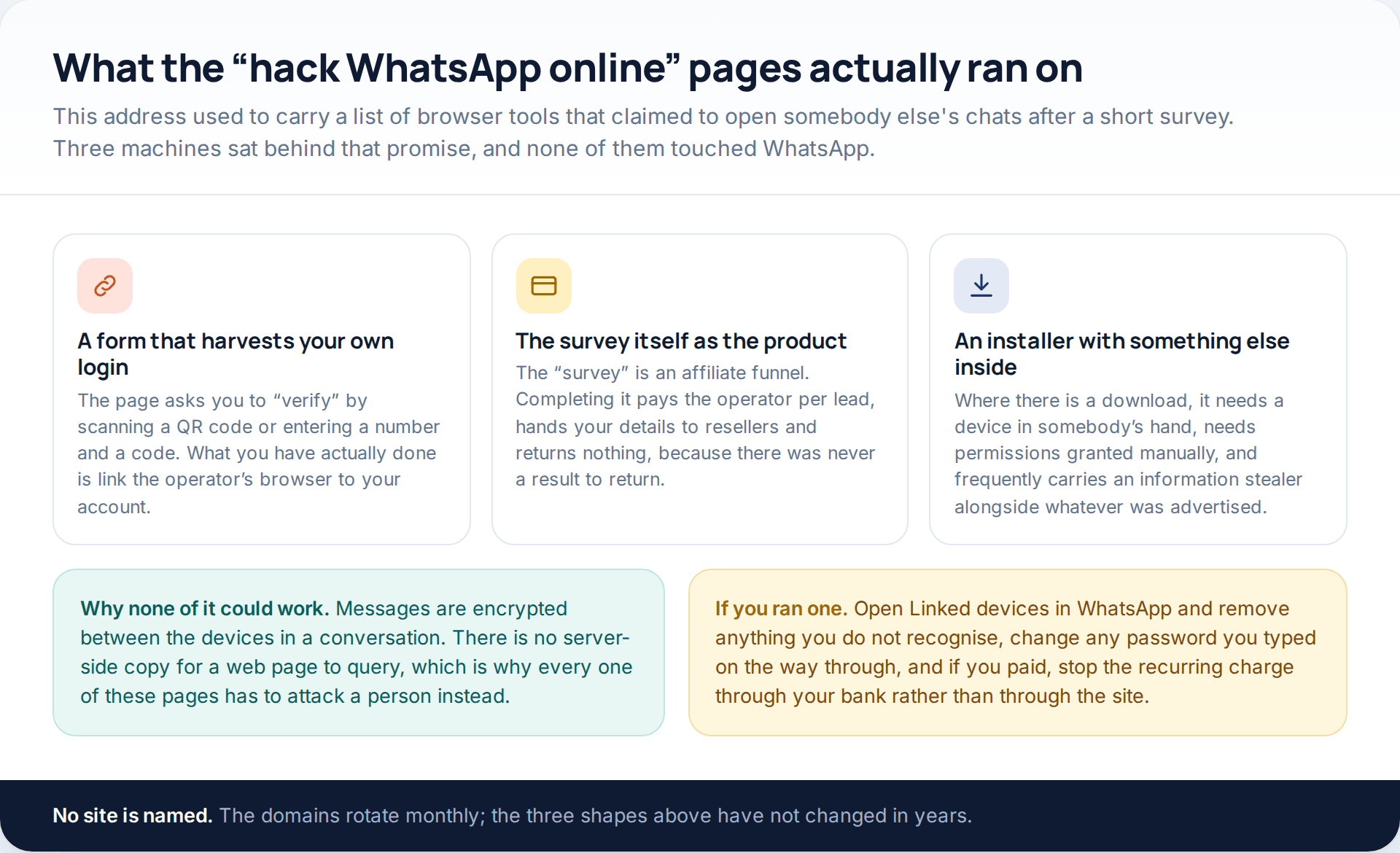
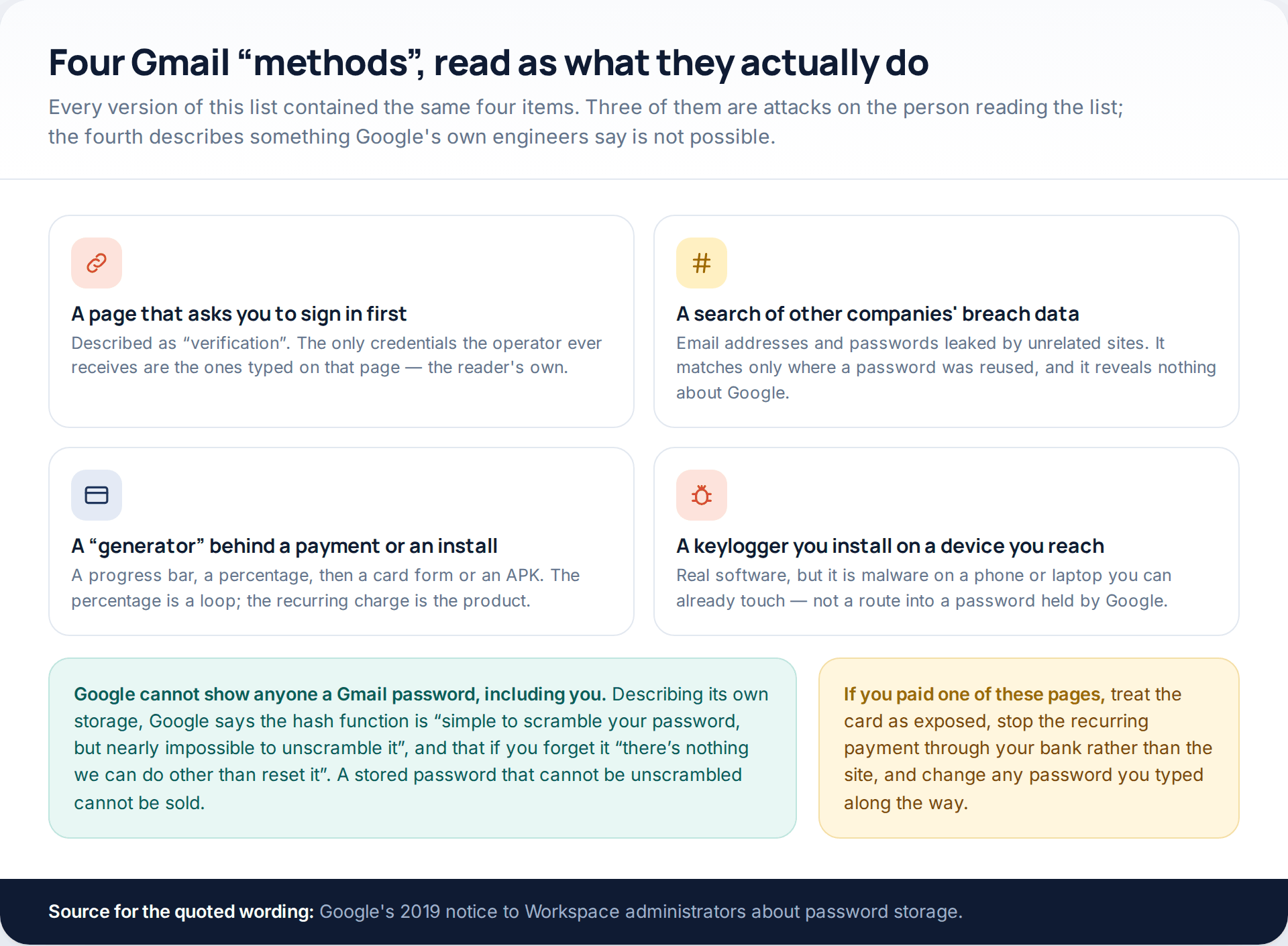
Worth a paragraph, because it explains the first route in the previous section. The pages that ranked for this phrase asked a visitor to “verify” before the search would run — by scanning a QR code, or by entering a number and then the code it triggered. That is not a verification step. Scanning a QR code links a browser to your account, and typing a code into a web form hands over the registration. The visitor was the target throughout.
The surveys were an affiliate funnel that paid per completion and returned nothing, because there was nothing to return. And the rare downloads needed a phone in somebody’s hand, permissions granted manually on the device, and brought other software with them.
None of it could have worked as advertised in any case. WhatsApp messages are encrypted between the two devices in a conversation, so there is no readable server-side copy for a web page to query. Every page making that promise has to attack a person instead — which is precisely what happened.
If a PIN you never set is blocking the registration
One variation genuinely costs time. Attackers increasingly switch on two-step verification once they are in, which means the code alone no longer finishes a registration. Your own correct code now lands on a PIN screen you cannot answer.
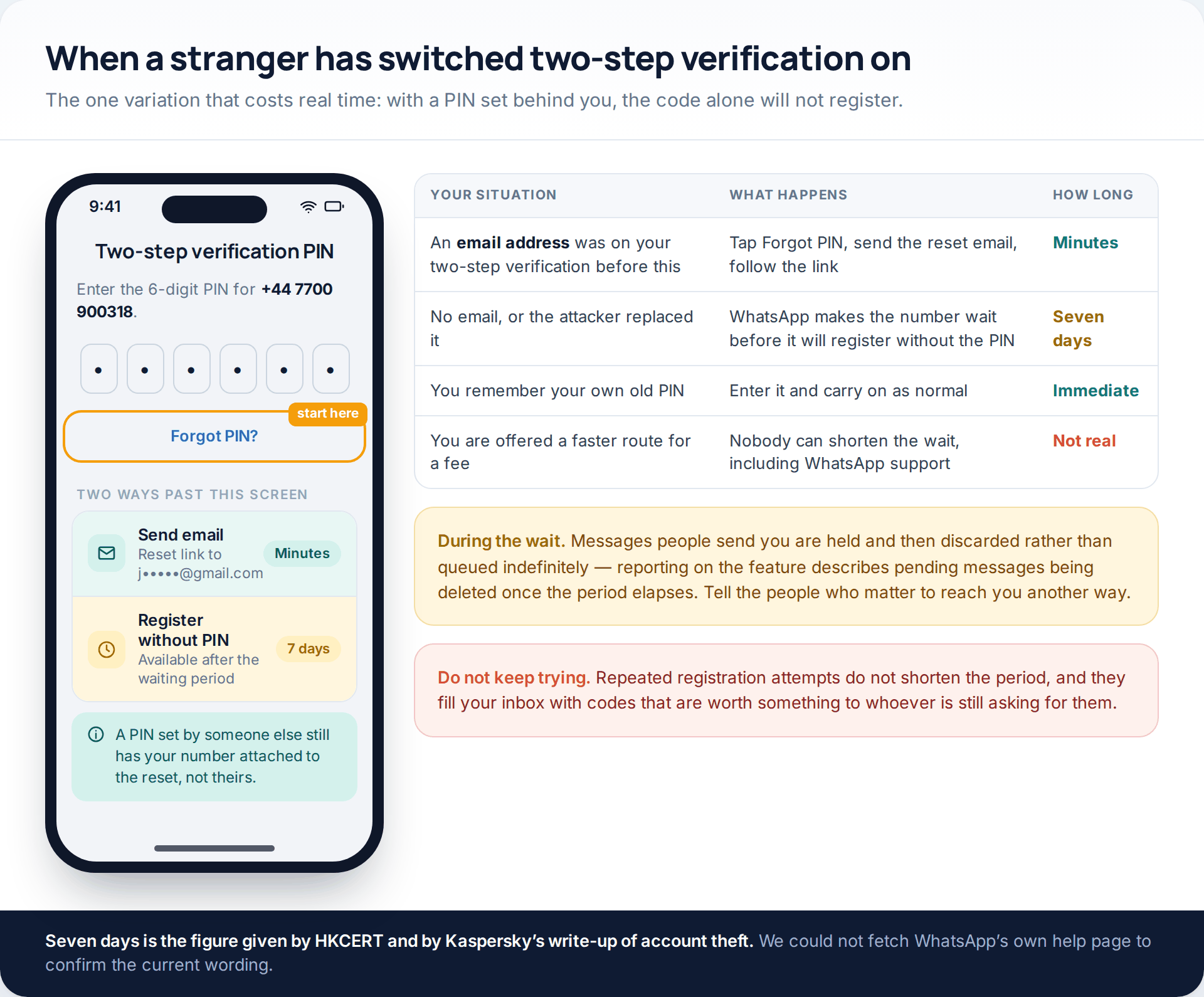
Tap Forgot PIN?. If an email address was attached to your two-step verification before any of this, the reset link arrives there and you are back within minutes. If there was no email, or the attacker replaced it with their own, WhatsApp makes the number wait before it will register without the PIN. Two independent write-ups of account theft — Hong Kong’s HKCERT advisory and Kaspersky’s guide — both give that wait as seven days. We could not confirm the current wording on WhatsApp’s own help pages, which block automated access, so treat it as the documented figure rather than a guarantee.
Nothing shortens it. Reinstalling does not, repeated attempts do not, and nobody selling a faster route has one. Use the week to tell people how to reach you, and to deal with the mobile account and email account the number depends on.
Warn the people who are about to be targeted
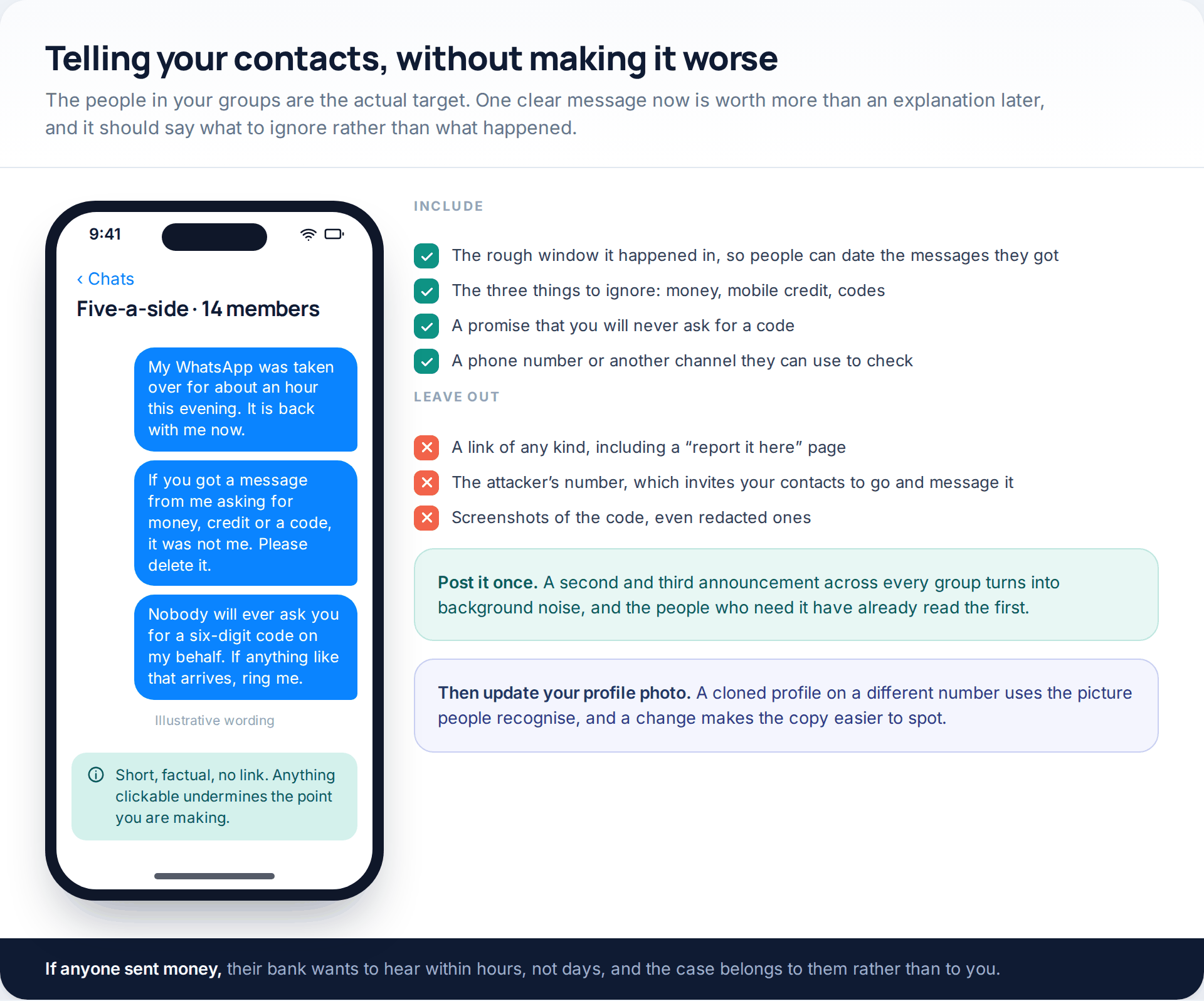
Your contacts are the point of the exercise. Send one message to your busiest groups and to anyone who might plausibly send you money, and keep it to three facts: roughly when it happened, what to ignore, and that you will never ask anyone for a code.
Resist the urge to include a link. You are asking people to be sceptical of messages from you, and a link in the same breath undercuts the whole thing. If anyone has already paid, their bank needs to know within hours — and if the incident involved a mobile number being moved rather than a code being forwarded, our guide to securing an account after a takeover covers the order in which to deal with the email and mobile accounts behind it.
What was exposed, and what was not
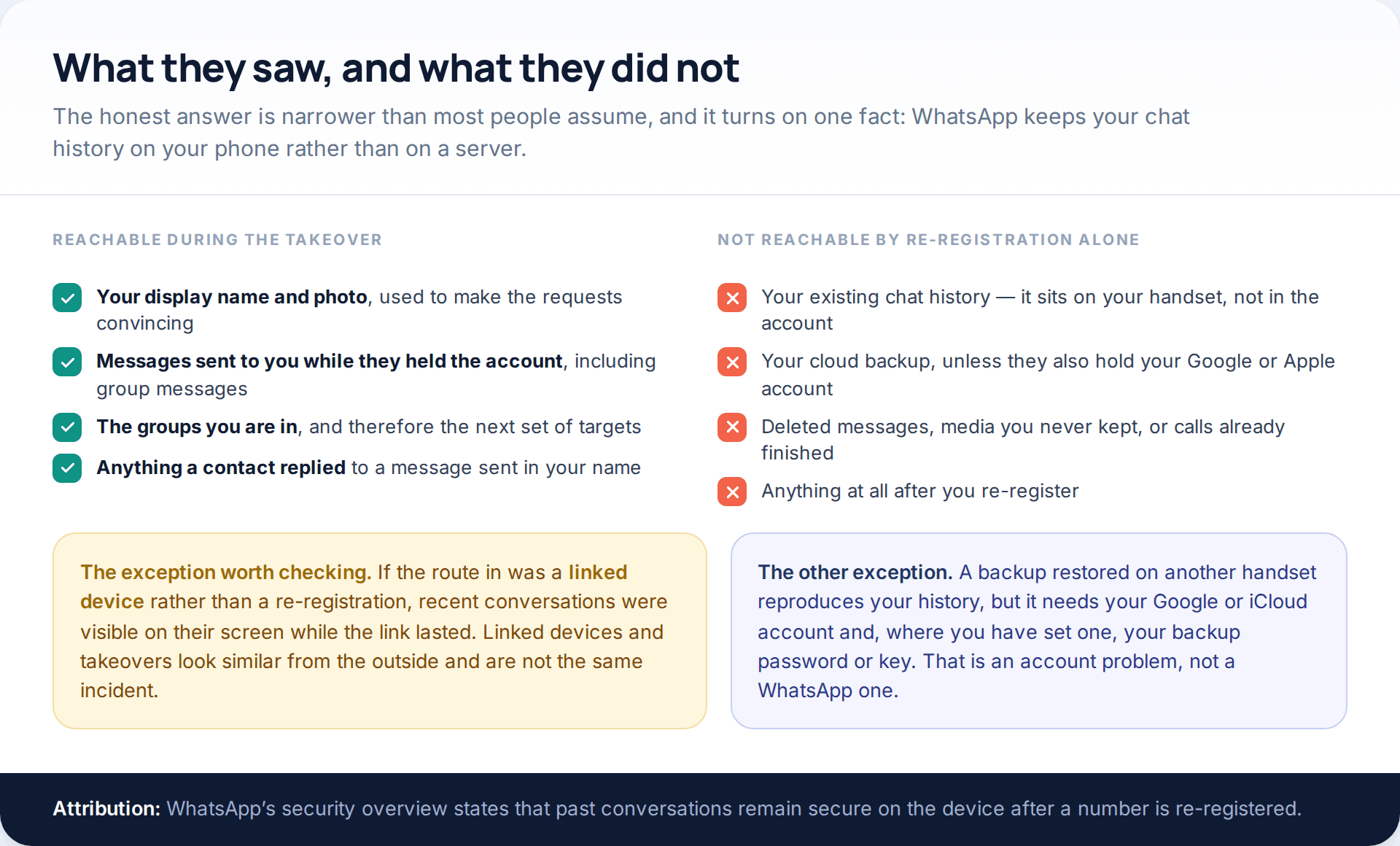
Here is the part that most reporting skips. WhatsApp keeps your chat history on your phone, not on a server that the account unlocks. Someone who registers your number on their own device gets an empty app with your name on it. WhatsApp’s own security overview makes the same point: re-registering restores access, and past conversations remain secure on the device.
So what they had was your identity and your incoming messages for the length of the takeover — enough to run a convincing scam on your groups, and nothing more. What they did not have was the years of conversation already on your phone.
Two caveats, and both matter. If the route in was a linked device rather than a re-registration, recent conversations were visible on their screen for as long as the link lasted, because a linked device receives messages in real time. And a cloud backup restored onto another handset does reproduce your history — but that needs your Google or Apple account, and, where you have set one, your backup password or encryption key. If you are trying to work out which of those applies to you, the signs are specific enough to check: we go through them in the signs someone else has been reading your WhatsApp.
How the code reached them in the first place
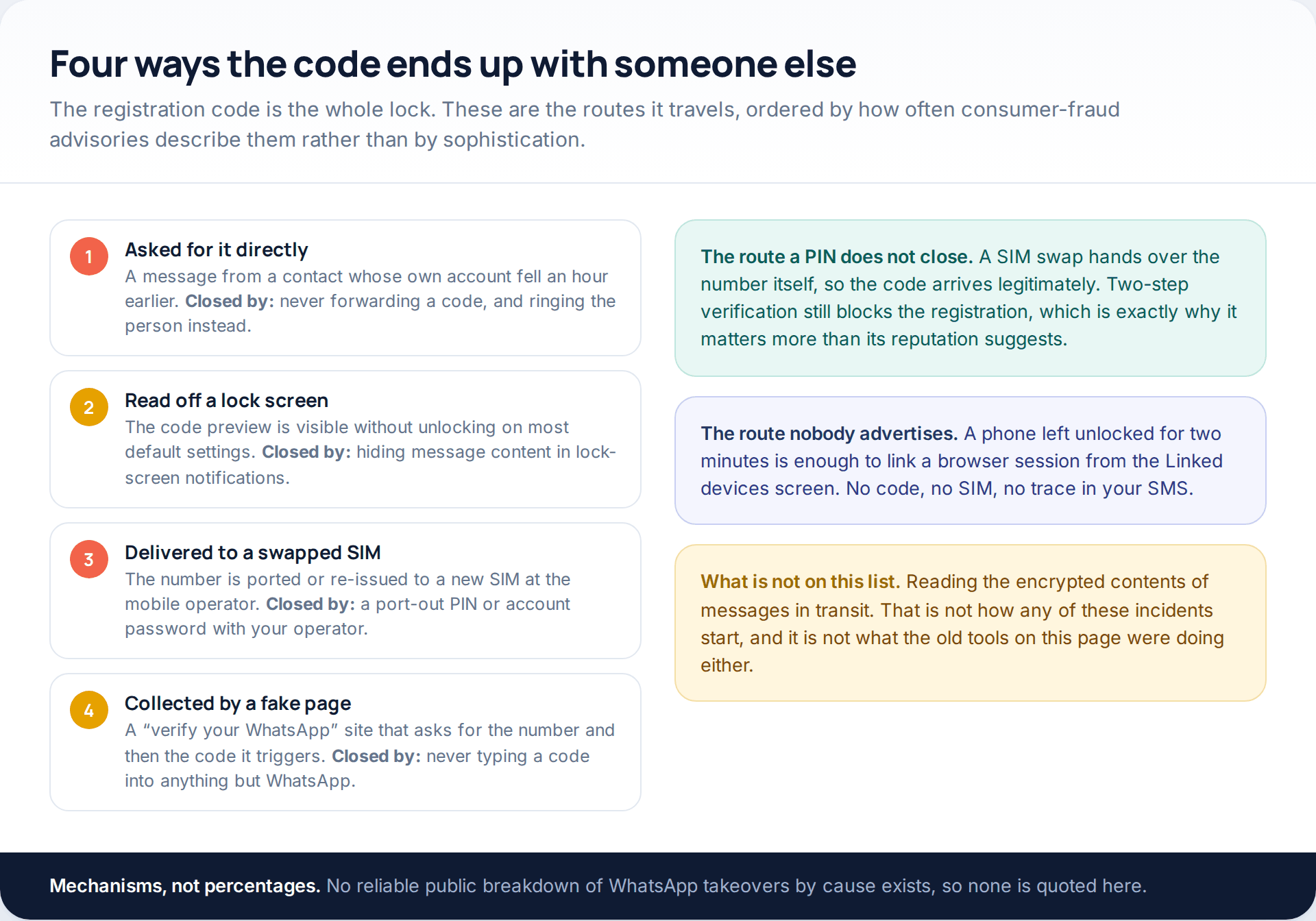
Knowing which of these happened changes what you do next. A forwarded code means the friend who asked for it has also been taken and is worth telephoning. A lock-screen preview means the phone was within reach of somebody. A SIM swap means the problem is at your mobile operator, not in WhatsApp, and the same weakness exposes your bank.
The SIM swap case deserves its own call. If your phone lost signal shortly before the takeover, or your operator mentions a SIM replacement you did not request, treat that as the incident and WhatsApp as a symptom. Ring the operator from another line, ask for the SIM to be reversed, and ask them to put a port-out PIN or account password on the account.
Closing the gaps so it does not happen again
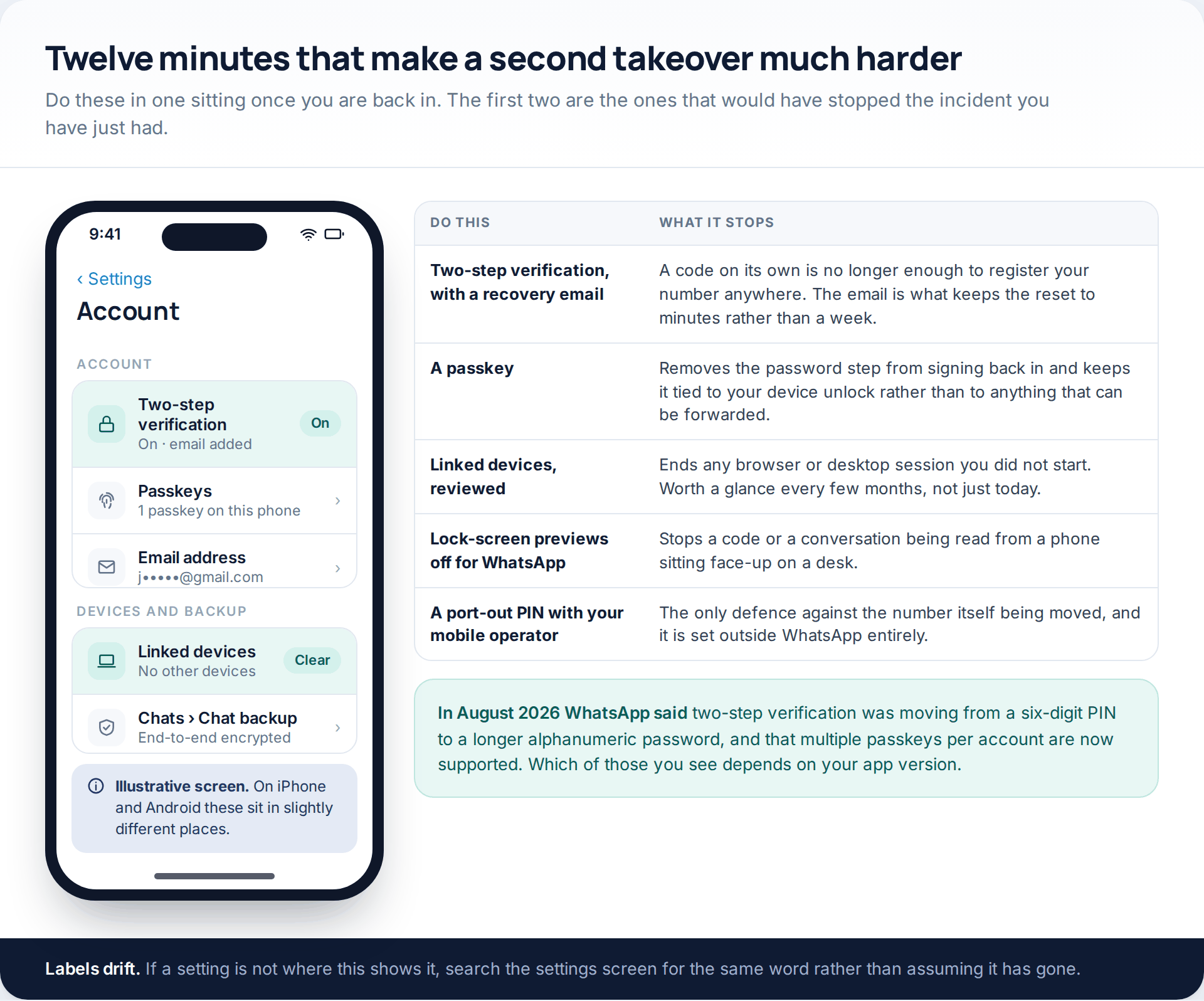
Two-step verification is the setting that would have stopped this, and the recovery email attached to it is the setting that would have made the recovery trivial. Add both now, while you are thinking about it.
WhatsApp announced in August 2026 that two-step verification was moving from a six-digit PIN to a longer alphanumeric password, and that an account can hold passkeys on more than one device. Whether you see the old PIN screen or the new password one depends on your app version and region, so set up whichever you are offered rather than waiting for the other.
Then the quieter ones: review Linked devices and remove anything unfamiliar, turn off message previews on the lock screen so a code cannot be read from a desk, and put a port-out PIN on your mobile account. None of those costs anything, and the whole set is a single sitting rather than a project.
How this page was put together
The mechanics here were checked in October 2026 against WhatsApp’s own blog and security pages, Meta’s newsroom, and two independent incident write-ups: the Hong Kong Computer Emergency Response Team Coordination Centre’s advisory on WhatsApp account theft, and Kaspersky’s guide to the same. WhatsApp’s help centre, faq.whatsapp.com, blocks automated retrieval, so nothing on this page is quoted from it; where the two secondary sources agreed — the seven-day wait, the email reset, the attacker being signed out on re-registration — we have said so and named them.
We have given no recovery times in hours beyond the registration itself, because the only published window is the seven-day one. We have not named any of the sites that sold “online WhatsApp hacking”, and we do not link to them. Menu paths are described rather than quoted screen by screen: WhatsApp’s settings differ between iPhone and Android and move between versions, so labels in this article may read slightly differently on your handset.
If what you are facing is not a takeover but a worry that someone close to you has access to the phone itself, that is a different problem with different answers — our guide to protecting a phone when the risk is close to home is the better starting point.
Common questions
Can I get my WhatsApp account back without waiting?
Usually yes. If no two-step verification PIN is in the way, re-registering your number takes about two minutes and signs the other device out immediately. The only wait is when a PIN you do not know has been set and no recovery email is attached, which both HKCERT and Kaspersky describe as a seven-day period.
Could they read my old messages?
Not through a re-registration. Your chat history sits on your handset, so registering your number elsewhere produces an empty app. The exceptions are a linked device, which does receive messages live while it is connected, and a cloud backup restored on another phone, which needs your Google or Apple account.
Should I delete the WhatsApp app and reinstall it?
You do not need to. Deleting the app does not end anybody else’s session, and reinstalling does not shorten a seven-day wait. Opening the app and registering your number is the step that matters.
What if my number was moved to another SIM?
Deal with the mobile operator first. Ring from another line, have the SIM reversed and ask for a port-out PIN or account password. Until the number is back with you, codes will keep arriving on the attacker’s SIM, so nothing you do inside WhatsApp will hold.
Does two-step verification really help if they already have my code?
That is exactly what it is for. The code proves control of the number; the PIN or password proves something the number alone cannot. A SIM swap defeats the first and not the second, which is why the pairing matters.
Is it worth reporting this to anyone?
Yes, to two places. Your national fraud reporting body, because the money requests sent in your name are a crime against your contacts. And your mobile operator, if the number itself was involved. Reporting the attacker’s profile inside WhatsApp is also worth doing, though it will not speed up your own recovery.
My contacts say they got a message from me but I was never signed out.
That points at a linked device rather than a takeover, or at a cloned profile using your photo and name on a different number. Check Linked devices first. If the list is clean, look at whether the messages actually came from your number or from one that merely looks like your account.
Using a monitoring app for this? GuestSpy is parental monitoring for Android that stays visible on the child's phone and runs from any browser. If it fits your family, see the Text messages & social feature.
Related guides
5 Best Security and Network-Testing Apps for Android (Rooted and Not)
The useful security apps for Android are not the ones with “hack” in the title. They are a network scanner,…
Gmail Password Compromised? Four Recovery Routes Google Accepts
If your Gmail password was hacked, there are four routes back and the one that is open to you depends…
Facebook Account Hacked? Every Free Route Back In
If your Facebook account was hacked, five routes lead back in and all of them are free: a device of…
Monitoring your child can see.
Location, screen-time budgets, routines, app and website blocking and the alerts that matter, run from any browser and visible on the phone. Pair an Android phone in about fifteen minutes.