Signs Your WhatsApp Has Been Read by Someone Else

Which WhatsApp hacked signs actually mean something? Four do: a device in the linked-devices list you cannot account for, being signed out without doing anything, a registration code you never requested, and messages marked read while the phone was in another room. The rest — a warm battery, an odd last seen, a message you cannot find — almost always have duller explanations.
This address used to promise a way to read somebody else’s WhatsApp. The tools it listed never did that; they collected the visitor’s own login, or needed somebody to hold the phone and install something. The useful version of the same subject is this one: the six ways another person can genuinely end up reading your conversations, how to tell which is happening, and how to close each one.
Start here: the five-minute check order
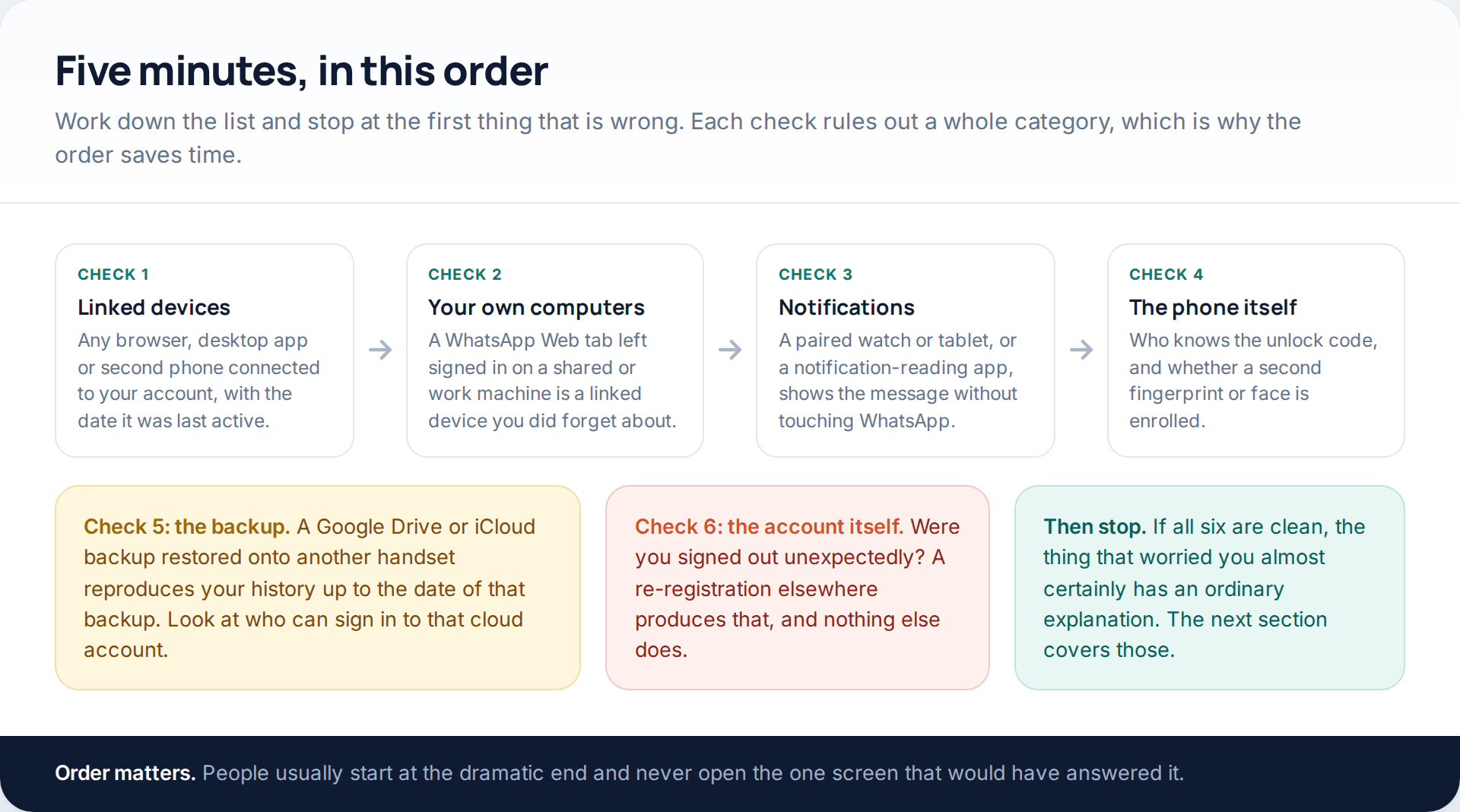
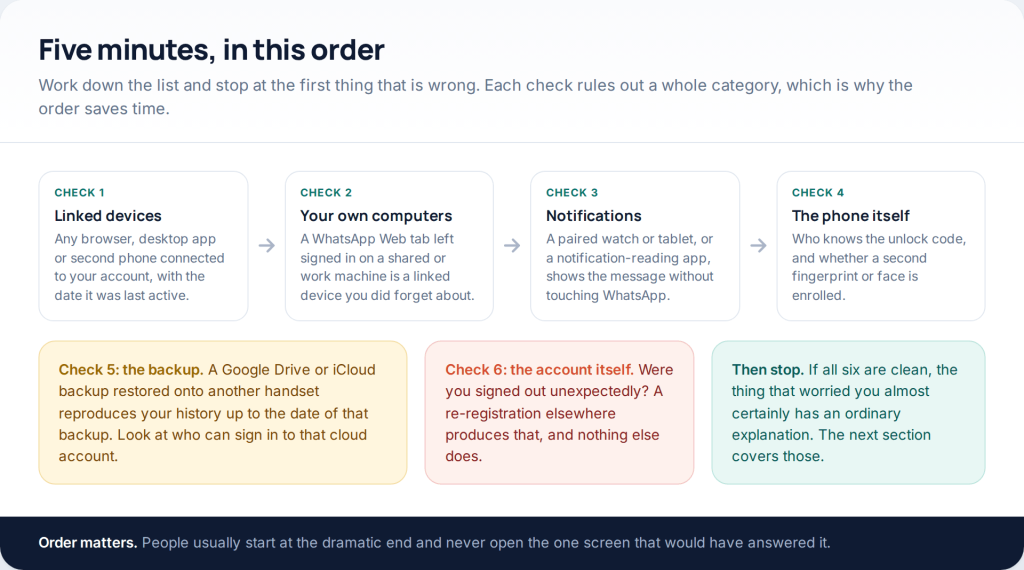
There are six routes by which another person reads a WhatsApp conversation, and they are not equally likely. Checked in order, each one rules out a whole category: the first takes ten seconds, and between them the first three account for nearly everything that turns out to be real.
What is not on the list is anybody reading the encrypted contents of your messages in transit. Personal chats on WhatsApp are end-to-end encrypted, and the company’s own material is unambiguous that no one else can read or hear them. Every route below targets a device or an account instead.
Check one: Linked devices
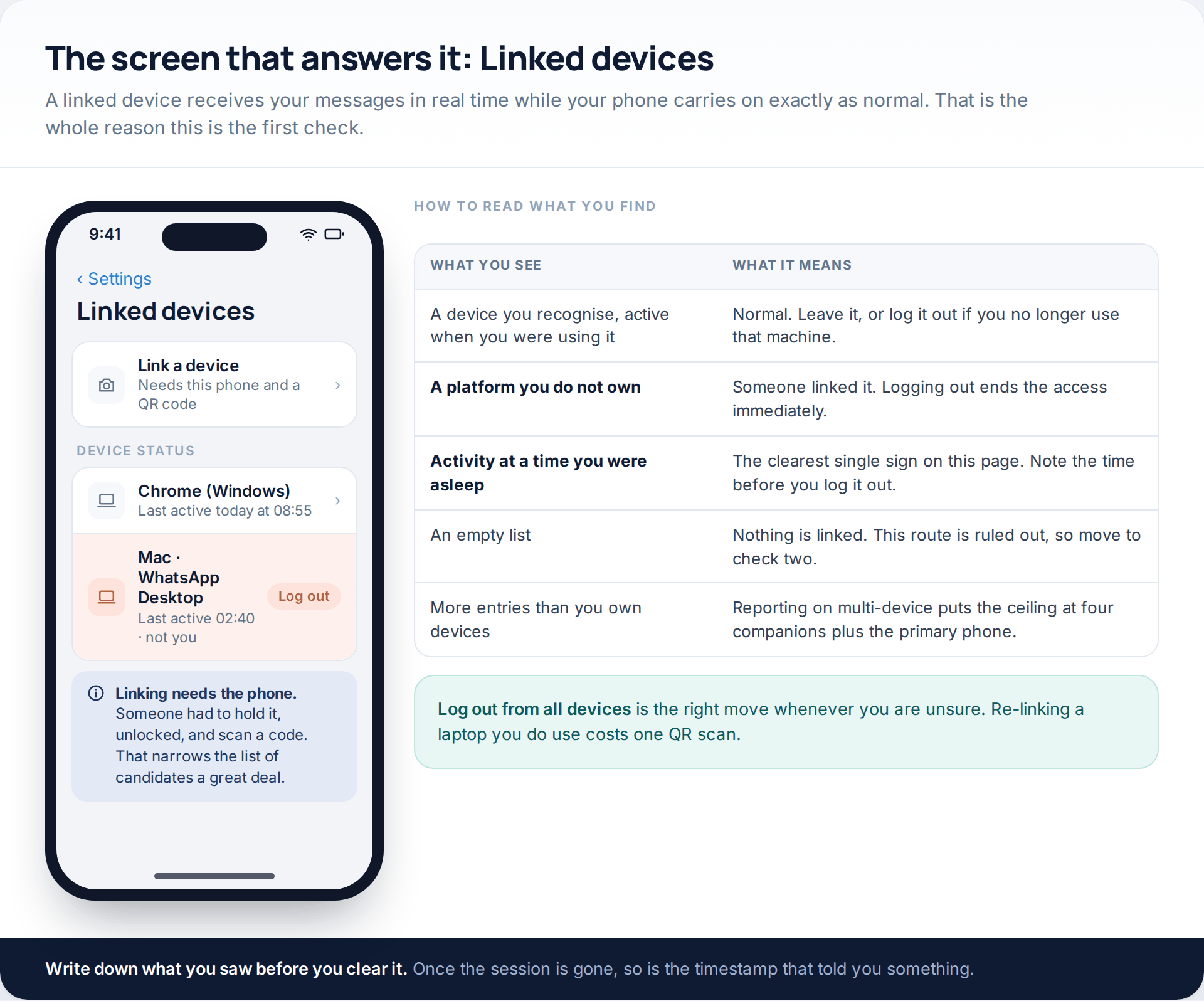
WhatsApp lets a browser, a desktop app or a second phone connect to your account and receive messages in real time. Your own phone carries on exactly as normal, which is why this is both the most useful route for an attacker and the easiest one to find.
Open Linked devices and read two things: the platform, and the last-active time. A machine you do not own is unambiguous. So is activity at three in the morning. Note what you saw before you clear it — once the session is logged out, the timestamp goes with it.
One detail is worth knowing: linking a device requires your phone, unlocked, to scan a QR code. Nobody does this remotely. If you find something here, the question is who had the handset, not who found your number.
Check two: a session you left open yourself
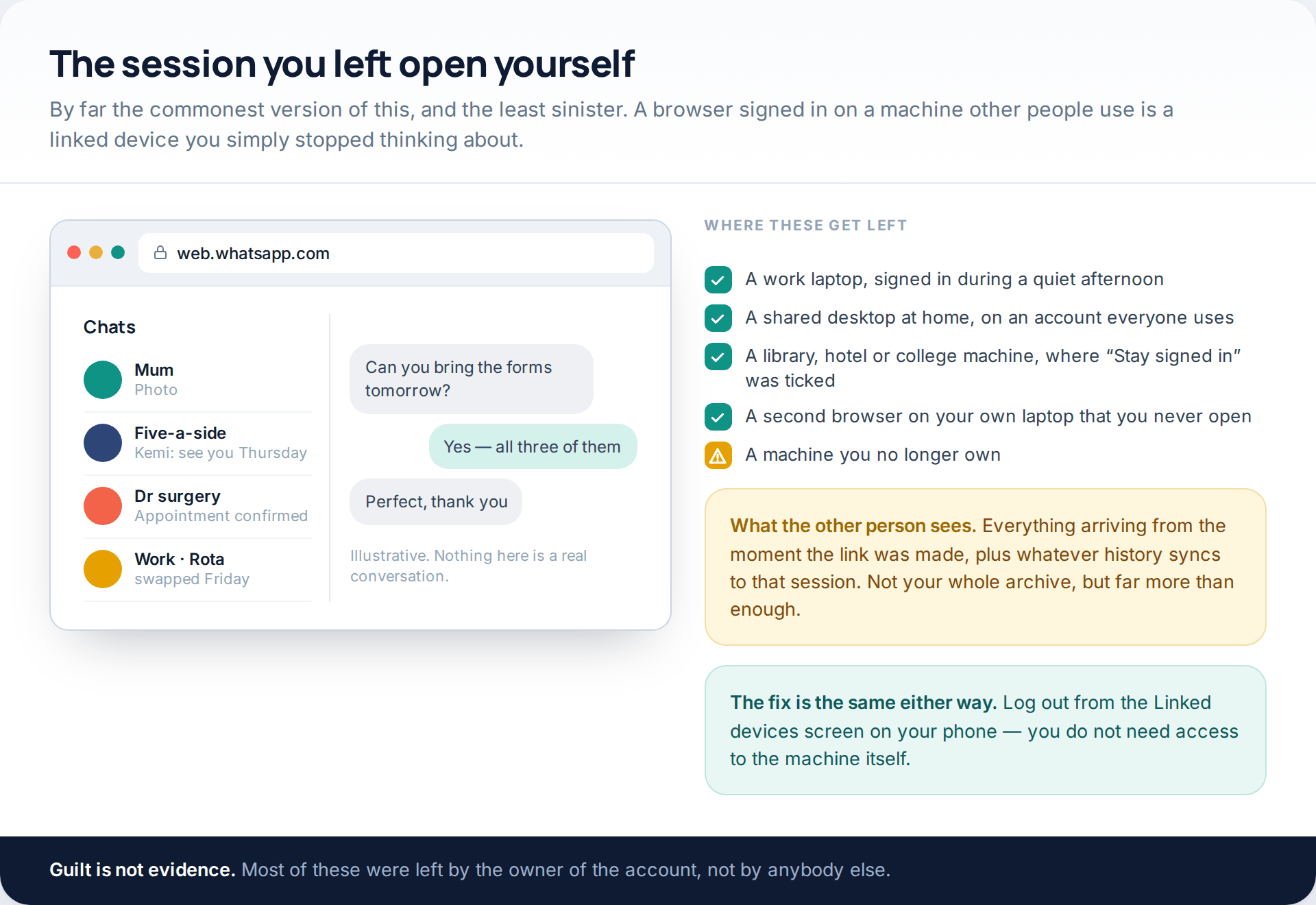
Before assuming anything, account for your own machines. A work laptop signed in during a quiet afternoon, a shared family desktop, a hotel or library computer where “Stay signed in” was ticked — all of these are linked devices, and all of them are invisible until you look at the list.
The person who later sits at that computer does not need to be malicious to read your messages; they only need to open a tab. And you can end it from your phone without going anywhere near the machine, which matters when it belongs to an employer or to a household you have left.
Check three: messages read without WhatsApp being opened
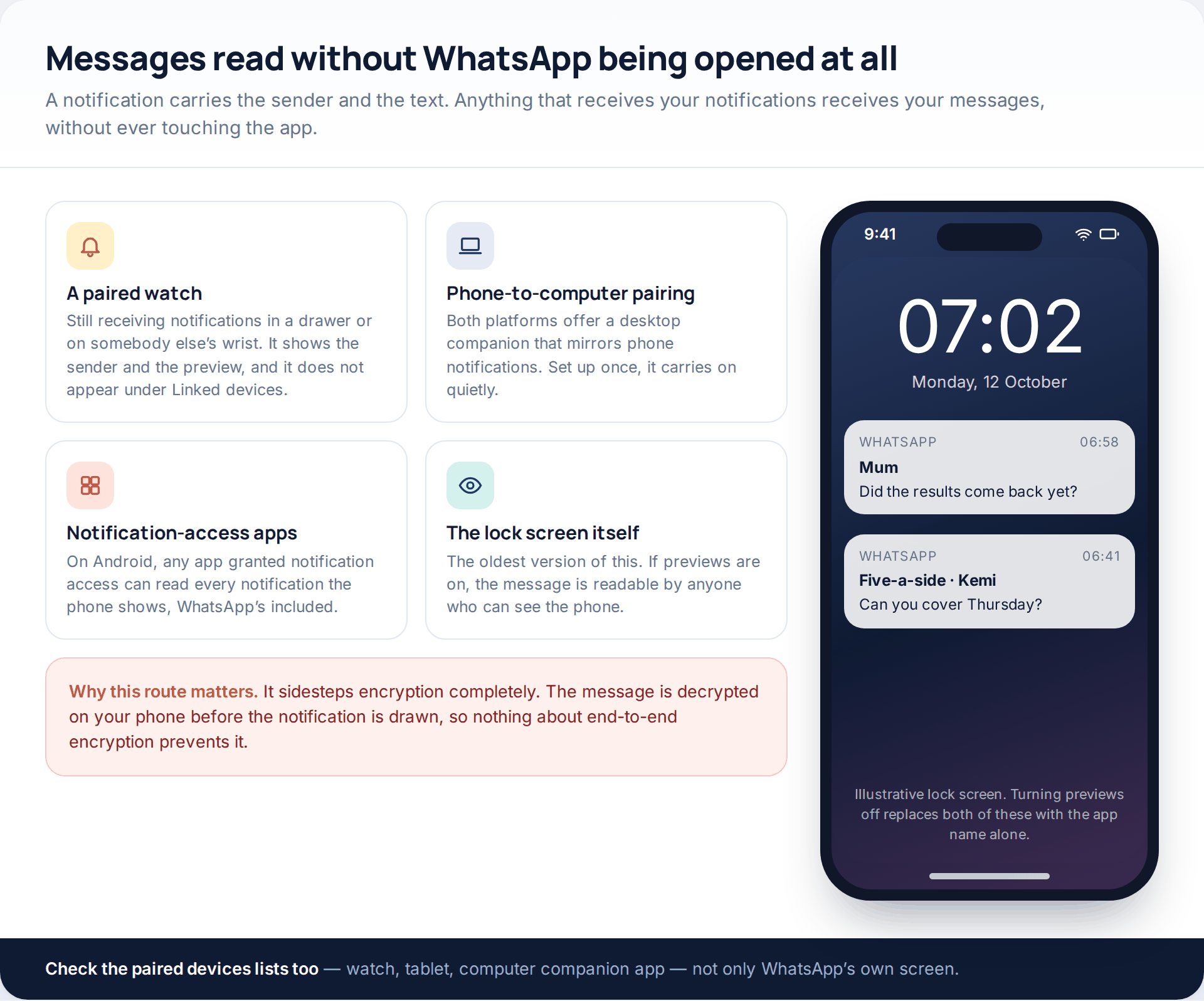
This is the route people miss, because it does not appear in WhatsApp at all. A notification is drawn after the message has been decrypted on your phone, so a smartwatch in a drawer, a desktop companion app that mirrors your phone’s notifications, or an Android app granted notification access will all show the sender and the text without any involvement from WhatsApp’s own settings.
Check the paired devices on your phone, not just inside the app: watches, tablets, and any computer you have paired for notification mirroring. On Android, look through the list of apps with notification access and remove anything you do not recognise. Then turn off message previews on the lock screen, which closes the oldest and simplest version of this.
If you find an app with notification access that you did not install, stop and read it as a wider problem than WhatsApp. That permission exposes every notification the phone shows, including banking messages and two-factor codes, so revoke it first and then work through the rest of the phone’s permissions rather than treating it as a WhatsApp problem.
Check four: the phone itself
The dullest route and the most common of all. Somebody who knows your passcode does not need anything on this page. Two things are worth a specific look: how many fingerprints or faces are enrolled on the device, because an extra one is permanent access that leaves no session anywhere; and whether your passcode is one that anyone has watched you type.
If this is the likely answer, chat lock is a proportionate response — it moves specific conversations into a folder with its own unlock, hides their notification content, and with a secret code can be removed from the chat list altogether. It is not encryption and it does not travel to the other person’s handset, but against somebody scrolling your phone for two minutes it is the correct tool.
Two details are worth checking while you are in the phone’s own settings rather than WhatsApp’s. The first is biometrics: most phones will happily hold several fingerprints or a second face, and an extra enrolment granted months ago behaves exactly like a key cut without your knowledge. The second is whether the handset is enrolled in anyone else’s device management — a phone supplied by an employer, or bought on a family plan and set up by somebody else, can carry policies you never agreed to. Neither of those shows up anywhere inside WhatsApp.
Check five: a backup restored elsewhere
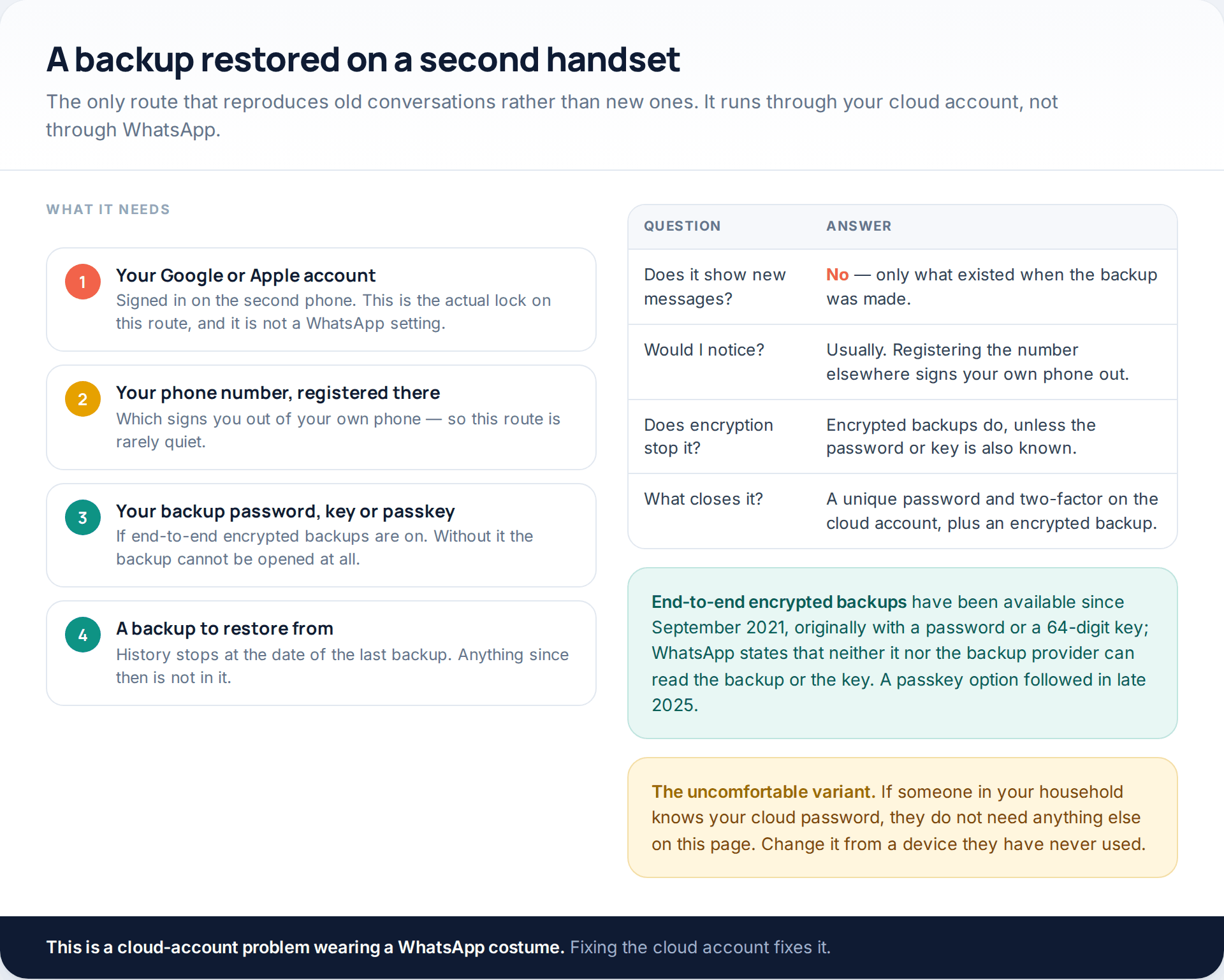
Every other route on this page shows messages from the moment it started. A restored backup is the exception: it reproduces history up to the date of the backup, and nothing after it.
It is also the route that depends least on WhatsApp. What it needs is your Google or Apple account, your number registered on the second handset — which signs your own phone out, so it is rarely quiet — and, if encrypted backups are on, the password, key or passkey that unlocks it. Secure the cloud account and this route closes.
Check six, and the claims that are not true
The sixth route is an account takeover: your number registered on somebody else’s phone. You will know, because you are signed out. What that person gets is your name and your incoming messages, not your archive — the history stays on your handset.
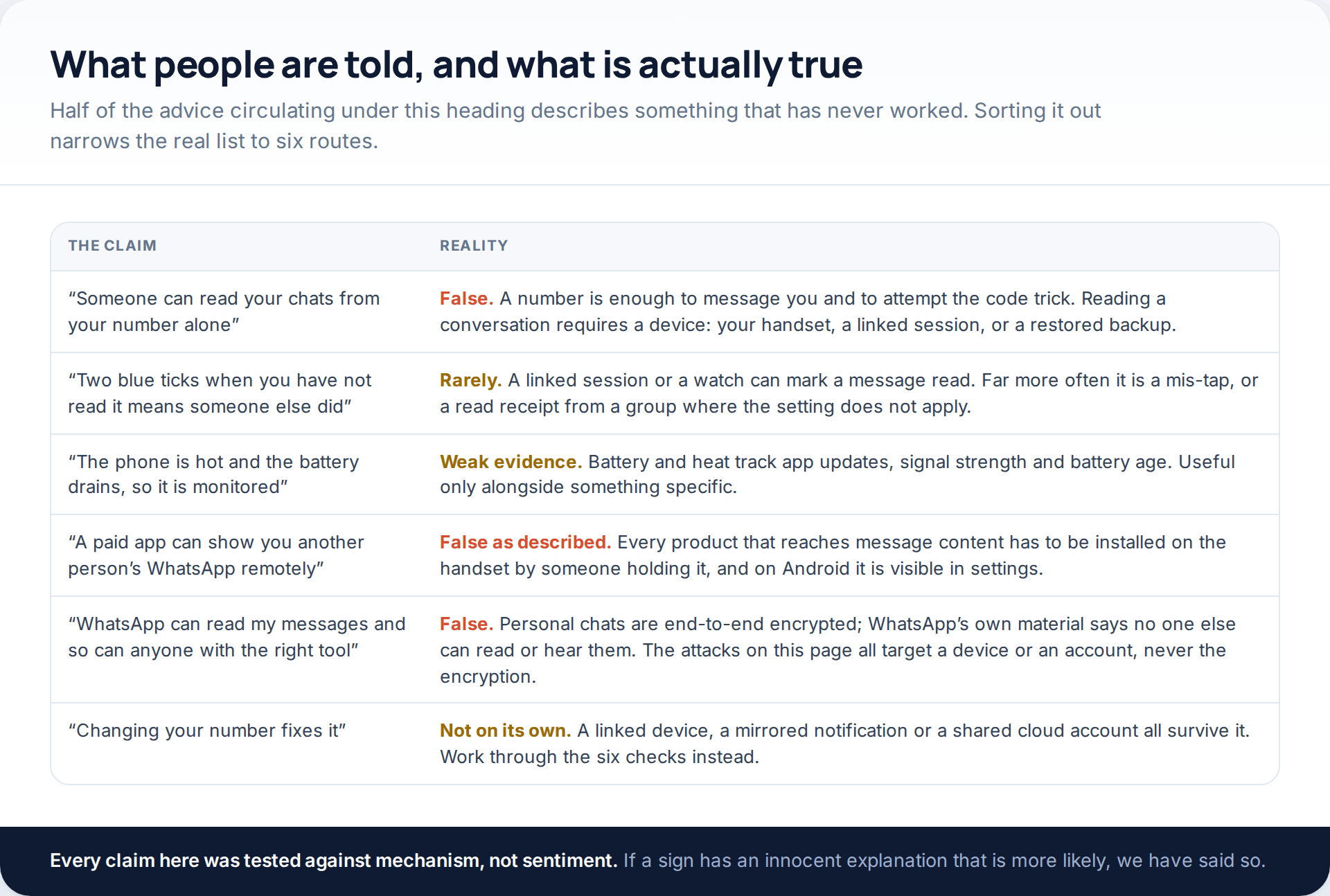
The first row is the one worth repeating, because it is the premise of every page this one replaced. A phone number lets somebody message you, see whatever your privacy settings make public, and try to talk you out of a registration code. It does not let anybody read a conversation.
The explanations that are usually right
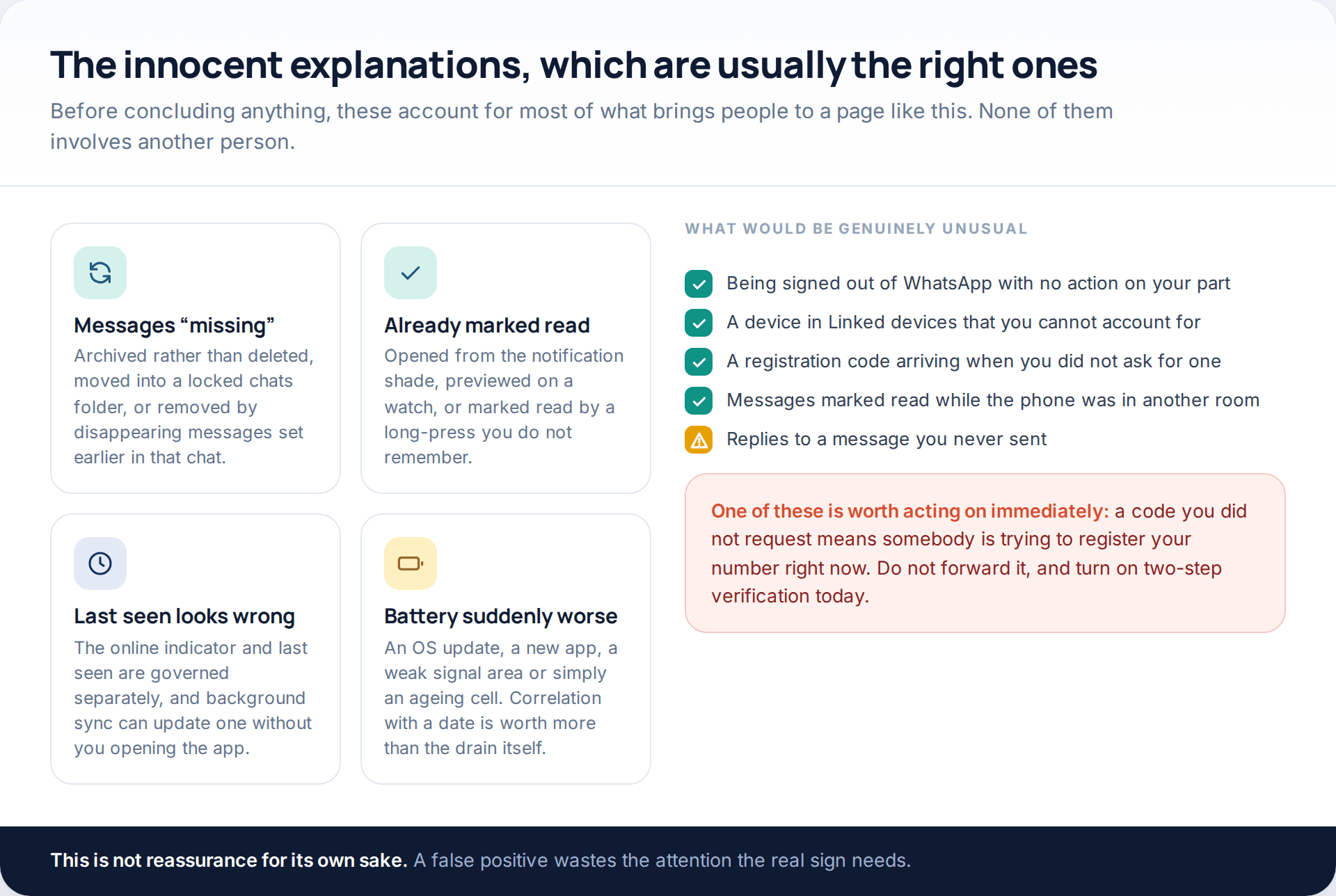
Archived chats, disappearing messages set months ago in that conversation, a preview opened from the notification shade, the separate behaviour of “online” and “last seen” — these account for most of what feels wrong. Battery and heat are the weakest evidence of all, because they track app updates, signal strength and the age of the cell far more than anything else.
One item on the right-hand list deserves acting on today rather than investigating: a registration code you did not request. It means somebody is attempting to register your number right now. Do not forward it to anyone, whatever they say, and turn on two-step verification this evening.
Closing each route
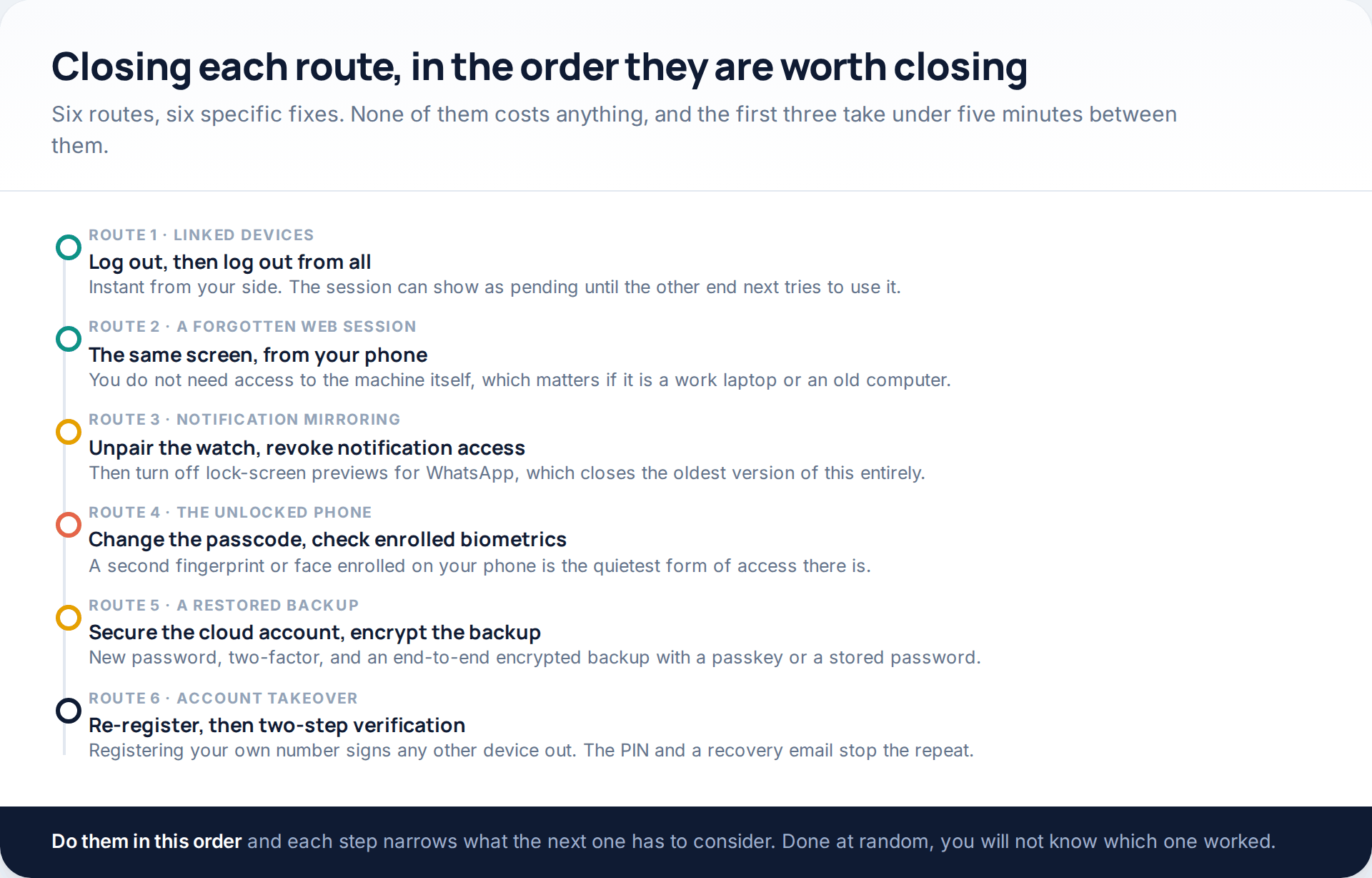
Nothing here costs money and nothing requires an app. The order matters only because doing them at random leaves you unable to tell which one mattered. If you want to go further than closing the route and tighten the account properly, the full set of free controls is laid out in the WhatsApp privacy settings that stop most attacks.
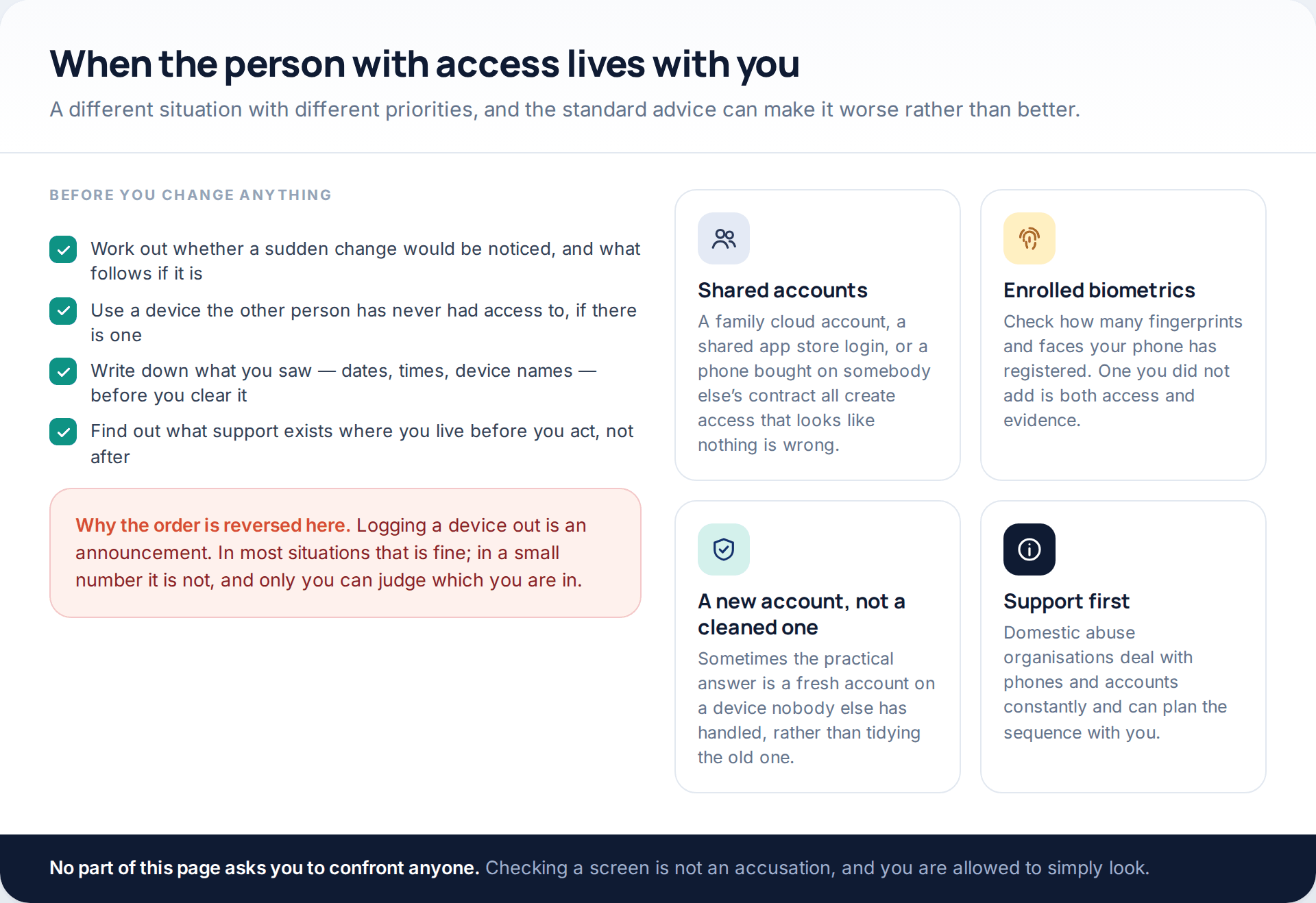
If the person with access lives with you
How this page was put together
The routes and screens here were checked in October 2026 against WhatsApp’s own blog and security pages and against reporting on the multi-device feature, encrypted backups and chat lock. WhatsApp’s help centre blocks automated retrieval, so nothing is quoted from it; where a figure comes from secondary coverage rather than from WhatsApp — the four-companion-device limit, the automatic sign-out of companions after roughly a fortnight of primary-phone inactivity — we have attributed it in the text as reporting rather than as a specification.
We have deliberately not published a list of symptoms with probabilities attached, because no reliable public data exists on how often each of these routes occurs. The myth table is reasoned from mechanism: a claim is marked false where the architecture rules it out, and marked weak where an innocent explanation is more likely than the alarming one. Menu paths are described rather than reproduced, since the same settings sit in different places on iPhone and Android and have moved between app versions.
Nothing on this page explains how to gain access to anyone else’s account, and nothing here would help with that. If you arrived because your account has already been taken rather than read, the recovery route is different and faster — it is set out in what to do when a WhatsApp account has been taken over.
Common questions
Can someone read my WhatsApp messages without touching my phone?
Only through something that was set up while they had it, or through an account you share with them. A linked device needs your unlocked phone to scan a QR code. A restored backup needs your cloud account. There is no route that starts with your phone number alone.
Does two blue ticks on a message I never opened prove anything?
Not by itself. A linked session, a watch, or a preview opened from the notification shade will all mark a message read. It is worth something only if it lines up with another finding, such as an unknown device in the linked list.
My battery drains much faster than it used to. Is that a sign?
It is the weakest sign there is. Battery life changes with system updates, new apps, poor signal and simply the age of the cell. Treat it as a prompt to check the linked-devices list rather than as evidence in itself.
Will reinstalling WhatsApp clear anything that is watching?
It does not end a linked session, does not remove notification access granted to another app, and does not change who knows your passcode. Reinstalling is one of the few steps that genuinely achieves nothing here.
How do I tell a linked device from an account takeover?
By whether you were signed out. A linked device leaves your phone working normally. A takeover registers your number elsewhere, which ends your own session immediately and with no warning.
Can WhatsApp itself tell me who read my messages?
No. The Linked devices screen shows platforms and last-active times, not people, and there is no log of what a session read. That is why writing down what you found before logging it out is worth doing.
Is there an app that detects whether my WhatsApp is being monitored?
Reputable mobile security apps can find known monitoring software on Android, and that is worth running. None of them can detect a linked web session, a paired watch or somebody who knows your passcode, which is why the manual checks above come first.
Using a monitoring app for this? GuestSpy is parental monitoring for Android that stays visible on the child's phone and runs from any browser. If it fits your family, see the Text messages & social feature.
Related guides
5 Best Security and Network-Testing Apps for Android (Rooted and Not)
The useful security apps for Android are not the ones with “hack” in the title. They are a network scanner,…
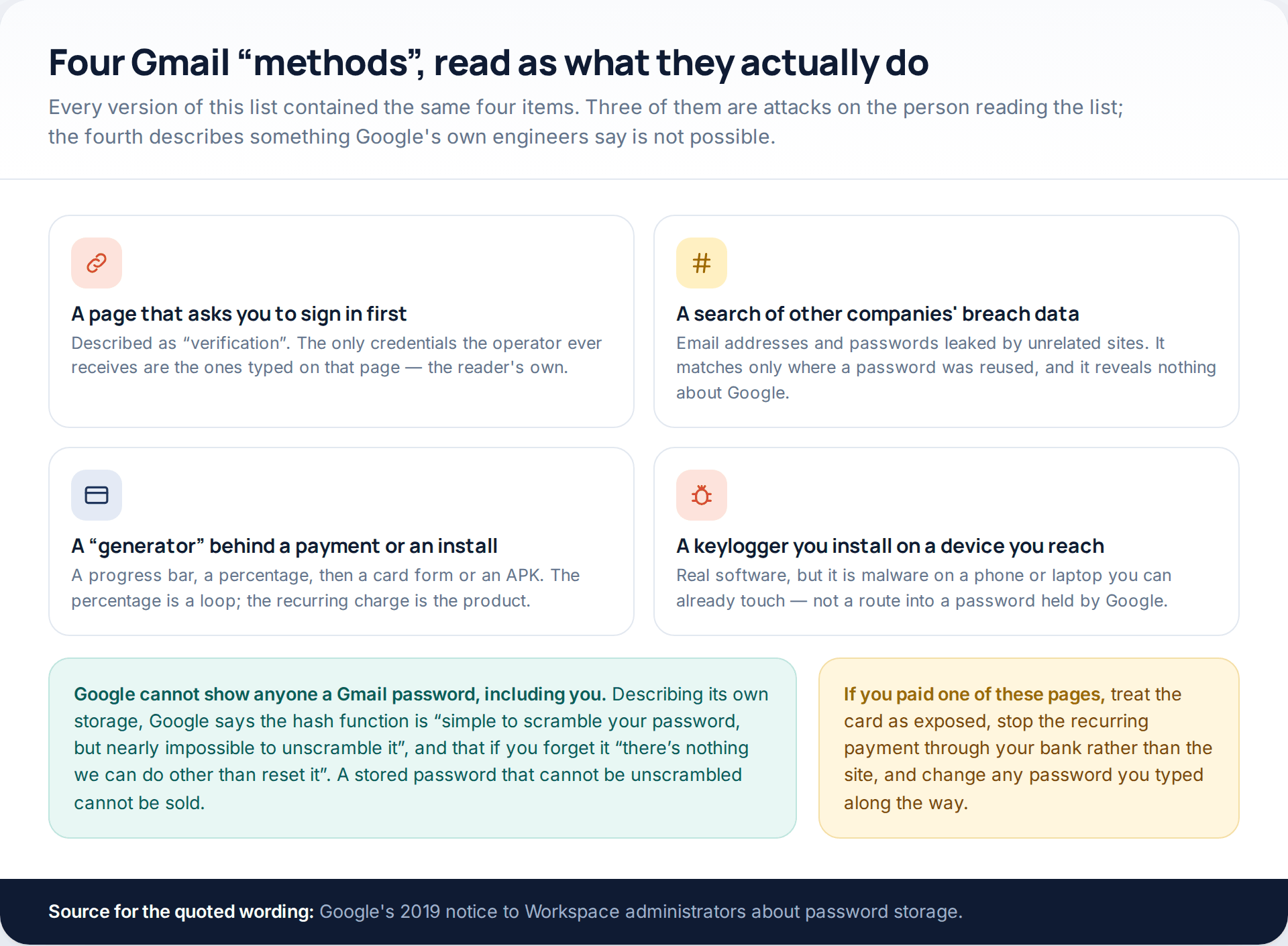
Gmail Password Compromised? Four Recovery Routes Google Accepts
If your Gmail password was hacked, there are four routes back and the one that is open to you depends…
Facebook Account Hacked? Every Free Route Back In
If your Facebook account was hacked, five routes lead back in and all of them are free: a device of…
Monitoring your child can see.
Location, screen-time budgets, routines, app and website blocking and the alerts that matter, run from any browser and visible on the phone. Pair an Android phone in about fifteen minutes.