WhatsApp Privacy Settings That Cost Nothing and Stop Most Attacks

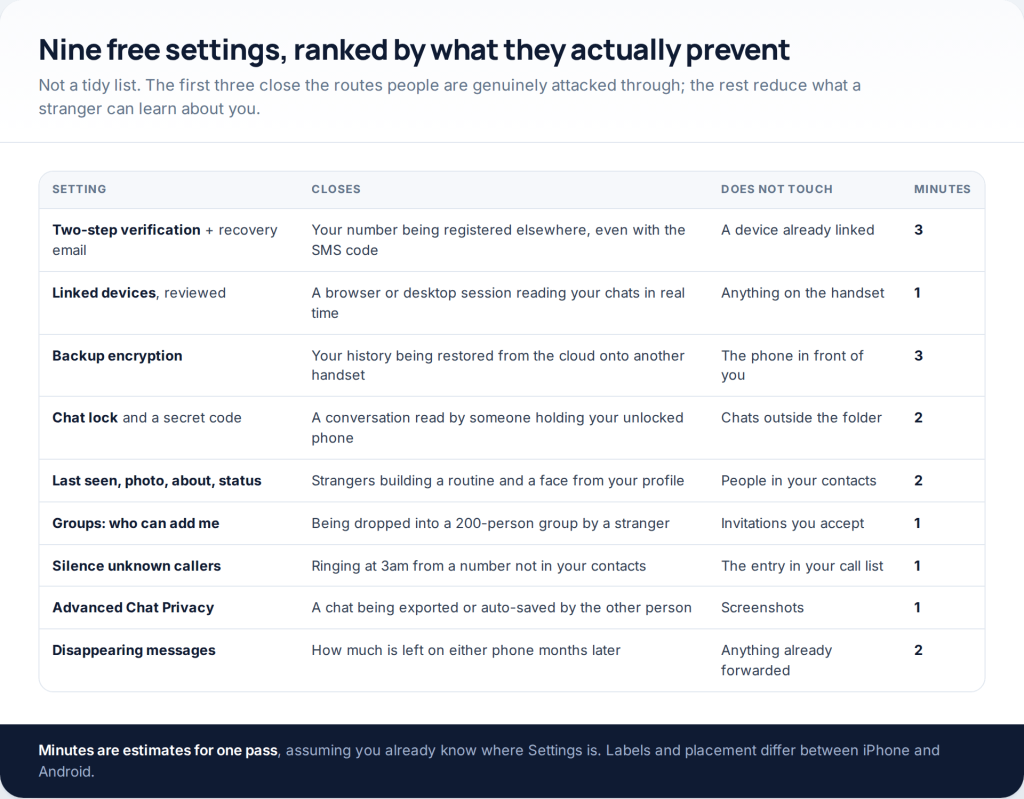
The WhatsApp privacy settings that matter are free, built in, and take about a quarter of an hour in total. Three of them close the routes people are actually attacked through — two-step verification, the linked-devices list, and backup encryption. The other six decide how much a stranger holding only your number can learn about you. Here is each one, and what it genuinely stops.
This address used to carry four “free ways to hack someone’s WhatsApp Messenger”. Each of the four described a way of tricking a person rather than a messaging system: a page that captured a login, a QR code scanned on the owner’s behalf, a code forwarded by somebody who was asked nicely, or software that had to be installed on a handset by hand. Flipped round, those four routes are exactly what the settings below close.
The nine settings, and what each one is for
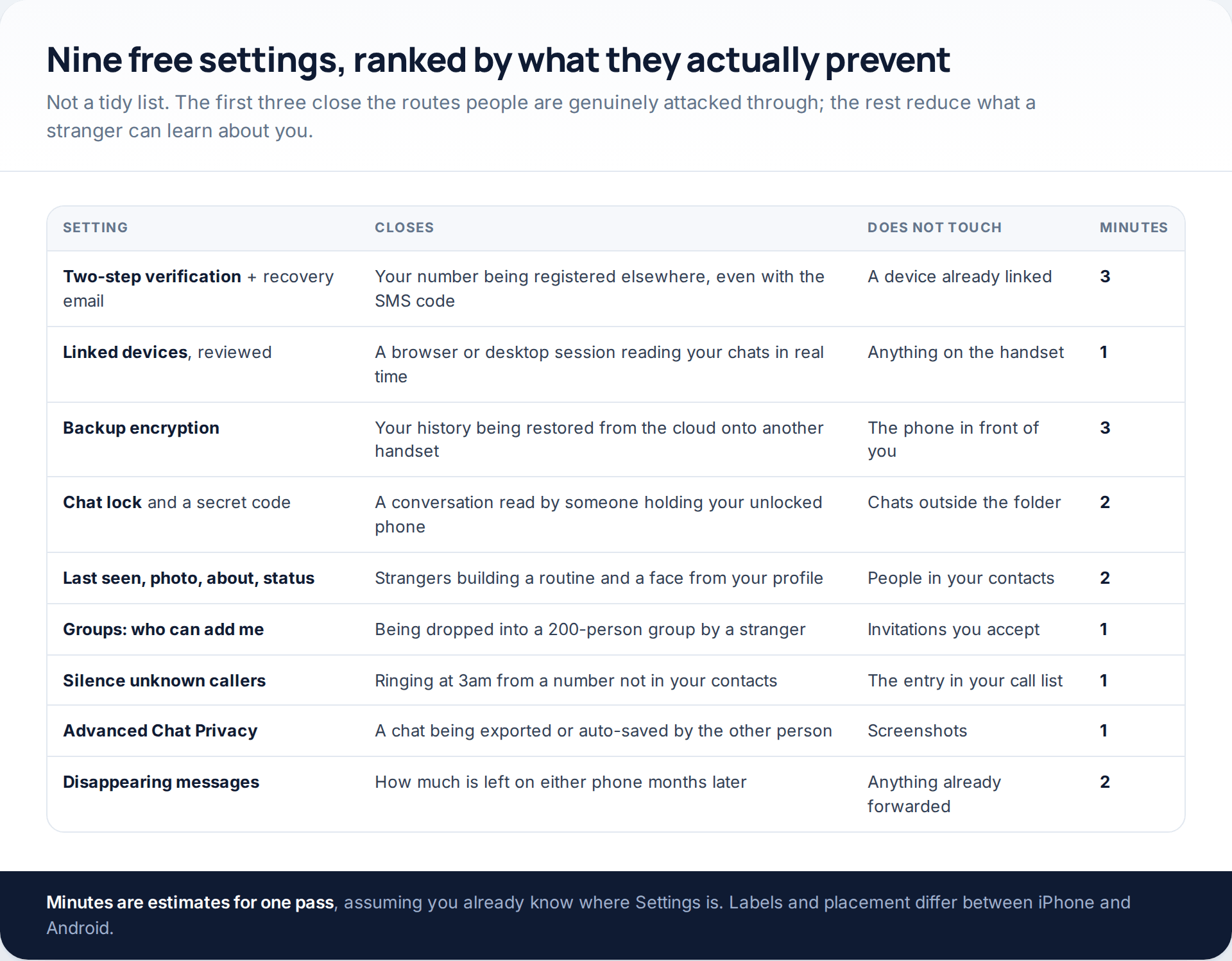
Ranking matters here, because WhatsApp’s privacy screen presents nine or ten options as equals and they are nothing of the sort. Turning off read receipts is a preference. Turning on two-step verification is the difference between a stolen six-digit code being an inconvenience and being a lost account.
Two-step verification, and the email most people forget
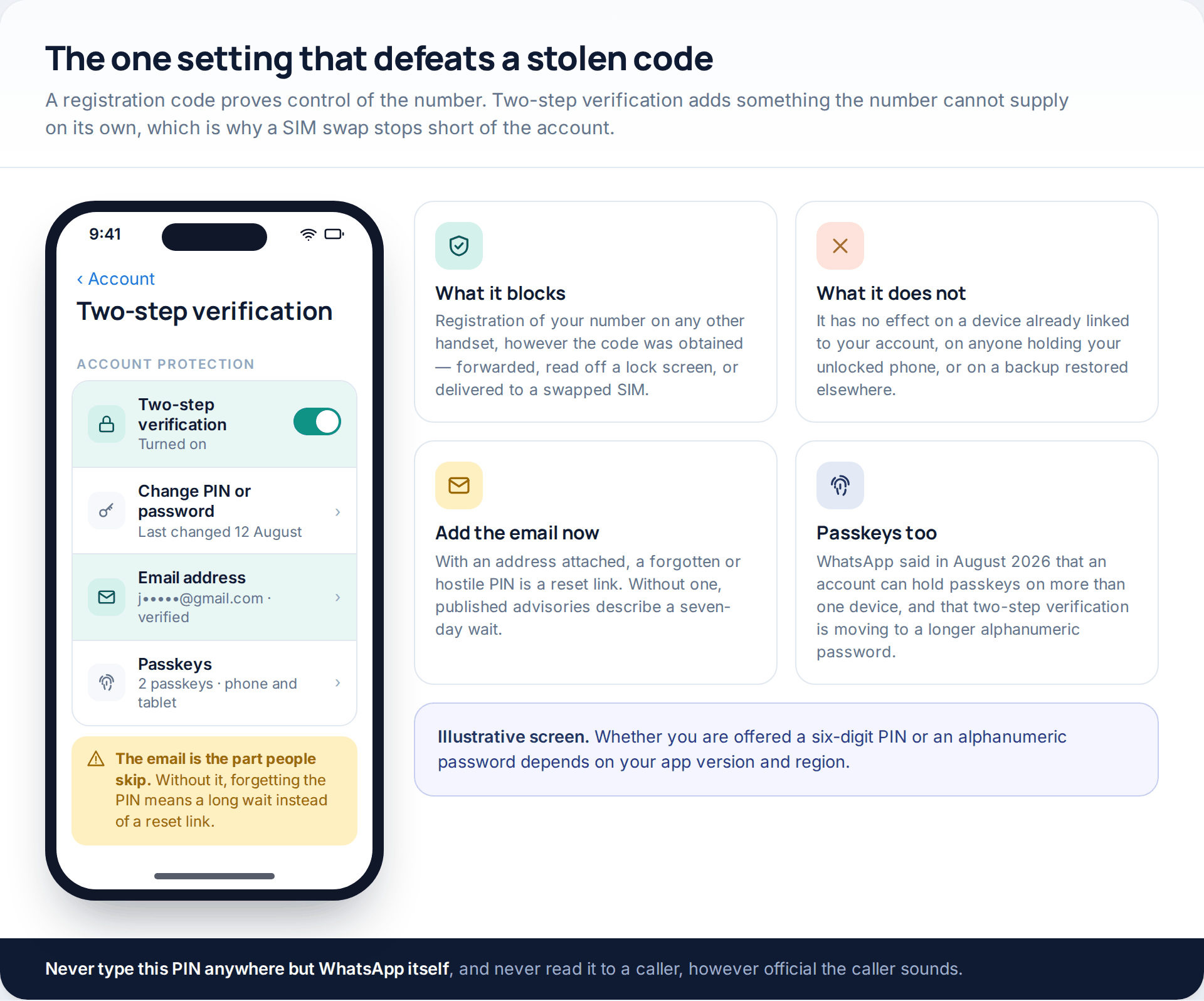
A WhatsApp account is tied to a phone number, and registering that number on a new phone needs one six-digit SMS code. Two-step verification adds a second thing: a PIN, or on newer versions a longer password, that the code alone cannot supply. Somebody who talks you out of the code, reads it from your lock screen or has your number moved to their own SIM still stops at this screen.
Attach the recovery email while you are there. Without one, published incident advisories describe a seven-day wait before a number can be registered without the PIN. With one, a reset link lands in your inbox. WhatsApp also said in August 2026 that two-step verification was moving from a six-digit PIN to a longer alphanumeric password, and that an account can now hold passkeys on more than one device — so set up whichever version your app offers rather than waiting for the other.
The PIN is never given to anyone. Not to a caller claiming to be WhatsApp, not to a friend whose account is “locked”, and not into a web page. WhatsApp has no support line that asks for it, because the whole value of the number is that only you know it.
Linked devices: ten seconds, once every few months
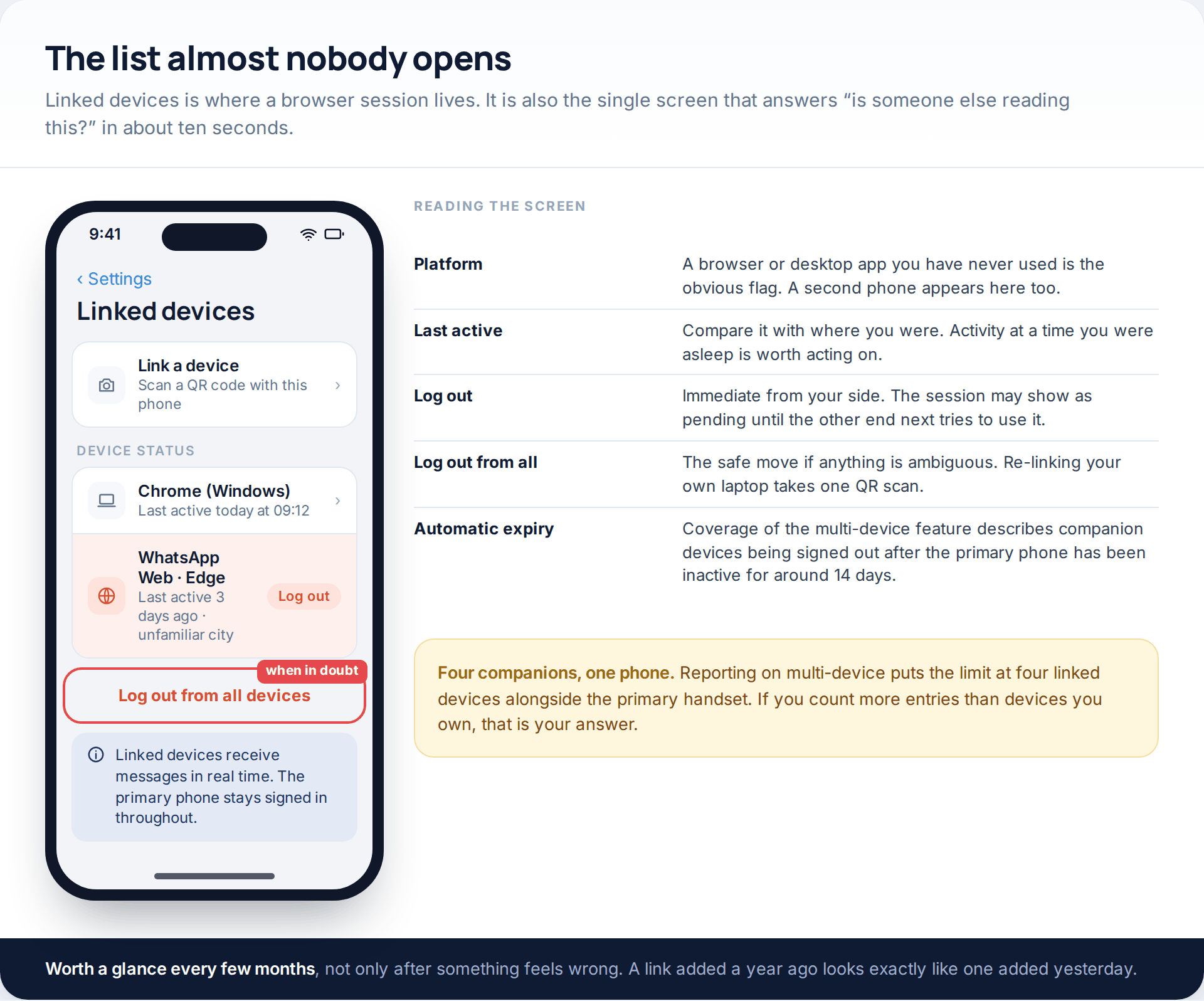
WhatsApp lets a browser or a desktop app connect to your account and receive messages in real time. That is a genuinely useful feature and it is also the quietest route into somebody’s chats, because it survives a password change, produces no SMS, and leaves your phone working exactly as before.
Open Linked devices and read two columns: what the device is, and when it was last active. A browser you have never used, or activity at a time you were asleep, is the whole diagnosis. Log it out, and if anything is ambiguous use Log out from all devices — relinking your own laptop costs one QR scan.
Coverage of WhatsApp’s multi-device feature puts the limit at four companion devices alongside the primary phone, and describes those companions being signed out automatically once the primary handset has been inactive for about a fortnight. Useful to know, but not something to rely on: a fortnight is a long time.
Last seen, profile photo and status
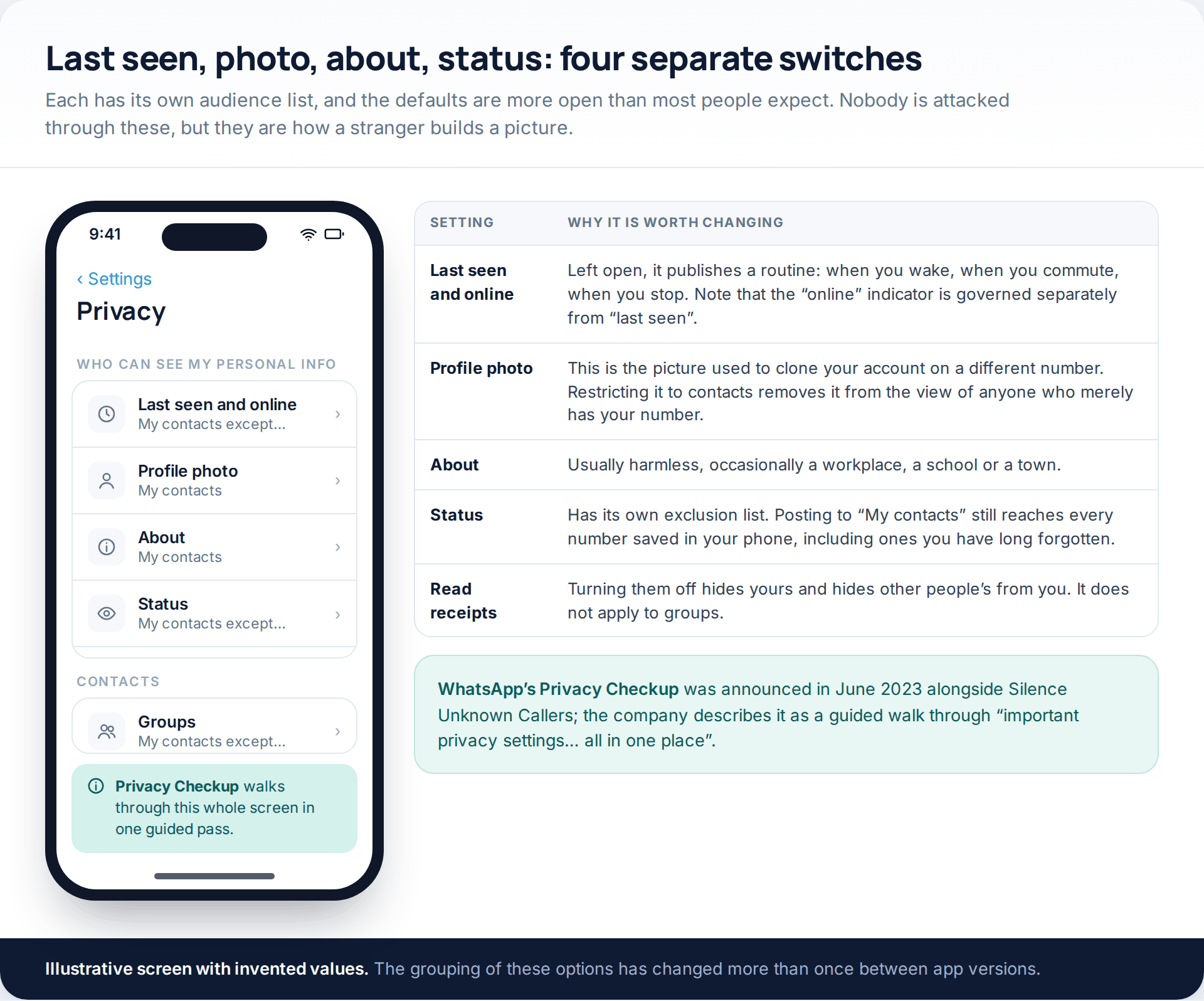
Nobody loses an account through these. What they leak is context, and context is what makes a scam message convincing. Your profile photo is the single most useful item here to somebody building a copy of your account on a different number, so restricting it to your contacts removes it from the view of anyone who merely knows your number. Last seen and the separate online indicator publish a daily routine to the same audience.
Each of these has an “except…” option, which is more useful than it looks: it lets you stay visible to friends while excluding a particular person without blocking them outright. WhatsApp’s Privacy Checkup, announced in June 2023, walks the whole screen in one guided pass and is the quickest way to do this if you would rather not hunt through menus.
Who can reach you at all
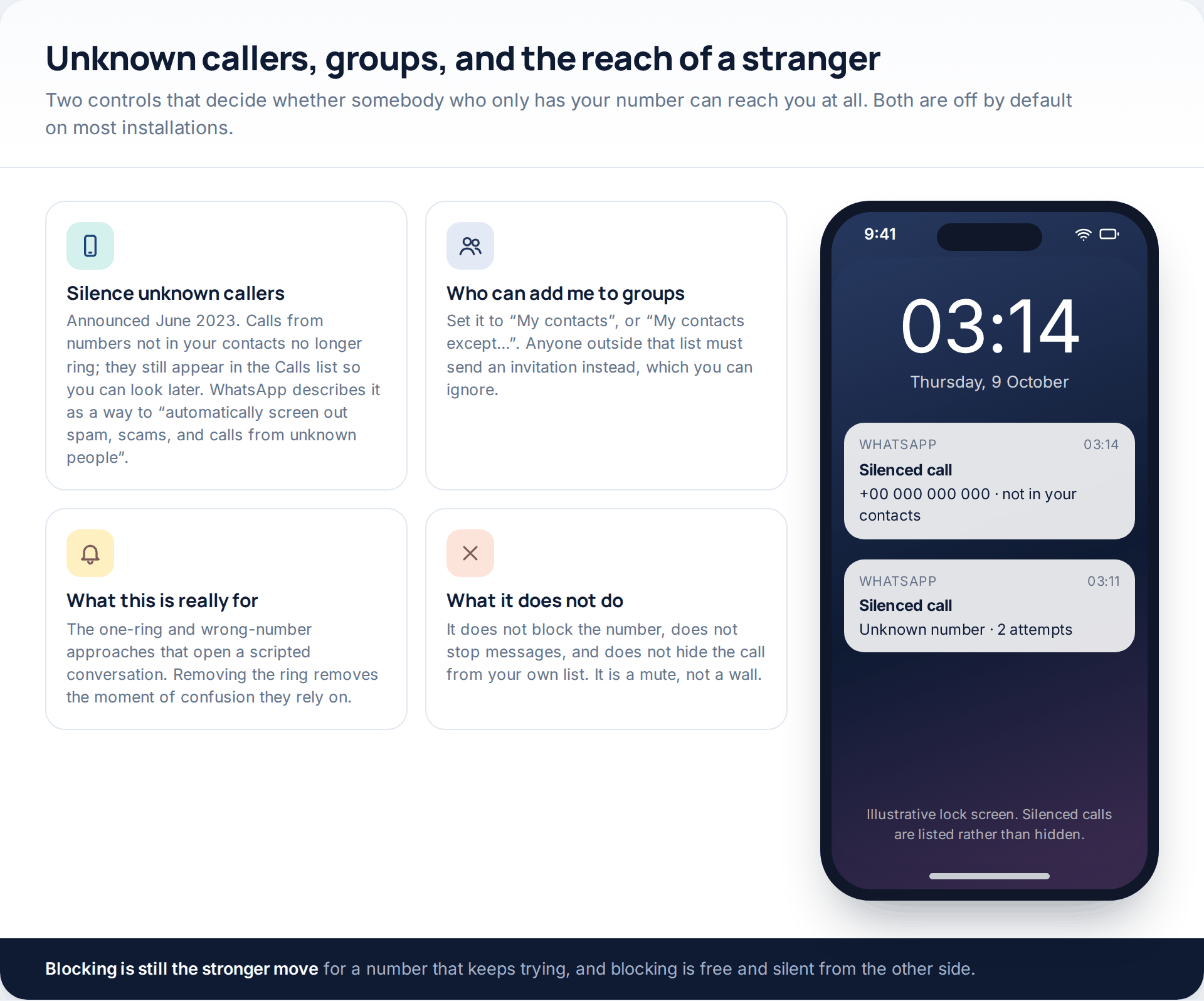
Two settings decide whether a stranger with your number can make your phone behave. Silence unknown callers, which WhatsApp announced in June 2023 as a way to screen out spam and scam calls, stops numbers outside your contacts from ringing; they still appear in the Calls list, so nothing is hidden from you. And Groups, under Privacy, decides who can add you to one without asking.
Set the group control to “My contacts” at minimum. Being added to a large group by a stranger exposes your number and your profile to everyone else in it, which is the mechanism behind a long-running family of investment and job-offer scams.
Chat lock, and the secret code
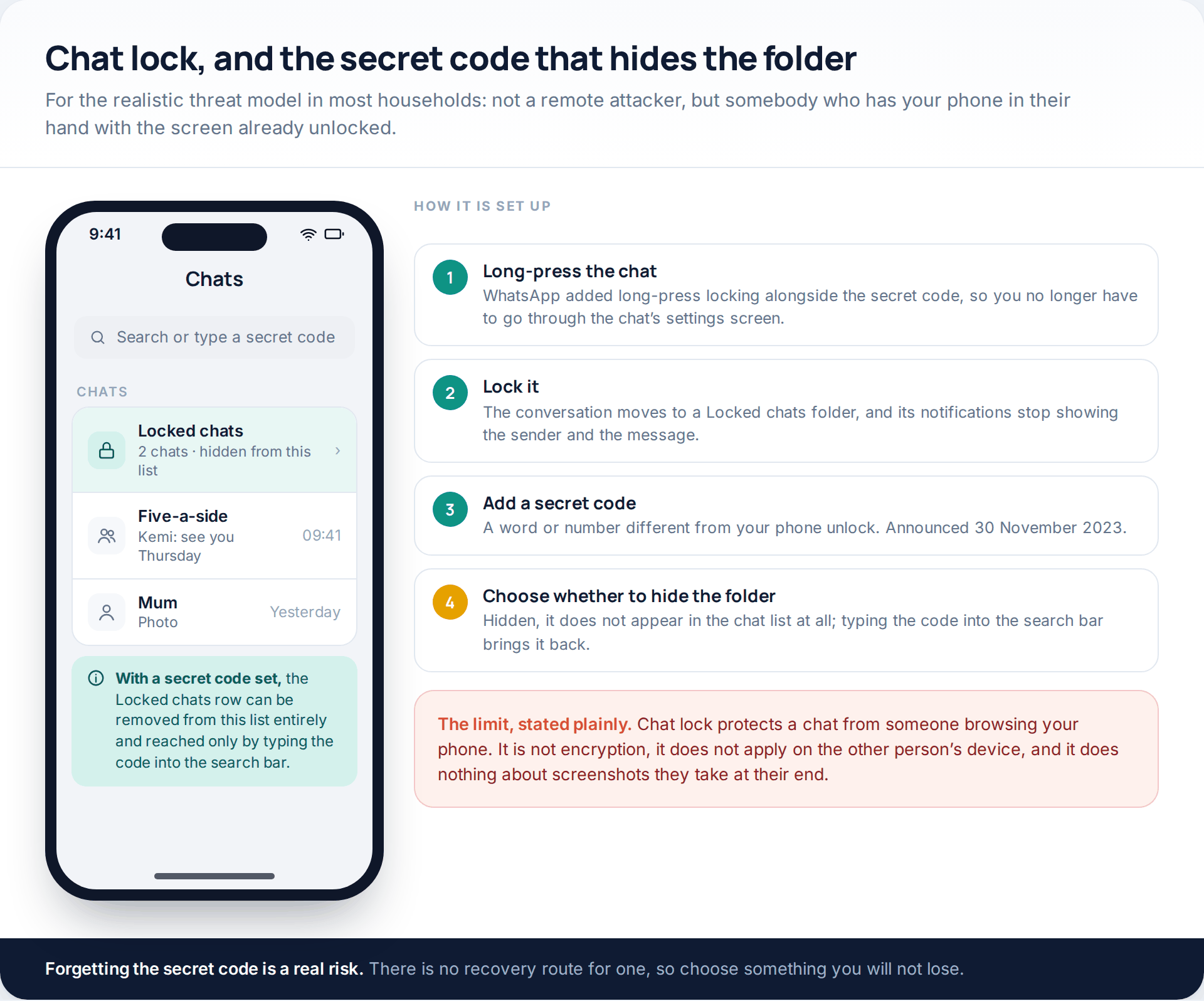
For most people the honest risk is not a remote attacker at all. It is a phone passed to someone to look at a photograph, or left unlocked on a kitchen table. Chat lock moves a conversation into its own folder, stops its notifications showing the sender or the content, and requires an unlock to open.
The secret code, announced on 30 November 2023, is the part worth setting up. It lets you use a code different from your phone unlock, and lets you remove the Locked chats folder from the chat list altogether — after which the only way to reach it is to type the code into the search bar. WhatsApp also added long-press locking at the same time, so a chat can be locked without going through its settings screen.
What survives a conversation
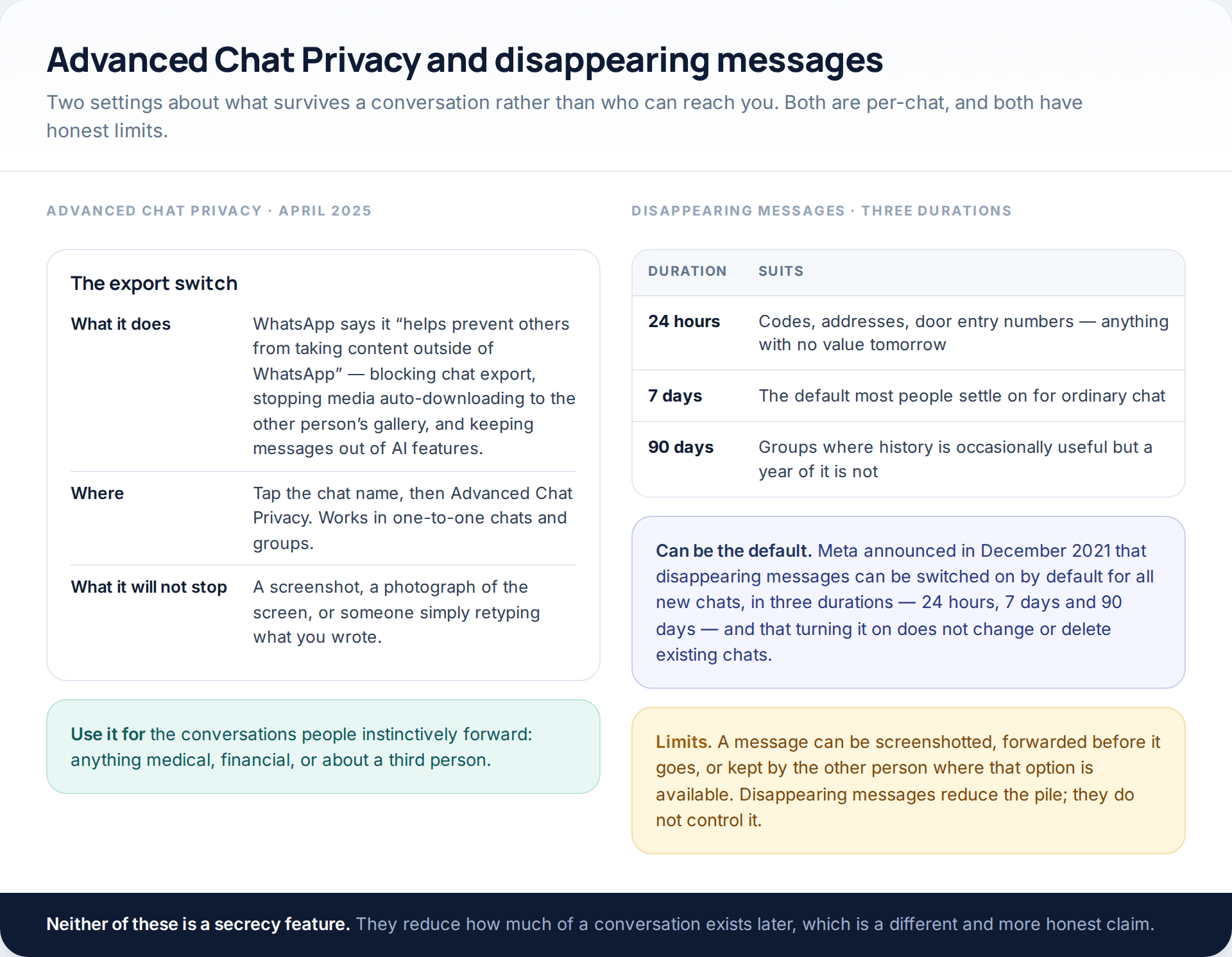
Advanced Chat Privacy, introduced on 23 April 2025, is a per-chat switch that WhatsApp describes as helping to prevent others taking content outside WhatsApp: it blocks exporting the chat, stops media auto-saving to the other person’s gallery, and keeps the messages out of AI features. Turn it on for the conversations people instinctively forward.
Disappearing messages come in three durations — 24 hours, 7 days and 90 days — and Meta announced in December 2021 that they can be switched on by default for every new chat. Existing conversations are not touched, so nothing vanishes retroactively.
Neither feature stops a screenshot, a photograph of the screen, or someone retyping what you wrote. They reduce the amount of material lying around months later, which is a smaller claim and a true one.
The backup, which is the real copy of everything
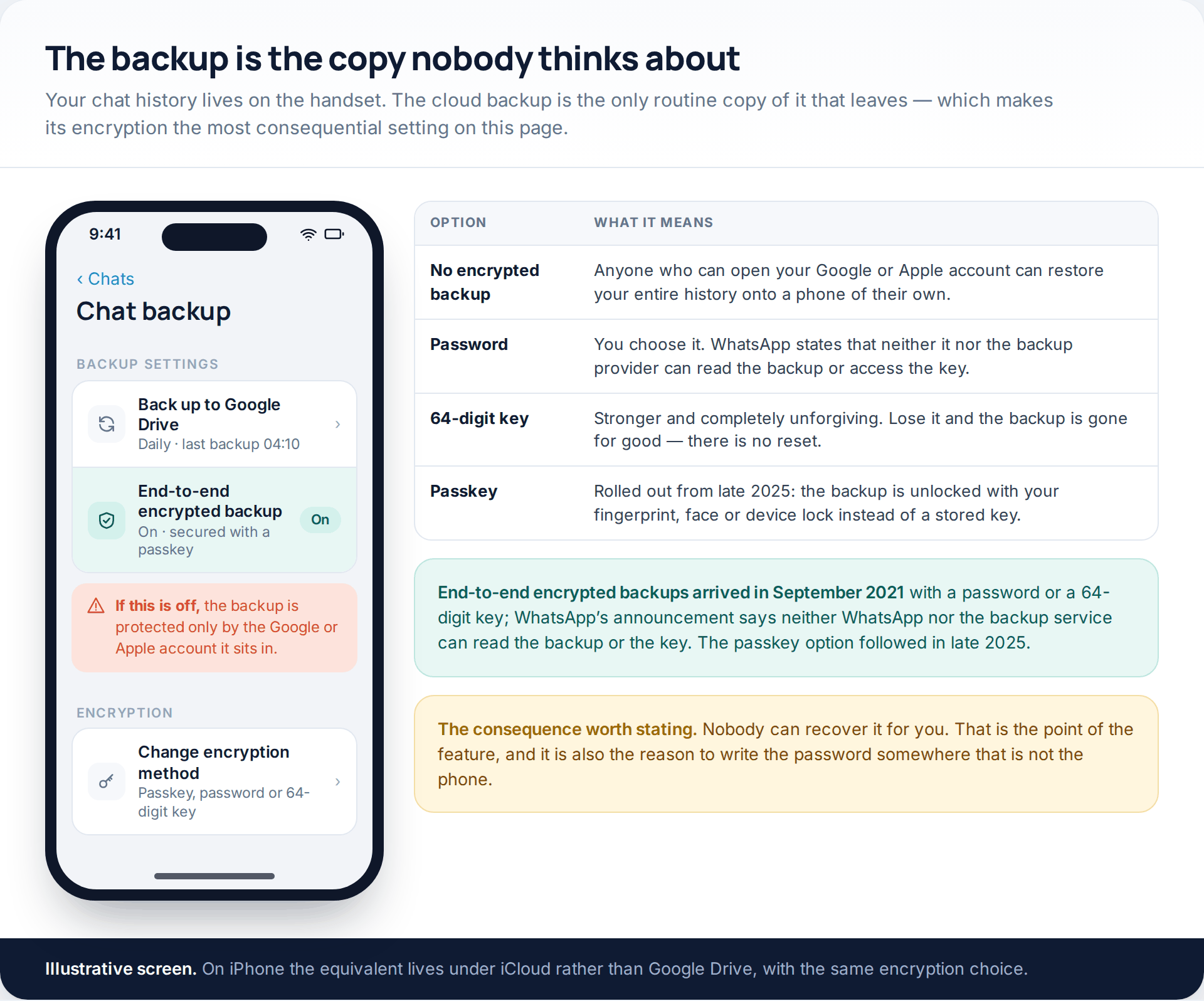
Your chats live on your phone. The exception is the nightly backup to Google Drive or iCloud, and if that backup is not encrypted it is protected by nothing stronger than the cloud account it sits in. Anyone who can open that account can restore your entire history onto a handset of their own.
End-to-end encrypted backups arrived in September 2021, originally secured with a password you choose or a 64-digit key, and WhatsApp’s announcement states that neither WhatsApp nor the backup provider can read the backup or access the key. A passkey option followed in late 2025, unlocking the backup with your fingerprint, face or device lock instead of something you have to store.
Choose the passkey if it is offered. If you choose a password, write it somewhere that is not the phone — the feature’s whole design means nobody can recover it for you, including WhatsApp.
Doing the whole thing in one pass
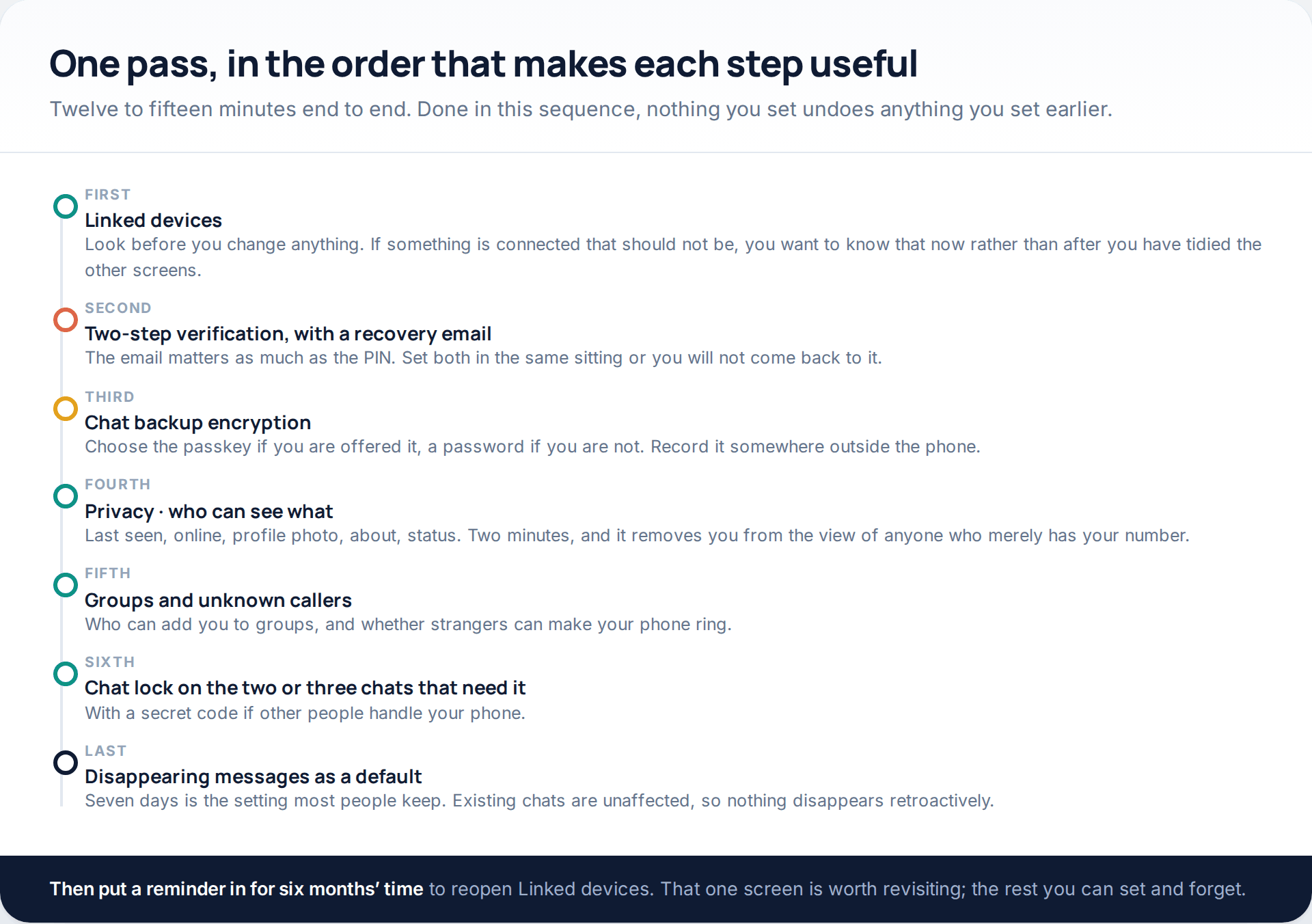
Fifteen minutes, once. The only screen worth revisiting on a schedule is Linked devices, because it is the only one that changes without you. If you would rather check whether anything is already connected before you start tightening things, the specific signs are set out in our guide to the signs someone else has been reading your WhatsApp.
How this page was put together
Every feature here was checked in October 2026 against WhatsApp’s own blog posts and Meta’s newsroom, each of which carries a publication date: the Silence Unknown Callers and Privacy Checkup announcement of June 2023, Secret Code for Chat Lock of 30 November 2023, Advanced Chat Privacy of 23 April 2025, end-to-end encrypted backups of September 2021, Meta’s default disappearing messages announcement of December 2021, and WhatsApp’s August 2026 post on alphanumeric two-step verification and multiple passkeys. Where a figure comes from reporting rather than from WhatsApp — the four-companion-device limit, the fortnight of inactivity, the seven-day PIN wait — we have said so in the text.
WhatsApp’s help centre at faq.whatsapp.com blocks automated access, so no menu path here is quoted from it. Paths are described rather than reproduced screen by screen, because the same settings sit in different places on iPhone and Android and have moved between versions more than once. If a label is not where we describe it, search the settings screen for the same word.
We have not tested these settings against any attack, we have not measured anything, and we have invented no figures. Where a setting has a limit we have stated it next to the setting rather than in a footnote. If you want the wider version of this — spotting software that has been put on a phone rather than tightening the app’s own controls — that is covered in our guide to detecting monitoring software on a phone.
Common questions
Which WhatsApp privacy setting should I change first?
Two-step verification with a recovery email attached, then Linked devices. The first stops your number being registered elsewhere; the second ends any session already reading your chats. Everything else on this page reduces exposure rather than closing a route in.
Can someone read my WhatsApp if they only know my number?
No. A phone number is enough to message you, to see whatever your privacy settings make public, and to try the code trick on you — but not to read a conversation. Reading chats requires a device: your handset, a linked session, or a restored backup.
Does turning off read receipts hide my last seen?
No, they are separate settings with separate audiences, and “online” is separate again from “last seen”. Turning off read receipts also hides other people’s ticks from you, and it has no effect in group chats.
Is chat lock the same as an app lock?
No. An app lock asks for a fingerprint to open WhatsApp at all. Chat lock protects specific conversations inside it, hides their notification content, and with a secret code can remove the folder from the chat list entirely.
If I turn on encrypted backups and forget the password, what happens?
The backup becomes unrecoverable. WhatsApp states that it cannot read the backup or access the key, which is precisely why there is no reset. Use the passkey option where it is offered, or store the password away from the phone.
Do disappearing messages delete the conversation from the other person’s phone?
They remove the messages from both sides after the duration you set, but they cannot undo a screenshot, a forward, or a photograph of the screen. Treat them as reducing what is left to find, not as control over what the other person keeps.
How often should I check Linked devices?
Every few months is sensible, plus any time your phone has been out of your hands or behaving oddly. It is the only setting on this page that can change without you touching it.
Using a monitoring app for this? GuestSpy is parental monitoring for Android that stays visible on the child's phone and runs from any browser. If it fits your family, see the Text messages & social feature.
Related guides
5 Best Security and Network-Testing Apps for Android (Rooted and Not)
The useful security apps for Android are not the ones with “hack” in the title. They are a network scanner,…
Gmail Password Compromised? Four Recovery Routes Google Accepts
If your Gmail password was hacked, there are four routes back and the one that is open to you depends…
Facebook Account Hacked? Every Free Route Back In
If your Facebook account was hacked, five routes lead back in and all of them are free: a device of…
Monitoring your child can see.
Location, screen-time budgets, routines, app and website blocking and the alerts that matter, run from any browser and visible on the phone. Pair an Android phone in about fifteen minutes.