Instagram Hacked? How to Recover the Account and Lock It Down

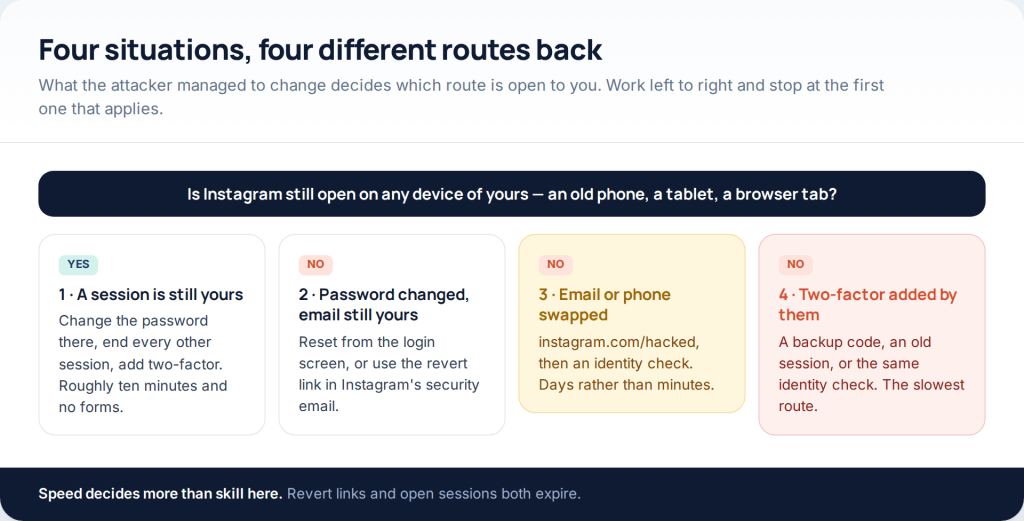
If someone has your Instagram account, there are four ways back, and the one that works depends on what they changed. A password only? Reset it from the login screen. Your email too? Look for Instagram’s revert link. Both your email and phone? instagram.com/hacked and an identity check. Whichever applies, end the other sessions before you change the password — or they stay signed in.
This page used to be a list of “Instagram password hacking apps”. It is now about getting a stolen account back, because that is the problem people actually arrive here with — and because no such app has ever read a password out of Instagram. The first section explains what those downloads really were.
Start by working out which route is yours
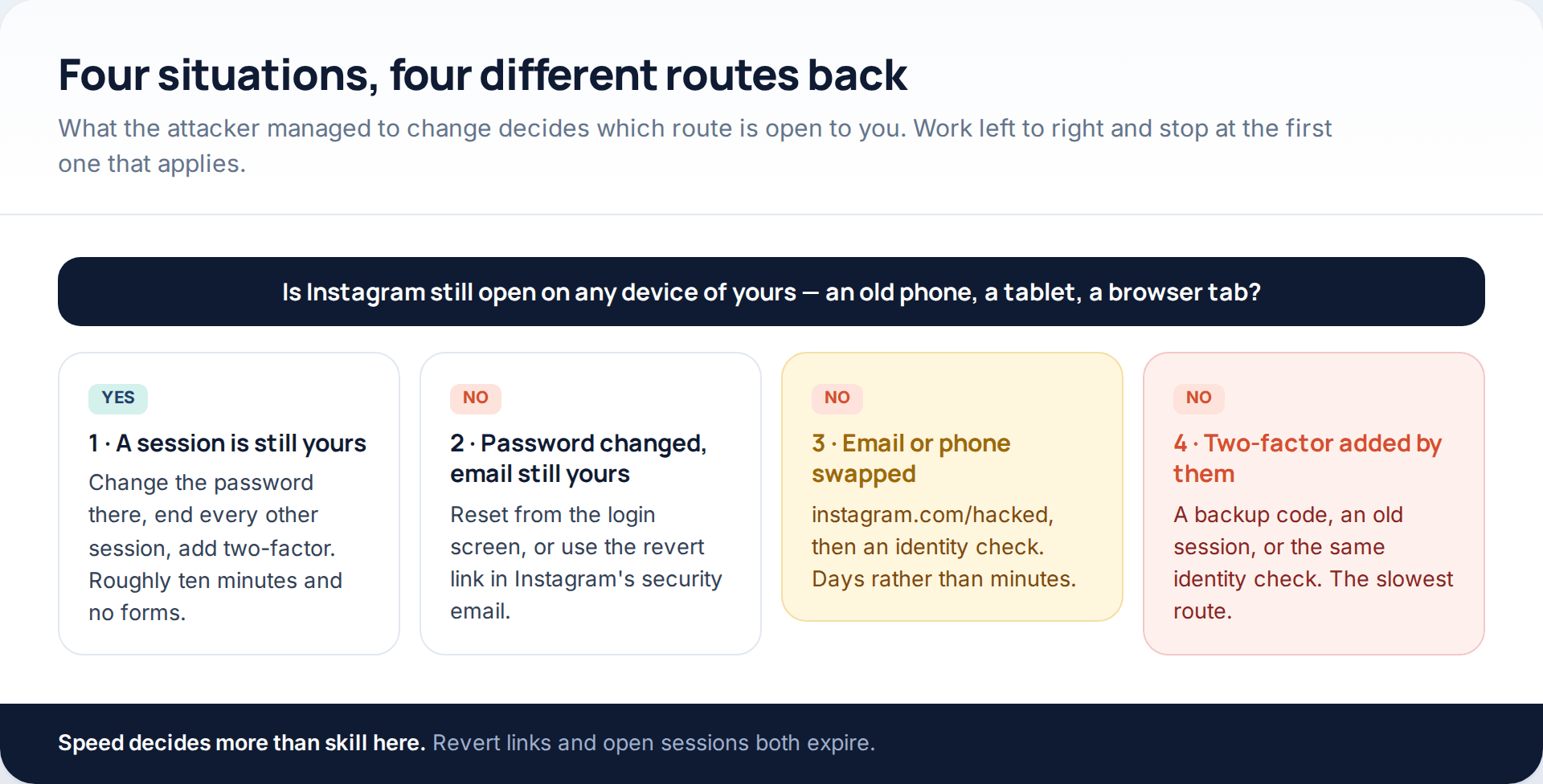
Three questions settle it. Is Instagram still open anywhere you can reach — an old phone in a drawer, a tablet, a browser you stay signed into at work? Is the email address on the account still yours? And has anyone switched on two-factor authentication that you did not set up?
Check in that order, because the effort rises sharply with each one. A forgotten tablet that is still logged in solves the whole problem in ten minutes. An identity review, at the other end, is days of waiting with no progress bar to watch.
One step comes before all four, though: make sure your email account is still yours. Every Instagram reset arrives there, so an attacker who can read your inbox can undo anything you do. If your email password was reused anywhere, or you have had password-reset messages you did not request, deal with the inbox first. Our step-by-step guide to securing a hacked account covers that order in more detail.
What the “password hacking apps” were really selling
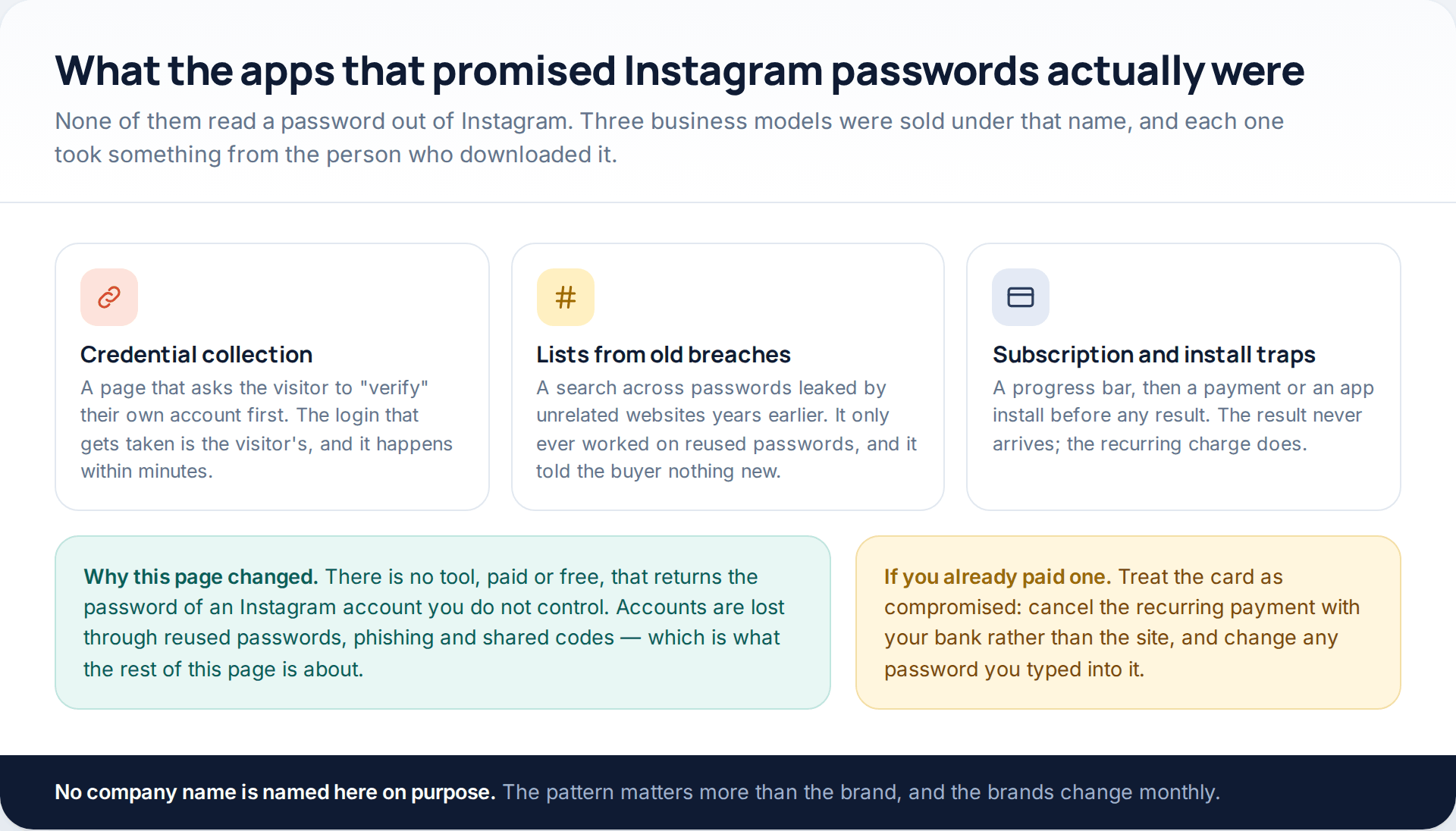
It is worth a minute, because it explains why so many people arrive at a page like this one after trying one of them.
The first kind collected logins. The visitor was asked to confirm their own account before the “search” could run, and the credentials they typed were the only ones the operator ever obtained. The second kind searched old breach data: lists of email addresses and passwords leaked by unrelated websites, sometimes years earlier. That only ever matched accounts whose owner had reused a password, and it revealed nothing about Instagram itself. The third kind never intended to return anything — a convincing progress bar, then a payment page or an app install, then silence.
What none of them could do is ask Instagram for a password. Instagram does not store passwords in a readable form and does not hand them to anyone, which is why the fourth category — a tool that genuinely breaks into an arbitrary account — does not exist at any price.
If you paid one of these sites, treat the card as exposed. Cancel the recurring payment through your bank rather than through the site, and change any password you typed on the way through. Many of these pages are built to harvest exactly that.
Route one: a session of yours is still open
Attackers change the password and sign in from their own device, but they do not always clear existing sessions. An Instagram app on a spare phone, or a logged-in browser on a work laptop, will often still work. That device is worth more than any support form, so look before you do anything else.
-
Open Accounts Center on that device
Your profile, then the menu, then Settings and activity, then Accounts Center, then Password and security. Some versions still show these under Security.
-
End every session you do not recognise
Under “Where you’re logged in”. Do this before the password change, because most services keep existing sessions alive through one.
-
Change the password
To something you have never used anywhere else. A short phrase of unrelated words beats a mangled single word.
-
Clean up what they added
Any email address, phone number, authenticator or linked account that is not yours.
-
Turn on two-factor and save the backup codes
This is the step that stops a repeat. Keep the codes somewhere other than the phone itself.
Route two: the password changed but your email still works
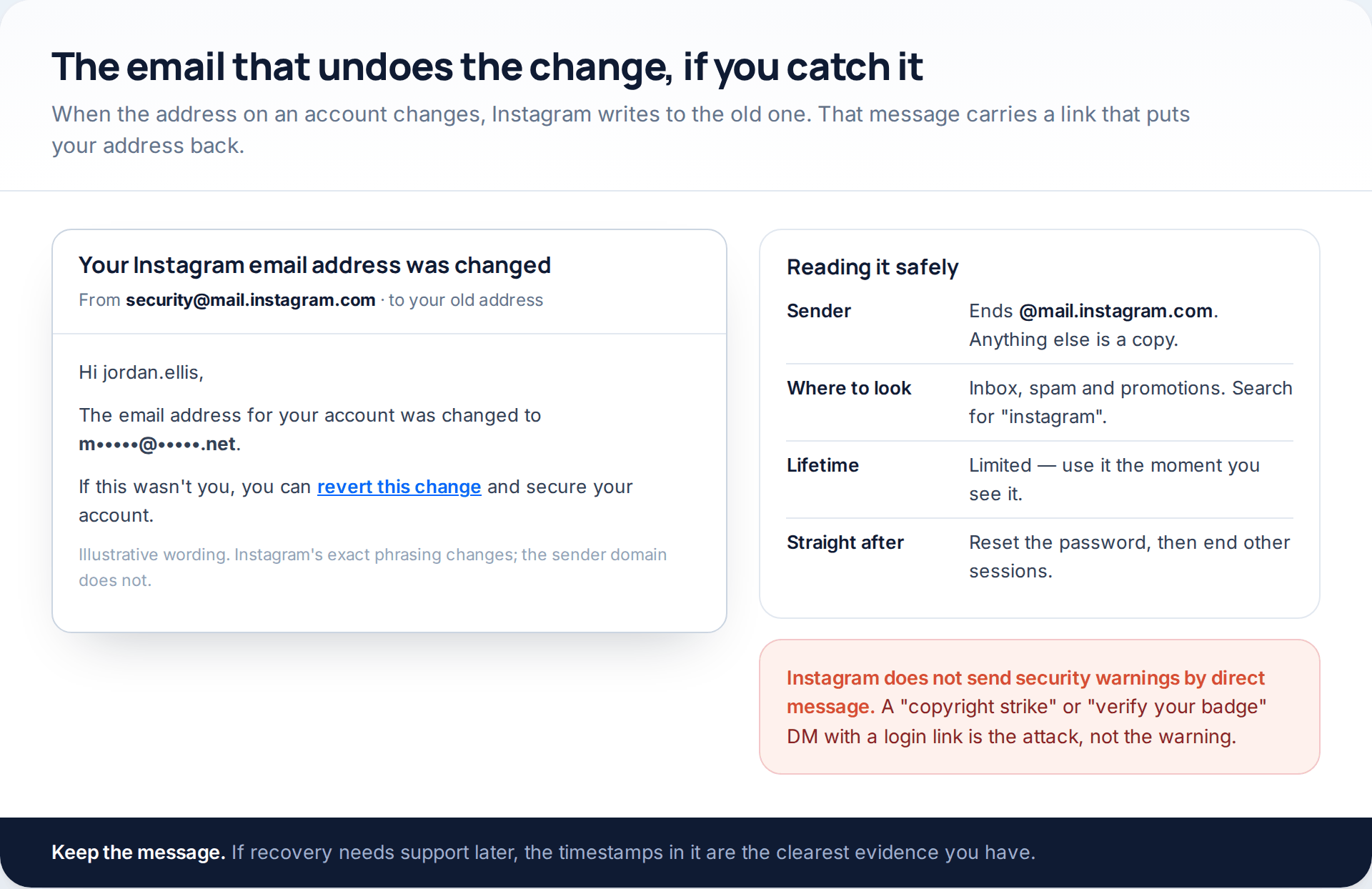
When an email address, phone number or password changes, Instagram writes to the address that was there before. If yours was swapped, that message is sitting in your inbox with a link to revert the change. Use it, then reset the password immediately.
Search every folder, including spam and promotions, and including the address you signed up with years ago rather than the one you use now. Genuine messages come from an address ending @mail.instagram.com. You can also confirm any message from inside the app later: Instagram keeps a list of the security emails it has sent recently, which is the simplest way to tell a real warning from a copy.
If no revert email exists, reset from the login screen instead. Tap Forgot password?, enter your username, and read the masked contacts carefully before you send anything.
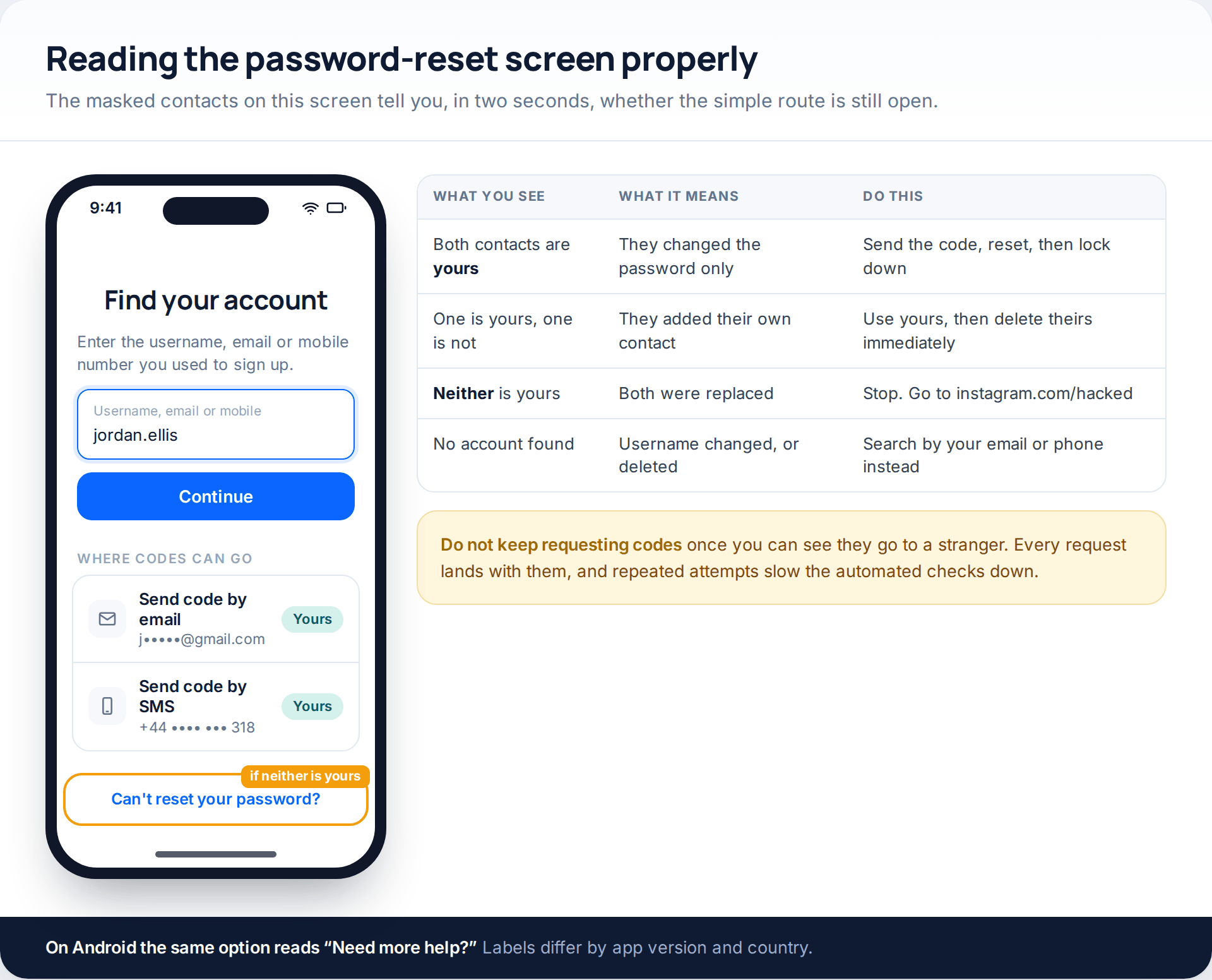
That screen is a diagnostic as much as a form. If the masked address is yours, you are two minutes from being back in. If it belongs to someone else, every code you request is delivered to them, and the route is closed — move on rather than trying again.
Route three: both contacts were replaced
This is the situation most people searching for help are in, and it is the reason the next section exists. With both contacts changed there is nowhere for a reset to go, so Instagram verifies you another way.
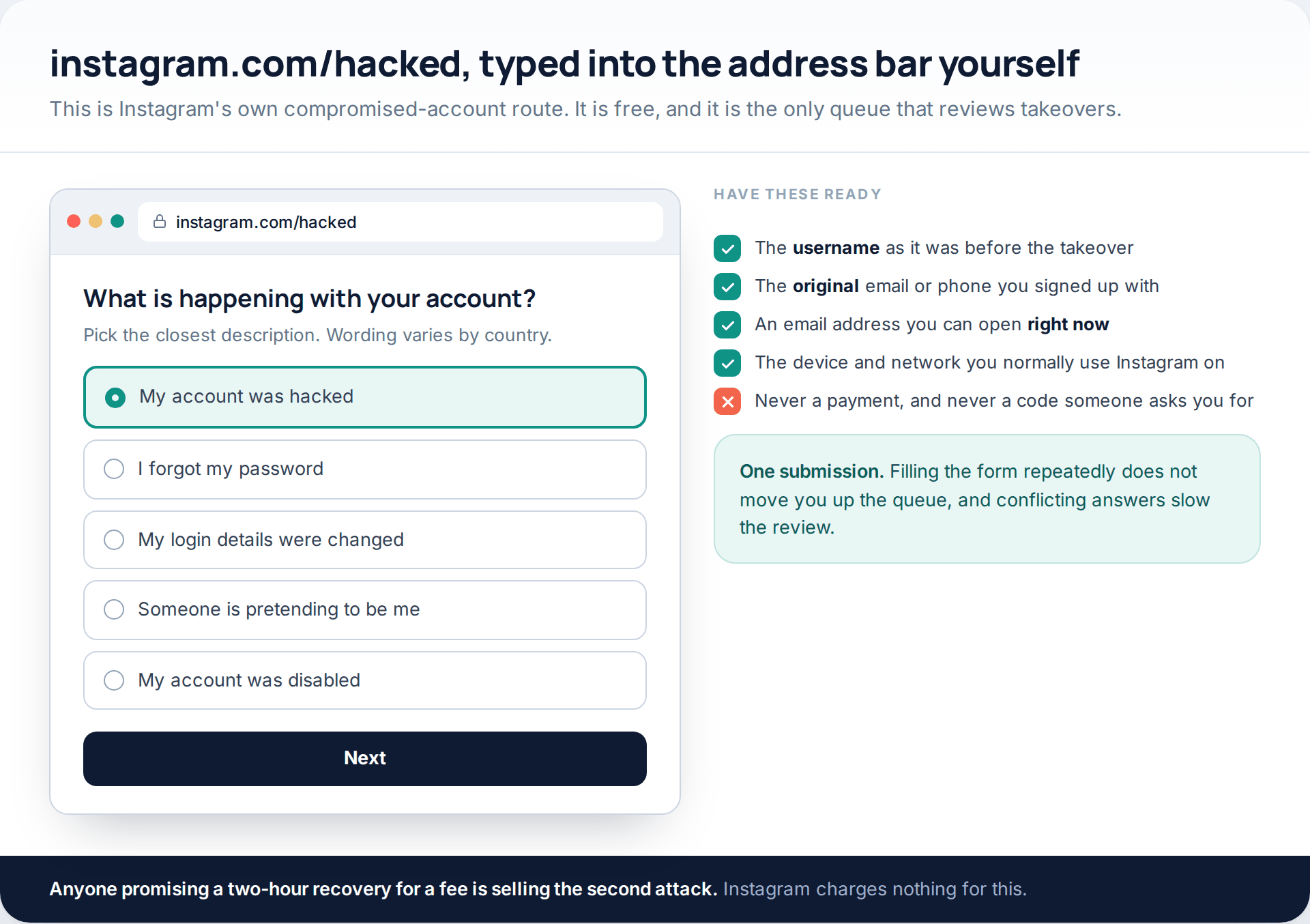
Type instagram.com/hacked into the address bar, choose the option about a hacked account, and give the username along with the email or phone you originally signed up with. Instagram asks for an address it can reply to as well, so use one you can open immediately.
Two things help and cost nothing. Do it on the device and network you normally use Instagram from, because familiar signals count in your favour. And submit once: repeat submissions with slightly different answers are the most common reason a review stalls.
The identity check, and why it fails
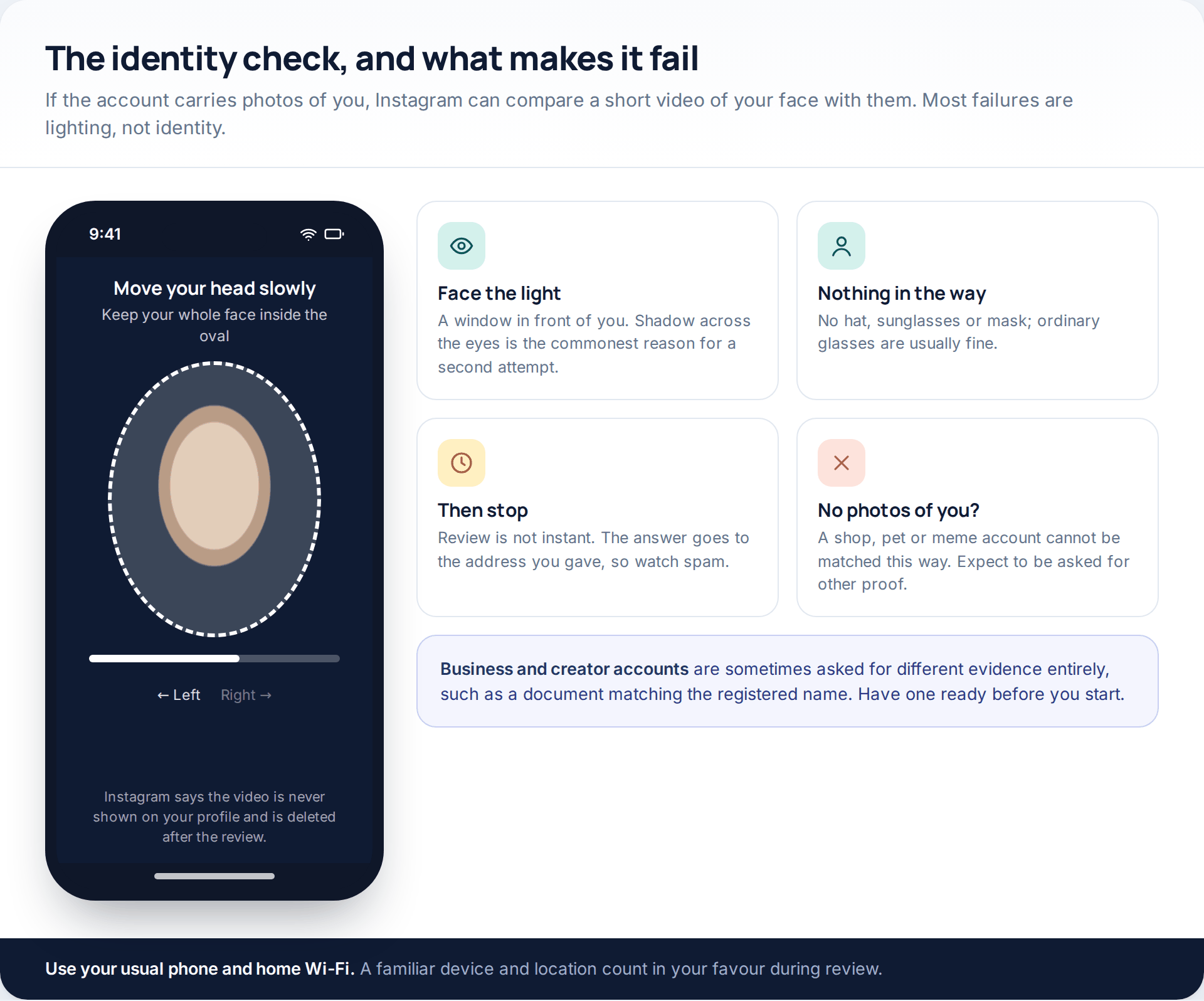
For personal accounts with photos of the owner, Instagram can compare a short video of your face with those pictures. You are asked to turn your head slowly while your face stays inside a frame. Instagram states the video is not published to your profile and is deleted after review.
Sit facing a window rather than with your back to one, take off hats and sunglasses, hold the phone at eye level and move slowly. If the account is a shop, a pet or a meme page, there is nothing to compare the video against; expect to be asked for different proof, and expect it to take longer.
Route four: they turned on two-factor authentication
Increasingly, attackers add their own authenticator app once they are in. The correct password then produces a code prompt you cannot answer — a password problem turned into an identity problem on purpose.
Try the options in this order. A backup code, if two-factor was yours originally and you saved them. Then any device still logged in, where their method can simply be removed. Then Try another way on the code screen, which leads to the same identity confirmation as the hacked-account form. There is no fifth option: pages offering a “2FA bypass” are selling malware or nothing at all.
Once you are back in: the twelve-minute lockdown
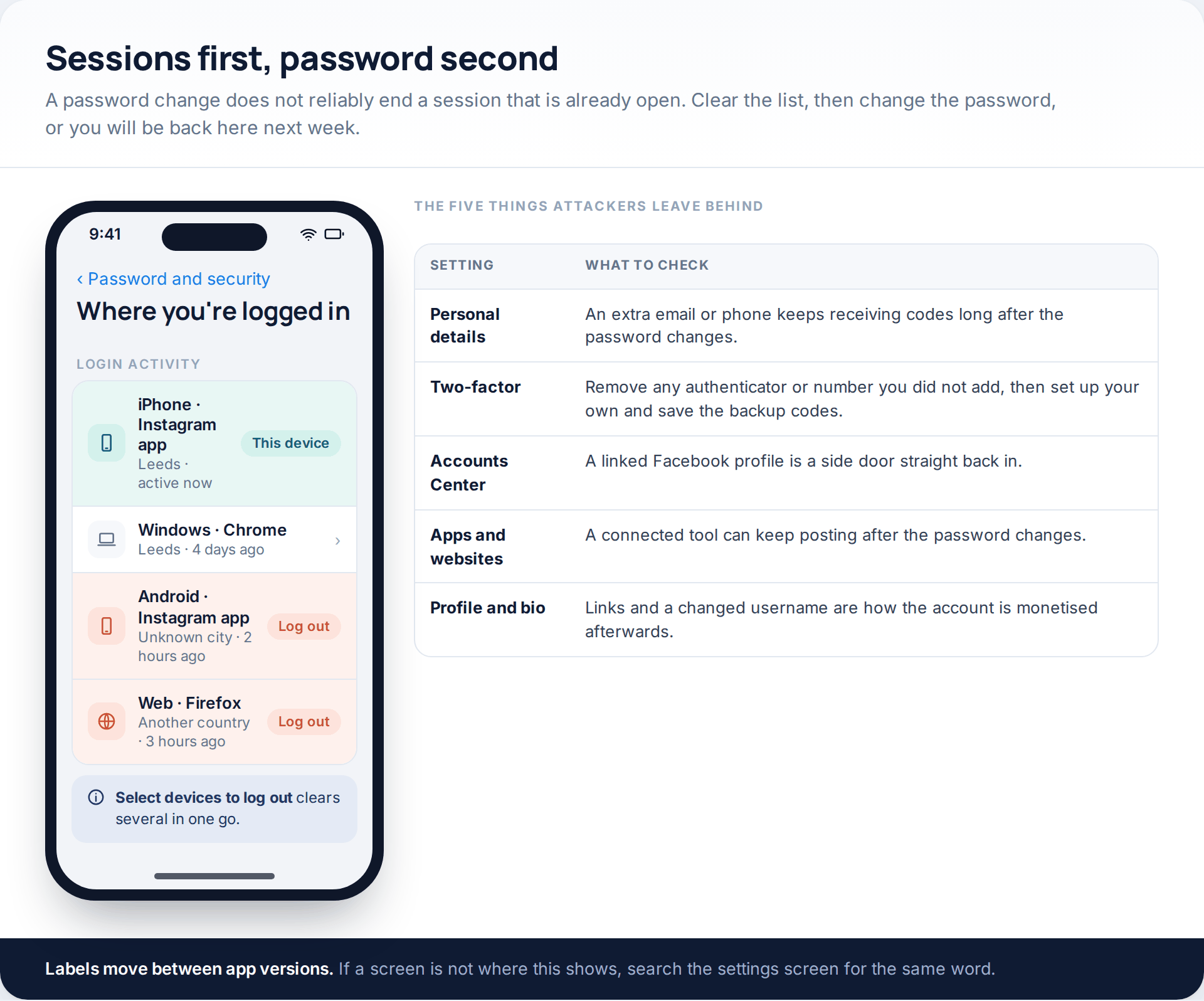
Recovering the login does not undo what was set up while they had it. Work through the settings in one sitting rather than over a week.
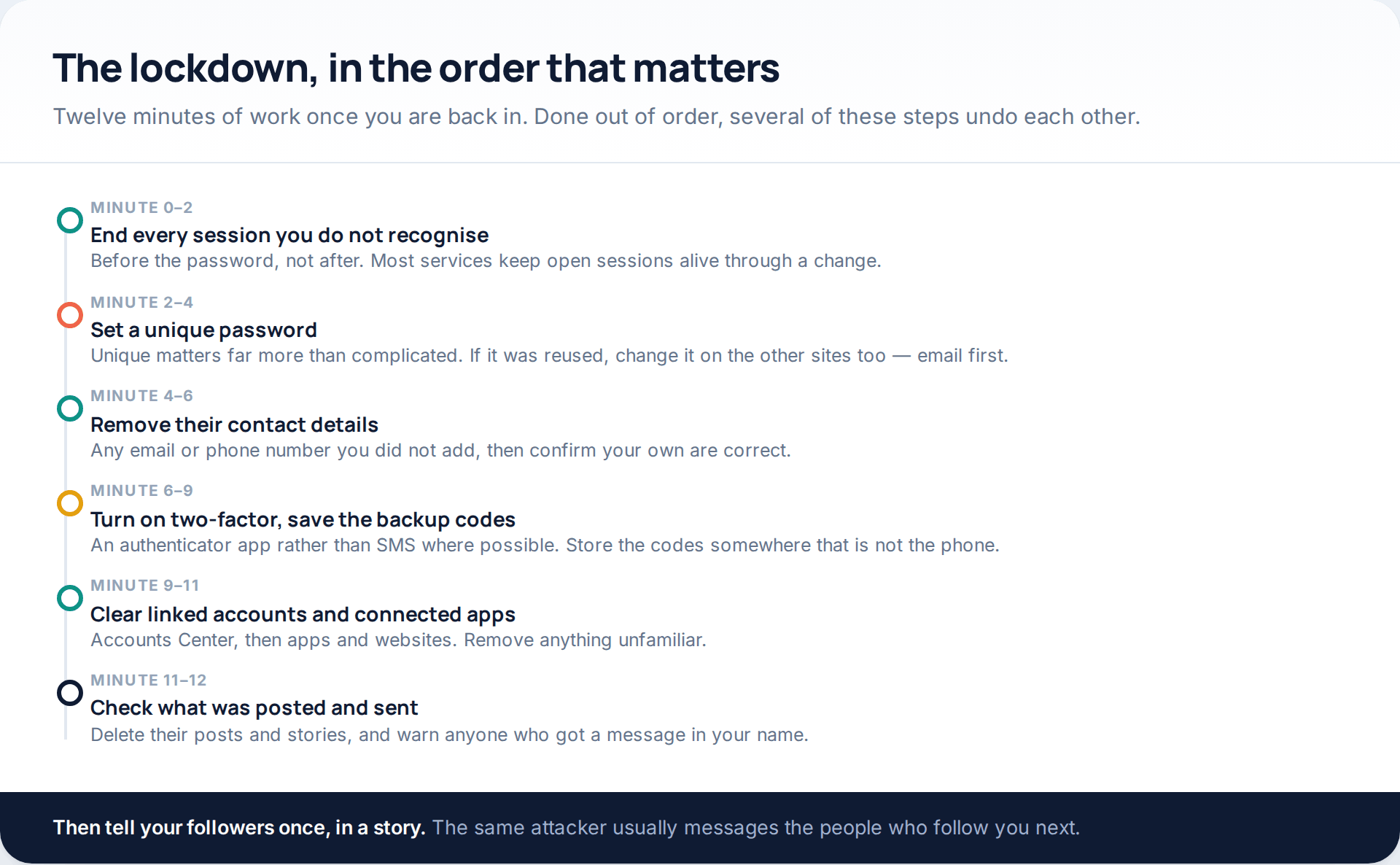
Two of those deserve a word. Linked accounts in Accounts Center are a genuine side door: a Facebook profile connected to your Instagram can be used to get back in, and most people never look at that screen. And connected apps hold access independently of your password, so a posting tool added last week keeps posting after you change it.
When the settings are clean, go through the profile itself: bio, website link, username, and the posts and stories published while you were locked out. Delete theirs, and tell your followers once. The next move in almost every one of these cases is a message to your contacts in your name.
How the account was taken, and what closes that route
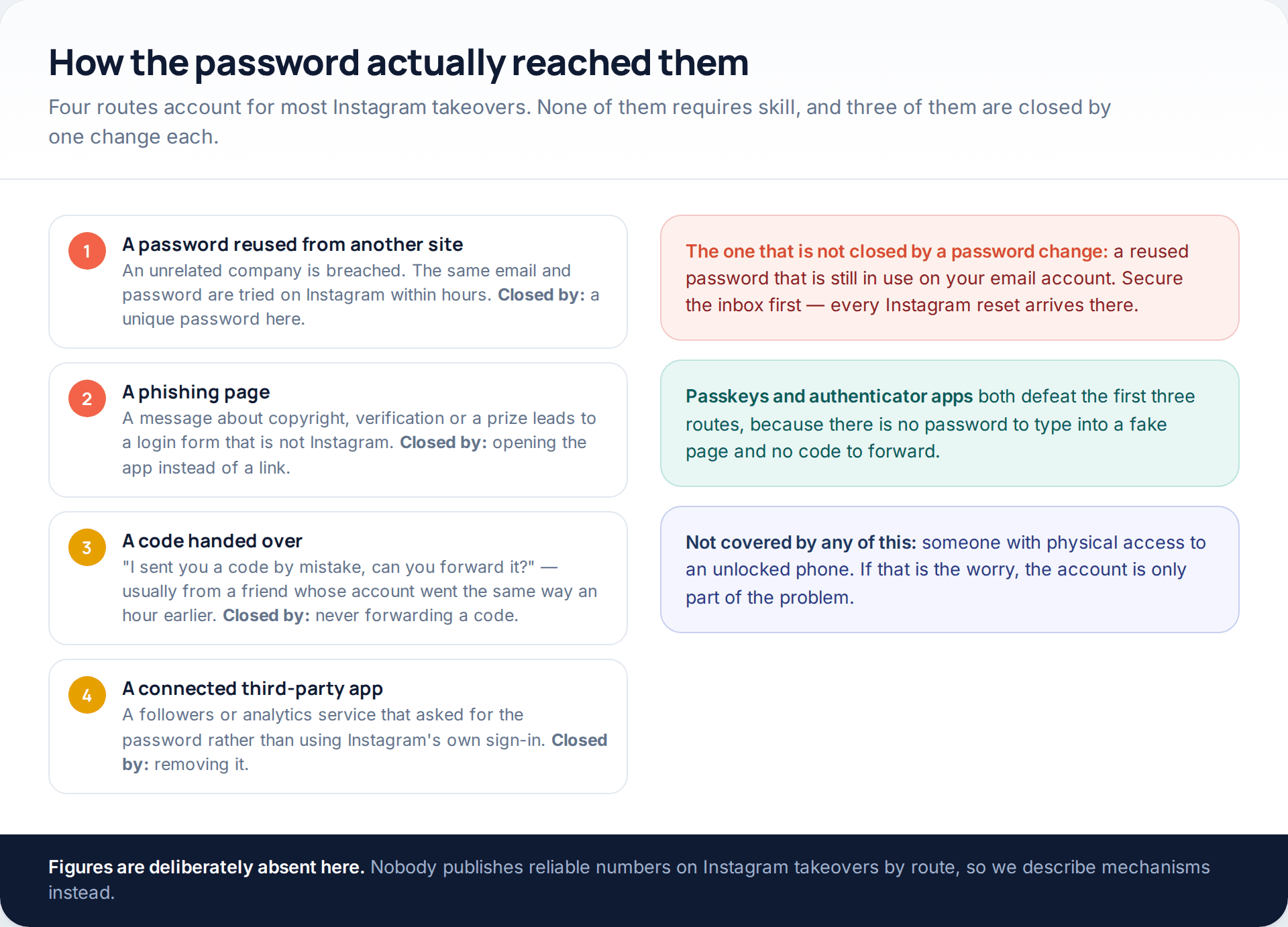
Knowing which of these happened matters, because it tells you what else is exposed. A reused password means every other account sharing it is at risk. A phishing page means whatever else you typed there is gone too. A forwarded code means the friend who asked for it has also been taken, and is worth telling.
If you want the settings that prevent a repeat, laid out in order rather than scattered through this page, we have covered them separately in three settings that secure an Instagram account. The short version is a unique password, an authenticator app or passkey, and a yearly look at the sessions list.
If the account was disabled or deleted instead
Two variations come up often enough to mention. If the attacker posted spam and the account was disabled, the login screen will offer a review — use it, and say in the appeal that the account was compromised. If they requested deletion, the request is not immediate: Instagram holds the account for a period before removing it permanently, and logging back in during that window cancels it. So recovery by any route above still saves the account, provided you get there in time.
How this page was put together
The routes, screens and menu paths here were checked against Instagram’s own help pages for hacked accounts, login help and security emails in October 2026, and against the current app. Instagram renames these screens often — “Security” became “Password and security” inside Accounts Center, and both wordings are still in circulation — so if a label is not where we describe it, search the settings screen for the same word rather than assuming the option has gone.
We have deliberately given no recovery timescales in hours, because Instagram publishes none and the ones quoted elsewhere are guesses. We have not named any of the sites that sell “hacking apps” or paid recovery, and we do not recommend one: every route that works is free. The section on how passwords leak describes mechanisms rather than quoting statistics, because no reliable public figures exist for Instagram takeovers by cause.
If you are reading this because a private account of yours was copied rather than taken, that is a different problem with different fixes — we cover it in what strangers can still see of a private Instagram account.
Common questions
How long does it take to recover a hacked Instagram account?
If a session is still open or your email still works, minutes. Through the hacked-account form with an identity check, expect days rather than hours, sometimes longer. Instagram does not publish a target, and anyone quoting you a fixed time is guessing or selling something.
Can I get the account back if the email and phone were both changed?
Often, yes. Use instagram.com/hacked, give the original email or phone you signed up with, and complete whatever verification is offered. Personal accounts with photos of you have the best chance, because the video check gives Instagram something to match.
Is there any app that recovers a hacked Instagram account?
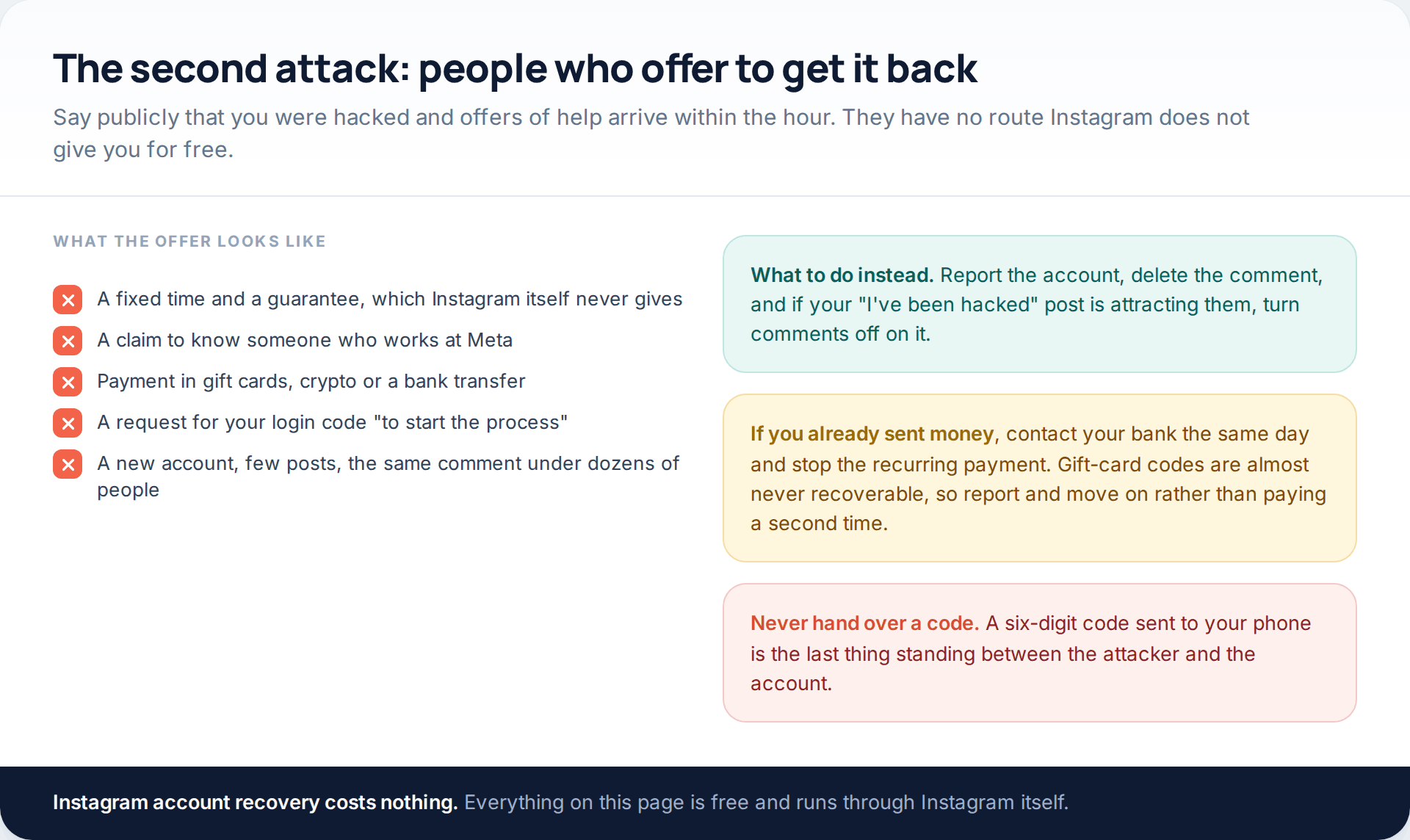
No. Recovery runs through Instagram’s own forms, which are free. Apps and services advertising recovery either resell those same forms or take payment and disappear, and several ask for the login code that hands them the account.
Can I talk to a real person at Instagram?
For most accounts the hacked-account flow is the support route. Meta Verified subscribers get account support as part of the subscription. Phone numbers and chat windows claiming to be Instagram support outside the app are not Instagram.
Should I make a new account while I wait?
You can, but use a different email address and phone number from the ones attached to the lost account, because reusing them can confuse the recovery. Tell your contacts from the new account so they ignore messages sent in your name.
They are posting from my account right now. Can I stop it faster?
Only by getting in. Reporting the posts helps Instagram act on the content, and you can warn followers from another account, but nothing outside the recovery routes above removes the attacker’s access.
Will two-factor authentication stop this happening again?
It closes the common routes, as long as it is yours and you keep the backup codes somewhere reachable. An authenticator app or passkey is stronger than SMS, because the code never travels and cannot be forwarded to anyone.
Using a monitoring app for this? GuestSpy is parental monitoring for Android that stays visible on the child's phone and runs from any browser. If it fits your family, see the App & website blocking feature.
Related guides
5 Best Security and Network-Testing Apps for Android (Rooted and Not)
The useful security apps for Android are not the ones with “hack” in the title. They are a network scanner,…
Gmail Password Compromised? Four Recovery Routes Google Accepts
If your Gmail password was hacked, there are four routes back and the one that is open to you depends…
Facebook Account Hacked? Every Free Route Back In
If your Facebook account was hacked, five routes lead back in and all of them are free: a device of…
Monitoring your child can see.
Location, screen-time budgets, routines, app and website blocking and the alerts that matter, run from any browser and visible on the phone. Pair an Android phone in about fifteen minutes.