Facebook Account Hacked? Every Free Route Back In
If your Facebook account was hacked, five routes lead back in and all of them are free: a device of yours that is still signed in, the find-your-account page, the warning email Facebook sends from a facebookmail.com address, the compromised-account report at facebook.com/hacked, and an identity check. Which one is open depends entirely on what the attacker changed first — so work out that, before you start filling in forms.
This page used to be called “Best 3 Facebook Hacking Tools”. It is now a recovery guide, because that is the problem people actually arrive here with — and because none of those three tools did what the title promised. The section below says what they really were, once, and then the page gets on with the useful part.
First, work out which problem you have
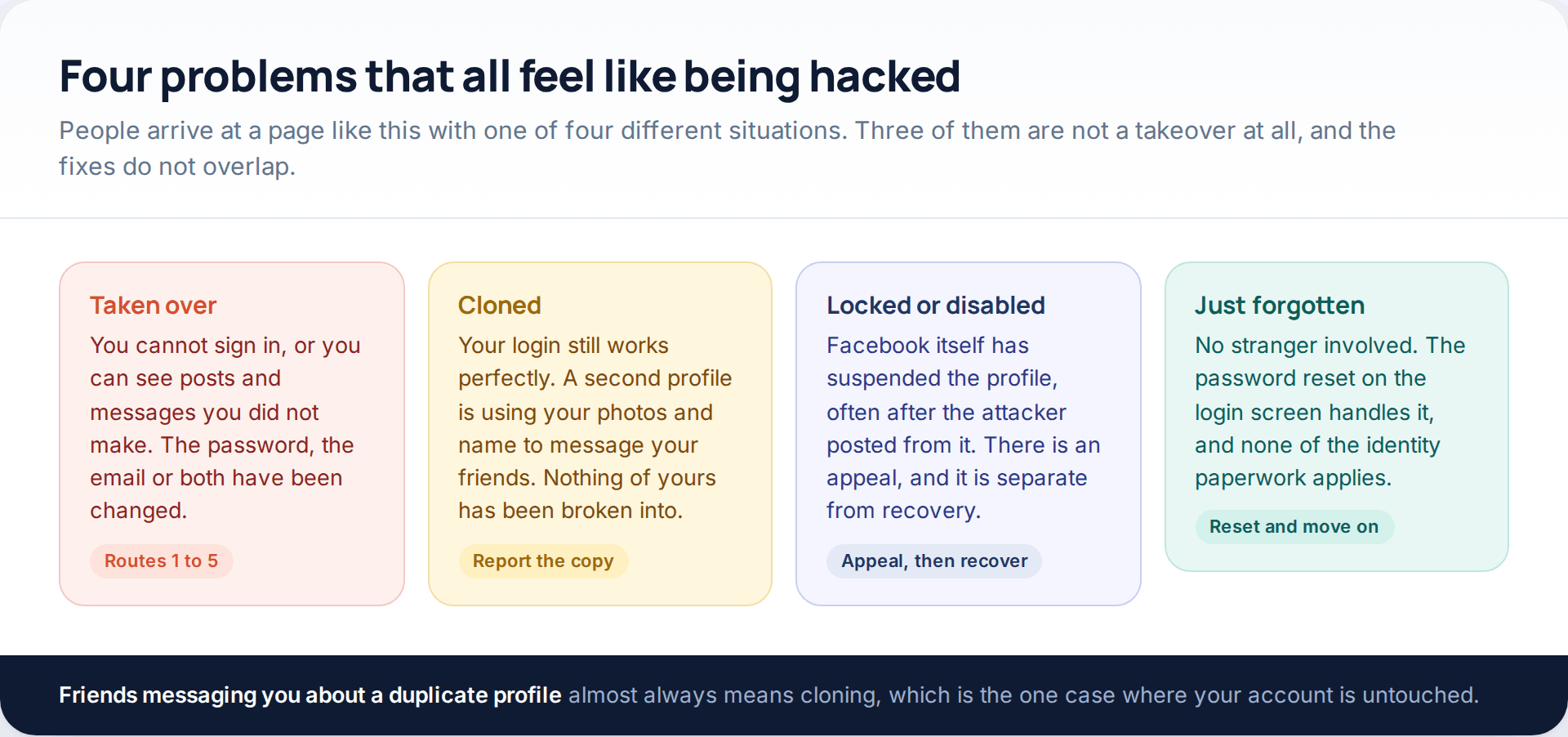
Three questions separate them. Does your own login still work? Has anything on the profile — the email address, the mobile number, the name — changed without you? And is the thing worrying you a second profile using your photographs rather than your real one misbehaving?
If the login works and a duplicate exists, skip to the cloning section; nothing was broken into. If Facebook is showing you a suspension notice, appeal that first, because recovery of a disabled account runs through a different queue. Everything in between is a genuine takeover, and the rest of this page is about those.
One thing comes before all five routes: check that your email account is still yours. Every reset message Facebook sends arrives there. If that inbox was reached as well, an attacker can reverse anything you do, and securing it is the real first step. Our walkthrough on securing an account after a break-in sets out that order in full.
What the old “hacking tools” sold, briefly
It is worth sixty seconds, because a sizeable share of people reading recovery guides got here through one of them. The first kind asked you to sign in to your own profile before the search could run, and that form was the whole product. The second searched old leak lists — addresses and passwords dumped by unrelated websites, sometimes a decade earlier — which matched nobody who had used a different password on Facebook. The third never intended to deliver anything: a progress bar, a payment page, then silence, with a recurring charge attached.
What none of them could do is ask Facebook for a password. Facebook does not store them in a readable form, and does not hand account access to outside parties. That is also why the first thing to assume about any offer to recover your profile for a fee is that it is the second attack, not the cure.
The five free routes, in the order worth trying
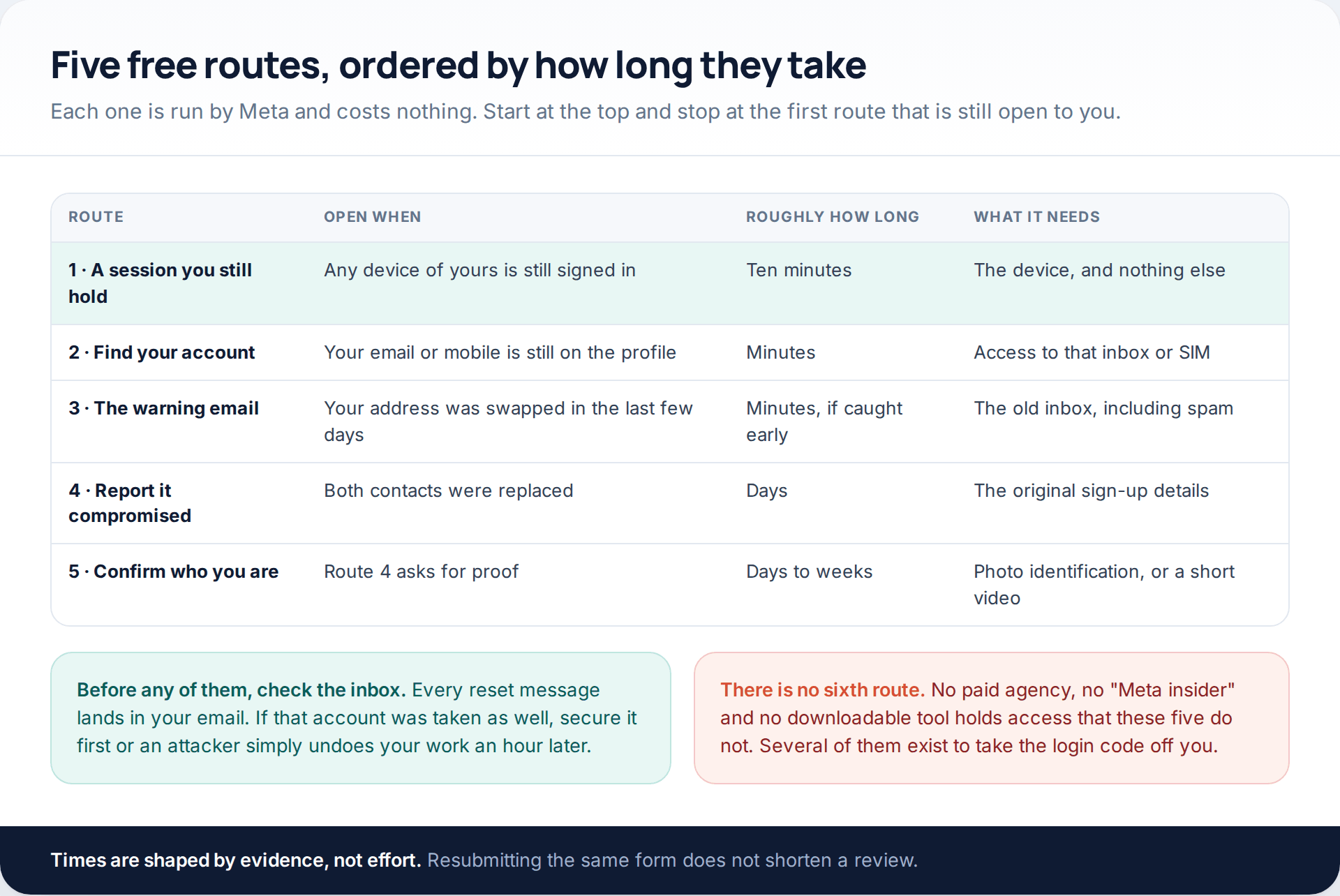
Route one: a session of yours that never ended
Attackers change the password and sign in from their own device. They do not always clear the sessions that were already open. A tablet in a drawer, an old handset, the browser on a work laptop you never sign out of — any of those may still hold a live session, and that is worth more than every form on this page. Look before you do anything else, and if you find one, go straight to the lockdown sequence further down.
Route two: the find-your-account page
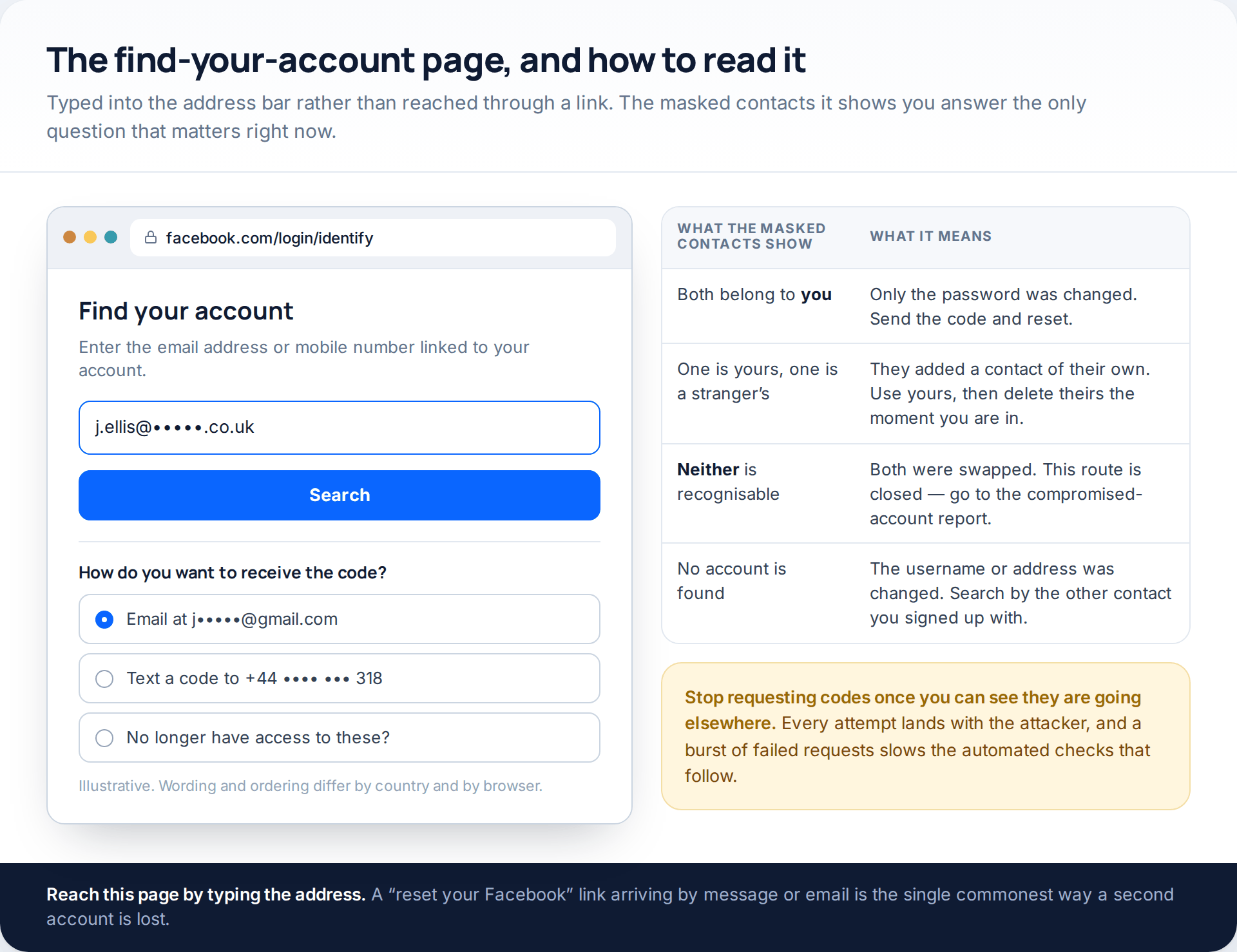
Type facebook.com/login/identify into the address bar yourself. Enter the email address or mobile number you signed up with, and read the masked contacts on the next screen before you request anything. If one of them is recognisably yours, you are a code away from being back in. If neither is, the route is closed and more attempts only ring the attacker’s phone.
Route three: the warning email, used fast
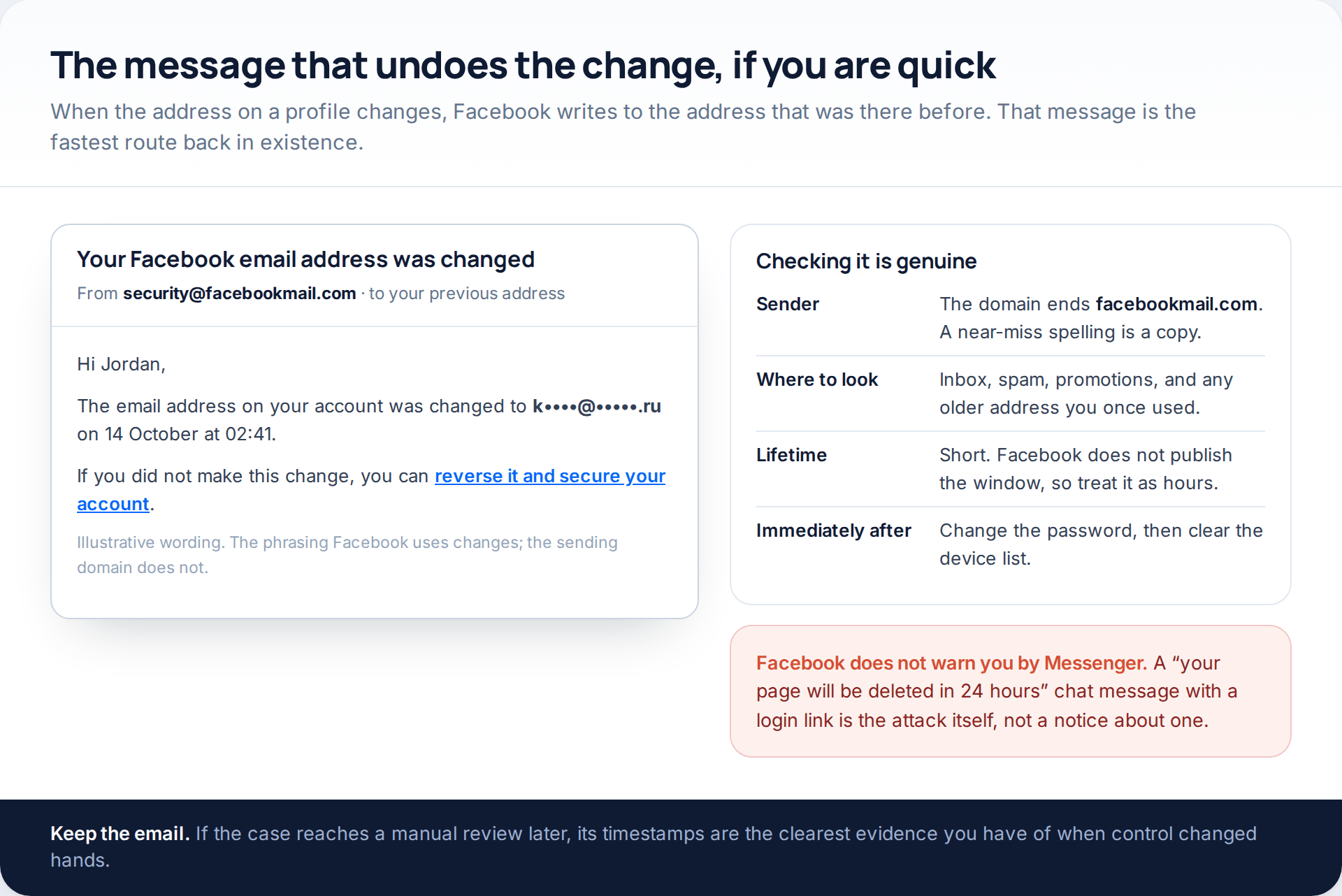
When the email address, mobile number or password on a profile changes, Facebook writes to the contact that was there before, and that message carries a link to reverse the change. Search every folder — spam and promotions included — and search the old address you signed up with years ago as well as the one you read daily. Genuine messages come from a facebookmail.com domain; a lookalike spelling is a phishing copy.
Facebook does not publish how long the reversal link stays valid, so treat it as hours rather than days. Use it, then change the password immediately, because reversing the address change does not by itself evict whoever is signed in.
Route four: report the account compromised
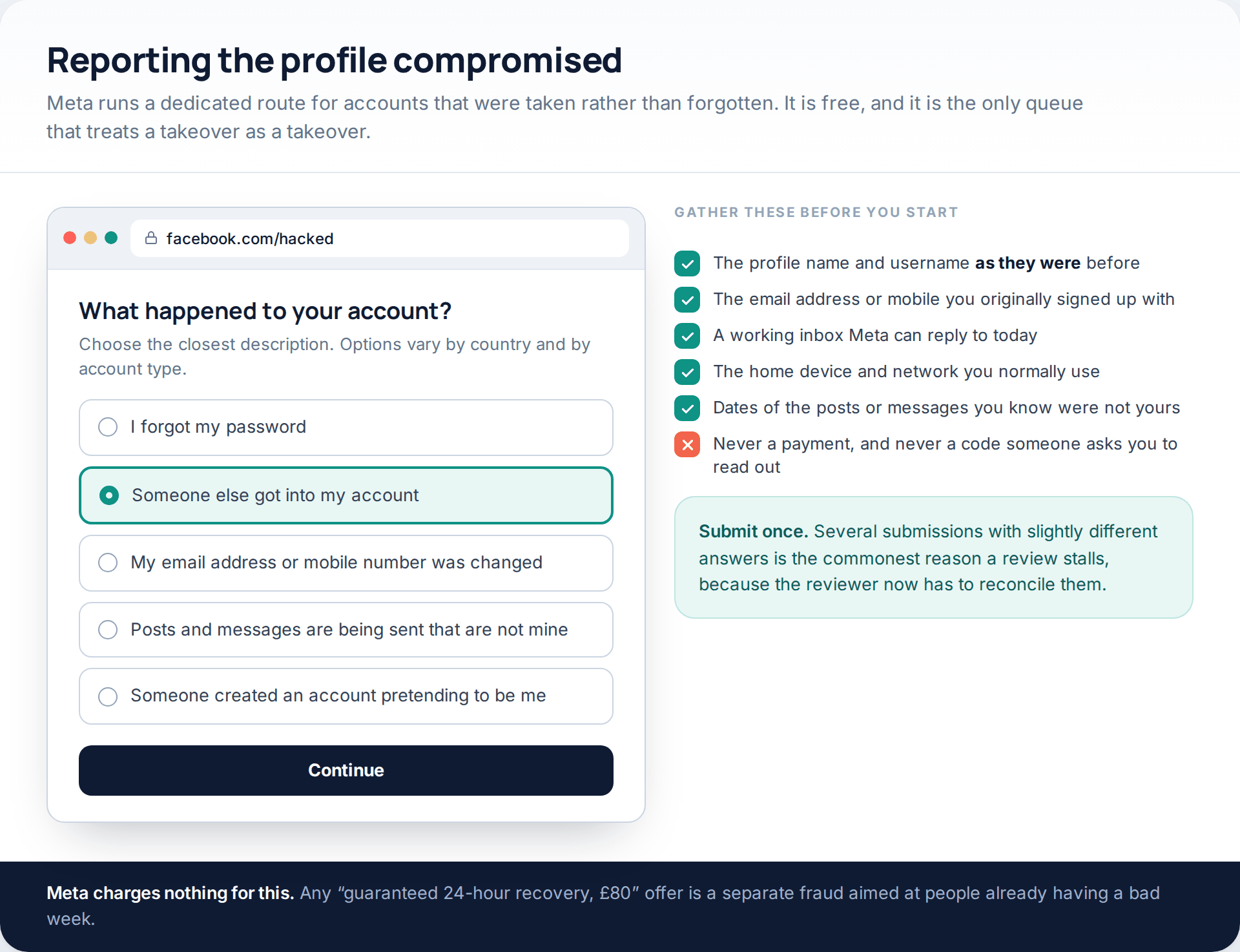
With both contacts replaced there is nowhere for a code to go, so Meta verifies you another way. Go to facebook.com/hacked, pick the description closest to what happened, and give the username and the contact details you originally registered with rather than the ones on the profile now. You will be asked for an address Meta can reply to, so use one you can open today.
Two free things improve your odds. Do it from the device and the network you normally use Facebook on, because familiar signals count. And submit once — repeat submissions with slightly different answers are the most reliable way to stall a review.
Route five: confirming who you are
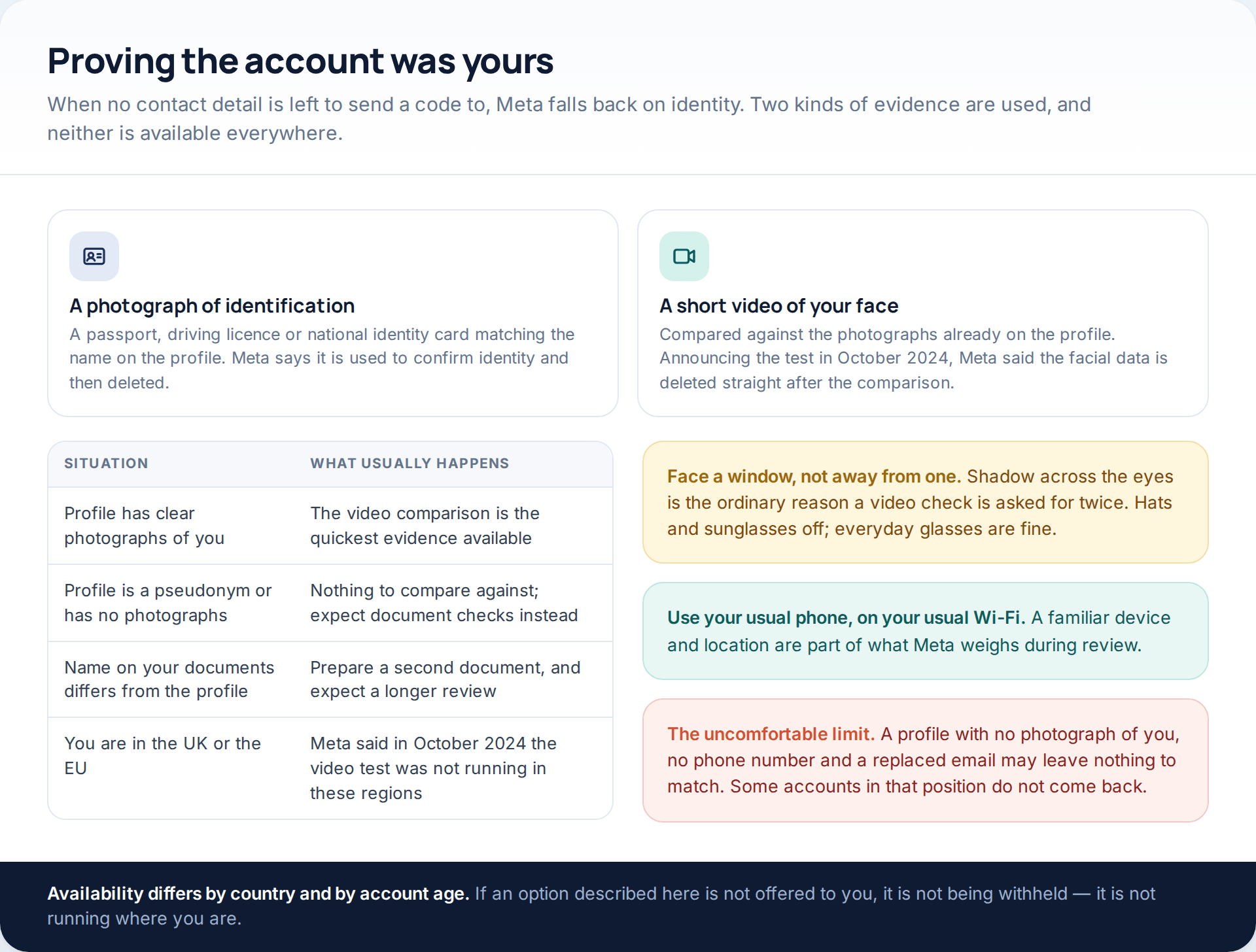
Meta’s fallback is identity. Historically that meant a photograph of government identification matching the name on the profile. Since October 2024 it has also been testing a short video of your face, compared against the photographs already on the account; Meta said at the time that the facial data generated is deleted straight after the comparison, and that the test was not running in the United Kingdom or the European Union.
When the attacker turns two-factor on behind them
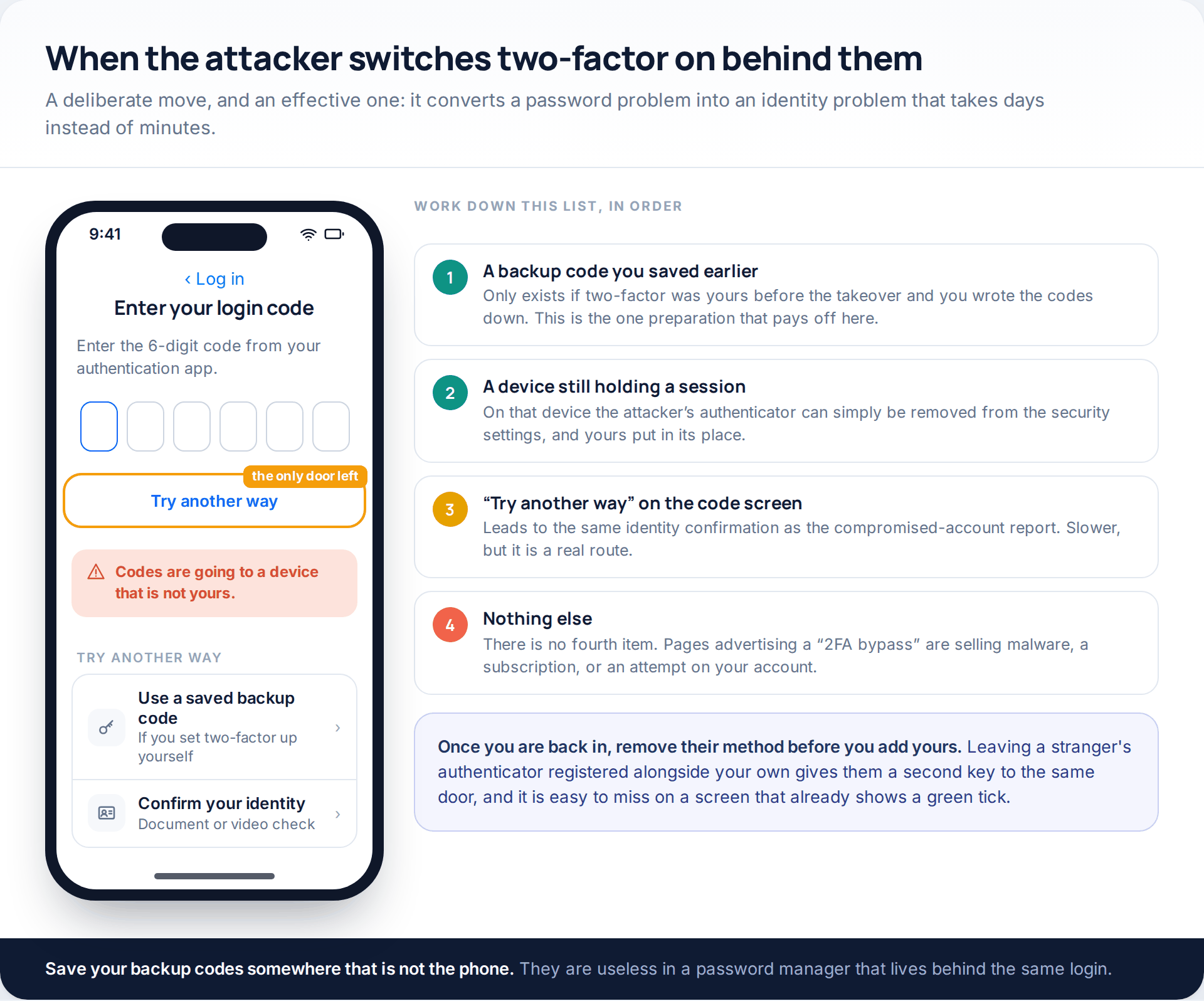
This is increasingly standard. Once inside, the attacker registers their own authenticator app, so even the correct password produces a code prompt you cannot answer. Work down four options in order: a backup code you saved when you set two-factor up; any device still holding a session, where their method can be deleted outright; the “Try another way” link on the code screen, which leads to the same identity confirmation as route five; and then nothing, because there is no fourth. Anything advertising a two-factor bypass is selling malware or a subscription.
Pages, ad accounts and everything else attached to the profile
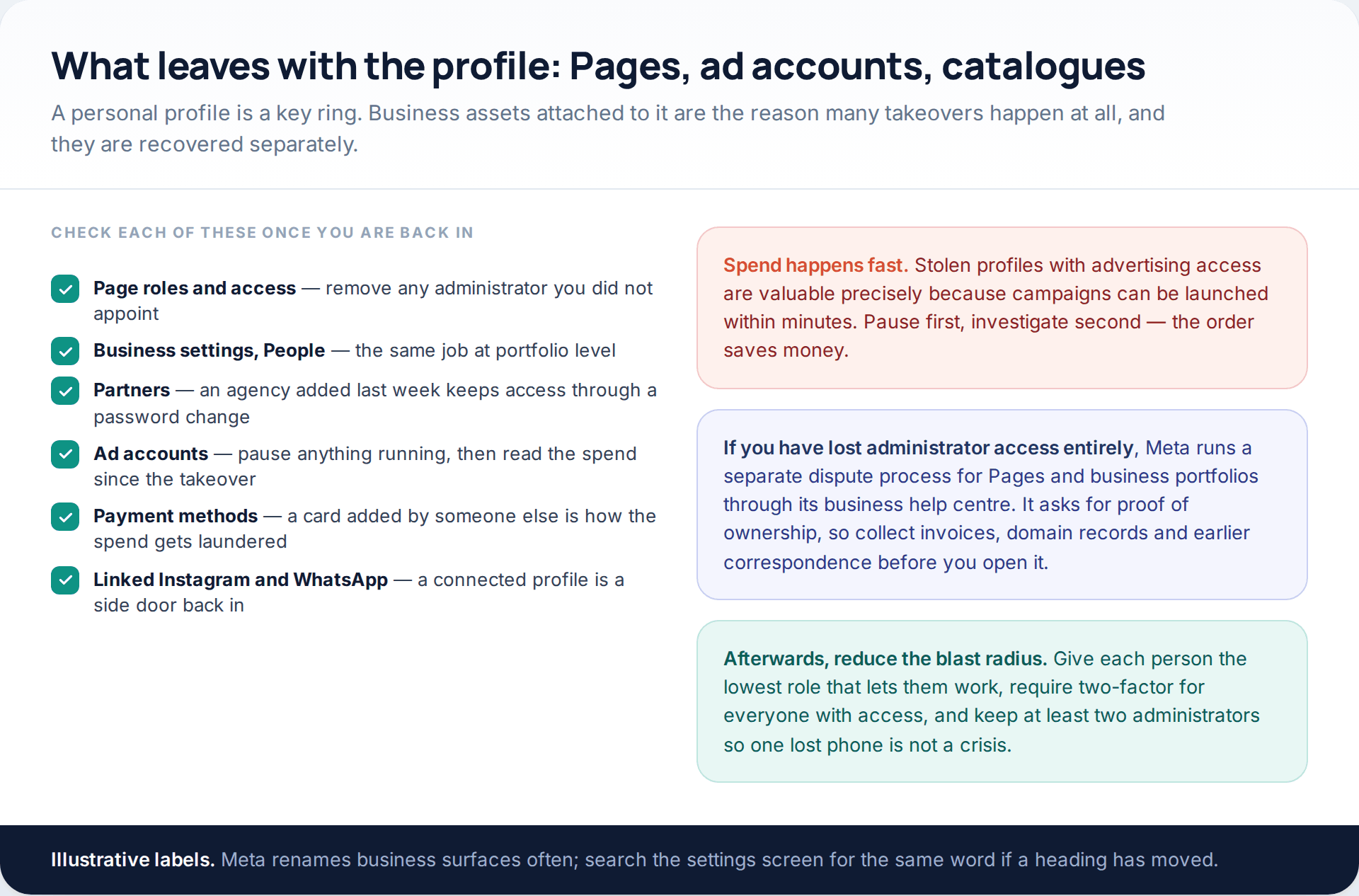
If you administer a Page or run advertising, the profile was probably not the prize. Stolen accounts with ad access are valuable because campaigns can start within minutes and the spend lands on a card that is not the attacker’s. So once you are back in, pause anything running before you start investigating, then work through Page roles, business settings, partners and payment methods in turn.
If administrator access is gone entirely, Meta runs a separate dispute route for Pages and business portfolios that asks for proof of ownership. Collect invoices, domain records and earlier correspondence before you open it, because a thin submission goes to the back of the queue.
Once you are back in: the lockdown, in order
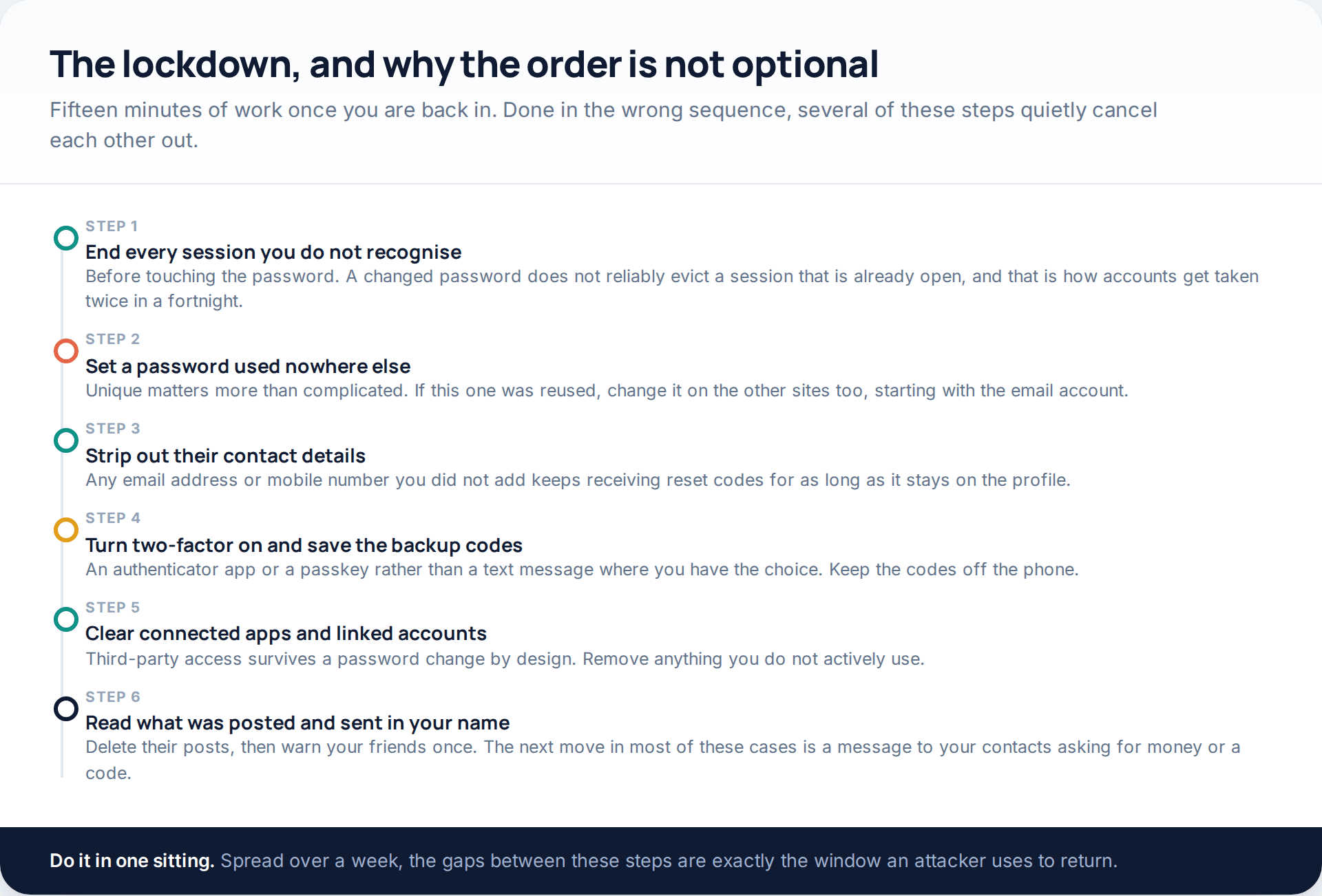
Recovering the login does not undo what was configured while somebody else had it. Two steps deserve particular attention. Sessions come before the password, because a password change does not reliably end a session already open — that single inversion is behind a large share of accounts that get taken twice in a month. And connected apps hold access independently of your password, so a posting tool authorised last week carries on posting after you change it.
When the settings are clean, read the profile itself: the name, the bio, the links, and everything published or sent while you were locked out. Delete theirs, then tell your friends once. The next step in nearly all of these cases is a message to your contacts, in your name, asking for money or a verification code.
Routes that no longer exist, and ones that never did
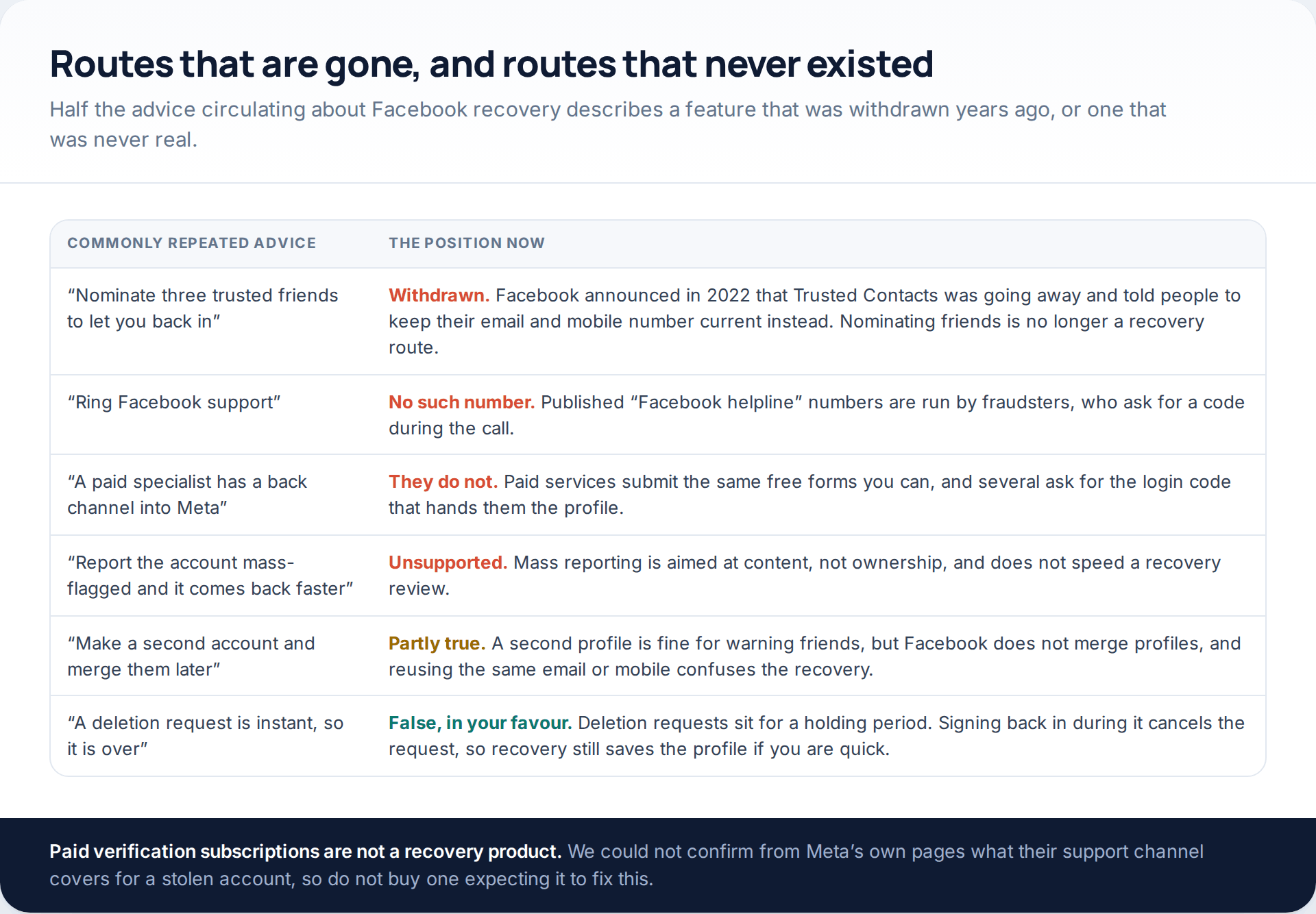
The one worth singling out is Trusted Contacts, the feature that let you nominate friends who could pass you a recovery code. Facebook announced in 2022 that it was going away, and advised people to keep their email address and mobile number current instead. Guides published since have carried on recommending it, which sends people hunting through a settings screen for an option that is not there. If you set it up years ago, do not count on it.
The second is paid recovery. Say publicly that you have been hacked and offers arrive within the hour, usually from new accounts leaving the same comment under dozens of posts. They hold no access that Meta’s free forms do not, and a good proportion of them exist to collect the login code that completes the takeover. If one has already taken money, treat it as card fraud and talk to your bank the same day.
Cloned rather than hacked
- Your own login still works exactly as it did yesterday
- Friends mention a second friend request arriving from you
- The copy carries only photographs that were already public on yours
- It was created within the last few days and has almost no history
Every week, people work through an entire recovery process for an account that was never touched. The signs of a clone are specific: your own login still works, the duplicate has only photographs that were already public on your profile, and friends are receiving a second request from “you”. Nothing was broken into, so there is nothing to recover.
What helps against a clone
- Reporting the duplicate profile itself, from several accounts
- One public post telling friends to ignore it
- Limiting who can see your friends list and older albums
- Restricting who can send you a friend request
What makes no difference
- Changing your own password
- Blocking the copy, which only hides it from you
- Forwarding the “do not accept my second request” chain post
- Adding two-factor authentication, useful though it is elsewhere
Report the copy rather than blocking it — blocking hides it from you while it carries on contacting everybody else — and ask friends to report it too. Then reduce what a stranger can lift next time: restrict who can see your friends list and your older photographs, and who can send you a friend request in the first place. Our guide to the mobile habits that hand over a Facebook password covers the phone-side settings that matter most.
How this page was put together
The routes, screens and addresses described here were checked in October 2026 against Meta’s published announcements, the current Facebook web and mobile interfaces, and reporting from established security publishers. Facebook’s own help pages block automated retrieval, so where a menu path is quoted we have cross-checked it against at least one independent walkthrough rather than relying on a single source. Labels move between app versions and between countries: if a setting is not where this page describes it, search the settings screen for the same word rather than concluding the option has gone.
We have given no recovery times in hours, because Meta publishes none and the figures quoted elsewhere are invention. We have not named any site selling “hacking tools” or paid recovery, and we recommend none — every route that works costs nothing. The identity-check section reflects what Meta said when it announced its video-selfie test in October 2024, including that the test excluded the United Kingdom and the European Union; availability may have changed since, and you should treat whatever your account is actually offered as the current position.
If you want to know how the password reached a stranger in the first place, rather than how to undo it, that is the subject of our companion piece on how Facebook credentials leak and how to reset safely.
Common questions
How long does Facebook take to recover a hacked account?
Minutes, if a session is still open or a code can still reach your email or mobile. Through the compromised-account report with an identity check, days is realistic and longer is common. Meta publishes no target, so any specific promise you are given came from someone guessing or selling.
Can I get the account back if the email and mobile were both changed?
Often, yes. Use facebook.com/hacked, give the contact details you originally registered with rather than the ones showing now, and complete whichever identity check you are offered. Profiles carrying clear photographs of the owner have the strongest chance, because there is something to compare against.
Is there an app or service that recovers a hacked Facebook account?
No. Recovery runs through Meta’s own free forms. Paid services either resubmit those same forms on your behalf or take the money and vanish, and several ask for the login code, which hands them whatever access you still had.
What happened to Trusted Contacts?
Facebook announced in 2022 that the feature was being withdrawn, and advised keeping an email address and mobile number on the account instead. Friends you nominated years ago can no longer help you back in, which is why so much older advice now leads nowhere.
Someone is posting from my account right now — can I stop it any faster?
Only by getting back in. Reporting individual posts helps Meta act on the content, and warning friends from another profile limits the damage, but nothing outside the five routes above removes the attacker’s access.
Should I create a new account while I wait?
You can, and it is the sensible way to warn people. Use a different email address and mobile number from the ones attached to the lost profile, because reusing them muddles the recovery, and be aware Facebook does not merge two profiles later.
They requested deletion of my account. Is it gone?
Not immediately. A deletion request sits for a holding period before anything is removed permanently, and signing back in during that window cancels it. Recovery by any route above still saves the profile, provided you reach it in time.
Will two-factor authentication stop this happening again?
It closes the common routes, as long as it is yours and the backup codes are somewhere you can actually reach. An authenticator app or a passkey beats a text message, because nothing is sent that a convincing stranger can talk you into reading out.
Keep reading
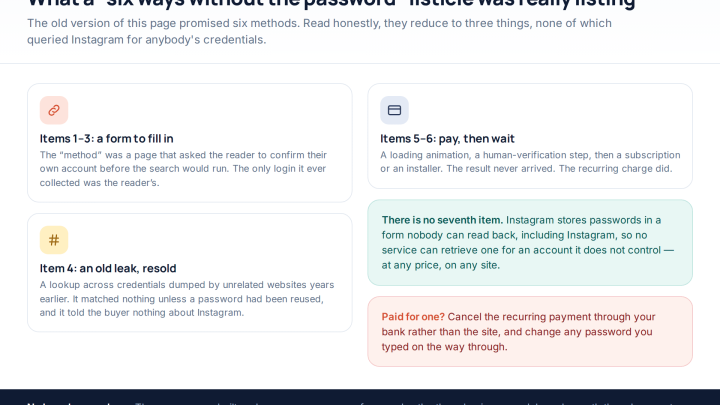
Six Ways Instagram Accounts Fall Without the Password, and How to Block Each
An Instagram hacked without password guessing is the normal case, not the exception. Passwords are almost never worked out —…
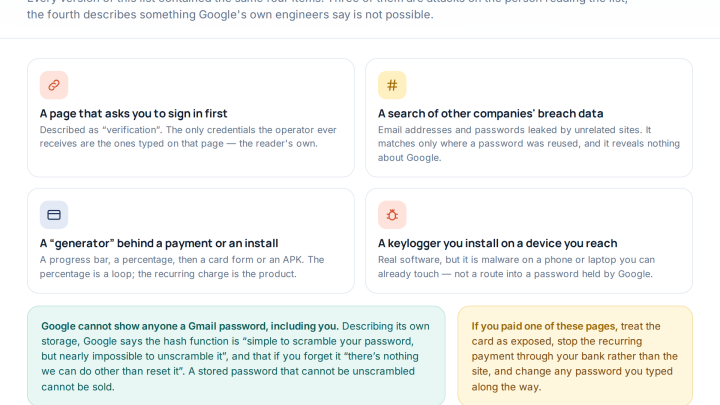
Gmail Password Compromised? Four Recovery Routes Google Accepts
If your Gmail password was hacked, there are four routes back and the one that is open to you depends…
Private Instagram Accounts: What Strangers Can Still See, and How to Shut It Down
What does a private Instagram account actually hide? The posts, the reels and the stories — and nothing else. Private…