Three Mobile Habits That Give Away a Facebook Password
 By GuestSpy Editor · Founder and editorPublished September 14, 2020Updated October 5, 202610 min read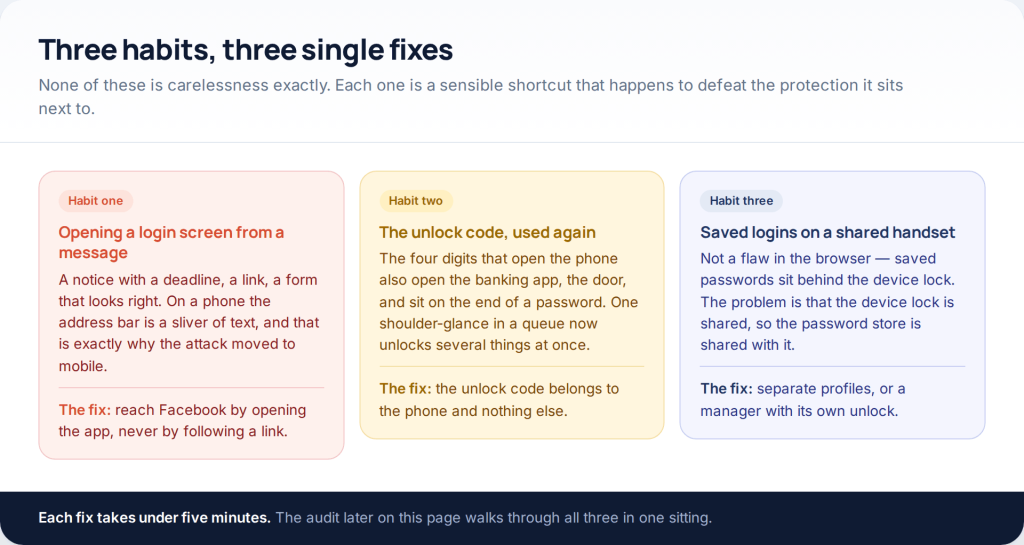
How does a Facebook password actually leave a phone? Almost never through clever software. It goes in one of three ordinary ways: a login screen opened from a message, an unlock code recycled somewhere it does not belong, or saved logins sitting on a handset several people use. To protect a Facebook password on mobile you mostly have to change habits rather than install anything, and each of the three has a fix that takes under five minutes.
This page used to be called “3 Ways to Hack Facebook Password Using Mobile”. The three ways it described were a fake login page, a credential list from somebody else’s breach, and an app that had to be installed on the handset first. We are keeping the number three and turning it around: these are the three mobile habits that hand a password over, written from the defending side. Nothing here helps anyone into an account that is not theirs.
Habit one: opening a login screen from a message
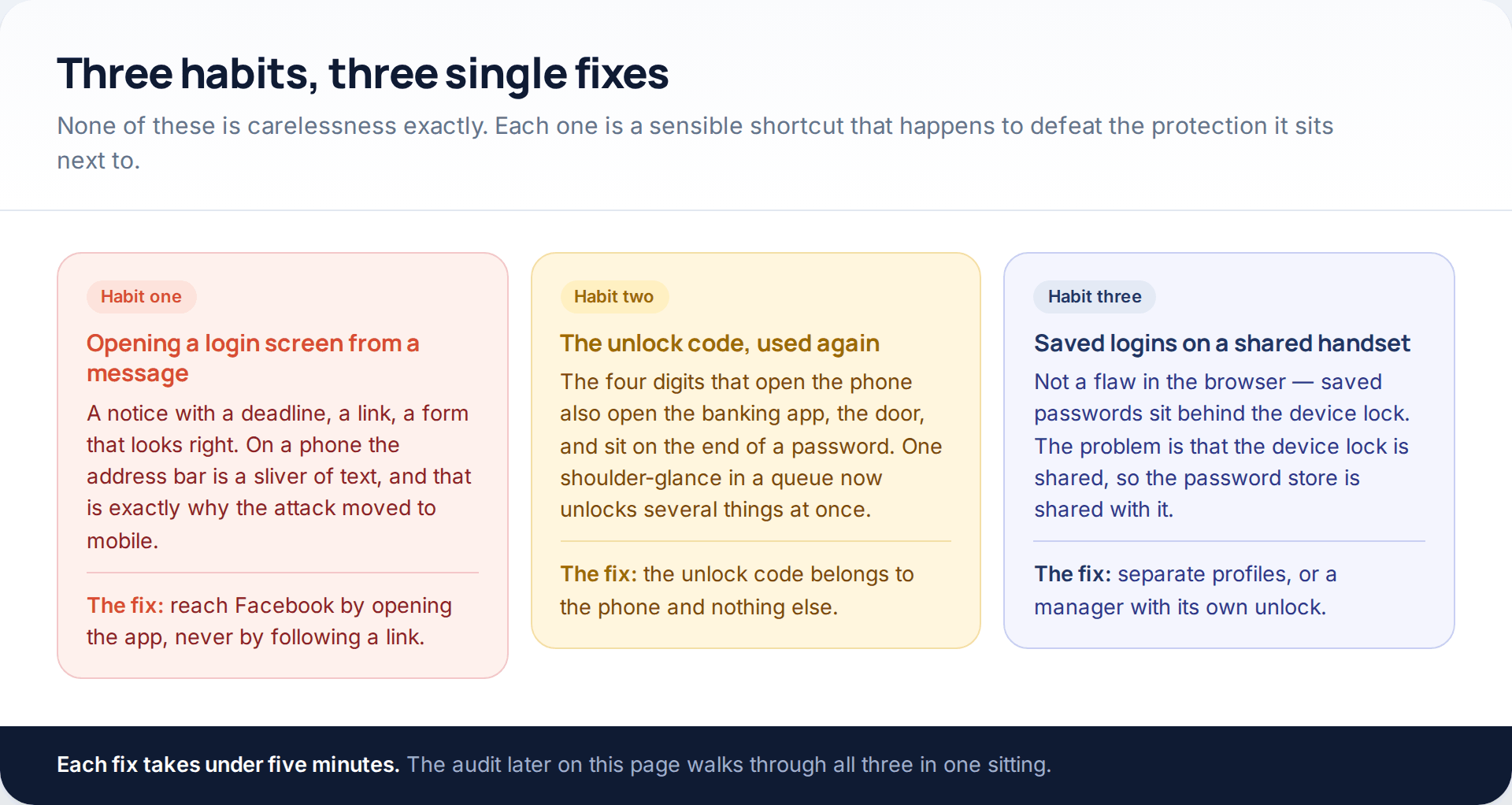
Phishing moved to the phone for a structural reason: a mobile browser shows you perhaps twenty characters of a web address and hides the rest behind an ellipsis. On a laptop a strange address is visible at a glance. On a handset it genuinely is not, and the attack is built around that.
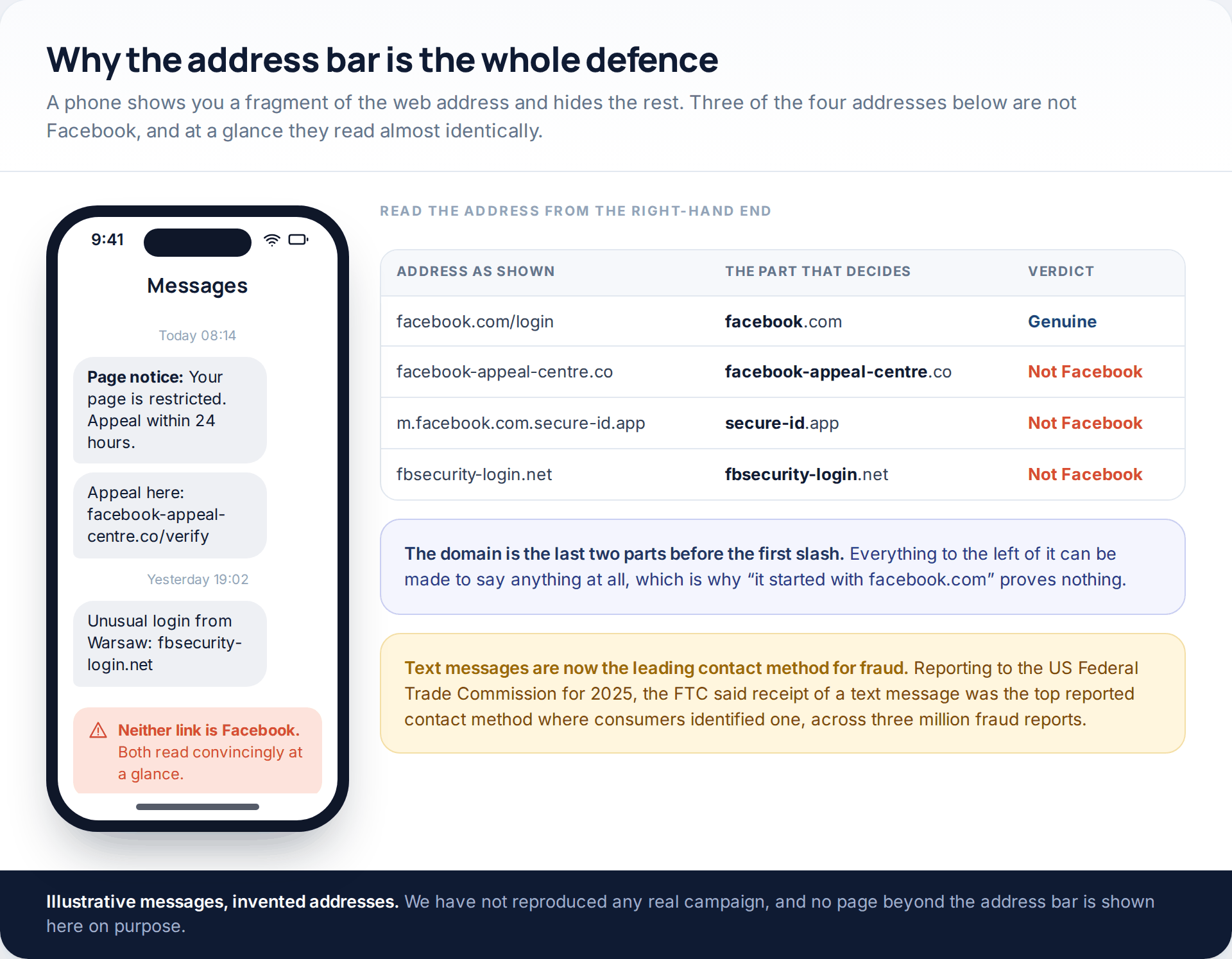
The current patterns are predictable once you have seen them. A copyright complaint with a twenty-four hour deadline. A Page restriction and an appeal link. A security alert about a login from a city you have never visited. All three work by supplying urgency and a convenient button, and the button is the whole attack.
The useful habit is small: never reach a login screen through a link. Not a link in a message, not one in an email, not one in a notification you cannot place. Close the message, open the Facebook app yourself, and look for the same notice there. A genuine restriction, complaint or security alert will be waiting inside the app, because that is where Facebook raises them.
Treat the volume as the warning. Reporting on 2025, the US Federal Trade Commission said that where consumers identified a contact method in their three million fraud reports, receipt of a text message was the one reported most. This is not an unusual thing that happens to careless people; it is the leading delivery route.
Habit two: the unlock code that became part of a password
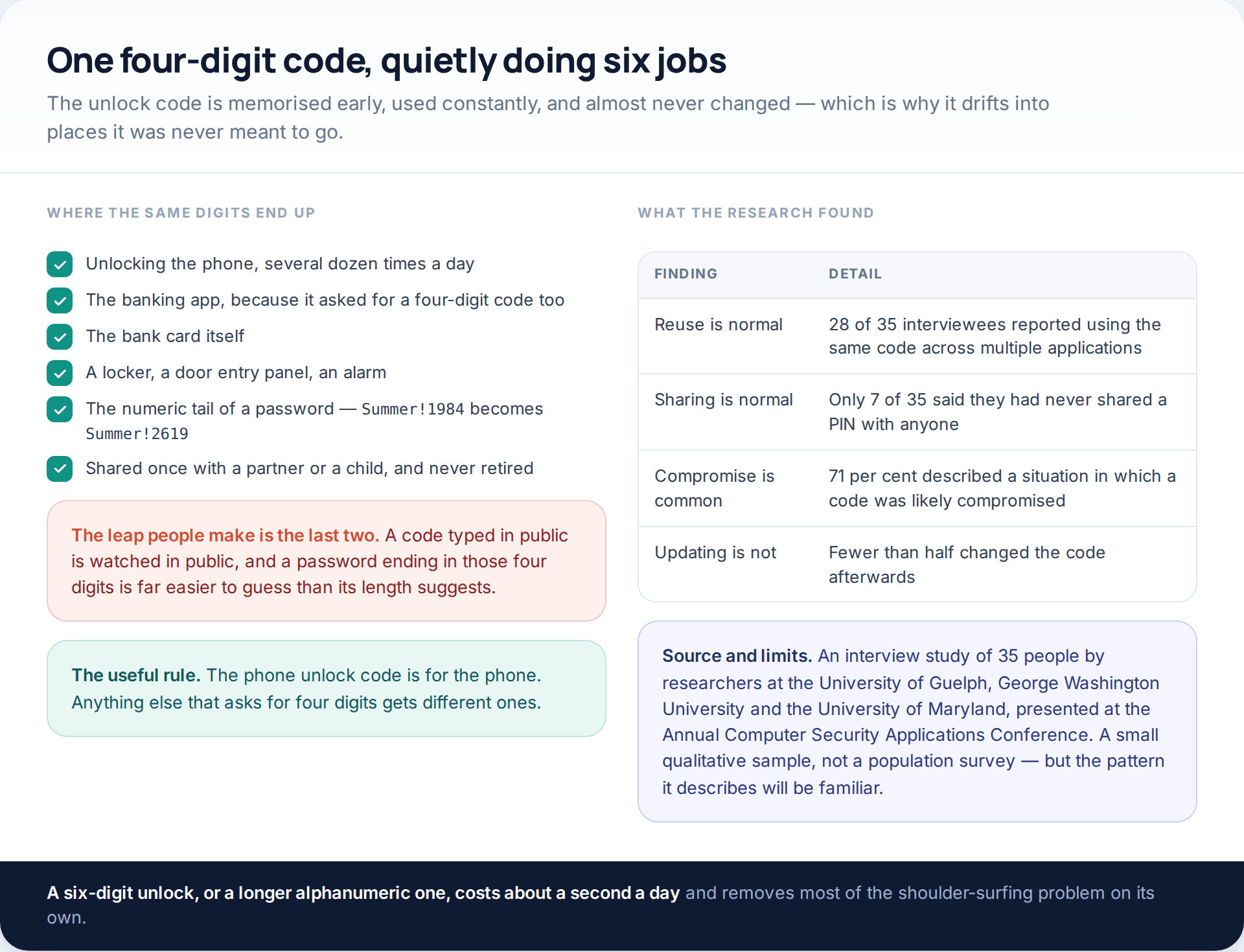
The unlock code is the most-typed secret most people own. It is memorised in childhood terms — a birthday, a house number, a year — and then, because it is memorable, it spreads. The banking app wanted four digits too. So did the gym locker. And then it turns up as the numeric tail of a password: the word stays the same, the digits change to the familiar ones.
An interview study of 35 people by researchers at the University of Guelph, George Washington University and the University of Maryland, presented at the Annual Computer Security Applications Conference, found 28 of them reusing the same code across multiple applications, only seven who had never shared a PIN with anyone, and 71 per cent describing a situation in which a code had likely been compromised — after which fewer than half changed it. It is a small qualitative sample rather than a population survey, and the behaviour it describes will nonetheless be recognisable.
Two changes fix it. The phone unlock code belongs to the phone and to nothing else; anything else asking for four digits gets different ones. And a Facebook password should contain no part of it — not as the ending, not reversed, not with a year added. If the current one does, that is the password to change first.
Habit three: saved logins on a handset other people use
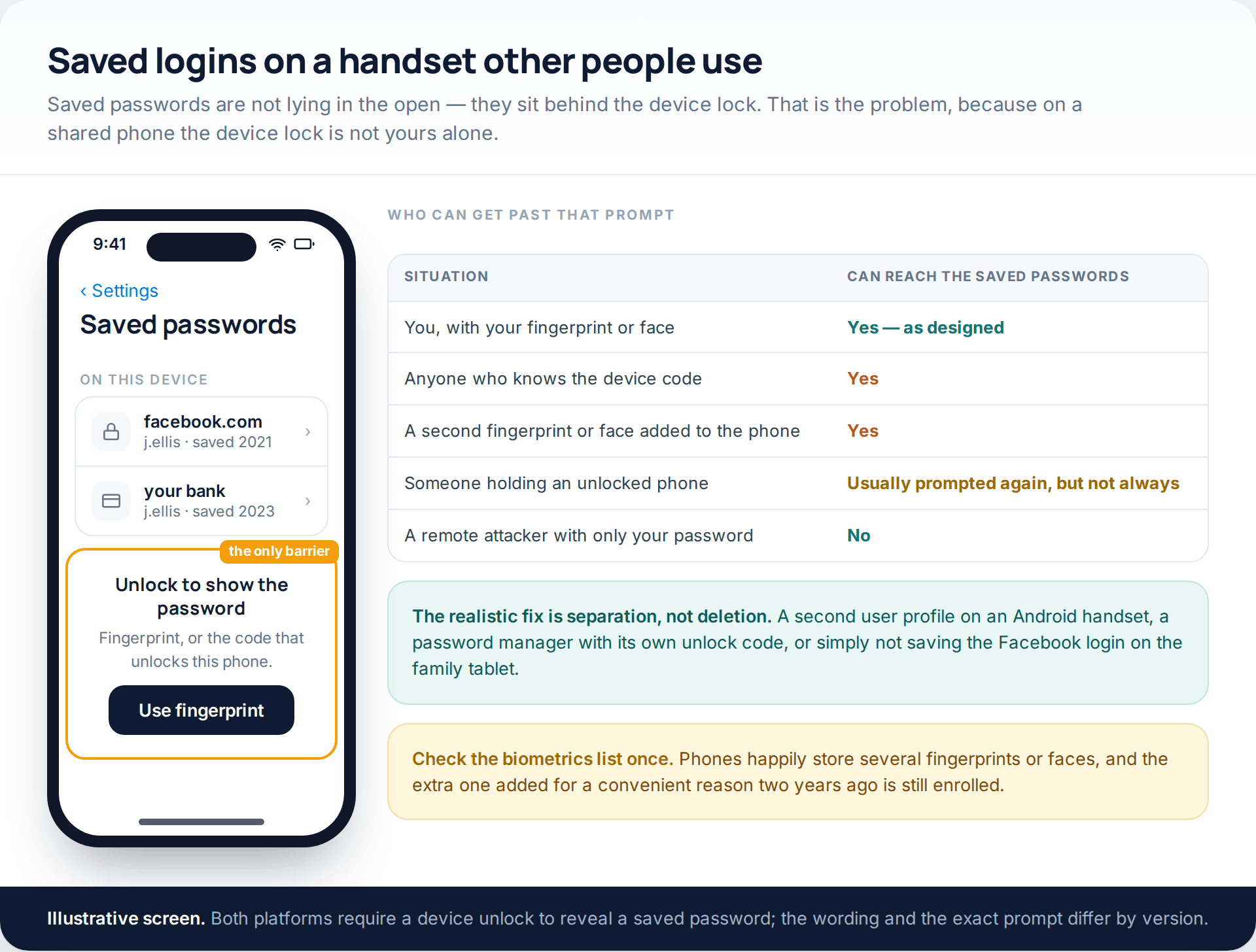
This one is widely described wrongly, so it is worth being precise. Saved passwords on a modern phone are not readable by anyone who picks it up: both platforms require a device unlock — a fingerprint, a face or the screen code — before revealing one. The browser is not the weak point.
The weak point is that the device lock is the only barrier, and on a family handset that barrier is shared. Anyone who knows the screen code can reach the saved passwords. So can anyone whose fingerprint or face was enrolled on the phone, including the one added two years ago for a perfectly good reason and never removed. The password store inherits the privacy of the unlock code, and on a shared device the unlock code has none.
The fix is separation rather than deletion. On Android, a second user profile gives each person their own saved logins. A dedicated password manager with its own unlock code adds a second barrier that the shared screen code does not open. And the simplest version of all: do not save the Facebook login on the tablet that lives in the kitchen. While you are in the settings, open the biometrics list and count what is enrolled — most people find at least one entry they cannot account for.
Autofill hygiene, and the warning it gives for free
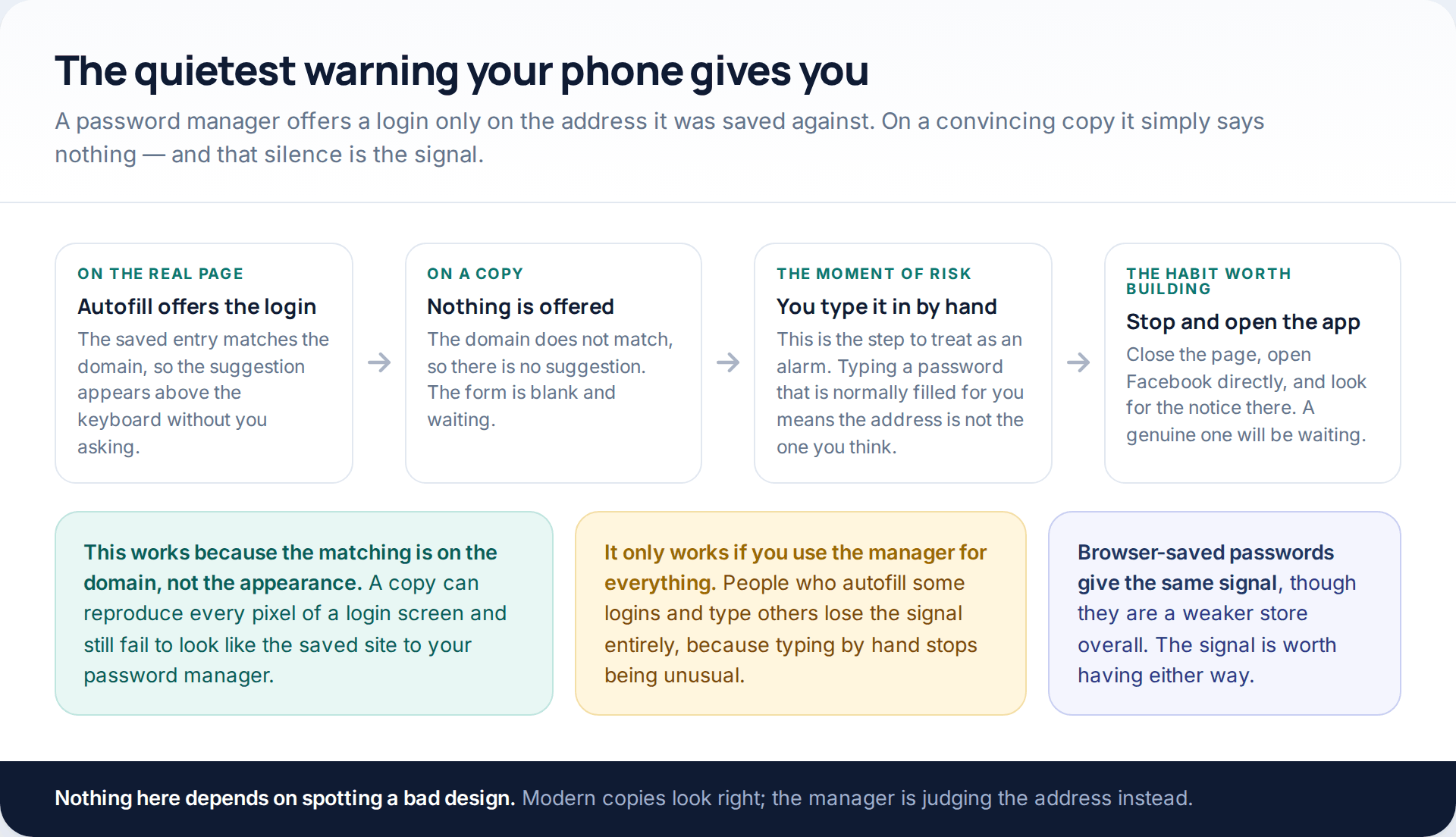
Here is the part of autofill that is genuinely a security feature rather than a convenience. A password manager — or the browser’s own store — offers a saved login only on the address it was saved against. A copied login page can reproduce every pixel of the real one and still get nothing offered to it, because the domain does not match.
That turns a non-event into a warning. If you arrive at a Facebook login screen and the suggestion does not appear above the keyboard, stop. Do not type it in. That silence is your password manager telling you the address is not the one it knows. The habit only works if you use the manager consistently, though: people who autofill some logins and hand-type others never notice, because typing by hand is not unusual for them.
Passkeys: removing the thing that can be given away
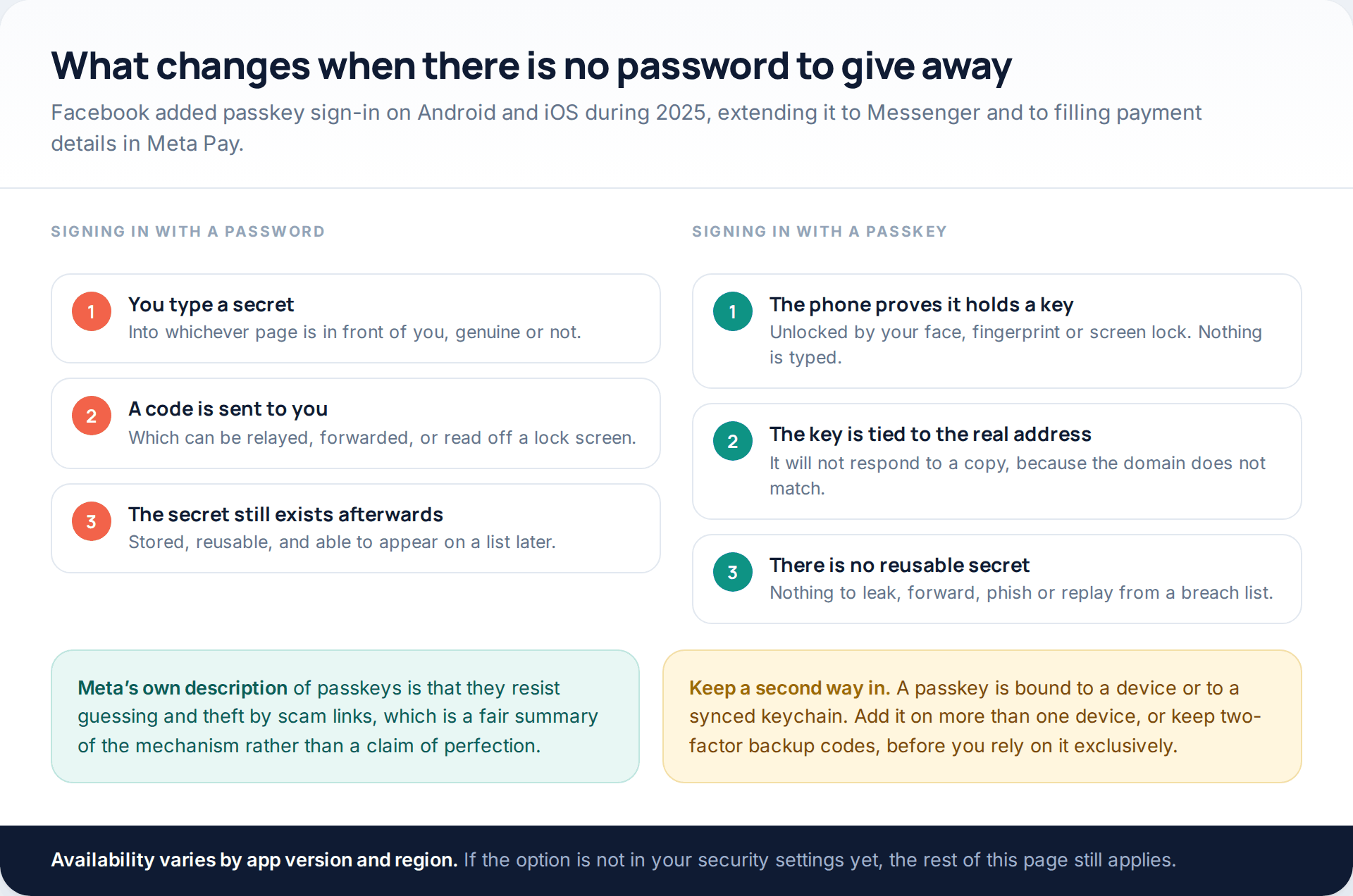
Every defence above manages a secret. Passkeys remove it. Instead of a password, the phone holds a key that it proves possession of, unlocked by your face, fingerprint or screen lock. Nothing is typed, nothing is sent that could be replayed, and the key refuses to respond to an address that is not the real one — so a convincing copy gets nothing at all.
Facebook added passkey sign-in on Android and iOS during 2025, extending it to Messenger and to filling payment details in Meta Pay. Meta’s own description is that passkeys resist guessing and theft by scam links, which is a fair account of the mechanism. Set one up if the option appears in your security settings — and add it on a second device, or keep your two-factor backup codes somewhere reachable, before you lean on it entirely.
Two-factor that lives in an app rather than a text
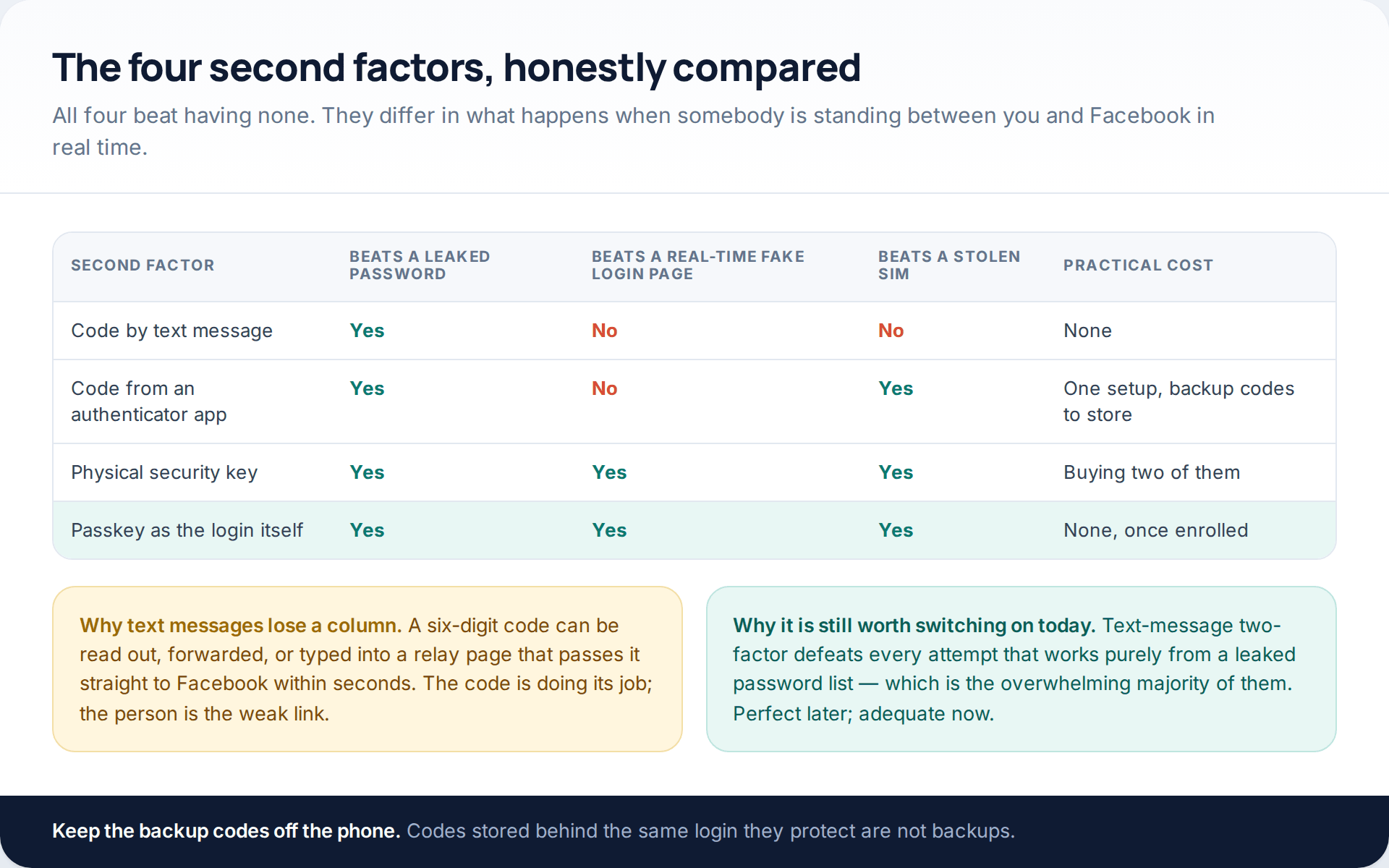
If there is one thing to switch on today, it is two-factor authentication, and the method matters less than its existence. Text-message codes defeat every attempt that works purely from a leaked password list, which is the overwhelming majority. They lose to a page relaying your login live, and to anyone who talks you into reading a code aloud.
An authenticator app removes the SIM from the equation entirely. A physical security key, or a passkey used as the login, removes the real-time relay as well, because neither will respond to the wrong address. Whichever you choose, store the backup codes somewhere that is not the phone — codes kept behind the login they protect are not backups.
The sixty-second audit
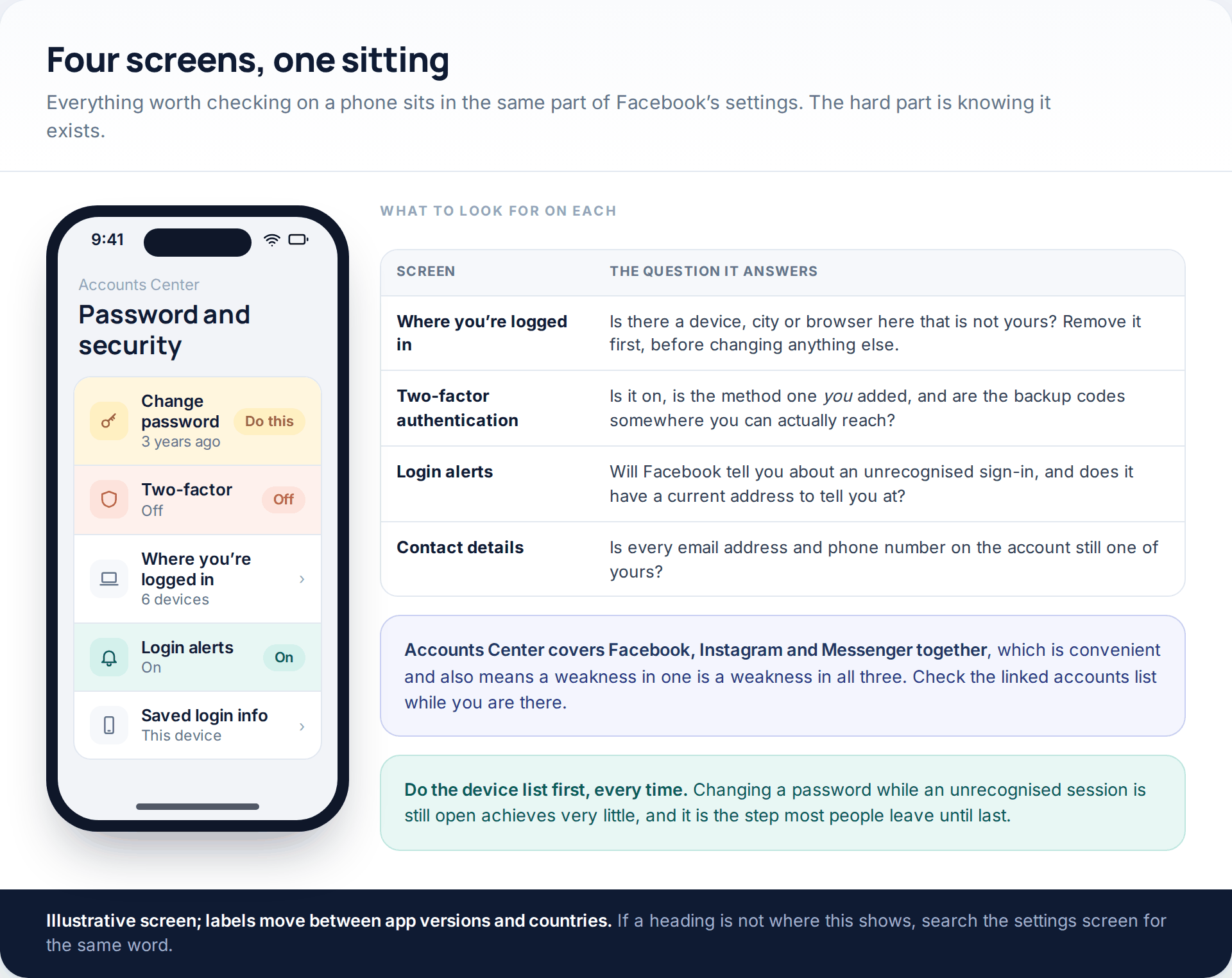
Everything above lives in one part of the app. On a phone, that is your profile, then the settings menu, then Accounts Center, then Password and security. Meta has moved these between Settings and Accounts Center more than once, so if the path does not match, search the settings screen for “password” and follow what you find.
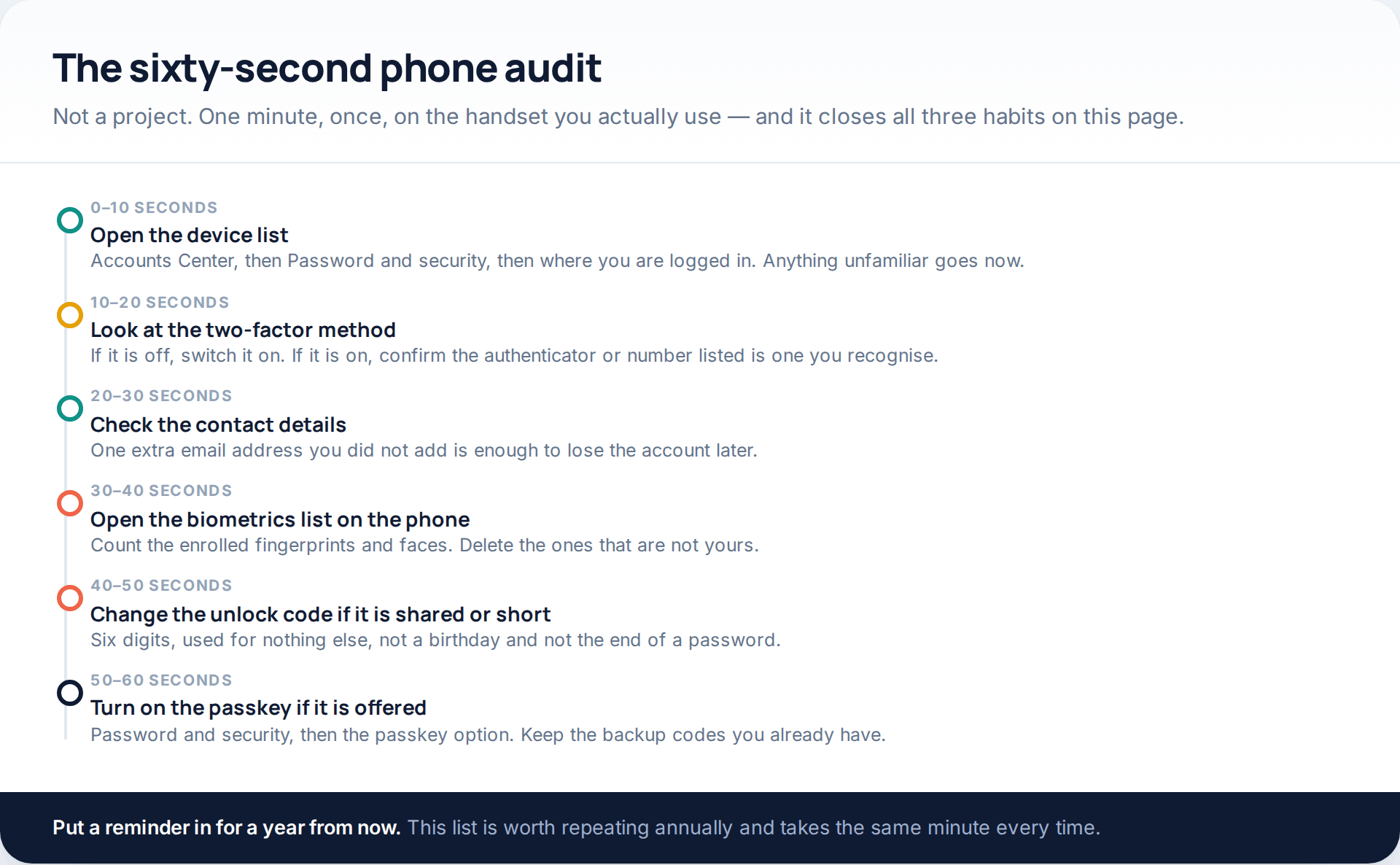
The step people skip is the fourth one. Phones store several fingerprints and faces without ever mentioning it again, and an extra enrolment is both invisible and complete access — to the saved passwords, the banking app and everything else behind the same lock. It takes ten seconds to look. If the handset has ever been handed to someone for a few minutes, look now. Our guide to checking what your apps can actually reach covers the rest of the phone-level review.
How this page was put together
The fraud-reporting figure is the US Federal Trade Commission’s own, from testimony covering its 2025 Consumer Sentinel data: three million fraud reports, and text messages as the most reported contact method where consumers identified one. The PIN research is an interview study of 35 participants by Khan and colleagues at the University of Guelph, with co-authors at George Washington University and the University of Maryland, presented at the Annual Computer Security Applications Conference; we have quoted its counts rather than converting them into percentages of the general population, because a sample of that size does not support it.
The passkey and two-factor behaviour described here reflects Meta’s announcements and the published behaviour of Android and iOS password stores as of October 2026. Facebook’s help pages block automated retrieval, so menu paths were cross-checked against independent walkthroughs and the current app rather than quoted from a single source; labels differ between app versions and countries, and the screens illustrated are neutral drawings rather than reproductions. We have deliberately not shown a fake login page, even as an example, and the web addresses in the messaging illustration are invented.
If the password has already gone rather than being at risk, two companion pieces pick up from there: the free routes back into a hacked Facebook account, and how credentials leak and how to reset safely.
Common questions
Can someone get my Facebook password just from my phone number?
No. A phone number alone gives no access. It does give an attacker a delivery route for a convincing message, and it matters a great deal if your two-factor codes arrive by text and your number can be moved to another SIM — which is the argument for an authenticator app.
Is it safe to let my phone save my Facebook password?
On a handset only you unlock, yes — the saved store sits behind your fingerprint, face or screen code. On a shared phone it is only as private as that unlock, so use a separate user profile or a password manager with its own code.
Does a longer password help against any of this?
Barely. None of the three habits on this page involves guessing. Length protects against brute force; uniqueness, two-factor and a passkey protect against everything described here.
How do I tell a genuine Facebook security alert from a fake one?
Do not try to judge the message. Open the app and look for the same notice inside it — Facebook keeps a record of the security messages it has sent you in the security settings, and anything absent from that list did not come from Facebook.
Should I use my fingerprint or a code to unlock my phone?
Both, in practice: a fingerprint for everyday convenience and a strong code behind it, because the code is the fallback that reveals everything when the fingerprint fails. A six-digit code used nowhere else is a reasonable minimum.
What if a family member already knows my unlock code?
Change it, and check the enrolled fingerprints and faces at the same time. If you share the handset deliberately, set up a second user profile or move your passwords into a manager with its own unlock instead.
Are passkeys risky if I lose the phone?
Only if that device holds your single way in. Passkeys sync through Apple’s and Google’s keychains and can be enrolled on more than one device, and keeping your two-factor backup codes gives you a second route regardless.
Using a monitoring app for this? GuestSpy is parental monitoring for Android that stays visible on the child's phone and runs from any browser. If it fits your family, see what the app does.
Related guides
5 Best Security and Network-Testing Apps for Android (Rooted and Not)
The useful security apps for Android are not the ones with “hack” in the title. They are a network scanner,…
Gmail Password Compromised? Four Recovery Routes Google Accepts
If your Gmail password was hacked, there are four routes back and the one that is open to you depends…
Facebook Account Hacked? Every Free Route Back In
If your Facebook account was hacked, five routes lead back in and all of them are free: a device of…
Monitoring your child can see.
Location, screen-time budgets, routines, app and website blocking and the alerts that matter, run from any browser and visible on the phone. Pair an Android phone in about fifteen minutes.