Phone Call Logs: Four Legitimate Ways to See Who Called and When
 By GuestSpy Editor · Founder and editorPublished September 21, 2020Updated October 5, 202610 min read
Phone call logs answer three questions and no others: which number, at what time, and for how long. There are four legitimate ways to reach one — the list on the handset, the carrier account the line is paid from, the parental controls that decide who can connect, and a monitoring app installed on the phone with the user’s knowledge. None of them produces a recording, and that distinction carries real legal weight.
This page used to be called “4 ways to hack phone call logs”. There was never a hack involved. Two of the four routes below are things you can already open — the handset and the bill — and the other two require either supervision you set up or software somebody installs in person. The old framing made ordinary account access sound like a technique, which is how pages like this one ended up selling subscriptions for it.
What a call log actually is
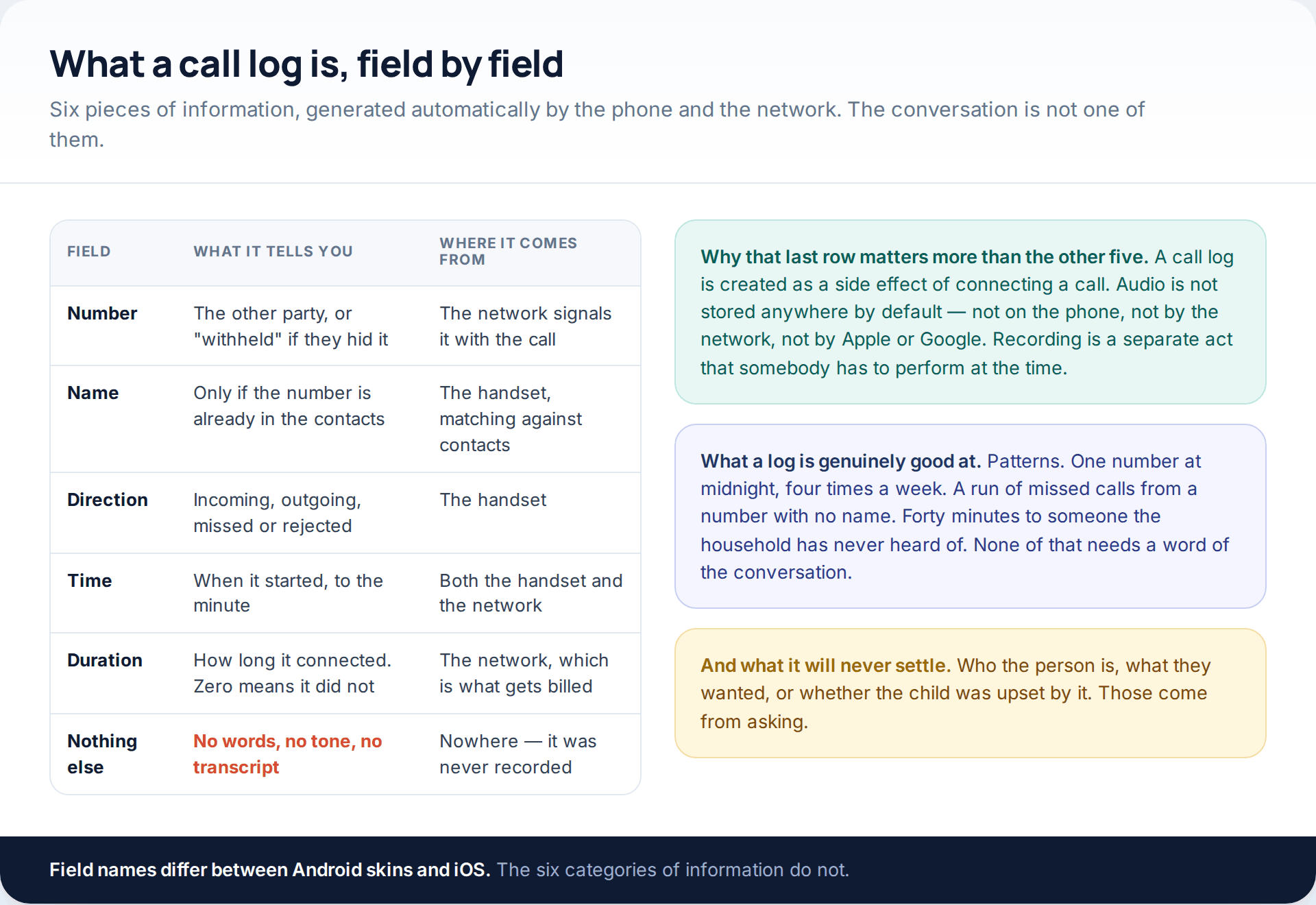
The log exists because a call has to be routed and billed. The phone writes down what it did; the network writes down what it carried. Neither of them stores the audio, which is why “recovering” a call that was not recorded at the time is not a thing that can be done at any price.
This matters for what you should expect from the routes below. They are all very good at patterns — a number appearing eleven times across three weeks, calls clustering after midnight, a forty-minute conversation with someone the household cannot place. They are all completely silent on what was said, and a parent who goes looking for the second thing will spend money and find the first.
Route one: the list on the phone
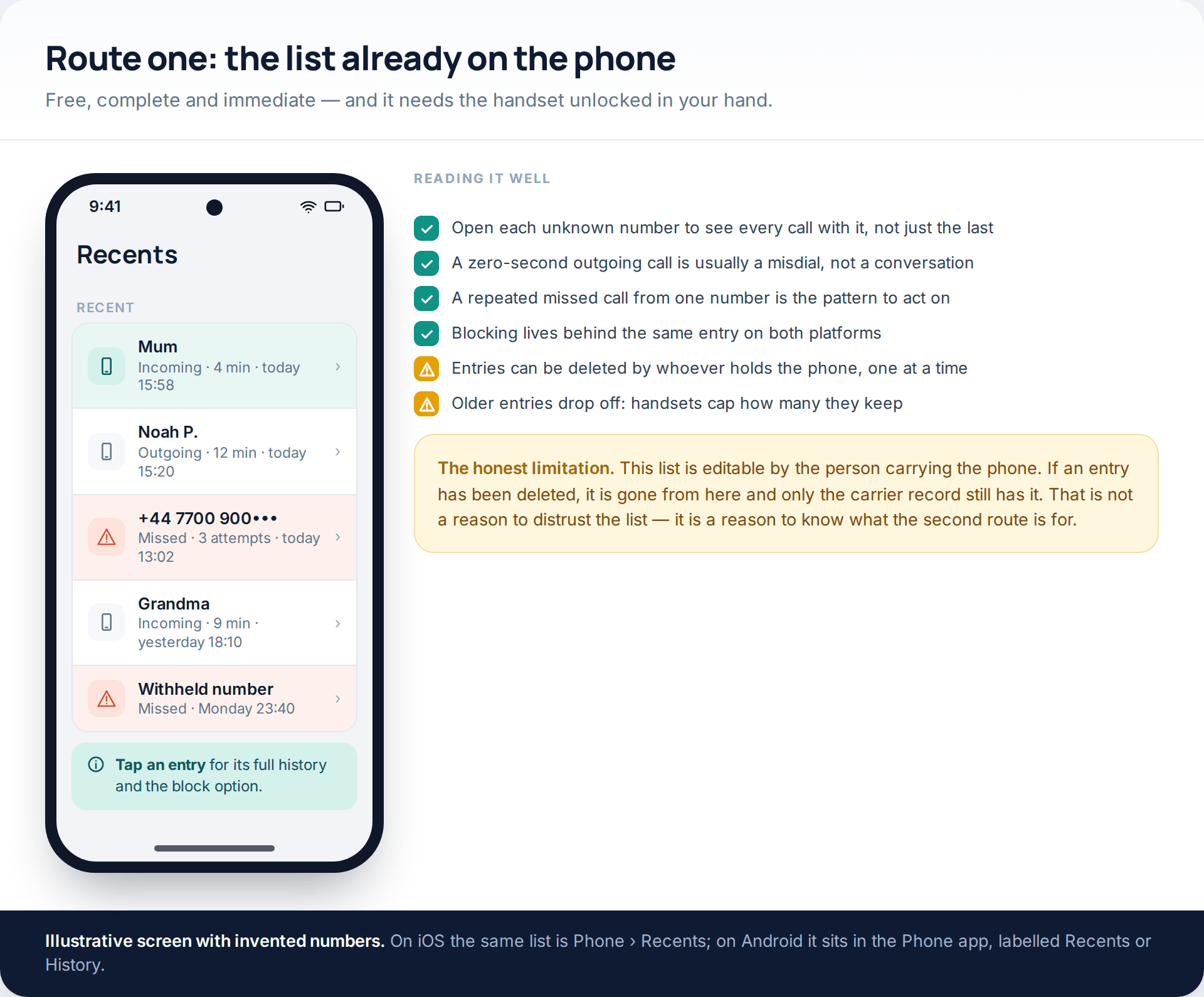
On iOS it is Phone › Recents; on Android it is the Phone app, labelled Recents or History depending on the manufacturer. Tapping an entry opens every call with that number rather than just the most recent one, which is the step most people skip and the one that turns a single missed call into a pattern.
Two caveats define what this route is worth. Entries can be deleted individually by whoever holds the phone, and handsets cap how many they keep, so an old call may simply have aged out. Neither is sinister on its own; both are reasons to know that the carrier keeps an independent copy.
There is also a reason to do this with the child rather than while they are asleep. Opening the Recents list together, and blocking a nuisance number from the same screen, is a five-minute piece of shared problem-solving. Doing it covertly converts the same five minutes into a thing you now have to keep secret.
Route two: the carrier account
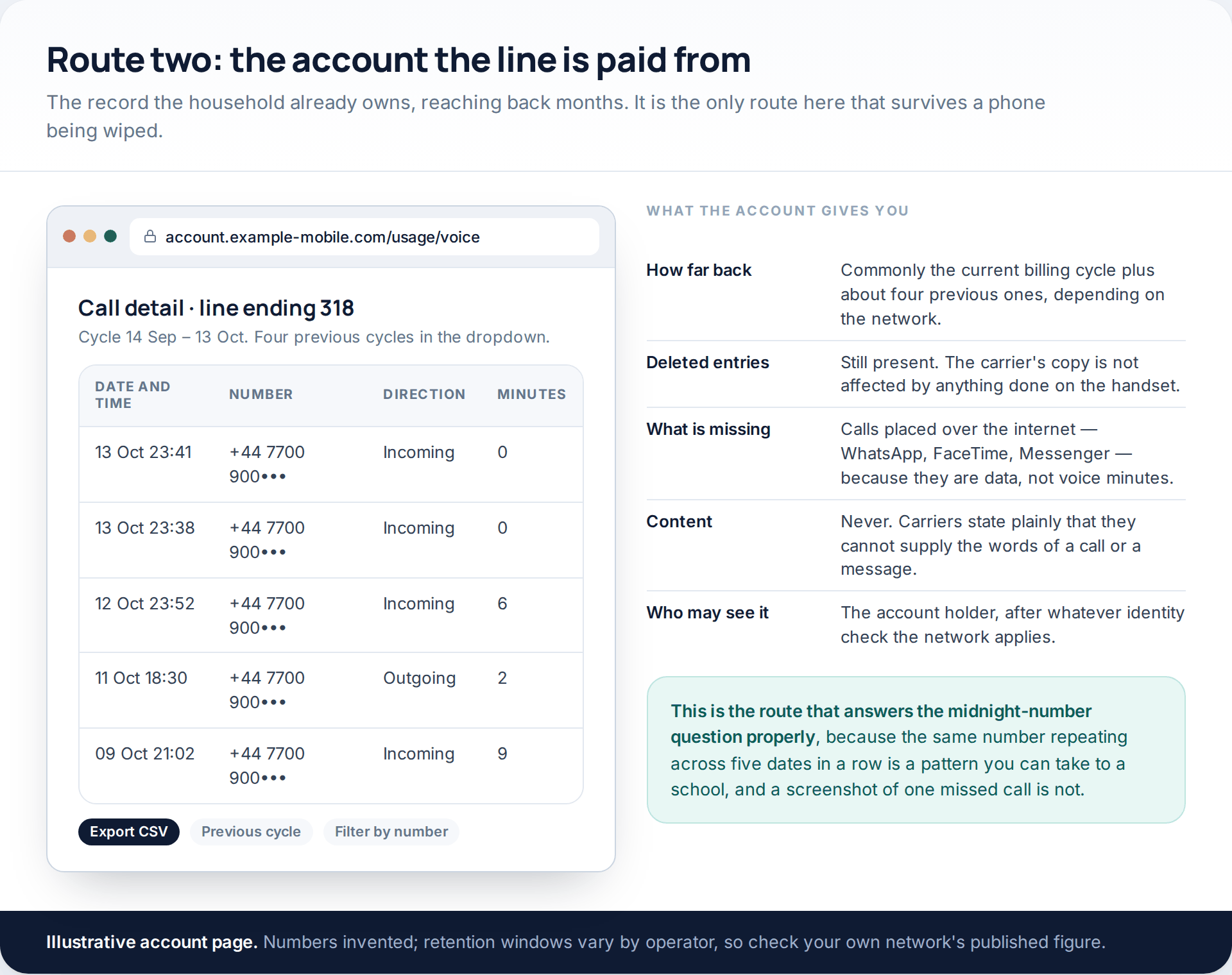
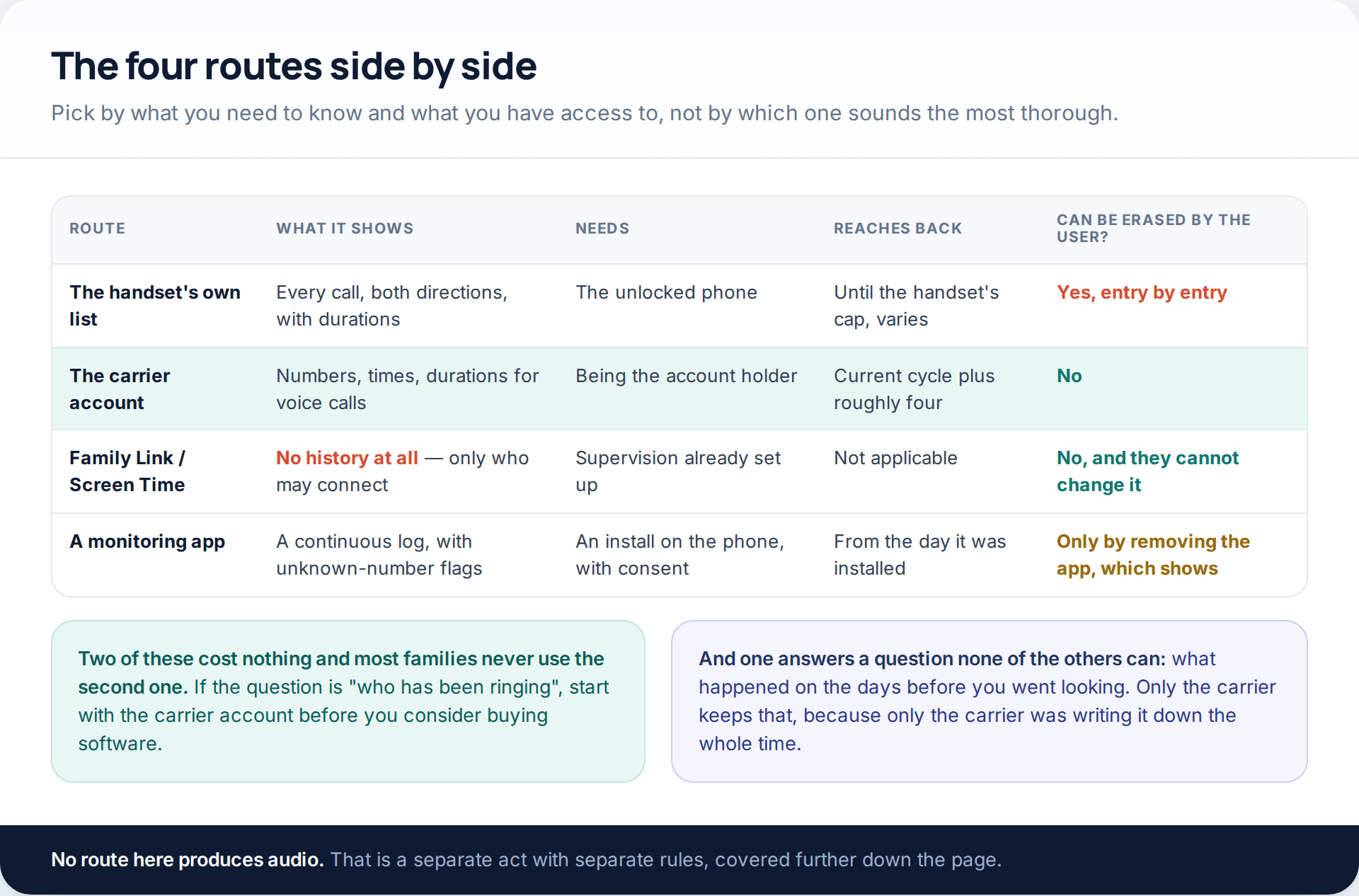
If the line sits on your account, the call detail is yours to read. Operators publish it in the online account and, on request, on the bill: date, time, the other number, direction and duration. One network’s support page describes the current billing cycle plus the four previous ones; others differ, so check what your own operator states.
Three things make this the strongest of the four routes. It is unaffected by anything done on the handset, so deleted entries are still there. It exports, usually as a spreadsheet, which matters if you ever need to show someone a pattern rather than describe one. And it is free, which the alternatives are not.
What it cannot do is see calls that never touched the voice network. WhatsApp, FaceTime and Messenger calls travel as data, so a bill can look quiet while the phone has been busy all week. And carriers are explicit that they cannot supply content: the words of a call or a message are not recorded and not retrievable.
Route three: the controls that stop the call instead
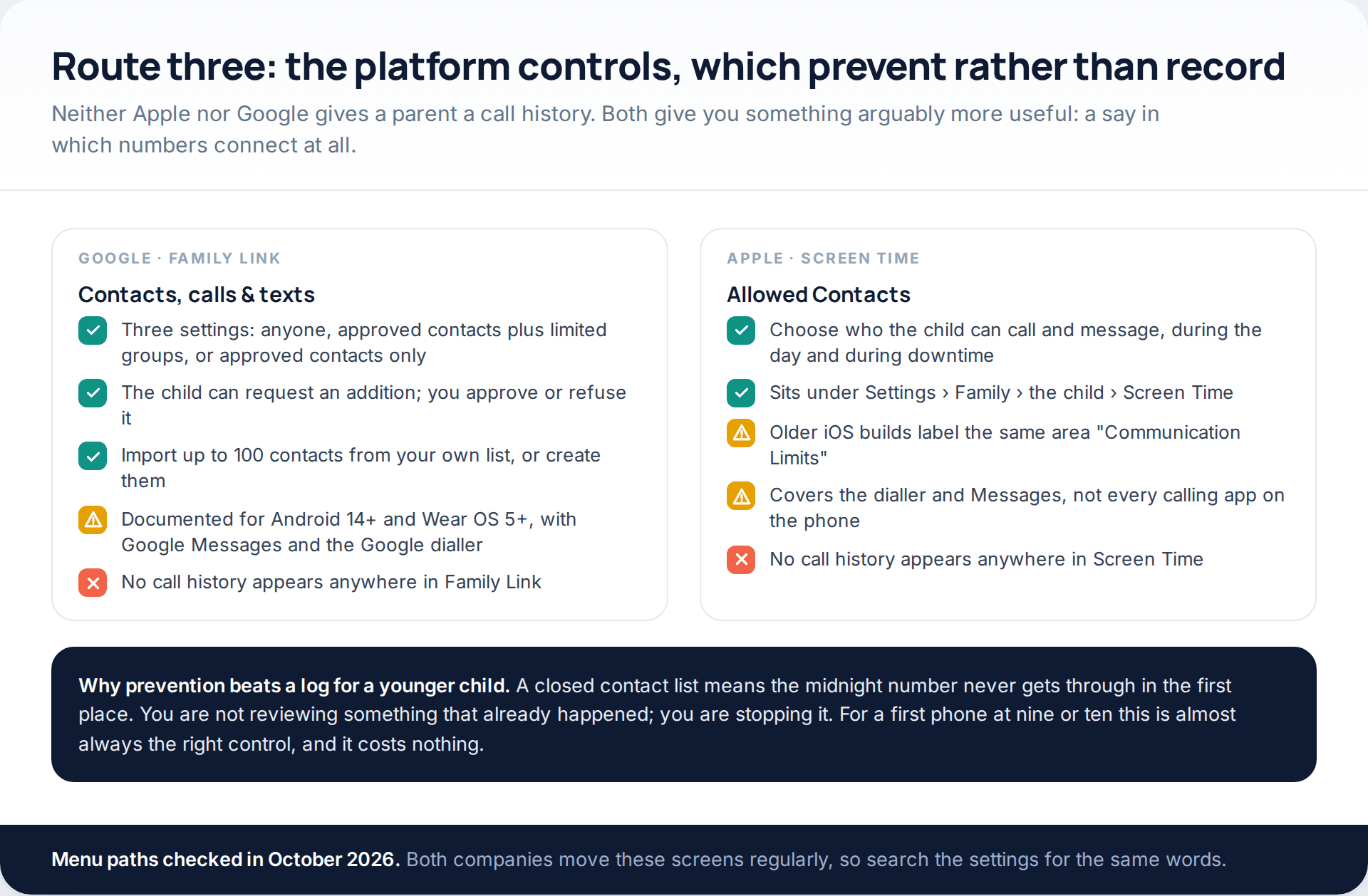
This is the route people are most often surprised by, because it does the opposite of what they came looking for. Family Link offers three settings for who can call and text — anyone, approved contacts plus groups containing an approved contact, or approved contacts only — with a request-and-approve flow for additions, and Google documents it for Android 14 and later with Google Messages and the Google dialler. Apple’s equivalent is Allowed Contacts under Screen Time, reached through Settings › Family › the child’s name, and labelled Communication Limits in older builds.
Neither shows a log. For an eleven-year-old being rung by a stranger, that turns out not to matter: the point of the exercise was to make it stop, and a closed contact list makes it stop permanently rather than one number at a time. Our guide to monitoring a child’s phone on both platforms covers how these settings sit alongside the rest of each system.
The four routes, compared
Route four: a log kept by an app
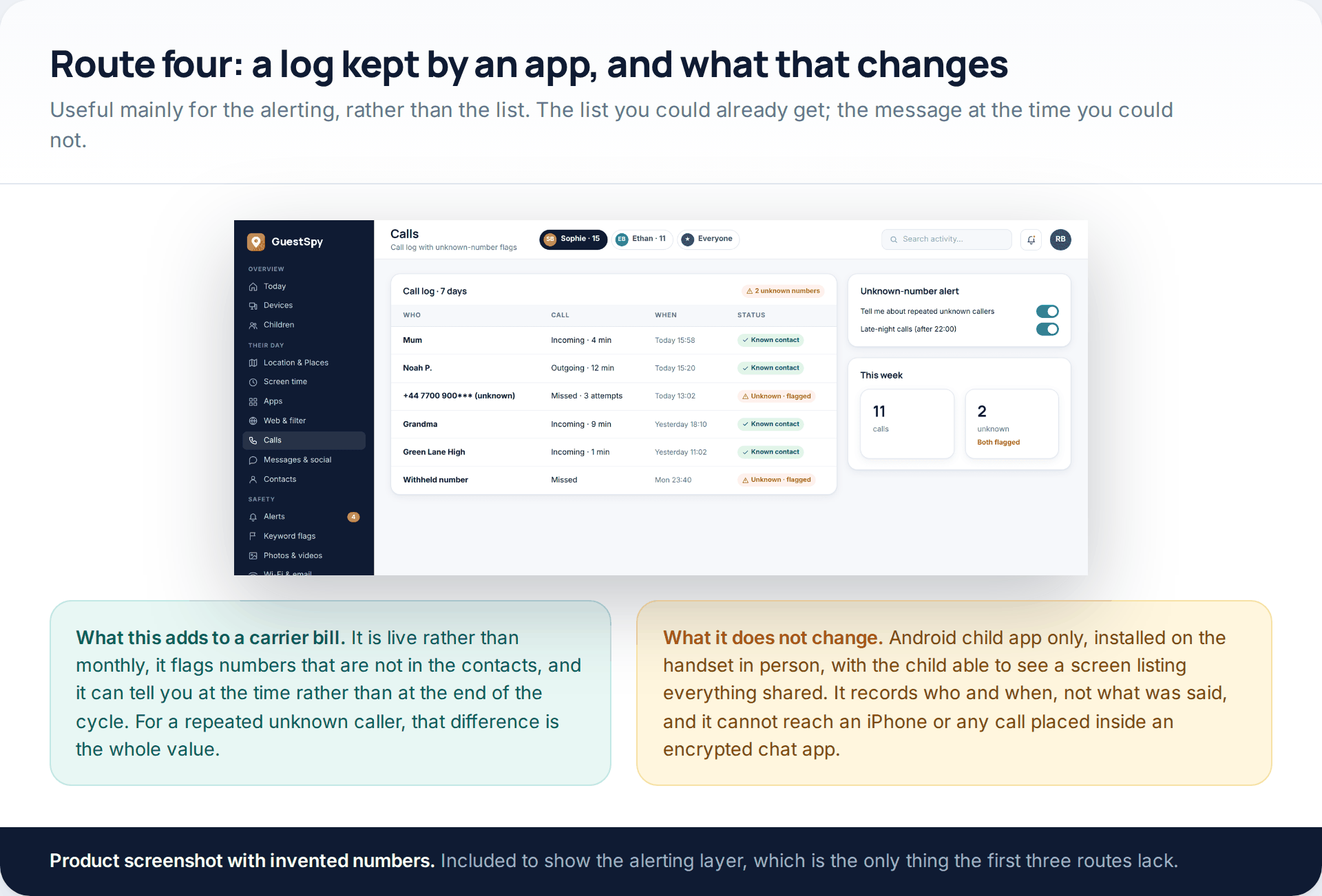
An installed app adds one thing the other three lack: it can tell you at the moment rather than at the end of the billing cycle. For a repeated unknown caller, or a pattern of late-night calls, an alert the same evening is a genuinely different proposition from a discovery three weeks later.
Everything else about it is the same trade described across this site. GuestSpy is an Android child app that has to be installed on the handset in person; the child sees a screen listing exactly what is shared; it logs who and when rather than what was said; and it reaches neither an iPhone nor a call placed inside an encrypted chat app. The call log page sets out what the view contains. If the carrier account already answers your question, you do not need it.
Logging versus recording: the line that matters
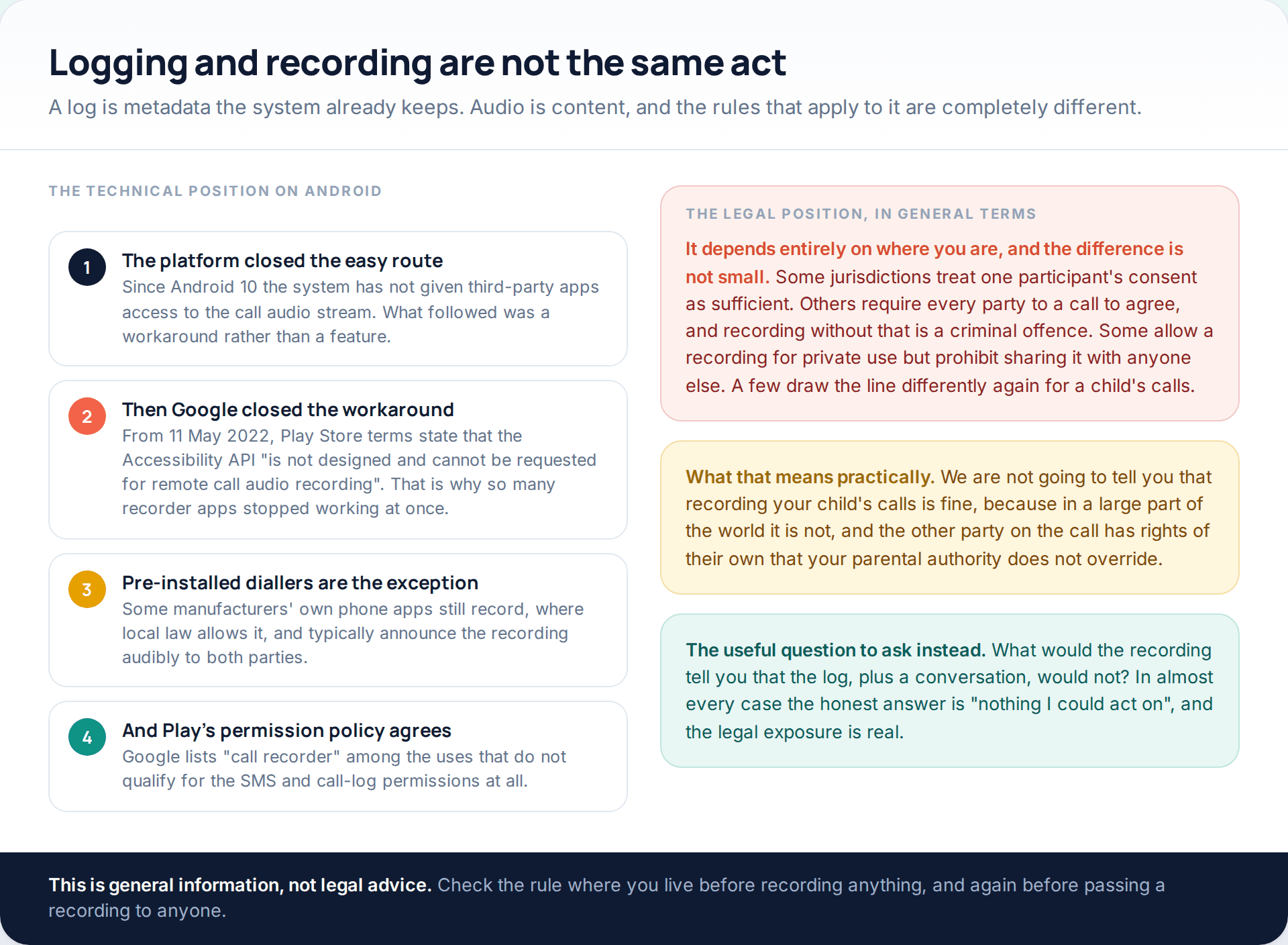
The technical history explains why the “call recorder” apps that used to fill these lists have largely vanished. Android stopped giving third-party apps access to the call audio stream at version 10. Developers moved to the Accessibility API as a workaround, and on 11 May 2022 Google’s Play Store terms closed that too, stating that the API “is not designed and cannot be requested for remote call audio recording”. Google’s permissions policy separately lists “call recorder” among the uses that do not qualify for SMS and call-log access. Pre-installed diallers from some manufacturers still offer recording where the law allows, and they generally announce it out loud to both parties.
The legal position is where real care is needed, and it varies so much that a single answer would be misleading. Some jurisdictions treat the consent of one participant as enough. Others require everyone on the call to agree, and recording without that is criminal rather than merely frowned upon. Some permit a private recording but prohibit sharing it. The other person on your child’s call has rights that your authority as a parent does not extend to, which is the part most discussions of this leave out.
This is general information rather than legal advice. Before recording anything, check the rule where you are — and check it again before you pass a recording to a school, an employer or anyone else.
A worked example
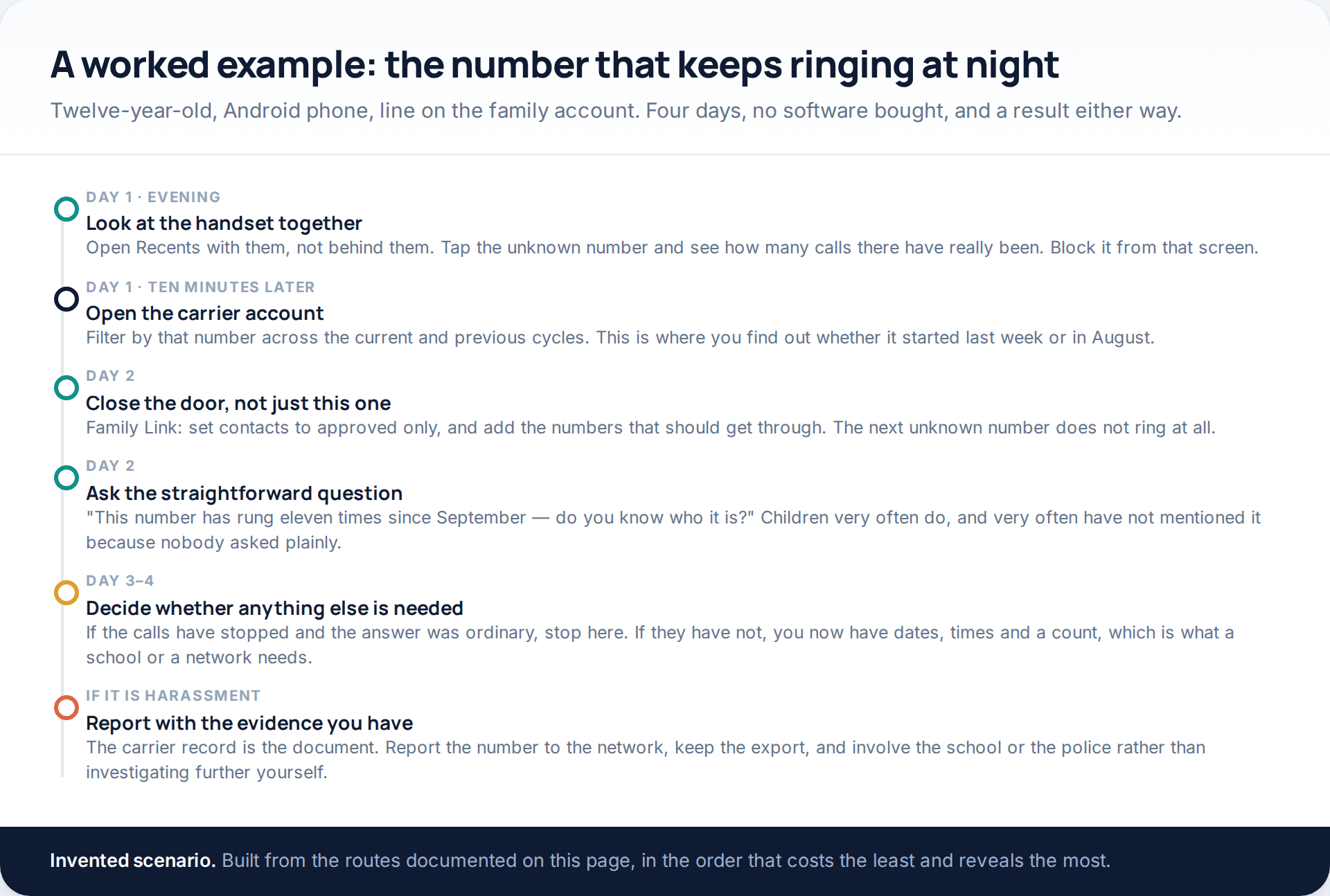
Notice where the money would have gone in that sequence, and what it would have bought. An app installed on day one would have produced a log starting on day one — useless for finding out that the calls began in August, which is the fact that changed what the parents did next. The carrier account answered that for nothing, in about four minutes.
When two logs disagree
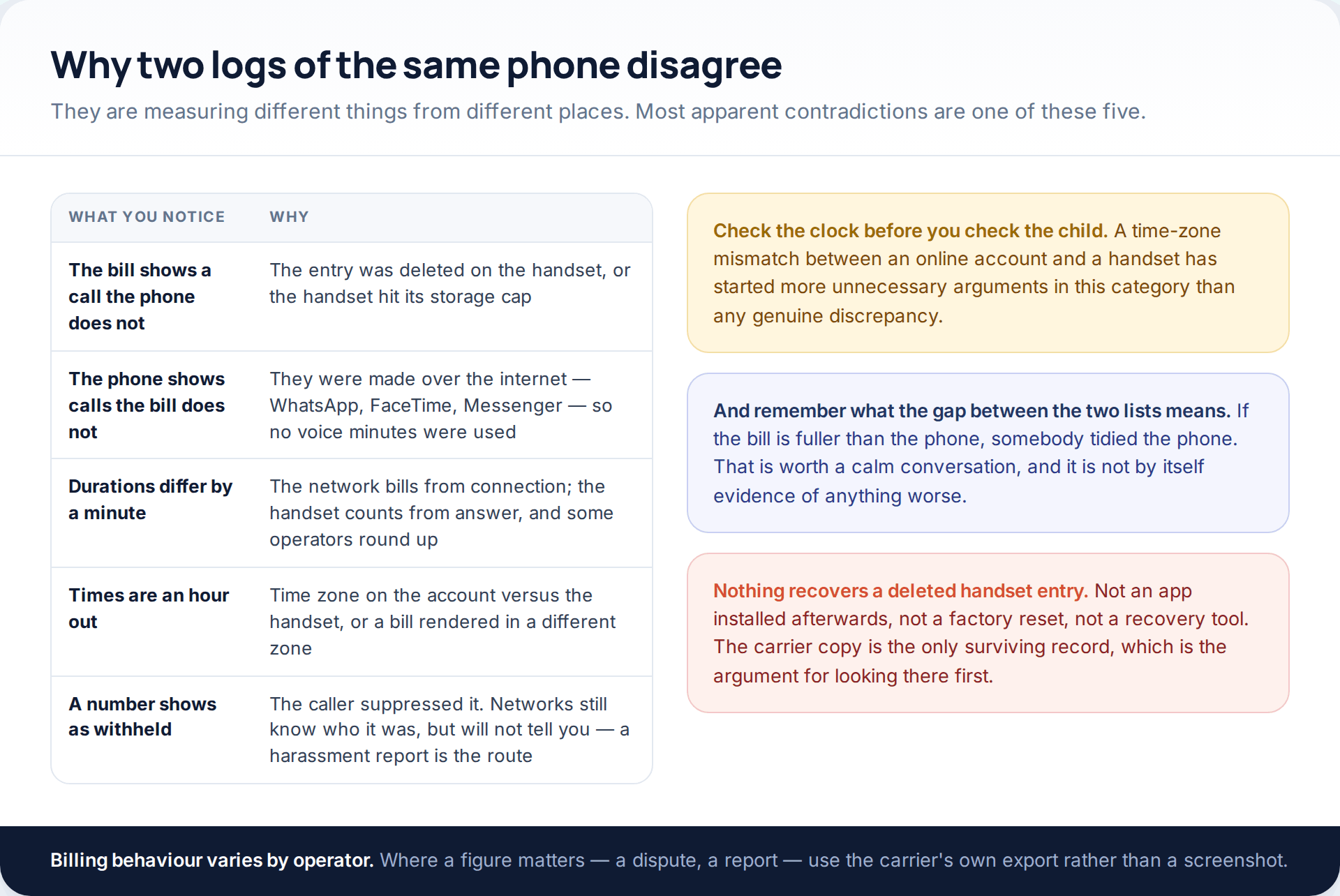
Of the five, the time-zone mismatch is both the most common and the most damaging, because it manufactures evidence of late-night calls that happened at six in the evening. Confirm the zone on the account page before concluding anything about what time a child was on the phone.
How this page was put together
The platform behaviour here was checked in October 2026 against Google’s help pages for Family Link contacts and supervision, Apple’s Screen Time support material, and the Google Play Store policies on SMS and call-log permissions and on surveillance apps. The account of why third-party call recording stopped working on Android draws on Google’s published developer policy change of 11 May 2022 and the Android 10 platform change that preceded it. Carrier retention is described from an operator’s own published support page; windows differ by network and by country, so treat the figure as typical rather than universal.
We have deliberately given no jurisdiction-by-jurisdiction account of call-recording law. The rules vary between countries and, in some countries, between regions; summarising them in a paragraph would be more likely to mislead than to help, and the consequences of getting it wrong fall on the reader. We have also not named or tested any call-recording application, and we do not recommend one. Menu paths in both Family Link and Screen Time move frequently, so they are described as locations to search for rather than exact routes.
If what a call log turns up is more worrying than a nuisance number, the next step is a different kind of decision, and we have written about it separately in what to do when you find something worrying on a child’s phone.
Common questions
Can I see my child’s call log without having the phone?
Yes, if the line is on your mobile account: the call detail is in the online account, covering the current billing cycle and usually several previous ones. You will get numbers, times and durations, never content, and calls placed over the internet will not appear.
Does Family Link show call history?
No. It lets you set who can call and text the phone and approve new contacts, but no call list appears in it. Google’s own parent disclosure describes screen time, location, Play approvals and app permissions, and does not include call history.
Can deleted call log entries be recovered?
Not from the handset. Once an entry is deleted it is gone, and no app installed afterwards changes that. The carrier’s copy is unaffected by anything done on the phone, which makes it the only surviving record.
Why do call-recording apps no longer work on Android?
Android 10 removed third-party access to the call audio stream, and from 11 May 2022 Google’s Play Store terms barred using the Accessibility API as a substitute. Some manufacturers’ built-in diallers still record where local law permits, usually with an audible announcement.
Is it legal to record my child’s phone calls?
It depends entirely on where you live, and in many places it is not. Some jurisdictions accept one party’s consent, others require everyone on the call to agree, and some allow a recording for private use but not sharing it. Check your local rule first; this page is not legal advice.
A withheld number keeps calling. Can I find out who it is?
Not yourself. The network knows, but will not tell a customer. If it is persistent, report it to the operator as nuisance or harassment with the dates and times from the account, and involve the police if there are threats.
Why does the bill show fewer calls than the phone?
Because calls placed through WhatsApp, FaceTime, Messenger and similar apps use data rather than voice minutes, so they never reach the voice detail. A quiet-looking bill is not evidence of a quiet phone.
Using a monitoring app for this? GuestSpy is parental monitoring for Android that stays visible on the child's phone and runs from any browser. If it fits your family, see the Calls & call recording feature.
Related guides
5 Best Security and Network-Testing Apps for Android (Rooted and Not)
The useful security apps for Android are not the ones with “hack” in the title. They are a network scanner,…
Gmail Password Compromised? Four Recovery Routes Google Accepts
If your Gmail password was hacked, there are four routes back and the one that is open to you depends…
Facebook Account Hacked? Every Free Route Back In
If your Facebook account was hacked, five routes lead back in and all of them are free: a device of…
Monitoring your child can see.
Location, screen-time budgets, routines, app and website blocking and the alerts that matter, run from any browser and visible on the phone. Pair an Android phone in about fifteen minutes.