Track SMS Messages: Free SMS Monitoring Apps for Parents, Compared

You cannot track SMS messages on a child’s phone from your own phone alone, and no free app changes that. What is genuinely free is strong: Apple and Google both let you control who can reach a child, and Google Messages will blur explicit images for nothing. But neither company will ever show a parent the words. For that, software has to run on the phone — openly, where the child can see it.
This URL used to carry a list of “5 best free SMS tracker apps”. It was the usual shape: paid trials filed under “free”, an order set by affiliate commission, and two or three apps that the Play Store had already removed. The honest version is below, and it starts with the free tools that no round-up ever mentions because nobody earns anything from them.
First decide which layer you actually need
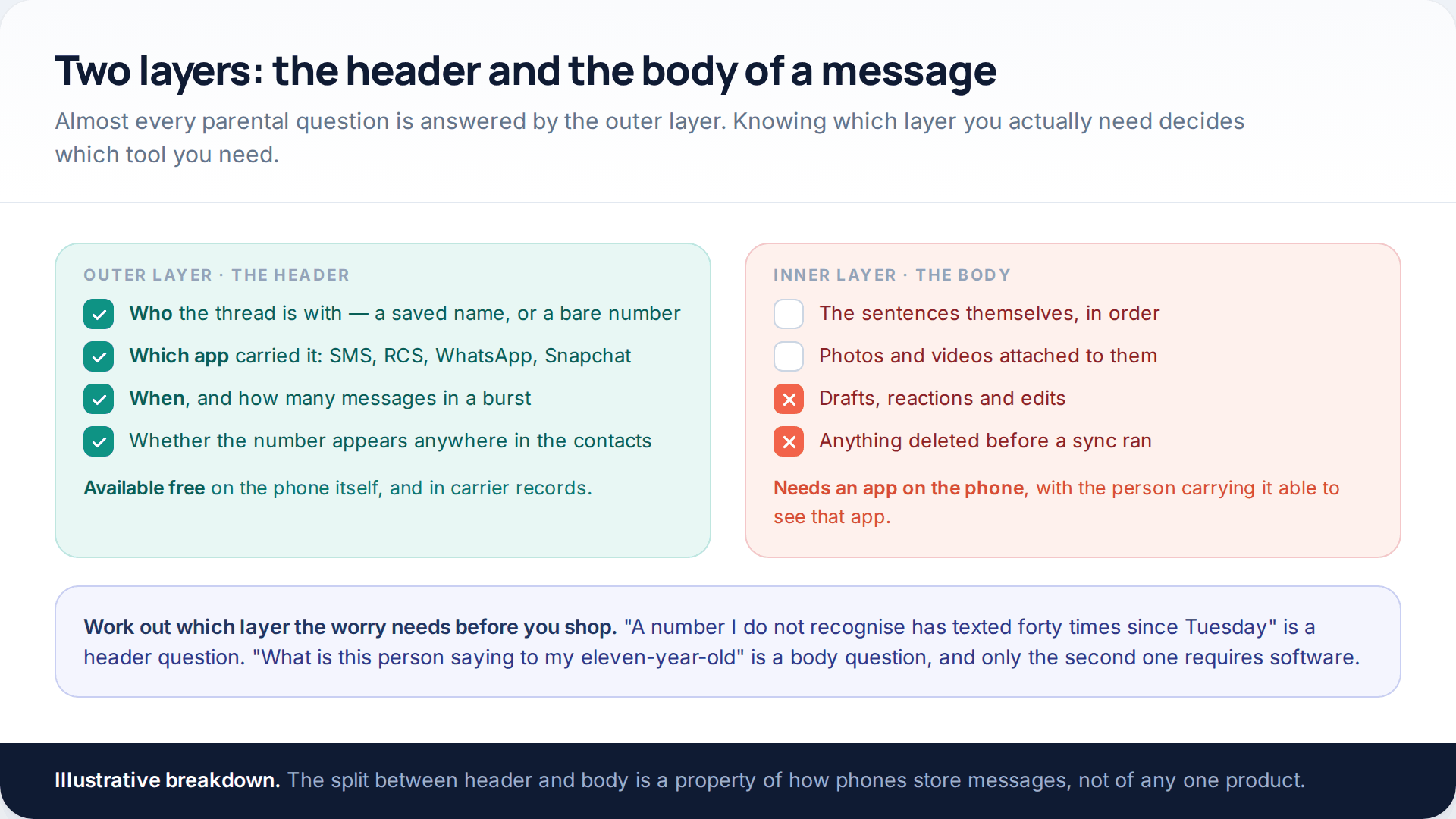
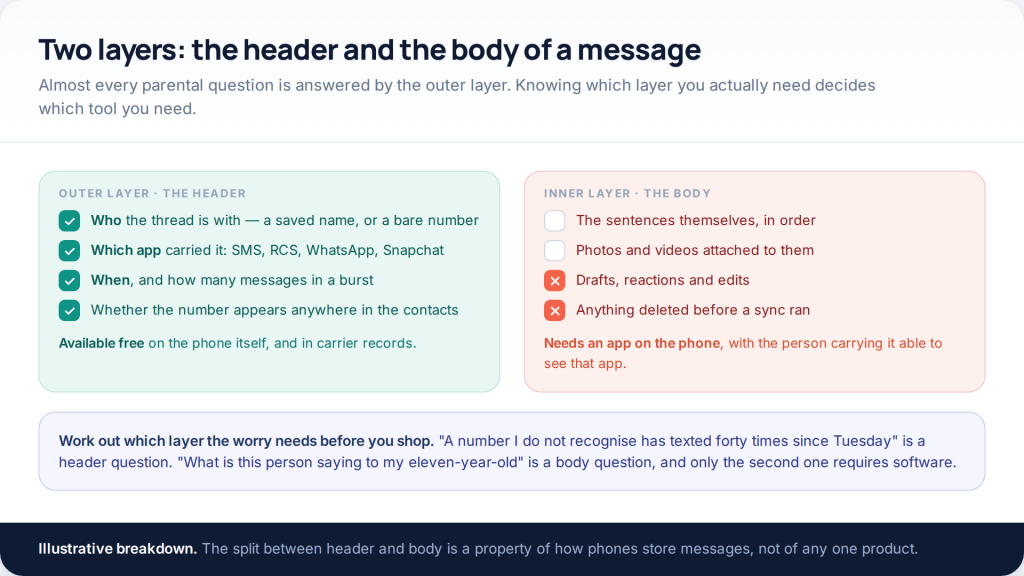
A message has an outside and an inside. The outside is who the thread is with, which app carried it, when it arrived, and how many arrived together. The inside is the sentences. Families almost always arrive looking for the inside and discover, a fortnight later, that the outside was what they needed.
Consider the three worries that bring most parents to a page like this. A number nobody recognises has started texting. The phone lights up at two in the morning. A friendship has turned sour and the mood at breakfast shows it. The first two are visible in the outer layer alone. The third is not really a monitoring problem at all.
Deciding this first saves you a subscription, because the free tools cover the outer layer well and the paid ones exist almost entirely for the inner one.
What the old round-ups were ranking
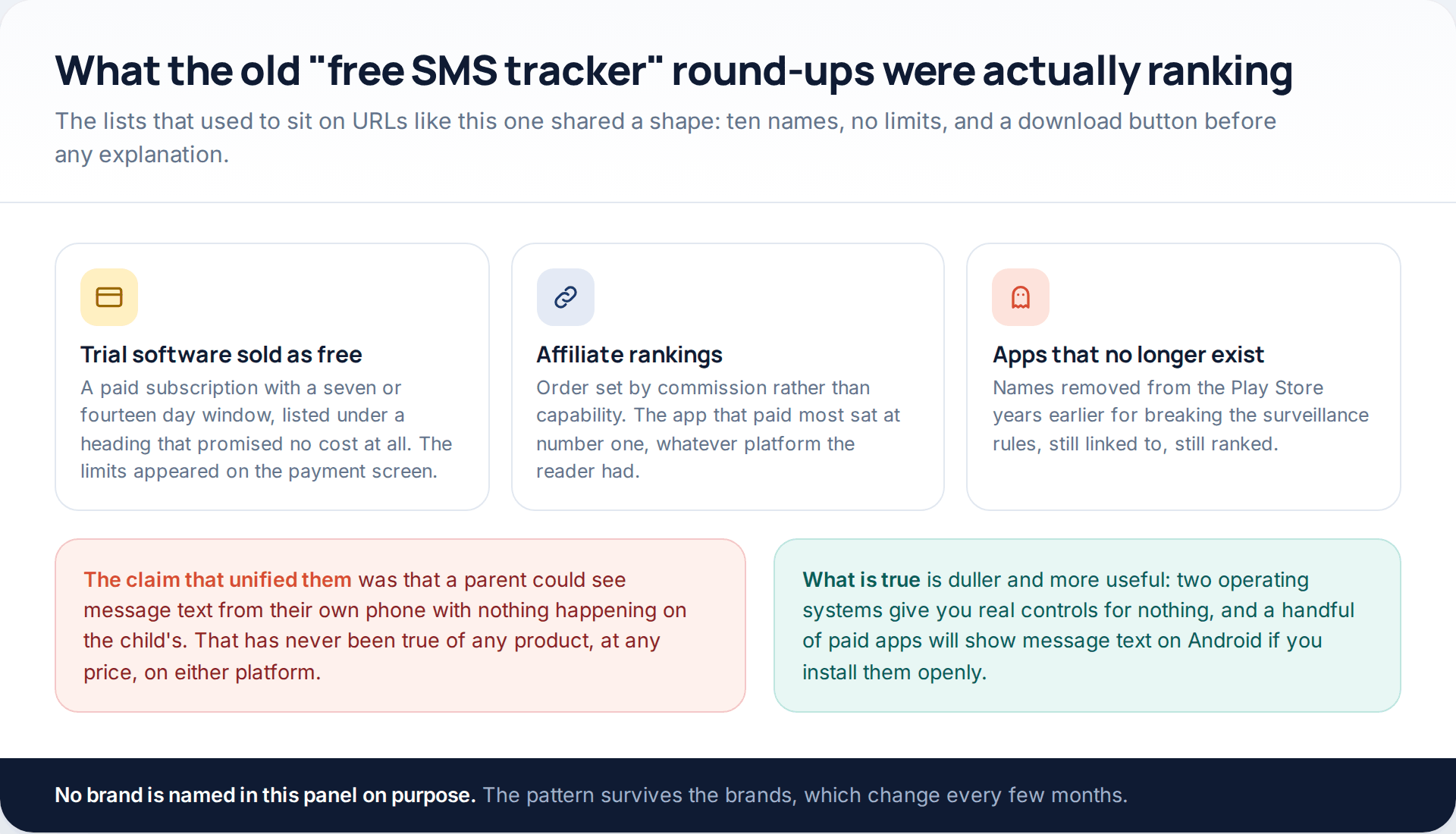
The claim that held those articles together was that a parent could read a child’s texts with nothing installed on the child’s device. It is not a question of which product is best at it. The route does not exist, on either operating system, at any price. Where a product does show message text, the reason is always the same: an application is running on that handset, with permissions the handset granted it.
Google’s Play Store rules make the second half of that explicit. Monitoring software is only permitted at all as a narrow exception for parents supervising their own children, and such an app must, in Google’s words, display “a persistent notification at all times when the app is running and a unique icon that clearly identifies the app”. Concealment is not a feature that got left out. It is the thing that gets an app removed.
Google Family Link: who, not what
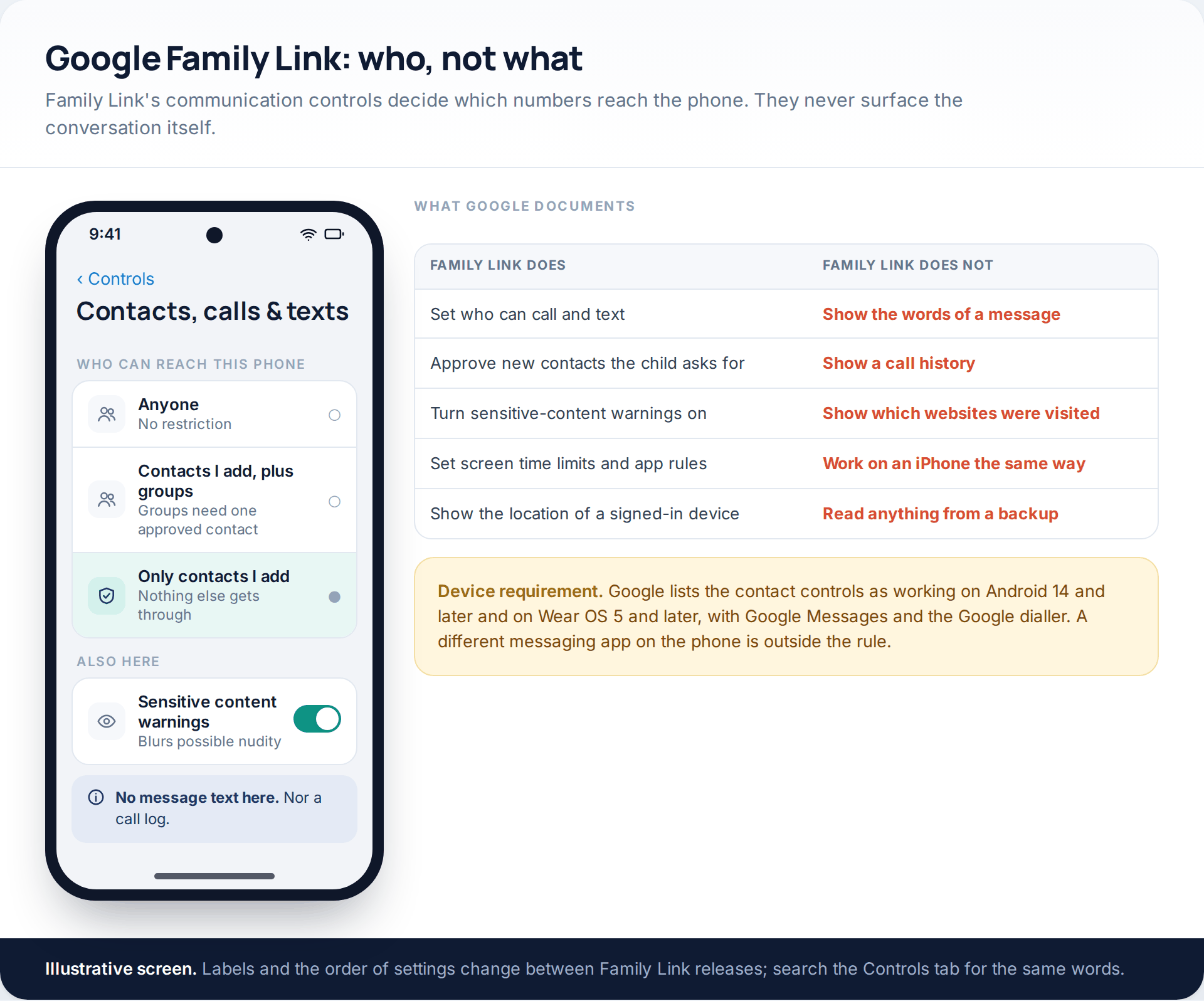
Family Link’s contact controls, rolled out across 2025, let a parent choose between three settings: anyone, parent-approved contacts plus groups containing at least one approved contact, or approved contacts only. A child can request an addition and you approve or refuse it. You will find it under the child, then Controls, then Contacts, calls & texts.
Two constraints matter before you rely on it. Google documents the feature as working on Android 14 and later, and on Wear OS 5 and later, with Google Messages and the Google dialler — a third-party texting app is outside its scope. And Family Link’s own disclosure to parents lists screen time, location, Play approvals and app permissions; message content and call history appear nowhere in it, because they are not there.
Used with its grain, this is a serious tool for a younger child. A closed contact list means an unknown number cannot begin a conversation at all, which is a better outcome than reading one after it has started. If you have not set the account up yet, our walkthrough of Family Link setup covers the order the screens appear in.
Apple’s side: a gate, not a window
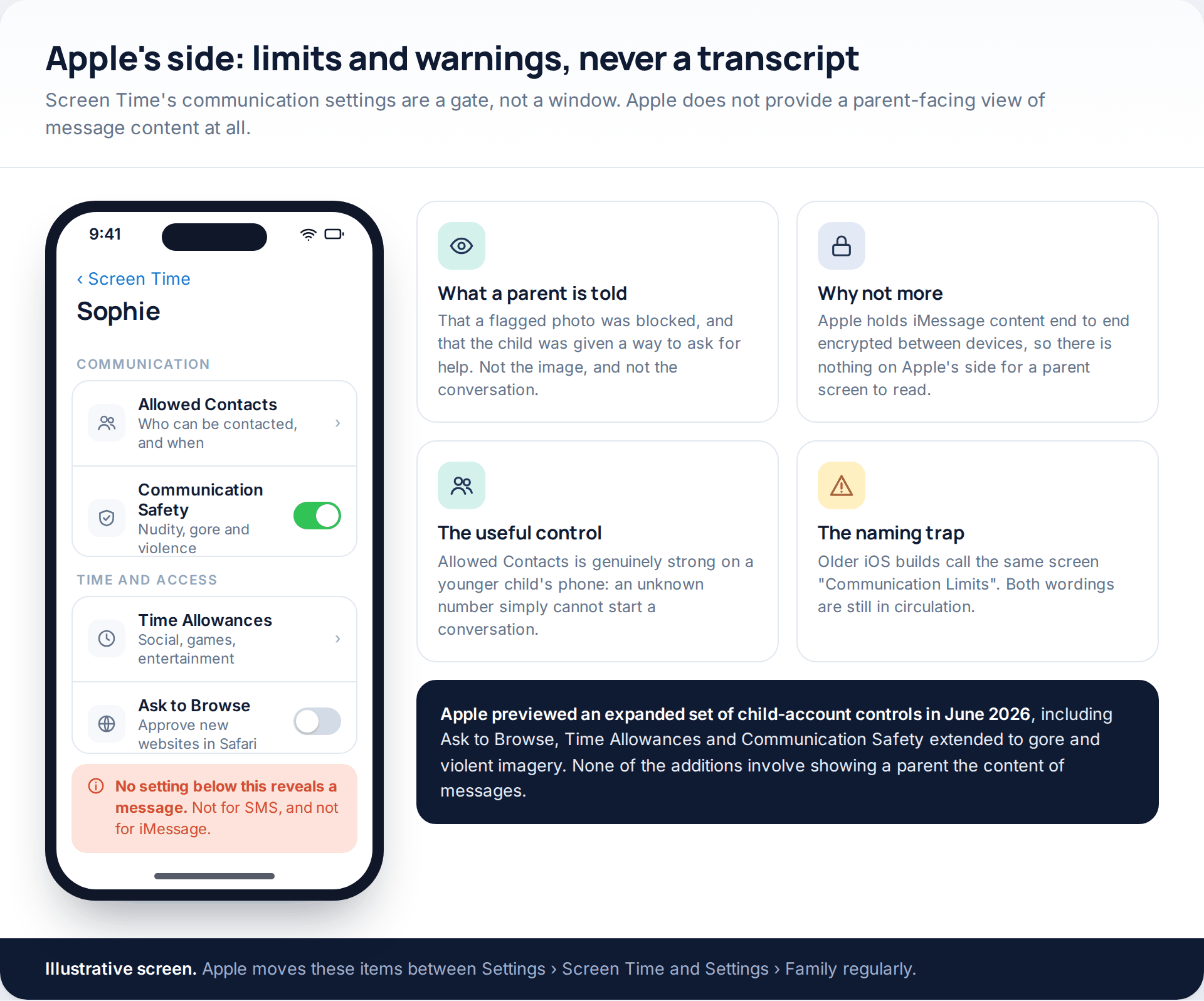
Screen Time’s equivalent lives under Settings › Family › the child’s name › Screen Time, where Allowed Contacts governs who the child can call and message, including during downtime. Older builds label the same area Communication Limits; both wordings are still in use, so search rather than assume.
Communication Safety is the other half. It detects nudity in photos and videos sent or received in Messages and FaceTime, blurs them, and offers the child a way out of the conversation. Apple’s June 2026 preview of its child-safety features extended that detection to gore and violent imagery for users under eighteen, alongside Ask to Browse for website approvals, Time Allowances per app category and Screen Time Schedules by day.
What no version of any of this does is show a parent a message. Apple holds iMessage content end-to-end encrypted between devices; there is nothing legible on Apple’s side for a parental screen to display, and the company has not built one anyway.
The best free thing on Android, and almost nobody switches it on
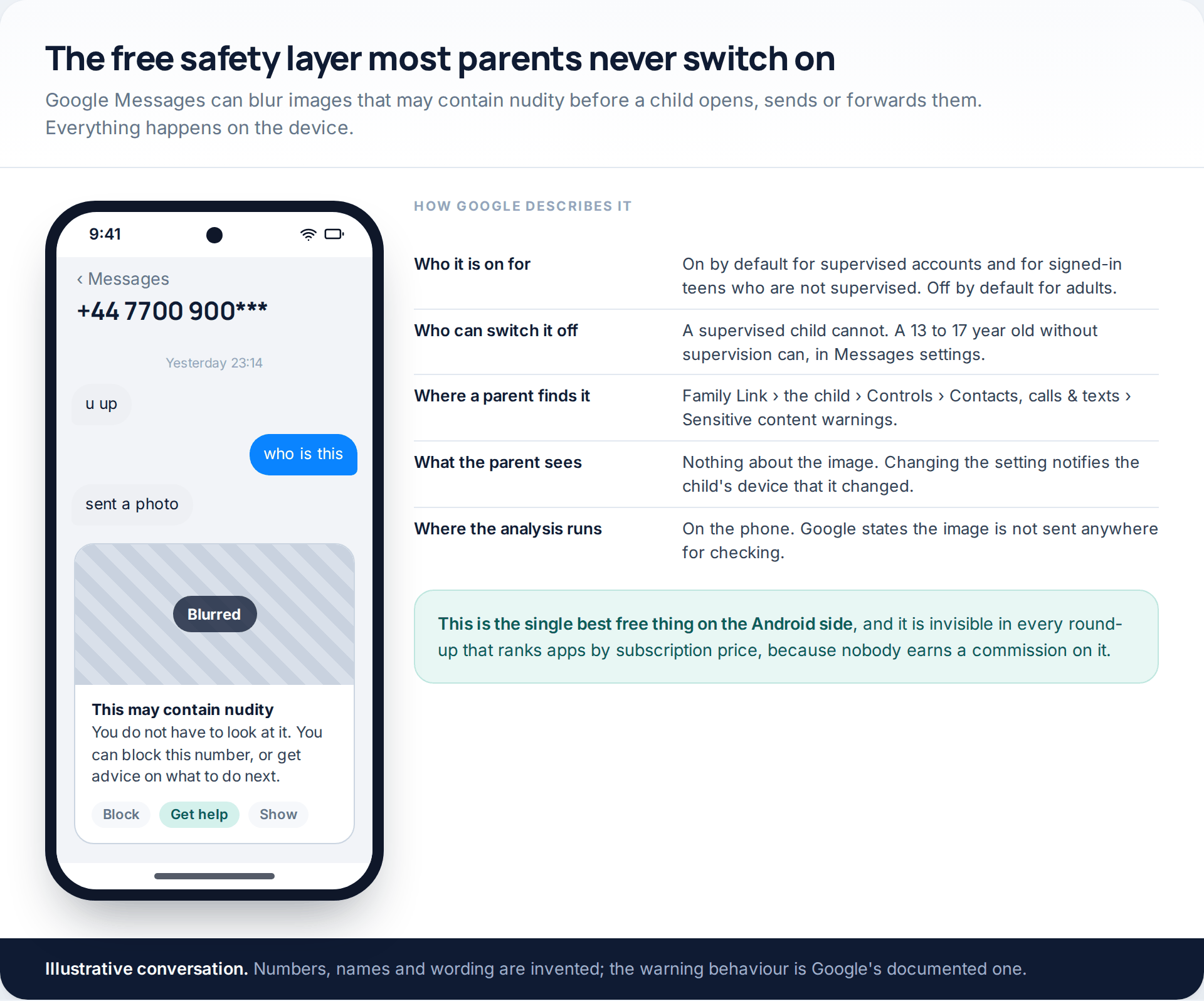
Google Messages carries sensitive content warnings that blur images which may contain nudity, warn before one is sent or forwarded, and point the child at advice. Google states the analysis runs on the device and the image is not sent away to be checked.
The defaults are worth knowing exactly. The feature is on by default for supervised accounts and for signed-in teenagers who are not supervised; a supervised child cannot turn it off, while an unsupervised 13-to-17-year-old can, from within Messages settings. Adults have it off by default. A parent manages it through Family Link under Controls › Contacts, calls & texts › Sensitive content warnings, and switching it changes nothing silently: the child’s device is notified that the setting changed.
The comparison table
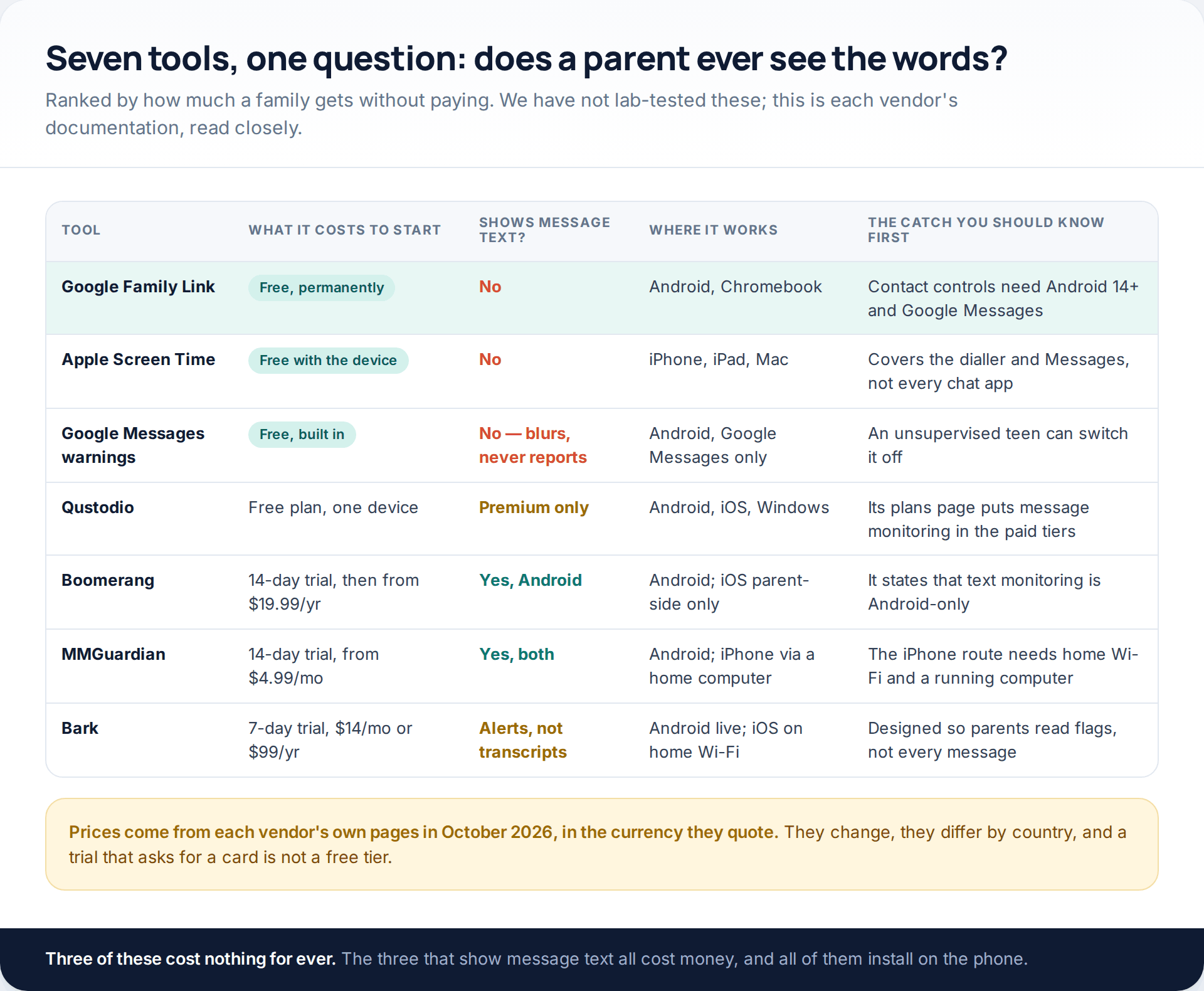
A note on what “free” means in that table. Qustodio publishes a free plan covering a single device with basic protection, and lists calls and messages monitoring under its paid tiers. Boomerang offers a fourteen-day trial of everything, then charges from $19.99 a year for one device, and states that its call and text monitoring features are available on Android only. MMGuardian also runs a fourteen-day trial, prices from $4.99 a month, and is the one product here that claims full message text on both platforms. Bark gives seven days, then $14 monthly or $99 a year, and by design sends a parent flagged excerpts rather than a transcript. Norton Family, which appears in many of these lists, does not monitor messages or calls at all — its supervision covers web, search, video, apps, time and location.
We have not lab-tested any of them. Nobody publishes comparable figures for detection accuracy or battery cost, and we are not going to invent any. What we can do is read the documentation carefully and tell you where it contradicts the marketing.
The iPhone question, answered properly
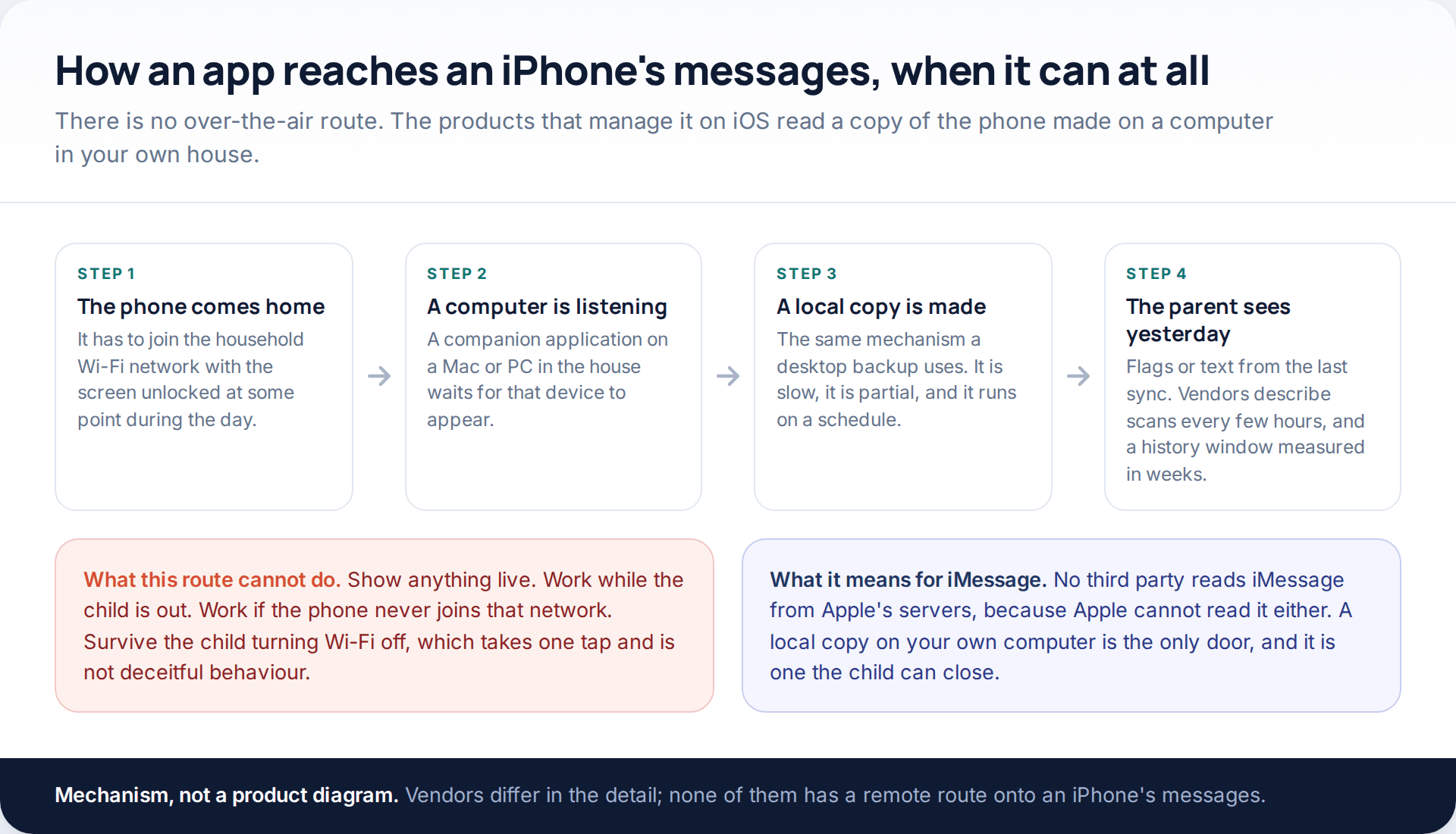
MMGuardian’s iPhone product requires a sync application running on a computer at home; when the child’s iPhone is on the same Wi-Fi network, that computer collects messages, which then appear in the parent app. Bark’s iOS monitoring works on comparable lines — the device needs to be on your home network, scans run every few hours, and Bark says it covers up to sixty days of text history on the device.
So iPhone monitoring is real, but it is retrospective, partial and interruptible. It stops when the phone stops coming home, when Wi-Fi is off, or when the computer is. Bark itself notes that catching deleted texts is harder on iPhone than on Android. None of that is a fault in the products; it is iOS working as designed.
What none of them can do
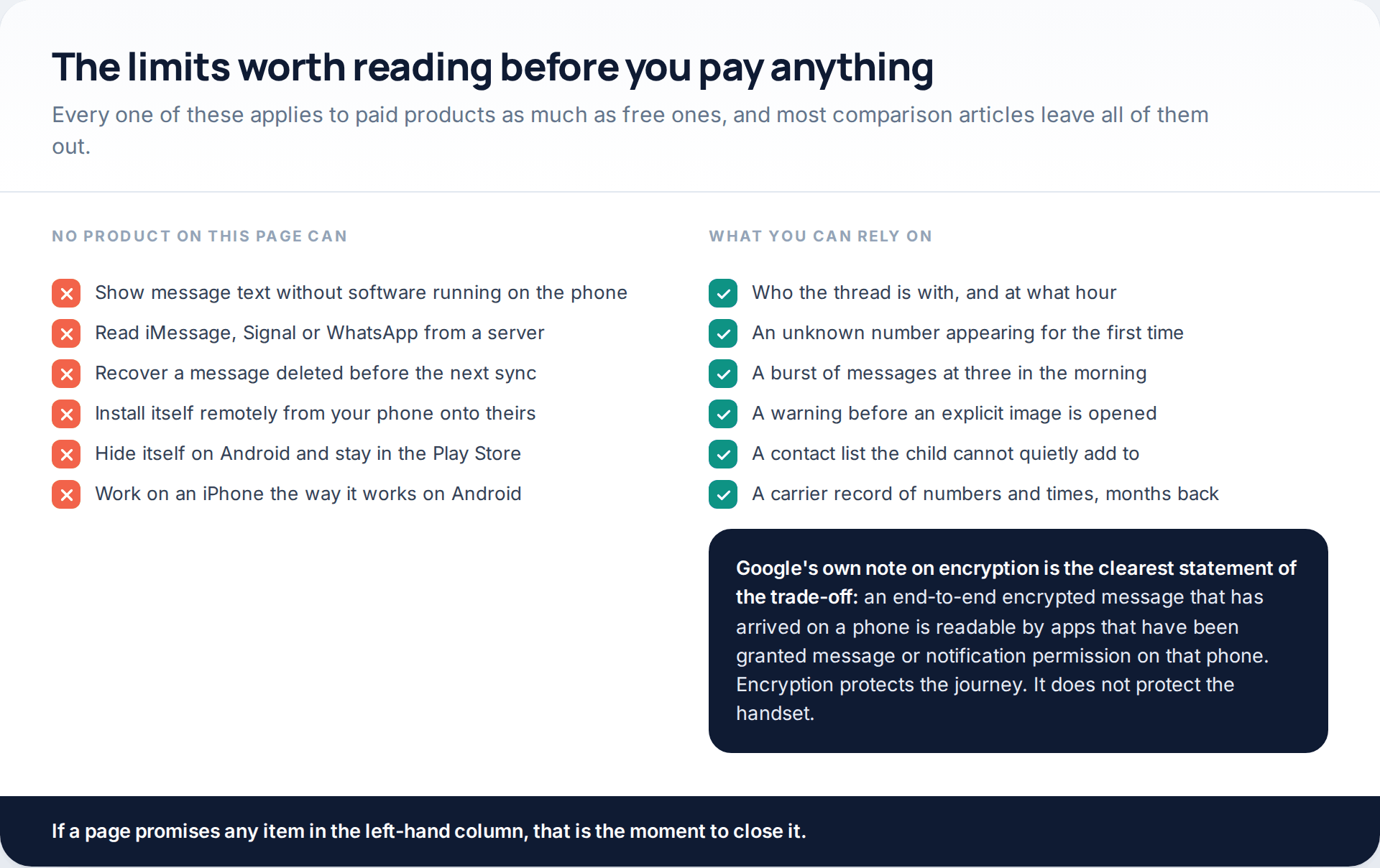
One line from Google’s own encryption help page is the sharpest summary of the whole subject: a message that is end-to-end encrypted in transit is, once it has arrived, “accessible to apps you’ve granted SMS or notifications permissions to” on that phone. Encryption protects the journey. It has never protected the handset, which is precisely why monitoring software has to live there and why it cannot live anywhere else.
Where our own app fits
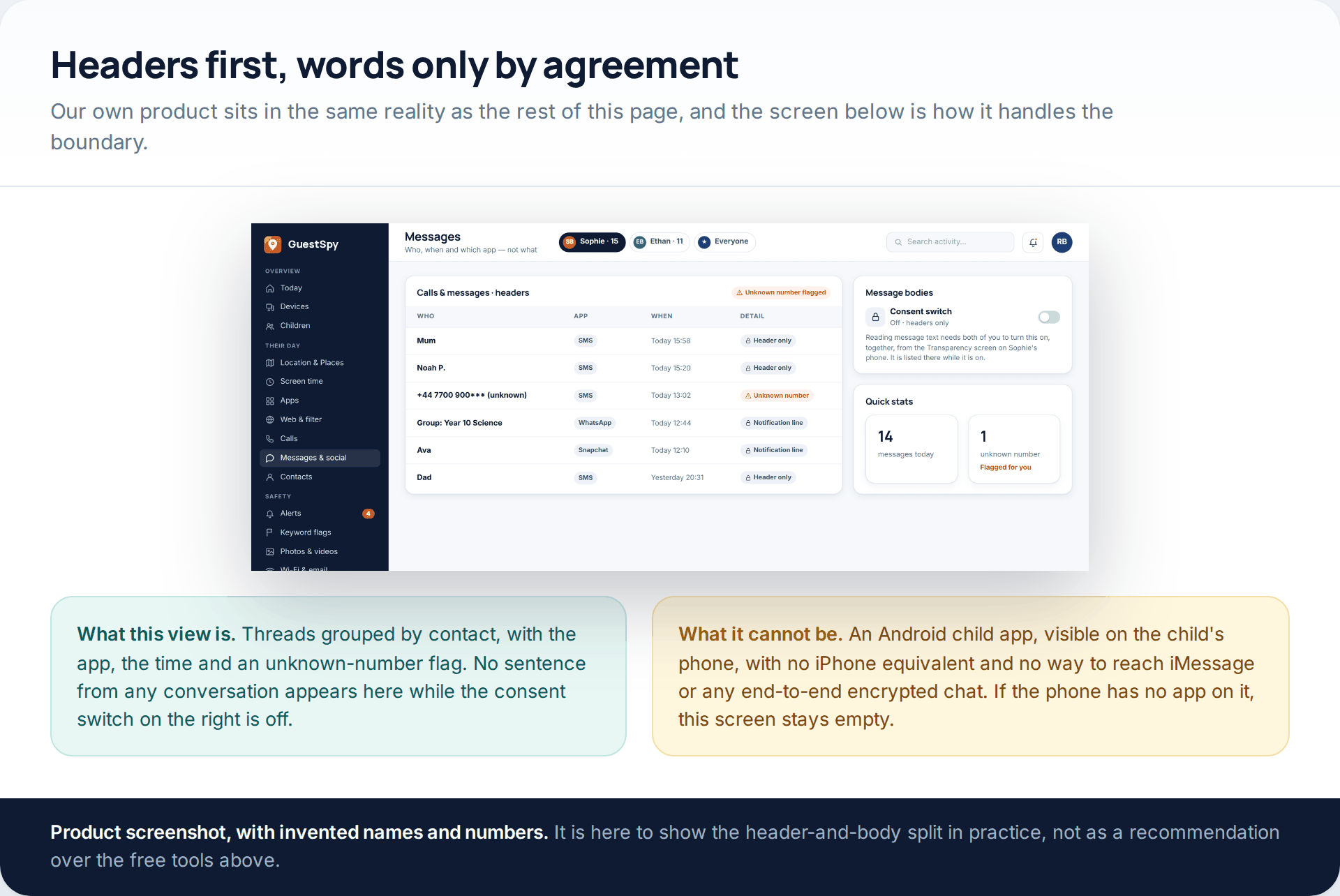
GuestSpy is built around the same split this page opens with: the panel shows who, when and which app, and the bodies of messages sit behind a consent switch that is turned on jointly and listed on the child’s own Transparency screen while it is on. You can read how that side works on the text message and social monitoring page. The limits are the same as everyone else’s and we would rather state them here: it is an Android child app, the child can see it on their phone, there is no iPhone version, it cannot read iMessage or any end-to-end encrypted chat, and nothing at all happens until it is installed on the handset.
How to choose without losing an afternoon
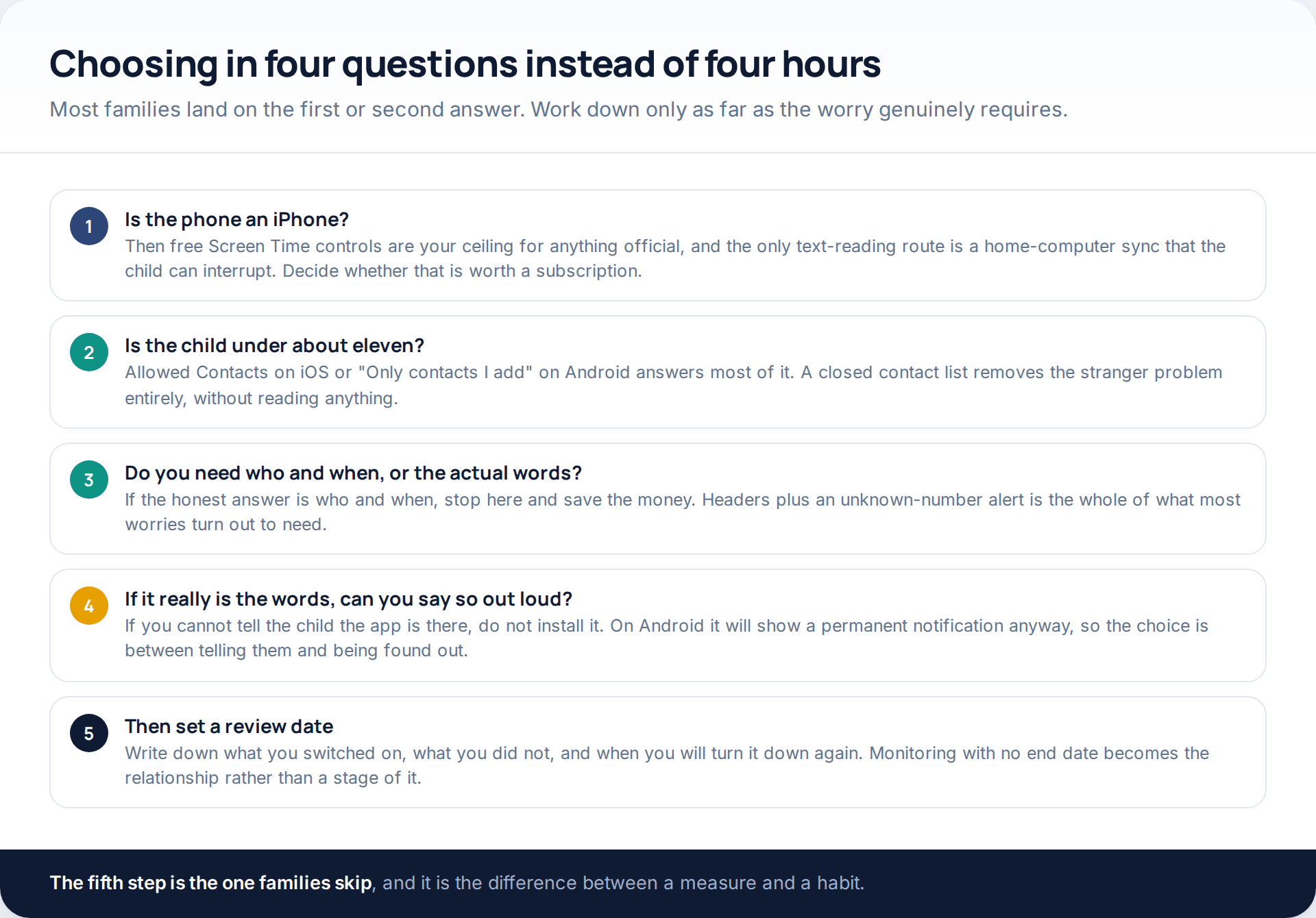
If you are weighing a paid app against a free control, the test that works is this: write down the sentence you want to be able to say in a fortnight. If it is “I know who has been texting her”, the free tools get you there. If it is “I know what he was told on Thursday night”, you are buying software, you are installing it on the phone, and you are telling him. Those are the only two routes, and the second is not available on an iPhone in any live form.
If what is really driving this is a specific incident rather than a general unease, the monitoring question may be the wrong one to be answering first. Work out what you would do with the answer before you go looking for it; a plan for the conversation is worth more than a transcript you cannot explain how you obtained.
How this page was put together
The platform behaviour described here was checked in October 2026 against Google’s own documentation for Family Link contacts, sensitive content warnings for supervised users, Google Messages end-to-end encryption, and the Play Store policies on SMS and call-log permissions and on surveillance apps; and against Apple’s Screen Time support material and its June 2026 child-safety announcement. Product details and prices come from each vendor’s own plans and feature pages, in the currency those pages quote. Menu paths move constantly, particularly in Family Link, so treat them as a description of where to look rather than a map.
We did not test any of these products in a laboratory, measure detection rates or compare battery drain, and we have not quoted anyone else’s numbers for those things either, because the published figures are not comparable. Where a vendor makes a claim we could not verify independently — MMGuardian’s full-text coverage on iPhone, for instance — we have said whose claim it is rather than restating it as fact. No product here was ranked by what it pays, and the two tools at the top of the table cost nothing.
If you are at the earlier stage of deciding whether to monitor at all, rather than which tool to use, our piece on where monitoring stops and surveillance starts is the better place to begin.
Common questions
Can I see my child’s texts from my own phone without touching theirs?
No. Message content only leaves a handset if software on that handset sends it, and that software has to be installed in person. Any page claiming otherwise is selling a subscription, collecting your card details, or both.
Does Google Family Link show text messages?
No. It controls who can call and text the phone, approves new contacts, and manages the sensitive content warnings in Google Messages. Google’s own parent disclosure lists screen time, location, Play approvals and app permissions, and does not list message content or call history.
Is there any free app that shows message text on Android?
Not in a form we would point you at. The products that display text charge for it, after a trial. Anything offering it permanently free is either funded by selling what it collects or is not doing what it says.
Can a monitoring app read WhatsApp or Signal?
Not from a server, because those services cannot read them either. On Android, an app with notification access can see what a notification displays, which is often a sender and a preview line rather than a conversation. That is a much thinner thing than it sounds.
Will my child know the app is there?
On Android, yes, if it comes from the Play Store: Google requires a persistent notification and a clearly identifying icon for any app in the parental-monitoring exception. Anything that hides is breaking those rules, which should tell you what else it is willing to do.
What about just checking the phone bill?
That is a genuine and free option for numbers and times. Carriers typically publish call and message records for the current billing cycle and several previous ones, showing numbers, dates and durations but never content, and messages sent over iMessage or RCS data usually do not appear at all.
My teenager is sixteen. Is any of this appropriate?
Rarely in the form described here. At that age the controls that still make sense are the ones a young adult would accept out loud: a shared location, an agreement about late-night phones, and a conversation about what they would do if something went wrong. Reading messages at sixteen tends to cost more than it finds.
Using a monitoring app for this? GuestSpy is parental monitoring for Android that stays visible on the child's phone and runs from any browser. If it fits your family, see the Location & Places feature.
Related guides
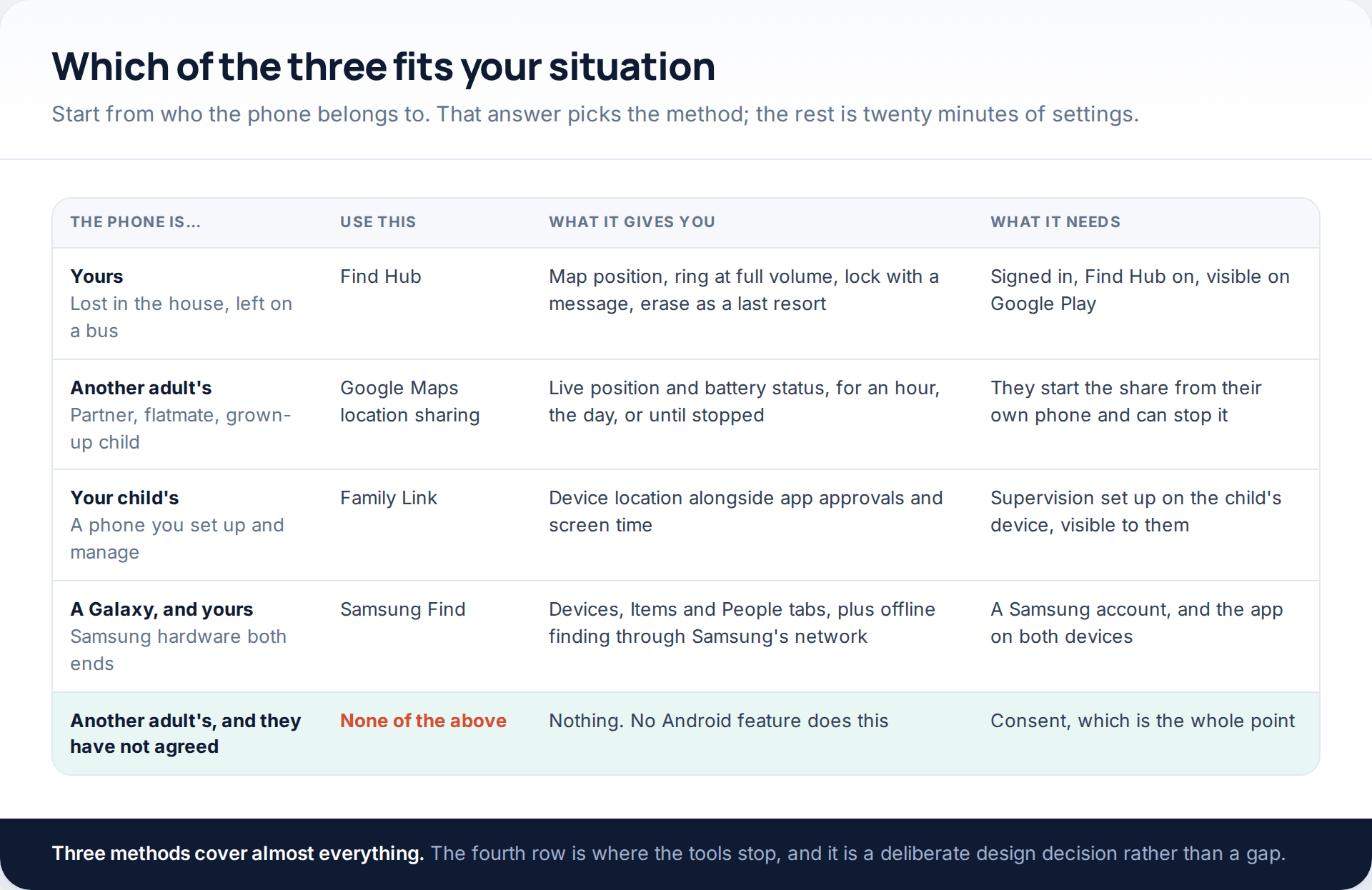
Track an Android Phone From Another Android Phone: Three Family-Safe Methods
To track an Android phone from another Android phone, you need one of three things arranged in advance. Find Hub…

Best 10 Free SMS Tracker for Android and iPhone
Earlier, when there we no messenger apps, people used to rely on text messages. Although time and technology are changing,…
Worried About Your Boyfriend? Why Secret Tracking Backfires, and What to Do
People searching for a way to track my boyfriend’s phone are usually after one of two completely different things: reassurance,…
Monitoring your child can see.
Location, screen-time budgets, routines, app and website blocking and the alerts that matter, run from any browser and visible on the phone. Pair an Android phone in about fifteen minutes.