Keeping an Eye on a Child’s Facebook: Supervision Tools That Work Remotely

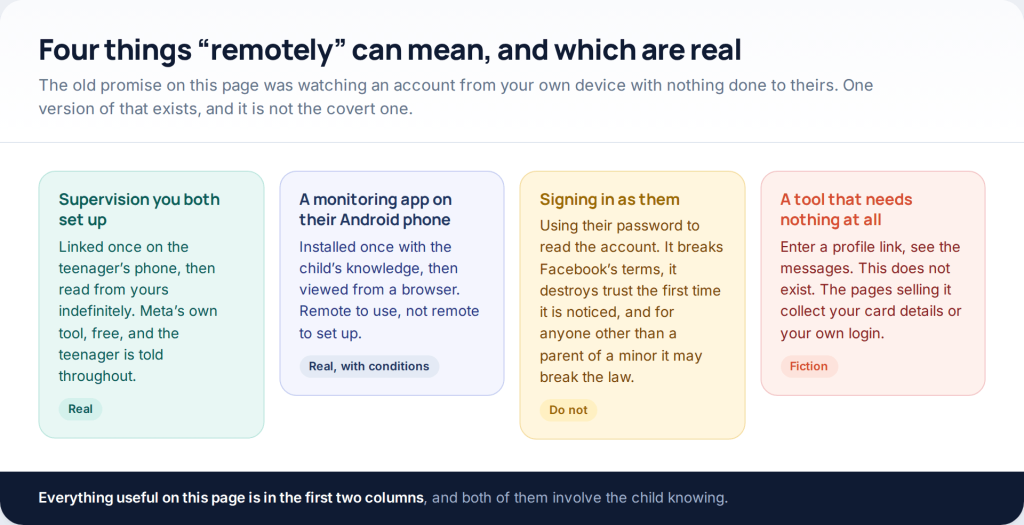
You can monitor a child’s Facebook and Messenger from your own phone — once supervision has been set up on theirs. Meta’s Family Center reports how long they spend, who can contact them, when their contact list changes and when a safety setting moves. It does not show you a single message, and for a teenager it never will. Under thirteen, Messenger Kids is a different bargain entirely.
This page used to promise a way to read someone’s Facebook with no access to their phone. No such thing exists: the pages selling it take a card number or the visitor’s own login. What does exist is consent-based supervision — Meta’s own, free, and set up once — which genuinely does then work from your device. This guide covers that, what it shows, and the line it will not cross.
What “remotely” can honestly mean
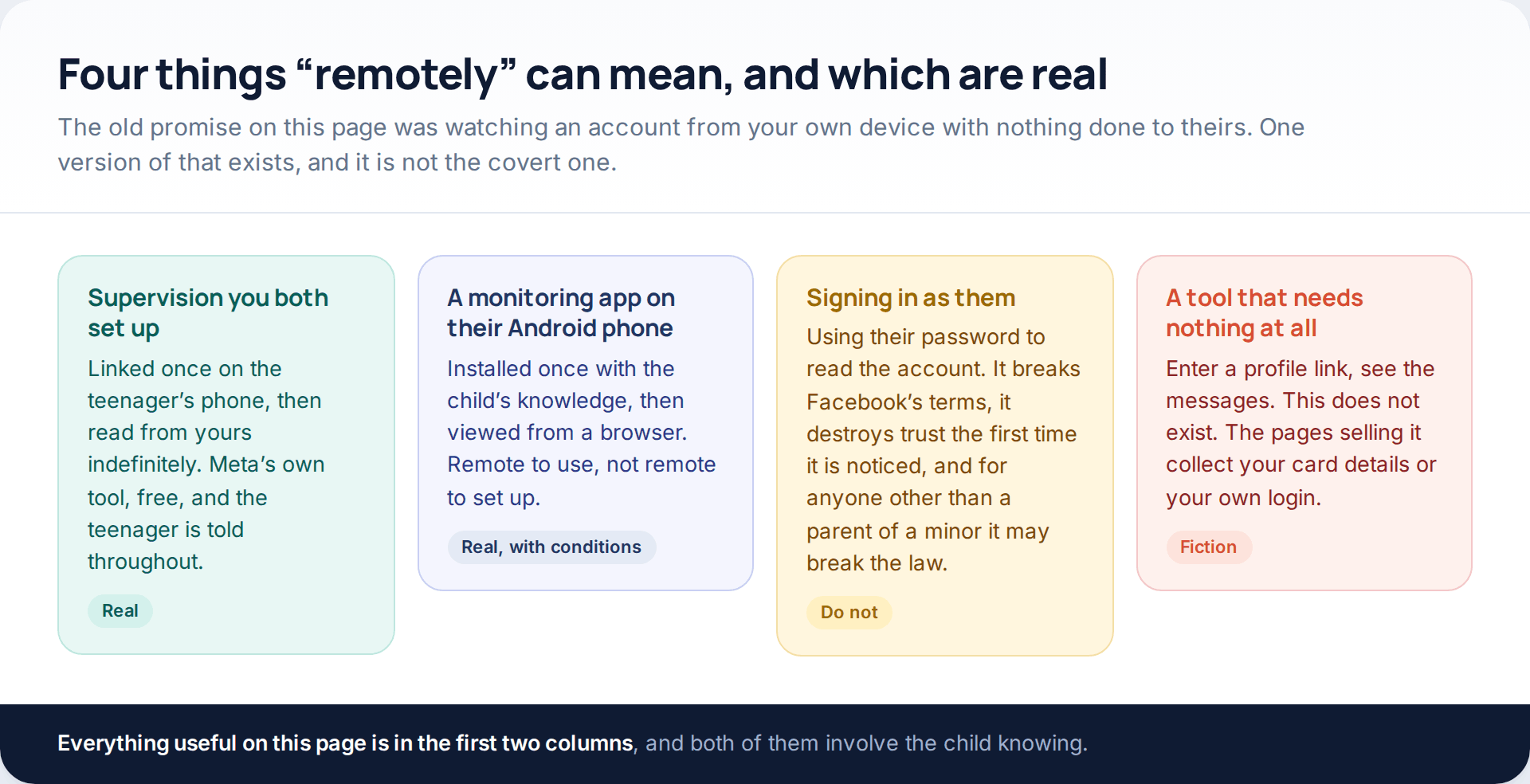
The distinction that matters is between remote to set up and remote to use. Nothing is remote to set up. Meta’s supervision has to be accepted on the teenager’s account. A parental app has to be installed on the handset. After that, both are entirely remote to use: you read them from your own phone, indefinitely, without touching theirs again.
The fourth column — paste in a profile, read the messages — does not exist at any price, and never has. Facebook does not expose anyone’s conversations to a third party, and since Messenger’s personal chats became end-to-end encrypted by default in December 2023, Meta itself does not hold the content to expose.
What is available at each age
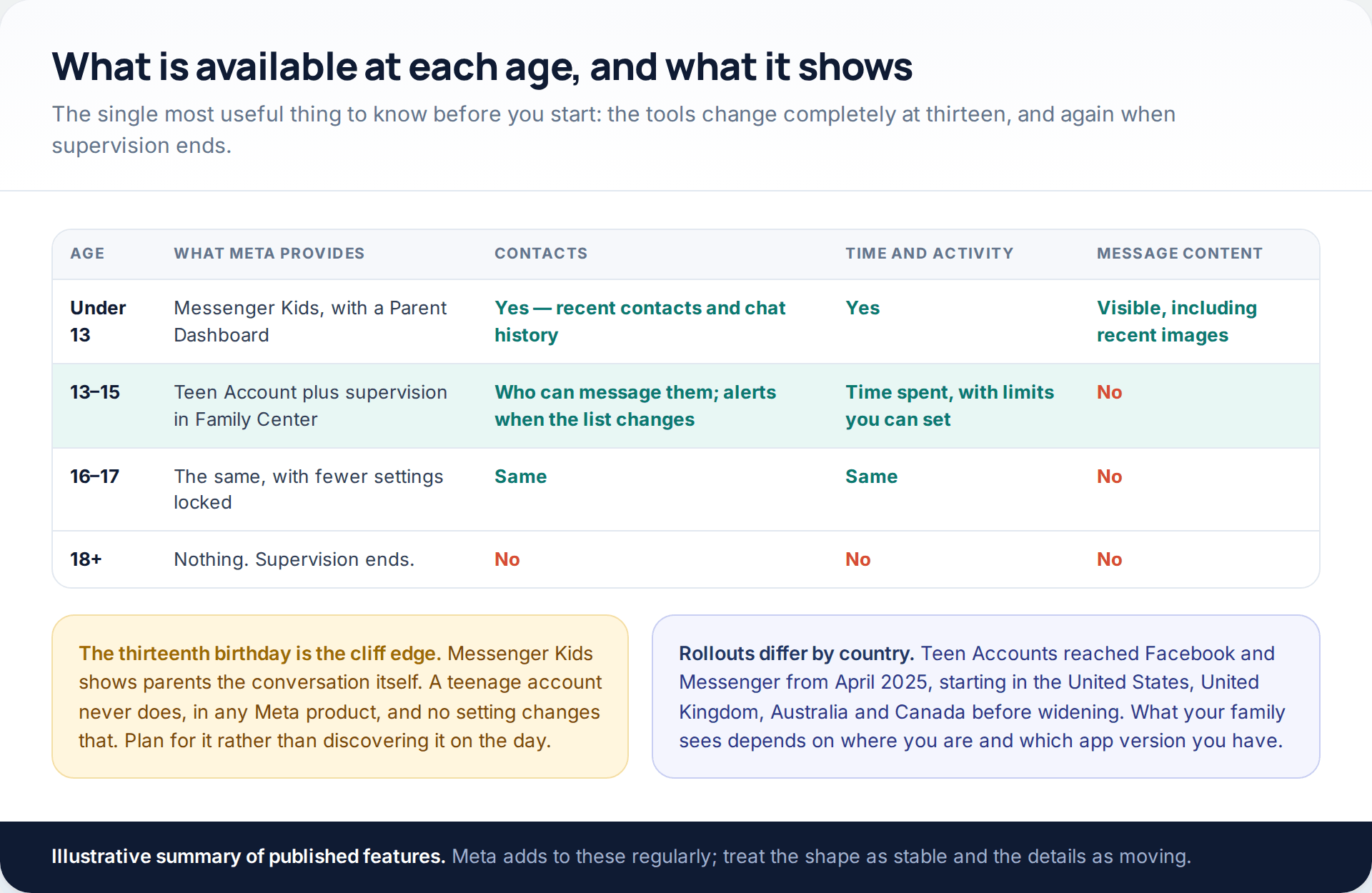
Most of the frustration parents feel with these tools comes from not knowing this table in advance. Under thirteen, Messenger Kids gives you the conversation. From thirteen, a teenage account gives you patterns and settings and nothing else. At eighteen, supervision ends entirely. Those transitions arrive on birthdays rather than when anybody feels ready, which is an argument for talking about them a year early.
Meta’s supervision: what Family Center shows
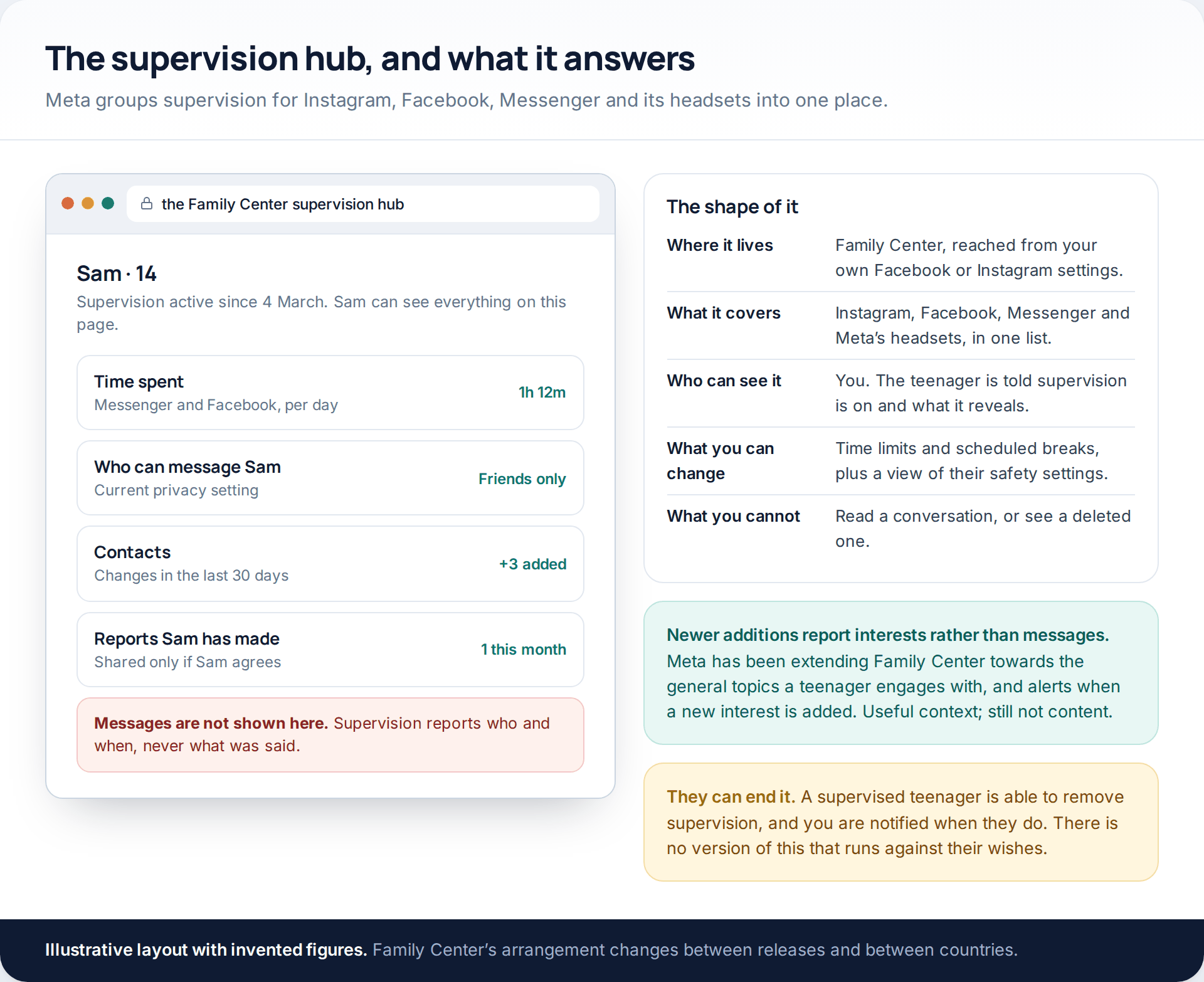
Family Center is the hub, reached from your own Facebook or Instagram settings, and it covers Instagram, Facebook, Messenger and Meta’s headsets in one list. For a supervised teenager it reports the time they spend, lets you set daily limits and scheduled breaks, shows their current privacy and safety settings, tells you who is able to message them and who can see their stories, and notifies you when their contact list changes or a safety setting is altered. If they report another user, you can be told, and they can choose whether to share the details.
Meta has been extending it since: recent additions report the general topics a teenager engages with and notify a parent when a new interest is added to their recommendations. That is context about the shape of their feed rather than content, which is a fair description of the whole product.
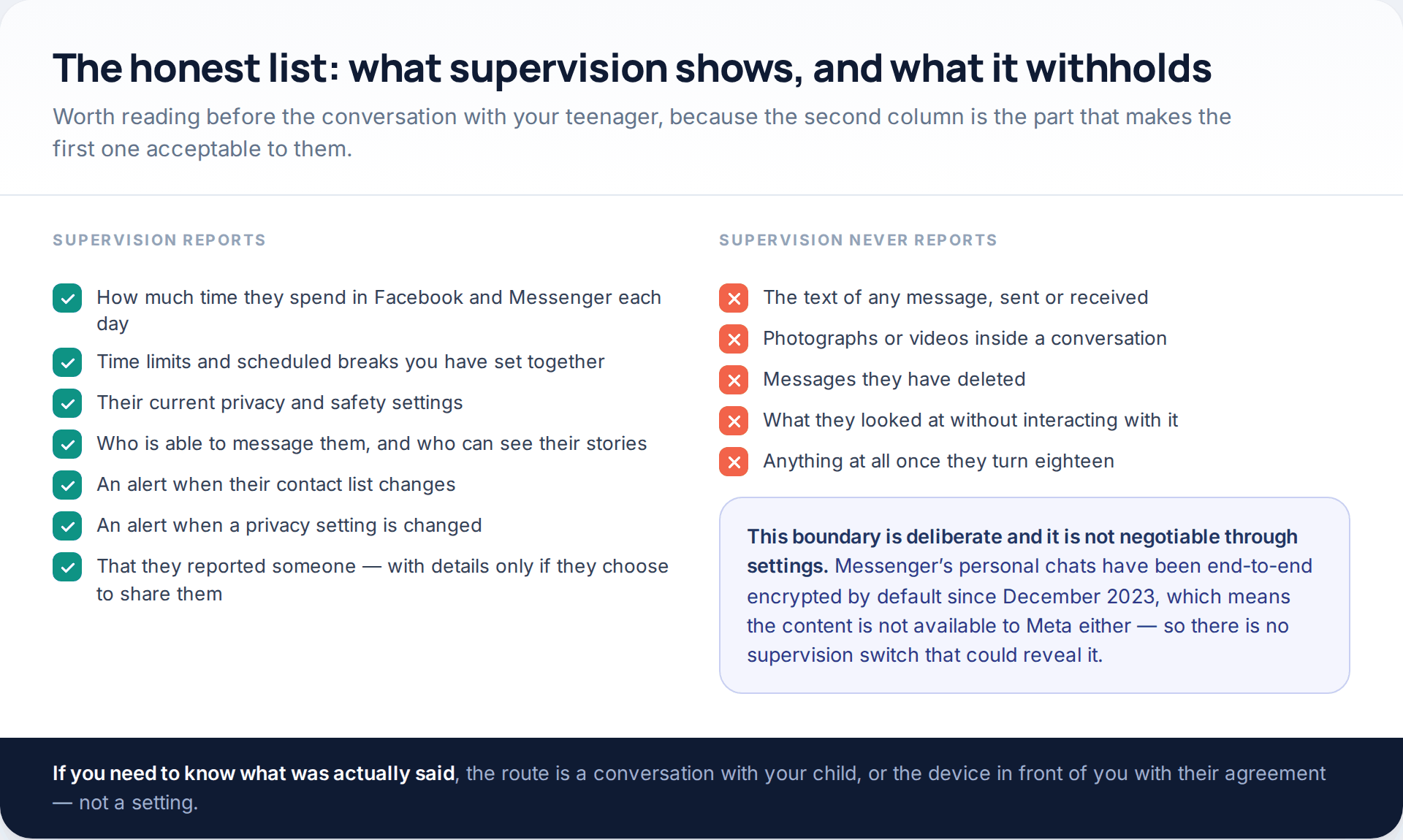
The boundary is not a setting you have failed to find. It is structural: Messenger’s personal chats are end-to-end encrypted by default, so there is no supervision switch that could reveal them, because Meta cannot read them either.
The protections that are already on
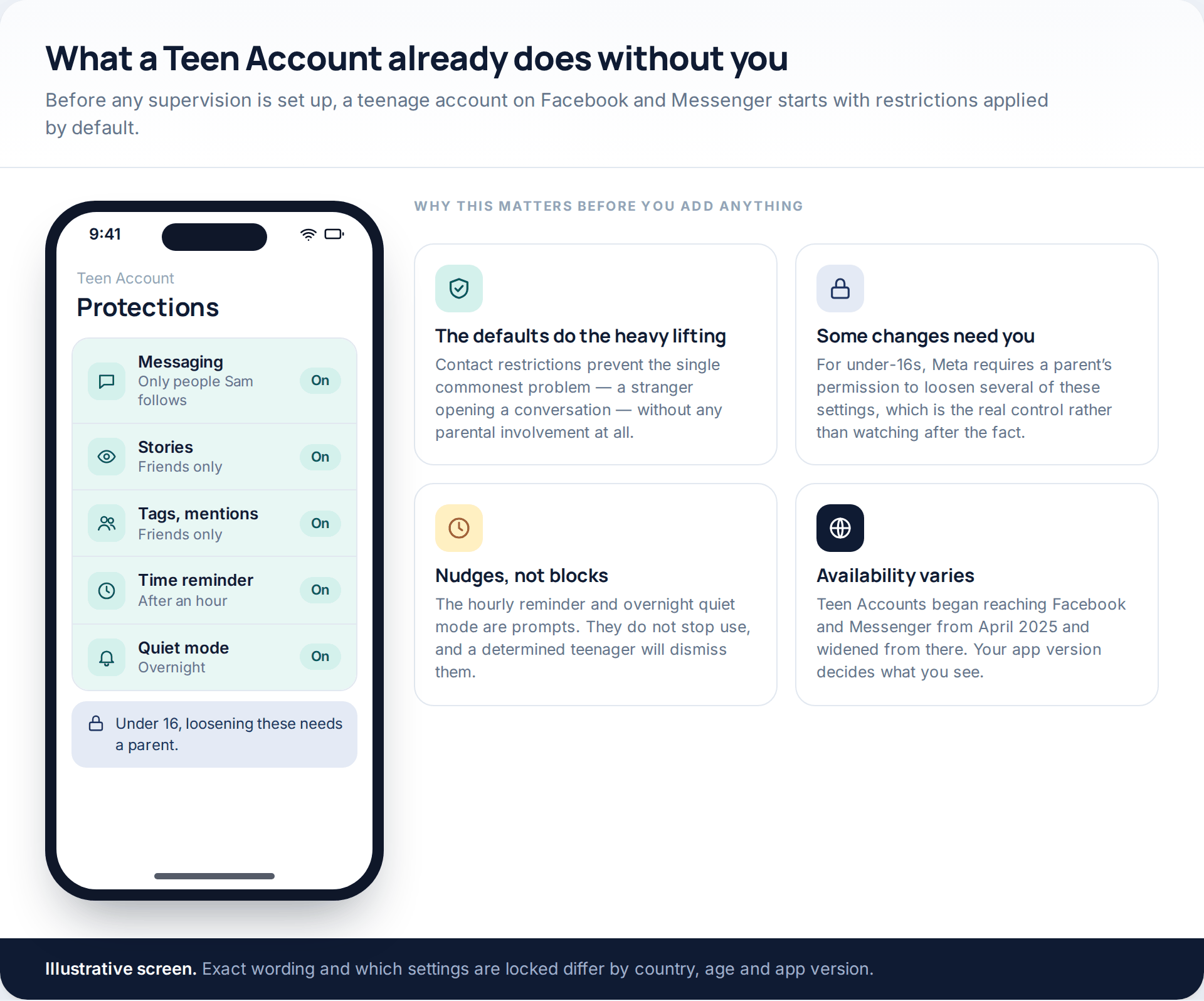
Before you set anything up, it is worth knowing what a teenage account does on its own. Meta began applying Teen Accounts to Facebook and Messenger from April 2025, starting in the United States, United Kingdom, Australia and Canada and widening from there. By default, teenagers receive messages only from people they follow or have messaged before; only friends can see and reply to their stories; tags, mentions and comments are limited to friends and accounts they follow; a reminder appears after an hour in a day; and an overnight quiet mode limits notifications. For under-16s, loosening several of these requires a parent’s permission.
That last point is the genuinely powerful one, and it is easy to miss while looking for a dashboard. Approving a change before it happens is worth more than reading about it afterwards.
Under thirteen: Messenger Kids
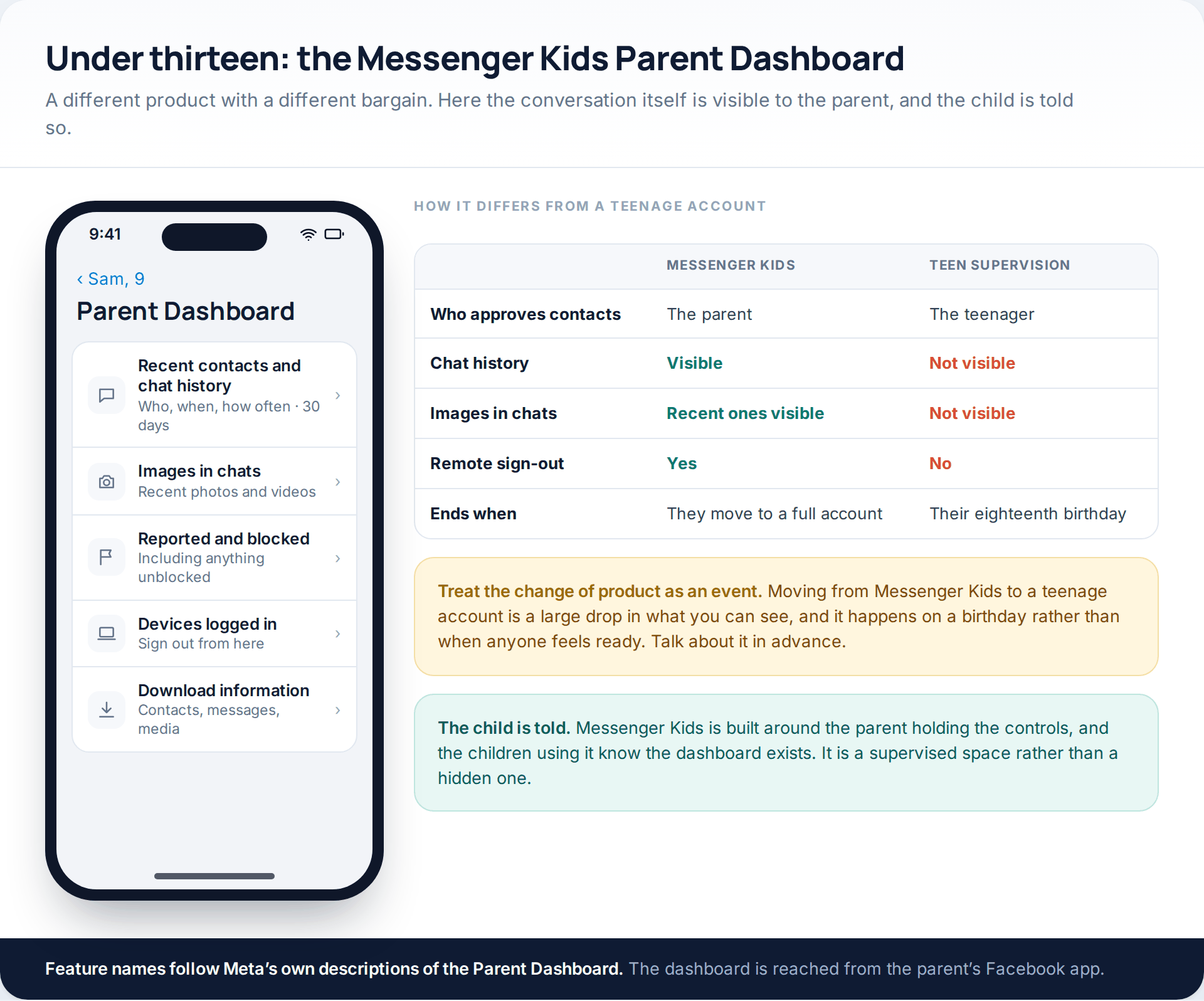
Messenger Kids is a separate app for under-13s, and parents hold the controls rather than observing them. The Parent Dashboard, reached from your own Facebook app, shows recent contacts and chat history — who the child talked to, whether by message or video call, and how often, over the past thirty days — along with recent images sent and received, a history of blocked and reported contacts, the devices the child is signed in on with the ability to sign them out, and a download of the child’s information.
Be clear with yourself that this level of visibility is temporary. It ends when they move to a full account, and nothing replaces it.
Setting it up so that it lasts
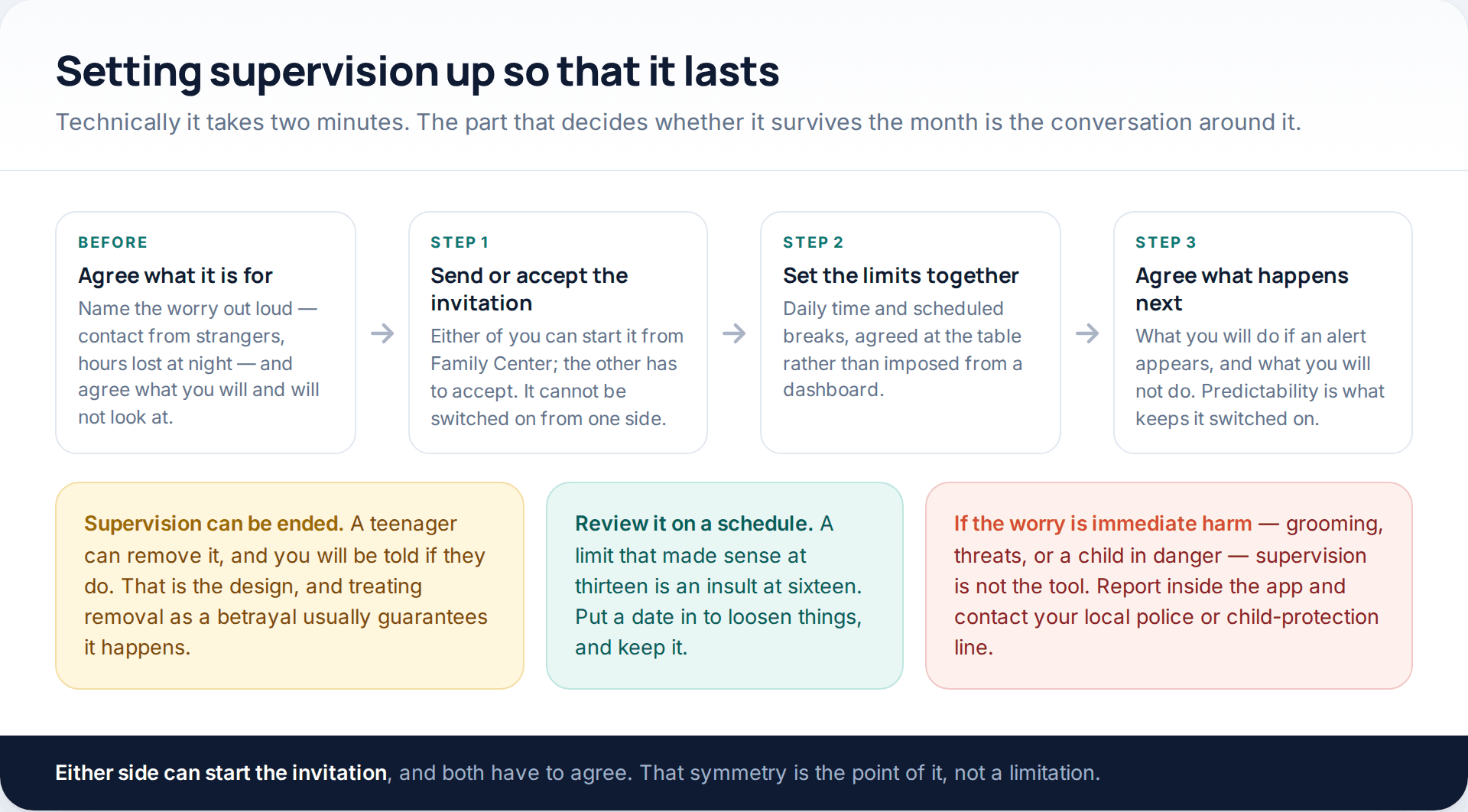
Supervision is started from Family Center by either of you, and the other has to accept — it cannot be switched on from one side. The technical part takes two minutes. What decides whether it is still on in a month is everything around it: naming the actual worry, agreeing the limits together rather than announcing them, and being explicit about what you will not look at.
A teenager can end supervision, and you are told when they do. Treating that as a betrayal is usually what causes it. Our guide to monitoring a teenager respectfully goes through that conversation in more depth, including how to hand control back as they get older.
What a monitoring app adds on Android
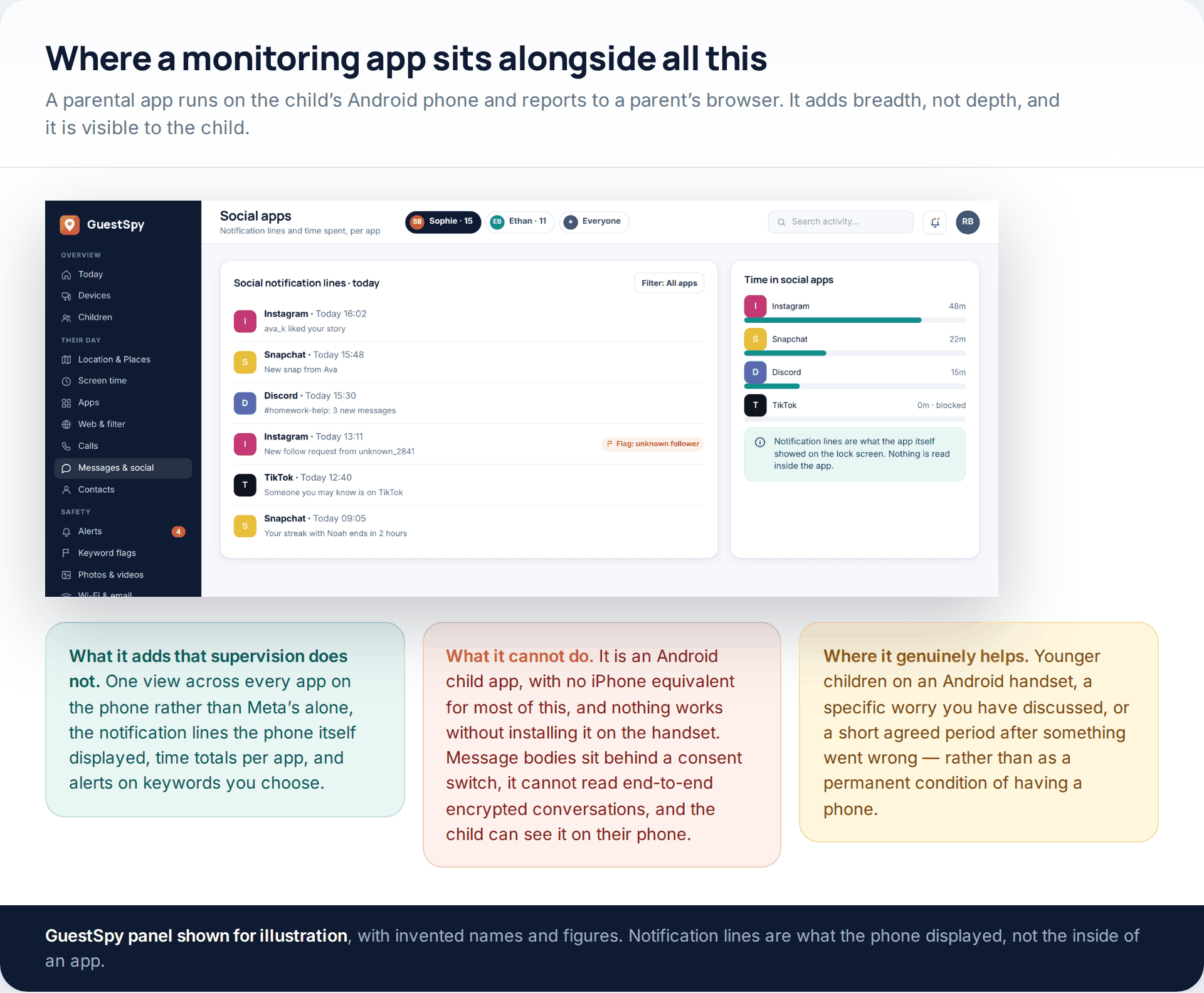
Meta’s supervision only covers Meta. If the real question is “what is happening on this phone”, a parental app on the child’s Android handset gives a single view across every app, plus time totals and alerts on keywords you choose.
It also has real limits, and they should be stated before anyone pays for anything. It is an Android child app, so most of it has no iPhone equivalent; nothing works without installing it on the handset; message bodies sit behind a consent switch rather than being on by default; it cannot read end-to-end encrypted conversations, which now includes ordinary Messenger chats; and the child can see it running. You can read what each part of ours does, and does not, on our features page.
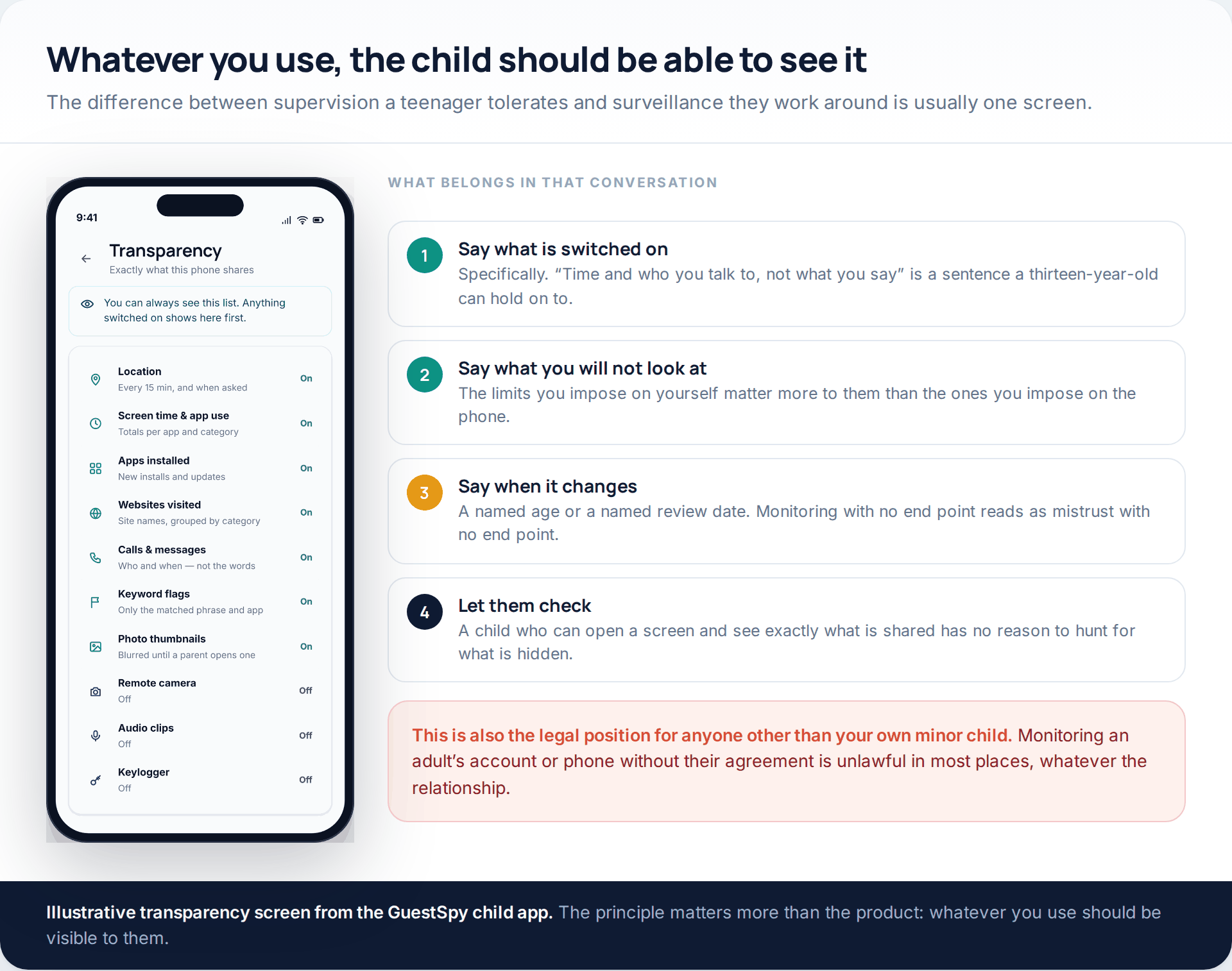
Whatever tool you choose, the test is the same: could your child open a screen and see exactly what is being shared? If not, you are not supervising, and the day it is discovered will cost more than the information was worth.
Things nothing will show you
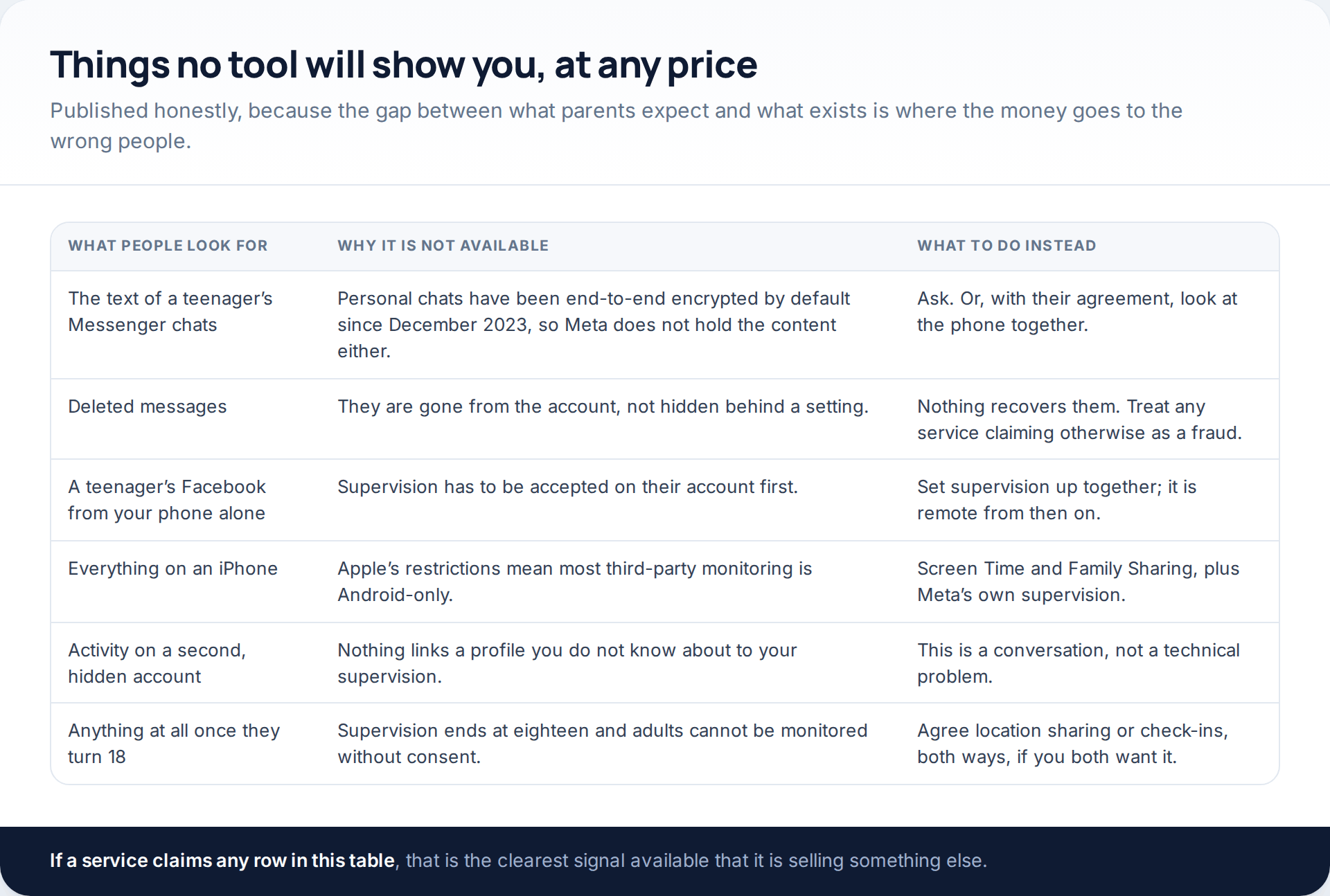
Two of these are worth dwelling on. Deleted messages are gone rather than hidden; no product recovers them, and every service claiming to is a fraud. And a second, hidden account is not a technical problem at all — nothing connects a profile you do not know exists to your supervision, which is why the relationship does the work that the software cannot.
If what you are really weighing is how much to watch and how much to trust, we have written about that separately in how much of a child’s social media to monitor.
How this page was put together
The supervision features described here are drawn from Meta’s own announcements and from reporting by established technology publications in October 2026: the April 2025 introduction of Teen Accounts on Facebook and Messenger and its initial countries, the Messenger supervision controls covering time spent, contacts, settings visibility and report notifications, the Messenger Kids Parent Dashboard features as Meta described them, and the default end-to-end encryption of Messenger’s personal chats from December 2023. Facebook’s own help pages block automated retrieval, so individual menu paths were cross-checked against independent walkthroughs rather than quoted from one place.
Labels and locations move between app versions and between countries, and Meta ships changes to Family Center frequently, so treat the shape of each tool as reliable and the exact wording as provisional. The screens illustrated are neutral drawings with invented names and figures, not reproductions of Meta’s interface. We have not lab-tested any monitoring application, including our own, and we have given no figures on how many families use these tools, because none we could verify exist.
We have deliberately not described any method of viewing an account without the account holder’s knowledge. Where the question is really about an adult rather than a child, there is no version of this that is both legal and useful, and the honest answer is a conversation.
Common questions
Can I see my teenager’s Facebook messages?
No. Supervision reports who can contact them and when their contact list changes, never the content of a conversation. Messenger’s personal chats are end-to-end encrypted by default, so the text is not available to Meta either. Under thirteen, Messenger Kids does show chat history to a parent — that is a different product.
Does my child know supervision is switched on?
Yes. They have to accept the invitation, they can see what it reports, and they can end it — at which point you are told. That visibility is deliberate, and it is what separates supervision from something neither of you would describe as fair.
Can I set this up without touching their phone?
No. The invitation has to be accepted on their account. Once that is done, everything afterwards is read from your own device, so the setup is the only part that needs them present.
What happens when they turn eighteen?
Supervision ends. There is no adult version, and no setting that extends it. If you both want to stay connected in some way after that, mutual location sharing or an agreed check-in is a different arrangement between two adults.
Is Messenger Kids actually safer than a teenage account?
It is more controlled: you approve contacts, and you can see the conversations and recent images. Whether that is right depends on the child’s age. It is designed for under-13s, and it ends rather than growing with them.
What about an iPhone?
Meta’s supervision works the same on either platform, because it runs inside the account rather than on the device. Third-party parental apps are a different matter: Apple’s restrictions mean most of their features are Android-only, so on an iPhone the practical combination is Meta’s supervision plus Apple’s own Screen Time and Family Sharing.
My child has a second account I was not told about. Can supervision find it?
No. Supervision only covers accounts linked to it, and nothing connects an unknown profile to your view. That one genuinely is a conversation rather than a setting — and a common enough teenage move that it is worth raising calmly rather than as an accusation.
Is it legal to monitor my child’s phone?
For your own minor child, generally yes, and the usual advice is to do it openly in any case. For anyone else — an adult partner, an adult child, an employee on a personal device — consent is required in most places, and monitoring without it can be a criminal matter as well as a relationship-ending one.
Using a monitoring app for this? GuestSpy is parental monitoring for Android that stays visible on the child's phone and runs from any browser. If it fits your family, see what the app does.
Related guides
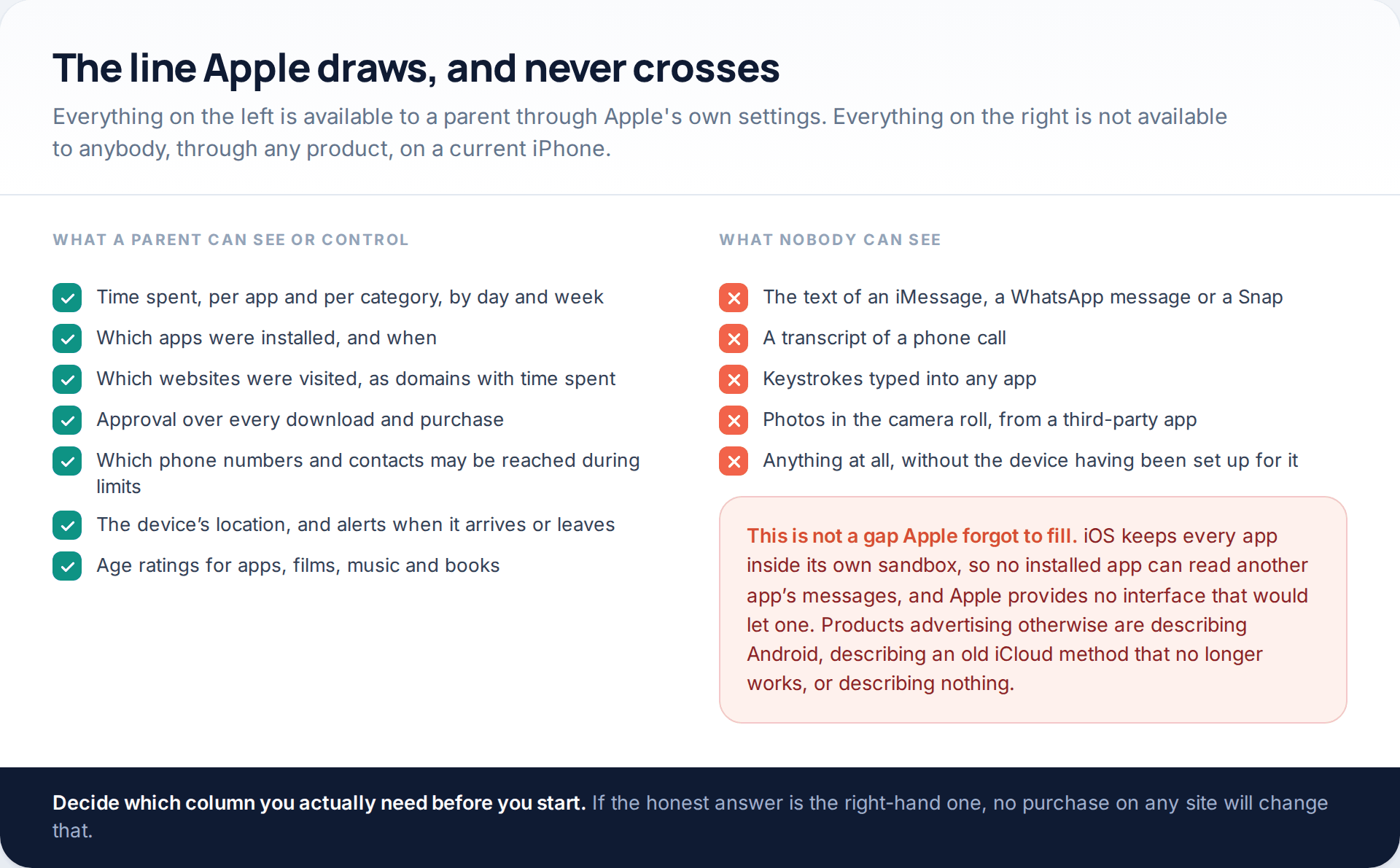
Monitoring a Child’s iPhone Openly: Screen Time, Family Sharing and the Limits
Apple’s monitor iPhone parental controls are better than their reputation and narrower than most advertising implies. Through Family Sharing and…
7 Best Free Hidden Spy Apps for Android (100% Undetectable)
Spying app makes our life easier as we don’t have to worry about our kids and online safety constantly. There…

How to Spy on Text Messages Without Installing Software
Are you wondering how to spy on text messages without installing software on the target phone? If yes, let us…
Monitoring your child can see.
Location, screen-time budgets, routines, app and website blocking and the alerts that matter, run from any browser and visible on the phone. Pair an Android phone in about fifteen minutes.