How to Monitor My Child’s Social Media
Every platform has its own supervision tools, and every one of them has real gaps. Here's what Instagram, Snapchat, TikTok, Discord, Roblox, YouTube and WhatsApp actually let you see.
 By GuestSpy Editor · Founder and editorPublished August 21, 2026Updated September 14, 202611 min read
Set up Instagram’s Family Center and it feels like the job is done — until you remember your child also has Discord, and Discord has nothing of the sort. That’s the pattern across almost every family trying to work out how to monitor a child’s social media: each platform hands you a different tool, with a different name, that covers a different slice of the problem, and none of them talk to each other.
This guide goes through seven platforms one at a time — Instagram, Snapchat, TikTok, Discord, Roblox, YouTube and WhatsApp — and says plainly what each one’s own supervision tool actually shows a parent, and what it doesn’t. The gaps matter as much as the features, because a parent who assumes Family Center covers “social media” in general is missing the two apps that often carry the most conversation.
The honest picture, before the detail
Every platform’s supervision tool is built by that platform, for that platform, and stops exactly at its own edges. That’s not a criticism of any single one — Instagram genuinely cannot see what’s happening inside Discord, and building a tool that did would raise far bigger privacy questions than the one it’s trying to solve. But it does mean a parent stitching together “full coverage” from platform tools alone is working with more gaps than they realise.
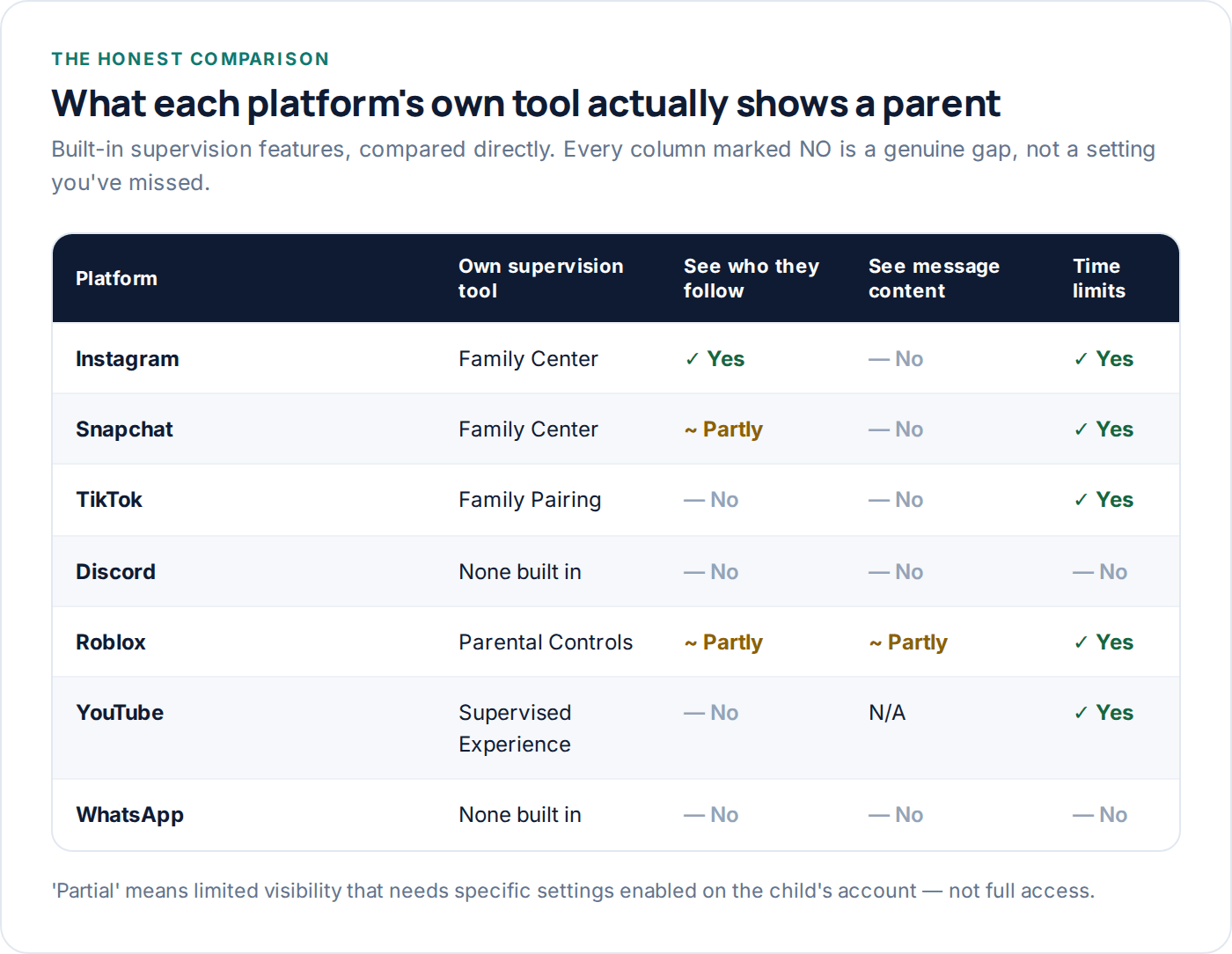
The clearest gap in the table above is message content. Every mainstream platform’s parental tool stops short of showing what was actually said in a private message — that’s a deliberate design choice most platforms have made, not an oversight, and it holds even for younger teen accounts. What you get instead is metadata: who they’re talking to, how often, for how long, and whether the account is public or private. That’s genuinely useful, but it’s a different thing to what most parents picture when they hear “monitor social media.”
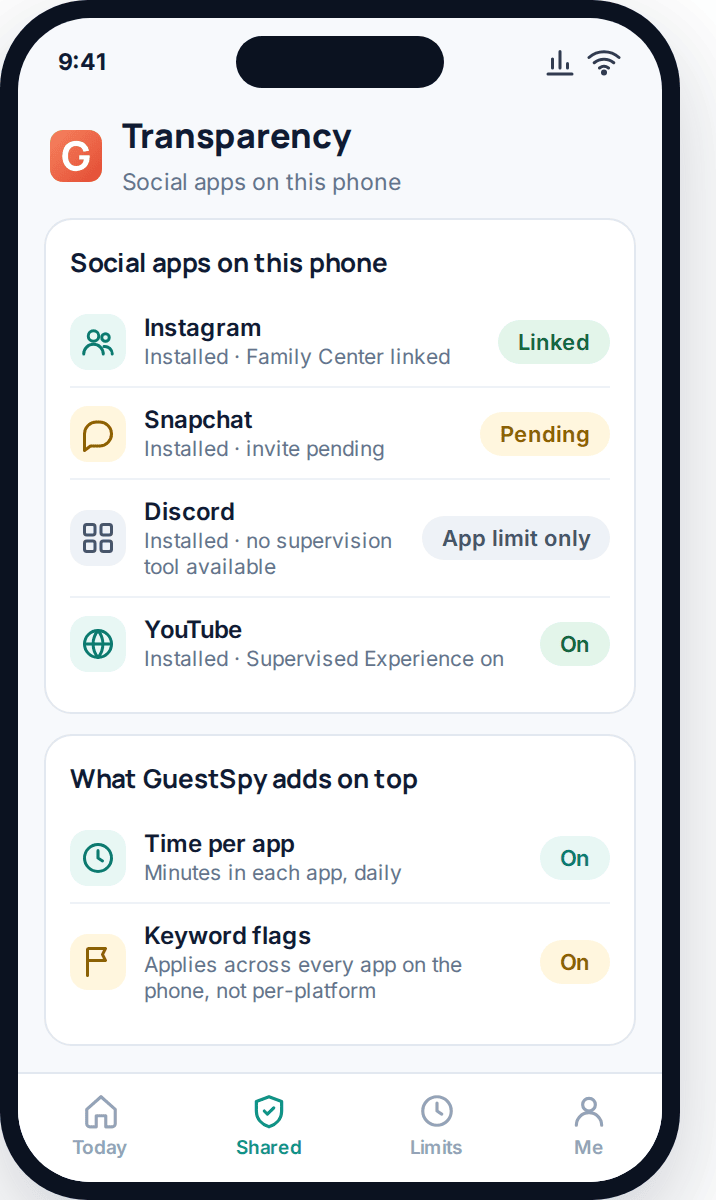
Worth keeping one running record of which of these tools are actually linked, per platform, per child — it’s easy to set up Family Center on Instagram in a burst of enthusiasm and forget that TikTok’s Family Pairing invite from three months ago was never accepted. A single screen listing what’s connected, rather than trusting memory, catches that gap before it matters.
Instagram: Family Center
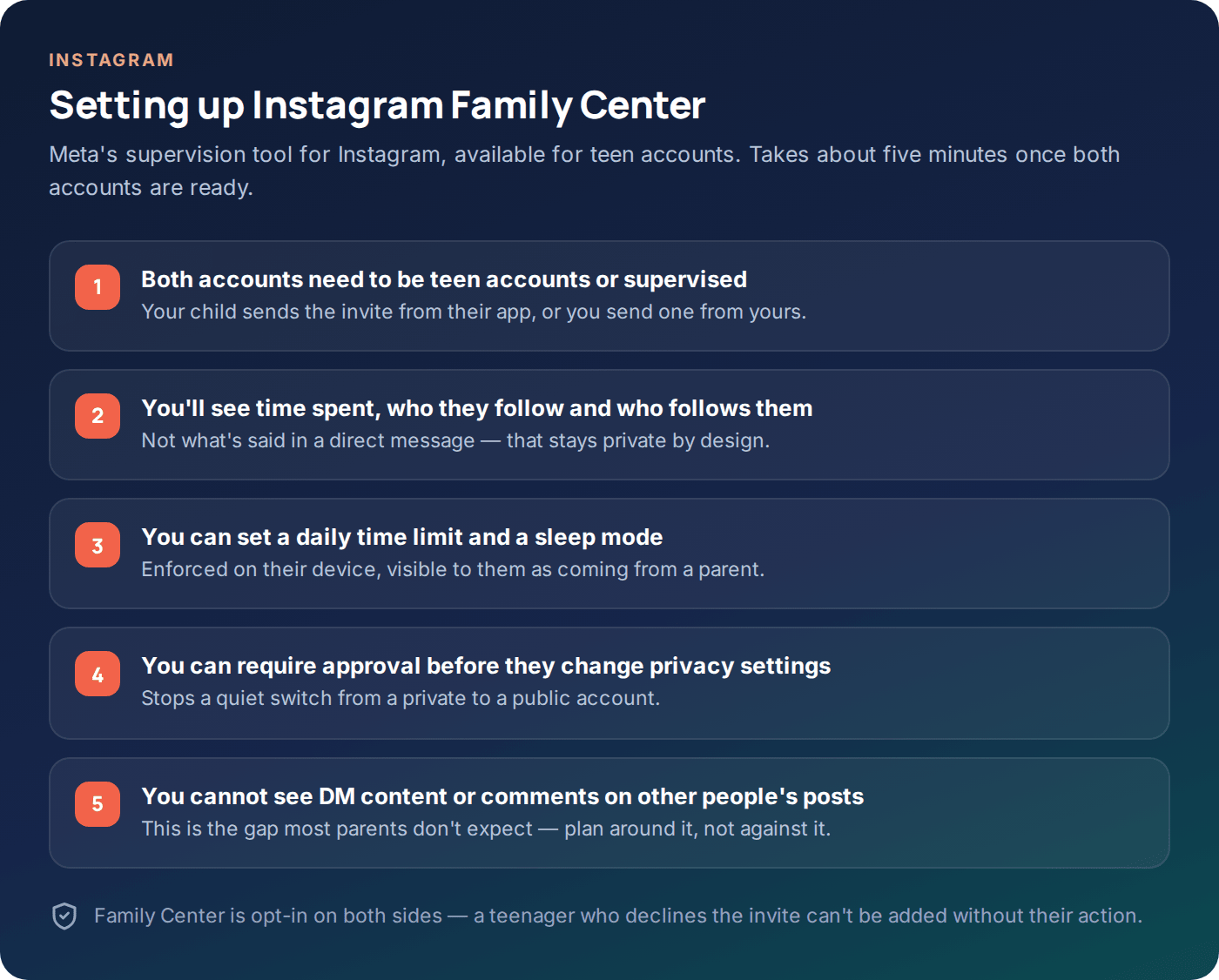
Family Center is Meta’s supervision tool, available once a teen sets up a teen account (automatic for under-18s in most regions) or a parent sends a supervision invite. Once linked, a parent sees time spent in the app, who their child follows and who follows them, and gets notified of certain account changes like a switch to a public profile.
What it doesn’t show: the content of direct messages, comments left on other people’s posts, or what’s inside Stories once they’ve expired. It’s also opt-in on the child’s side in most setups — a teenager who wants to decline the invite generally can, which is worth knowing before assuming it’s enforceable the way a device-level control is.
Snapchat: Family Center
Snapchat has its own, separate Family Center — not connected to Instagram’s despite the shared name, since they’re different companies. It shows who your child has added as a friend and who they’ve been messaging recently, but not the content of the messages themselves, which fits Snapchat’s whole design around messages that disappear by default.
What it’s good for
Seeing the friend list and catching an unfamiliar name early — often the first sign something’s changed in who your child is talking to.
What it’s not
A way to see what was actually said. Snapchat’s disappearing-message design means there’s rarely a persistent record even for the child themselves.
Worth knowing
Snap Map, a separate feature, can share live location with friends — worth checking it’s set to the level your family’s comfortable with, separately from Family Center.
TikTok: Family Pairing
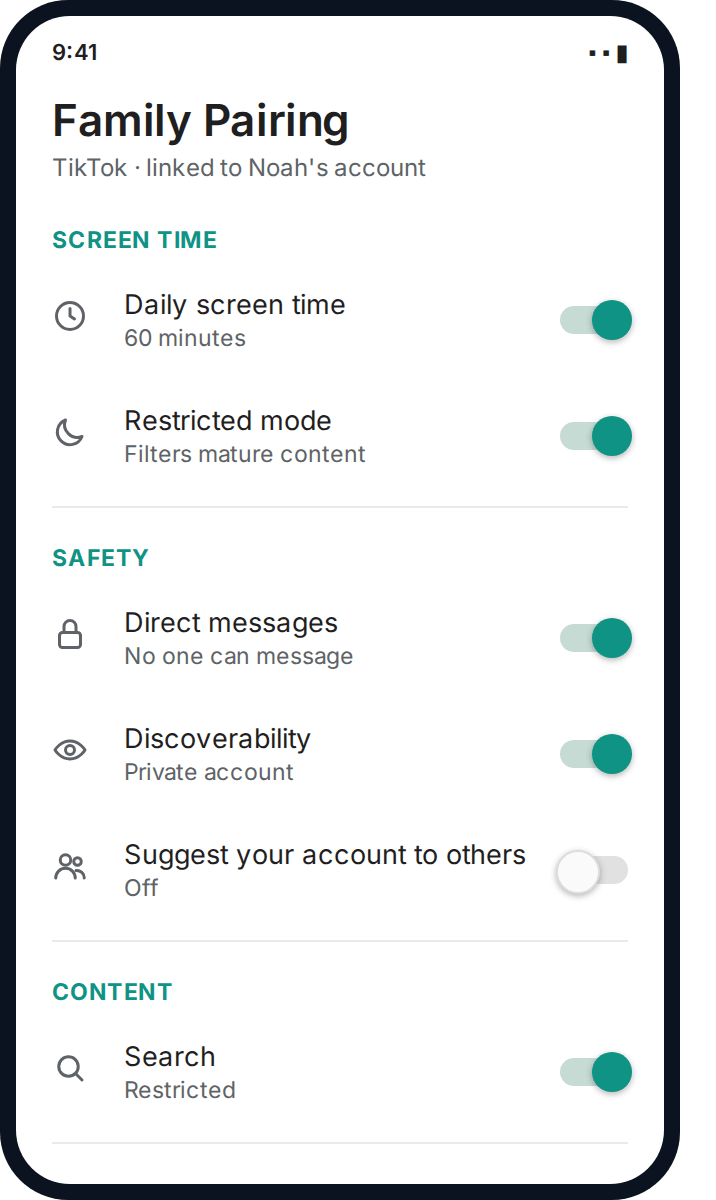
Family Pairing links a parent’s TikTok account to a child’s and is, in practice, one of the stronger tools in this list for restricting who can reach your child in the first place — direct messages can be turned off entirely, the account set to private, and search and content both restricted at the same time.
Where it’s weaker is visibility after the fact — it’s built around prevention rather than review, so there’s little in the way of “here’s what happened this week” reporting. If your priority is stopping unwanted contact before it starts, Family Pairing does that well. If your priority is seeing what’s already happened, it does that less well than Instagram’s or Snapchat’s tools.
Discord: no built-in tool
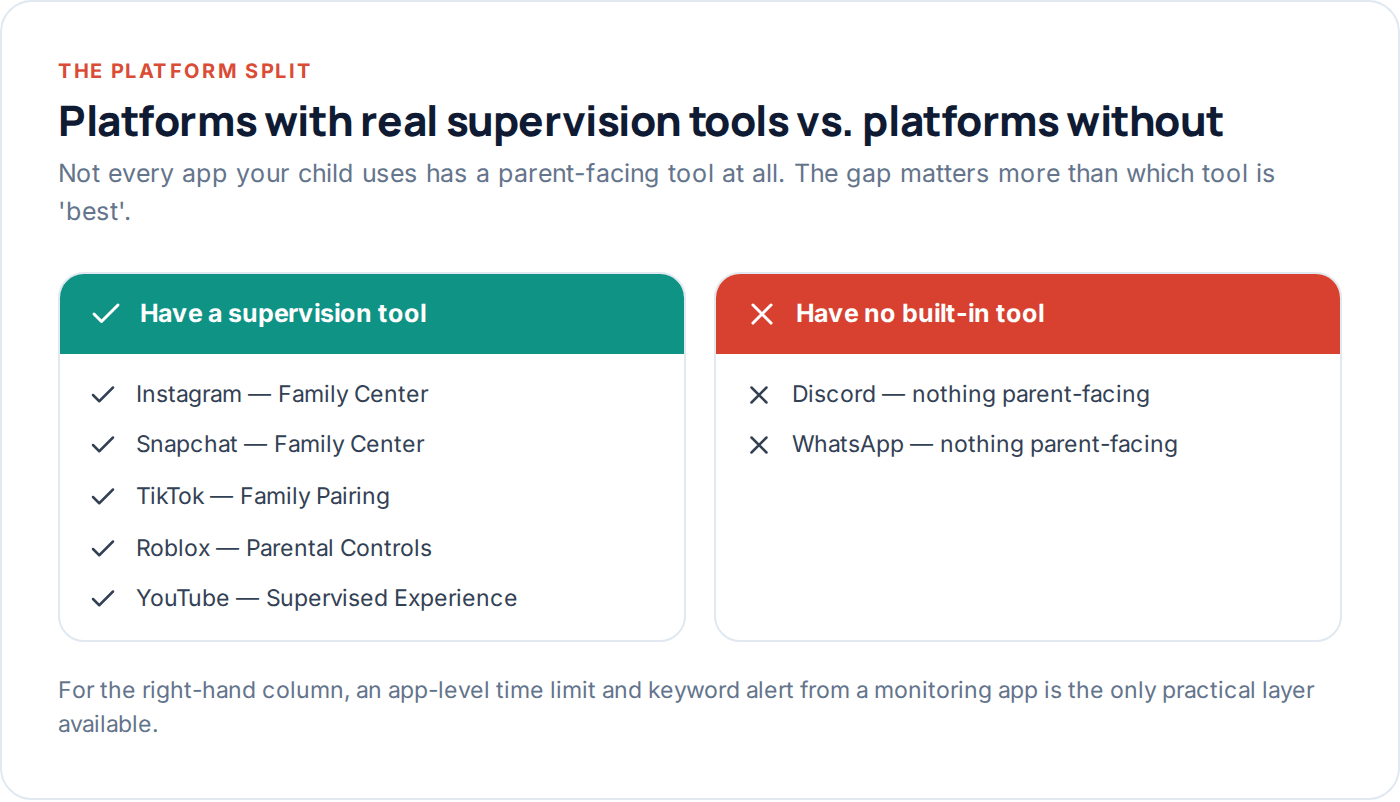
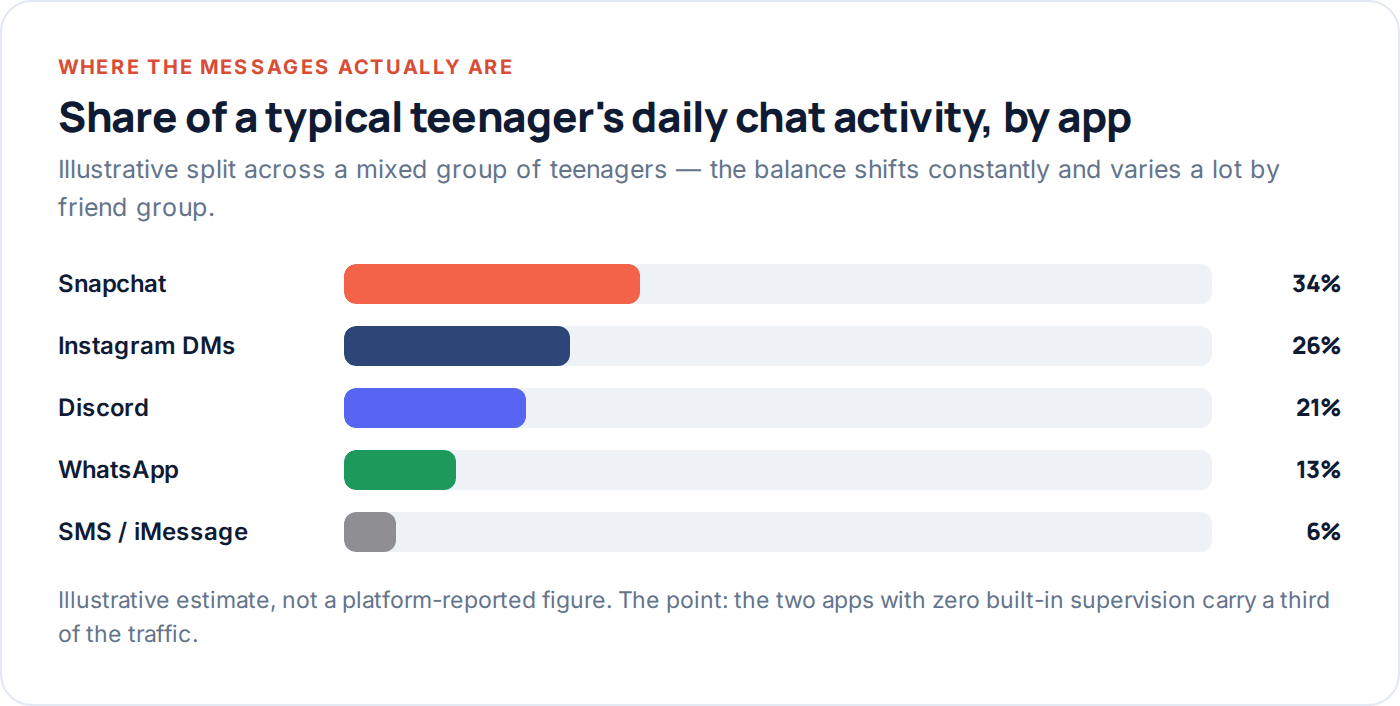
Discord has no parent-facing supervision tool at all as of writing — no family pairing, no linked account, nothing. That’s a significant gap given how much of a typical teenager’s daily chat activity happens there, often in servers with dozens or hundreds of members that a parent has never heard of.
What Discord does offer is account-level settings your child can configure themselves — restricting who can direct message them, safe-search-style content filtering on media — but there’s no parent view of any of it. For this platform, the only practical layer is a phone-level tool that can flag keywords or track time spent, since Discord itself won’t hand a parent anything.
Roblox: Parental Controls
Roblox’s own Parental Controls, set up through a linked parent account, cover spending limits, a content maturity filter, and — importantly for a platform built around games with in-game chat — the ability to restrict who can chat with your child, down to “no one” for younger accounts.
This is genuinely one of the stronger tools in this guide precisely because Roblox’s core safety issue — chat inside games with strangers — is exactly what the tool restricts. The main limitation is that it applies platform-wide rather than per-game, so if your child plays a specific experience you’re comfortable with more open chat on, that’s not something Roblox lets you set separately.
Worth knowing too: Roblox’s spending controls are separate from its chat controls, and both are worth checking independently. In-game purchases add up quickly for a younger child who doesn’t fully grasp that Robux cost real money, and the spending limit is one of the more commonly missed settings simply because it lives in a different menu to the chat restrictions parents usually go looking for first.
YouTube: Supervised Experience
YouTube’s Supervised Experience, set up through a Google Family Link-linked account, lets a parent choose a content level (roughly: made-for-kids, a broader “explore” tier, or teen-appropriate) and set watch-time limits. It’s a genuinely different design to the other platforms here, because YouTube’s main risk to a child is content, not contact from other people.
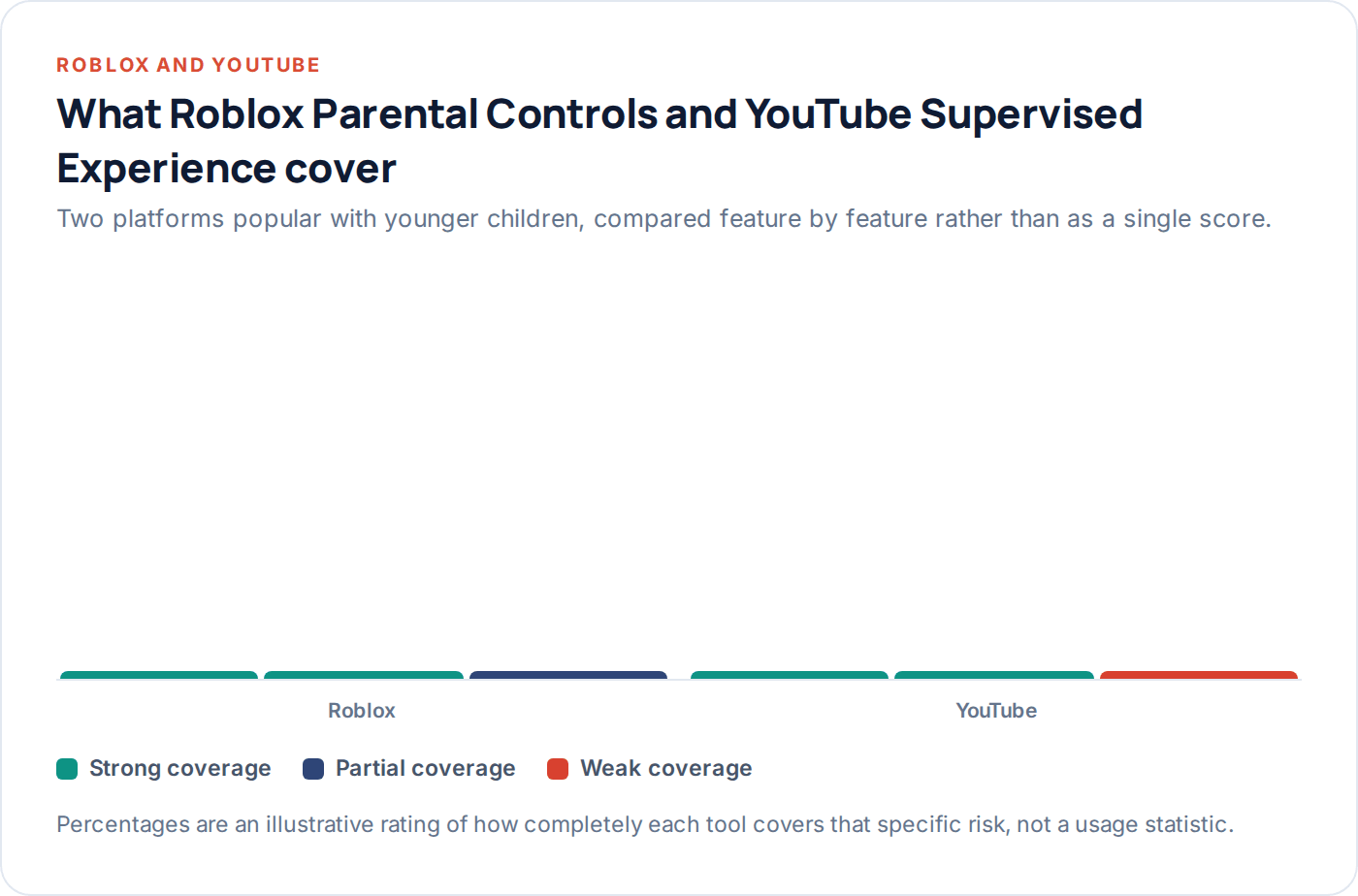
The clear gap is comments. Even at the strictest content setting, comment sections remain largely unmoderated by the parental tool — YouTube’s own comment moderation is separate and imperfect, and a video suitable for a ten-year-old can still carry comments that aren’t. If comment exposure is a specific worry, disabling comments isn’t something Supervised Experience controls; it’s set per-video by the creator.
WhatsApp: no built-in tool
Like Discord, WhatsApp has no parental supervision feature — no linked account, no visibility for a parent into who a child is messaging or how often. For families where WhatsApp is the main messaging app, especially common where extended family or friend groups outside school use it heavily, this is a real gap with no platform-side fix.
WhatsApp does offer end-to-end encryption on all messages, which is a genuine privacy strength for the platform generally, but it also means even WhatsApp itself cannot see message content — so there’s no version of a parental tool coming that would show conversation content without fundamentally changing how the app works. Plan around this one rather than waiting for a fix.
One setting worth checking regardless: WhatsApp’s “who can add me to groups” control, buried in Privacy settings, defaults to allowing anyone with your child’s number to add them to a group directly. Restricting it to contacts only, or to nobody without an invite, closes off one of the more common ways a child ends up in a group chat with people they’ve never met.
Covering what no platform tool reaches
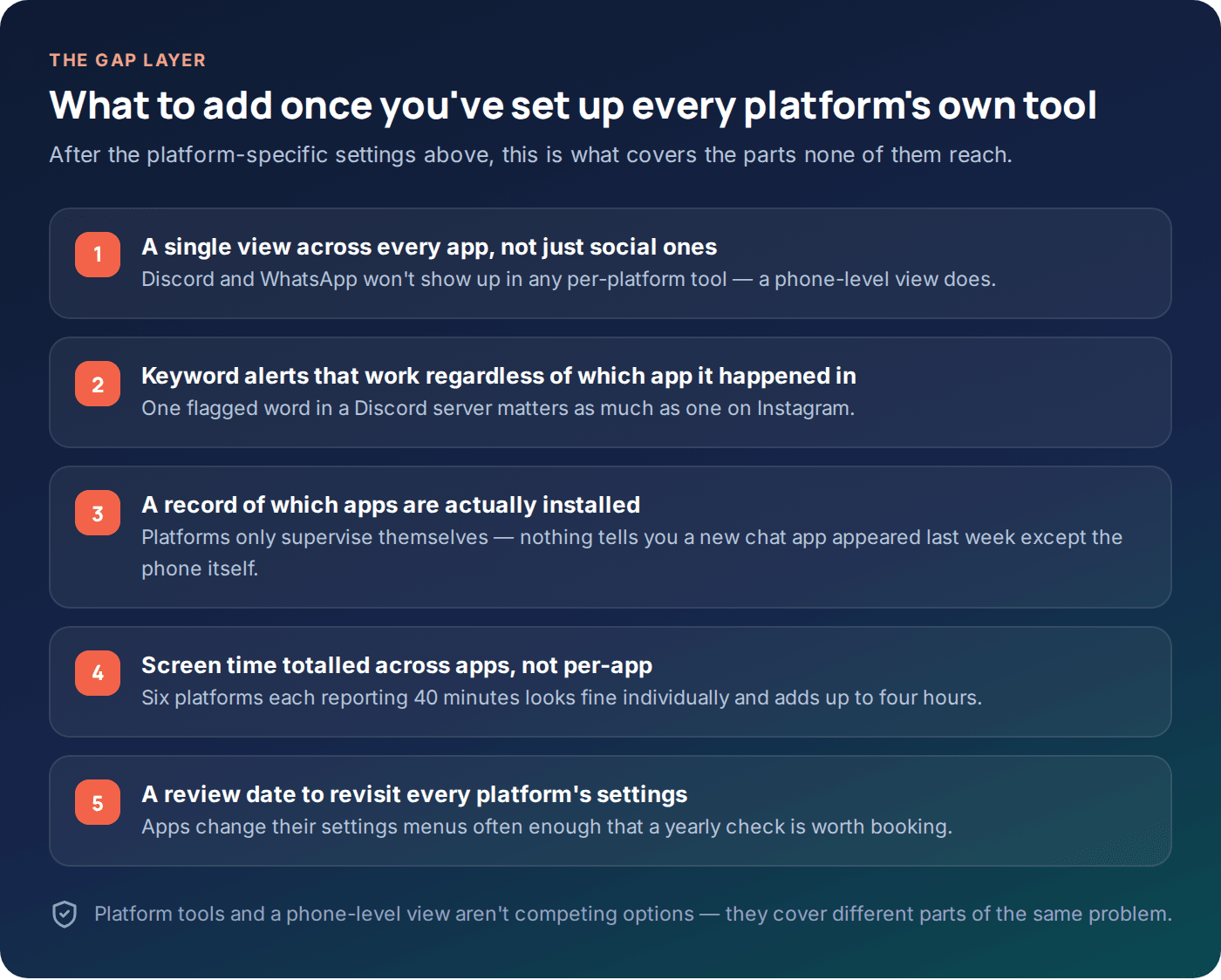
Once every platform’s own tool is switched on, there’s still a real gap: Discord and WhatsApp have nothing at all, and even the platforms with tools stop at message content. That’s where a phone-level layer earns its place — not as a replacement for the platform tools above, but as the thing that covers what they structurally can’t.
A tool like GuestSpy’s app monitoring works differently to a platform’s own tool: instead of reading inside any single app, it looks at the phone as a whole — which apps are installed, how much time is spent in each one, and whether a notification anywhere on the phone contains a word from an agreed watch-list. That’s a coarser view than a platform-specific tool gives for the apps that have one, but it’s the only view at all for the apps that don’t.
| What you need | Best source |
|---|---|
| Who they follow, on Instagram or TikTok | That platform’s own tool |
| Whether a new chat app appeared on the phone | Phone-level app list — no platform tool shows this |
| A flagged word in a Discord or WhatsApp chat | Phone-level keyword alert — the only option for these two apps |
| Total daily screen time across every app | Phone-level screen time, not summed manually from six different platform tools |
Set the platform tools up first — they’re free, well-designed for their specific job, and take about half an hour across all seven apps. Add a phone-level layer for what’s left over, particularly if Discord or WhatsApp are in regular use.
Worth a note on how these two layers actually interact day to day. The platform tools tend to generate their own occasional notifications — a weekly activity summary from Instagram, an email when a Family Pairing setting changes on TikTok — while a phone-level tool like GuestSpy is built around a single daily view instead. In practice most parents end up checking the phone-level dashboard regularly and the platform-specific emails only when something in them looks unusual, rather than trying to monitor seven separate inboxes at once.
Questions parents actually ask
Which platform’s supervision tool is the best?
None of them cover everything, so “best” depends on what you’re worried about. TikTok’s Family Pairing is strong on preventing contact; Instagram’s Family Center is strong on visibility into who’s following whom; Roblox’s controls are strong on restricting in-game chat. Match the tool to the actual risk on that platform.
Can I see my child’s Instagram or Snapchat DMs with a monitoring app?
Generally no, not the content of the conversation itself — both platforms encrypt or otherwise protect message content in a way that a phone-level app cannot read directly. What a phone-level tool can usually do is flag when a notification for a new message contains a concerning word, which is different from reading the full conversation.
My child says Discord doesn’t need supervision because “it’s just my friends.” Is that true?
Often mostly true, but Discord servers can include people well outside a child’s real-life friend group, especially gaming or fandom servers with public invite links. Worth asking to see the server list together rather than assuming, since Discord itself won’t show you.
Do I need to set up every platform’s tool, or just the phone-level one?
Both, ideally — they cover different things. The platform tools are free, purpose-built and catch things a phone-level view can’t (like who follows whom), while the phone-level layer catches what platform tools structurally can’t, especially on Discord and WhatsApp.
Will my child know if I set up Family Center or Family Pairing?
Yes — every platform tool in this guide requires the child’s account to accept a pairing invite, and most show an ongoing indicator that supervision is active. None of them are designed to work invisibly, which fits the same consent-first approach worth using for any monitoring tool.
What about new apps I’ve never heard of?
This is exactly the gap a phone-level app list closes — no single platform tool will tell you a new app appeared, because each one only knows about itself. A phone-level view of installed apps, checked occasionally, is the practical answer here.
Where to start this week
Work through the seven platforms your child actually uses — not all seven will apply — and set up each one’s own supervision tool first; it’s free and takes about five minutes per app. Then look at what’s left uncovered, especially if Discord or WhatsApp are part of your child’s daily routine, and add a phone-level layer such as GuestSpy for the gap. The keyword alerts and app monitoring pages cover how that layer works in more detail.
No single tool, platform or otherwise, gives full visibility into a teenager’s social life, and that’s fine — the goal was never total coverage. It’s knowing where the real gaps are, so you’re not caught assuming a setting exists that doesn’t.
Using a monitoring app for this? GuestSpy is parental monitoring for Android that stays visible on the child's phone and runs from any browser. If it fits your family, see the Text messages & social feature.
Related guides
The Complete Guide to Child Phone Monitoring (iPhone and Android)
What you can actually see on each platform, how to set it up in an afternoon, and the one conversation…
The Complete Guide to Monitoring a Teen Respectfully
A step-down approach to monitoring a teenager's phone: what to negotiate, what to drop by 15 and 17, and how…
The Honest Parent’s Guide to Phone Monitoring
What phone monitoring actually delivers versus what the marketing promises, five claims worth being sceptical of, and a straight framework…
Monitoring your child can see.
Location, screen-time budgets, routines, app and website blocking and the alerts that matter, run from any browser and visible on the phone. Pair an Android phone in about fifteen minutes.