Free Monitoring Apps for Android: What Each One Can and Cannot Do

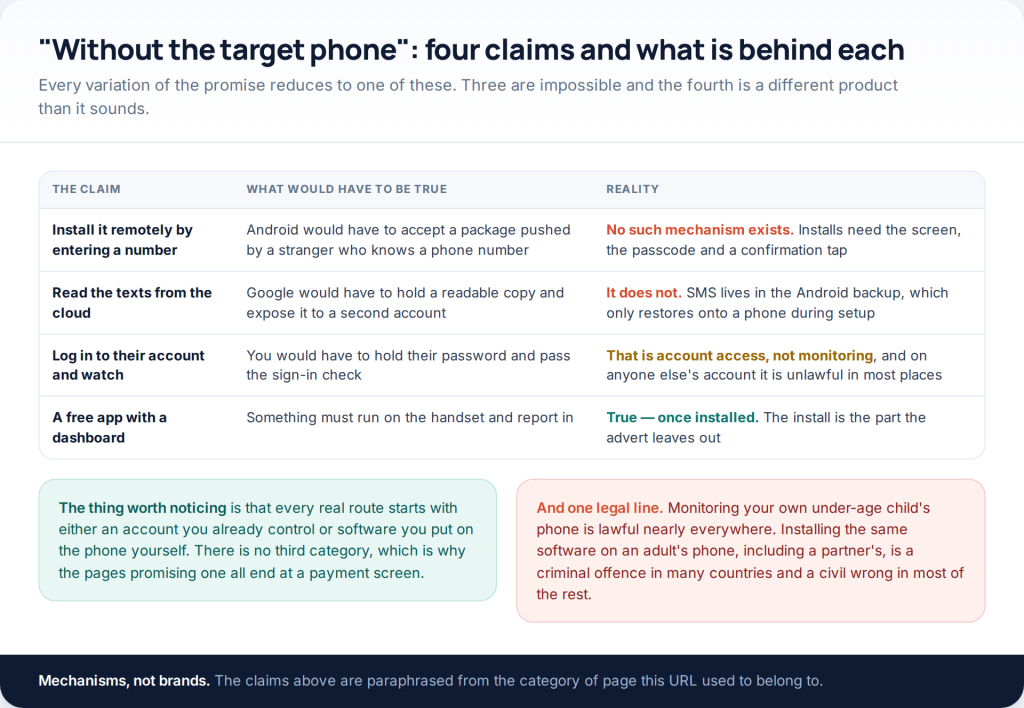
Free monitoring apps for Android are real, but none of them installs from a distance. Android has no mechanism for pushing software onto a phone you are not holding, and no free tier changes that. What genuinely works without touching the handset again is the Google account you set up, the mobile account the line sits on, and the home network — and between them they answer more than most parents expect.
This page used to be a list of “free spy apps for Android without the target phone”. The phrase describes a product that has never existed. Every app on every one of those lists required somebody to pick the phone up, unlock it and tap install — the lists simply left that out, because the sentence after it was a payment screen. What follows is the version with the install step left in, plus everything that genuinely works without one.
The four claims, taken apart
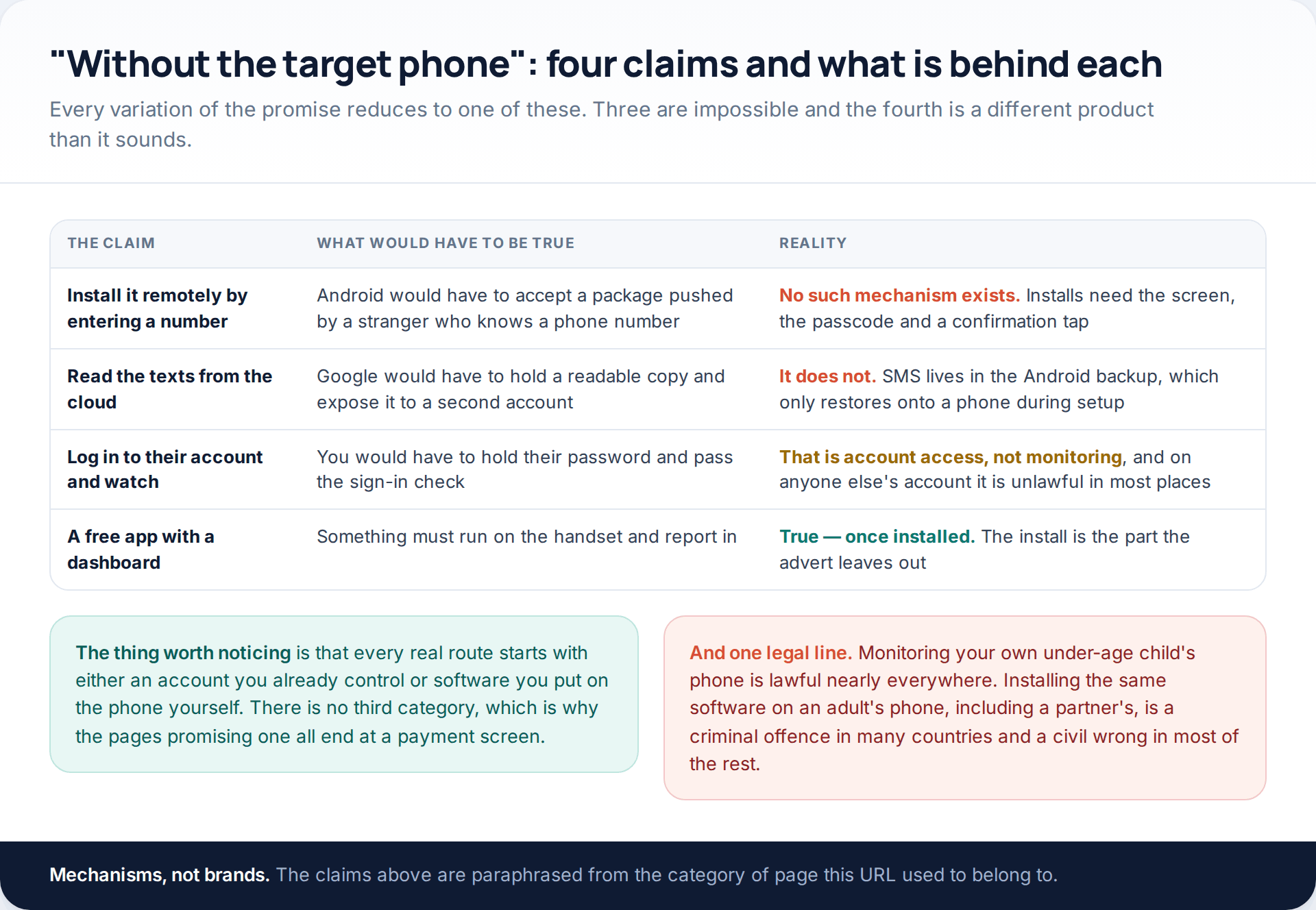
It is worth being precise about why the remote install does not exist, because the explanation also tells you what does. Android will not accept an application package from a stranger who knows a phone number; an install needs the screen, the passcode and a deliberate confirmation. That is not a gap waiting to be filled by a clever product. It is the security model, and the day it stops being true is the day every phone in the world is compromised.
The cloud version fails for a related reason. Android does back up text messages, and we will come to exactly what that means, but a backup is a restore target rather than a readable archive: it goes onto a phone during setup and it is not browsable from a web page. Google’s own documentation describes some of it as encrypted with the device’s screen lock.
Route one: the Google account you already control
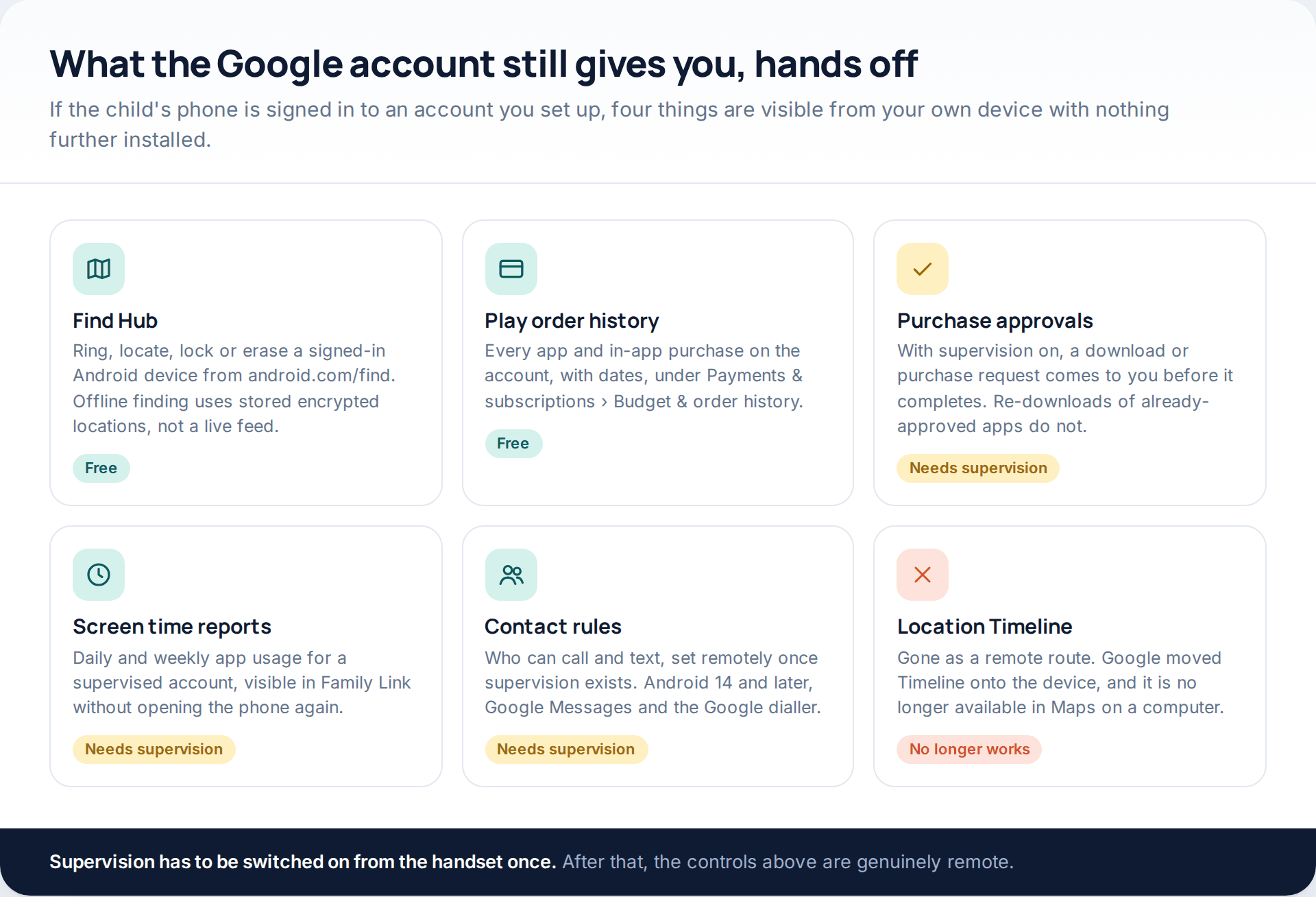
If you set up the child’s phone and the account is supervised, the remote layer is already in place and most parents never open half of it. Purchase approvals land on your phone before a download completes — though not for a re-download of something already approved, or for an app update, which is worth knowing before you rely on it. Screen-time reports show app-by-app usage without touching the device. Contact rules, on Android 14 and later with Google Messages and the Google dialler, let you decide who can reach the phone at all.
Play order history is the one nobody thinks of. Everything bought on the account, with dates, sits under Payments & subscriptions › Budget & order history in the Play Store or at play.google.com, and it is often the fastest way to find out what a child has actually been using.
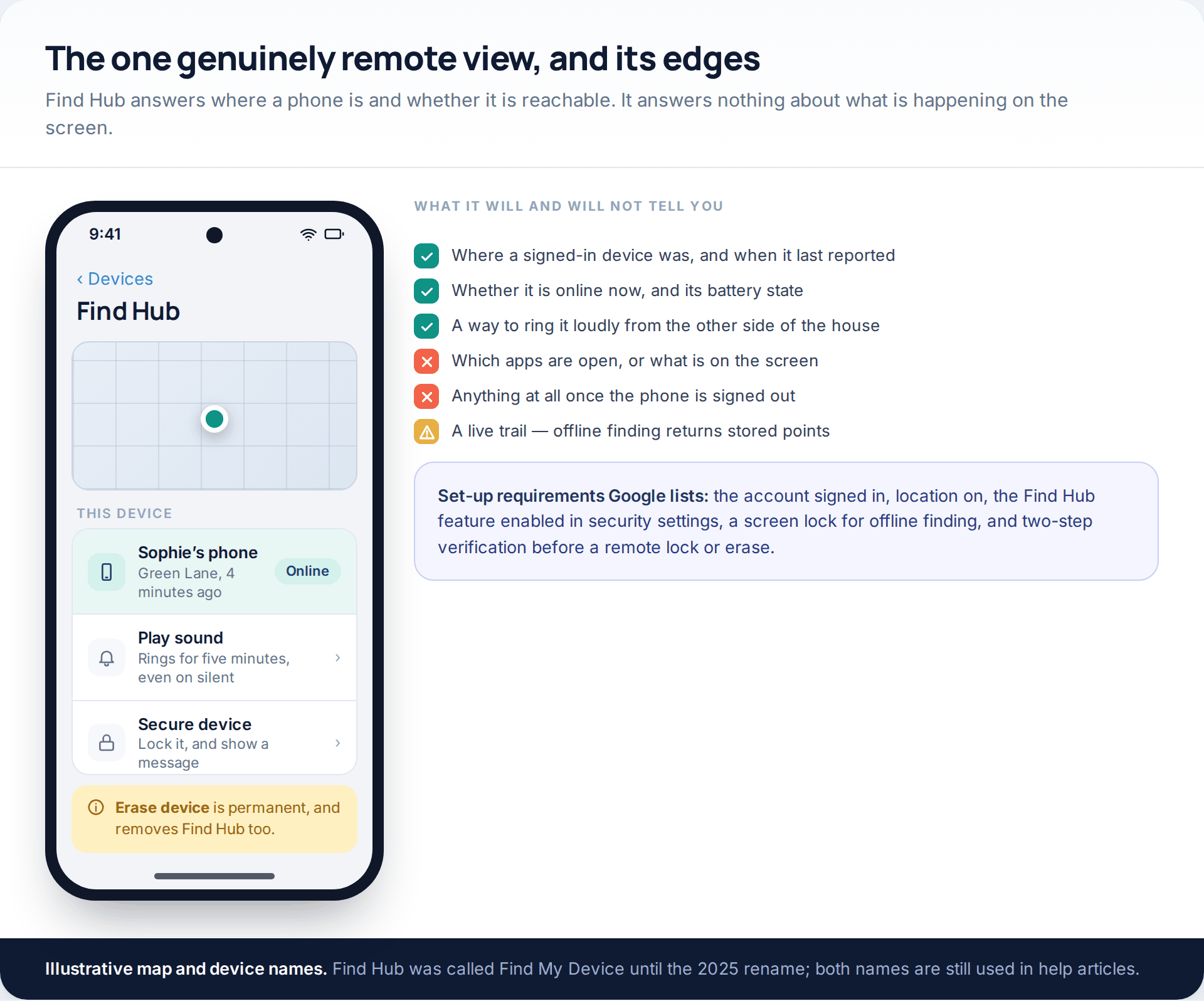
Find Hub — the service Google renamed from Find My Device in 2025 — rings, locates, locks or erases a signed-in Android device from android.com/find or the app. Google lists the requirements plainly: the account signed in, location turned on, the feature enabled in security settings, a screen lock for offline finding, and two-step verification before a remote lock or erase.
The route that stopped working, and still appears in old guides. Google Maps Timeline is no longer a remote view of anyone’s movements. The data now comes from the device, and Google states that Timeline is not available in Maps on a computer. If a guide tells you to open a web Timeline to see where a family member has been, it was written before that change and the rest of it is probably out of date too.
Route two: the mobile account
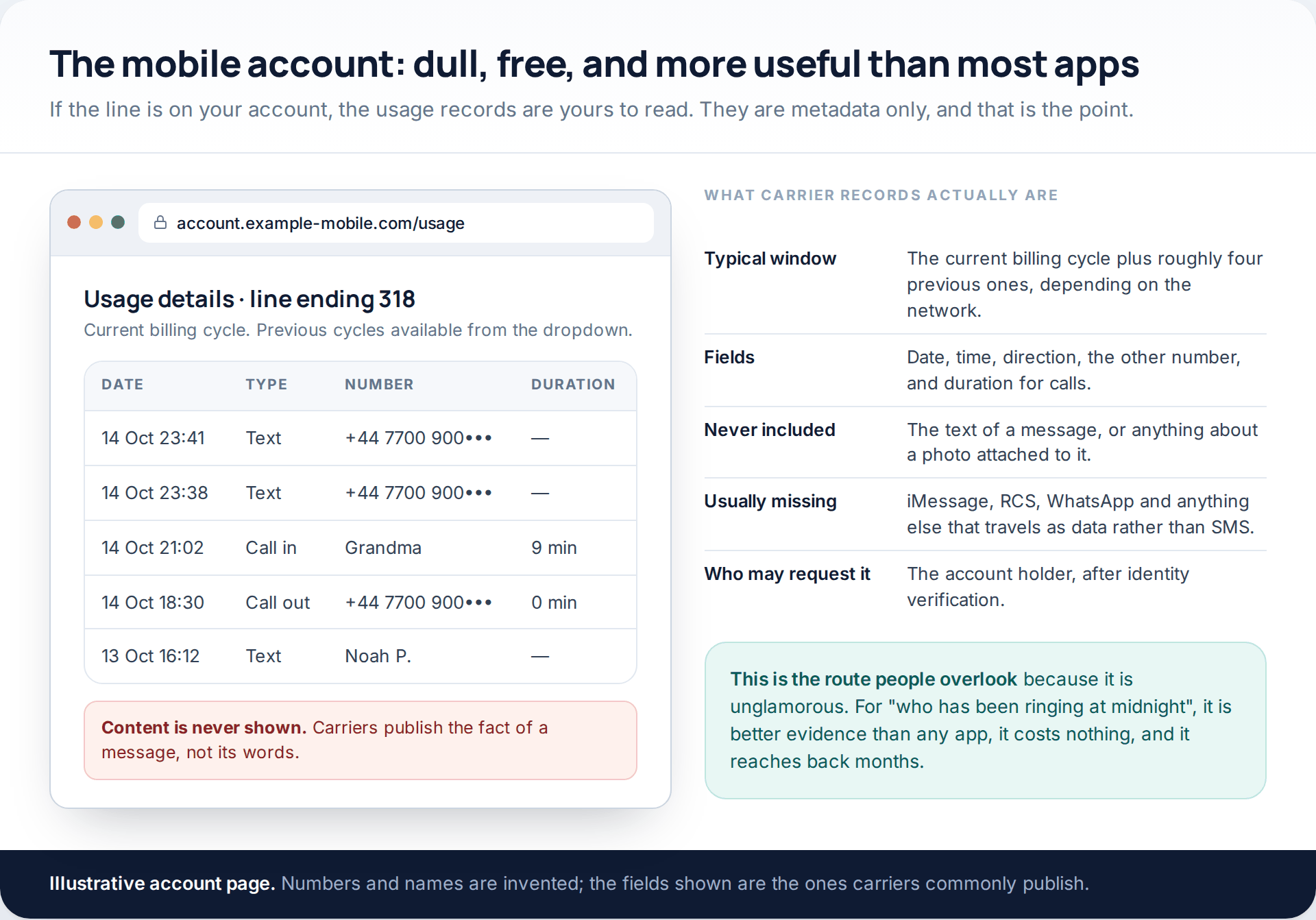
If the line is on your account, the usage records belong to you. Carriers publish call and message details for the current billing cycle and several previous ones — one US network’s help page gives the current cycle plus four — showing the date, the time, the other number and, for calls, the duration.
Two limits define what this is good for. Content never appears; carriers state plainly that they cannot provide the text of a message. And anything that travels as data rather than SMS — iMessage, RCS, WhatsApp, Snapchat — usually will not appear at all, which means a quiet-looking bill is not evidence of a quiet phone.
For the specific worry of a strange number ringing late, though, nothing beats it. It is free, it reaches back months, and it is the only route here that produces something you could show a school or, if it ever came to it, the police.
Route three: the home network
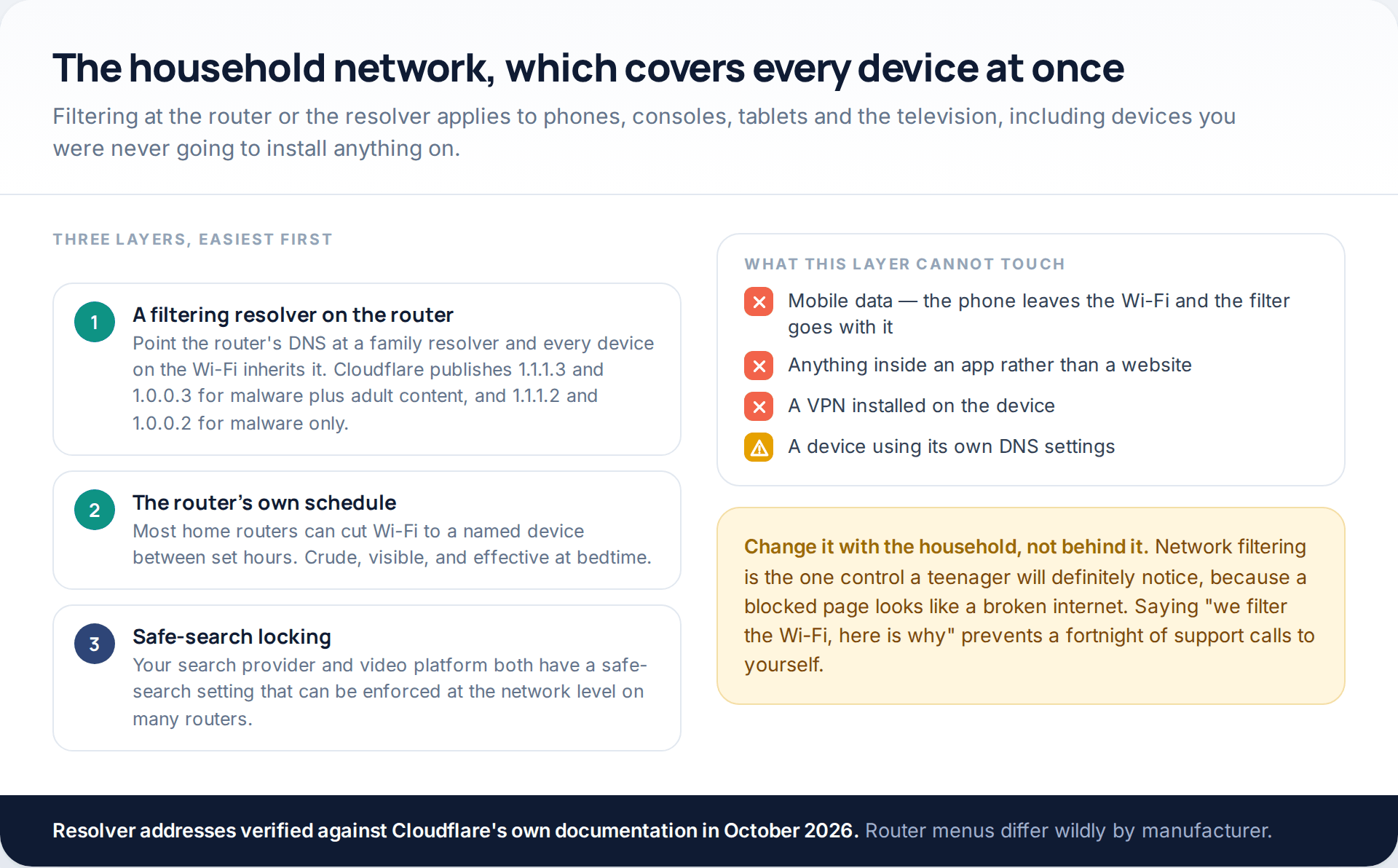
Network-level controls are the most underused free layer in the house, because they apply to the television, the console and the tablet as well as the phone. Pointing the router’s DNS at a filtering resolver is the quickest version: Cloudflare documents 1.1.1.3 and 1.0.0.3 for malware plus adult content, and 1.1.1.2 and 1.0.0.2 for malware alone, and when a blocked domain is queried the resolver returns 0.0.0.0 rather than the real address.
The limits are obvious once stated. It stops at the edge of your Wi-Fi, so mobile data walks straight past it. It filters websites rather than what happens inside an app. A VPN on the device defeats it. And a device set to use its own DNS ignores the router entirely, which on a modern phone takes about four taps.
Used alongside the rest, it is still worth the twenty minutes. Look for the DNS fields under the router’s internet or WAN settings rather than its parental-controls page, which on most home hubs is a thinner feature with a longer name.
The free tiers, read carefully
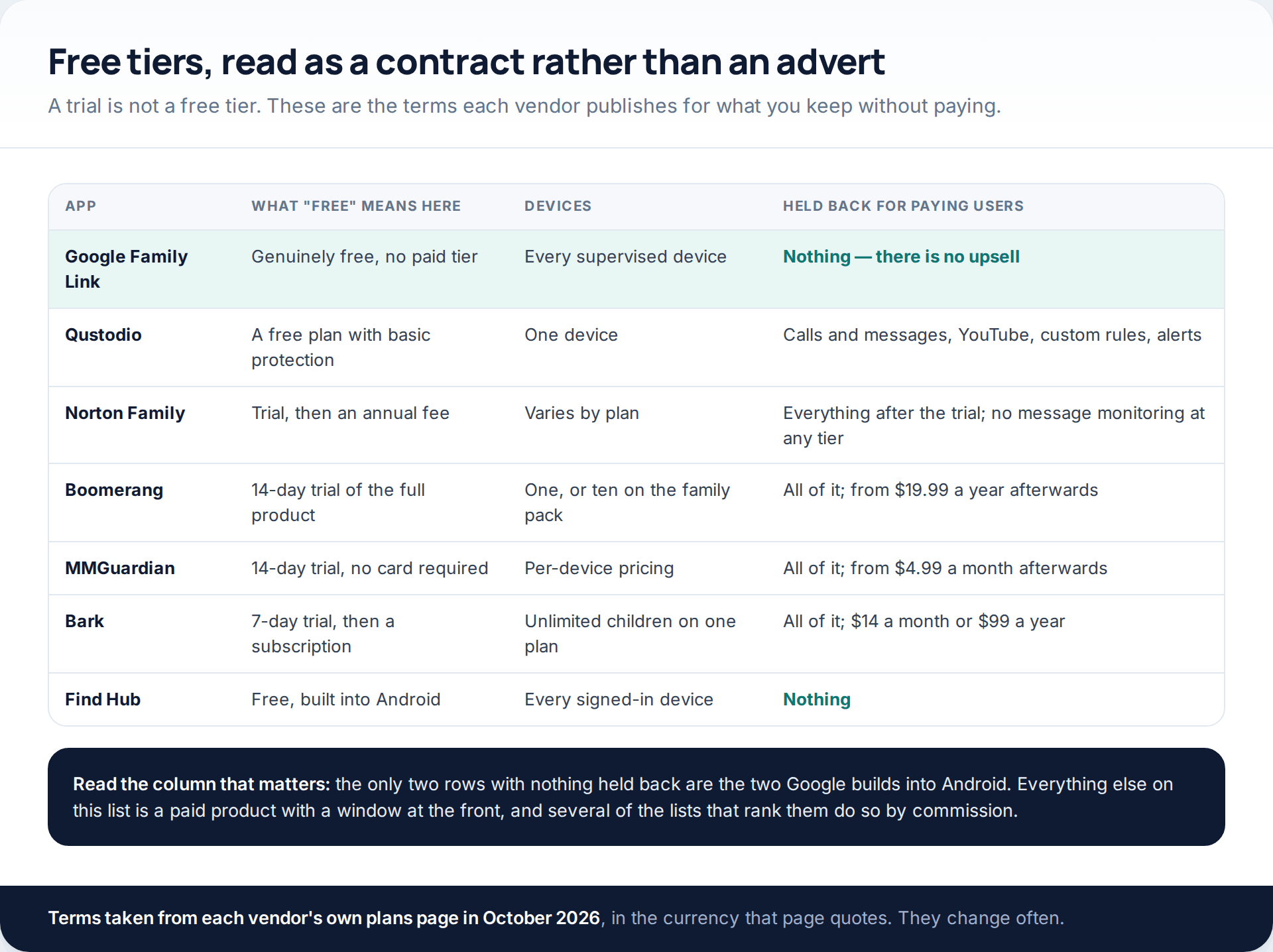
Qustodio publishes a free plan covering one device with basic protection, and lists calls and messages monitoring, YouTube monitoring, custom rules and alerts under its paid tiers. Boomerang’s fourteen-day trial covers everything, after which a single device costs from $19.99 a year and a ten-device family pack $39.99. MMGuardian also runs fourteen days without a card and prices from $4.99 a month. Bark gives seven days, then $14 monthly or $99 annually for unlimited children. Norton Family, widely listed as a monitoring app, does not monitor messages or calls at all — its supervision covers web, search, video, apps, time and location.
None of these were lab-tested by us. We have read each vendor’s published terms and reported them; we have not measured battery cost, reliability or how often any of them misses something, because nobody publishes figures for that which could be compared fairly.
If you do install something
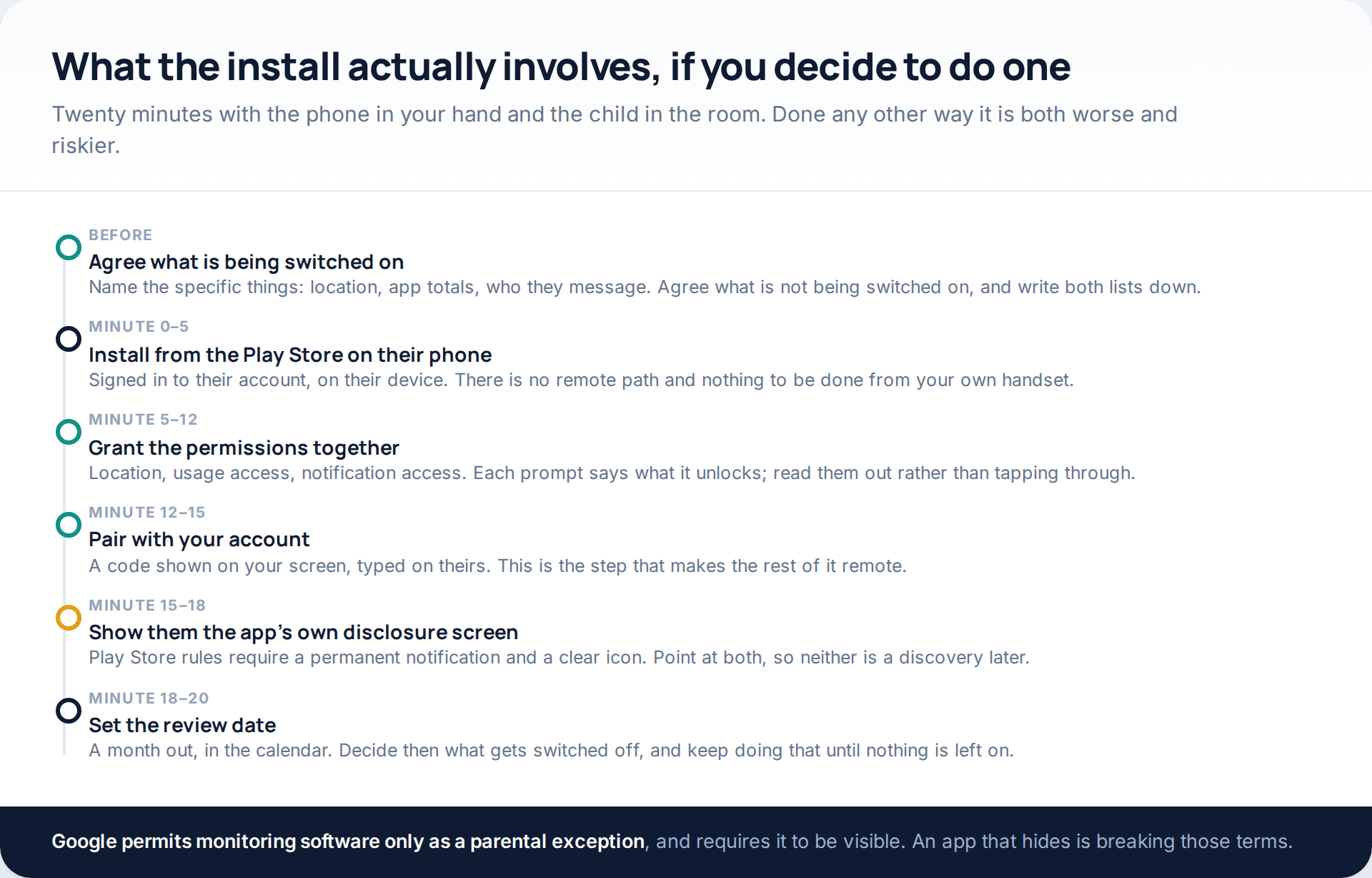
Two rules make the difference between a measure a family can live with and one that blows up in six weeks. The first is that the child is in the room. The second is the review date, which almost nobody sets and which is the only thing that keeps monitoring from quietly becoming permanent.
It is also the law of the Play Store, not just good manners. Google permits surveillance software only as a narrow exception for parents supervising their own children, and requires compliant apps to show “a persistent notification at all times when the app is running and a unique icon that clearly identifies the app”. An Android app that promises to stay hidden is telling you it is outside those rules, which is a reasonable guide to how it treats everything else, including the data it collects about your child.
A worked example that never installs anything
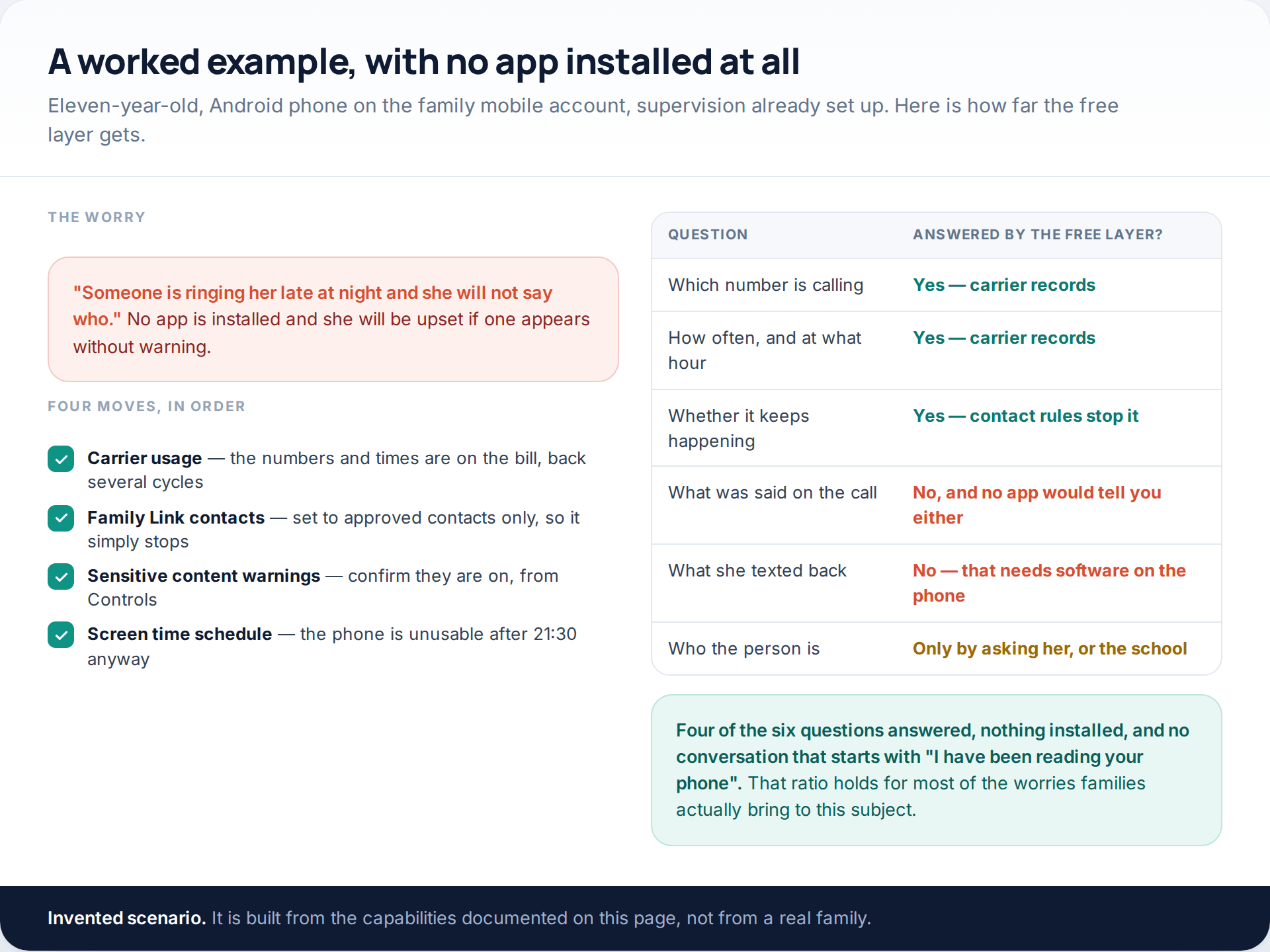
Notice which two questions the free layer cannot reach: what was said, and what was sent back. Those are the only two that need software on the handset, and they are also the two that most often turn out not to be the real question. If the calls have stopped and you know who was making them, the content of a call you cannot hear is rarely the thing that changes what you do next.
Where a paid app genuinely changes things
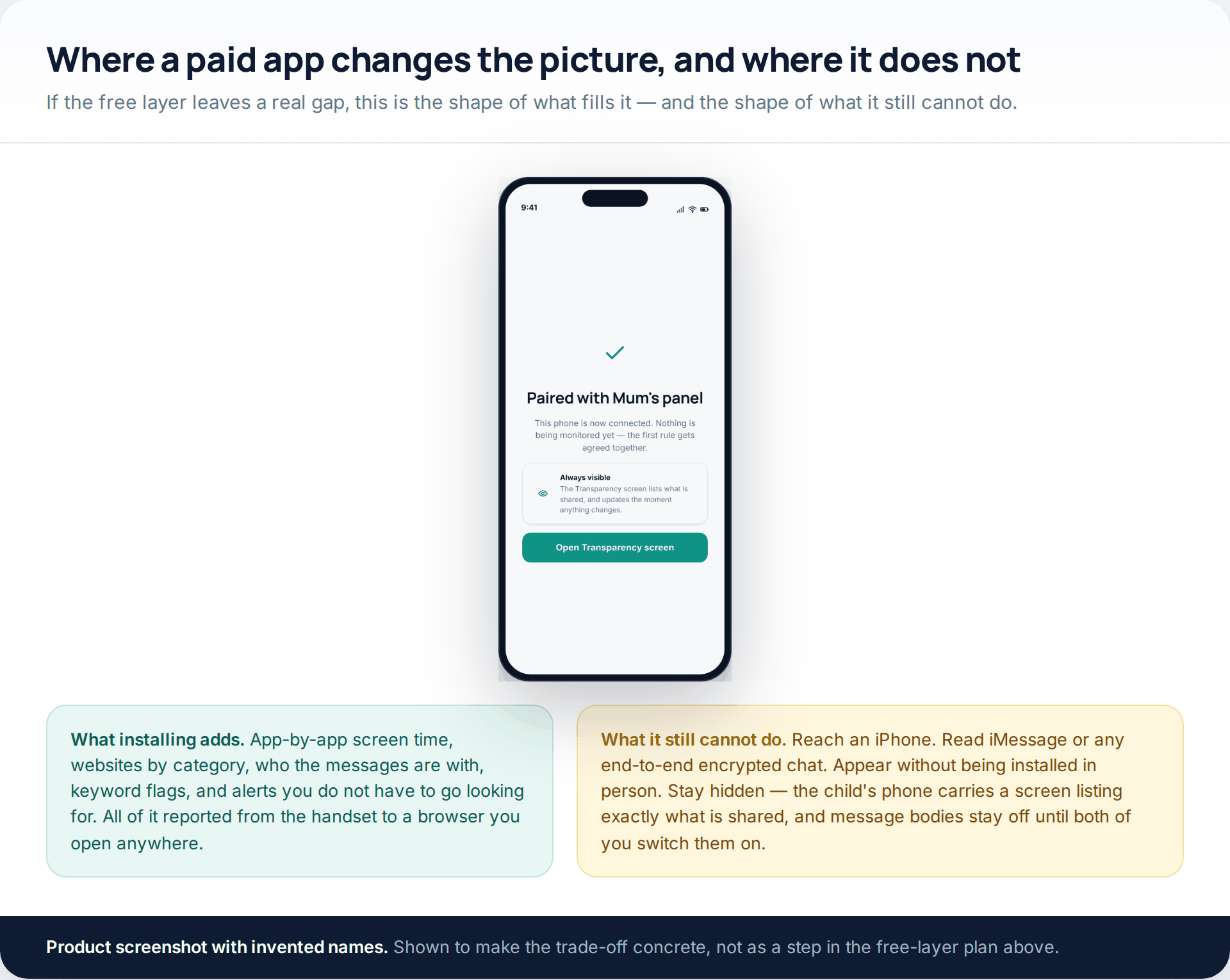
Our own product sits exactly where this page puts the category. GuestSpy is an Android child app; it has to be installed on the handset, the child can see it listed on their own phone, message bodies stay behind a switch you both turn on, and it cannot read iMessage or any end-to-end encrypted conversation. If that trade is the right one for your family, the features overview sets out what each part does. If the free layer above already answers your question, there is no reason to add it.
The sibling question to this one — reading the actual texts — has its own page, because the answer is different and more restrictive. We cover the options, free tiers and limits in our guide to monitoring text messages on a child’s phone.
How this page was put together
The Android behaviour described here was checked in October 2026 against Google’s own help pages for Find Hub, Android backup and restore, Family Link supervision and contacts, and Google Maps Timeline, along with the Play Store policies on SMS and call-log permissions and on surveillance apps. The resolver addresses come from Cloudflare’s documentation. Carrier record retention comes from a mobile operator’s published support page rather than from an estimate; other networks differ, so treat the four-cycle window as typical rather than universal.
We did not install or test any of the commercial products named here, measure battery drain, or compare how much each one catches. Prices and trial lengths are the ones each vendor publishes, in the currency they publish them in, and they move. Where a vendor’s own page and a review site disagreed, we used the vendor’s page and said whose claim it is. No product was placed by what it pays, and the two things we would actually start with — Family Link and Find Hub — have no affiliate programme at all.
If what you are really deciding is whether to monitor rather than how, that question is worth separating out first; our honest guide to phone monitoring is a better starting point than any comparison table.
Common questions
Is there any way to install a monitoring app without the phone?
No. Android requires a person at the device to approve an install. Services claiming otherwise are either selling you a subscription for nothing or harvesting the account details you type in on the way.
Can I read the Android backup of my child’s phone?
Not as a document. Google’s backup restores onto a device during setup rather than opening in a browser, and parts of it are encrypted with the phone’s own screen lock. Restoring a child’s backup onto another handset would also mean signing in as them, which is account access rather than supervision.
Which free monitoring app for Android is actually best?
Family Link, by a distance, because it is the only one with nothing held back and the only one Google builds into the platform. Its honest weakness is that it shows no message content and no call history, which is deliberate rather than an oversight.
Can I see my child’s location without an app on their phone?
Yes, if their Android device is signed in to an account you supervise: Find Hub shows where a signed-in device is and whether it is reachable. What you cannot do any more is open a web Timeline of where they have been, because Google moved that onto the device.
Do free apps sell the data they collect?
Some do, and the ones that give away a full-featured product permanently have to be funded somehow. Read the privacy policy for the words “partners”, “advertising” and “aggregate” before you install anything free that reads a child’s activity.
What about a phone I bought but my teenager uses?
Owning the handset makes installing software lawful in most places, but it does not make doing it quietly a good idea, and for an older teenager it is usually counterproductive. Tell them, agree the list, and put a date on it.
Will any of this work on an iPhone?
The Google-account routes do not, because they depend on an Android device signed in to a supervised account. The carrier route and the network route work on any phone. Apple’s own Screen Time and Family Sharing are the equivalent layer on that side.
Using a monitoring app for this? GuestSpy is parental monitoring for Android that stays visible on the child's phone and runs from any browser. If it fits your family, see the App & website blocking feature.
Related guides
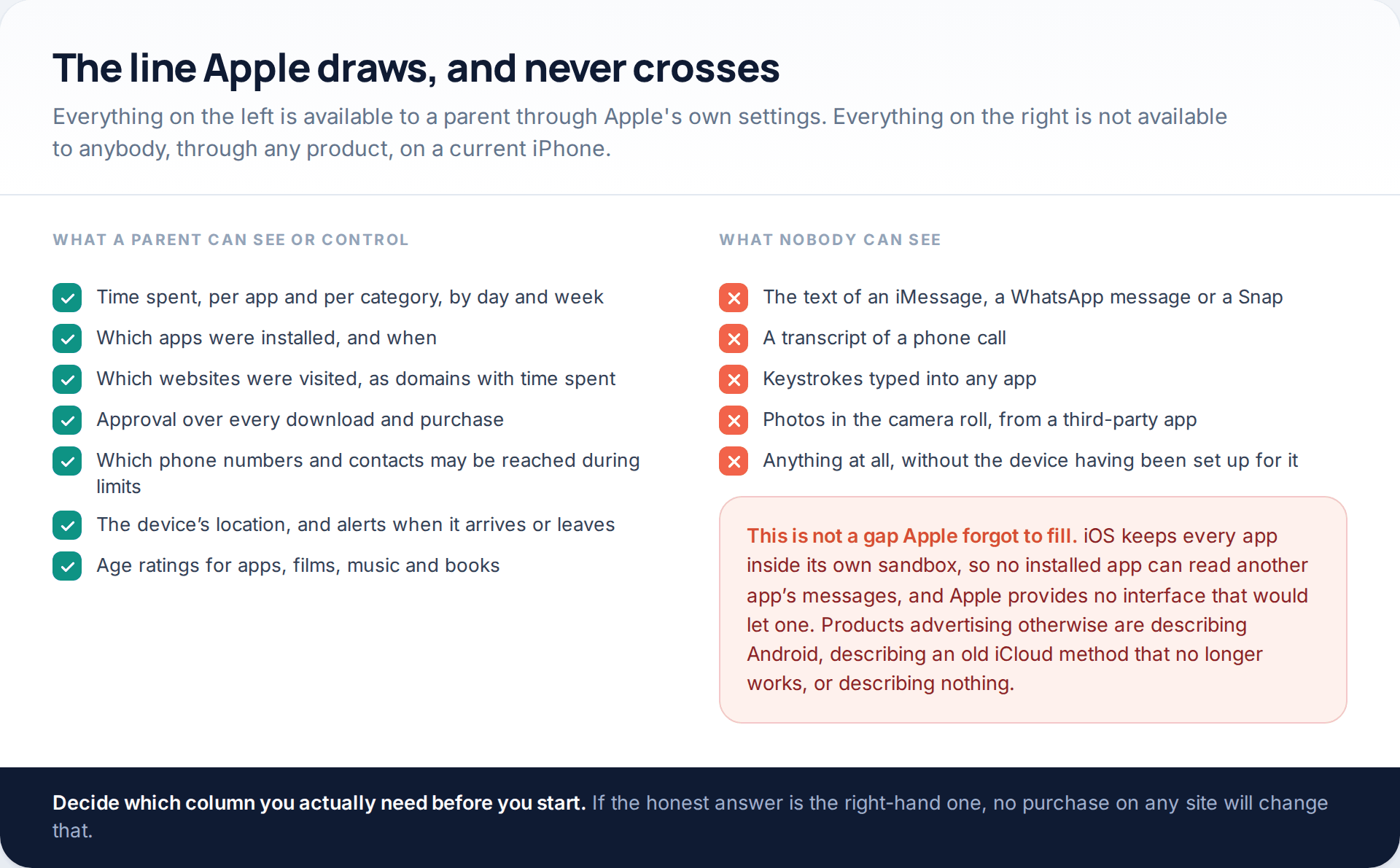
Monitoring a Child’s iPhone Openly: Screen Time, Family Sharing and the Limits
Apple’s monitor iPhone parental controls are better than their reputation and narrower than most advertising implies. Through Family Sharing and…
7 Best Free Hidden Spy Apps for Android (100% Undetectable)
Spying app makes our life easier as we don’t have to worry about our kids and online safety constantly. There…

How to Spy on Text Messages Without Installing Software
Are you wondering how to spy on text messages without installing software on the target phone? If yes, let us…
Monitoring your child can see.
Location, screen-time budgets, routines, app and website blocking and the alerts that matter, run from any browser and visible on the phone. Pair an Android phone in about fifteen minutes.