Monitoring a Child’s WhatsApp: Why Remote-Only Claims Are False

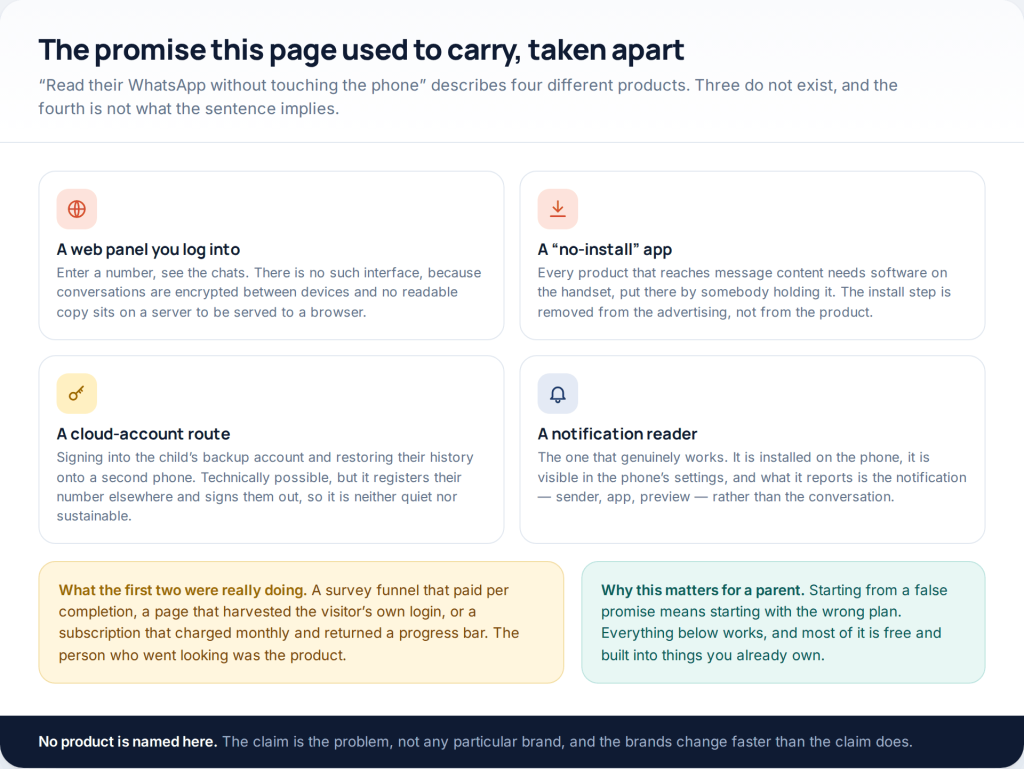
Nothing lets you monitor a child’s WhatsApp from your own phone alone. The messages are encrypted between the two handsets in a conversation, so there is no copy anywhere for a web panel to fetch. What genuinely exists is better than it sounds: WhatsApp’s own parental controls, the child’s settings configured together, device-level limits through Family Link or Screen Time, and — on Android only — an app installed openly whose ceiling is the notification, not the message.
This address used to promise access to somebody’s WhatsApp without touching their phone. That promise has never been met by any product, free or paid: what sat behind it was a survey funnel, a page that captured the visitor’s own login, or a subscription that billed monthly and delivered a progress bar. The rest of this page is the version that works, written for a parent and a child who both know it is happening.
Why the remote-only claim cannot be true
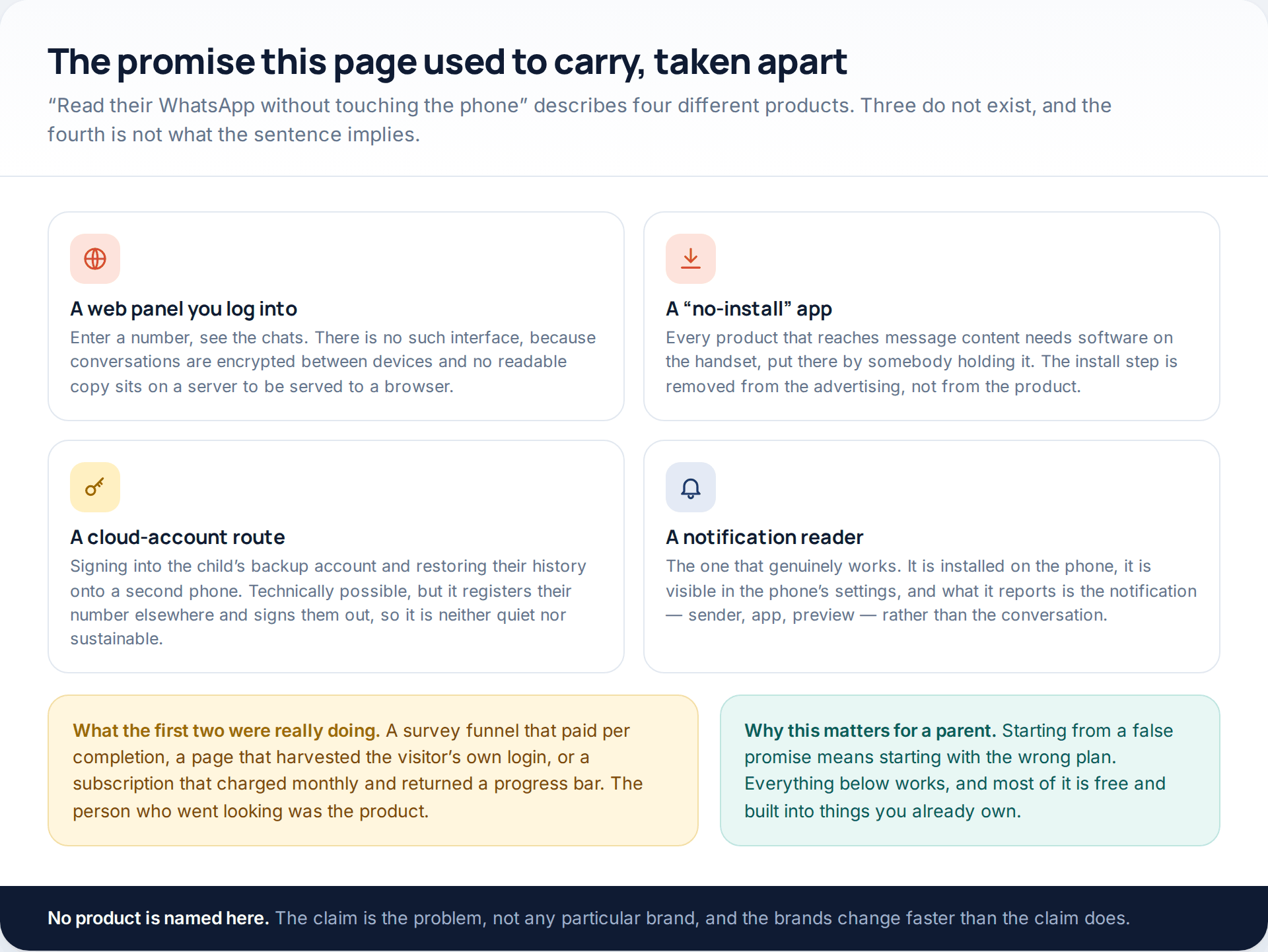
Personal WhatsApp chats are end-to-end encrypted. The practical consequence for a parent is simple: there is no server-side copy of the text, so no login page can show it to you and no amount of money changes that. The only places a readable message exists are the two phones in the conversation.
That rules out the web panel and the no-install app outright. It leaves two real mechanisms — restoring the child’s cloud backup onto another handset, which registers their number elsewhere and signs them out of their own phone, and reading the notifications their phone draws. Only the second is sustainable, and it has a hard ceiling that the next sections set out.
The four layers that do exist
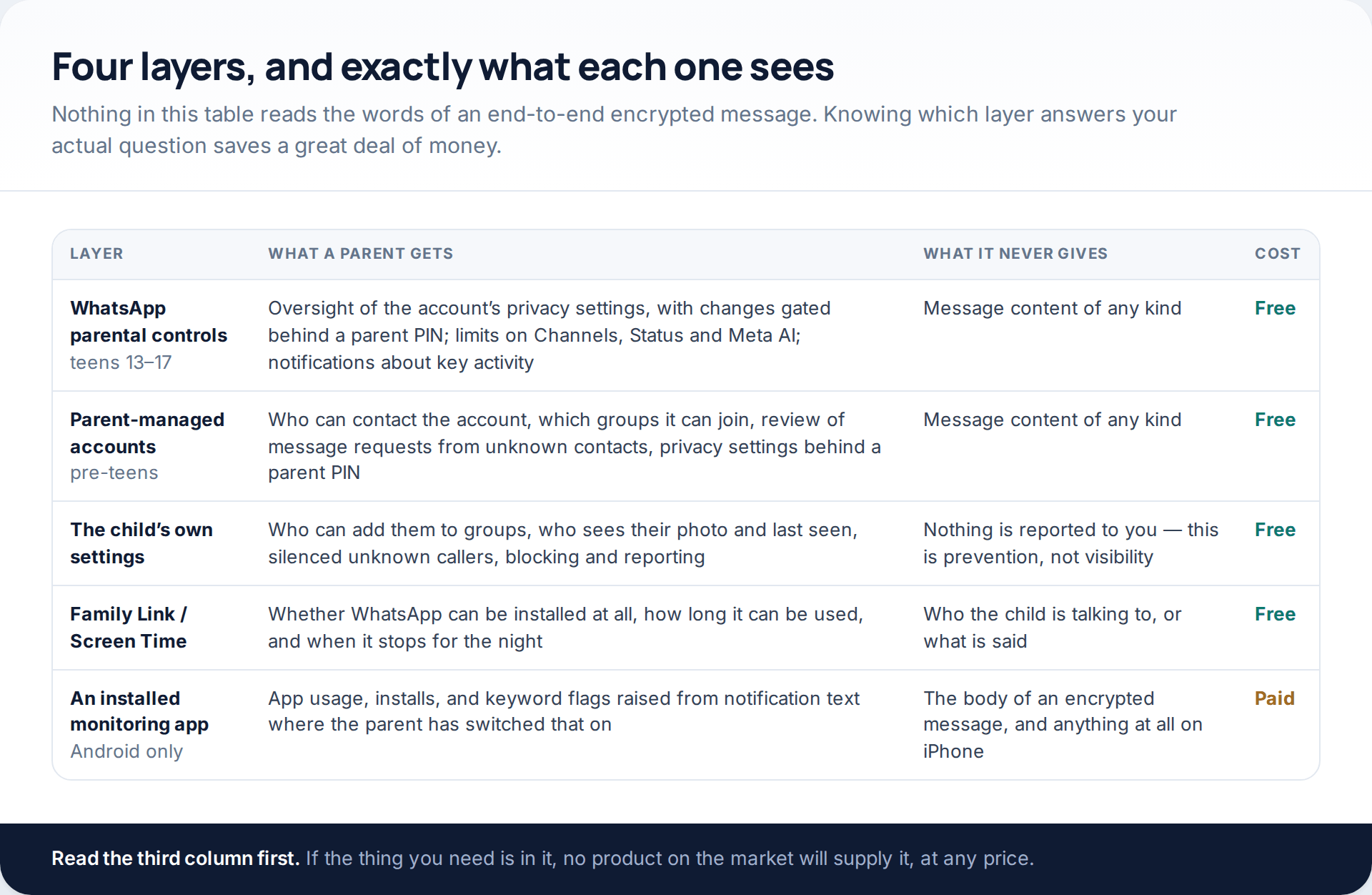
Three of the four are free and two of them are new. It is worth knowing what each answers before you decide anything, because the commonest mistake is buying the paid layer to solve a problem the free one already handles.
What WhatsApp itself now gives parents
For most of its existence WhatsApp had no parental features at all, and a great deal of advice still assumes that. It changed in 2026, in two separate pieces.
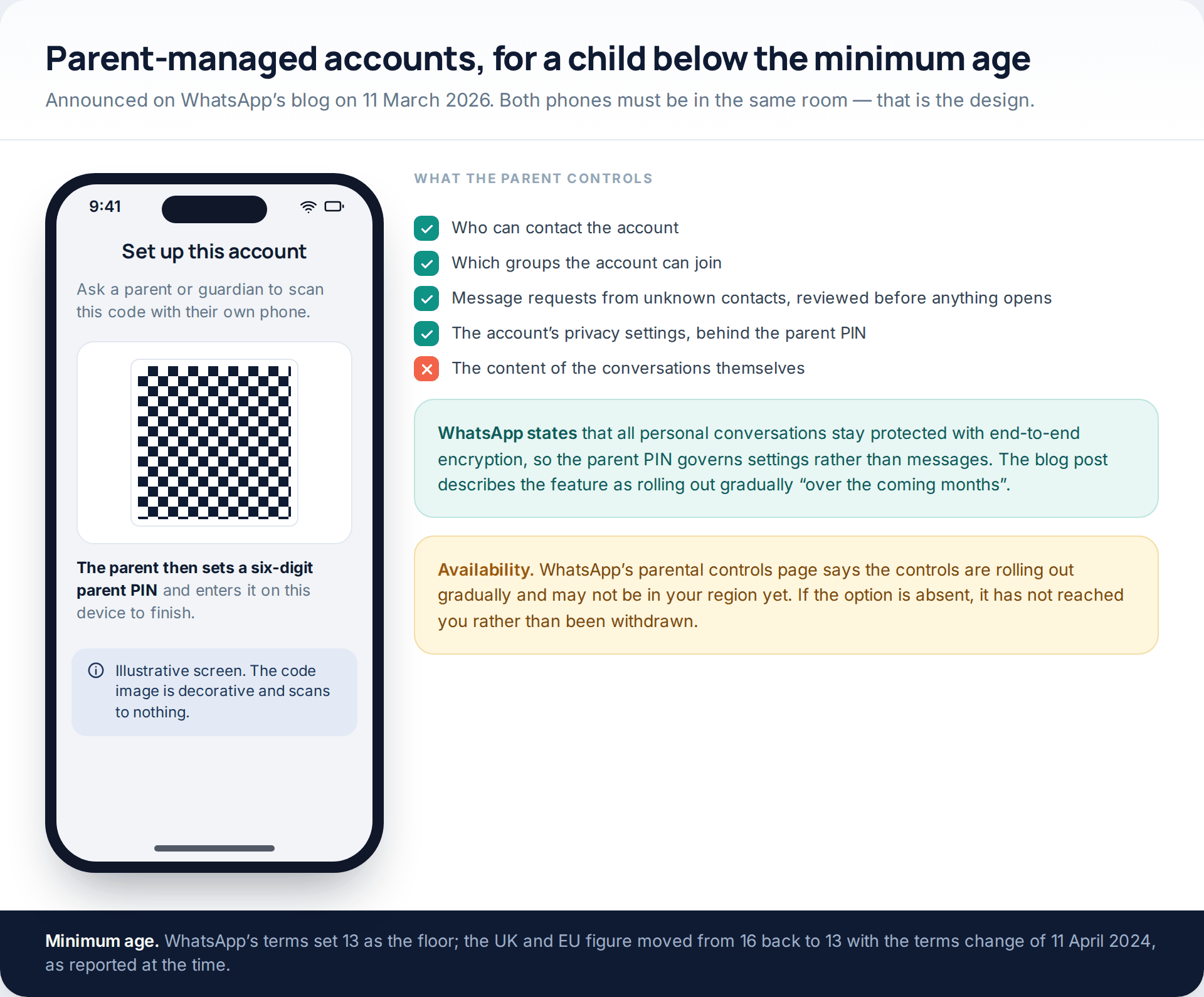
Parent-managed accounts, announced on WhatsApp’s blog on 11 March 2026, are for pre-teens: a parent sets the account up from their own phone alongside the child’s, decides who can contact it and which groups it can join, reviews message requests from unknown contacts, and manages its privacy settings behind a six-digit parent PIN. WhatsApp is explicit that personal conversations stay protected with end-to-end encryption, so the PIN governs reach rather than content.
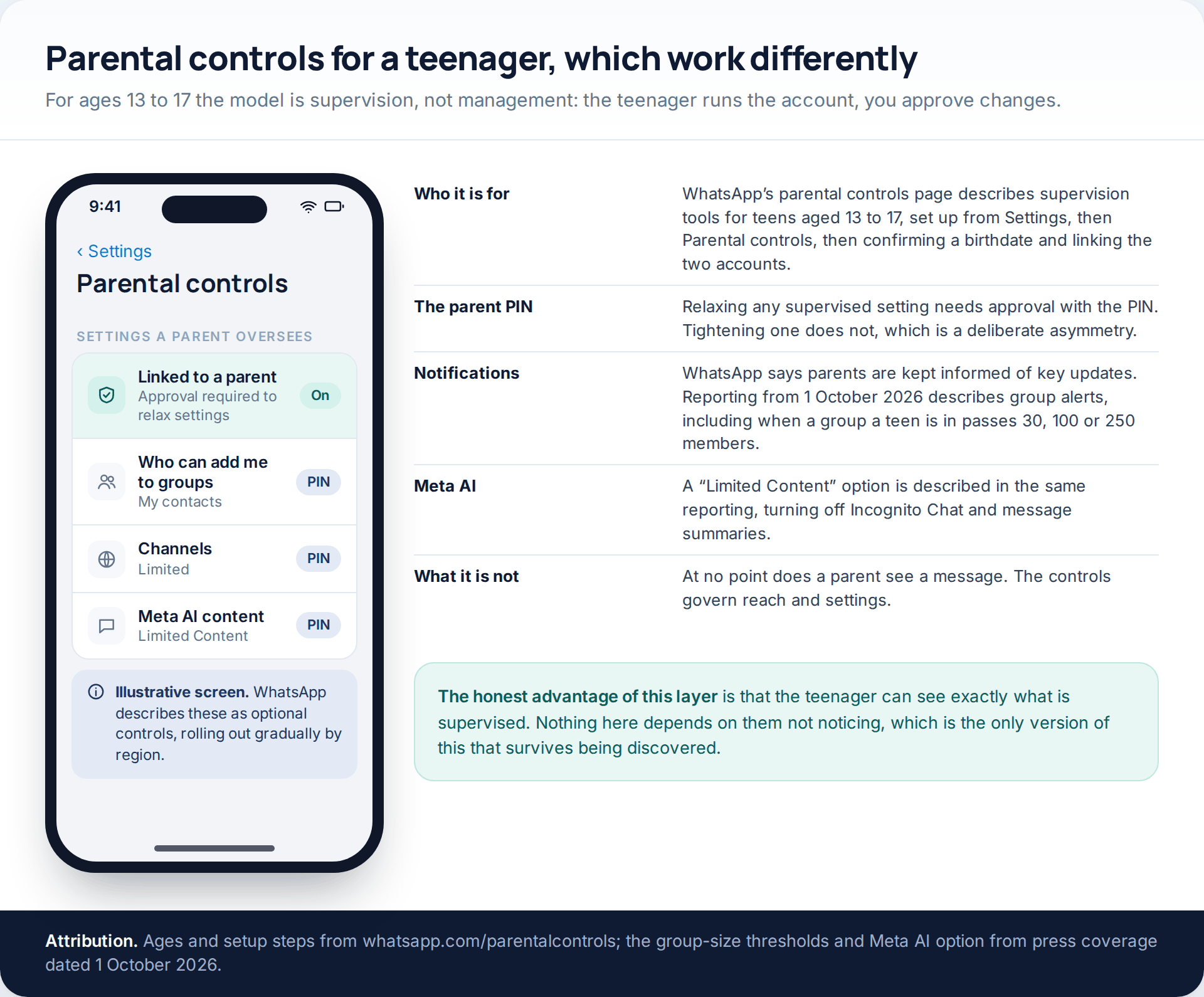
Parental controls for teens are the other half. WhatsApp’s own parental controls page describes optional supervision tools for ages 13 to 17, set up from Settings, then Parental controls, then confirming a birthdate and linking the two accounts. A parent oversees the account’s privacy settings — relaxing any of them requires approval with the parent PIN — and can limit access to Channels, Status and Meta AI content, while receiving notifications about key updates. Press coverage dated 1 October 2026 adds detail: alerts when a group the teen is in passes 30, 100 or 250 members, and a “Limited Content” option for Meta AI that disables Incognito Chat and message summaries.
Two caveats, both from WhatsApp. The parental controls page says these are rolling out gradually and may not be available in your region yet — if you cannot find the option, it has not reached you. And on age: WhatsApp’s terms set 13 as the minimum, a figure the UK and EU returned to with the terms change of 11 April 2024, having previously been 16 there.
The child’s own settings, set up together
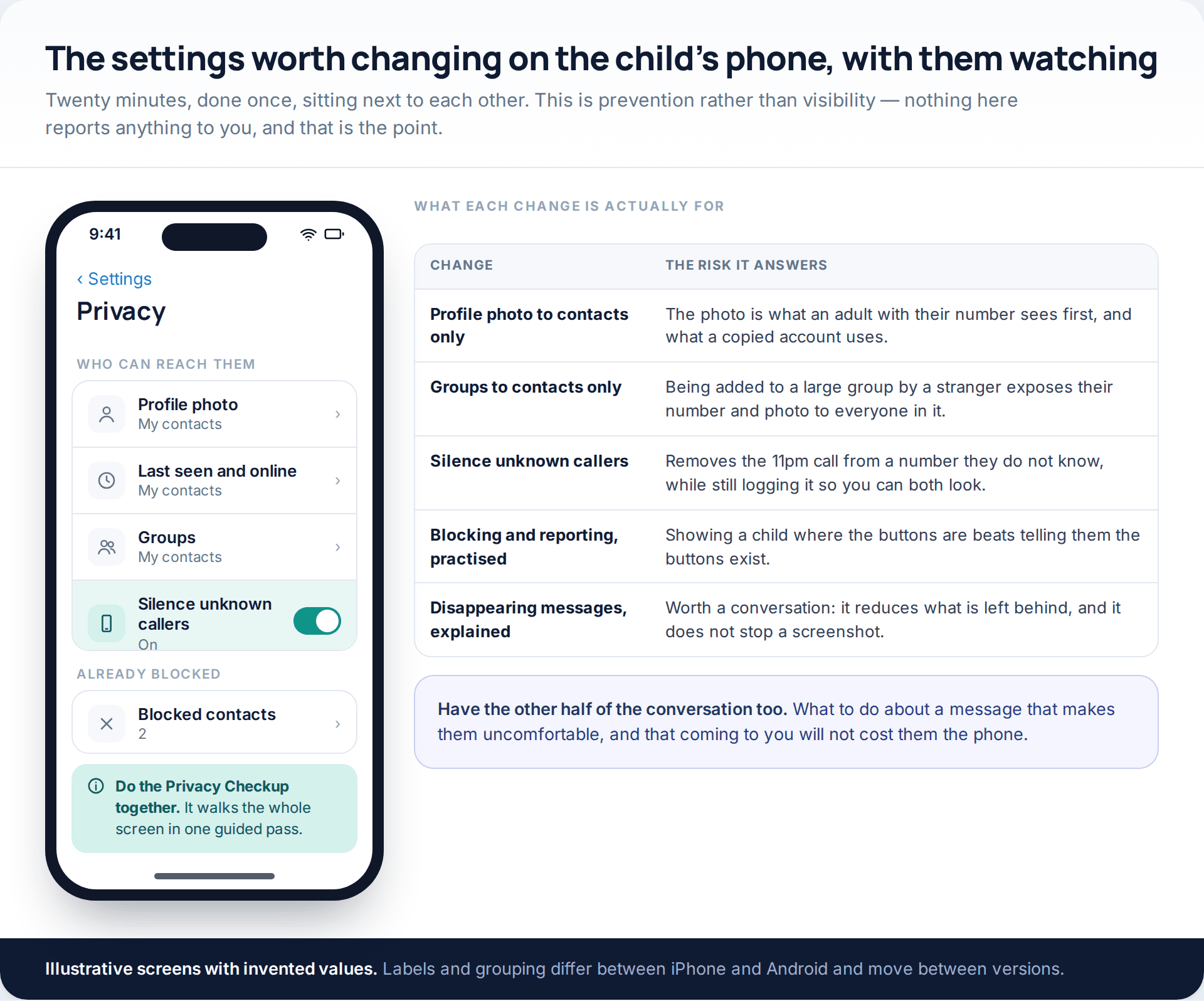
This is the layer families skip, and it closes more risk than anything paid. Four settings do most of the work: profile photo restricted to contacts, groups restricted to contacts, last seen restricted, and unknown callers silenced. Between them, an adult who merely has the child’s number can no longer see their face, add them to a group of strangers, or make their phone ring at eleven at night.
Do it with the child rather than to them, and spend as long on the other half: what to do about a message that makes them uncomfortable, where the block and report buttons are, and a clear promise that telling you will not cost them the phone. That promise is the single most effective safety feature in this article, and it is not a setting.
Family Link and Screen Time: the layer that has authority
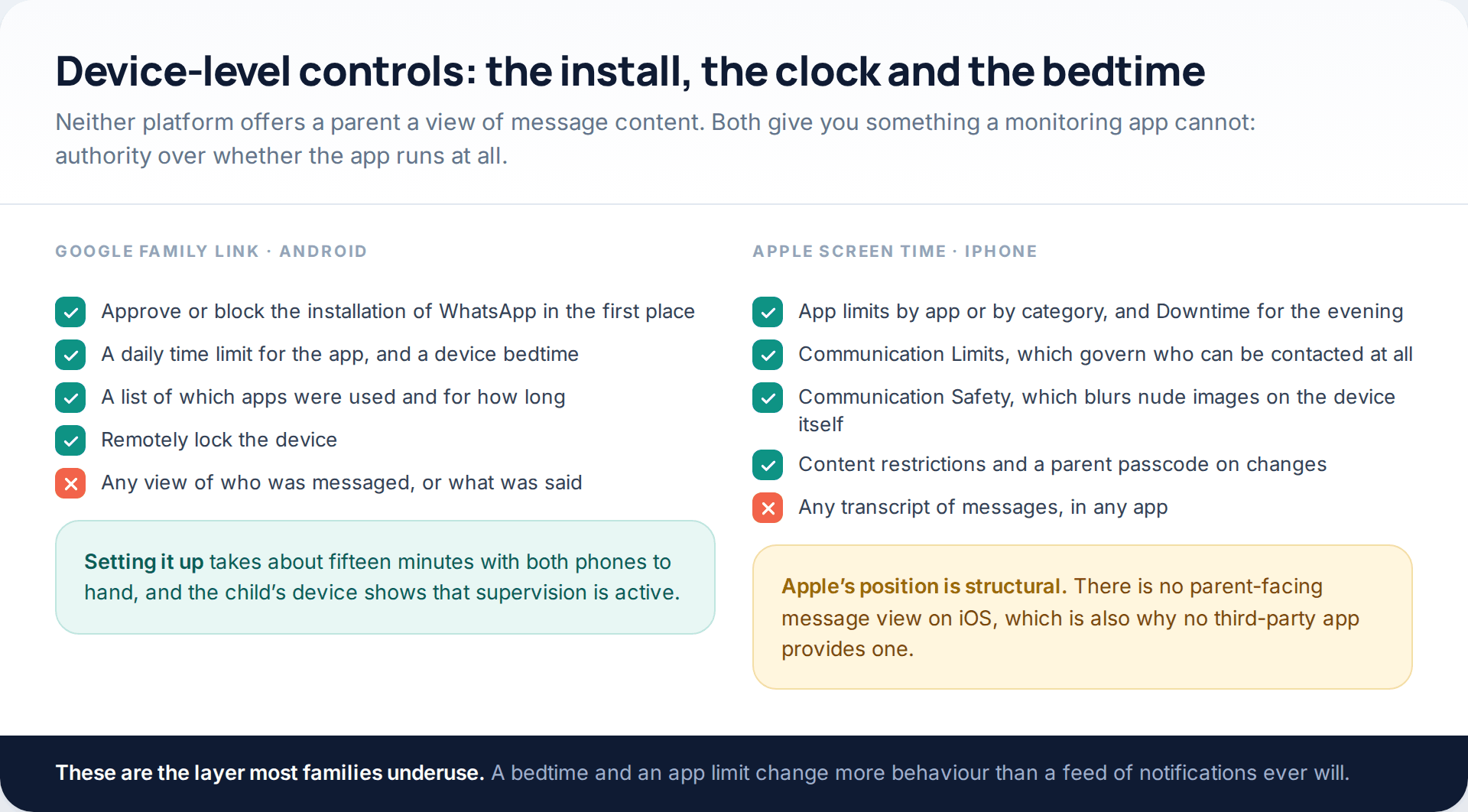
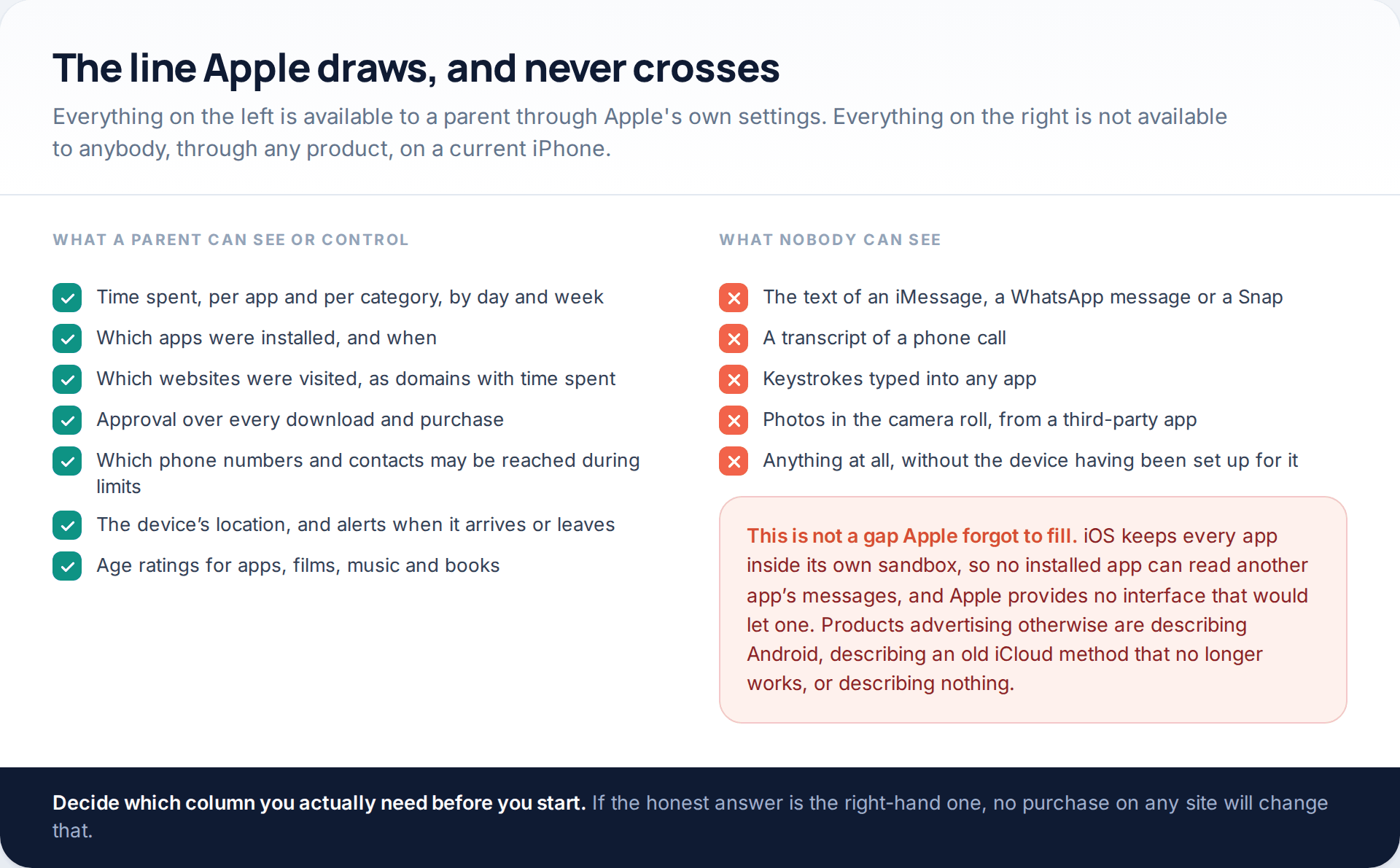
Neither Google nor Apple gives a parent a transcript of anything, in any app. What they give you is upstream of the conversation: whether WhatsApp can be installed at all, how long it can be used each day, and when the phone stops for the night. For the age at which most of these questions arise, that is usually the more useful control.
Apple adds two things worth knowing on iPhone. Communication Limits govern who can be contacted at all, and Communication Safety blurs images that may contain nudity on the device itself, before anything is sent, opened or forwarded. Both run locally and neither reports content to a parent. If you have not set either platform up, our walkthrough of getting Google Family Link working properly is the place to start on Android.
The paid layer, and the sentence it cannot write
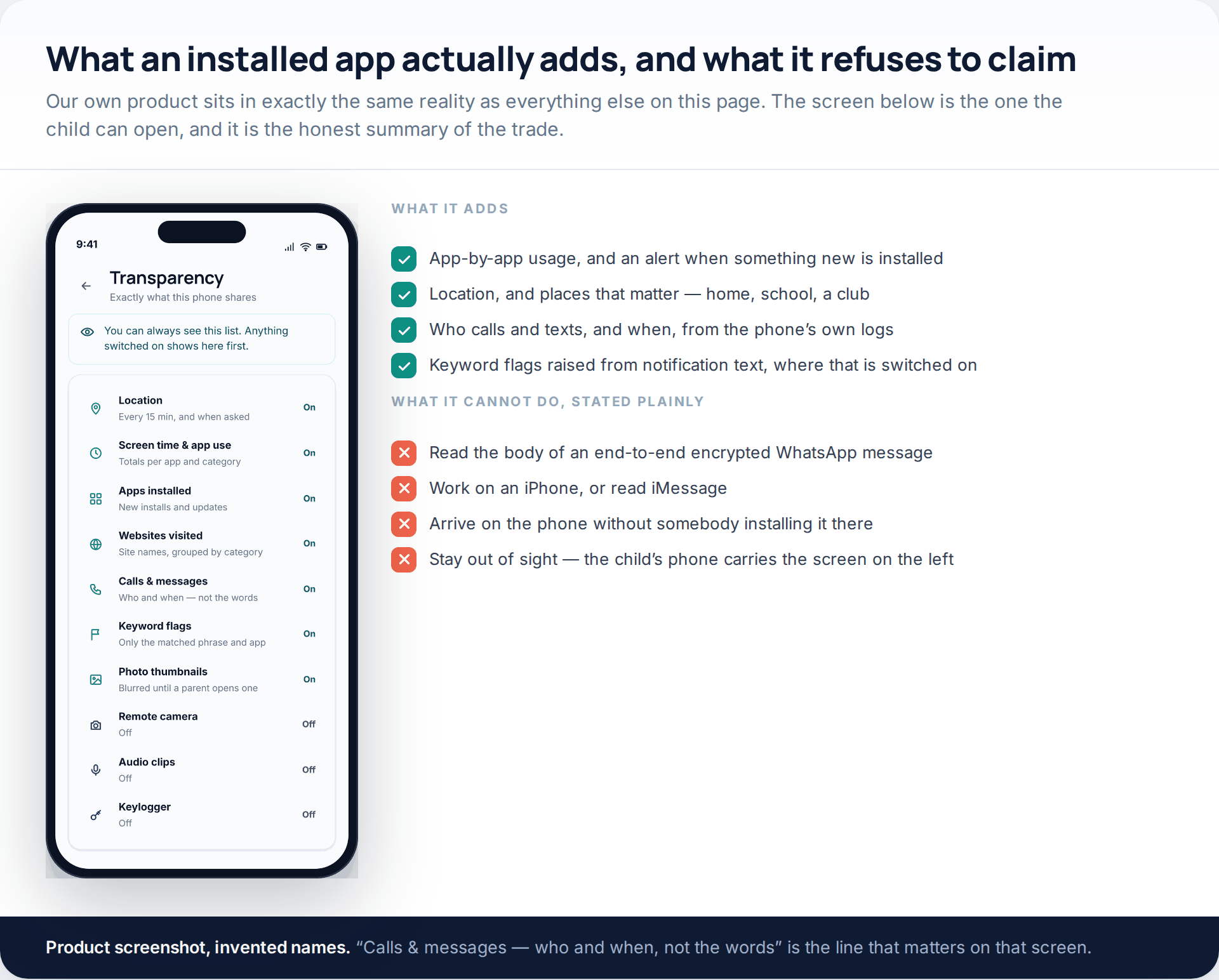
If the free layers leave a genuine gap — a specific worry, a younger child on an Android phone, an agreement you have both made — an installed app adds app usage and installs, location and places, call and message metadata from the phone’s own logs, and keyword flags where you switch them on. GuestSpy is our product and it sits under the same constraints as every other: it is an Android child app, it cannot reach an iPhone or read iMessage, it cannot read the body of an end-to-end encrypted WhatsApp message, message bodies elsewhere sit behind a consent switch, nothing happens until somebody installs it on the handset in person, and the child’s phone carries a screen listing exactly what is shared. What it can do with keyword alerts is described on its own page, limits included.
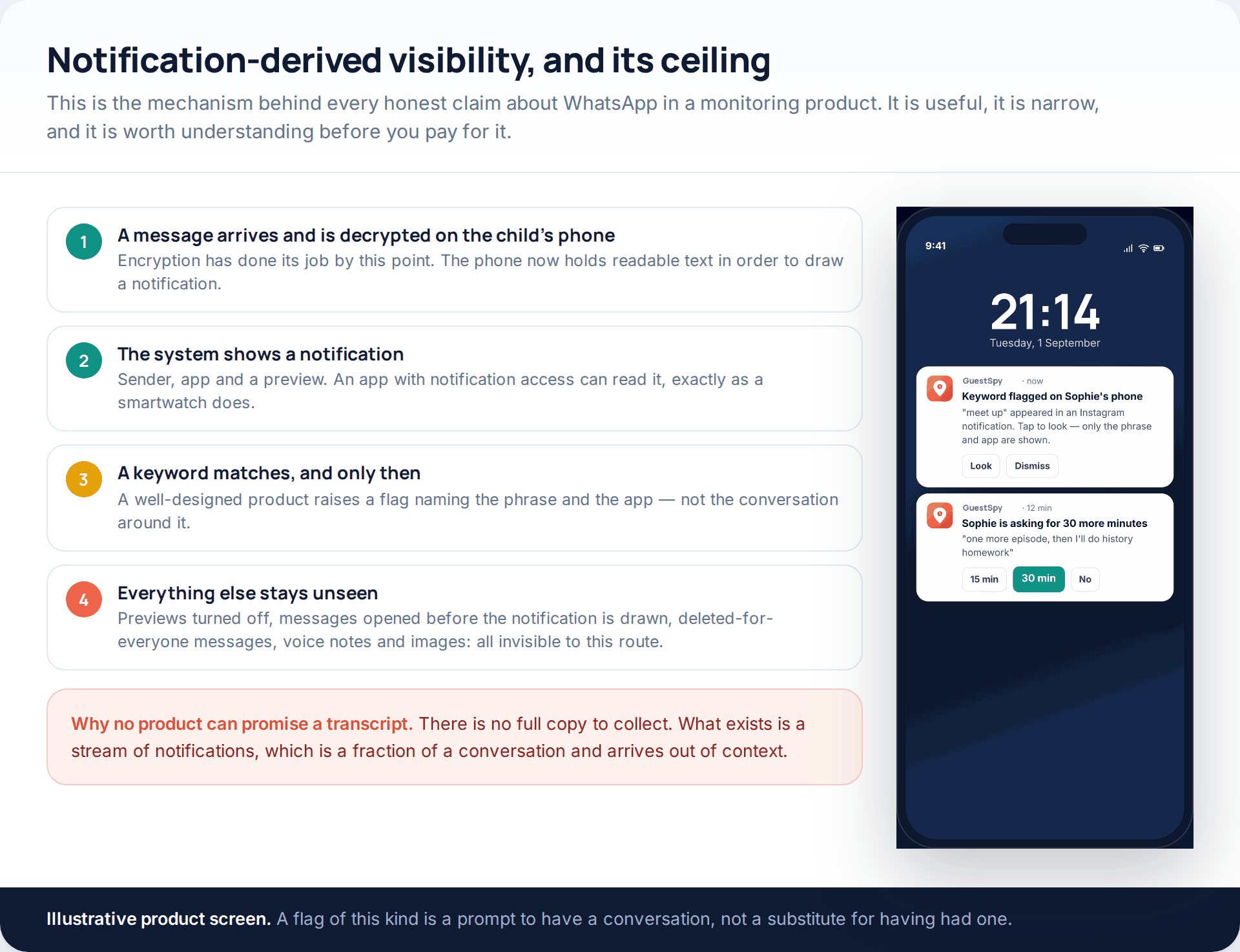
The mechanism is worth understanding because it explains the ceiling. A message is decrypted on the child’s phone so the system can draw a notification; an app with notification access reads that notification, exactly as a smartwatch does. If previews are turned off, if the child opens the chat before the notification is drawn, if the content is a voice note or an image, or if the message is deleted for everyone, the route sees nothing. Any product promising a WhatsApp transcript is describing something it cannot deliver.
Choosing by age rather than by budget
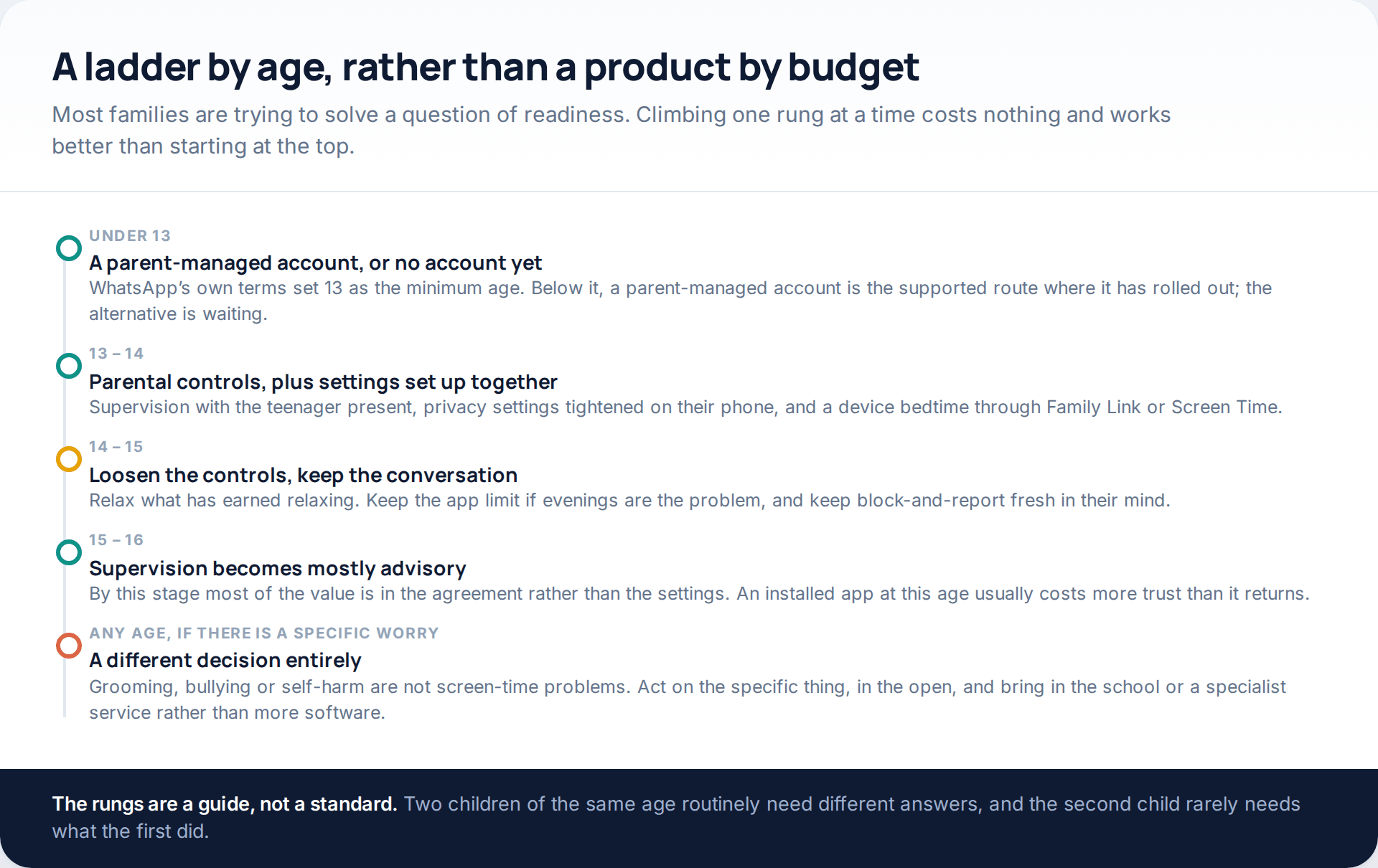
The last row is the one worth separating out. Grooming, bullying and self-harm are not screen-time problems, and adding monitoring software to them tends to delay the response rather than improve it. If you have found something specific, deal with the specific thing — openly, with the child, and with the school or an appropriate service involved. We have written about the conversation itself in how to monitor a teenager without losing their trust.
One practical note on climbing back down the ladder, because almost nobody plans for it. Supervision that is never relaxed stops being supervision and becomes a standing judgement, and teenagers read it that way. Agree at the outset what would cause a control to come off — a term with no incidents, a phone handed over at bedtime without an argument — and then actually remove it when that happens. A control you have taken off yourself is far easier to put back than one that was removed by a row.
It is also worth being honest with yourself about what you are solving. If the worry is evenings disappearing, a bedtime on the device answers it and no feed of alerts will. If the worry is who the child is talking to, the contact and group controls answer it better than any transcript would, because they act before the conversation rather than after. And if the worry is that something has already happened, none of the four layers is the right tool: keep what you have found, talk to the child without making the discovery the whole conversation, and bring in the school or an appropriate support service.
How this page was put together
The WhatsApp features here were checked in October 2026 against WhatsApp’s own material: the blog post “Introducing parent-managed accounts on WhatsApp” dated 11 March 2026, and whatsapp.com/parentalcontrols, which sets out the 13-to-17 supervision tools, the parent PIN behaviour and the setup path, and which states that the controls are rolling out gradually and may not be available in every region. The group-size alert thresholds and the Meta AI “Limited Content” option come from press coverage dated 1 October 2026 and are attributed as reporting in the text. The minimum-age change in the UK and EU is from contemporaneous coverage of the 11 April 2024 terms update.
WhatsApp’s help centre, faq.whatsapp.com, blocks automated retrieval, so nothing here is quoted from it and no menu path is reproduced screen by screen. Labels and the placement of settings differ between iPhone and Android and have moved between app versions; if something is not where we describe it, search the settings screen for the same word. Because parental controls are still rolling out, what you see may be ahead of or behind what is described here.
We did not lab-test any monitoring product, including our own, and we have invented no statistics, prices or test results. Every capability claimed here for GuestSpy is stated alongside its limits, and the limits are the same ones that apply to its competitors. Nothing in this article explains how to monitor an adult, or anyone, without their knowledge — if that is what you came for, this is not the page, and in most jurisdictions it is not lawful either.
Common questions
Can I read my child’s WhatsApp messages from my own phone?
No. Personal chats are end-to-end encrypted, so no copy exists for a parent dashboard to display. WhatsApp’s own parental controls govern who can reach the account and what its settings are; they never show message content, and the company says so explicitly.
What age can a child use WhatsApp?
WhatsApp’s terms set 13 as the minimum. The UK and EU figure was 16 between 2018 and 2024 and returned to 13 with the terms change of 11 April 2024. Below 13, the supported route where it has rolled out is a parent-managed account set up by an adult.
What is the difference between a parent-managed account and parental controls?
A parent-managed account is for a pre-teen and the parent configures it: contacts, groups, message requests and privacy, all behind a parent PIN. Parental controls are for 13 to 17, where the teenager runs their own account and your approval is needed to loosen a supervised setting.
Does any monitoring app actually show WhatsApp messages?
Not the content of encrypted chats. What the honest ones do is read notifications on an Android phone and raise a flag when a keyword appears. That misses previews that are switched off, chats opened before a notification appears, voice notes, images and anything deleted for everyone.
Is there anything for an iPhone?
Screen Time, Communication Limits and Communication Safety, all free and all built in. No third-party app provides a message view on iOS, because Apple does not expose one. Claims to the contrary are describing a product that cannot exist on that platform.
Will my child know an app is installed?
On a well-built product, yes, by design — the phone carries a screen listing what is shared. Software that sets out to stay unseen is a different category of product with different legal consequences, and it is not what this page is about.
What should I do if I find something genuinely worrying?
Deal with the thing itself rather than the software. Keep what you found, talk to the child without making the discovery the subject, and involve the school or an appropriate support service. Installing more monitoring at that point usually delays the response instead of improving it.
Using a monitoring app for this? GuestSpy is parental monitoring for Android that stays visible on the child's phone and runs from any browser. If it fits your family, see the Text messages & social feature.
Related guides
Monitoring a Child’s iPhone Openly: Screen Time, Family Sharing and the Limits
Apple’s monitor iPhone parental controls are better than their reputation and narrower than most advertising implies. Through Family Sharing and…

7 Best Free Hidden Spy Apps for Android (100% Undetectable)
Spying app makes our life easier as we don’t have to worry about our kids and online safety constantly. There…

How to Spy on Text Messages Without Installing Software
Are you wondering how to spy on text messages without installing software on the target phone? If yes, let us…
Monitoring your child can see.
Location, screen-time budgets, routines, app and website blocking and the alerts that matter, run from any browser and visible on the phone. Pair an Android phone in about fifteen minutes.