A Step-by-Step Guide to Securing a Hacked Account
The panic of a hacked account has a predictable shape: a friend messages asking why you sent them a strange link, or you simply can’t log in anymore. What happens in the next twenty minutes decides whether this is a bad afternoon or a problem that comes back in a month.
This is a step-by-step guide to securing a hacked account properly — email, social media or cloud storage — in the right order, including the two steps most quick-fix guides leave out entirely: checking for a mail forwarding rule, and revoking third-party app access. Skip either of those and a password change alone can leave the door quietly open.
- Signs an account is actually compromised
- The order of operations, and why email comes first
- Password and two-factor authentication
- Sessions, devices, and connected apps
- The step people forget: forwarding and auto-reply rules
- Checking your phone isn’t the actual problem
- Which account to secure first, if more than one is affected
- Telling the people who might hear from “you”
- Preventing this happening again
- Questions people actually ask
Signs an account is actually compromised
Some signs are unambiguous: you’re locked out entirely, or someone tells you they received a message you never sent. Others are subtler and worth checking rather than dismissing — a password reset email you didn’t request, a new device showing up in your account’s activity log, or a friend mentioning a “you” who asked to borrow money over a chat app.
The subtler signs matter because attackers who plan to stay in an account for a while, rather than blast out spam immediately, deliberately avoid the obvious tells. A quiet forwarding rule or an unfamiliar connected app can sit unnoticed for months, which is exactly why the checklist further down includes checks beyond “can I still log in.”
Most major services now keep a plain-language activity log specifically for this — a list of recent sign-ins, password changes and security-relevant events, usually under a heading like “Recent security activity” or “Login activity.” It’s worth checking this log even when nothing feels obviously wrong, since it’s the one place both the loud and the quiet signs show up together, timestamped, rather than relying on noticing something yourself.
The order of operations, and why email comes first
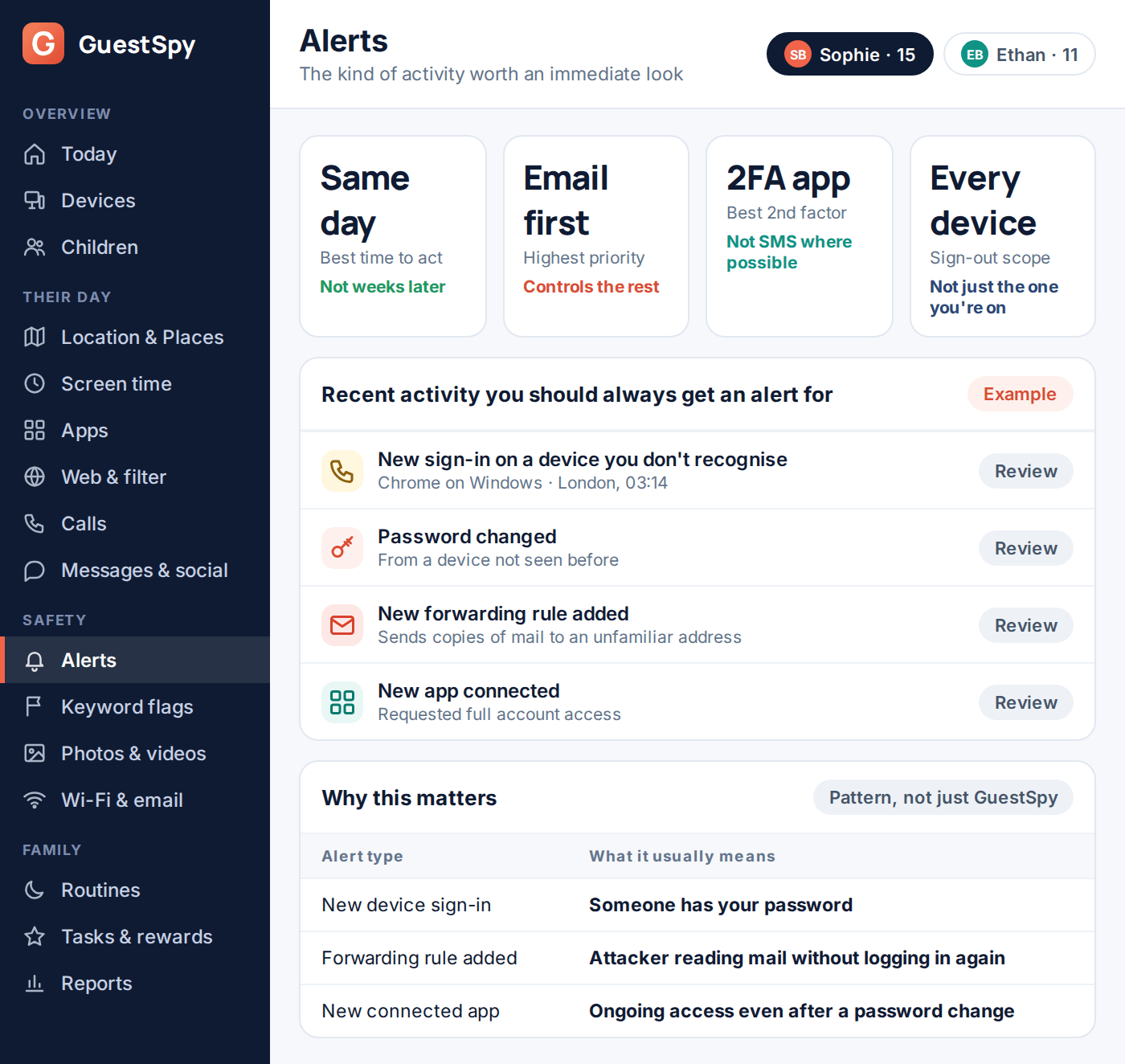
Most guides list steps without explaining why the order matters, and the order is the part that actually prevents a second lockout. Email comes first because almost every other account — social media, cloud storage, shopping, banking in some cases — routes its password reset through your email address. If email is still compromised while you’re resetting everything else, the attacker can simply reset those passwords again the moment you’re done.
Change the email password from a device you’re confident is clean — a different phone, a different computer, or the same one after you’ve separately confirmed it isn’t compromised. Typing a new password into a device that’s already the problem hands the new password straight to whoever has it.
Password and two-factor authentication
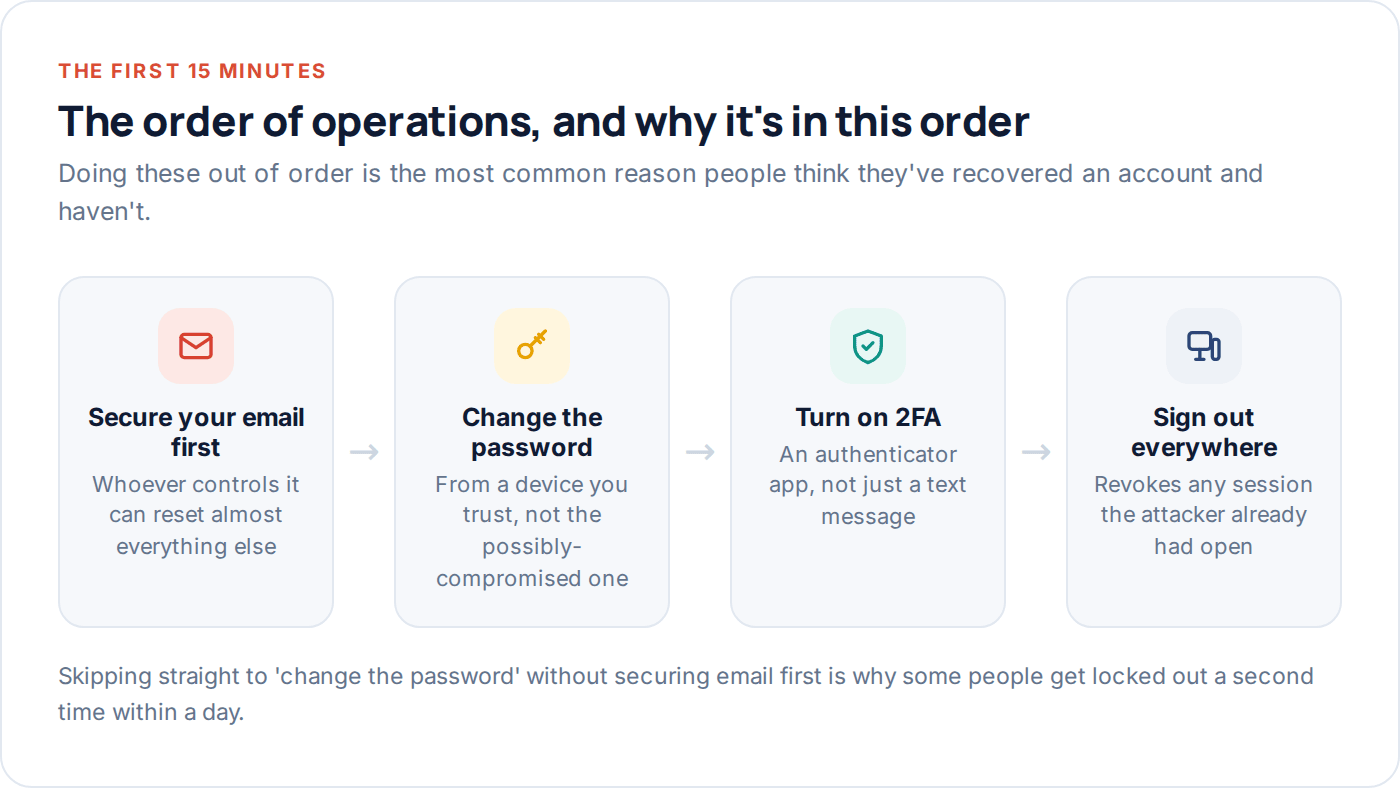
The new password should be unique to this account — not a variant of an old one, since reused and lightly-modified passwords are exactly what credential-stuffing attacks are built to catch. A password manager makes this realistic to actually do across dozens of accounts, rather than a one-off exercise you never repeat.
Two-factor authentication is the single change that does the most ongoing work afterwards. An authenticator app or a physical security key is meaningfully stronger than a text message code, since SMS can be intercepted through a SIM swap — a real, if less common, attack where someone convinces your mobile carrier to move your number to their SIM card.
Best
A hardware security key or passkey. Physically resistant to phishing — there’s no code to trick you into typing into a fake page.
Good
An authenticator app generating time-limited codes. Works offline, isn’t tied to your phone number.
Better than nothing
SMS codes. Still stops a huge share of password-only attacks, just weaker against a targeted SIM swap.
Sessions, devices, and connected apps
A password change alone doesn’t end an attacker’s existing session — most services keep you logged in on a device until you explicitly sign out, regardless of a later password change. Every major email, social and cloud provider has a “sign out everywhere” or “manage devices” option; use it immediately after changing the password, not as an afterthought.
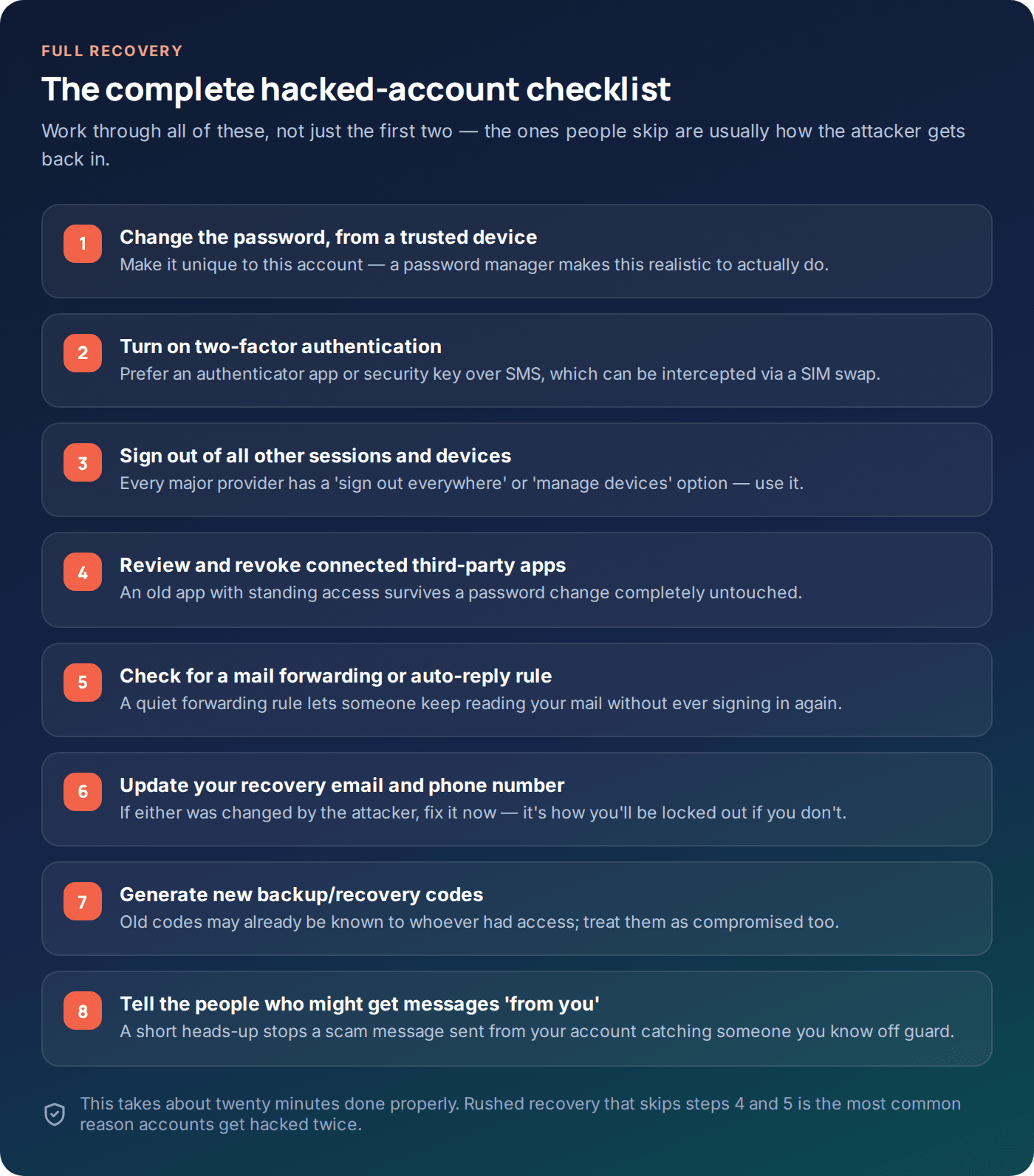
Connected third-party apps are the step almost everyone skips, and they’re a genuine problem: an old app granted account access years ago keeps that access through a password change completely untouched, because it authenticates with a token, not your password. Review the full list — most platforms show this under a “connected apps,” “third-party access,” or “apps with account access” setting — and remove anything you don’t actively recognise and use.
The step people forget: forwarding and auto-reply rules
This is the one that catches people out weeks later. An attacker with brief access to your email can quietly set up a rule forwarding a copy of every message — or just messages containing words like “password” or “verify” — to an address you’ll never see in your normal inbox. The account looks completely normal to you while someone else reads everything that arrives.
Checking your phone isn’t the actual problem
Occasionally the account compromise traces back to the device, not just a leaked password — a phone with something monitoring keystrokes or notifications will hand over a new password just as easily as an old one, no matter how strong it is. It’s worth a quick check on the device itself alongside the account-level steps, since fixing the account while leaving the device compromised just invites a repeat.
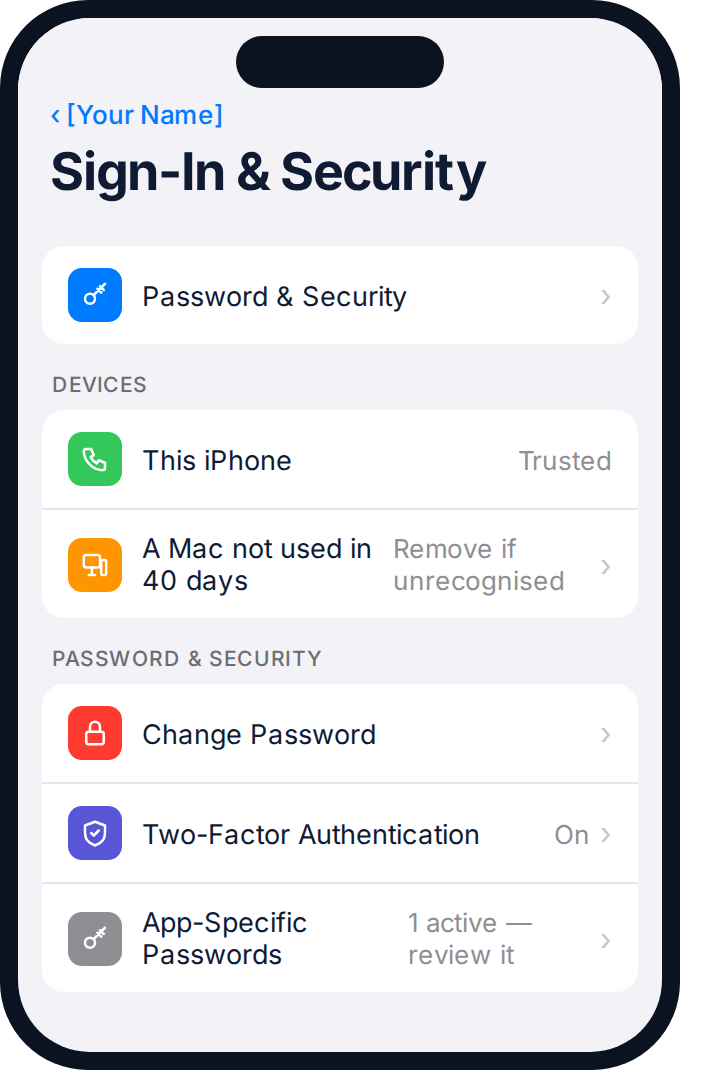
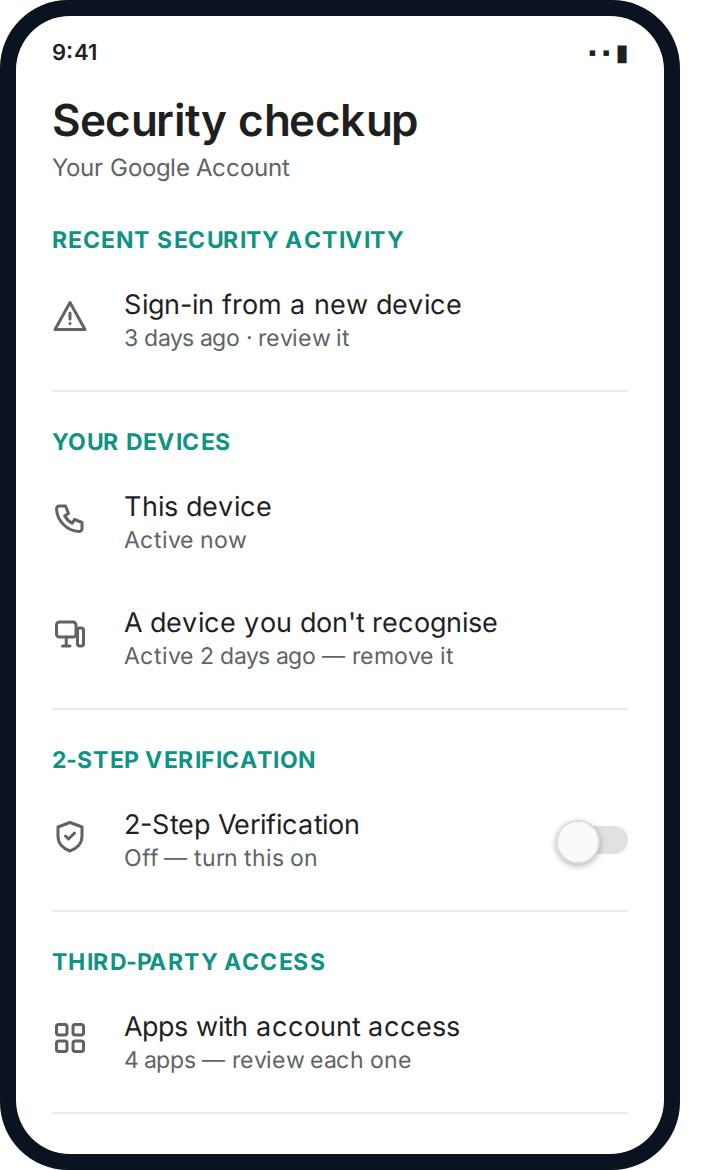
On Android specifically, the account’s own security checkup screen does double duty — it shows you unfamiliar devices and connected apps in one place, which covers two of the checklist items above at the same time.
If anything on the device itself looks unfamiliar — an app you don’t remember installing, a settings change you didn’t make — treat that as its own problem worth investigating properly rather than something a password change alone will fix. A phone that’s genuinely compromised, rather than just the account, needs its own separate clean-up: checking for unfamiliar apps with broad permissions, confirming the operating system is fully up to date, and in unclear cases, a factory reset before you trust it with a freshly changed password again.
This is also a reasonable moment to check whether the phone’s own account — the Apple ID or Google account it’s signed into — matches the one you’re recovering, and whether anyone else has access to that account through family sharing or a device management profile you didn’t set up.
Which account to secure first, if more than one is affected
If the compromise has spread — the same password reused elsewhere, or your email was the entry point to other accounts — not everything needs equal urgency. Work down a rough priority order rather than trying to fix everything at once.
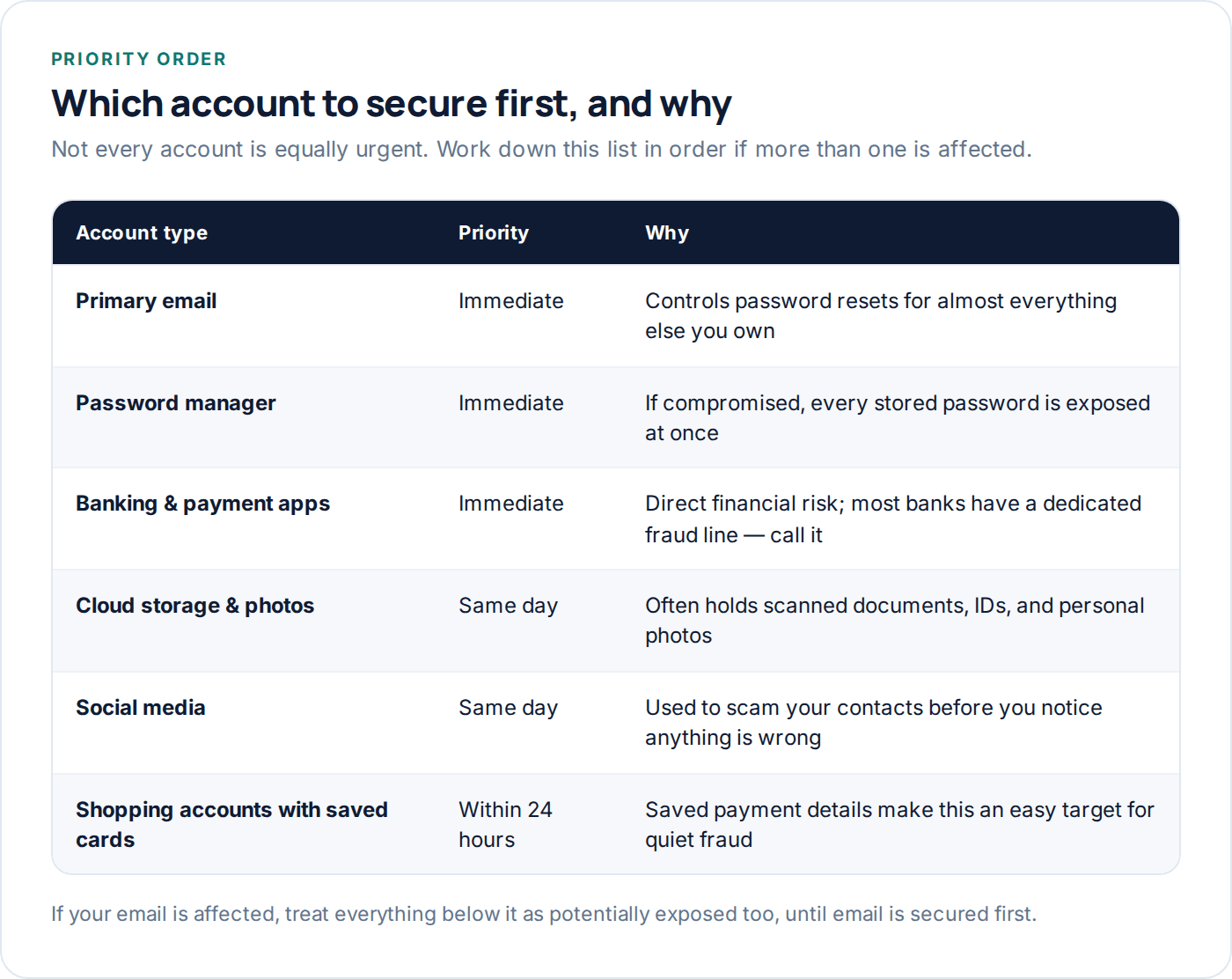
Notice that email and your password manager, if you use one, sit above banking on this list in terms of what to secure first — not because they matter more, but because they’re usually the fastest route back into everything else, including the accounts that hold your money.
Banking deserves one extra note: most banks and card providers have a dedicated fraud or security line, separate from general customer service, and calling it directly is usually faster than working through a general enquiries queue. Have your account details and a rough timeline ready — when you first noticed something wrong, and what, if anything, you’ve already changed — since that’s what they’ll ask for first.
Telling the people who might hear from “you”
If the account sends messages — email, social media, messaging apps — a short heads-up to close contacts is worth the mild embarrassment. “My account was compromised earlier today, ignore anything odd you got from me and don’t click any links” takes thirty seconds and stops a follow-on scam from working on someone you know.
This matters most for accounts with a wide reach — a work email, a social profile with a large following — where the follow-on scam can spread faster than you can individually warn people. A single public post or a group message covers this efficiently.
Preventing this happening again
Knowing how accounts actually get compromised in the first place makes the prevention steps feel less arbitrary — each one closes a specific, common route in.
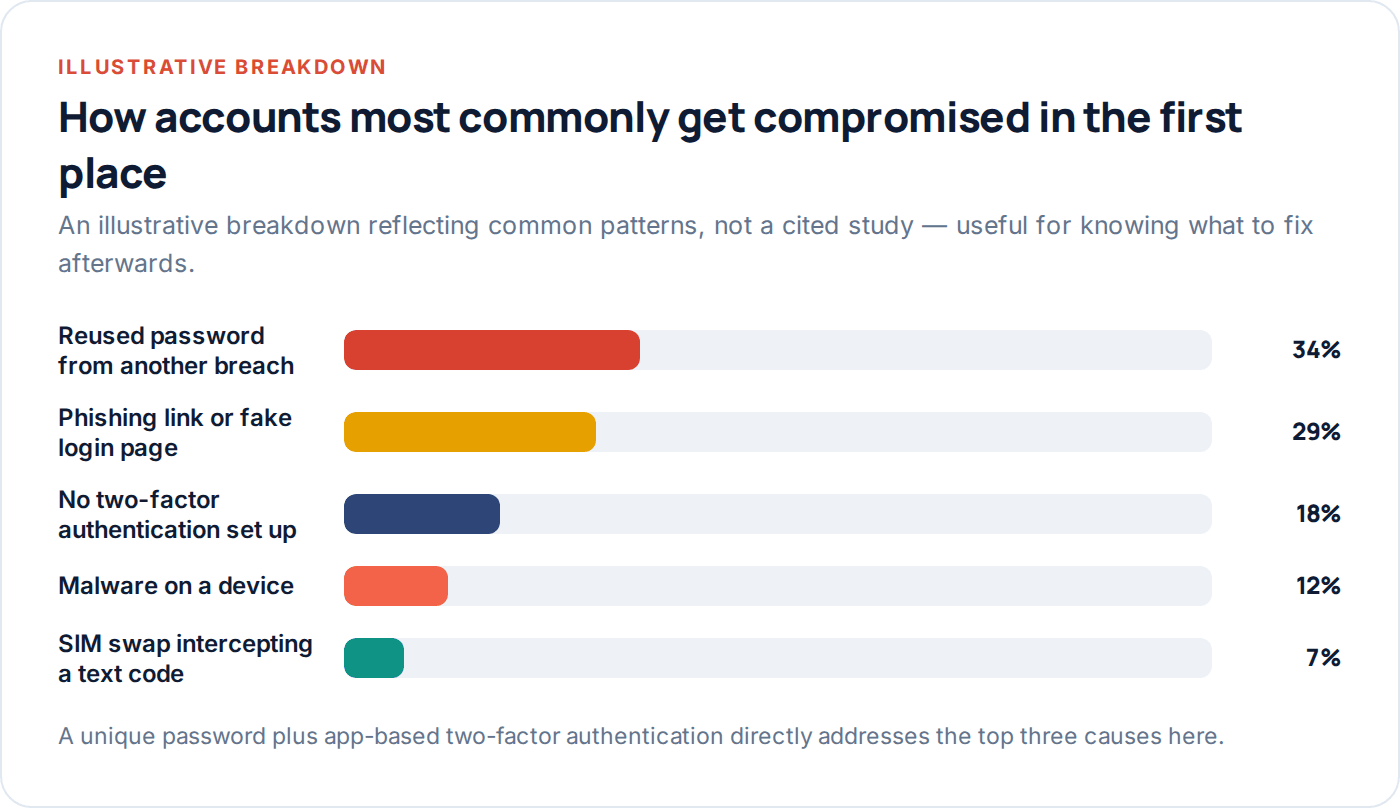
Put together, the difference between a vulnerable account and a hardened one is a short, fixed list of settings — not an ongoing effort or specialist knowledge.
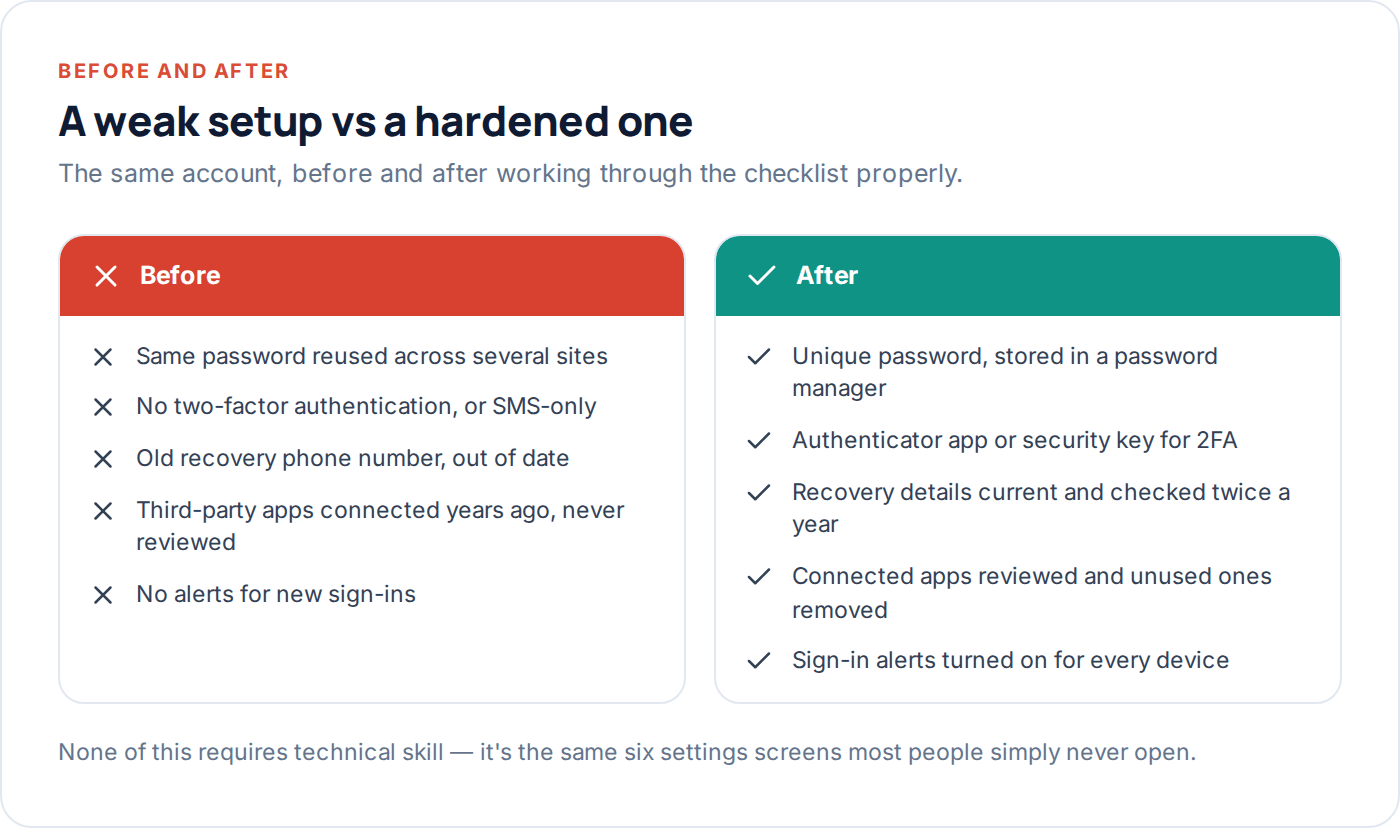
Put a date in your calendar every six months to check connected apps and active sessions specifically — these are the two settings that quietly accumulate access over time and are easy to forget once the initial recovery panic has passed.
A password manager earns its keep here beyond just generating unique passwords — most will also flag reused or previously-breached passwords across every account you’ve stored, which turns “how many of my accounts share a password” from a guess into a five-minute audit. Running that check once, right after a recovery, often finds two or three other accounts quietly sharing the same exposure before they become their own separate incident.
Questions people actually ask
Should I contact the company or fix it myself first?
Fix what you can yourself first — changing the password, enabling 2FA and signing out other sessions usually takes minutes and doesn’t require waiting for support. Contact the company’s official support channel afterwards if you’re locked out entirely, or if money or sensitive documents were involved.
Is it enough to just change my password?
No — this is the single most common recovery mistake. A password change alone doesn’t end an existing session, doesn’t remove a connected third-party app’s access, and doesn’t catch a forwarding rule. All of those survive a password change untouched unless you check them separately.
How do I know if a text or email ‘from my bank’ asking me to verify is real?
Don’t click the link either way. Open your banking app directly, or type the bank’s known web address in yourself, and check for the same alert there. Genuine urgent account notices are almost always visible inside the official app too, not only via a link in a message.
What if I don’t recognise any of the sign-in activity but nothing seems different?
Treat it as a real signal even without other symptoms — attackers who plan to stay quiet often avoid making obvious changes at first. Work through the full checklist rather than waiting for something more obviously wrong to appear.
Could someone have accessed my account through my phone rather than a leaked password?
Yes — this is worth checking alongside the account-level steps, particularly if the device has behaved oddly recently. If you suspect this, our FAQ and guide to detecting spyware cover how to check the device itself, separately from the account.
Do I need to worry if the account belongs to a business, not just me personally?
Yes, and generally faster — a compromised work account can be used to target colleagues or clients before anyone notices, and most organisations have a specific IT or security contact for exactly this. Report it there immediately, in addition to the personal steps in this guide.
What to do this week
If you’re dealing with this right now: secure email first, change the password from a trusted device, turn on an authenticator app, sign out every other session, then go back and check connected apps and forwarding rules specifically — those last two are what most quick fixes miss. If nothing is currently wrong, the six-monthly habit of checking sessions and connected apps is the cheapest insurance against this happening at all.
Our privacy policy covers how we handle account data on our own side, and the FAQ answers the questions people ask most about account security generally. If you’re not sure where to start, our contact page is there for anything this guide didn’t cover — and it’s worth remembering that a properly hardened account, one with a unique password and app-based 2FA turned on, is genuinely difficult for most attackers to get into a second time.
Keep reading
Are ‘Free Phone Spy’ Apps a Scam? What They Really Do
What sites promising 'free, undetectable phone spy software' are actually selling — and why the ones that look most convincing…
The Complete Guide to Detecting Spyware
The real symptoms worth worrying about, what usually turns out to be nothing, and the exact settings to check on…
How to Protect Your Phone in an Abusive Situation (Safely)
If you think your phone is being used to monitor or control you, how you check matters as much as…