At What Age Should You Monitor Your Child’s Phone?
There is no single right age — there's a right amount of monitoring for each stage. Here's the age-by-age framework, and what to add or remove as your child grows.
 By GuestSpy Editor · Founder and editorPublished August 25, 2026Updated September 14, 202611 min read
Ask ten parents what age to start monitoring a child’s phone and you’ll get ten different answers, most of them a specific number pulled from nowhere. The honest answer is that age is a poor question. The better one is: what does this particular child, at this particular stage, actually need someone watching for — and what should you have already stopped watching by the time they’re older?
This guide sets out an age-by-age framework for that question, built around four rough stages from six to seventeen. It covers first-phone readiness, what a reasonable default looks like at each stage, and — just as important — what to deliberately switch off as your child earns more independence. Nothing here is a fixed rule. Some nine-year-olds handle more freedom than some thirteen-year-olds. Use the ages as a starting point, not a verdict on your particular child.
- Why “what age” is the wrong first question
- Is my child ready for their first phone?
- Ages 6–9: shared devices, not a phone in a pocket
- Ages 10–12: the first-phone stage
- Ages 13–15: their own phone, their own social life
- Ages 16–17: mostly stepping back
- When siblings are different ages on the same rules
- Why a review date matters more than the age
- Questions parents actually ask
Why “what age” is the wrong first question
A number invites the wrong comparison. If the answer is “monitor from age eleven,” a parent with a mature nine-year-old under-protects them, and a parent with an anxious fourteen-year-old over-monitors in a way that damages trust for no safety gain. Readiness varies more within an age group than between them.
A better frame is stage-based: what does this child do with a phone right now, and what’s the smallest amount of oversight that covers the real risks at that stage? Early on, the risks are mostly accidental — stumbling into the wrong content, losing track of time. By the mid-teens, the risks are mostly social — who’s messaging them, what they’re being asked to do or send. The tools that matter shift accordingly, and a framework built around fixed ages misses that shift.
Is my child ready for their first phone?
This is usually the real question hiding behind “what age.” Before any monitoring decision, there’s a more basic one: should this child have a phone of their own yet, or would a shared device or a basic handset cover the actual need?
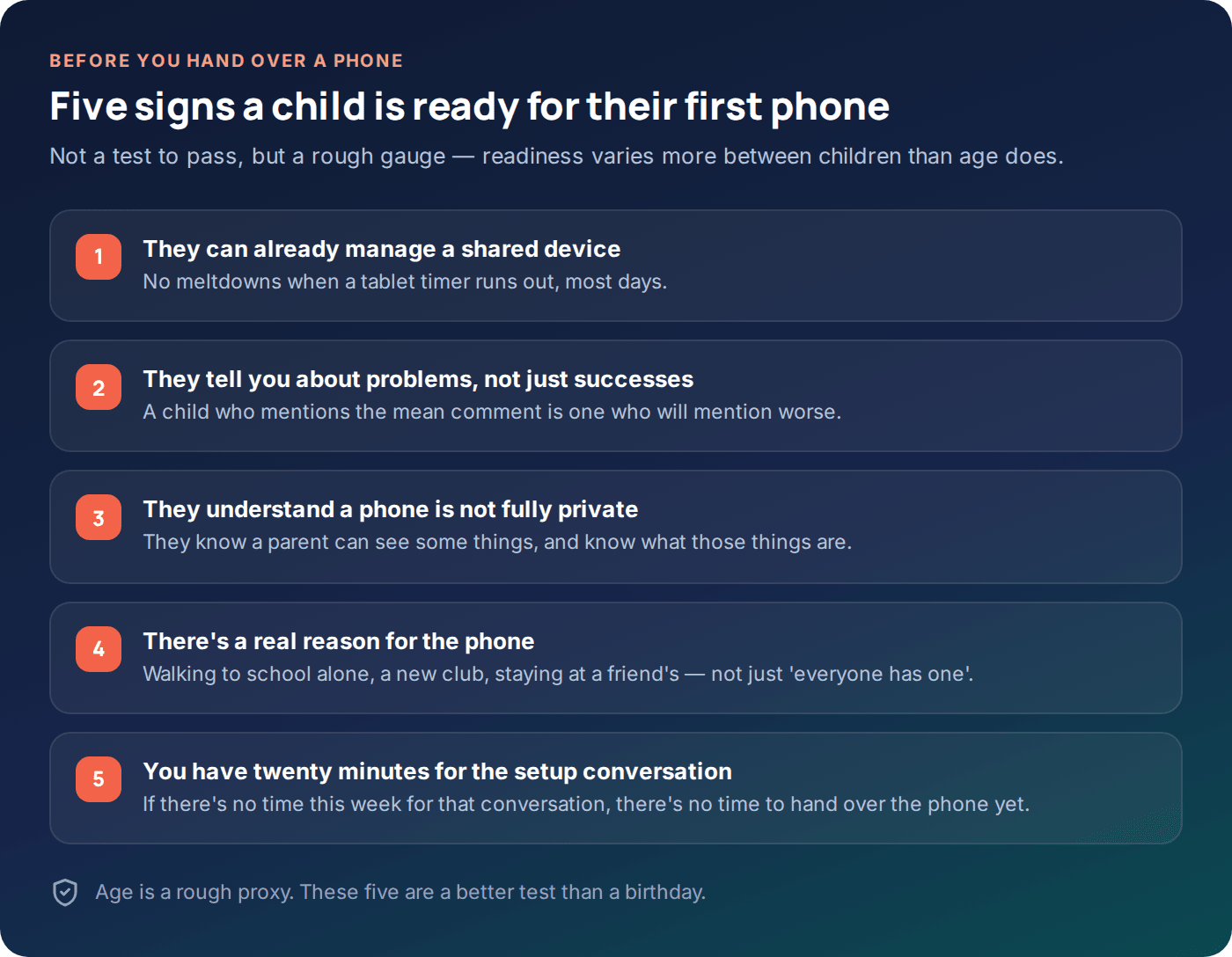
The five signs above are a better gauge than a birthday. A child who already manages screen time on a shared tablet without a daily fight is telling you something useful about how a phone of their own will go. A child who still needs constant reminders to put a tablet down is not necessarily “too young” — but they probably need tighter defaults on day one than a sibling who’s already shown they can self-regulate.
What the phone is actually for
Worth asking directly: what problem does this phone solve? “Walking home from football alone,” “staying over at a friend’s for the first time,” and “everyone else in the class has one” are three different reasons, and they call for different phones. The first two are solved by a basic handset with calls, texts and location — no app store required. The third is real social pressure and worth taking seriously, but it doesn’t automatically mean a full smartphone with unrestricted internet access is the right answer at that exact moment.
Ages 6–9: shared devices, not a phone in a pocket
Very few children this age need a personal phone. What they usually have is a shared tablet, a hand-me-down phone kept at home for games and video calls, or occasional supervised use of a parent’s device. The framework here is simple: assume nothing is filtered unless you’ve filtered it, and keep the device somewhere you can see it.
Content filtering
Set to strict. At this age, the goal is to prevent accidental exposure, not to negotiate a compromise — a six-year-old has no context for what they might stumble into.
App approval
Every install needs a parent’s yes. Free-to-play games with chat features are the most common source of an unwelcome message at this age, not social media.
Location
Relevant mainly if the device leaves the house — a school tablet, a car journey. At home, it adds little.
Message monitoring and keyword flags are unnecessary at this stage — there’s usually no meaningful messaging happening yet, and setting it up teaches a habit of surveillance before there’s anything to watch for. Save that layer for when it has a real job to do.
Ages 10–12: the first-phone stage
This is where most children get a phone that’s genuinely theirs, often tied to starting secondary school and the independent journeys that come with it. It’s also the stage where the framework earns its keep, because the risks are broader than at six but the child’s judgement is still developing fast.
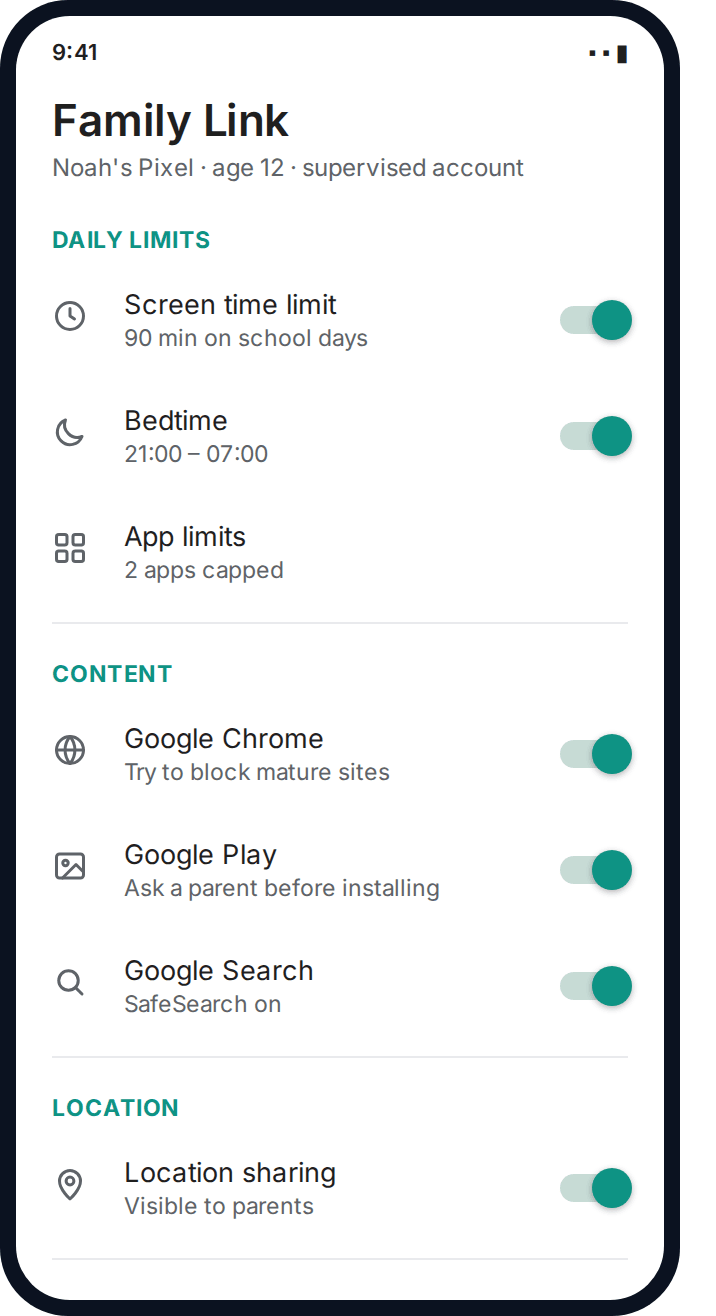
A reasonable default here: location always on, a standard content filter, app installs needing approval, a firm bedtime cutoff, and — new at this stage — message flags on a short list of genuinely serious words (meeting up, sending photos, home address, that kind of thing). Full message content still isn’t necessary and reading it routinely tends to create more friction than it prevents.
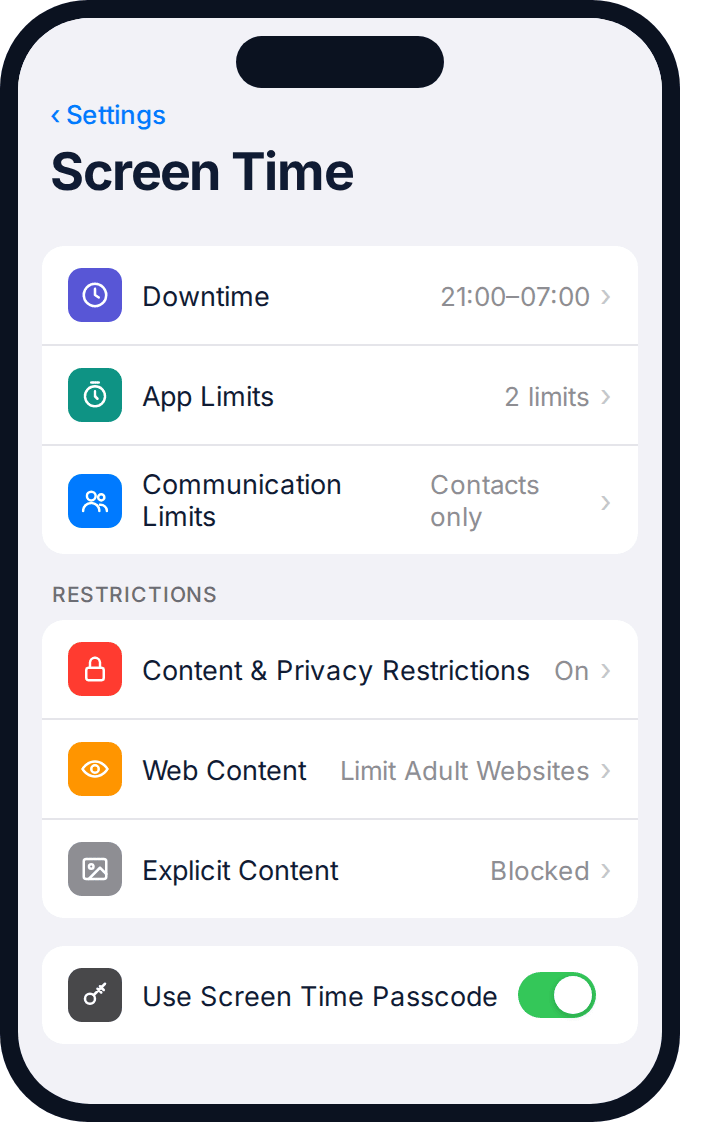
Communication Limits on iPhone and the contact-approval features in Family Link are particularly well suited to this stage — they stop an eleven-year-old’s first phone from immediately being reachable by anyone with the number, without you having to read a single message to enforce it.
The most common mistake at this stage
Setting it up once and never touching it again. A twelve-year-old’s judgement in September is not the same as it is the following June, and settings that felt right on day one of secondary school often need loosening by the end of year seven. That’s what the review date in the next section is for.
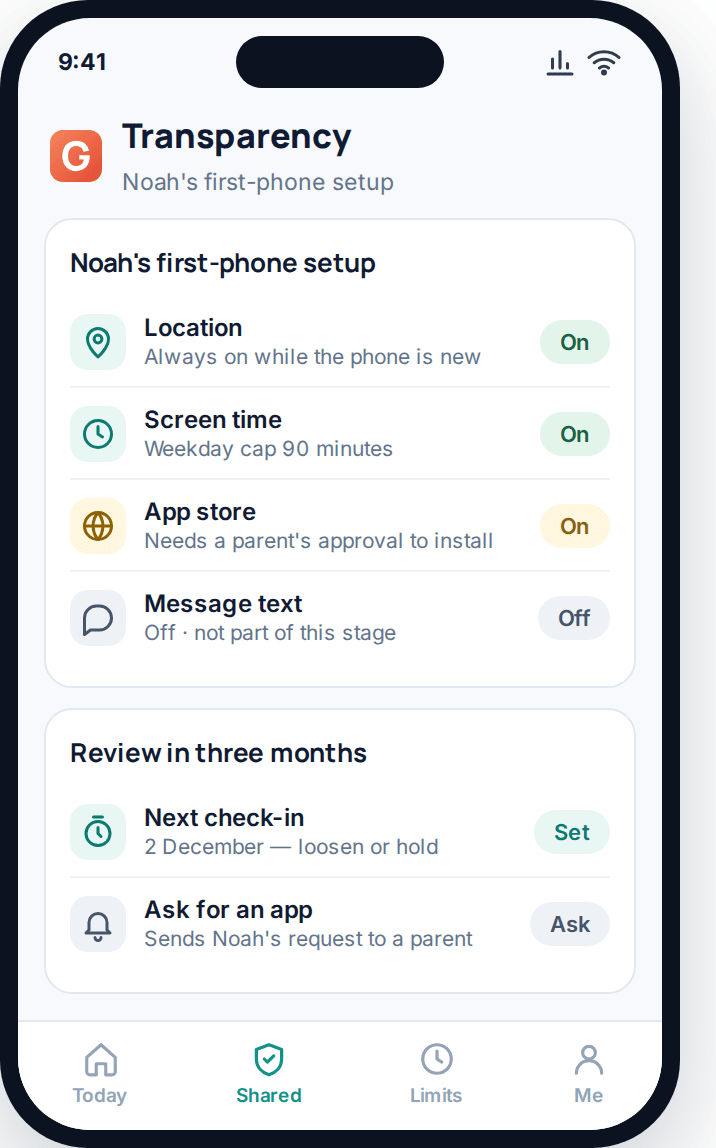
Booking that next check-in before you switch anything on is what keeps a first-phone setup from quietly becoming the permanent setup — the child’s own transparency screen showing a review date already on the calendar makes the arrangement feel time-limited rather than indefinite.
Ages 13–15: their own phone, their own social life
By now the phone is genuinely central to their friendships, and heavy-handed monitoring starts to cost more than it protects. The shift at this stage is from “watch everything” to “watch for the serious stuff and otherwise step back.”
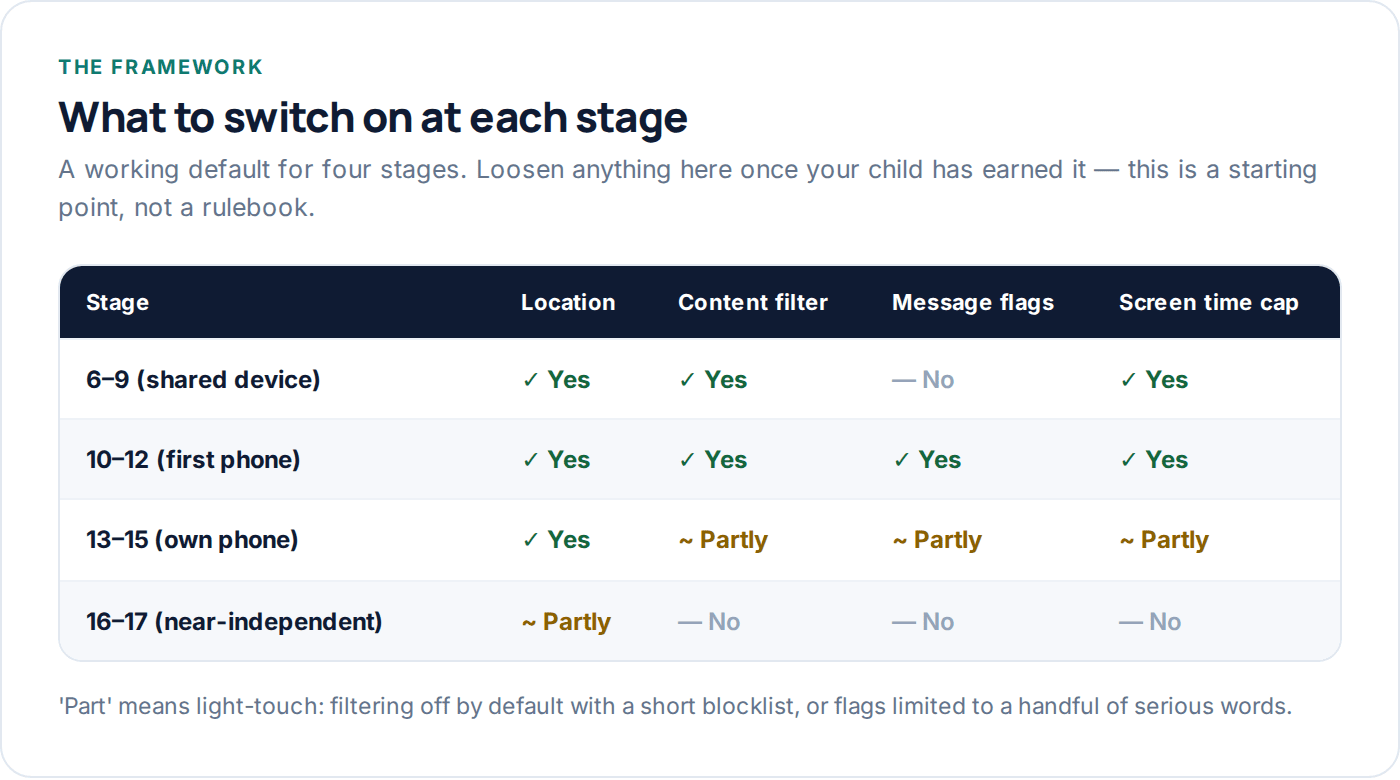
Location and screen time limits still earn their place — they’re low-friction and most teenagers accept them without much complaint. Content filtering typically loosens to a short blocklist rather than a broad category filter, because broad filters increasingly catch legitimate research and schoolwork at this age and become something to route around rather than respect. Message flags stay, but trimmed to a shorter, more serious list than at ten or eleven. Reading message content routinely is rarely worth what it costs in trust by this stage, even when it’s technically available.
Ages 16–17: mostly stepping back
Eighteen months or so from managing a phone with zero oversight, this stage is about winding almost everything down deliberately rather than letting it quietly lapse. Location sharing, ideally mutual — you can see them, they can see you — tends to be the one thing that survives, often because both sides find it genuinely useful rather than because it’s enforced.
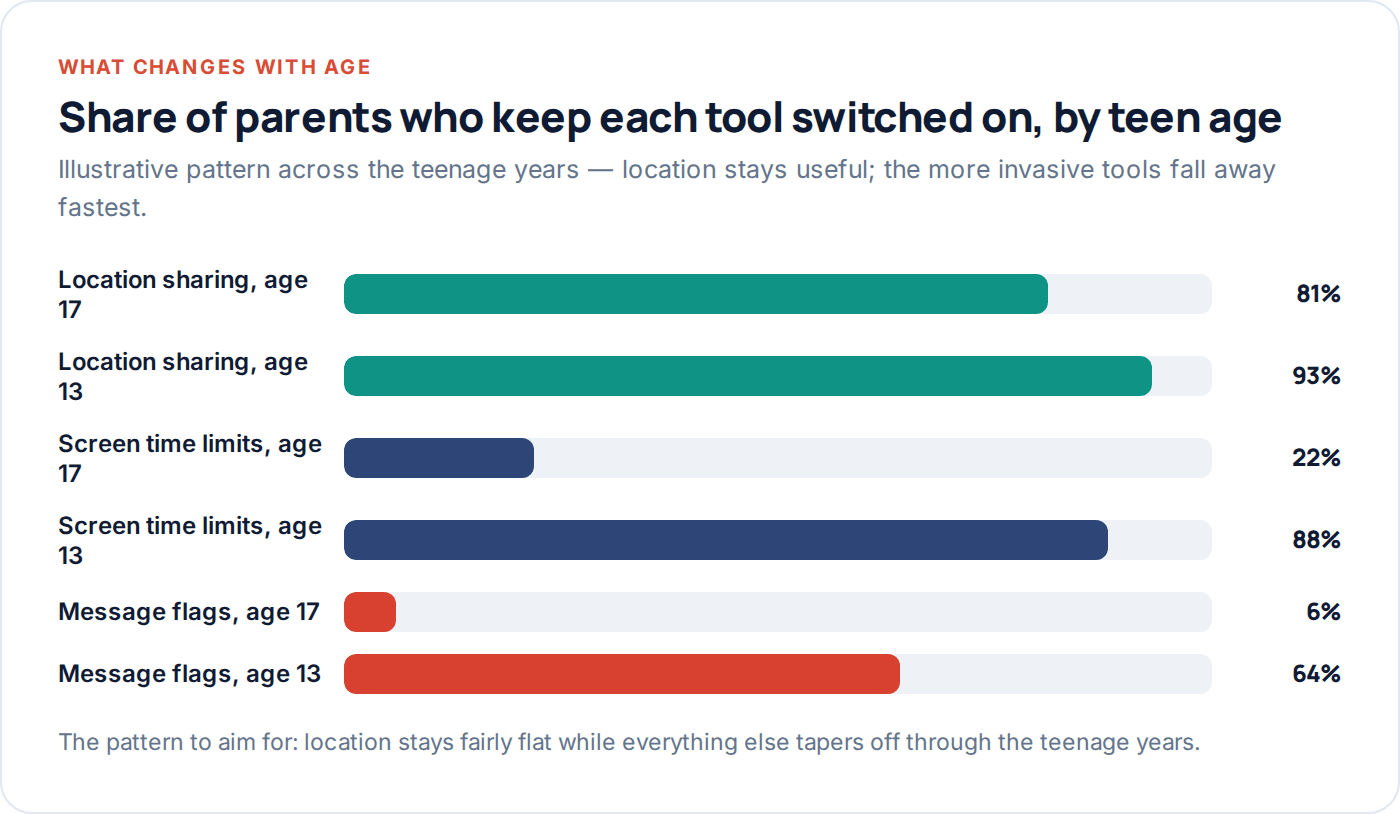
Content filtering, message flags and screen time caps mostly come off by this stage. Keeping them on past sixteen without a specific reason tends to read as distrust rather than care, and a seventeen-year-old who feels distrusted is a seventeen-year-old who stops volunteering information — which is the opposite of what any of this was for.
When siblings are different ages on the same rules
A common failure mode: the household rule gets set for the oldest child and then applied unchanged to a younger sibling years later, or set for the youngest and never loosened for the older one. Every child in the house is at their own stage, and the table below is meant to be read per child, not per household.
| Stage | Typical device | Reasonable monitoring default |
|---|---|---|
| 6–9 | Shared tablet or basic handset | Strict content filter, app approval, no message flags needed |
| 10–12 | First personal phone | Location, standard filter, app approval, short-list message flags |
| 13–15 | Own smartphone | Location, screen time, light filtering, trimmed flags — content mostly left alone |
| 16–17 | Own smartphone, largely unsupervised | Location sharing (ideally mutual) and little else |
If your household has a nine-year-old and a fifteen-year-old sharing a Wi-Fi filter, it’s worth checking whether the settings were built around whichever child arrived first. The GuestSpy dashboard lets you set each child’s profile independently, which avoids the fifteen-year-old inheriting a nine-year-old’s filter — or the reverse.
Why a review date matters more than the age
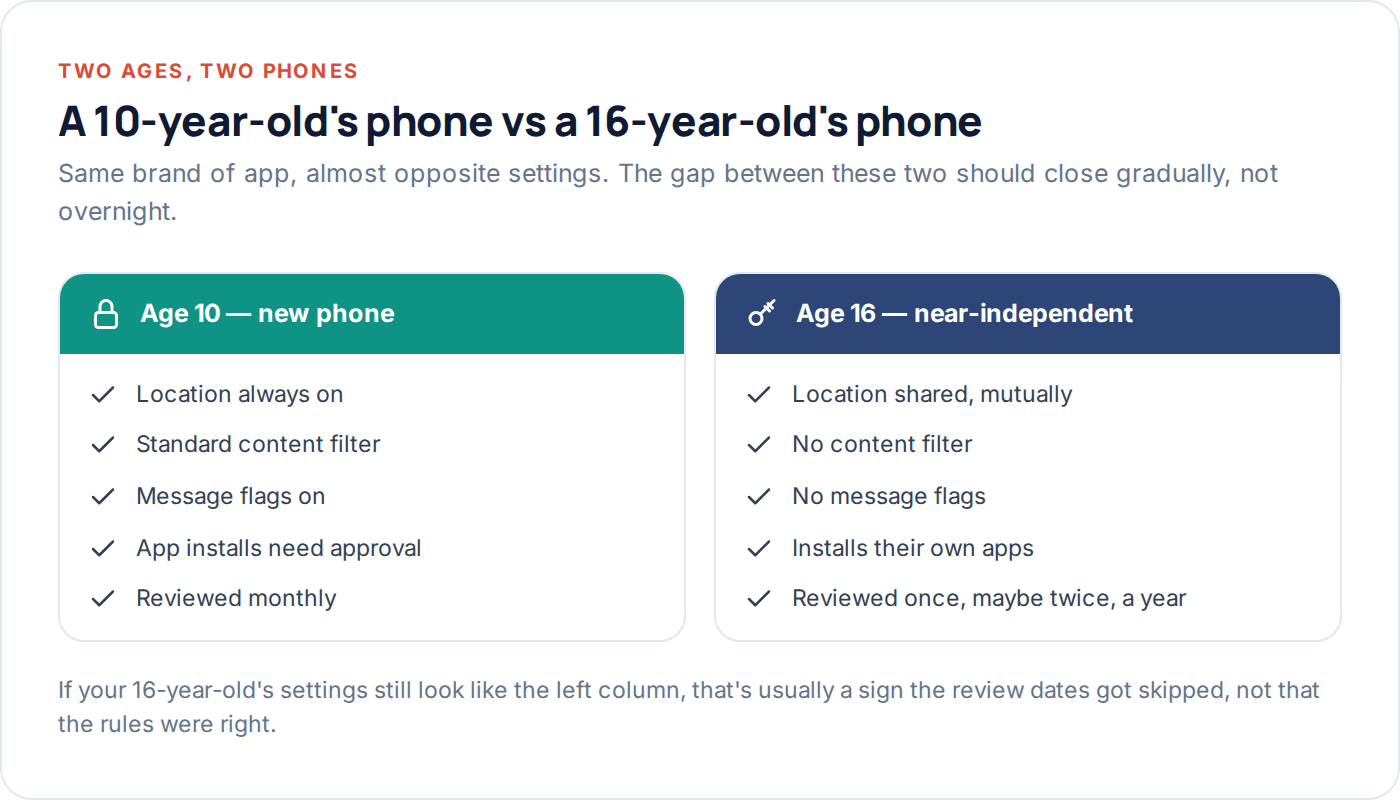
The pattern in the chart above is the point of this whole framework: some tools should stay roughly flat through the teenage years, and others should taper off hard. That taper doesn’t happen automatically — it happens because someone puts a date in the calendar and actually revisits the settings. Without a scheduled review, monitoring set up sensibly at eleven quietly becomes something that looks a lot like distrust at sixteen, not because anyone decided that, but because nobody decided to change it.
A simple approach: put a review date in the calendar every three months for a child under thirteen, and every six months from thirteen onward. At each review, ask one question about every tool that’s switched on — does this still have a job to do? If not, turn it off and say so. “I’ve turned off the app-approval requirement because you’ve had it a year and never asked to install anything that wasn’t fine” is a sentence that builds trust, not just a settings change.
- Set the review date when you first switch anything on — not after a problem forces the conversation.
- Review per tool, not as an all-or-nothing decision — location might stay while content filtering goes.
- Tell them what changed and why — a silent change gets noticed anyway, and explaining it costs you nothing.
- Write the next date down before you finish the conversation — the loop only works if it repeats.
Questions parents actually ask
What age to monitor a child’s phone if they’re mature for their age?
Go by the stage descriptions above rather than the age bracket — a mature ten-year-old might sit closer to the 10–12 defaults even before their birthday, and a less-ready thirteen-year-old might need the tighter defaults from the younger bracket for a little longer. Behaviour is a better guide than the calendar.
Should I monitor my child’s phone before they even have one?
There’s nothing to monitor before there’s a device, but the conversation should come first regardless — agree what will be visible and why before you hand over the phone, not after the first thing goes wrong.
Is 10 too young for a first phone?
Not inherently — plenty of ten-year-olds manage a well-set-up first phone fine, especially with the tighter defaults described for that stage. The better question is whether there’s a real reason for the phone yet, and whether your child has shown they can handle a shared device responsibly first.
My teenager says monitoring at their age is babyish. How do I respond?
Ask what specifically they’d change and negotiate from there — a fifteen-year-old who successfully argues content filtering off in exchange for keeping location on has just demonstrated exactly the judgement that earns loosened rules. Blanket refusal to discuss it teaches the opposite lesson.
Do younger siblings need the same settings as an older sibling had at that age?
Not necessarily. Judge each child on their own stage and behaviour rather than copying whatever worked, or didn’t, for an older sibling — two children at the same age can have quite different readiness.
What if I started monitoring too late, at fourteen or fifteen?
Start with the conversation, not the settings — explain what’s changing and why, and expect more pushback than you’d get from a younger child. It’s better to start late with an honest conversation than not to start at all, but skip the heaviest tools; a sudden jump to strict monitoring on an older teenager tends to backfire.
Where to start this week
Work out which of the four stages actually describes your child right now, not which one matches their age on paper, and set the defaults for that stage this week. Put the next review date in the calendar before you finish — that single habit is what keeps monitoring proportionate as your child grows, rather than something that quietly outlives its usefulness. If you’re managing more than one child, the GuestSpy dashboard lets each child’s settings move through these stages independently, and the screen time and location tracking pages cover the specific tools mentioned above in more depth.
The aim across all four stages is the same: a young adult who leaves home having made their smaller mistakes somewhere you could still help, and who never had to find out where the monitoring was by finding a way around it.
Using a monitoring app for this? GuestSpy is parental monitoring for Android that stays visible on the child's phone and runs from any browser. If it fits your family, see what the app does.
Related guides
The Complete Guide to Child Phone Monitoring (iPhone and Android)
What you can actually see on each platform, how to set it up in an afternoon, and the one conversation…
The Complete Guide to Monitoring a Teen Respectfully
A step-down approach to monitoring a teenager's phone: what to negotiate, what to drop by 15 and 17, and how…
The Honest Parent’s Guide to Phone Monitoring
What phone monitoring actually delivers versus what the marketing promises, five claims worth being sceptical of, and a straight framework…
Monitoring your child can see.
Location, screen-time budgets, routines, app and website blocking and the alerts that matter, run from any browser and visible on the phone. Pair an Android phone in about fifteen minutes.