The Complete Guide to Child Phone Monitoring (iPhone and Android)
What you can actually see on each platform, how to set it up in an afternoon, and the one conversation that decides whether monitoring works or backfires.
 By GuestSpy Editor · Founder and editorPublished September 6, 2026Updated September 14, 202613 min read
Most guides to child phone monitoring are written to sell you something. They promise you can read every message on any phone in five minutes, and they skip the part where your fourteen-year-old finds the app, factory-resets the phone at a friend’s house, and stops telling you anything real for a year.
This guide is the other kind. It covers what you can genuinely see on an iPhone and on an Android in 2026, what the built-in tools do for free, where a monitoring app actually adds something, and — the part that matters most — how to set it up so it still works in six months. I have organised it the way a parent actually moves through the problem: decide what you are trying to solve, have the conversation, set up the platform you own, then add tools only if the first two steps did not cover it.
- What monitoring means (and what it isn’t)
- Before you install: the conversation
- What you can actually see: iPhone vs Android
- The three layers that cover most families
- Setting it up on iPhone
- Setting it up on Android
- What to watch at each age
- When you find something worrying
- The legal and ethical line
- Questions parents actually ask
What monitoring means, and what it isn’t
There is a real difference between two things that use identical software. One is a parent who says “I can see where your phone is and roughly how you’re spending time on it, and here’s the screen where you can check what I see.” The other is an app installed while a kid is asleep, hidden from the app drawer, quietly copying everything.
The first one is a house rule with a technical backstop. The second one is surveillance, and it fails in a specific and predictable way: it gets discovered. Phones get slow, batteries drain, a notification slips through, a sibling talks. When it is discovered, you lose the thing you were actually trying to protect — a kid who tells you when something goes wrong.
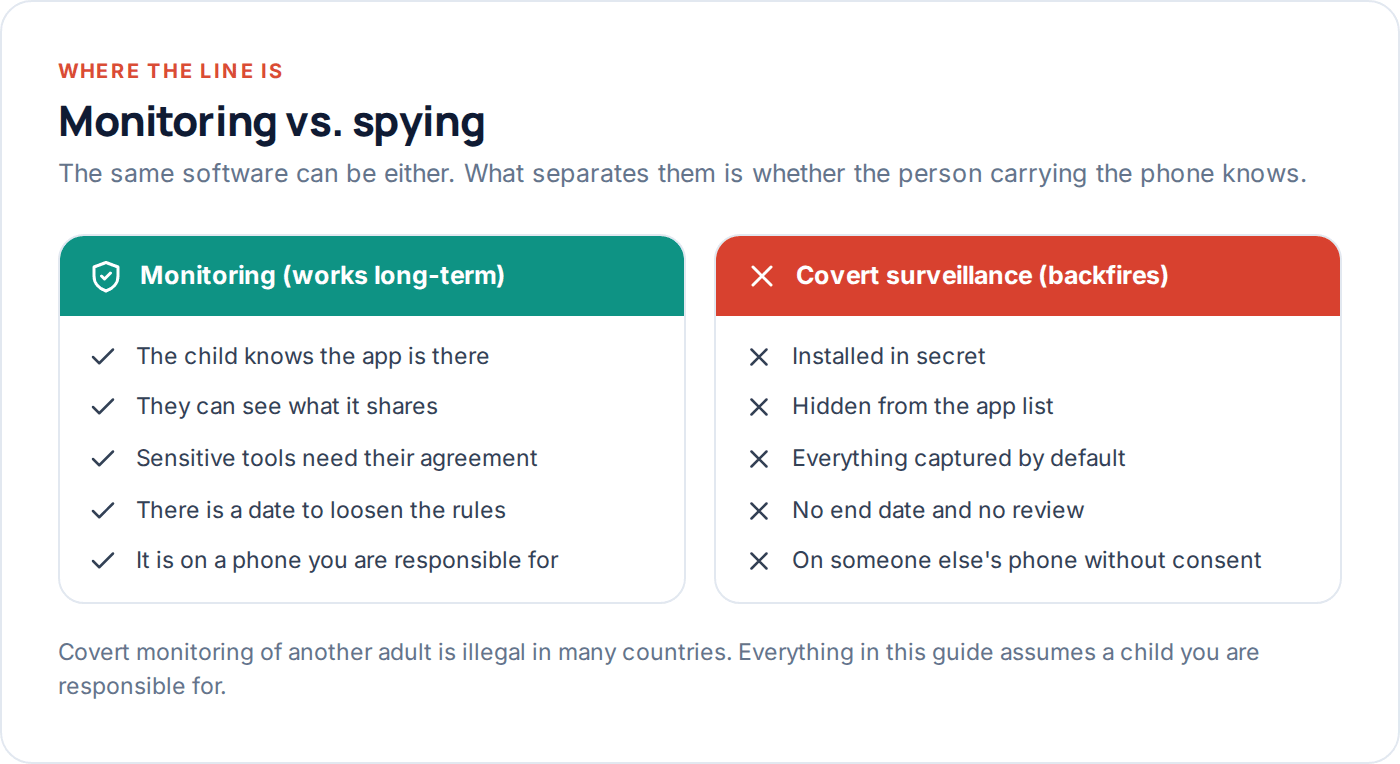
That is not a moral lecture, it is a practical one. Every experienced parent I have spoken to who monitored covertly and got caught describes the same aftermath: months of a closed door. The kids who kept talking to their parents were the ones who knew the rules from the start and thought they were fair.
Before you install anything: the conversation
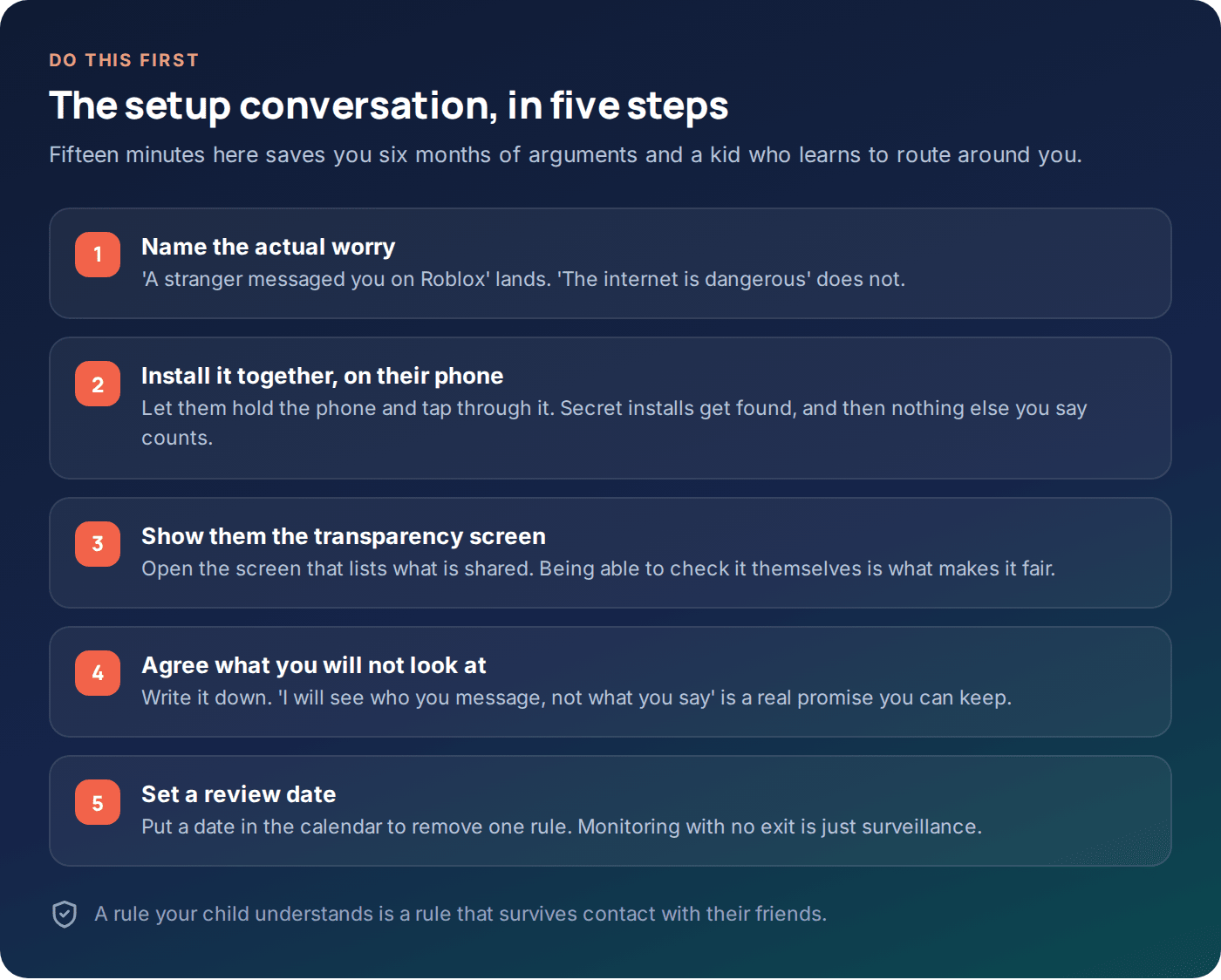
Skip this and everything after it gets harder. The conversation does two jobs: it tells your child what is happening, and it forces you to decide what you are actually worried about. Those are different problems and most parents only do the first.
Be specific about the worry. “I want to know you got to school” is a concrete, solvable thing and a child can agree it is reasonable. “I need to know what you’re doing online” is unbounded, and any teenager will hear it as “I don’t trust you,” because that is roughly what it means.
Then be specific about the limit. The single most useful sentence you can say is some version of: “I will be able to see who you’re messaging and when. I’m not going to read what you say unless something makes me genuinely worried, and if that happens I’ll tell you first.” That is a promise you can actually keep, and keeping it is what buys you the next two years.
What to do if they say no
Younger children mostly shrug and move on. Teenagers negotiate, and you should let them. Real negotiating room: which apps are covered, whether message content is included, what time the phone goes to bed, and — the strongest card you hold — what they get in return. Later bedtime on weekends, no phone checks at all if the week goes fine, a review in three months. Monitoring that only ever tightens gives a teenager no reason to cooperate.
If they refuse outright, that is information. Sometimes it means “this is embarrassing and my friends will see it.” Sometimes it means something is already wrong. Either way, pushing a covert install is the worst available option.
What you can actually see: iPhone vs Android
This is where most articles start lying. The honest summary: location, screen time, app usage, and blocking work well on both platforms. Message content works properly on neither, and any product claiming otherwise for a stock iPhone is either describing iCloud backup access (which needs the Apple ID password and full account access) or is simply not telling you the truth.
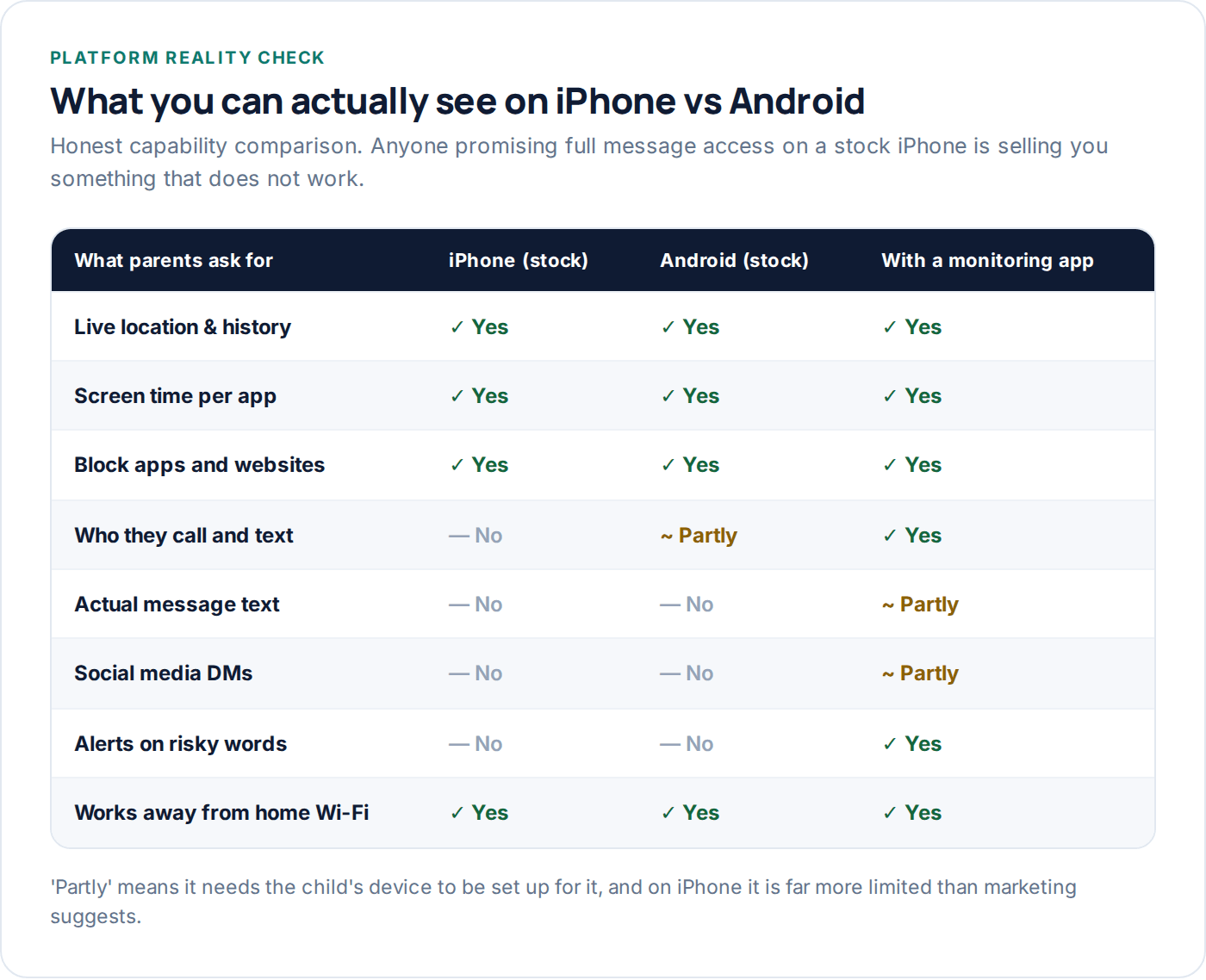
Apple’s design deliberately prevents one app from reading another app’s messages. That is a security property, not a gap someone can patch. Android is more permissive: with the accessibility and notification permissions granted on the device itself — visibly, by someone holding the phone — an app can read notification content, which is how “message monitoring” genuinely works on Android. It sees notification lines, not a full chat archive, and it stops working if the child turns the permission off, which they can see.
Understanding that changes what you should aim for. You are not going to get a transcript. You can very reliably get: where the phone is, how long it spent in which app, which sites it tried to reach, who is calling and texting, and an alert when a flagged word appears. In practice that answers almost every real question a parent has.
The three layers that cover most families
Think of it as three layers, added in order. Most families never need all three.
1. The platform
Screen Time on iPhone, Family Link on Android. Free, built in, impossible to uninstall without your passcode. Handles time limits, app blocking, content filtering, purchases and basic location.
2. The network
Filtering on your home router or DNS. Covers every device on the house Wi-Fi including consoles and TVs — but does nothing on mobile data or at a friend’s house.
3. A monitoring app
Adds the things layers 1 and 2 cannot do: place alerts, who they message, keyword flags, and one dashboard covering several children at once.
Start with layer one and live with it for two weeks. A surprising number of families discover that a bedtime schedule and an app limit solved the actual problem, and that they never wanted a monitoring app — they wanted the phone to stop being in the bedroom at 1am.
Setting it up on iPhone
Everything below lives in Settings → Screen Time on the child’s iPhone. Do it on their phone, with them watching. It takes about ten minutes.
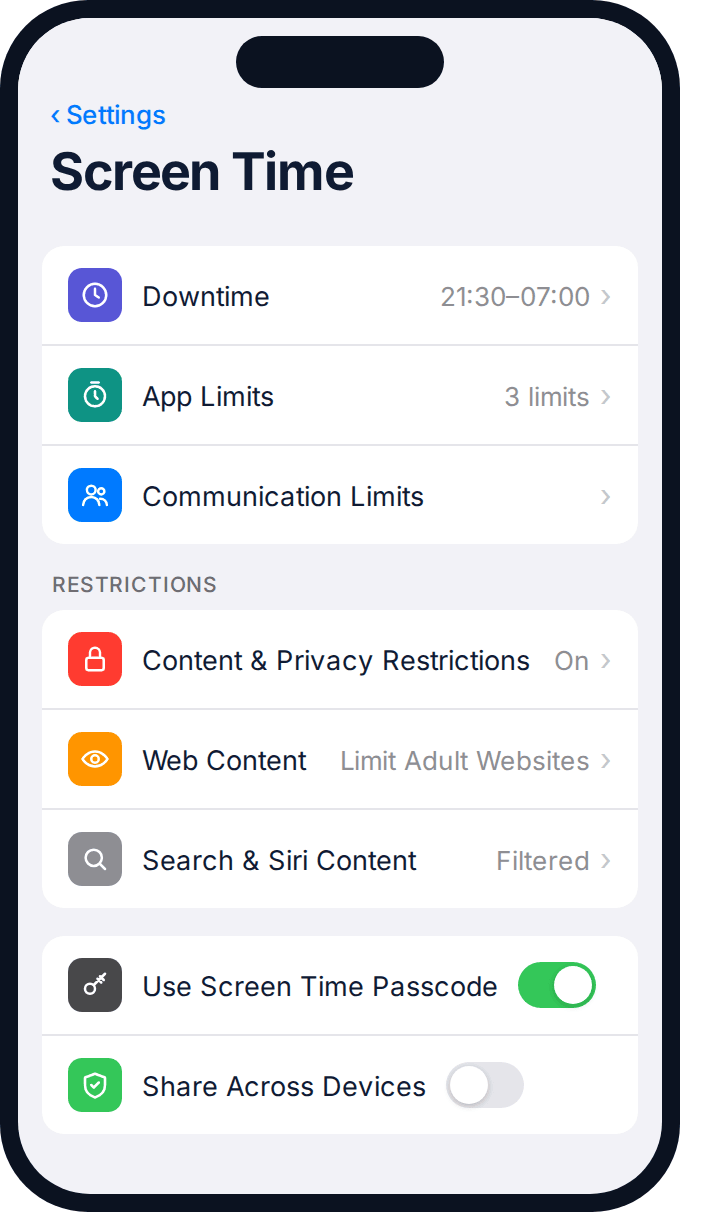
- Set a Screen Time passcode that is not your phone passcode. Kids know your phone passcode. Use four digits you have never used elsewhere, and do not use a birthday.
- Downtime — set the window when only approved apps work. Start at bedtime plus thirty minutes; it is the least contested rule you will ever set.
- App Limits — set a daily cap on a category (Social, Games) rather than individual apps. Kids switch apps; categories follow them.
- Communication Limits — restrict who can be contacted during downtime. Useful for younger children, usually too blunt for teenagers.
- Content & Privacy Restrictions → Web Content → Limit Adult Websites. Imperfect, but it removes the accidental encounters, which is most of them.
- Turn off “Allow Changes” for Account Changes and Cellular Data Changes so the phone cannot be signed out of the family account to escape the rules.
Setting it up on Android
Android’s equivalent is Google Family Link, and it is genuinely more capable than Apple’s version — you get app-install approval, per-app limits, location, and a remote lock that actually works.
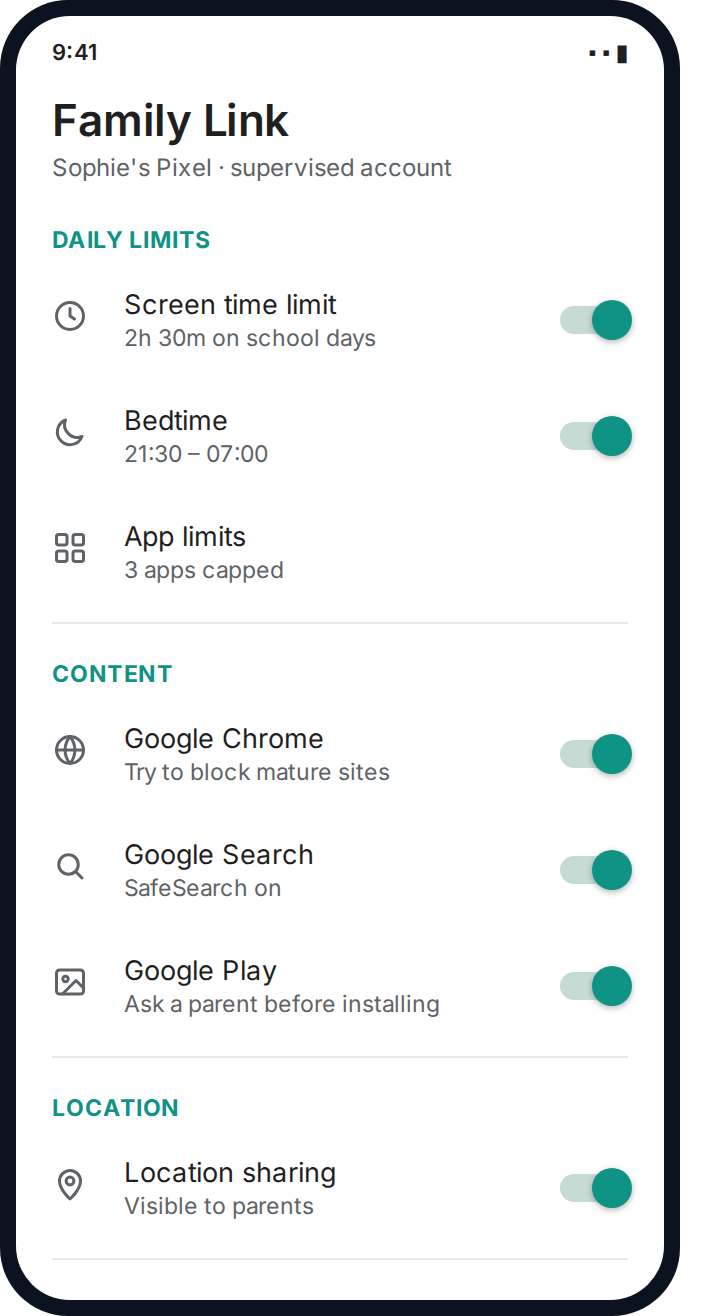
- Create or convert the child’s Google account to a supervised account. Under 13 (or your country’s equivalent) this is required anyway.
- Install Family Link on your phone and pair it with theirs. The child’s phone shows a permanent notification that it is supervised — that visibility is a feature, not a nuisance.
- Set the daily limit and bedtime. Family Link enforces these at the OS level; the phone genuinely locks.
- Turn on app approval so new installs need your yes. This one setting prevents most of the “where did this app come from” problems.
- SafeSearch and Chrome site restrictions — set to block mature sites, and add specific exceptions rather than opening it back up wholesale.
- Location sharing — leave on. It is the single most-used feature in every family that sets this up.
If you want more than this — arrival alerts at specific places, flags on particular words, or a view across two or three children at once — that is where a dedicated app such as GuestSpy sits on top. It does not replace Family Link; it covers the questions Family Link does not answer.
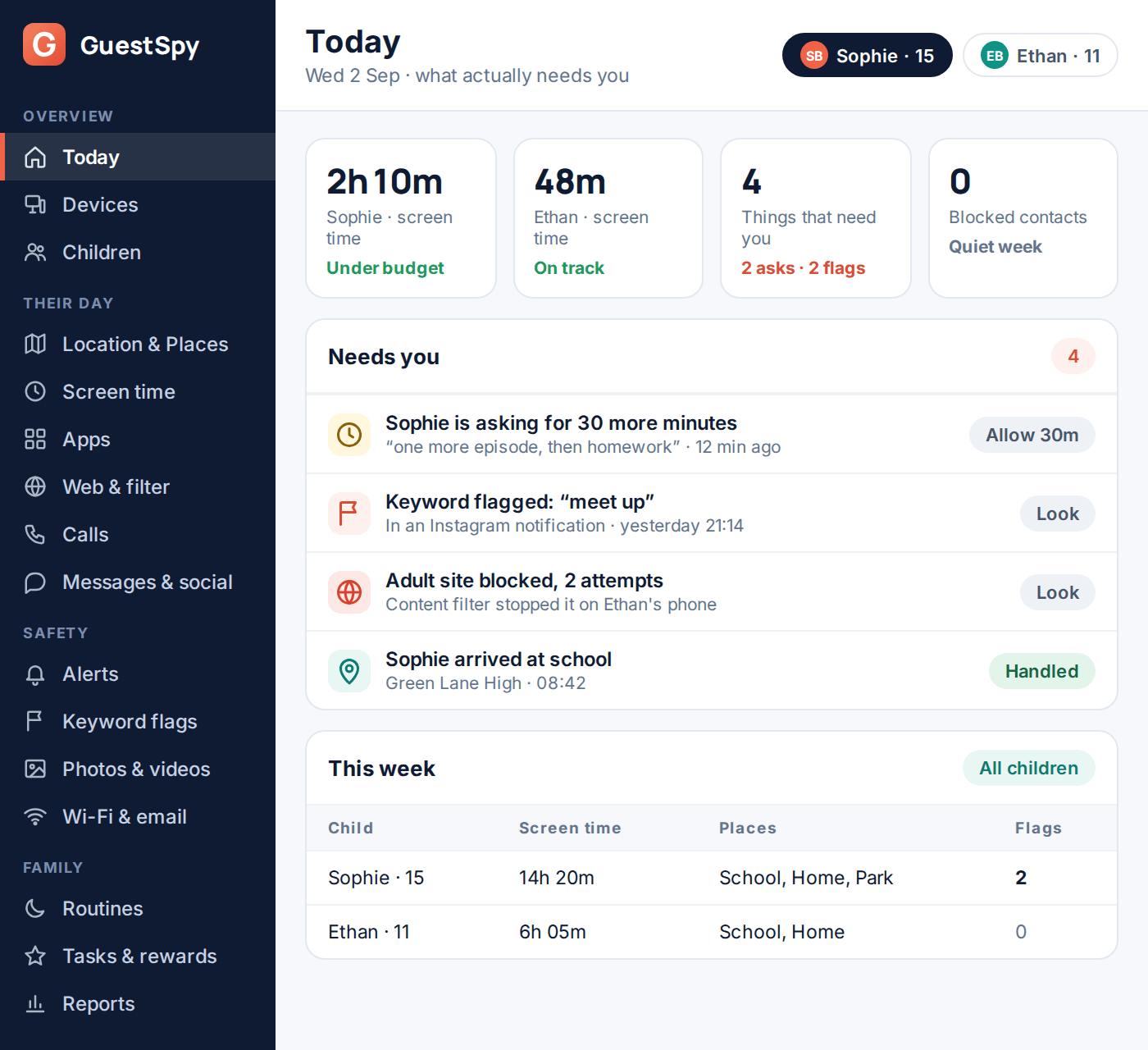
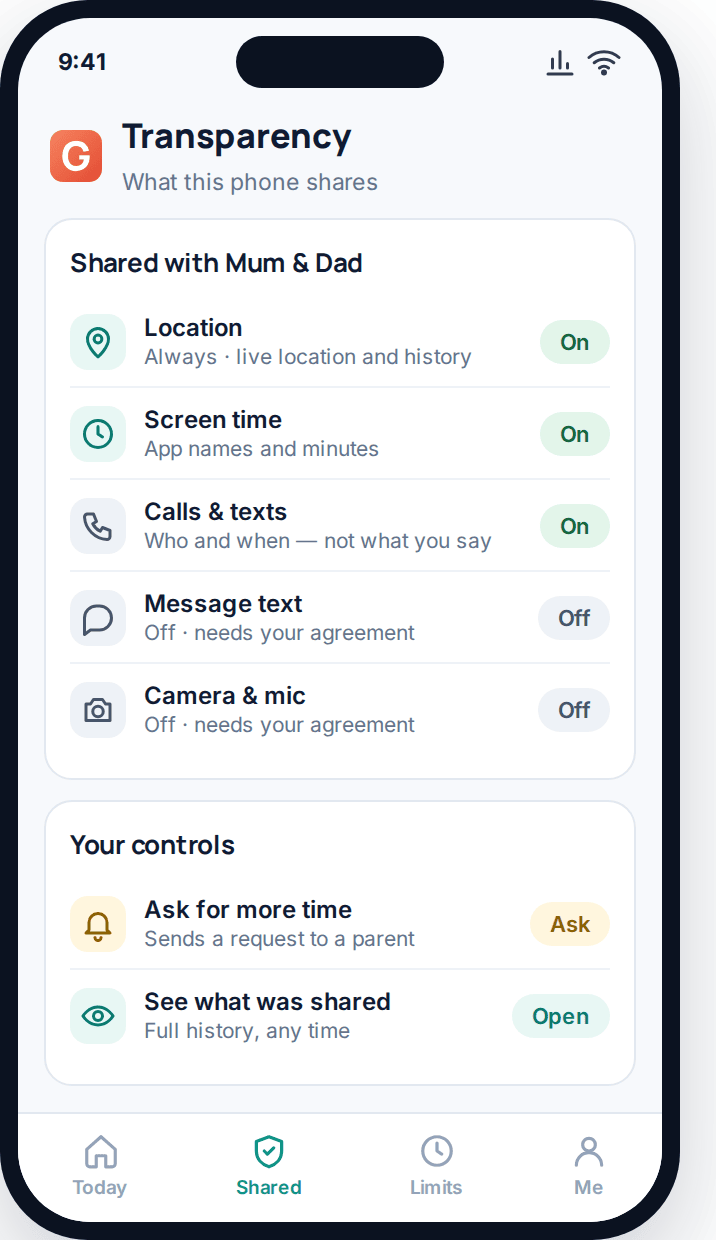
The reason the dashboard above is short is deliberate. The failure mode of monitoring software is a firehose: forty notifications a day, none of them important, until you stop reading any of them. A useful parent view answers one question — is there anything I need to do today? — and stays quiet otherwise.
What to watch at each age
The right amount of monitoring is not a fixed setting; it is a dial you turn down as they get older. Roughly:
| Age | Reasonable default | What to leave alone |
|---|---|---|
| 6–9 | Full content filtering, app approval, tight time limits, location on. Shared device where possible. | Nothing much — at this age the phone is a tool you lend them. |
| 10–12 | Location, time limits, app approval, contact list visible. Alerts on risky words are reasonable here. | Start leaving the content of friend-group chats alone unless something is flagged. |
| 13–15 | Location, screen time, blocking. Who they message, not what they say. Flags for a short list of genuinely serious words. | Group chat content, search history, photos. Reading these will cost you more than it finds. |
| 16–17 | Location sharing (ideally mutual), and honestly not much else. Keep the safety net, drop the surveillance. | Almost everything. They are eighteen months from managing this with no help at all. |
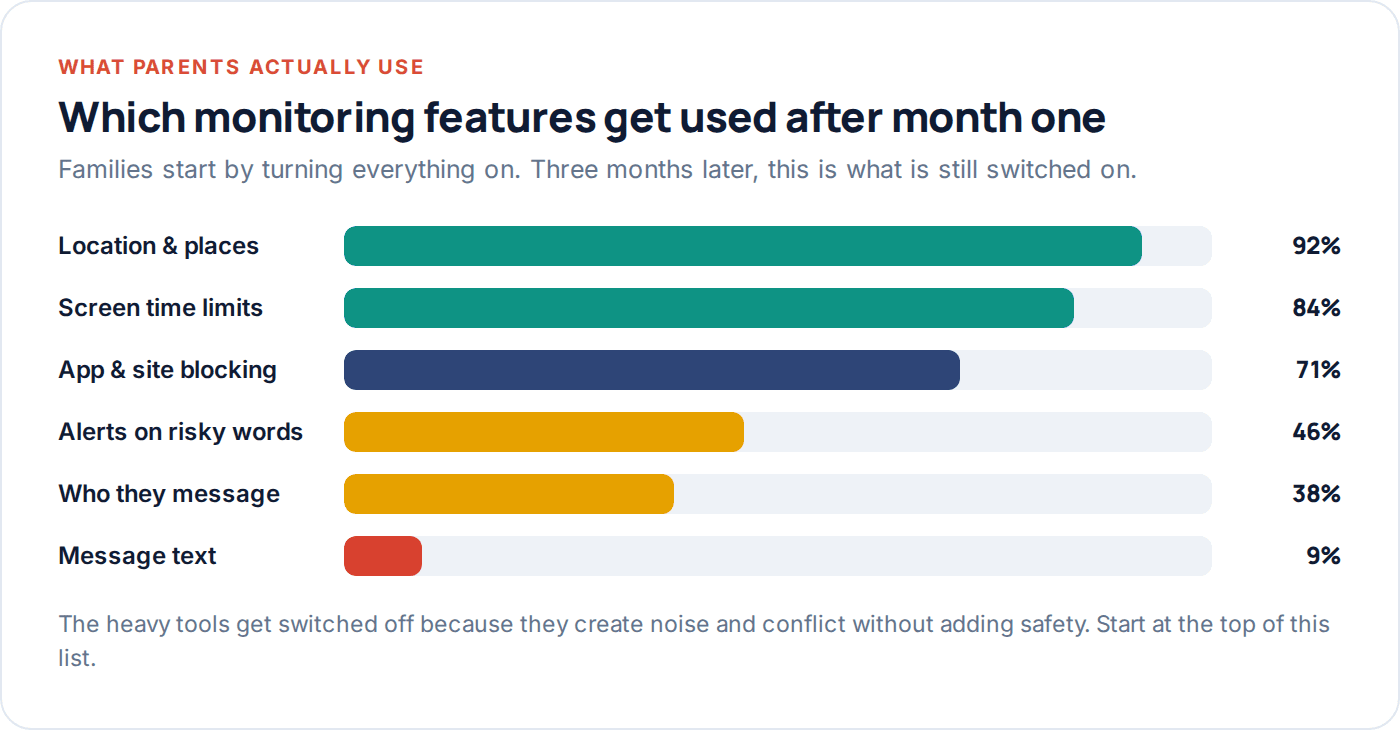
Notice what that chart shows: the invasive features are the ones families abandon. That is not a coincidence. They generate constant low-grade conflict and almost never surface the thing you were actually afraid of. Location and time limits survive because they are quiet, useful, and easy to justify.
When you find something worrying
Sooner or later you will see something you wish you had not. How you handle the first one sets the pattern for every one after it.
Do not act at 11pm. Almost nothing needs a response that night, and everything you say while shocked will be the thing they remember. Sleep on it unless there is immediate danger.
Lead with the fact that you saw it. “I saw a message from someone I don’t know asking to meet you” is honest and it keeps the deal you made. Pretending you found out another way turns one problem into two.
Separate the categories. A kid being bullied needs support and probably the school. A kid being contacted by an adult stranger needs the platform’s report function and possibly the police — save the evidence, do not delete it. A kid doing something normal and embarrassing needs you to be a bit less interested than you feel like being.
Do not escalate the monitoring as a punishment. It reads as revenge and it teaches them the real lesson: get better at hiding. If a rule needs to tighten, say which one, why, and when you will review it.
The legal and ethical line
Monitoring your own minor child on a device you own and pay for is legal essentially everywhere. Beyond that it gets complicated quickly, and the boundaries matter:
- Another adult’s phone — including a partner’s — is off limits without their genuine knowledge and consent. In many countries installing monitoring software on an adult’s device without consent is a criminal offence, and “we’re married” is not a defence.
- Recording calls is governed by separate law that varies by country and by state. Some places need both parties to agree. Check before you enable it anywhere.
- Older teenagers occupy a grey zone legally and a real one ethically. A seventeen-year-old has a reasonable expectation of some privacy even on a phone you pay for.
- Someone else’s child — your kid’s friend who is on your Wi-Fi, a stepchild in a shared custody arrangement — needs the agreement of their parent or guardian.
If you want the plain-language version of what is and is not acceptable use, our acceptable use page lays it out, and the FAQ covers the questions that come up most.
Questions parents actually ask
Can I read my child’s texts on an iPhone?
Not from another app, no. iOS does not allow one app to read another’s messages. You can see the contacts they message most through Screen Time, and on a Mac signed into the same Apple ID you would see iMessages — but that is full account access, not monitoring, and your child will know. Anyone selling you stock-iPhone message reading is describing something else.
Will my child know the app is installed?
With GuestSpy, yes — deliberately. The app is visible on their phone and has a screen listing exactly what is shared. Apps that promise invisibility are built for a use case we do not support and that is illegal in most places when used on anyone but your own minor child.
What age should I stop monitoring?
There is no fixed age, but a good rule is that by sixteen you should be down to location sharing and little else. The goal is a young adult who can manage their own phone, and you cannot get there without gradually handing it over.
Does monitoring actually keep kids safer?
Partly. It reliably catches the practical things — where they are, how much time is going where, an unknown number calling repeatedly. It does not substitute for a child who feels able to tell you when something is wrong, and if it costs you that, it has made things worse. Treat it as one layer, not the plan.
Can they just delete the app?
On Android, uninstalling requires the parent PIN and you get told if it is removed. On iPhone, Screen Time restrictions prevent app deletion when configured. No system is uninstallable-proof against a determined teenager with time and YouTube — which is another argument for the version they have agreed to.
Do I need to tell them every time I look?
No, and that becomes unworkable fast. What you owe them is the categories — what you can see at all — not a log of every glance. Where it matters is acting on something: if you are going to raise it, say you saw it.
Where to start this week
If you do nothing else: have the conversation, turn on the built-in controls for your platform, and switch on location sharing. That is an evening’s work and it covers the majority of what most families actually needed.
If you get to the end of a fortnight and there are still questions the built-in tools cannot answer — you cannot see who is calling, you want to know when they arrive somewhere, you are managing three children in three places — that is the point where a dedicated app earns its place. You can set GuestSpy up in about two minutes, it is free to start, and the child app is visible on their phone by design.
The thing worth remembering: the aim is not a perfectly observed teenager. It is a teenager who gets to eighteen having made their mistakes somewhere you could still help.
Using a monitoring app for this? GuestSpy is parental monitoring for Android that stays visible on the child's phone and runs from any browser. If it fits your family, see what the app does.
Related guides
The Complete Guide to Monitoring a Teen Respectfully
A step-down approach to monitoring a teenager's phone: what to negotiate, what to drop by 15 and 17, and how…
The Honest Parent’s Guide to Phone Monitoring
What phone monitoring actually delivers versus what the marketing promises, five claims worth being sceptical of, and a straight framework…
Monitoring vs. Spying: Where Parents Should Draw the Line
A working framework for the monitoring vs spying question: four questions to ask about any situation, and how common grey…
Monitoring your child can see.
Location, screen-time budgets, routines, app and website blocking and the alerts that matter, run from any browser and visible on the phone. Pair an Android phone in about fifteen minutes.