The Complete Guide to GPS Tracking for Families
How your phone actually works out where it is, why the accuracy varies so much, what it costs your battery, and how to pick the right tool for your family.
 By GuestSpy Editor · Founder and editorPublished September 9, 2026Updated September 14, 202611 min read
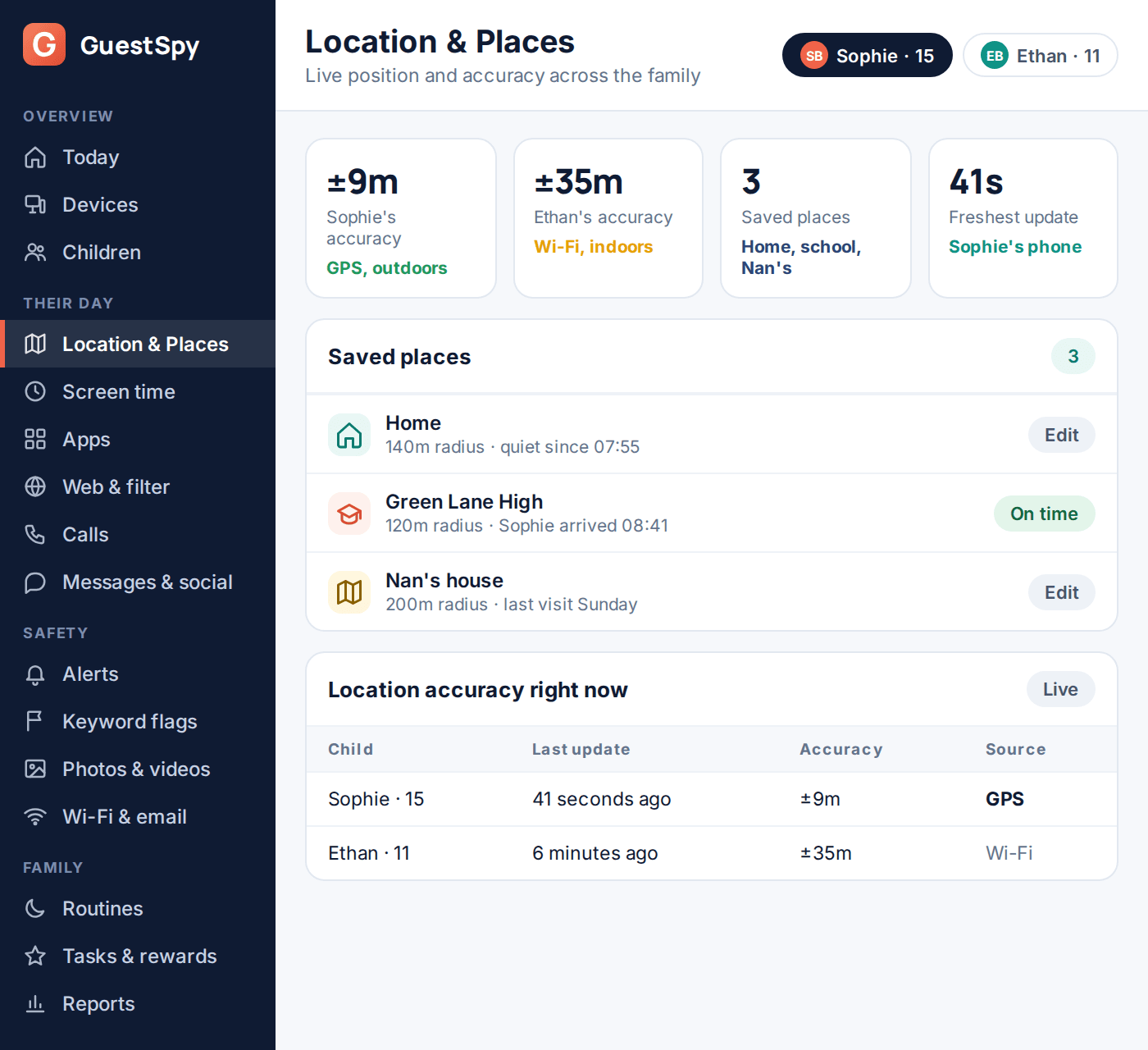
A ten-year-old’s location app shows him three streets from home when he is, in fact, standing in the kitchen. A parent’s first thought is that something is broken. Usually nothing is — the phone is indoors, the GPS signal is weak, and it has quietly fallen back to a much rougher estimate based on nearby Wi-Fi networks.
Understanding roughly how GPS tracking for families actually works removes most of that panic. It also tells you what to expect, what a location app genuinely can and can’t do, and which of the three main options — the phone your child already carries, a dedicated GPS tracker, or a smartwatch with its own connection — actually fits your situation. This guide covers all of it, in plain terms, without pretending any of it is more precise than it really is.
- How a phone actually works out where it is
- Why the accuracy varies so much
- Why the dot seems to drift or lag
- What location tracking costs your battery
- Phones, dedicated trackers, and smartwatches
- Which one actually fits your family
- What to do when the location is wrong or stale
- Setting realistic expectations
- Questions parents actually ask
How a phone actually works out where it is
“GPS” gets used as shorthand for the whole system, but a modern phone is rarely relying on satellites alone. Three separate technologies work together, and the phone picks whichever combination answers fastest with the least battery spent.
GPS (and GLONASS, Galileo, BeiDou) satellites orbit the earth broadcasting a precise time signal. Your phone’s chip listens to at least four of them at once and calculates its position from the tiny differences in when each signal arrives. Outdoors, with a clear view of the sky, this is genuinely accurate — typically somewhere in the 5 to 20 metre range.
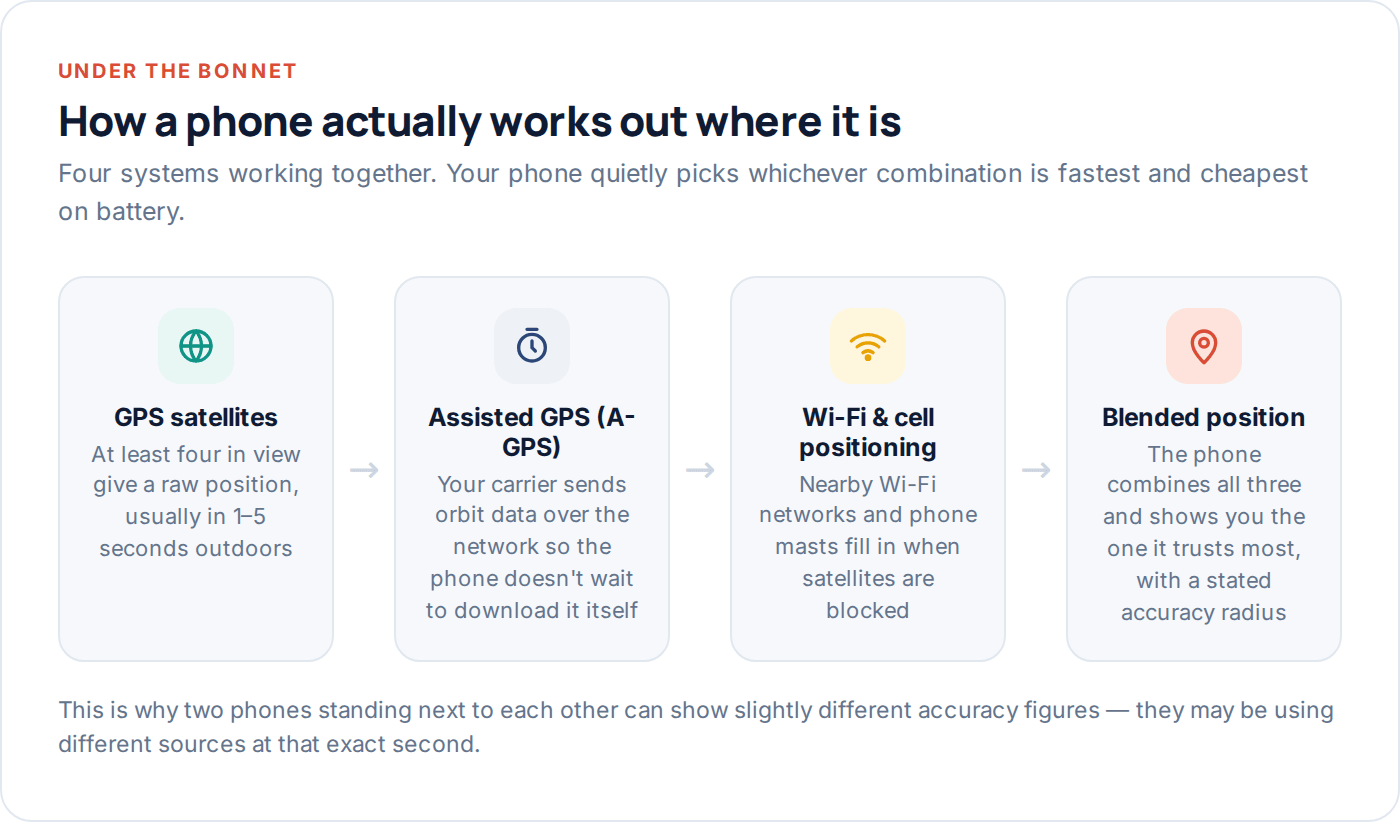
Assisted GPS (A-GPS) speeds that process up. Downloading satellite orbit data directly from space can take up to a minute from a cold start. Instead, your carrier’s network sends the same data down instantly, so the phone gets a fix in a second or two rather than sitting there calculating.
Wi-Fi and cell-tower positioning is the fallback for when satellites aren’t reachable at all — which is most of the time indoors. Your phone (with location services on) recognises nearby Wi-Fi networks, cross-references them against a crowd-sourced map of roughly where those networks physically sit, and estimates a position from that. It is much less precise, but it works through walls and roofs where GPS cannot.
Why the accuracy varies so much
Every location reading comes with an accuracy figure, whether or not the app shows it to you — a radius, in metres, that the true position is very likely to fall within. That number moves around constantly, and it is the single most useful piece of information a family location app can surface, far more useful than the dot itself.
Standing in an open field, that radius might be 5 to 10 metres — good enough to tell you which side of the field someone is on. Standing on a city street between tall buildings, satellite signals bounce off glass and concrete before reaching the phone, an effect engineers call the “urban canyon,” and the same phone might report 30 or 50 metres. Indoors, GPS often can’t get a fix at all, and the position you see is Wi-Fi-based and correspondingly rougher.
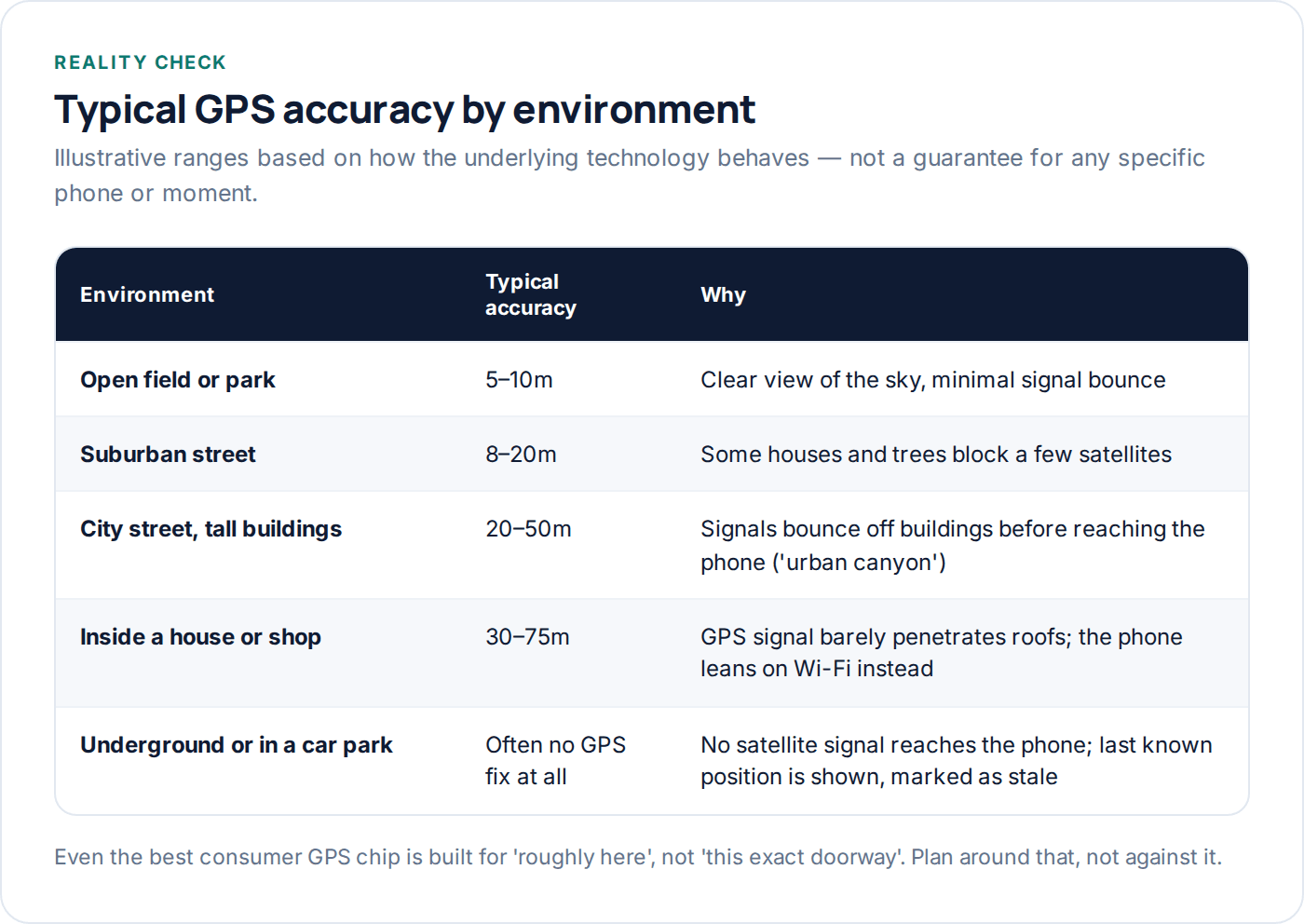
None of this means the tracking is broken. It means the number in the corner of the screen is telling you the truth about a physical limitation, and it is worth learning to glance at that figure before reacting to the dot’s exact position.
Why the dot seems to drift or lag
Two separate things get lumped together as “the location is wrong”: inaccuracy, which is the radius problem above, and staleness, which is a timing problem. A dot that was correct two minutes ago in a moving car will look wrong by the time you check it, simply because the car has moved on. That is not an accuracy failure — it is an update-frequency one.
Apps balance update frequency against battery constantly. A setting that refreshes position every few seconds gives you an almost live view but drains the battery fast; a setting that refreshes every few minutes to save power will always show you something slightly in the past. Most family location tools default to a middle setting and speed up automatically when someone is clearly moving, then slow back down when they’re still.
Phones asleep, in a pocket, or in Low Power Mode
Both iOS and Android throttle background location updates when the battery gets low, specifically to protect the battery, and both let an app request an exemption. If a teenager’s phone has been sitting at 8% battery for the last hour of school, expect the last update to be older than usual — the phone made a deliberate trade-off to keep the phone alive over keeping the location current.
What location tracking costs your battery
This is the trade-off most guides skip entirely, and it is the reason “just track everything, all the time, as precisely as possible” is the wrong default for most families.
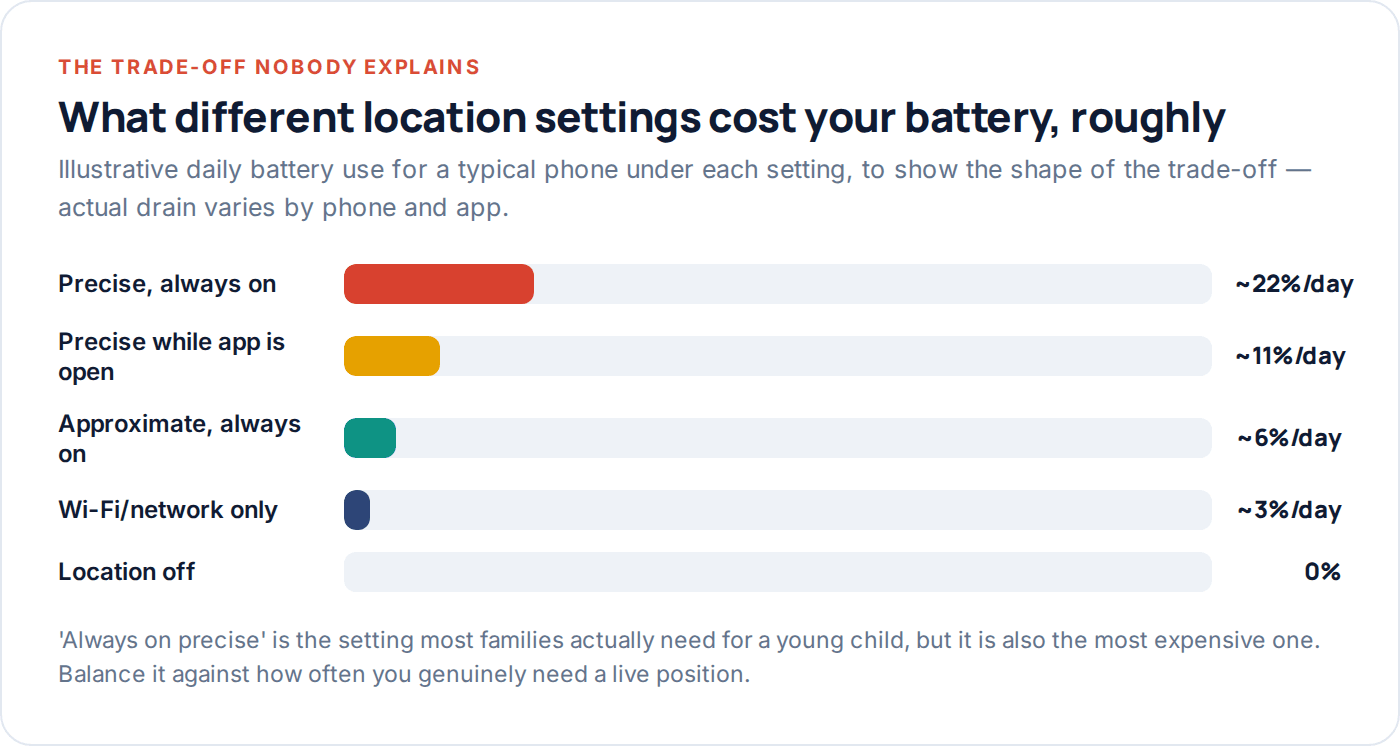
Precise, continuous GPS tracking is genuinely expensive — the chip has to stay listening to satellites almost constantly, and constant listening is what drains a battery fastest. Approximate tracking, which leans more on Wi-Fi and cell towers and updates less often, costs a fraction of that. For most day-to-day use — knowing which neighbourhood someone is in, confirming they got to school — approximate tracking with periodic precise check-ins is plenty, and it means the phone still has battery left by 4pm.
Where precise, always-on tracking earns its cost is a smaller, specific list: a younger child on their first solo outing, a teenager travelling somewhere unfamiliar, or any situation where “roughly the right street” genuinely isn’t good enough. Reserve it for those, rather than leaving it on as a permanent default and then being surprised the phone is dead by dinner.
Phones, dedicated trackers, and smartwatches
Most families default to using the phone the child already carries, and for anyone over about ten that is usually the right call — it is one less device, and the tracking software rides on hardware that is already charged, carried and replaced when it breaks.
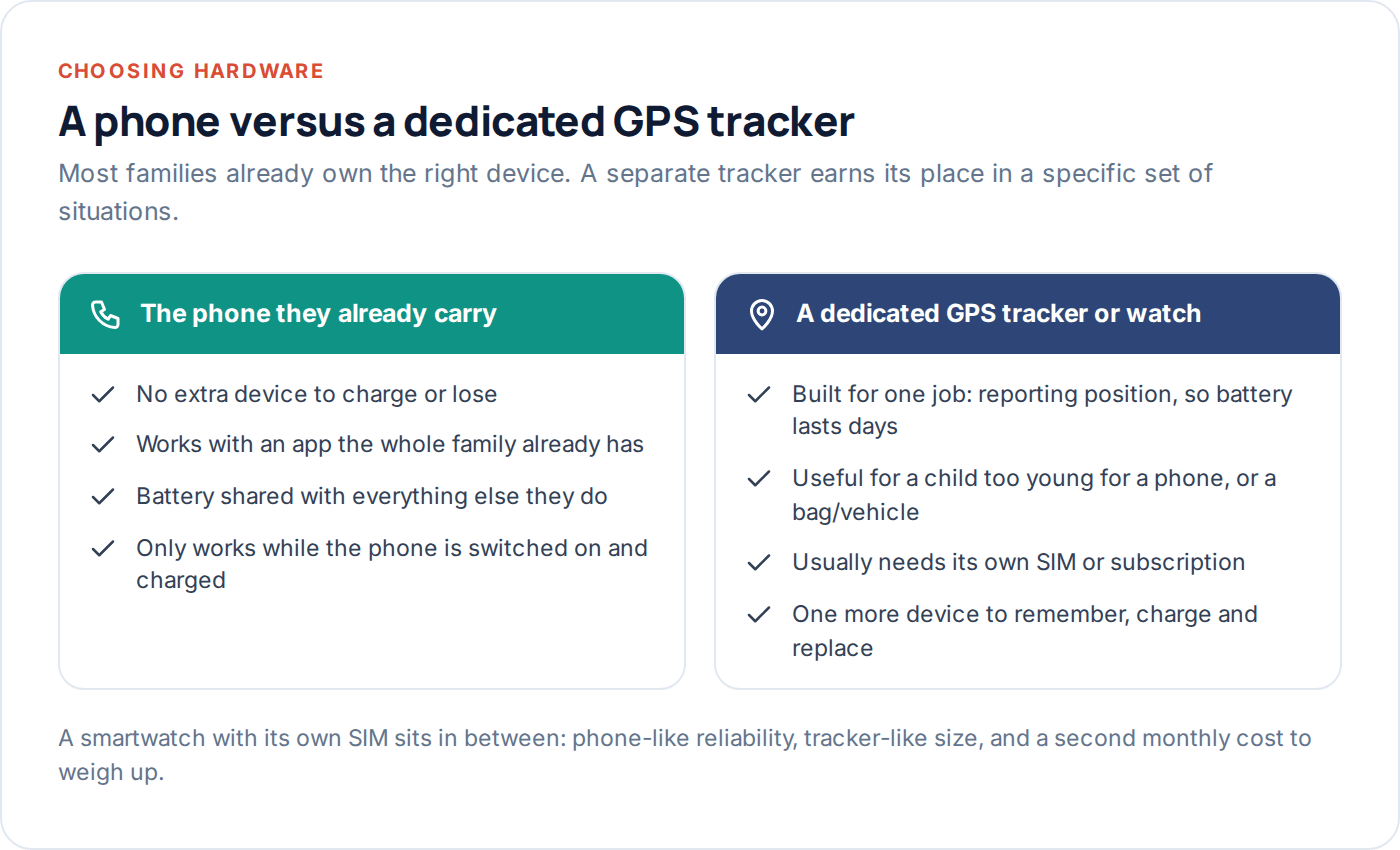
A dedicated GPS tracker changes the equation in a specific way: because it does one job, its battery can last days rather than hours, and it can go somewhere a phone can’t — clipped inside a school bag, attached to a bike, or given to a child too young to be trusted with a phone at all. The trade-off is a separate SIM or subscription, another thing to charge, and a device that is easier to simply leave behind.
A smartwatch with its own cellular connection sits between the two: phone-grade reliability and update frequency, in a form factor a younger child is less likely to lose or leave in a locker, at the cost of a second monthly bill and a second device to keep charged.
Phone
Best for most children over ten. No extra hardware, works with a family app you probably already use, battery shared with everything else.
Dedicated tracker
Best for bags, bikes and cars — or a child too young for a phone. Battery built to last days, but it is one more thing to remember.
Cellular smartwatch
Best for children who want independence without a full phone. Reliable like a phone, harder to lose, with its own monthly cost.
Which one actually fits your family
Start from the actual question you’re trying to answer, not the device that looks most impressive. “Did she get to school” needs infrequent, approximate location and nothing else. “Where exactly is he right now, this minute” — because he’s meant to be walking home from a friend’s and hasn’t shown up — needs precise, frequent updates, at least for the twenty minutes that matters.
| Situation | What actually fits | Why |
|---|---|---|
| Confirming arrivals (school, home, activities) | Phone, approximate mode with geofence alerts | You need an event, not a live feed. Battery-cheap and reliable. |
| Teenager out in an unfamiliar area | Phone, precise mode temporarily | Worth the battery cost for a few hours when the stakes are higher than usual. |
| Child aged 6–9, no phone yet | Dedicated GPS tracker or watch | Gives a safety net without handing over a full smartphone early. |
| A bag, bike, or car rather than a person | Dedicated tracker | Long battery life matters more than live precision for an object that doesn’t move constantly. |
| Family with several children across different ages | One app covering phones and, where needed, a tracker | One dashboard beats checking three separate apps. |
Whatever you choose, the same rule applies as with any family monitoring: the person being tracked should know it, understand roughly how accurate it is, and — where they’re old enough — be able to see their own location history too. Our location tracking feature page and the broader features overview cover how that looks in practice.
What to do when the location is wrong or stale
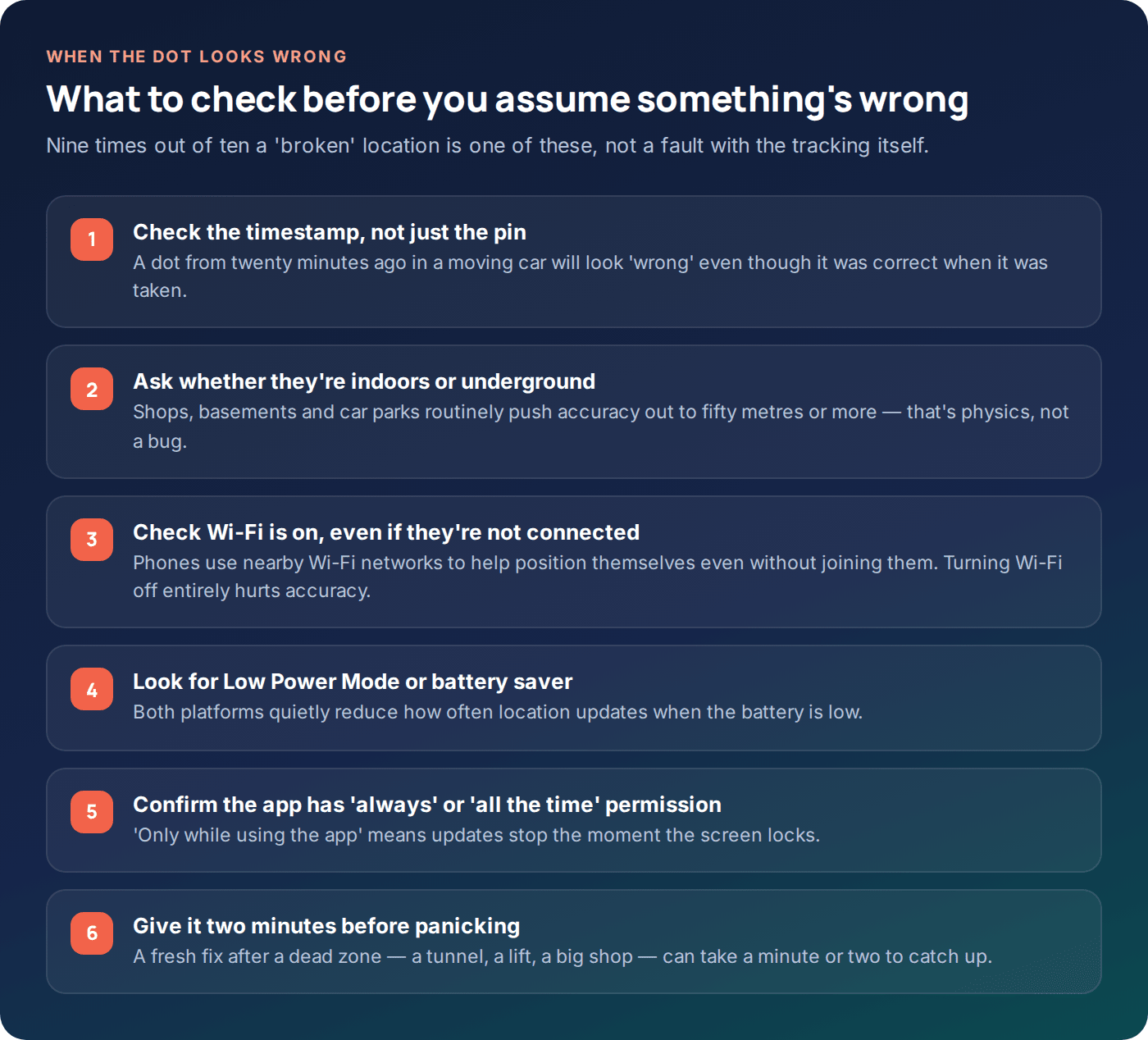
Before assuming a fault, run through the ordinary explanations — most “broken tracking” reports turn out to be one of these, not a genuine failure.
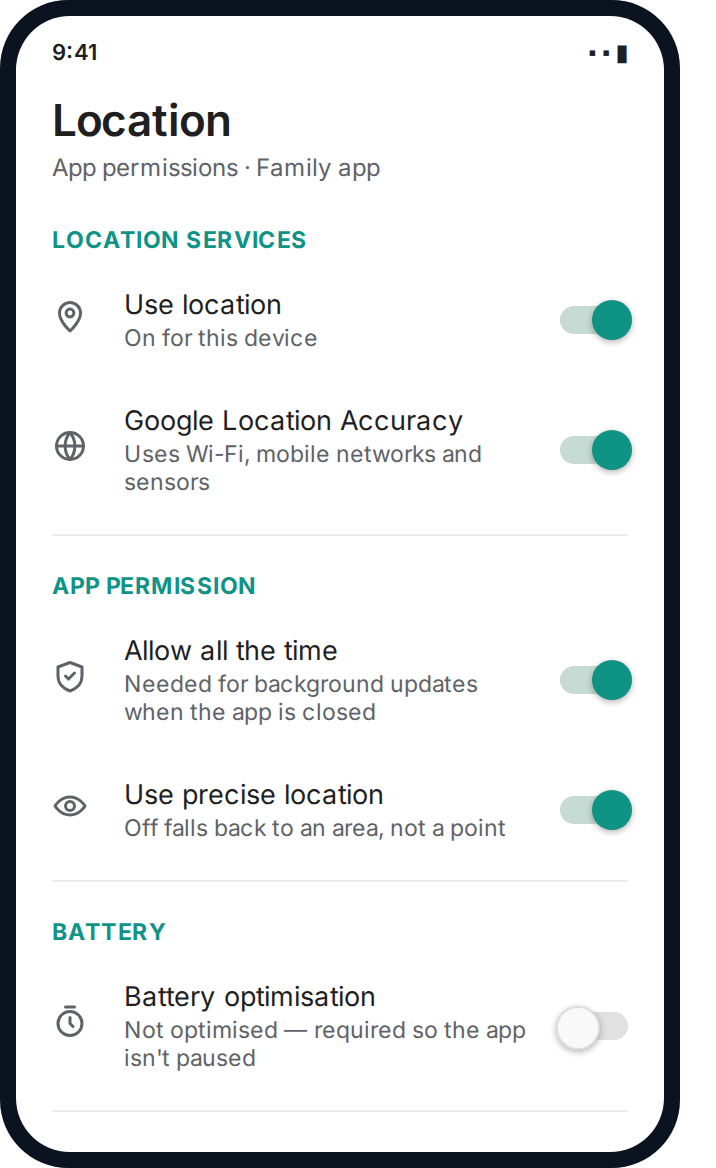
On Android specifically, two settings account for the large majority of “it just stopped working” reports: precise location switched off (which silently caps every reading to an area rather than a point) and battery optimisation left enabled for the tracking app (which lets the operating system pause it in the background to save power). Both are one settings screen away from fixing.
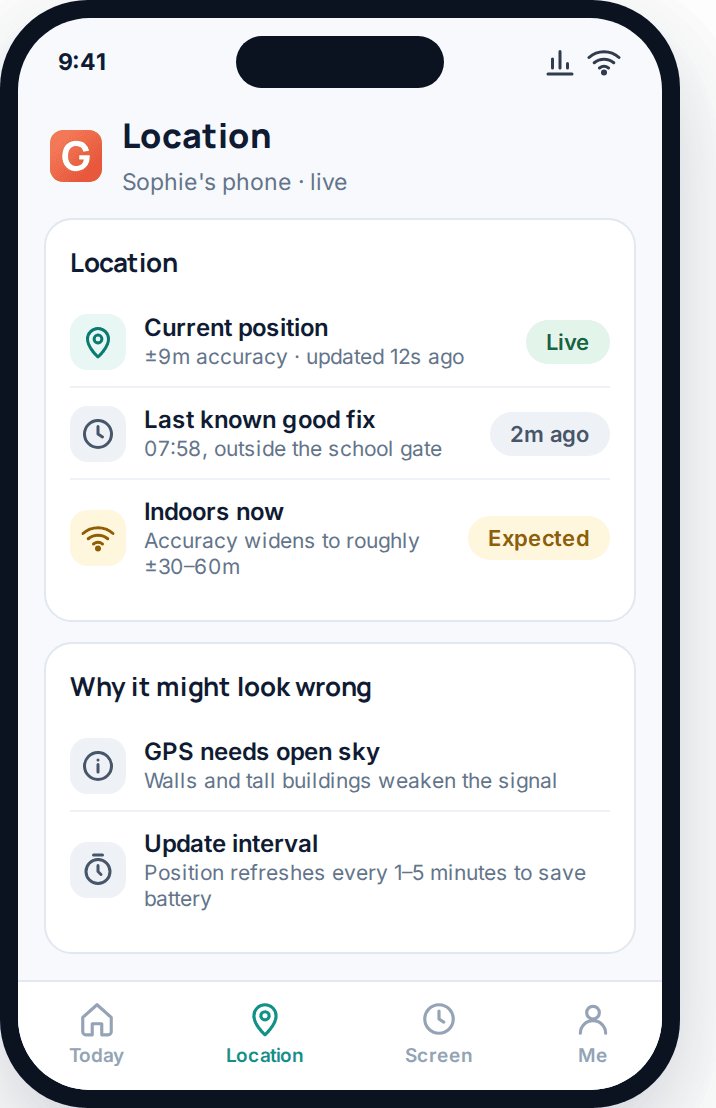
On a phone, always check the timestamp on a reading before the position itself. A location that is accurate but forty minutes old will look exactly like a location that is wildly wrong, and the fix for each is completely different.
Run through the checklist below before assuming the tracking itself has failed — it catches the overwhelming majority of “it’s not working” moments in under a minute.
Setting realistic expectations
The honest headline figure worth remembering: outdoors, with a clear sky, expect somewhere around 5 to 20 metres. Indoors, in a city, or underground, expect considerably worse, sometimes no live fix at all. That is a property of the physics involved, not a shortcoming of any particular app, and it is true whether you are using a free built-in tool or a paid family app.
What GPS tracking for families is genuinely good at: confirming someone reached a place, seeing which general area they’re in, and getting an alert the moment they arrive or leave somewhere you’ve set up as a place to watch. What it is not good at: pinpointing an exact doorway, working reliably underground, or replacing a conversation with your child about where they’re actually going. Treat it as one useful layer, not a substitute for the rest of parenting.
Questions parents actually ask
Why does my child’s location sometimes jump to the wrong side of the street?
That’s usually GPS “urban canyon” error — signals bouncing off nearby buildings before reaching the phone, which can shift the calculated position by tens of metres in dense areas. It’s a known limitation of satellite positioning near tall buildings, not a fault with the tracking app.
Does GPS tracking work without mobile data or Wi-Fi?
The phone can still calculate its own GPS position without any connection at all. What it can’t do without data or Wi-Fi is send that position anywhere — so you’ll see the last update from before the phone lost signal, correctly marked as old, until it reconnects.
How much does location tracking really drain the battery?
It depends heavily on the setting used. Continuous, precise tracking is the most expensive mode a phone runs; approximate tracking that updates every few minutes costs a fraction of that. Most families are better served defaulting to approximate and switching to precise only when it actually matters.
Is a dedicated GPS tracker more accurate than a phone?
Not usually — most trackers use the same satellite systems as a phone, so raw accuracy is similar. Their real advantage is battery life measured in days rather than hours, and the ability to go somewhere a phone can’t, like inside a school bag.
Why does the app show my child indoors when they’re actually outside, or vice versa?
This happens right at the boundary between GPS and Wi-Fi positioning — near a doorway, the phone can genuinely be uncertain which source to trust, and it may briefly show a position based on the wrong one before settling. It usually corrects itself within a minute or two.
Can I get an exact location, like which room someone is in?
No consumer GPS technology does that reliably — even at its best, outdoor GPS is accurate to several metres, and indoor accuracy is worse still. Anything claiming room-level precision from GPS alone is overstating what the technology can do.
Where to start
If you take one thing from this guide, take the accuracy figure seriously — glance at it before reacting to the dot. For most families, the phone your child already has, running an app that shows both position and accuracy honestly, covers the vast majority of what you actually need. You can see how that looks with GuestSpy’s setup, and the FAQ covers the specific edge cases that come up once you’re using it day to day.
A dedicated tracker or smartwatch is worth the extra cost and hassle for a genuinely different situation — a younger child, a bag or a bike — not as an upgrade on a phone that is already doing the job well.
Using a monitoring app for this? GuestSpy is parental monitoring for Android that stays visible on the child's phone and runs from any browser. If it fits your family, see the Location & Places feature.
Related guides
How to Track Elderly Parents’ Location (With Consent)
Capacity, dignity and consent come first. Then the practical part: what to set up, how to involve siblings, and when…
Location Sharing Etiquette for Families and Couples
The unwritten rules of sharing your location with a partner or family: consent, reciprocity, teenagers' right to some privacy, and…

How to Set Up a Family Safety Circle
Who belongs in a family safety circle, how mutual and one-way sharing differ, and how to set one up that…
Monitoring your child can see.
Location, screen-time budgets, routines, app and website blocking and the alerts that matter, run from any browser and visible on the phone. Pair an Android phone in about fifteen minutes.