Free Text-Message Monitoring for Parents: What Remote Setup Really Needs

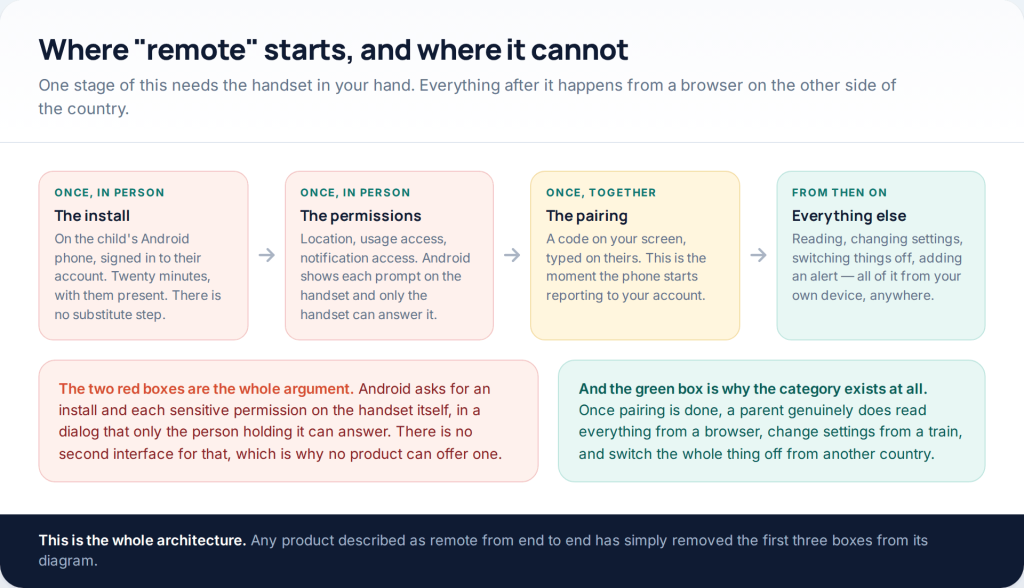
A free SMS tracker can be remote afterwards. It cannot be remote during. Setting one up means roughly twenty minutes with the child’s Android phone in the room — an install, four or five permissions and a pairing code — and from that point everything else happens from your own browser. Any product that claims to skip the first twenty minutes is describing something that does not exist on either operating system.
This URL used to promise a tracker that needed no contact with the phone at all. That promise is the whole genre, and it reduces to three sales pitches: enter a number, read it from the cloud, or install something invisible. None of the three works, and the last section of this page explains precisely why. The rest of it is the setup that does.
What “remote” can honestly mean
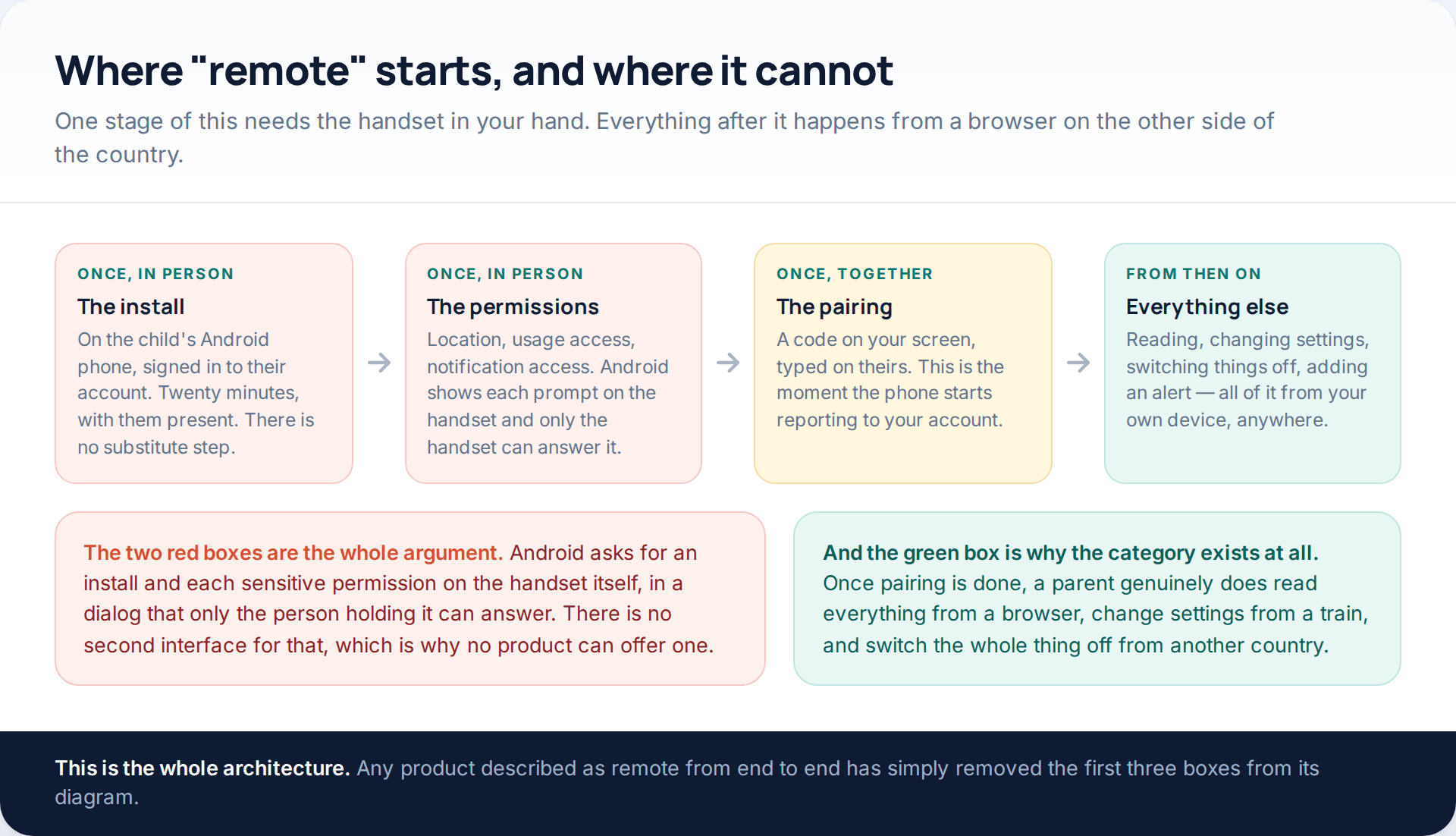
It is worth separating the two things that get called remote monitoring, because conflating them is how people end up paying for nothing. Remote reading — opening a browser anywhere and seeing what a phone has reported — is real, and it is what every legitimate product in this category does. Remote installation — making software appear on a handset you are not touching — is not real, and the reason is structural rather than commercial.
Android requires a person at the device to approve an installation and each sensitive permission. Those dialogs cannot be answered from another phone. If they could, the entire security model of the platform would be gone, and the problem would be considerably larger than a parent not being able to read a text.
Before you install anything
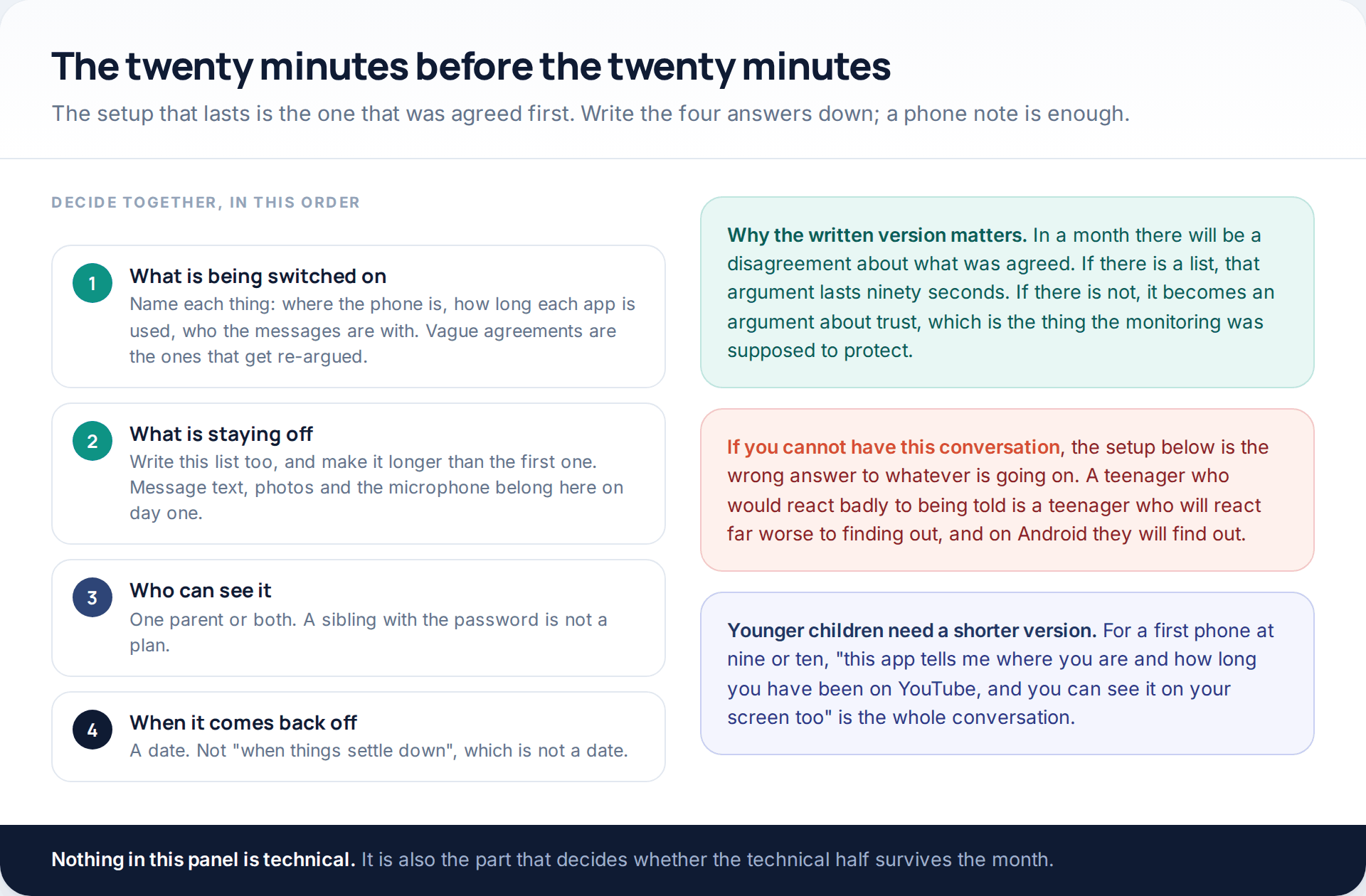
Two of these four are usually skipped, and they are the two that matter most. The stays off list is what makes the arrangement specific rather than open-ended: a child who knows that message text, photos and the microphone are not being shared has something concrete to trust. The end date is what keeps a temporary measure temporary.
The setup, step by step
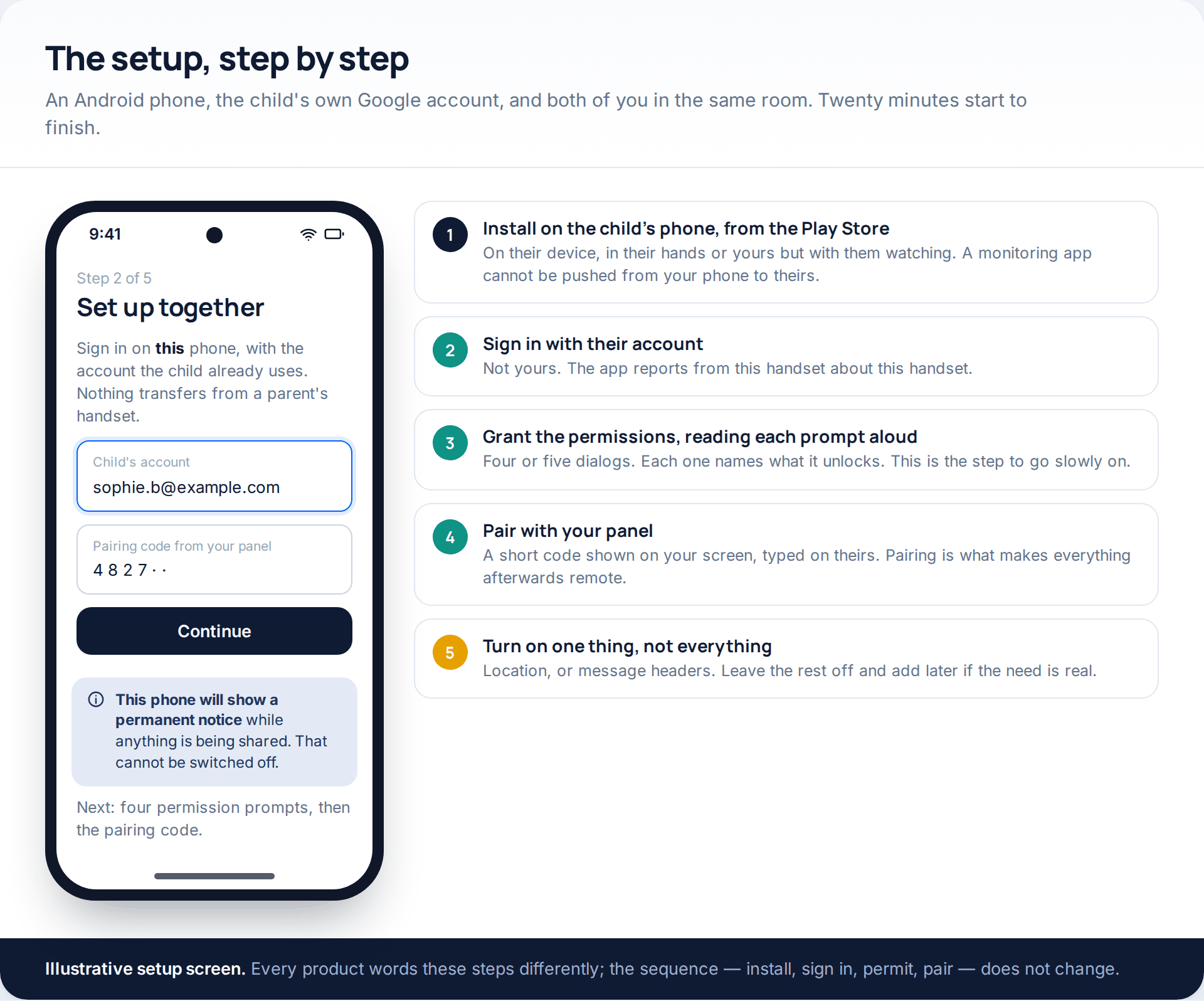
A detail that trips people up: you sign in on the child’s phone with the child’s account, not yours. The app reports from that handset about that handset. There is nothing to install on your own phone at all in most products — the parent side is a web page.
The last step in that list is the one to take seriously. Turn on one thing. Location is the usual choice because it is the least intrusive and the most often genuinely useful; message headers are the other reasonable starting point if the worry is about who, rather than where. Switching everything on at once makes the arrangement impossible to discuss, because there is nothing left to concede.
The permissions, one at a time
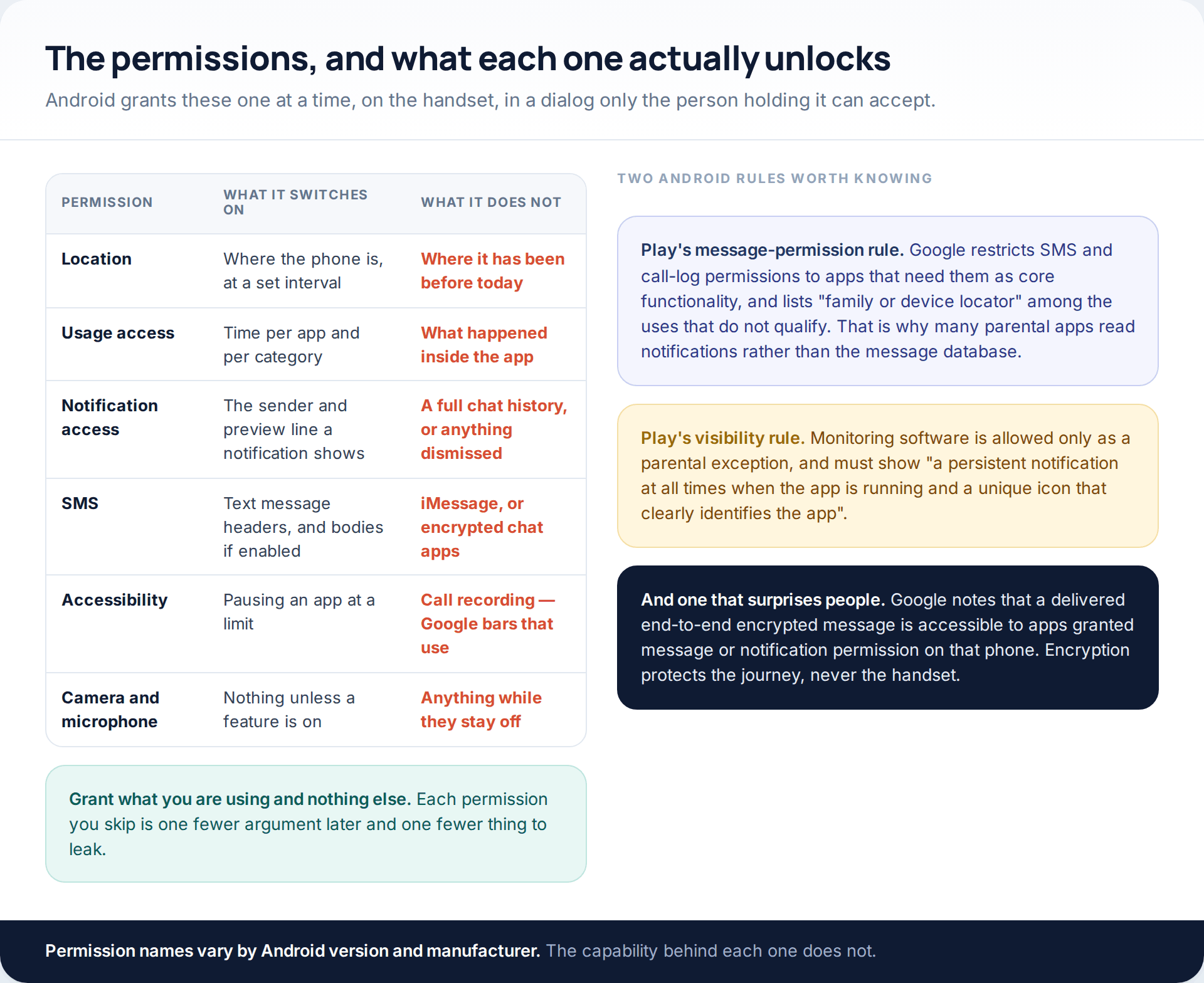
Two of Google’s own rules explain a great deal about why products in this category behave the way they do.
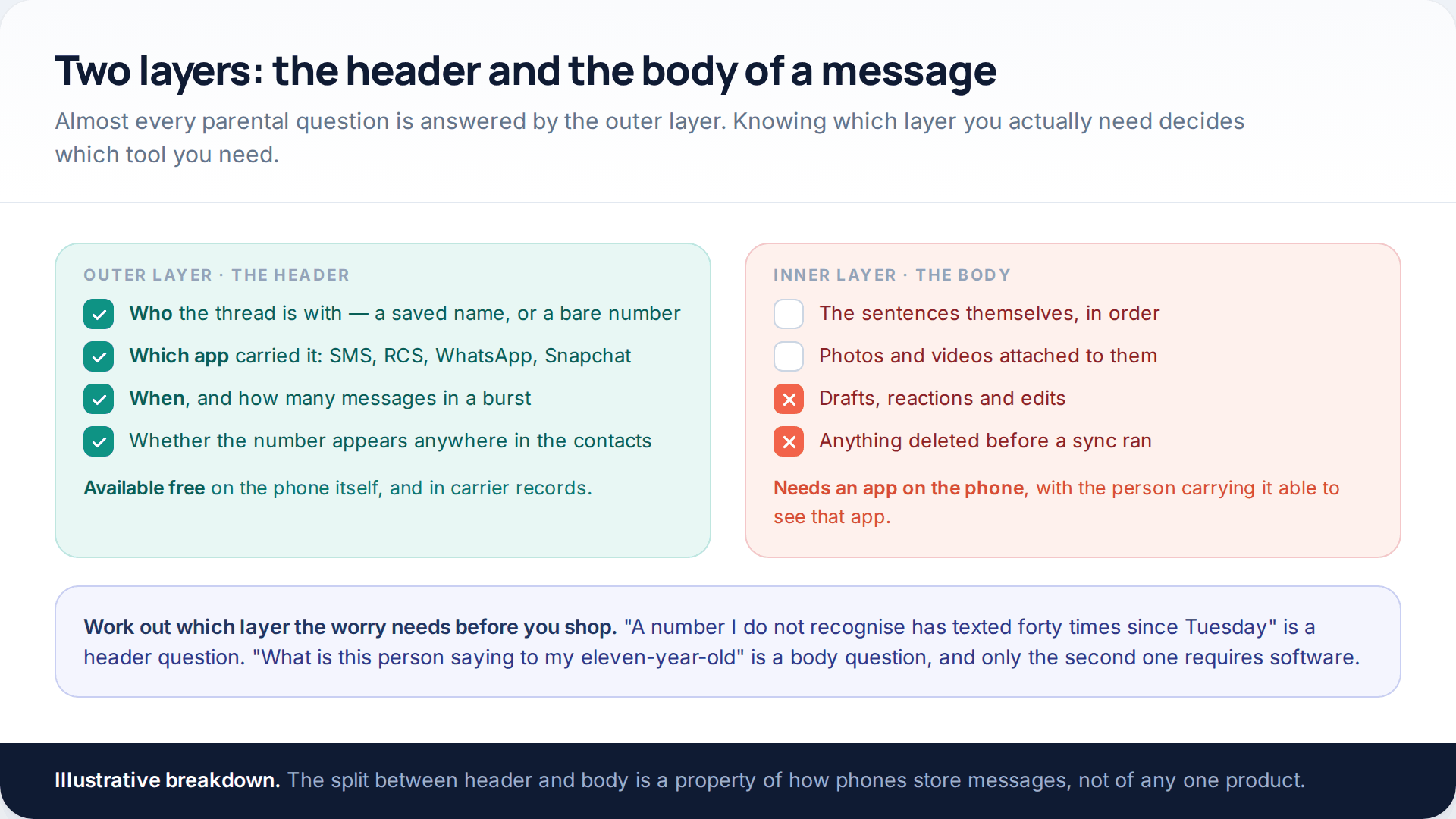
The first is the permissions policy. Google restricts the SMS and call-log permissions to apps whose core functionality requires them, and explicitly lists “family or device locator” among the uses that do not qualify. That is why a number of parental apps read notifications rather than the message database — and why their coverage is thinner than it sounds, since a notification shows a sender and a preview line rather than a conversation, and shows nothing at all once dismissed.
The second is the surveillance policy. Monitoring software is permitted only as an exception for parents supervising children, and Google requires such an app to display “a persistent notification at all times when the app is running and a unique icon that clearly identifies the app”. There is no compliant way to hide. An app offering to do so is telling you where it stands in relation to the store’s rules, and by extension to everything else.
The notice on the child’s phone
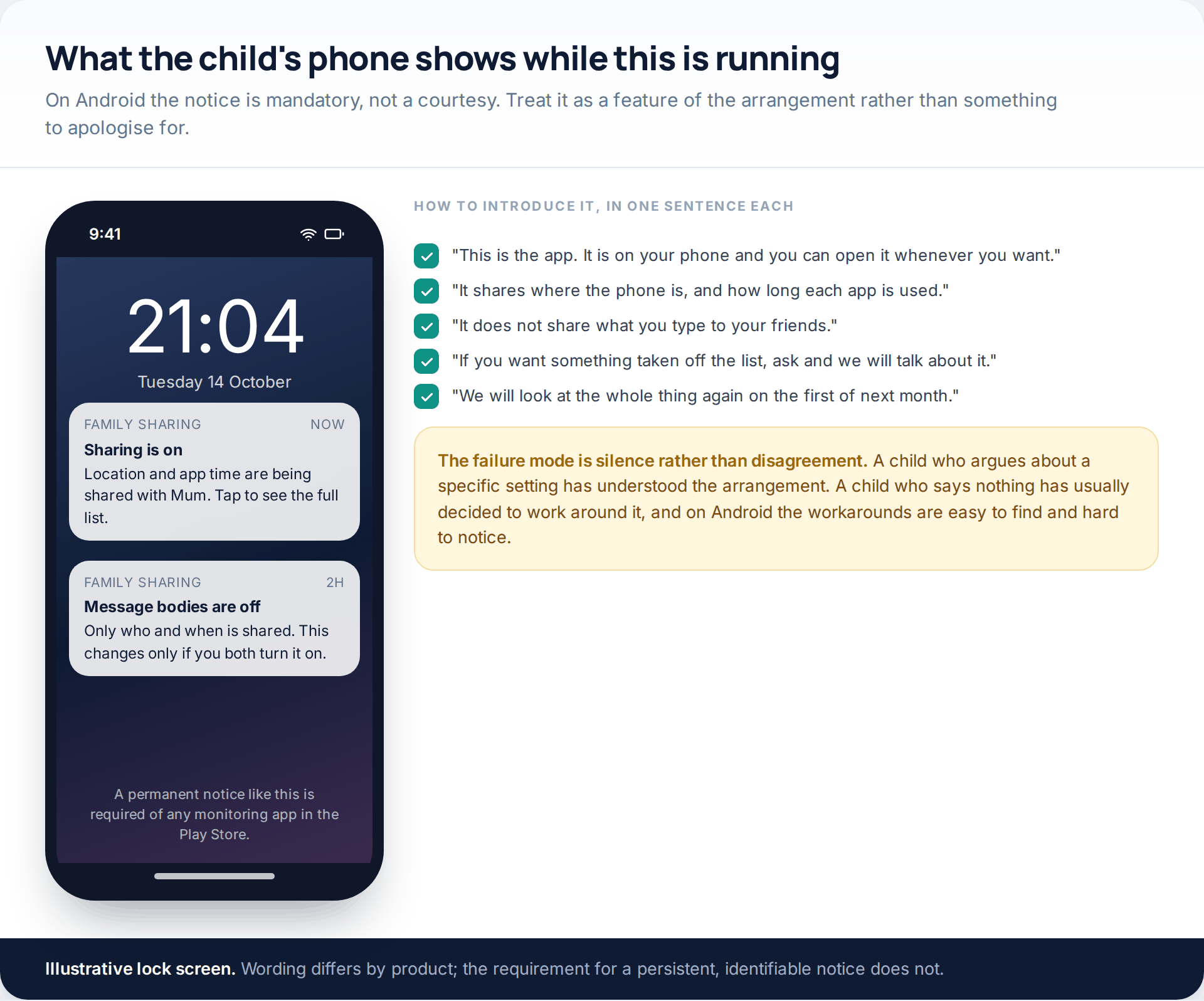
Parents often treat this notification as the problem with the whole approach. It is closer to being the point of it. The notice means the arrangement has to be honest, and an honest arrangement is one a child can question, negotiate and eventually grow out of. We have written more about getting that first conversation right in our guide on telling your child you are monitoring their phone.
The backup and sync routes, assessed
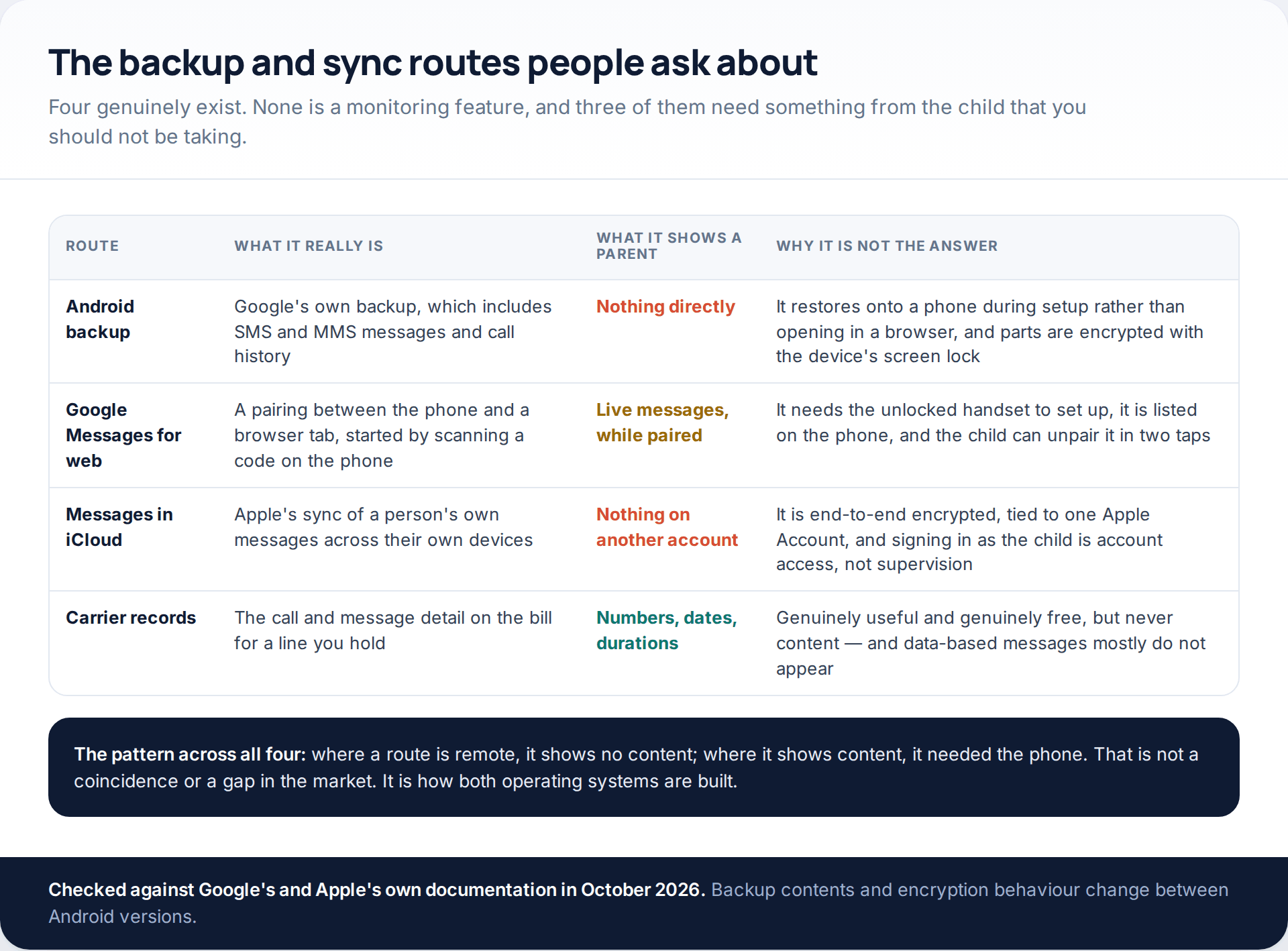
The Android backup question comes up constantly, so here is the precise answer. Google’s backup does include SMS and MMS messages and call history. But it is a restore target: it goes onto a device during setup, it does not open in a browser, and Google states that some of it is encrypted with the device’s own screen lock. Restoring a child’s backup onto a second handset would also mean signing in as them, which is account access rather than supervision and a materially different thing both ethically and legally.
Google Messages for web is the route that genuinely shows live messages, and it is worth understanding why it is still not the answer. Pairing requires scanning a code on the unlocked phone, the pairing appears in the app on that phone, and it can be ended there in two taps. It is a convenience feature for the owner of the device, built with the owner’s knowledge in mind, and using it otherwise is both fragile and a breach of the trust the rest of this page is trying to preserve.
Messages in iCloud is simpler still: Apple’s sync covers one person’s own devices on one Apple Account, and the content is end-to-end encrypted. There is no parental view, and there is not going to be one.
Why the no-install claims are false
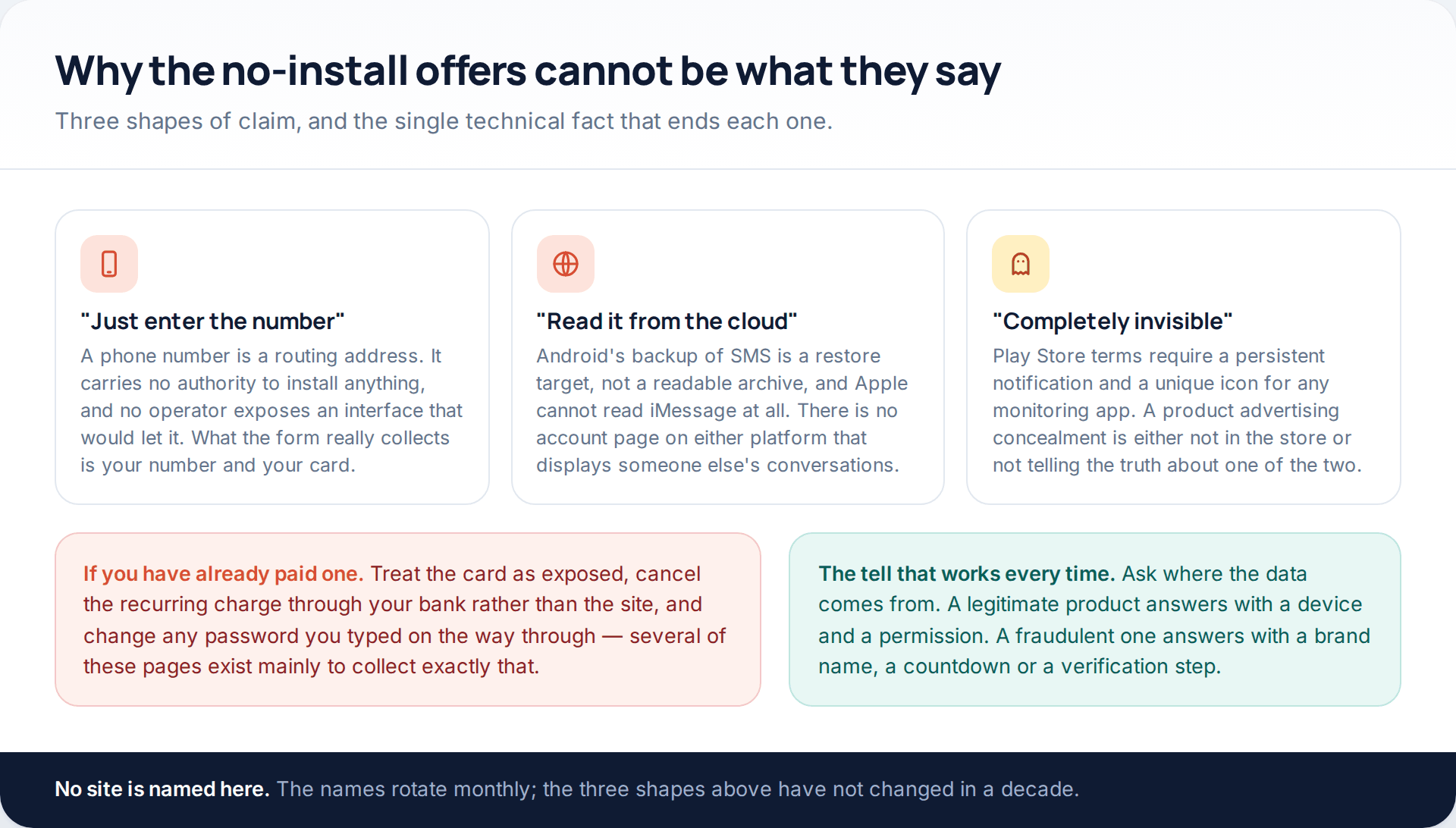
The “enter the number” version deserves the most attention, because it is the most persuasive. A mobile number is a routing address. It tells a network where to deliver a call or a message; it confers no authority to place software on the device at the other end, and no operator exposes an interface that would allow it. The only interception routes that work at the network layer are the ones reserved for law enforcement under a warrant, and they are not for sale.
If you have already paid one of these sites, treat the card as exposed. Cancel the recurring payment through your bank rather than through the site, which will usually not respond, and change any password you entered along the way.
When the log has gaps
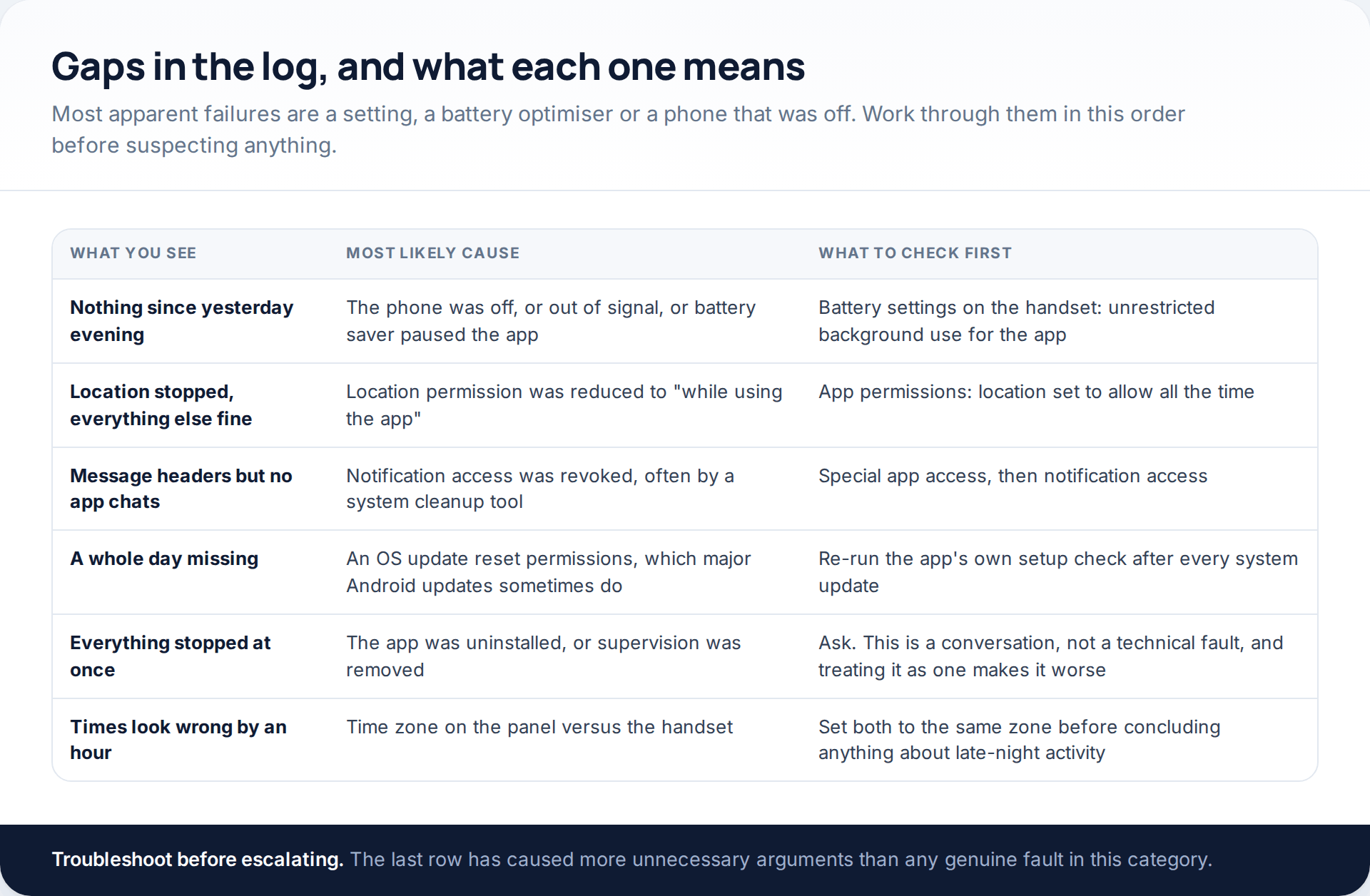
The last row of that table is not a joke. A panel set to one time zone and a handset set to another will show late-night activity that never happened, and we have seen that misunderstanding do real damage in a household before anyone thought to check the clock.
The second-to-last row is the serious one. If everything stops at once, the app has been removed or supervision has been ended, and the right response is a conversation rather than a reinstallation. Reinstalling without discussing it turns an agreed arrangement into a contest, and it is a contest a teenager will win eventually.
How the pairing step looks in practice
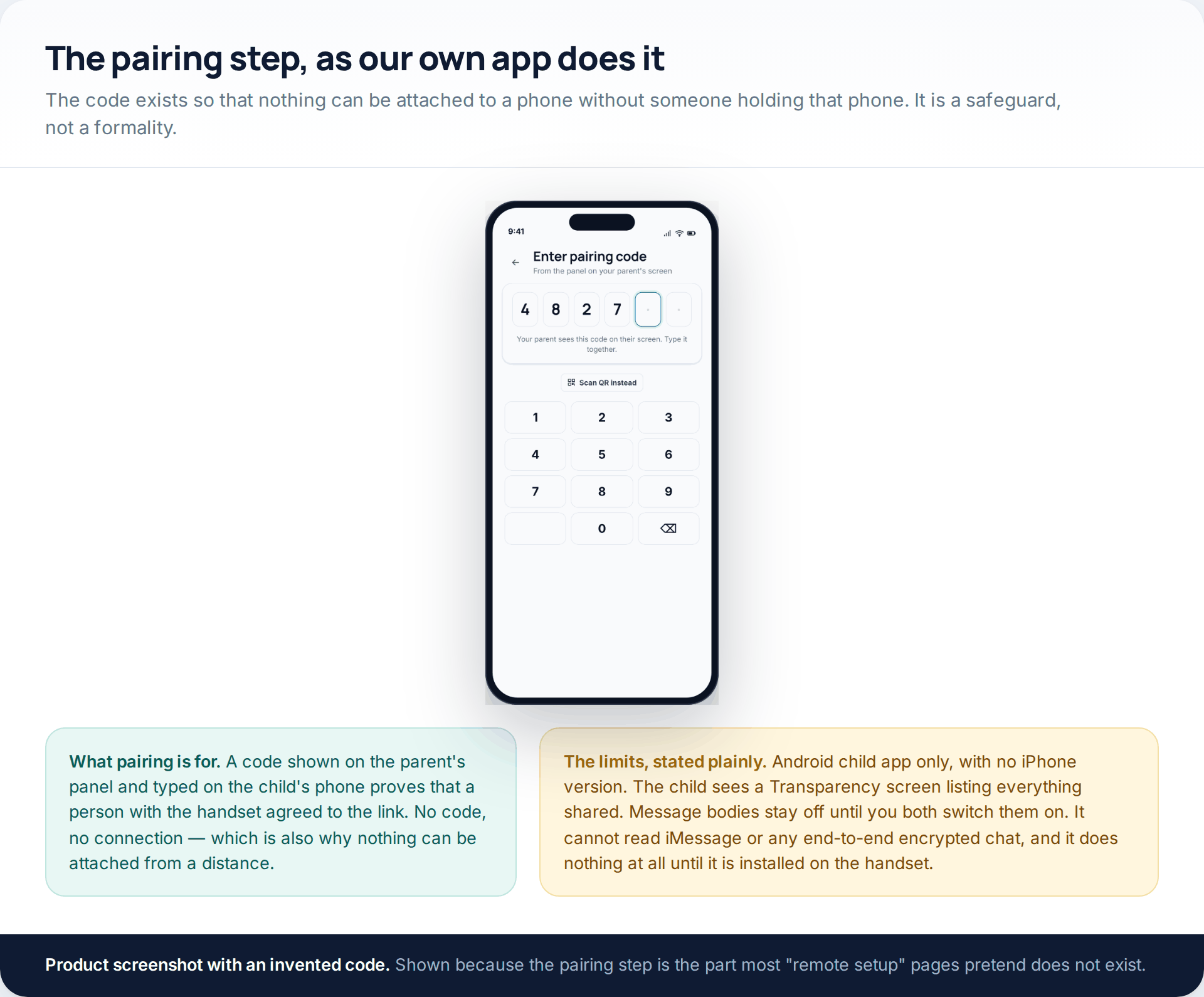
GuestSpy works the way this page describes because there is no other way for it to work. The download and setup page covers the install itself. The limits are the ones stated above and we would rather repeat them than have them discovered: Android child app only, no iPhone version, a Transparency screen on the child’s phone listing everything shared, message bodies off until you both switch them on, no access to iMessage or any end-to-end encrypted chat, and nothing whatsoever happening until it is installed on the handset.
The first month
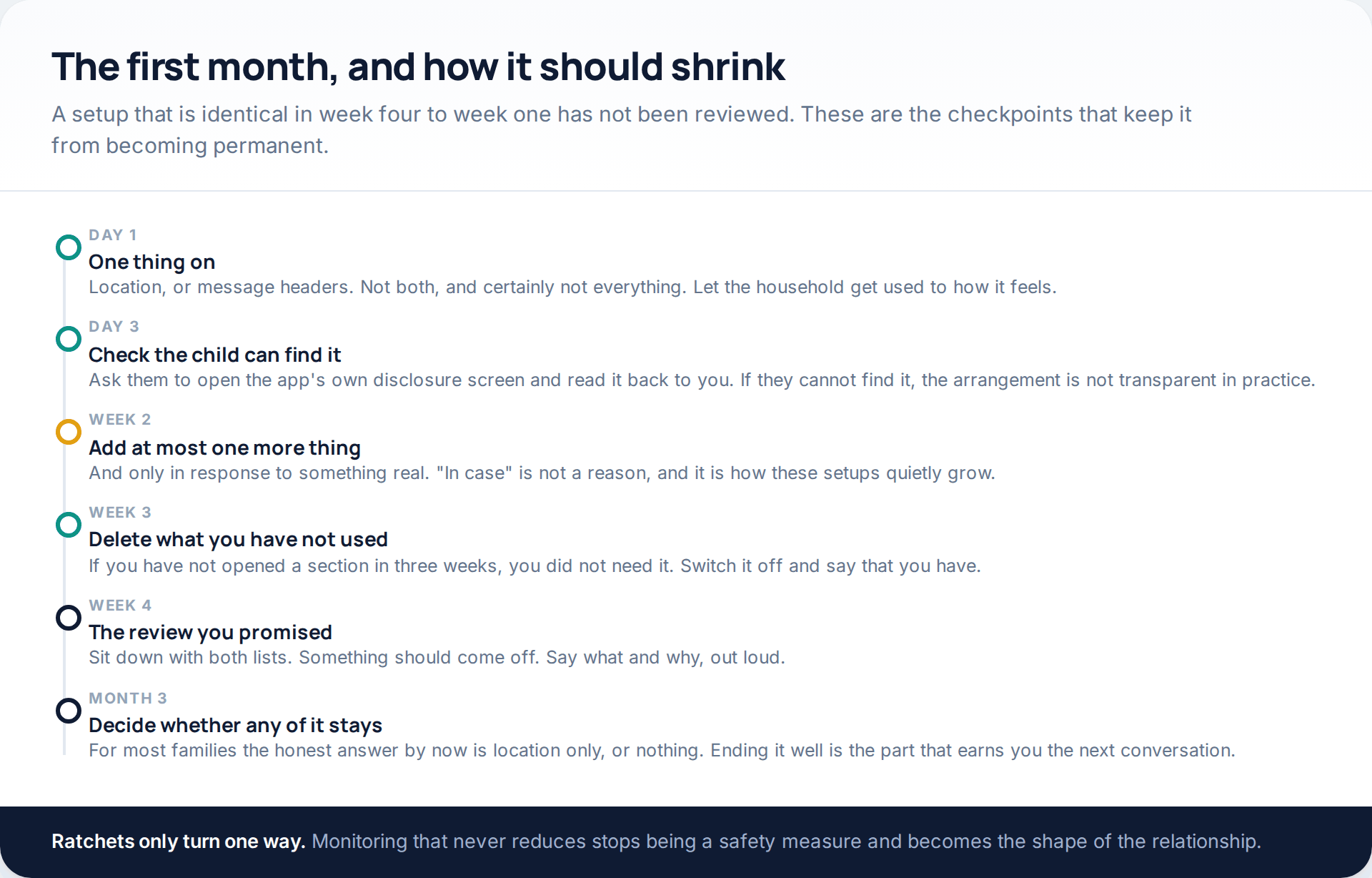
Most of the harm attributed to monitoring comes from setups that never ended. The technology is rarely the problem; the permanence is. Putting a date in the calendar at the start costs nothing and changes what the whole thing means to the person being monitored.
How this page was put together
The platform behaviour here was checked in October 2026 against Google’s documentation on Android backup and restore, end-to-end encryption in Google Messages, and the Play Store policies on SMS and call-log permissions and on surveillance apps; and against Apple’s published list of end-to-end encrypted iCloud data categories. The setup sequence describes how Android grants permissions rather than any single product’s wizard, because the wizards differ and the underlying dialogs do not. Permission names and the location of battery settings vary by manufacturer, so treat those as directions rather than exact paths.
We have deliberately not given timings for how quickly data appears in a panel, because that depends on the handset, the network and the vendor, and every figure published elsewhere is a best case. We have not named any of the sites selling no-install trackers, and we have not tested one; the technical explanations above are about what the platforms permit, which is a more durable answer than a review of a site that will have a different name next quarter.
If you are still at the stage of deciding whether any of this is proportionate, rather than how to set it up, our piece on monitoring a teenager without wrecking the relationship is the better place to start.
Common questions
Can any tracker be installed remotely?
No. Android requires a person at the handset to approve the installation and each sensitive permission, and those dialogs cannot be answered from elsewhere. Every product that works needed somebody to hold the phone once.
How long does the setup take?
About twenty minutes if the conversation has already happened, and most of that is reading permission prompts properly rather than tapping through them. The pairing itself takes under a minute.
Will my child be able to see the app?
Yes, on Android, if it came from the Play Store. Google requires a persistent notification and a clearly identifying icon for monitoring apps. Plan on them seeing it, because the alternative is them finding it.
Can I read messages from the phone’s backup instead?
Not as a document. Android’s backup includes SMS and call history but restores onto a device during setup rather than opening in a browser, and parts are encrypted with the phone’s screen lock. Reaching it would mean signing in as the child, which is a different thing entirely.
What about WhatsApp and Snapchat?
An app with notification access can see what a notification shows — usually a sender and a preview line — and nothing once it has been dismissed. The conversations themselves are end-to-end encrypted and no third-party product reads them from a server.
Does any of this work on an iPhone?
Not in this form. iOS has no equivalent to Android’s notification or SMS access for third-party apps. Apple’s own Screen Time controls who can be contacted and blurs explicit images; it never shows a parent a message.
The log has gone quiet. Has the app been removed?
Possibly, but check the ordinary explanations first: battery optimisation pausing background work, a permission reset by a system update, or the phone simply having been off. If everything stopped at the same moment, the honest next step is to ask rather than to reinstall.
Using a monitoring app for this? GuestSpy is parental monitoring for Android that stays visible on the child's phone and runs from any browser. If it fits your family, see the Text messages & social feature.
Related guides
Track SMS Messages: Free SMS Monitoring Apps for Parents, Compared
You cannot track SMS messages on a child’s phone from your own phone alone, and no free app changes that.…
Track an Android Phone From Another Android Phone: Three Family-Safe Methods
To track an Android phone from another Android phone, you need one of three things arranged in advance. Find Hub…

Best 10 Free SMS Tracker for Android and iPhone
Earlier, when there we no messenger apps, people used to rely on text messages. Although time and technology are changing,…
Monitoring your child can see.
Location, screen-time budgets, routines, app and website blocking and the alerts that matter, run from any browser and visible on the phone. Pair an Android phone in about fifteen minutes.