A Parent’s View of Snapchat: Family Centre, Location and What Stays Hidden

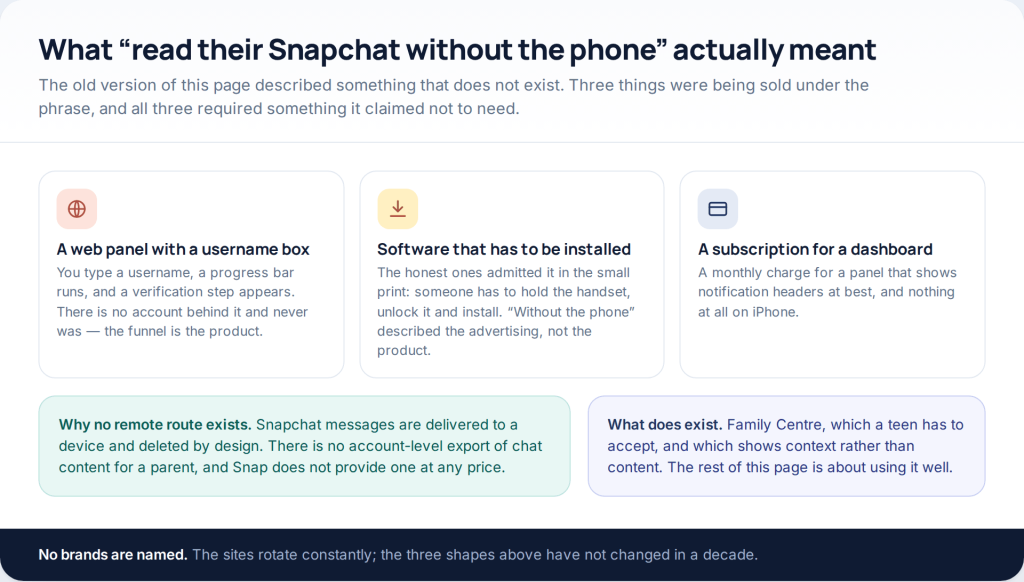
If you want to monitor a child’s Snapchat, there is exactly one sanctioned route: Family Centre, which your teen has to accept, and which shows you context rather than content. You get the friends list, who they have messaged in the last seven days, a weekly time breakdown and two content switches. You never get a single message. That is the deal, and it is worth understanding before you start.
This page used to promise a way to read a child’s Snapchat remotely. No such thing exists, and the next section explains what was being sold instead. What does exist is a set of parent tools Snapchat built deliberately narrow, plus two conversations that matter more than any of them.
What “read their Snapchat without the phone” really was
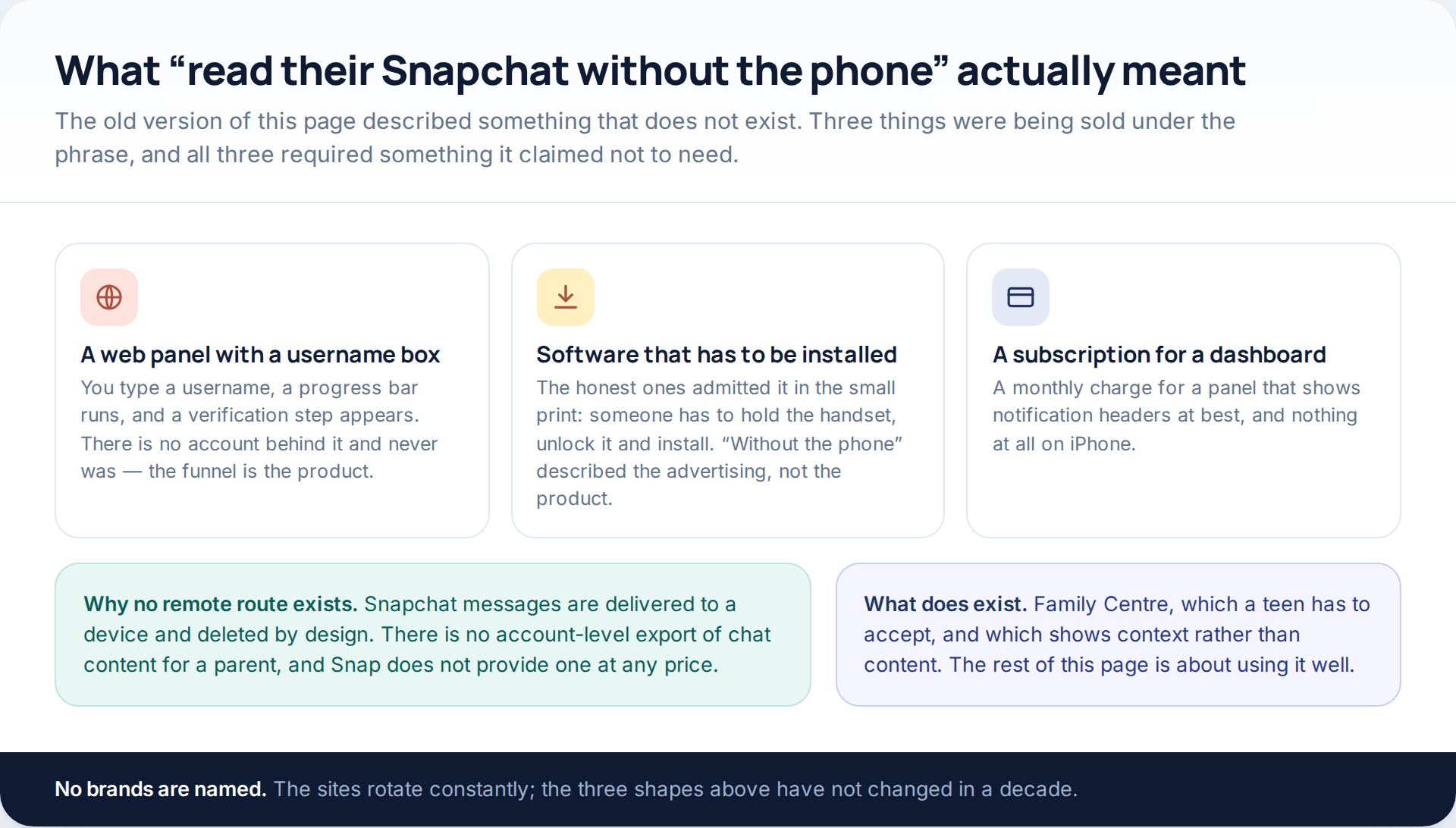
Three products shared that phrase. The first was a web page with a username box and a progress bar, ending in a verification step that never resolved, because there was no account behind it. The second was ordinary monitoring software, which does work, but only once somebody has held the phone, unlocked it and installed it — the “without the phone” part described the advertising. The third was a monthly subscription for a dashboard that, at best, forwards notification headers, and which does nothing at all on an iPhone.
The reason none of them could do what was promised is structural. Snapchat messages are delivered to a device and deleted by design; Snap states that opened or expired Snaps typically cannot be retrieved from its servers by anyone, for any reason. There is no account-level archive of a teenager’s chats sitting somewhere waiting for a parent login, and no amount of money produces one.
What Family Centre actually shows
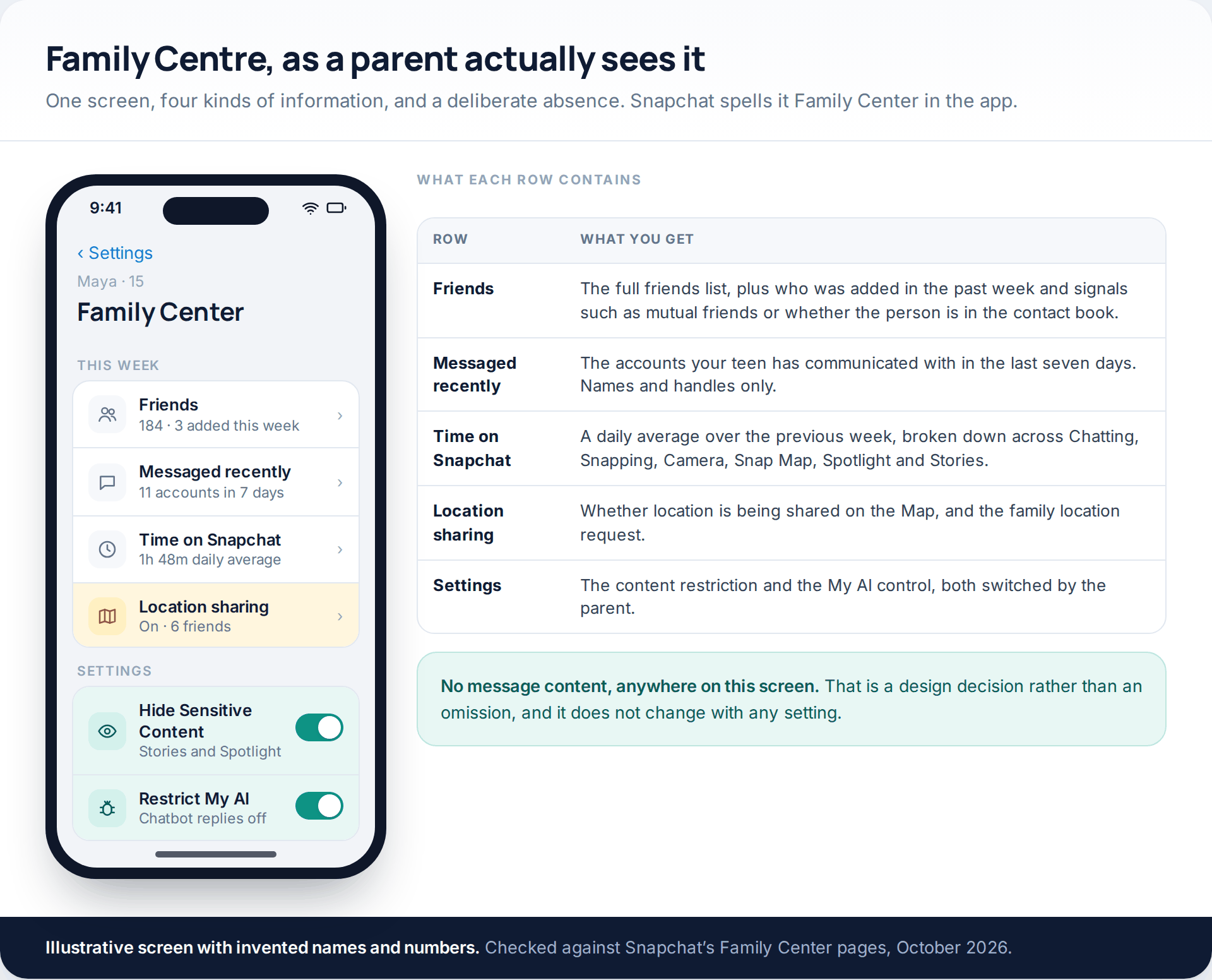
Snapchat spells it Family Center in the app, which is worth knowing when you go looking. It gives a parent four things.
The friends list, in full, plus who has been added in the past week. Since Snapchat’s January 2026 update this includes context about new friends — whether you have mutual connections, whether the account is in the contact book, and similar signals. The point is to notice the pattern: eleven new friends in a week, none connected to anyone your teen knows, is a different picture from two.
Who they have messaged recently, meaning the accounts communicated with in the last seven days. Handles and names only, and only for a rolling week — it is not a log you can scroll back through.
Time on Snapchat, as a daily average over the previous week, split across Chatting, Snapping, Camera, Snap Map, Spotlight and Stories. This arrived with the same January 2026 update and is the most useful addition in a while, because the split says more than the total.
Location sharing, in the sense of whether your teen is sharing on the Map and whether they are sharing with you. Plus the ability to report an account on their behalf, which is a genuinely useful thing to have if something has gone wrong and they are reluctant to do it themselves.
Setting it up without it becoming an argument
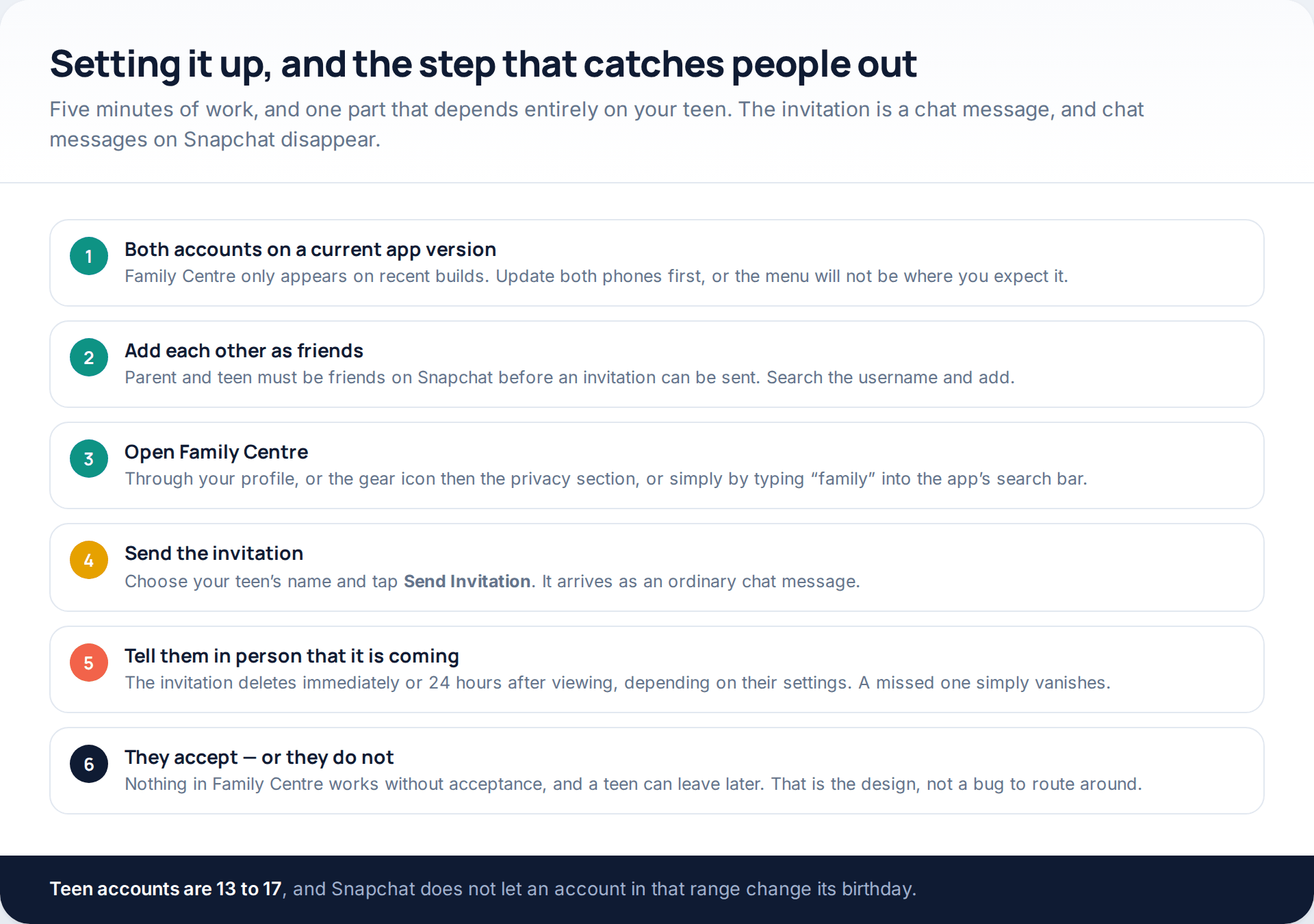
The mechanics are quick. Both of you need a current version of the app, you need to be friends on Snapchat, and then you open Family Centre — from your profile, from the gear icon and the privacy section, or just by typing “family” into the search bar. Pick your teen’s name, tap Send Invitation, and wait.
The step that catches people out is the last one. The invitation arrives as an ordinary chat message, which means it deletes itself either immediately or 24 hours after viewing, depending on their settings. Snapchat’s own advice is to tell your teen in person that it is coming. A missed invitation looks identical to a refused one.
And it is worth being straightforward about what you are asking for, because they will find out in about ninety seconds of looking. Saying “I will be able to see who you add and roughly how long you spend, and I will not be able to read anything” is both true and a much better opening than being discovered. We have written separately about how to frame that conversation with an older child.
What stays hidden, permanently
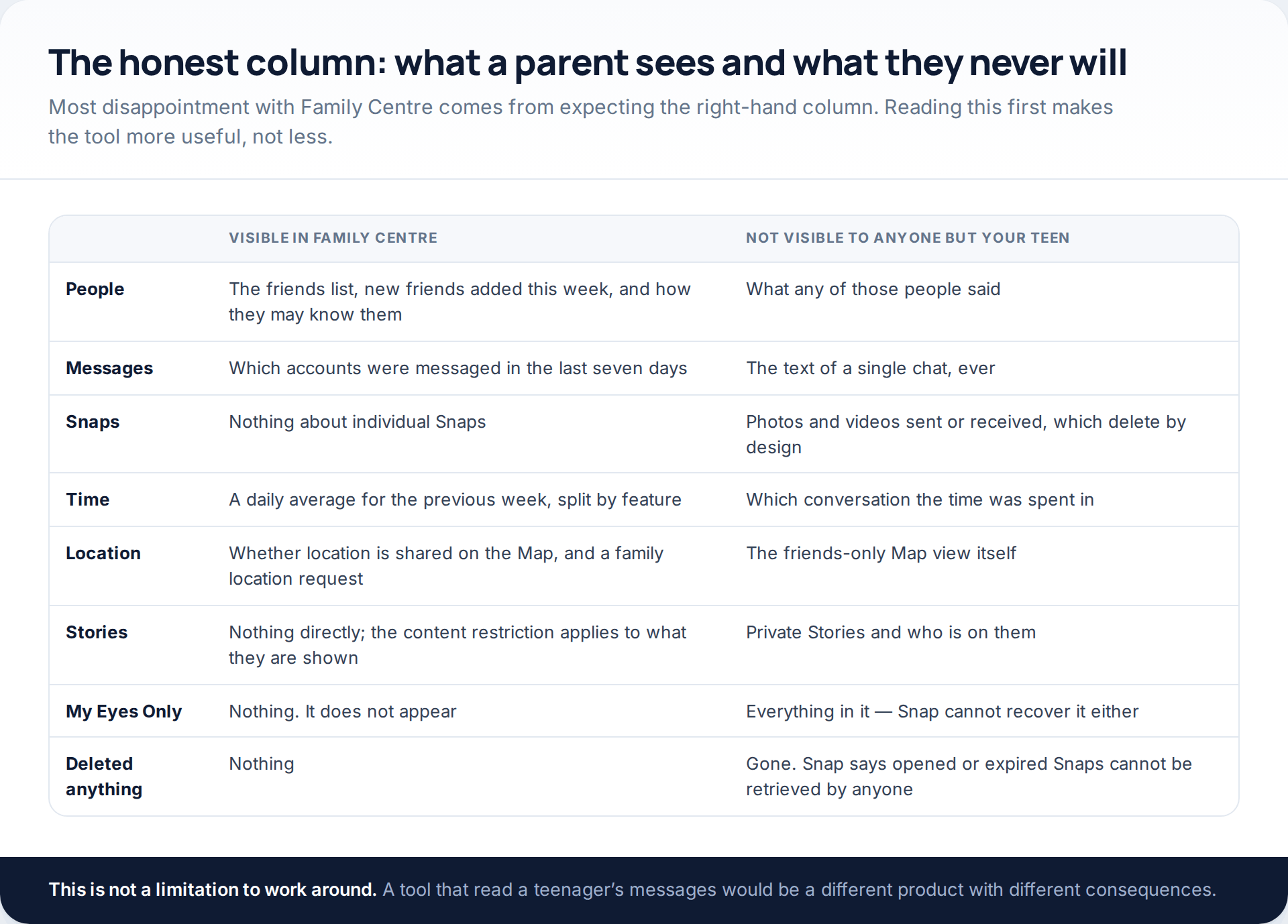
Family Centre shows you context. It does not show you content, and there is no setting, subscription or version that changes this. You will never see the text of a chat, the photographs and videos exchanged, who is on a private Story, or anything at all in My Eyes Only — a passcode-protected area that Snap itself cannot open.
You also will not see history. The messaging view covers seven days and then rolls forward. Deleted content is gone in a stronger sense than on most platforms, because deletion is the default rather than an action.
If that feels thin, it is worth sitting with the alternative for a moment. A tool that let a parent read a teenager’s messages would also be a tool that let anyone who got hold of the parent account read them, and would change what a teenager is willing to say to a friend who is struggling. Snapchat drew the line at context deliberately, and most child-safety organisations draw it in the same place.
Reading the time breakdown properly
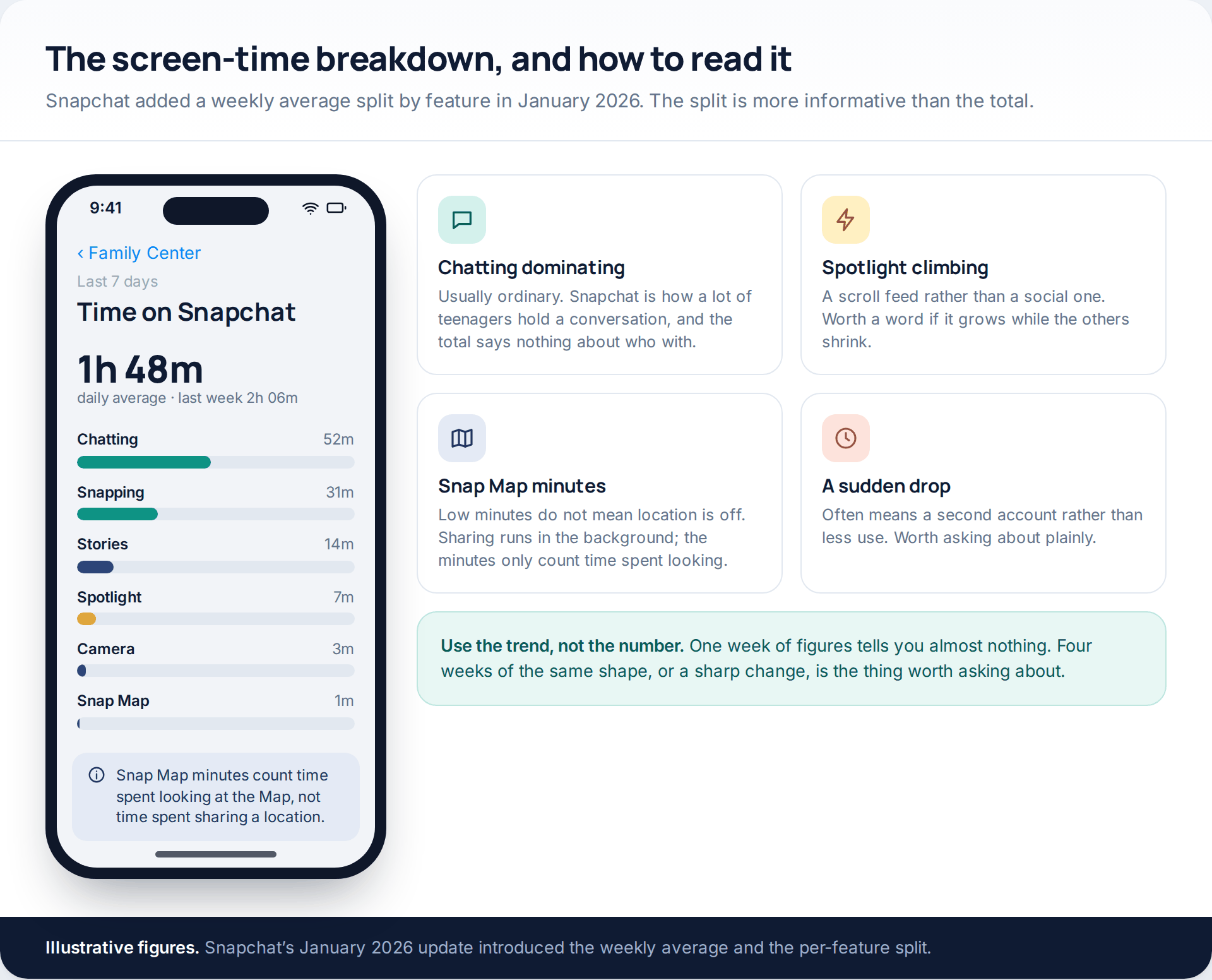
Two hours a day on Snapchat sounds alarming until you see that most of it is Chatting, at which point it is roughly what the telephone was. The shape is what to watch, and it is only readable over several weeks.
Three patterns are worth a question. Spotlight climbing while everything else falls means the app has become a scroll feed rather than a social one. A sharp, unexplained drop in total time more often means a second account than a change of habit. And low Snap Map minutes mean very little — location sharing runs in the background whether or not anyone opens the Map, so the minutes only measure time spent looking at it. If screen time generally is the concern rather than Snapchat specifically, that is a different conversation and worth having separately.
Snap Map: what you see, and what you can ask for
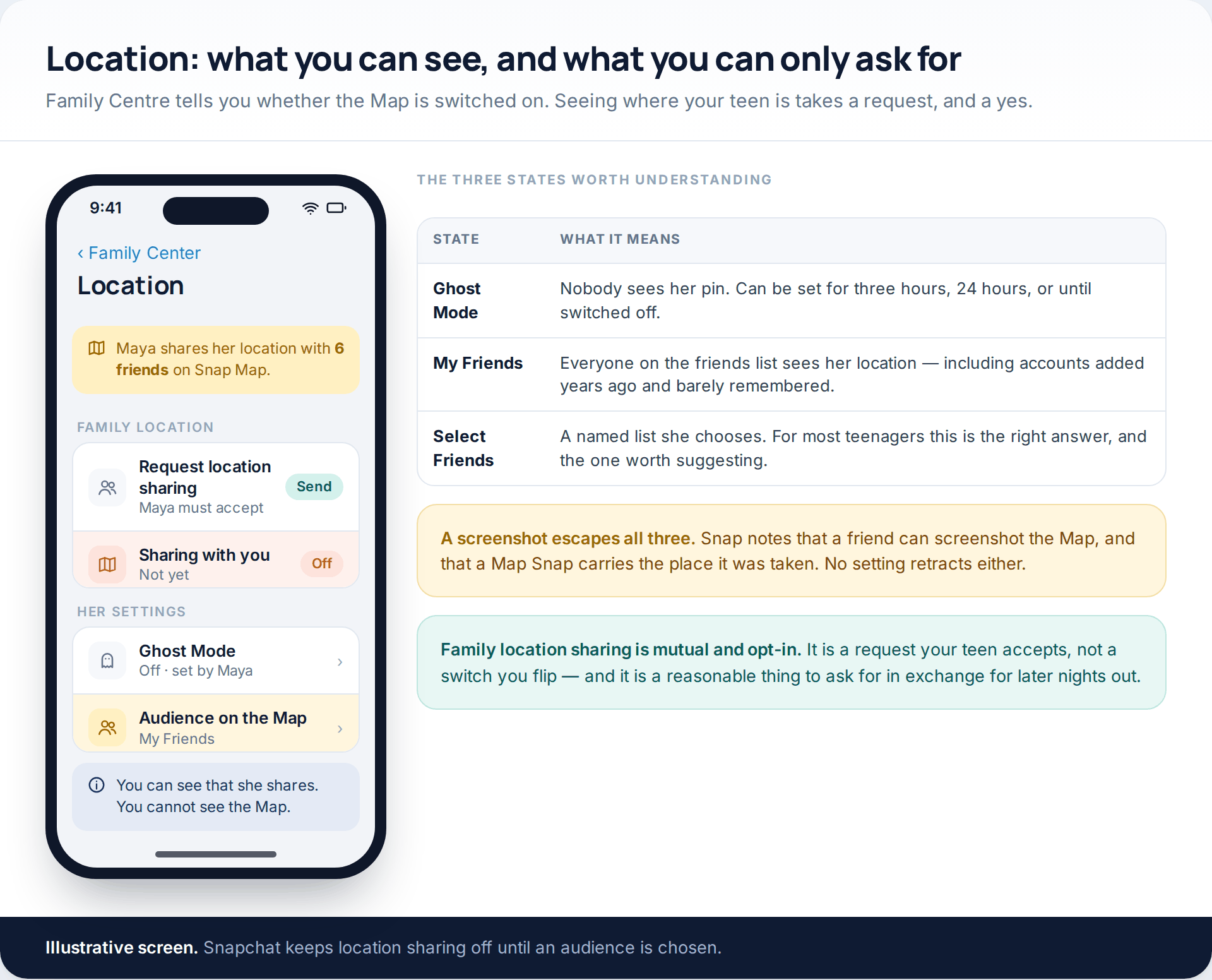
Family Centre tells you whether your teen shares location on the Map, and lets you send a family location request they can accept or decline. It does not show you their Map.
The setting underneath has three states. Ghost Mode hides them from everyone and can be set for three hours, twenty-four hours, or until switched off. My Friends shares with the entire friends list. Select Friends shares with a named list they choose. Snapchat keeps sharing off until an audience is picked, and says only friends a user has chosen can see them.
For most teenagers, Select Friends is the answer, and it is an easier sell than Ghost Mode because it does not ask them to disappear. The argument that works is not about supervision: a friends list of a hundred and eighty people, assembled over four years, is a lot of people to show a home address to every evening. Note too that Snap warns a friend can screenshot the Map, and that a Map Snap carries the place it was taken — neither of which any setting retracts afterwards.
The two switches you actually hold
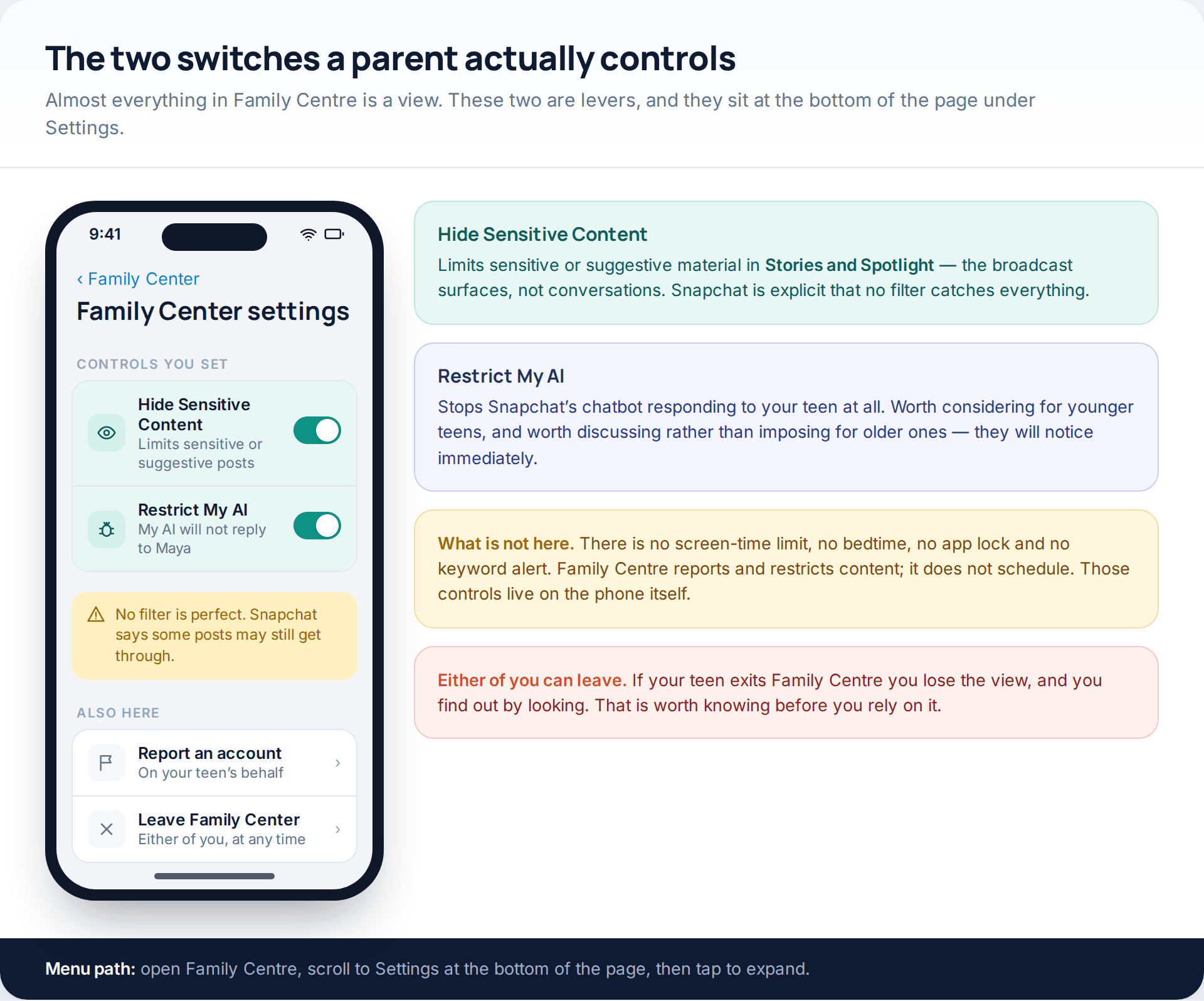
At the bottom of Family Centre, under Settings, there are two controls. Hide Sensitive Content limits sensitive or suggestive material in Stories and Spotlight — the broadcast surfaces, not conversations — and Snapchat says plainly that no filter is perfect and some posts may still appear. Restrict My AI stops Snapchat’s chatbot replying to your teen at all.
What is not there matters as much. There is no screen-time limit, no bedtime, no app lock and no keyword alert in Family Centre. If you want Snapchat unavailable after ten o’clock, that is an iOS Screen Time or Android Family Link job, not a Snapchat one. And either of you can leave Family Centre at any time; if your teen does, the view simply stops, and you find out by looking rather than by being told.
The two conversations that beat the settings
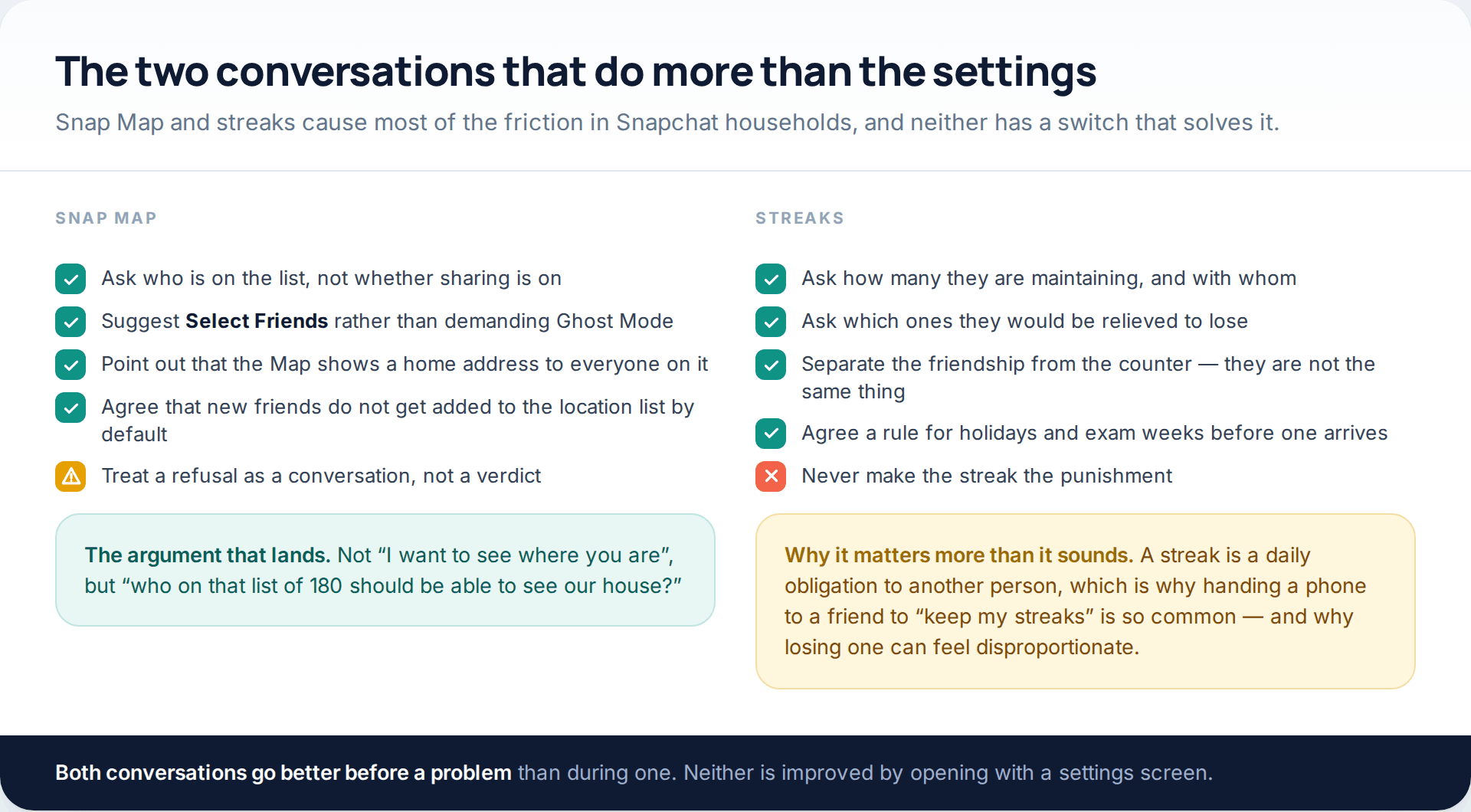
Streaks deserve more respect than they usually get from adults. A streak is a daily obligation to a specific person, and the reason a teenager hands their phone to a friend before a flight is that letting one lapse feels like letting someone down rather than losing a number. Asking how many they are keeping, and which ones they would be quietly relieved to lose, gets further than explaining that it is only a counter.
The Map conversation works best as a question about audience rather than permission. Who on that list should be able to see this house? That framing tends to produce a shorter list without an argument, and a shorter list is the actual goal.
Where a monitoring app fits, and where it stops
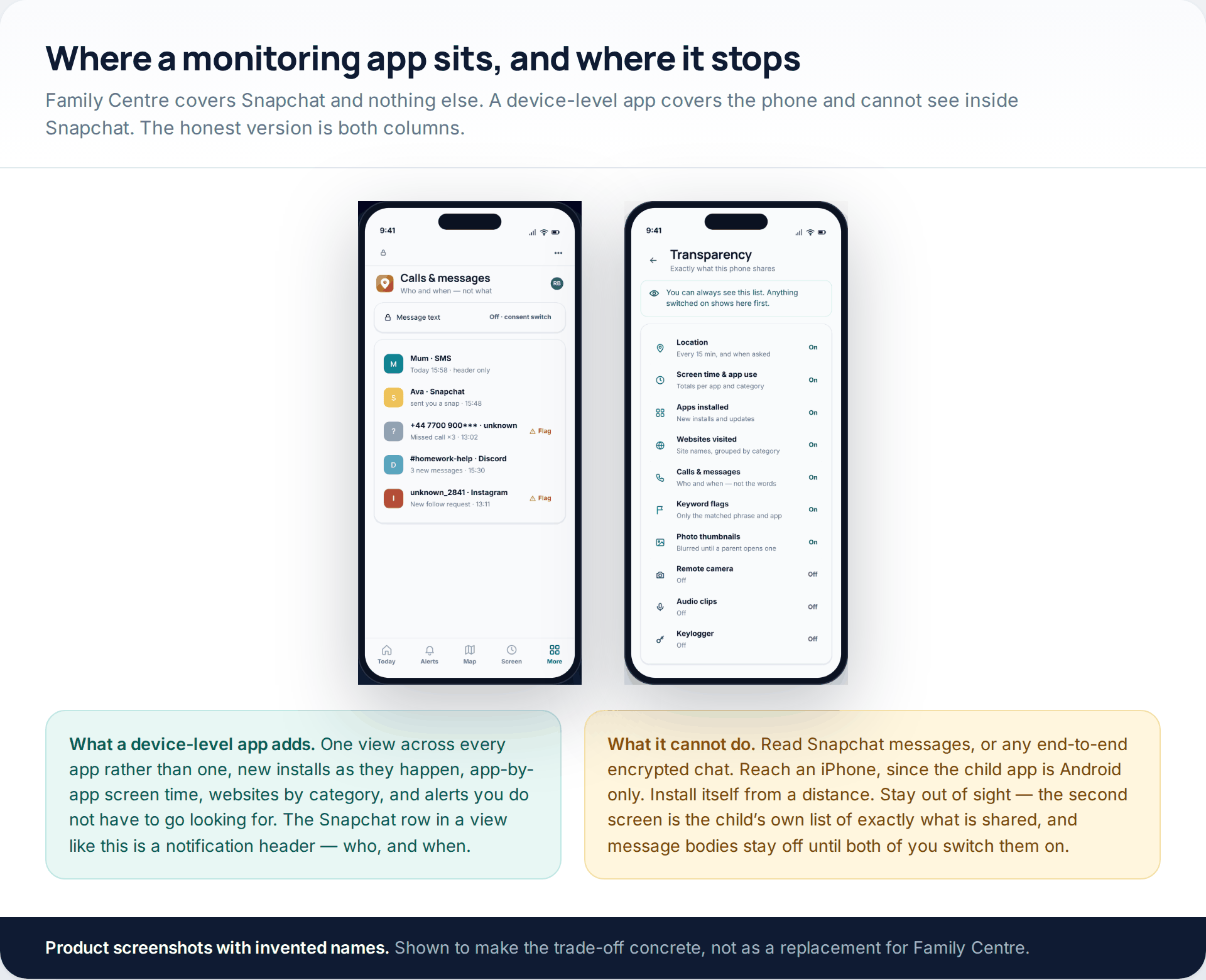
Family Centre covers Snapchat and stops there. If the question is broader — what is on the phone, what got installed last week, how the hours split across every app — a device-level tool is the layer underneath. GuestSpy’s parent view reports app installs, app-by-app screen time, websites by category, and who calls and messages arrive from, in one place rather than one app at a time.
Its limits are the ones that matter here. It cannot read Snapchat messages, or any end-to-end encrypted chat — the Snapchat row in a view like that is a notification header, meaning who and when. The child app is Android only, so an iPhone is out of scope. It has to be installed on the handset in person; nothing arrives remotely. And it is visible: the child’s phone carries a screen listing exactly what is shared, with message bodies switched off until both of you turn them on.
If something has already happened
If your teen has been contacted by an adult stranger, pressured for images, or threatened with something being shared, the order is: do not delete anything, report the account — Family Centre lets a parent report on a teen’s behalf — block, and then contact your national reporting route. In the UK that is CEOP or the police on 101; in the US, the NCMEC CyberTipline. For intimate images of someone under 18, Take It Down and Childline’s Report Remove both exist specifically to get content taken off platforms, and both are free.
The one thing not to do is handle it by taking the phone away first. Whatever happens next depends on your teenager telling you things, and the most common reason they do not is the expectation of losing the device.
How this page was put together
The Family Centre features, menu paths and limits described here were checked against Snapchat’s own parent and help pages in October 2026, including the Family Center overview, the articles on finding it in the app, adding a teen, restricting content, and Snap Map visibility, and Snap’s newsroom post of January 2026 announcing the weekly screen-time breakdown and the new-friend context. Where Snapchat states something in its own words — that no filter is perfect, that sharing is limited to friends a user has chosen, that opened or expired Snaps cannot be retrieved — we have used its wording rather than strengthening it.
We did not test any third-party product that claims to read Snapchat content, because the claim is not credible on its face and testing it would mean paying for it. No statistics appear here: there are no reliable public figures for how many teenagers use Family Centre or what parents find in it, and an invented number would be worse than none. Snapchat changes these screens often, so treat every path above as current rather than permanent.
If the worry is less about Snapchat specifically and more about what a thirteen-year-old should have on their phone at all, that question is answered better elsewhere, and we have covered it in deciding when monitoring is appropriate by age.
Common questions
Can I see my child’s Snapchat messages through Family Centre?
No. Family Centre shows which accounts your teen has messaged in the last seven days and nothing about what was said. There is no setting that reveals content, and no third-party product can read it either, because the messages are not stored for that purpose.
Does my teenager know I have joined Family Centre?
Yes, necessarily. They receive an invitation and have to accept it, they can see that you are connected, and they can leave at any time. It was designed as a visible, mutual arrangement rather than a quiet one.
What age does Family Centre work for?
Snapchat applies its teen protections to accounts aged 13 to 17, and does not allow an account in that range to change its birthday. You and your teen must also be friends on Snapchat before an invitation can be sent.
Can I set a time limit on Snapchat from Family Centre?
No. Family Centre reports time and restricts content; it has no scheduling. Daily limits and bedtimes come from Apple’s Screen Time or Google Family Link, which sit underneath the app rather than inside it.
Will I be told when my child adds a new friend?
You can see new friends added in the past week when you open Family Centre, along with context about how they may know them, but it works as a view you check rather than an alert that interrupts you.
What is My Eyes Only, and can I see inside it?
It is a passcode-protected area of Memories. Nobody can see inside it except your teen — not you, not Family Centre, and not Snapchat, which states it cannot recover that content if the passcode is forgotten.
My teenager refuses Family Centre. What now?
Treat it as a negotiation rather than a failure. Device-level controls still apply, and the usual exchange — later nights out, or a phone upgrade, in return for location sharing — works better than an ultimatum. A refusal is also information about where the relationship is.
Is there any way to see Snapchat activity on an iPhone without the phone?
No. Nothing reads Snapchat remotely on any platform, and the device-level tools that exist need to be installed on the handset itself. On iPhone, the realistic layer is Apple’s own Screen Time, set up on the device with your teen present.
Using a monitoring app for this? GuestSpy is parental monitoring for Android that stays visible on the child's phone and runs from any browser. If it fits your family, see the Location & Places feature.
Related guides
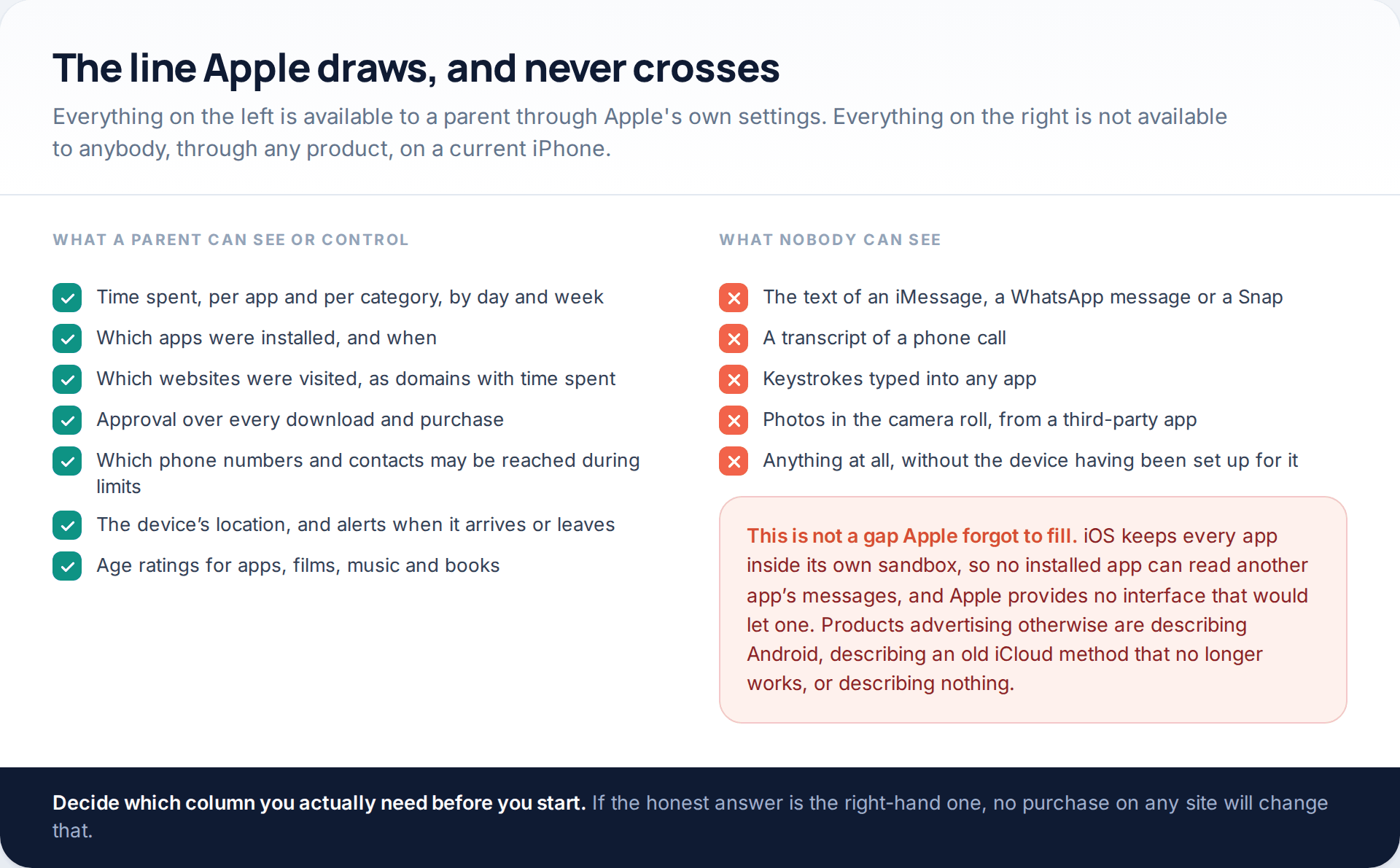
Monitoring a Child’s iPhone Openly: Screen Time, Family Sharing and the Limits
Apple’s monitor iPhone parental controls are better than their reputation and narrower than most advertising implies. Through Family Sharing and…

7 Best Free Hidden Spy Apps for Android (100% Undetectable)
Spying app makes our life easier as we don’t have to worry about our kids and online safety constantly. There…

How to Spy on Text Messages Without Installing Software
Are you wondering how to spy on text messages without installing software on the target phone? If yes, let us…
Monitoring your child can see.
Location, screen-time budgets, routines, app and website blocking and the alerts that matter, run from any browser and visible on the phone. Pair an Android phone in about fifteen minutes.