Tracking a Phone’s Location the Legitimate Way: Six Methods That Need Consent

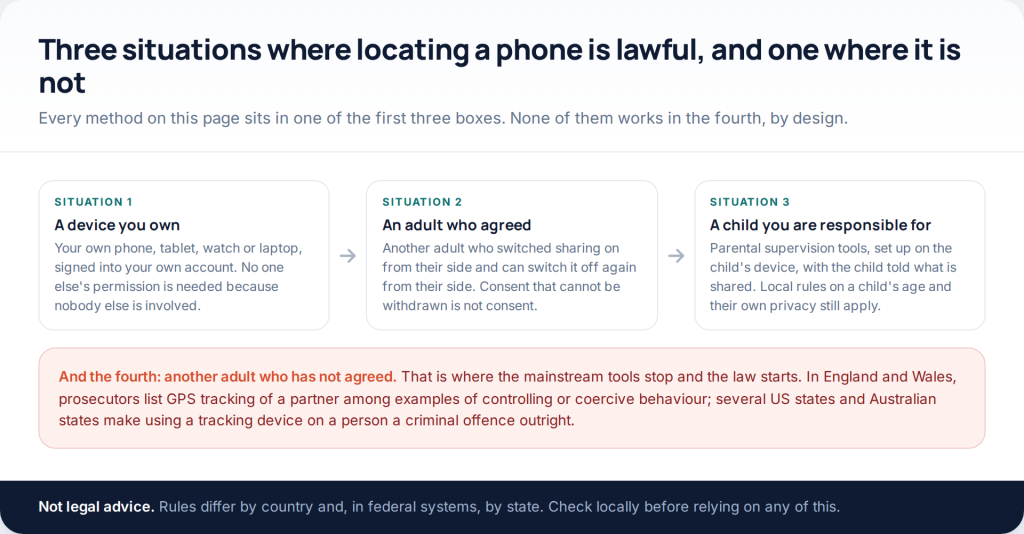
There are six realistic ways to track a cell phone location, and every one of them needs something arranged in advance: your own account on your own device, another adult who switched sharing on, or a child’s phone you set up as a parent. Nothing locates a handset from a phone number, and nothing works retrospectively. Here is each method, what it costs, and how accurate the result really is.
This page used to promise covert tracking. It described three things that do not do what they claim: pages that take a phone number and text it a link, dashboards that take card details before showing a generic map, and monitoring software that has to be installed on the handset with it unlocked in your hands. The first two take money and return nothing useful. The third works, and using it on another adult who has not agreed is unlawful across much of the world.
The rule that applies to all six
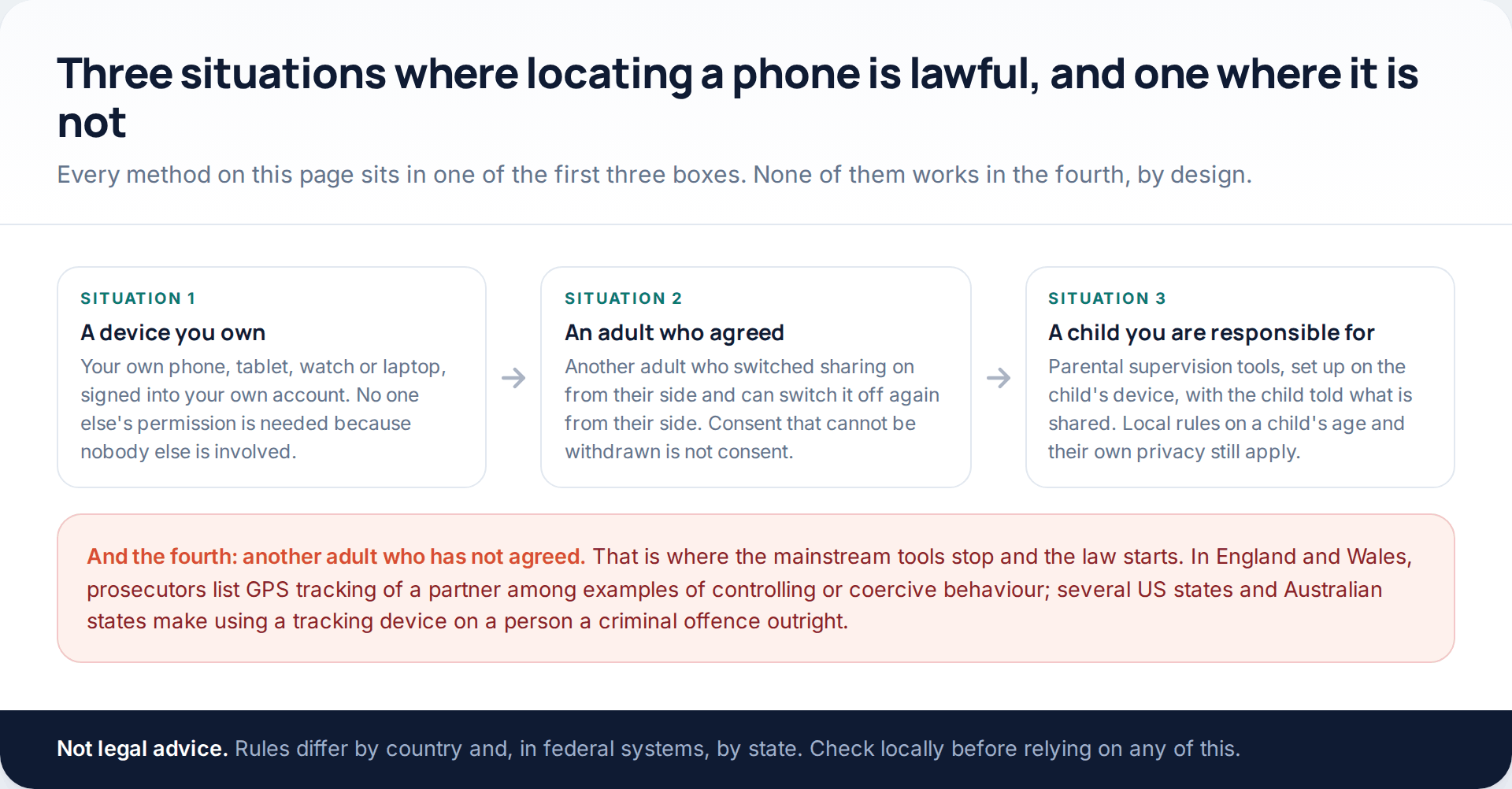
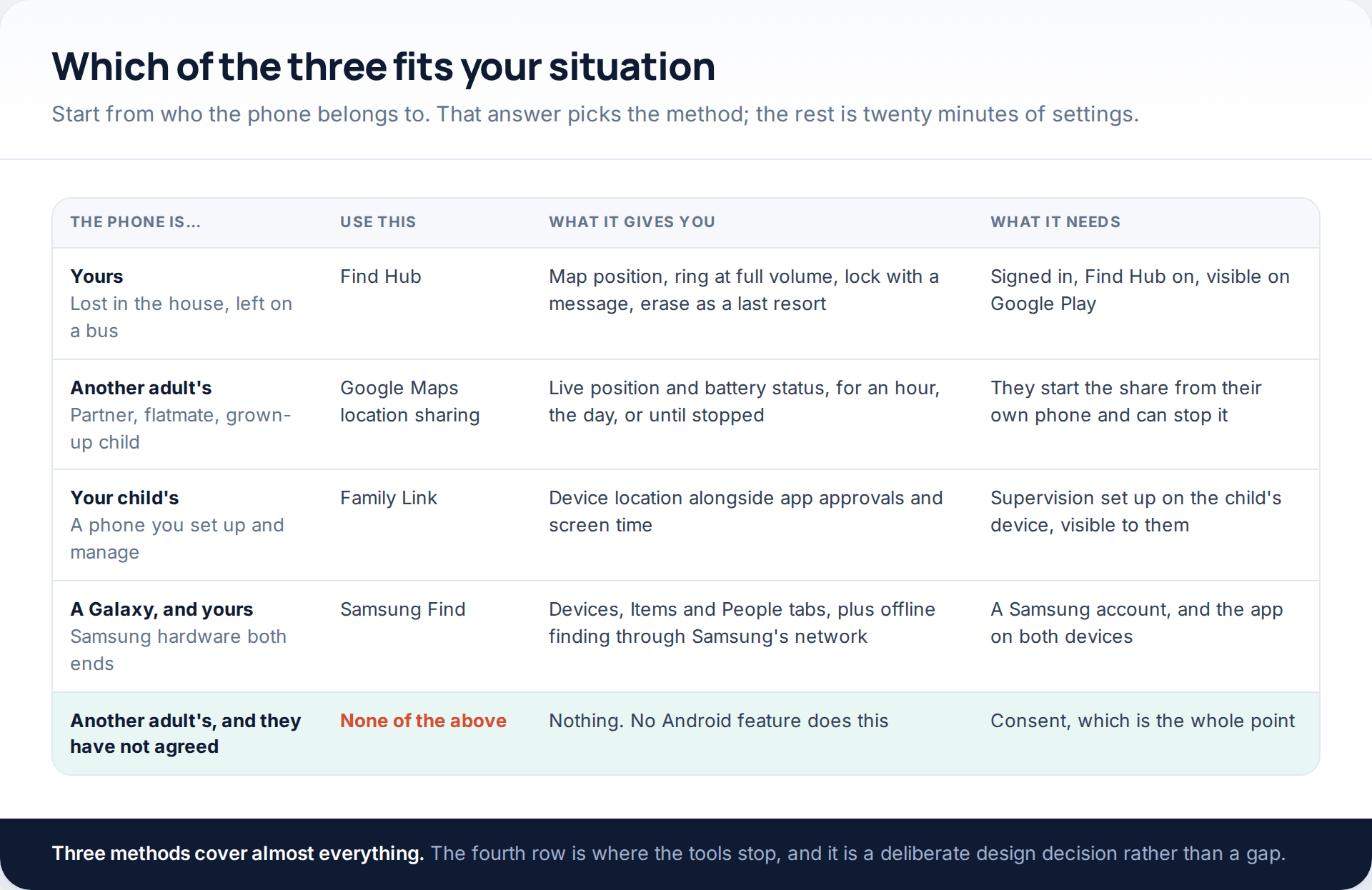
Worth being blunt about the fourth box, because it is why this subject attracts so much rubbish. Locating another adult who has not agreed engages real law: in England and Wales, Crown Prosecution Service guidance on controlling or coercive behaviour names GPS tracking devices fitted to phones, tablets and vehicles as an example of the offence; California’s Penal Code section 637.7 makes it a misdemeanour to use an electronic tracking device to determine a person’s location; Victoria’s Surveillance Devices Act 1999 requires the express or implied consent of the person being tracked. None of that is legal advice, and all of it is published.
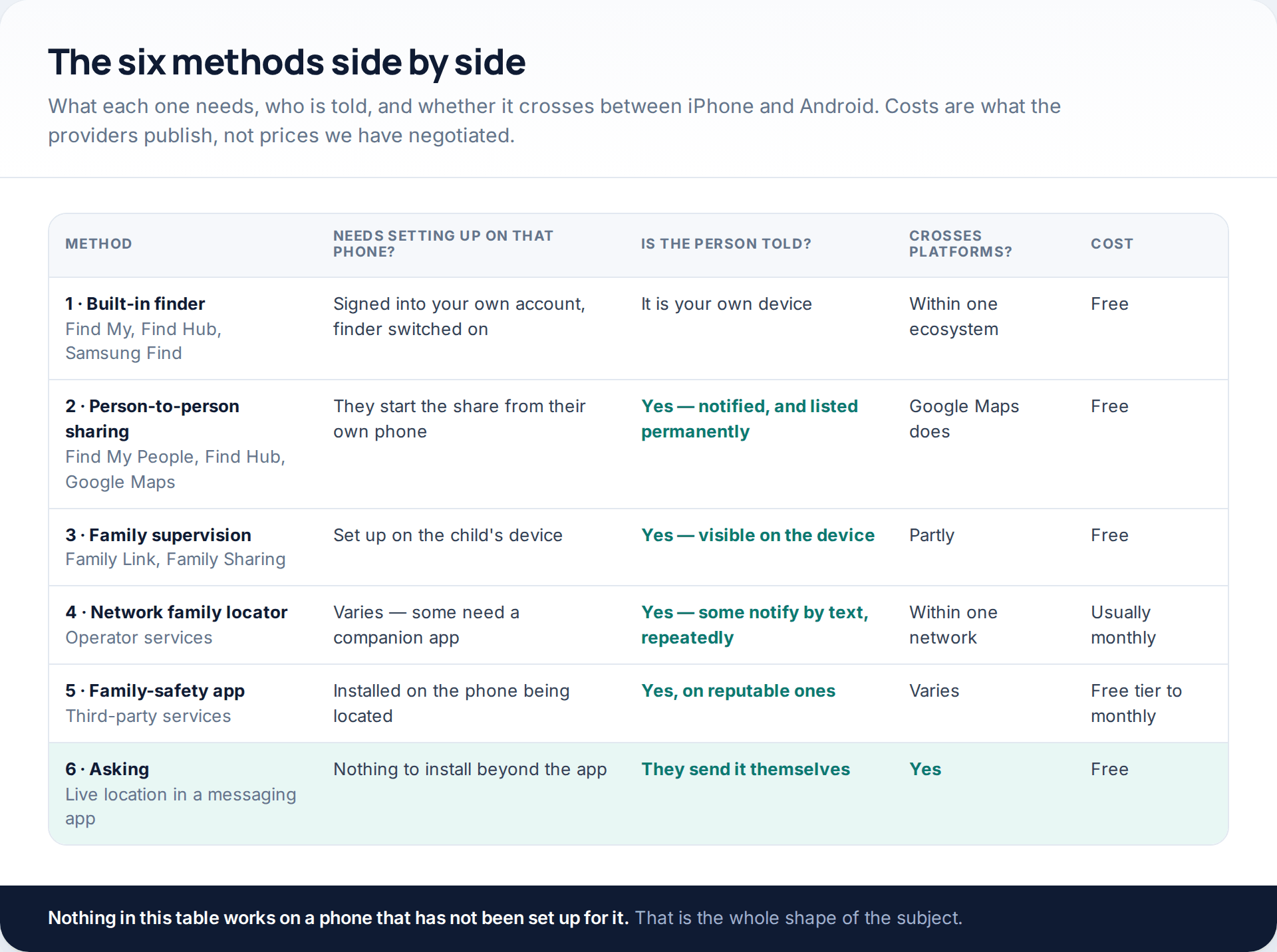
1 · The finder that is already on the phone
For your own devices, nothing third-party is needed. Apple’s is Find My; Google renamed Find My Device to Find Hub in 2025, which is why older guides send you hunting for an icon that no longer exists; Samsung adds Samsung Find, with Devices, Items and People tabs, for Galaxy hardware. All three also run in a browser, which matters when the device you want to find is the one you would normally search on.
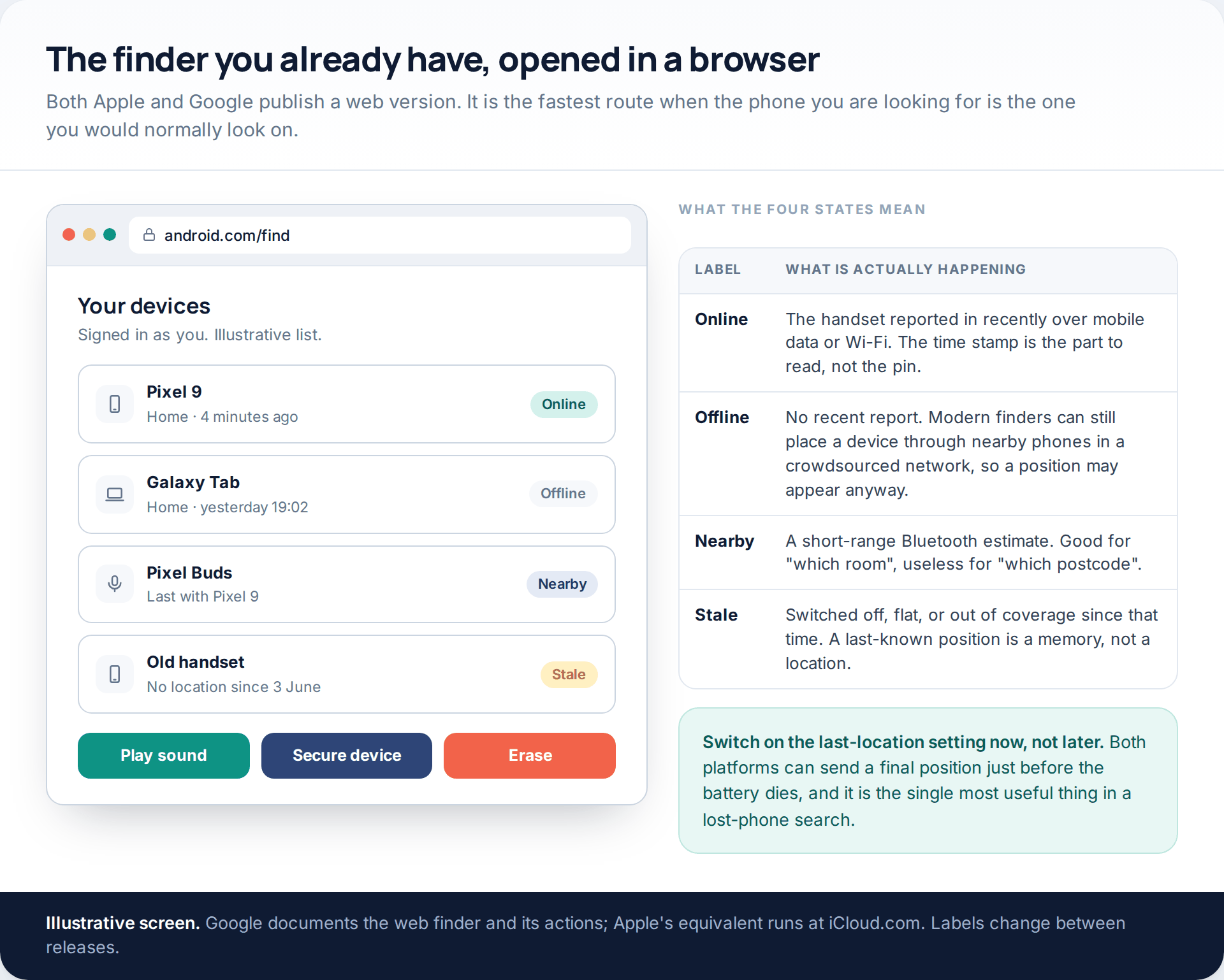
Google’s documentation sets out what a device needs before any of this works: signed into a Google Account, connected to mobile data or Wi-Fi, Find Hub switched on and the device visible on Google Play. Apple has an equivalent list. Both now also run crowdsourced networks, where nearby phones relay an encrypted position for a device that is otherwise offline — which is how a handset left on a bus is sometimes found hours later.
The full lost-phone procedure, including when to lock rather than erase, is set out in our complete guide to finding a lost phone. The one setting to enable before you need it is the final-position report that fires as the battery dies.
2 · Person-to-person location sharing
This is the method most people searching for this actually want: seeing a partner, a flatmate or an adult relative on a map because they put themselves there.
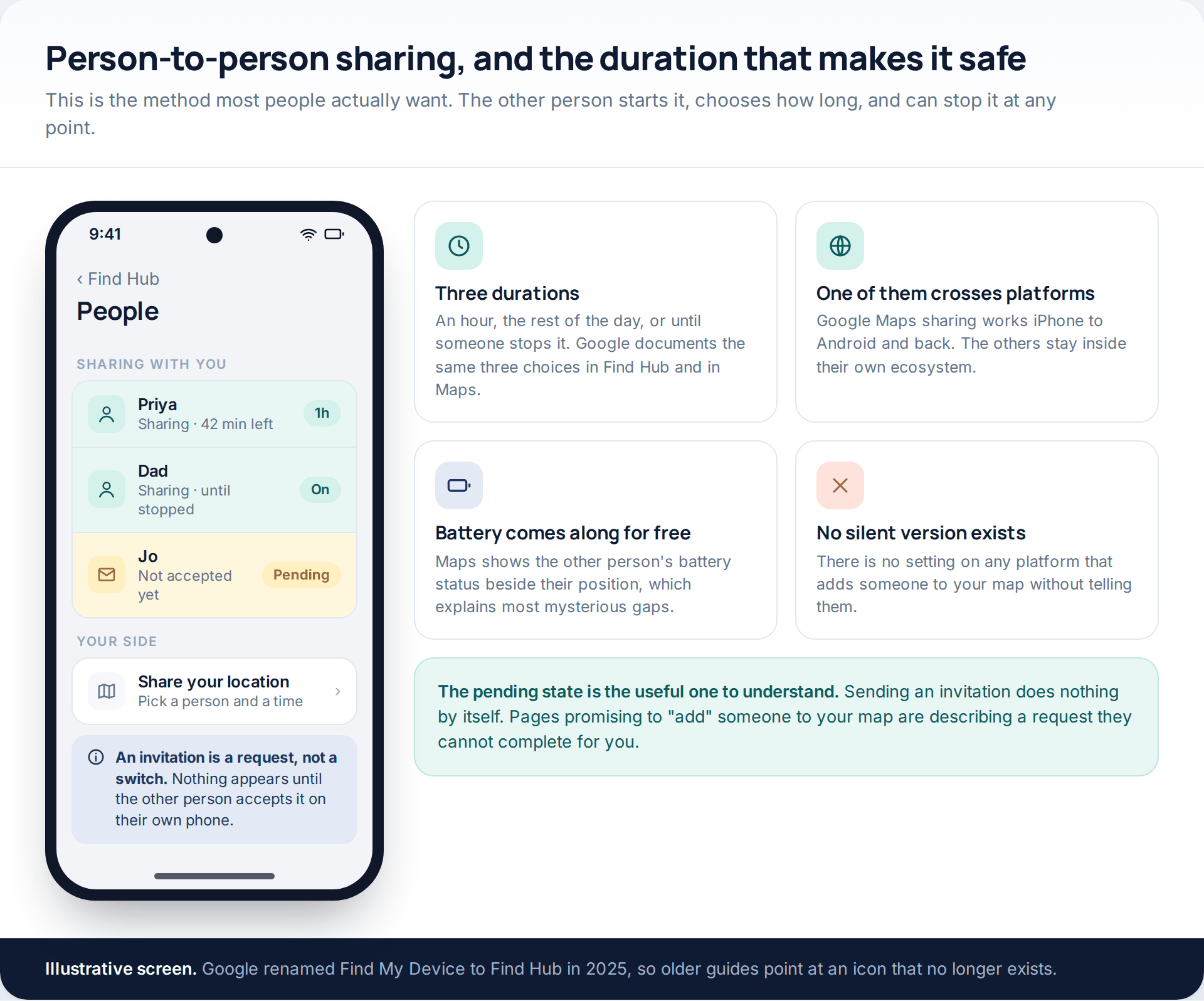
On iPhone it lives in Find My under the People tab. On Android, both Find Hub and Google Maps do it, and Google documents the same three durations everywhere: one hour, the rest of the day, or until you turn it off. Google Maps is the cross-platform answer — it runs on both operating systems, and Google’s help pages state what the other person receives: your name, profile picture, real-time location and battery status.
Two properties make this category trustworthy. The other person starts the share from their own phone, and they can end it from their own phone without needing anything from you. If you want the mechanics in more detail, including adding places and handling a stale reading, see our guide to setting up family location sharing.
3 · Family accounts and parental supervision
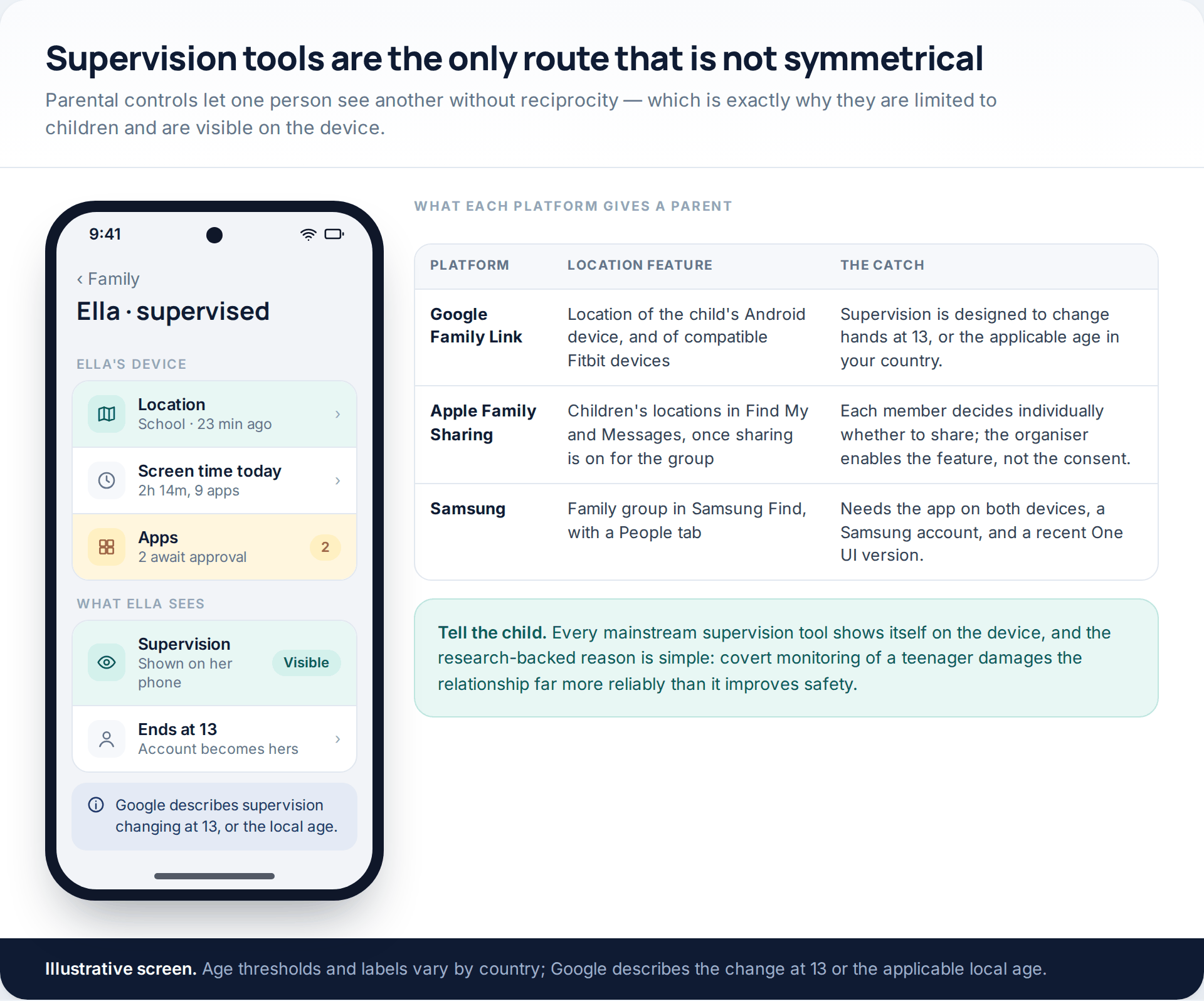
Google Family Link covers the location of a supervised child’s Android device, alongside app approvals and screen time; Google’s own documentation describes supervision as applying to children under 13, or the applicable age in your country, with the account changing hands at that point. Apple does it through Family Sharing, where the organiser enables location sharing for the group but each member still decides individually. Samsung offers a family group inside Samsung Find, limited in size and requiring the app on both sides.
All of them are visible on the child’s device, and that is deliberate. Supervision is the only asymmetric arrangement on this page — one person seeing another without reciprocity — and the visibility is what keeps it defensible. Introduce it with the child in the room, show them the screen that lists what is shared, and agree what happens to it as they get older.
4 · Your mobile network’s family locator
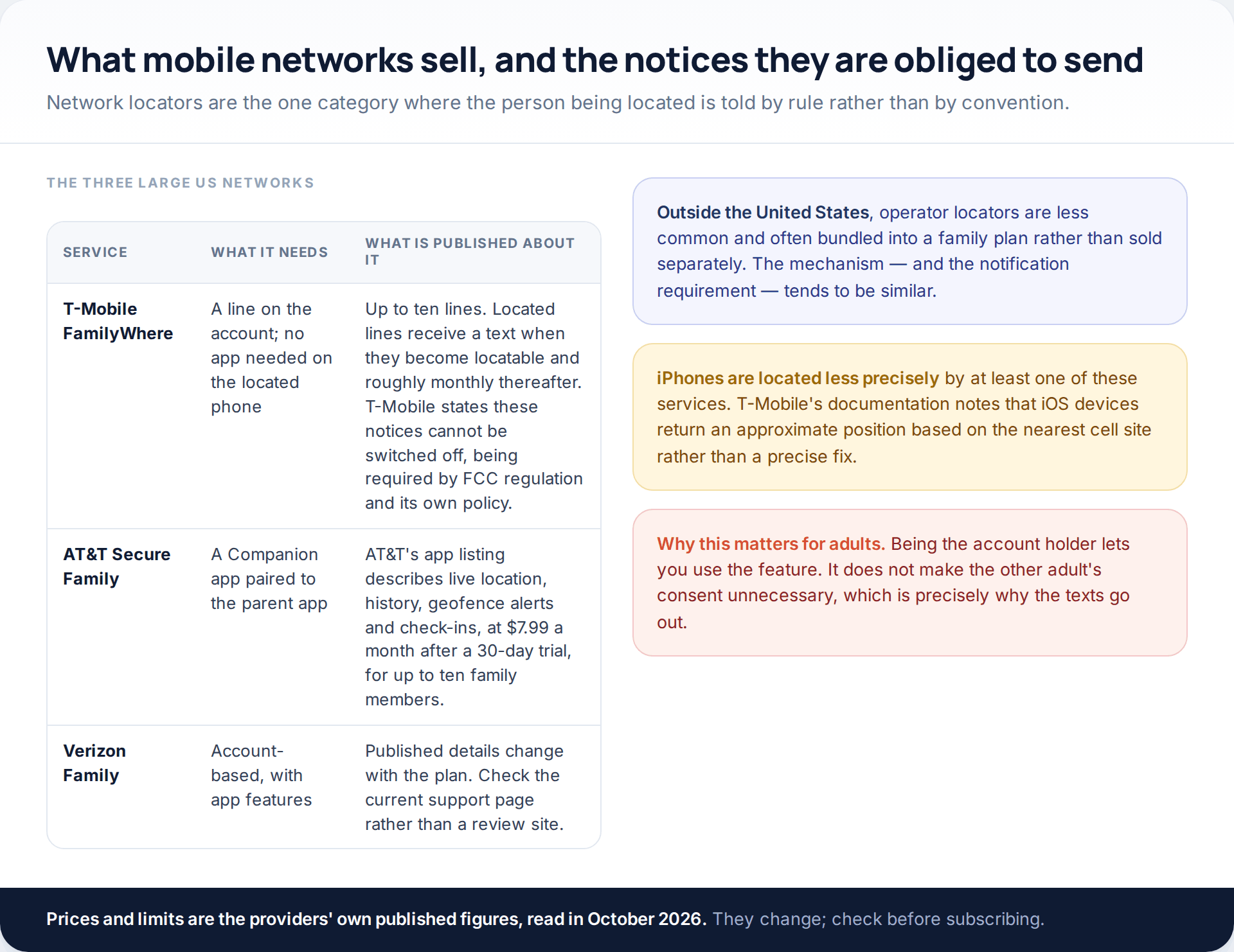
Network locators are worth knowing about mainly for one feature: the notification is mandatory. T-Mobile’s support documentation for FamilyWhere states that the notifications sent to a located phone cannot be disabled, because they are required by FCC regulation and by the operator’s own privacy and safety policy, and that located lines receive a text when they become locatable plus a reminder roughly monthly. AT&T’s published app listing describes a Companion app that must be paired to the parent app, at $7.99 a month after a 30-day trial, for up to ten family members.
Accuracy is the weak point. T-Mobile notes that iOS devices return only an approximate position based on the nearest cell site. For a child’s handset this is often enough; for anything requiring a street address, it is not.
5 · A dedicated family-safety app
Third-party services add the things platform tools are weak at: saved places with arrival alerts, longer history, and a single view across several children’s devices. The question to ask of any of them is whether the app on the located phone admits what it is doing.
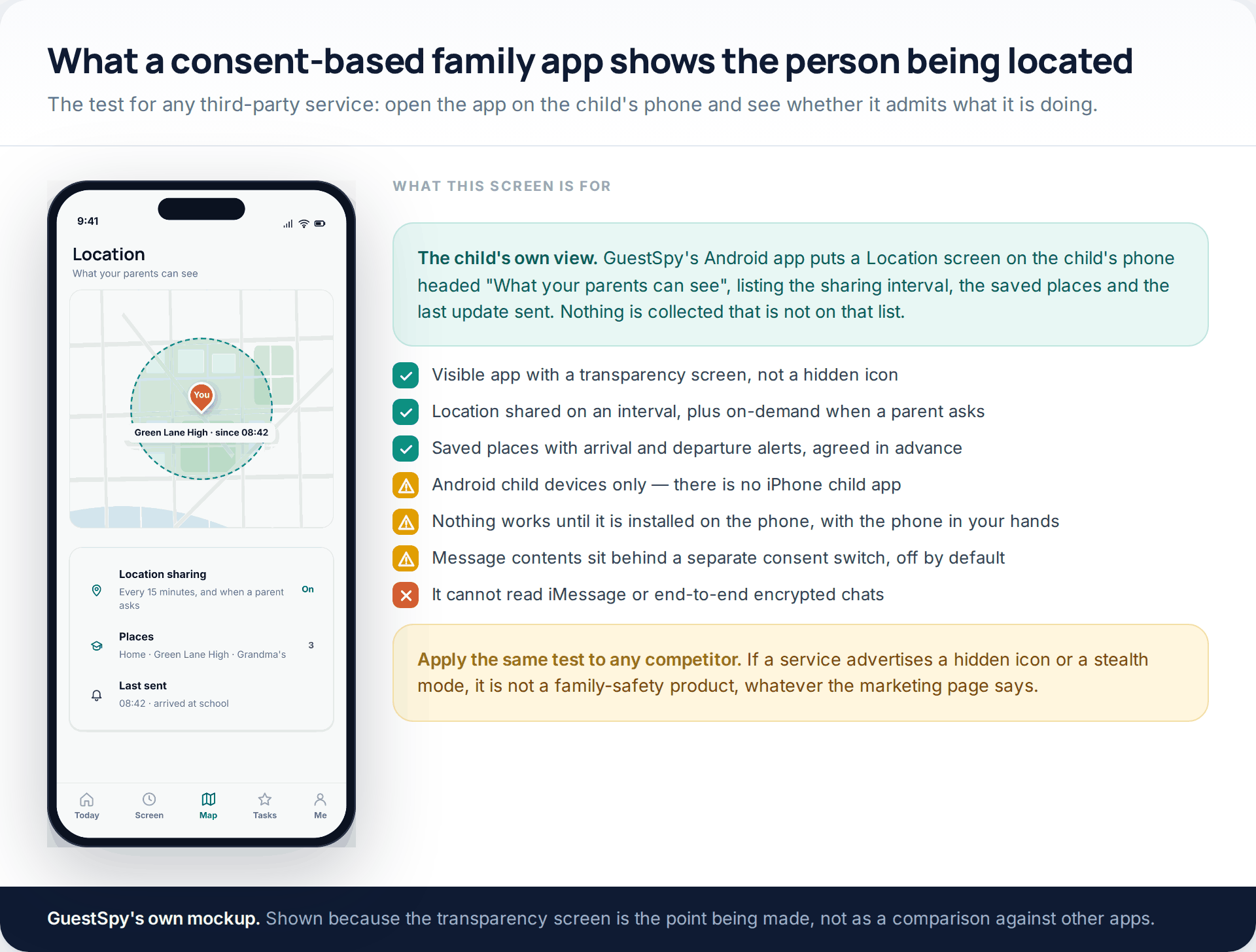
GuestSpy is our own, and the honest limits matter more than the feature list: it is an Android location tracker for a child’s phone, not a universal one. There is no iPhone child app. Nothing works until it is installed on the handset, with the phone in your hands. The child sees the app and a transparency screen listing exactly what is shared. Message contents sit behind a separate consent switch that is off until you deliberately turn it on, and it cannot read iMessage or any end-to-end encrypted chat. If what you need is an adult’s location, a mutual share in Google Maps is the right tool and this is not.
6 · Asking, which works better than it sounds
The method that gets overlooked. Every major messaging app will send a live position for a fixed period: WhatsApp offers 15 minutes, one hour or eight hours, with a stop control in the chat, and the sender can end it early. iMessage and Google Maps both do something equivalent.
For the situations people usually describe — a late journey home, meeting somewhere unfamiliar, a long drive — this is better than permanent sharing, not worse. It is scoped to the occasion, it expires without anyone having to remember, and it arrives with a reason attached rather than as a coordinate to interpret.
Accuracy, battery and the limits worth knowing
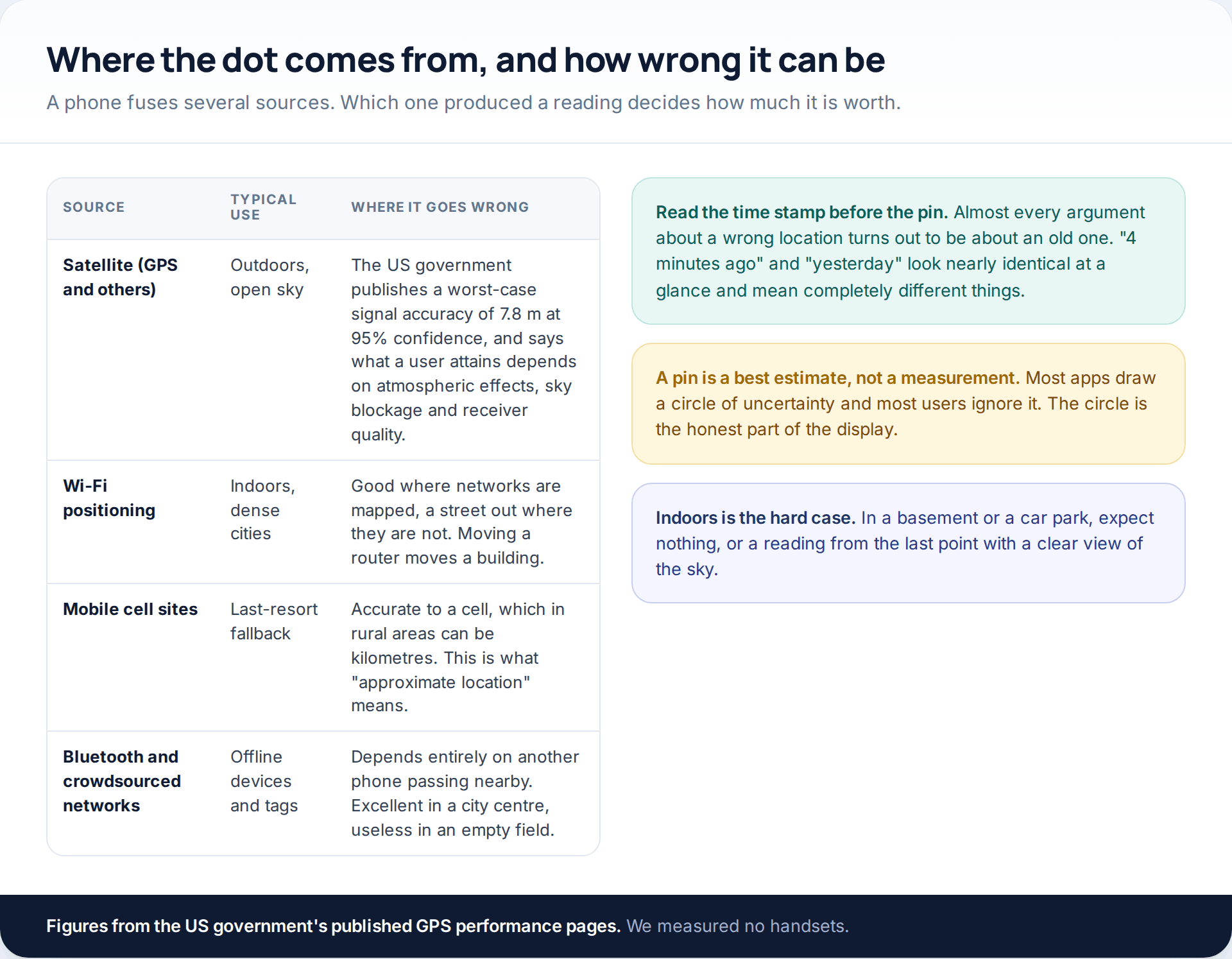
A modern handset fuses satellite, Wi-Fi, mobile and sensor data, and the result is presented as one dot with no indication of where it came from. The United States government publishes a worst-case signal accuracy of 7.8 metres at 95% confidence for GPS in space, and is explicit that what any user actually attains depends on atmospheric effects, sky blockage and receiver quality. In practice that means good readings in open air, poorer readings between tall buildings, and often nothing at all several floors underground.
Read the time stamp first
The single most common misreading is treating an old position as a current one. A pin from eleven minutes ago and a pin from eleven hours ago occupy the same space on the screen. Most apps print the age next to it, in small grey text that nobody looks at, and almost every argument about an “obviously wrong” location turns out to be about that line.
Battery, honestly
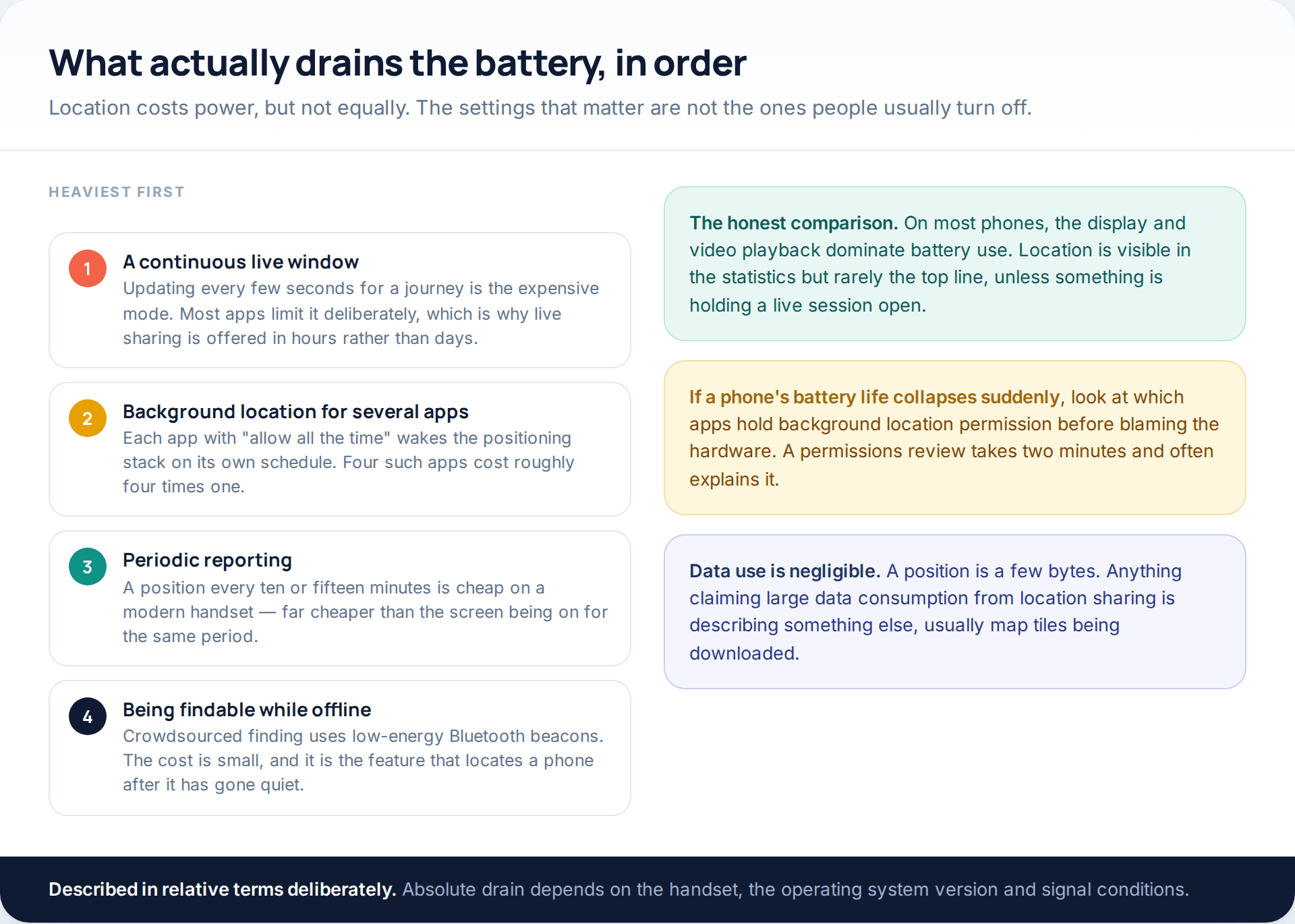
Location costs power, but less than people expect and unevenly. A continuous live session is the expensive case; a position every quarter of an hour is not. The usual culprit when battery life collapses is several apps holding permission to use location all the time, so a permissions review is the first thing to try. Data use, by contrast, is negligible: a position is a few bytes, and anything consuming real data is downloading map tiles rather than reporting a location.
What none of these can do
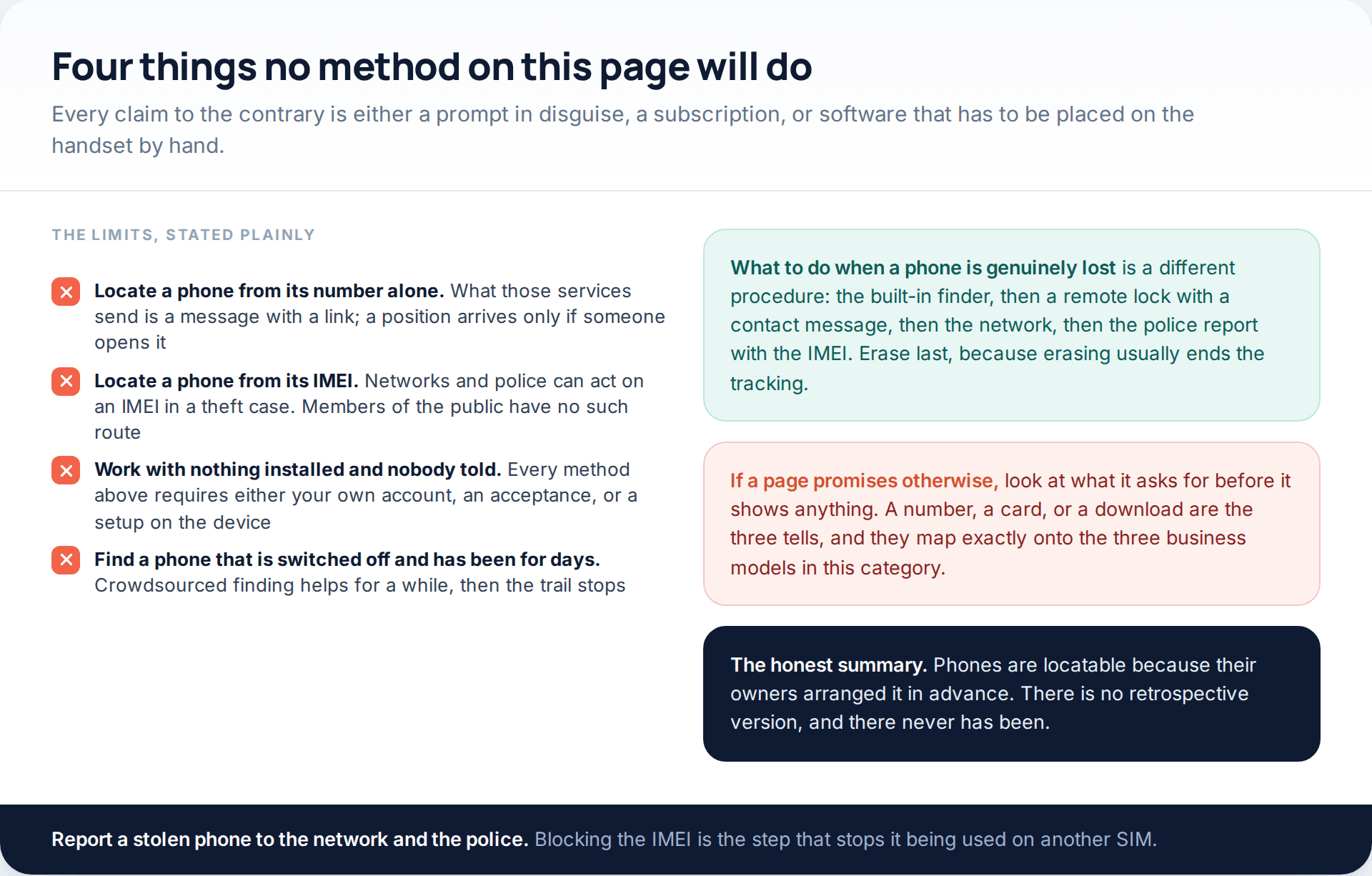
The IMEI question comes up constantly and deserves a direct answer. An IMEI identifies a handset, and a network can block one so the device cannot be used with another SIM. That is a useful thing to do after a theft, through the operator and with a police report. What an IMEI does not do is produce a position for a member of the public, and services offering IMEI tracking are selling the same prompt-with-a-link trick under a more technical name.
How this page was put together
Everything describing a product here was checked against the provider’s own documentation in October 2026: Apple’s Find My and Family Sharing support pages, Google’s Find Hub and Maps location-sharing help pages and the Family Link disclosure, Samsung’s Find documentation, T-Mobile’s FamilyWhere support article and AT&T’s published app listing for Secure Family. The GPS accuracy figures come from the US government’s GPS performance pages. The legal references come from Crown Prosecution Service legal guidance, California Penal Code section 637.7 and section 8 of Victoria’s Surveillance Devices Act 1999.
We have tested none of these services in a laboratory, and we have not measured accuracy or battery use on any handset. Where we give numbers, they are the publishers’ own, and prices in particular move — treat the figures above as a pointer to the right support page rather than a quotation. Menu paths shift between releases: Find My Device became Find Hub during 2025, and several of the screens here are drawn as illustrations rather than captured, so search an app’s settings for the keyword rather than assuming a feature has gone.
We have deliberately not explained how any covert monitoring product is installed or configured, and we have not named one. The one product we do mention is our own, and it is described with its limits attached.
Common questions
Can I track a cell phone location using just the number?
No. Services claiming this send the number a message containing a link, and report a position only if someone opens it — which means the recipient has been told, and you get one reading rather than ongoing tracking. Mobile networks can locate handsets, but they do it for emergency services under legal process.
Does any of this work if the phone is switched off?
Partly, and briefly. Both Apple and Google run crowdsourced networks in which nearby phones relay an encrypted position for a device that is offline, and both can send a final location as the battery dies if that setting was switched on beforehand. A phone that has been off for several days generally shows only its last known position.
What is the most accurate method?
Satellite positioning outdoors with a clear view of the sky, which is what the built-in finders and sharing features use when they can. Indoors, Wi-Fi positioning usually takes over; as a last resort a phone falls back to the nearest cell site, which can be accurate to a kilometre or worse in rural areas.
Will the other person know?
Yes, in every method on this page. Platforms notify when sharing starts and keep a permanent list. Supervision tools are visible on the child’s device. Network locators send texts that, in T-Mobile’s case, cannot be switched off. If a service promises otherwise, that is the signal to close the tab.
Can I locate my child’s iPhone from an Android phone?
Not through Find My, which stays inside Apple’s ecosystem. The practical answer is Google Maps location sharing, which runs on both and works in either direction, set up on the child’s iPhone with them present.
How much battery does location sharing use?
Less than most people assume for periodic reporting, and noticeably more for a continuous live session — which is why platforms offer live sharing by the hour rather than indefinitely. If a phone’s battery has collapsed, check how many apps hold permission to use location all the time before blaming the feature.
Is there a free way to do this?
Four of the six are free: the built-in finders, person-to-person sharing, parental supervision through Family Link or Family Sharing, and sending a live location in a messaging app. Network locators and most third-party services charge monthly.
Using a monitoring app for this? GuestSpy is parental monitoring for Android that stays visible on the child's phone and runs from any browser. If it fits your family, see the Location & Places feature.
Related guides
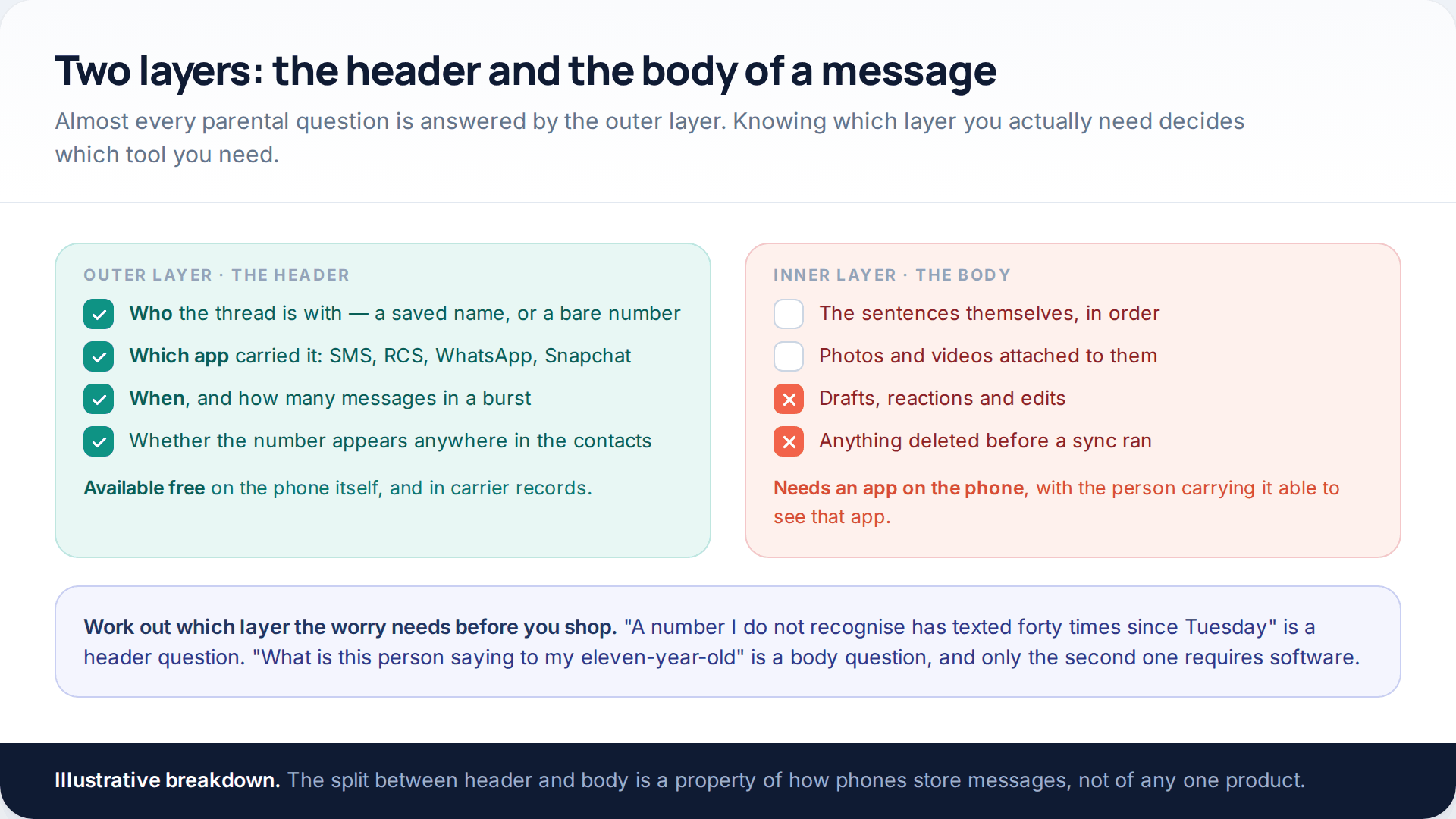
Track SMS Messages: Free SMS Monitoring Apps for Parents, Compared
You cannot track SMS messages on a child’s phone from your own phone alone, and no free app changes that.…
Track an Android Phone From Another Android Phone: Three Family-Safe Methods
To track an Android phone from another Android phone, you need one of three things arranged in advance. Find Hub…
Best 10 Free SMS Tracker for Android and iPhone
Earlier, when there we no messenger apps, people used to rely on text messages. Although time and technology are changing,…
Monitoring your child can see.
Location, screen-time budgets, routines, app and website blocking and the alerts that matter, run from any browser and visible on the phone. Pair an Android phone in about fifteen minutes.