Call Recorder Apps and the Law: What You May Record, and Where

The short answer on call recorder apps and the law: both Android and iPhone now record calls from the dialler itself, both announce it out loud to everyone on the line, and that announcement exists because recording a call the other person does not know about is unlawful in a great many places. You may record a call you are part of. The rules on telling the other person are what vary.
This page used to be about recording calls covertly. Two things have made that advice obsolete as well as unsafe. Android closed the technical route years ago, so the apps that promised it either record one side badly or do nothing. And in all-party consent jurisdictions, suppressing the notice turns a lawful recording into a criminal interception. The rest of this page is the version that works: what each platform allows, which rule applies to you, and how to record properly.
What changed, and why your old recorder stopped working
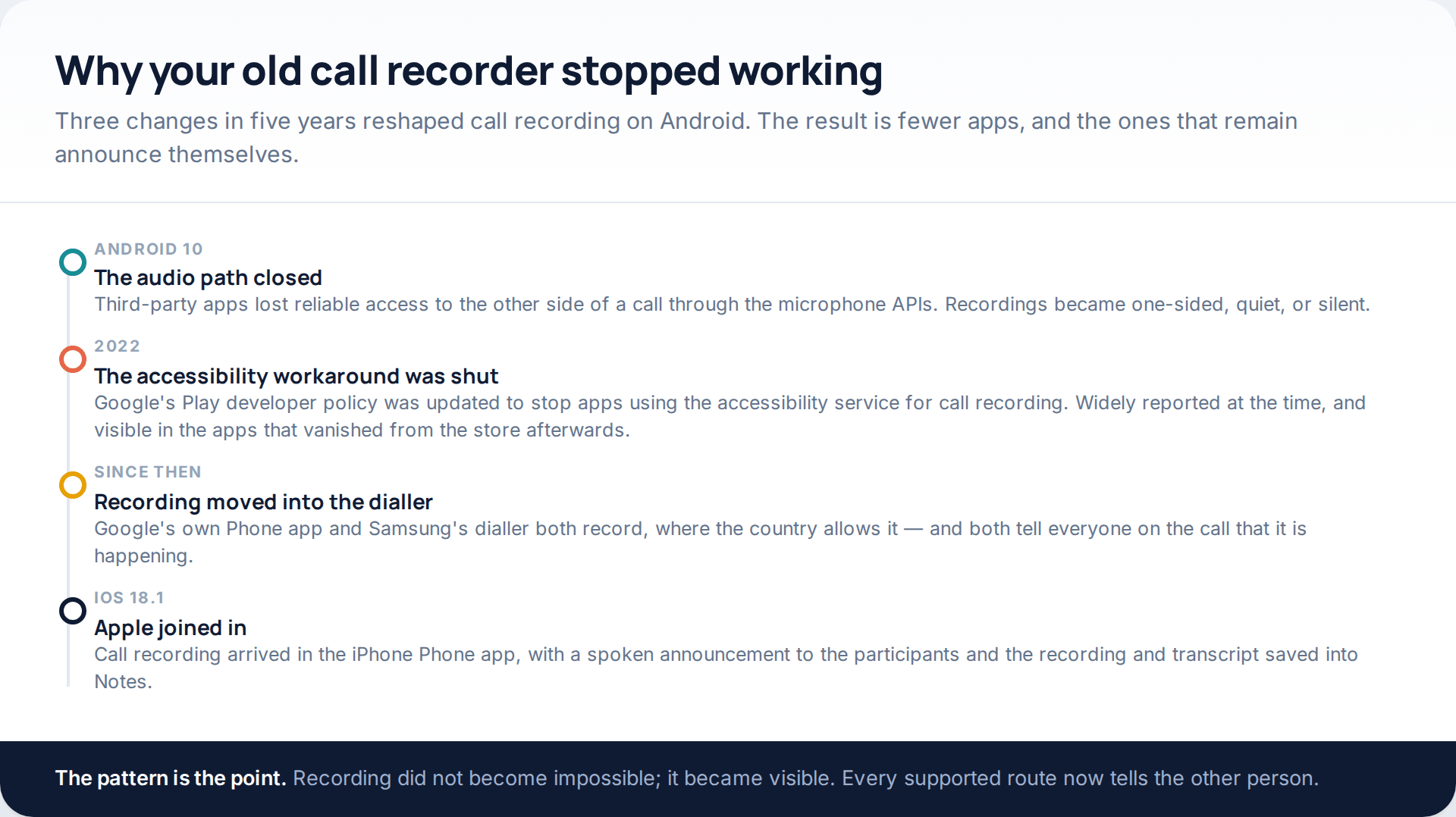
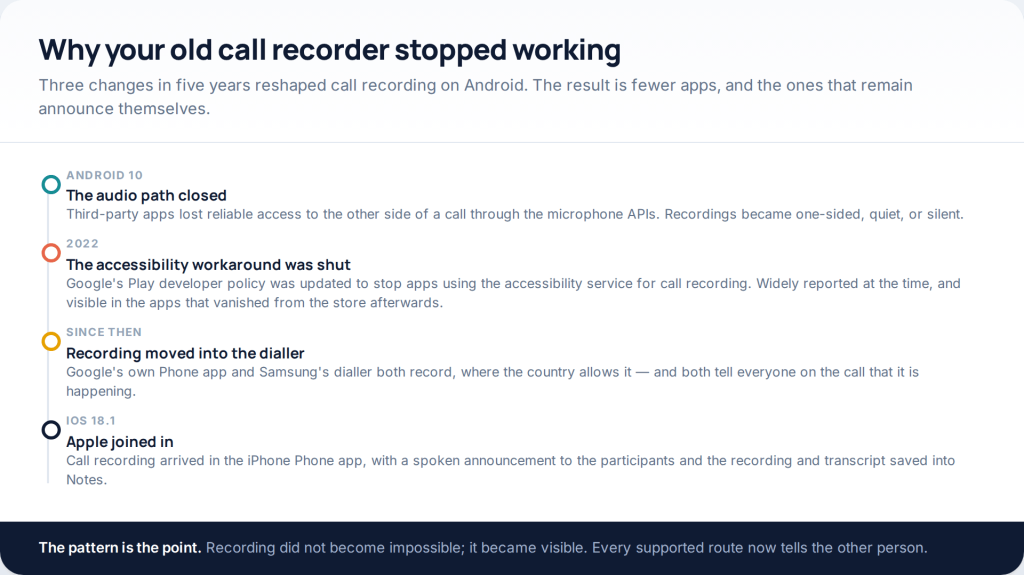
If you used a third-party call recorder in 2018 and cannot get one to work now, nothing is broken. Android 10 removed the reliable way for an ordinary app to capture the other side of a call. The remaining workaround ran through the accessibility service, and Google’s Play developer policy was updated in 2022 to stop apps using accessibility for call recording — a change reported widely at the time and clearly visible in the apps that disappeared from the store afterwards.
What filled the gap was the dialler. Google’s own Phone app records. Samsung’s records. Apple added recording to the iPhone Phone app in iOS 18.1. All three announce it. That is not an accident of design: a spoken notice is the cheapest way for a platform to keep hundreds of millions of users on the right side of consent law in countries it cannot individually check.
What Android allows now
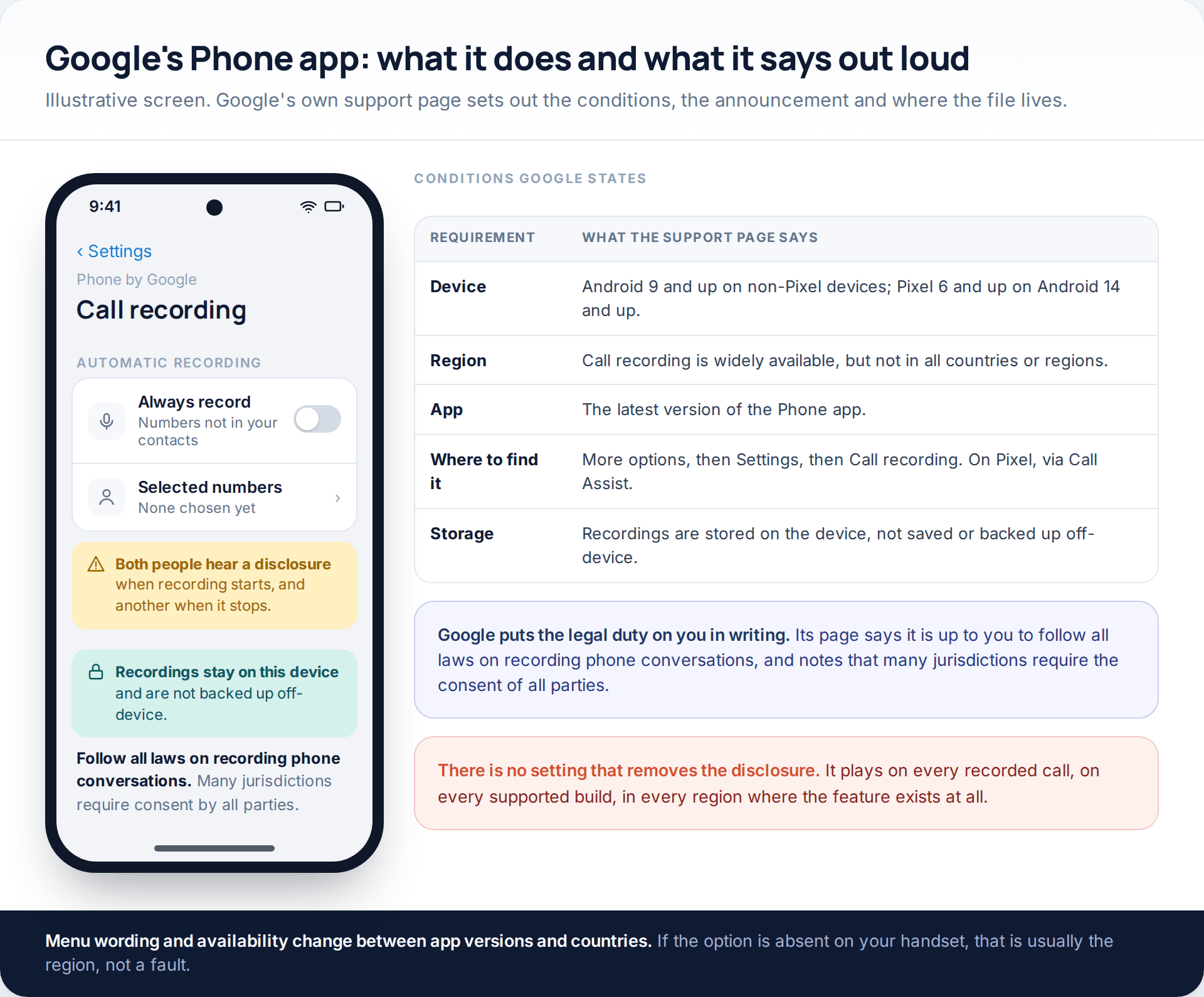
Google’s support page for the Phone app sets out the conditions plainly. Recording needs Android 9 and up on non-Pixel devices, or a Pixel 6 and up running Android 14 and up, together with the latest version of the Phone app. Google notes that call recording is widely available, but not in all countries or regions — so if the option is simply absent on your handset, the likeliest reason is where you are.
The behaviour matters more than the menu. Google states that when you start recording, both parties are notified with a disclosure that the call is being recorded, and that when you stop, both are notified again. Recordings are stored on the device and, in Google’s words, are not saved or backed up off-device. The page also says it is up to you to follow all laws on recording phone conversations, and that many jurisdictions require consent by all parties.
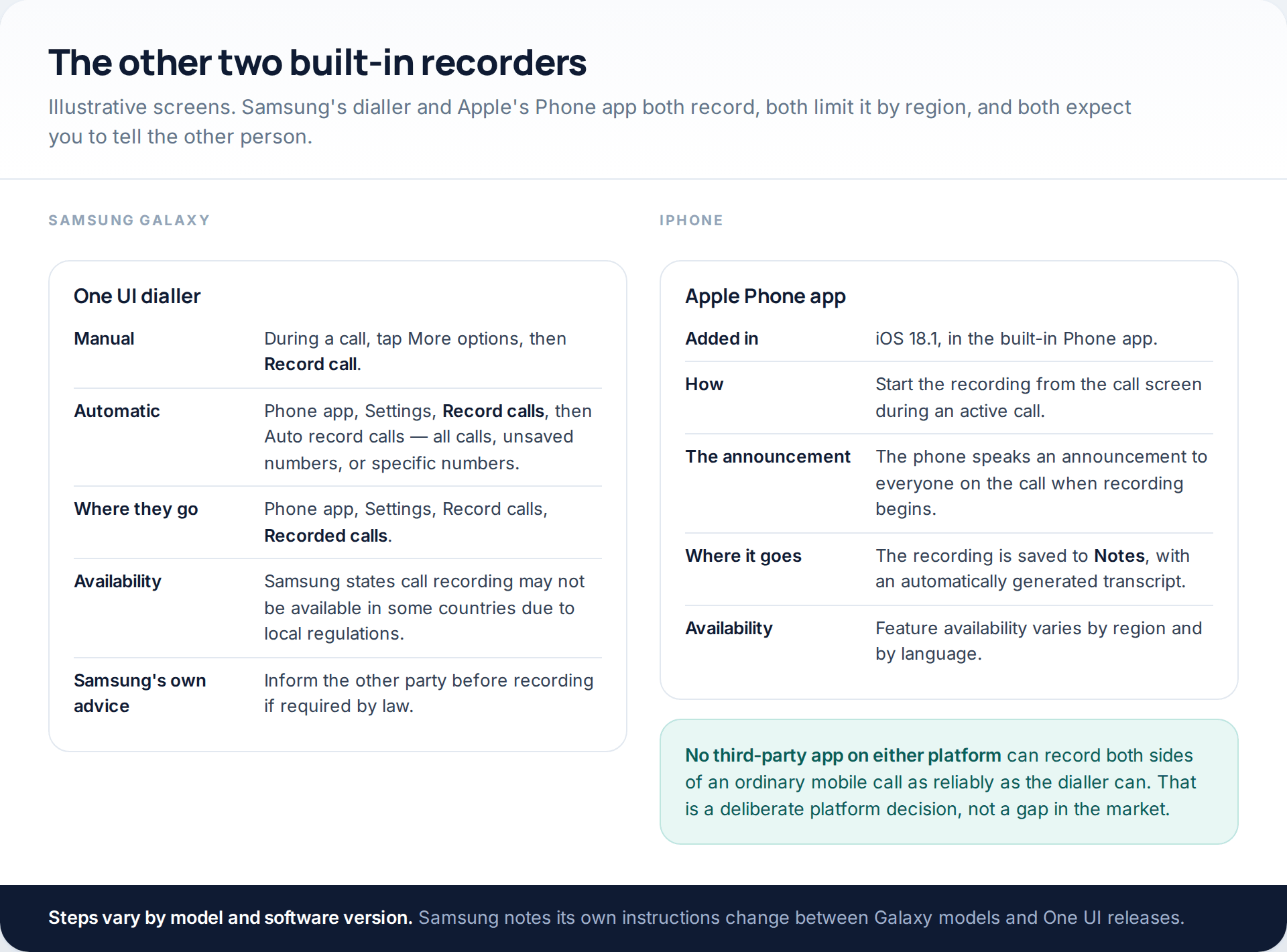
Samsung’s dialler works the same way with different wording. Its support page describes tapping More options during a call and choosing Record call, or setting automatic recording under Phone app settings, Record calls, then Auto record calls, with options for all calls, unsaved numbers, or specific numbers. Recorded files are listed under Recorded calls in the same settings area. Samsung notes that call recording may not be available in some countries due to local regulations, and advises informing the other party before recording if required by law.
What the iPhone allows
Apple added call recording to the Phone app in iOS 18.1. You start it from the call screen during an active call; the phone speaks an announcement to everyone on the line when recording begins, and the recording is saved into Notes with an automatically generated transcript alongside it. Availability varies by region and language, as it does on Android.
There is no third-party equivalent on either platform that reliably captures both sides of an ordinary mobile call. That is a deliberate platform decision rather than a gap somebody will fill, which is worth knowing before you spend money on an app promising otherwise.
The announcement, and why we will not help you around it
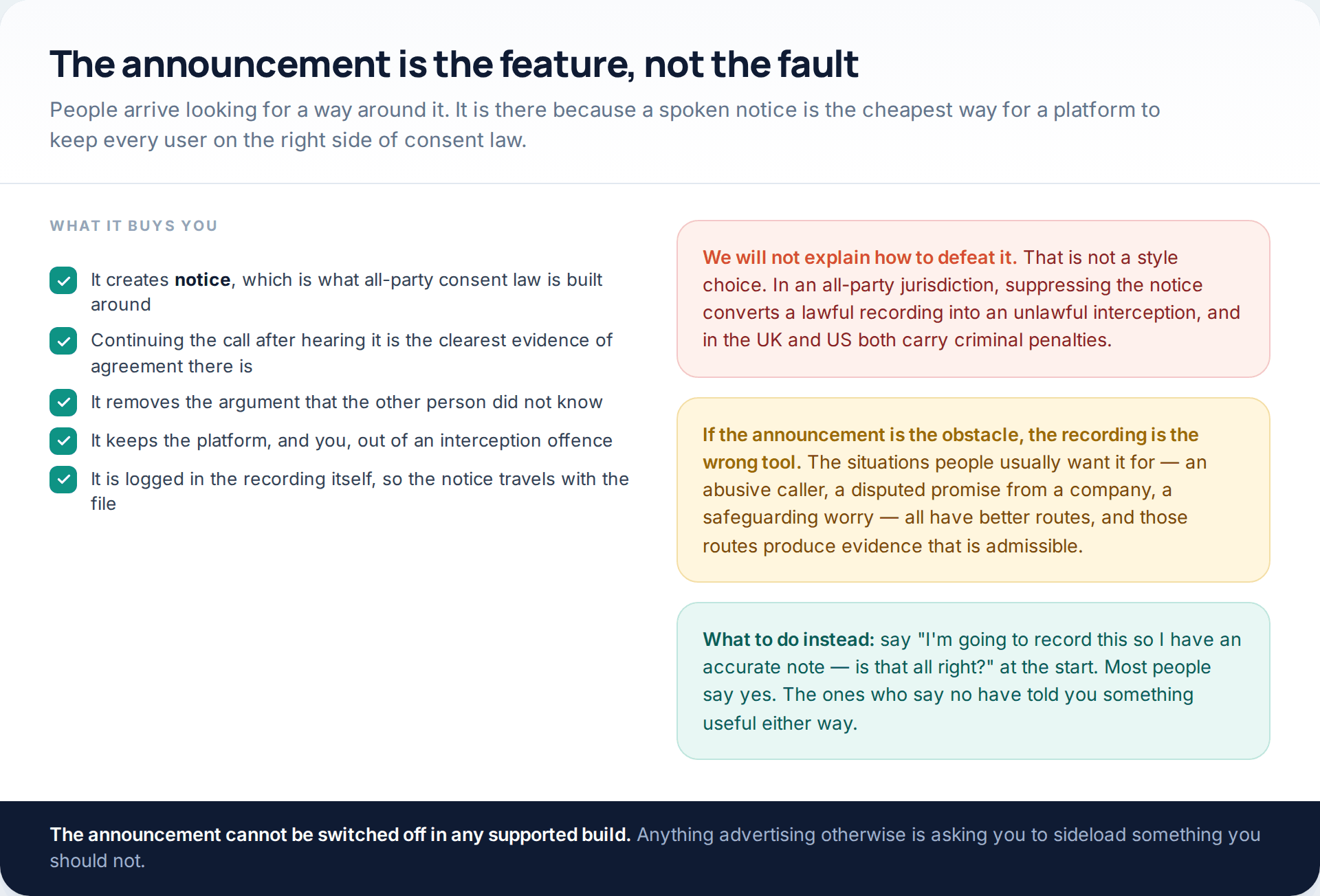
Used properly, the announcement is doing you a favour. All-party consent law is built around notice and agreement. A spoken notice at the start of the call, followed by the other person carrying on talking, is about as clean a demonstration of both as you can manufacture — and it is baked into the file, so it travels with the recording.
The sentence that replaces all of this: “I’m going to record this so I have an accurate note — is that all right?” Most people say yes without breaking stride. The few who say no have told you something useful, and you can take written notes instead.
One-party and all-party consent
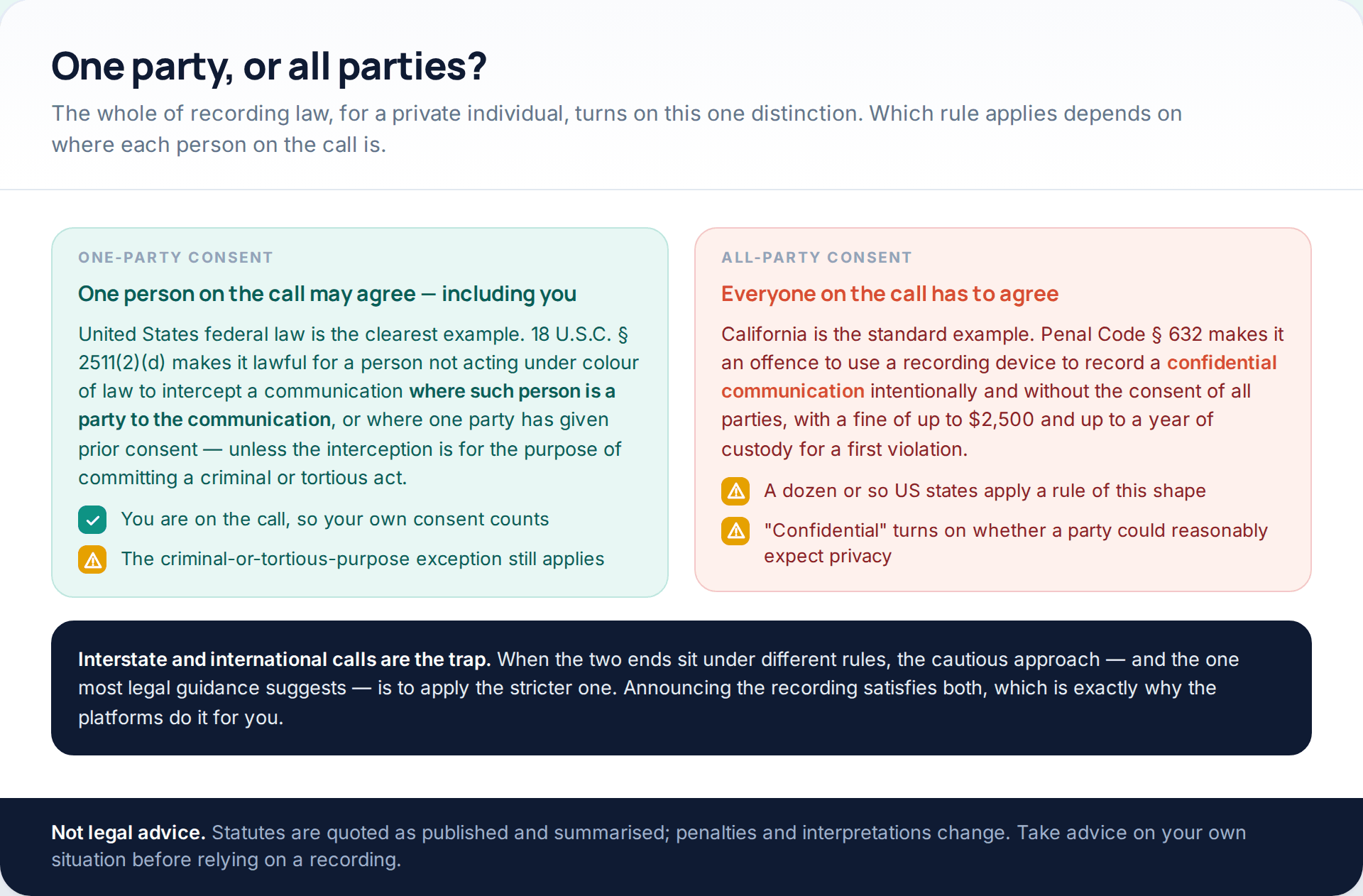
Nearly all of recording law, for a private individual, collapses into one question: does one person on the call have to agree, or does everyone?
In the United States, federal law sits at the one-party end. 18 U.S.C. § 2511(2)(d) provides that it is not unlawful for a person not acting under colour of law to intercept a wire, oral or electronic communication where that person is a party to the communication, or where one of the parties has given prior consent — unless the interception is made for the purpose of committing a criminal or tortious act. Being on the call is itself the consent, and that final clause is not decoration: recording in order to blackmail somebody is not protected by it.
A number of states go further. California Penal Code § 632 makes it an offence to intentionally record a confidential communication using a recording device without the consent of all parties, with a fine of up to $2,500 and up to a year of custody for a first violation. “Confidential” turns on whether the circumstances reasonably indicate a party wanted the conversation confined to the people on it — so a private phone call generally qualifies, and a public meeting generally does not. Roughly a dozen states apply a rule of this shape, and the details differ between them.
Two worked examples. You are in New York, your bank’s agent is in Texas — both one-party states, and you are a party to the call, so your own consent suffices. You are in New York and the person you are calling is in California: two different rules on one line. The cautious approach, and the one most guidance takes, is to apply the stricter rule. Announcing the recording satisfies both at once, which is precisely why the platforms do it for you.
Outside the US the structure is usually different again, and typically has two layers. The first asks whether recording a conversation you are taking part in is itself prohibited — in many countries, for your own personal use, it is not. The second is data protection, which bites as soon as the recording goes beyond your own personal and household use. The UK GDPR, for instance, states expressly that it does not apply to processing by an individual in the course of a purely personal or household activity — which means that the moment you share, publish or use a recording in a business context, you are in a different regime.
None of this is legal advice. It is a summary of published statutes to help you ask the right question. Take advice on your own facts before you rely on a recording for anything that matters.
May I record this call?
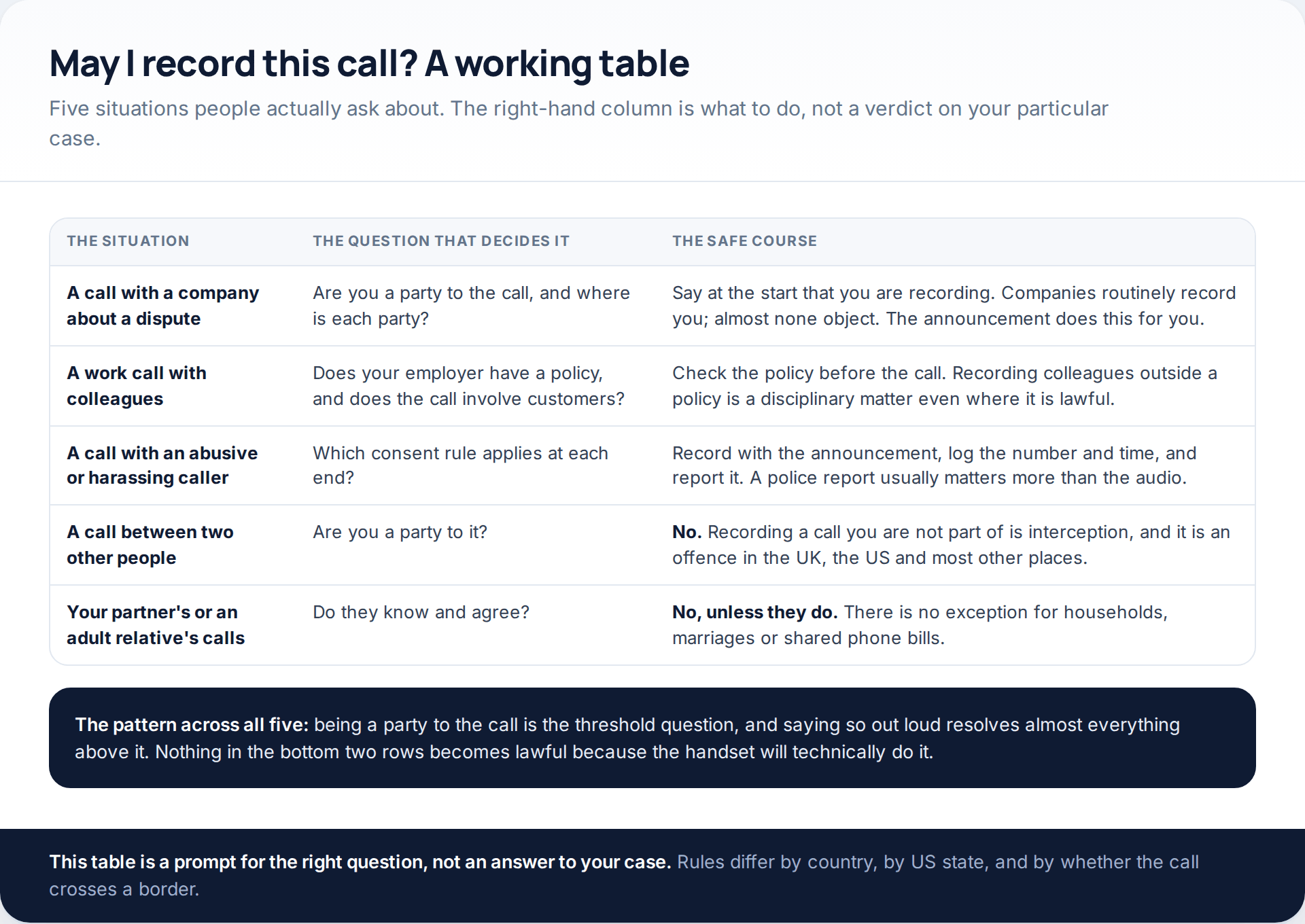
The bottom two rows are the ones this page used to be about, and they do not get a nuanced answer. Recording a conversation you are not part of is interception. There is no exception for spouses, for people who share a phone contract, or for parents of adult children. The fact that a handset will technically do a thing has never been an argument about whether you may.
The work row is subtler than it looks. Recording a colleague may be lawful in your state and still be a disciplinary matter under your employer’s policy, and recording a customer almost always engages the employer’s data-protection obligations rather than your own. If you are trying to work out what an employer may and may not do in this area, we cover it in what is legal in employee monitoring.
How to record a call you are part of, properly
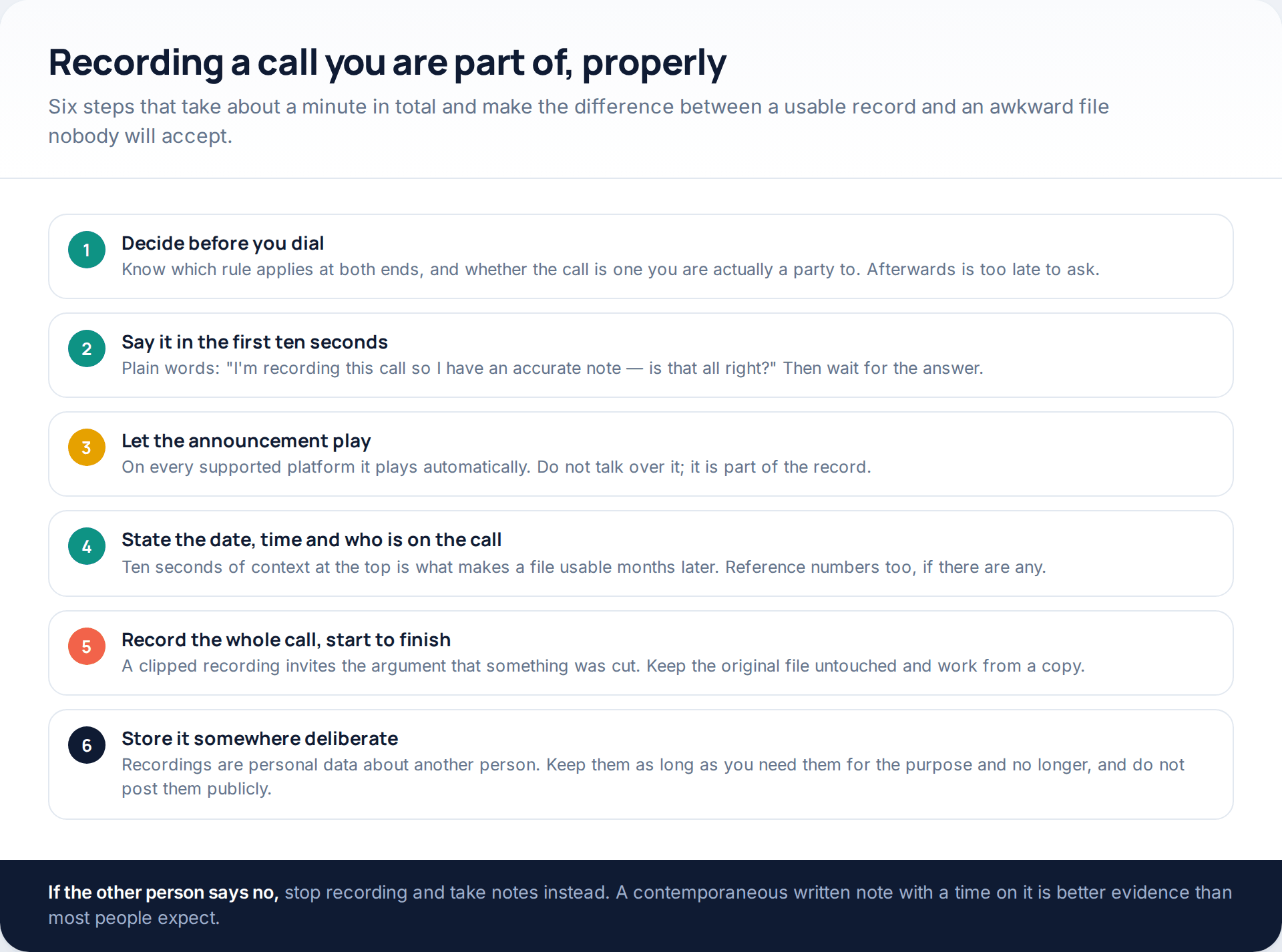
Two of those steps do most of the work. The ten seconds of context at the top is what makes a file usable six months later, when you no longer remember which of eleven calls this was. And recording the whole call matters because a clipped file invites the obvious argument.
- Ask, do not assume, and wait for the answer
- Let the platform’s announcement play without talking over it
- Keep the original file, work from copies
- Delete it when the purpose it was made for has ended
Businesses recording calls
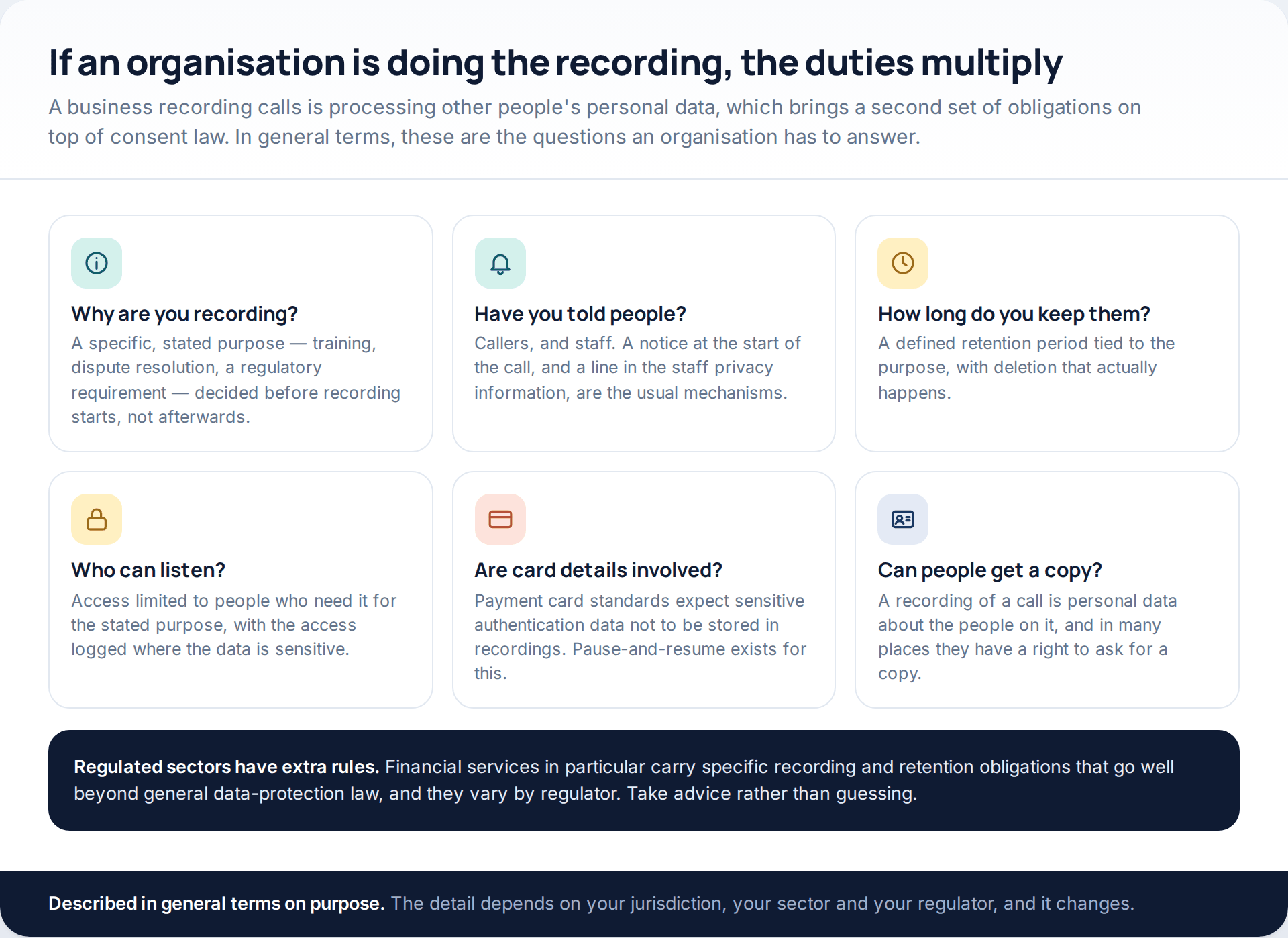
The individual question is “may I record this?”. The organisational question is “may we process this?”, and it has more parts. In general terms: a defined purpose settled before recording starts; callers and staff told; a retention period that is actually enforced; access limited to people who need it; payment card details kept out of stored recordings, which is why pause-and-resume exists; and a right for the people on the call to ask for a copy.
Regulated sectors carry more. Financial services in particular have recording and retention obligations that go well beyond general data-protection law and differ by regulator. If you are writing this down for a team, our guide to writing a monitoring policy covers the structure, and the specifics should come from a professional adviser in your jurisdiction rather than from an article.
What a recording is actually worth
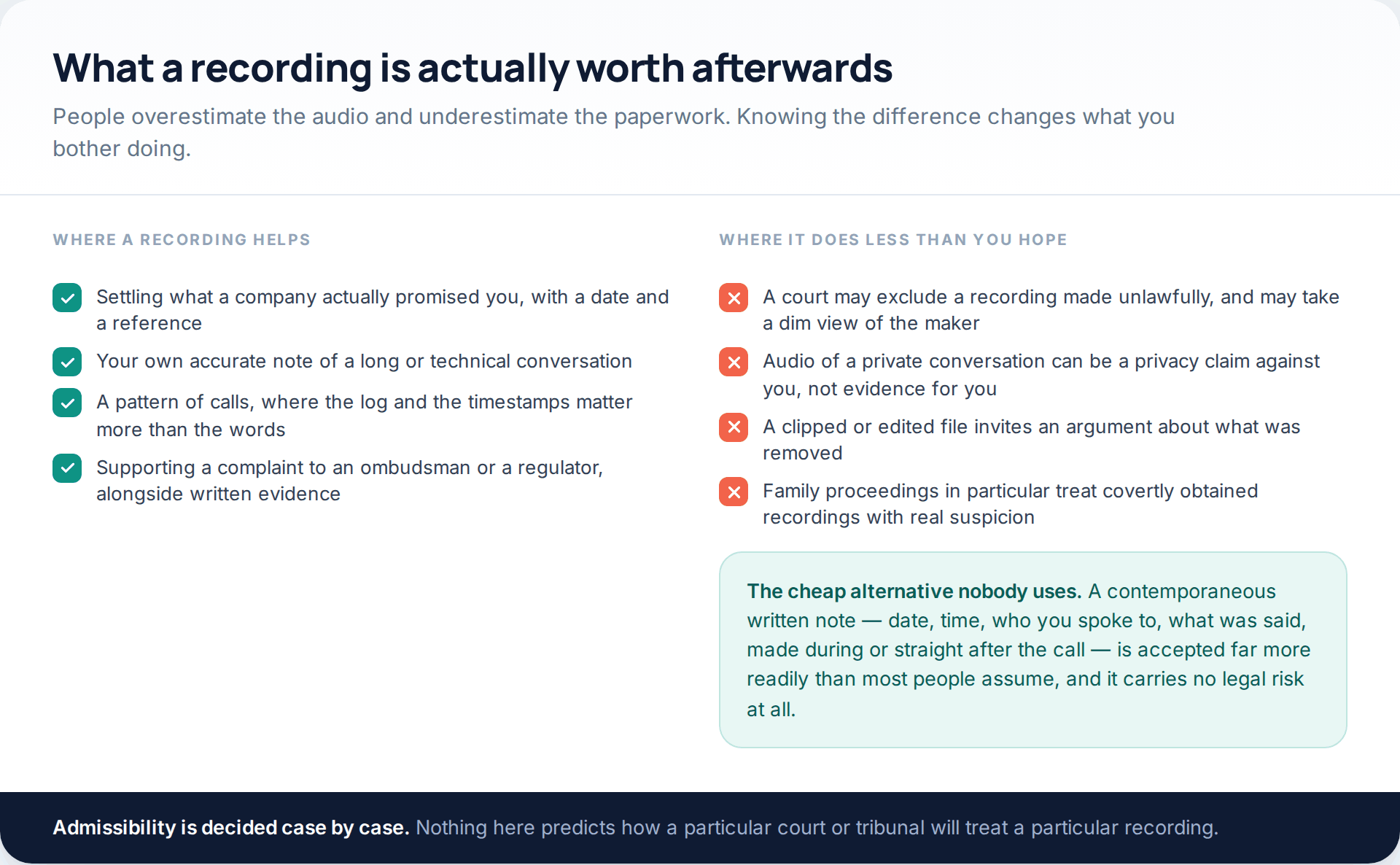
Recordings are excellent for pinning down what a company promised and when. They are much weaker as the centrepiece of a personal dispute. One made unlawfully may be excluded, and the fact of making it can become the issue; family proceedings in particular treat covertly obtained recordings with suspicion, and the person who made one frequently comes off worse.
The alternative that almost nobody bothers with is a contemporaneous written note: date, time, who you spoke to, what was agreed, written during the call or immediately after. It is accepted more readily than people expect, carries no legal risk, and takes two minutes. If what you need is simply a record of who called and when, that already exists on the phone — we cover reading it in our guide to getting at call logs legitimately.
How this page was put together
The platform behaviour here was read from official documentation in October 2026: Google’s support page for call recording in the Phone app, including the device and region conditions, the disclosure played to both parties, on-device storage, and Google’s own statement that following recording law is the user’s responsibility; and Samsung’s support page for call recording on Galaxy phones, including the menu paths, the auto-record options and Samsung’s note that availability varies by country due to local regulations. The iPhone section reflects the call recording feature introduced in iOS 18.1, which saves the recording and transcript to Notes and announces itself to participants.
The legal sections quote published statute: 18 U.S.C. § 2511(2)(d) for the US federal one-party rule, California Penal Code § 632 for the all-party example and its stated penalties, and Article 2 of the UK GDPR for the purely personal or household activity exclusion. We have deliberately not published a state-by-state list, because those lists go stale quickly and the differences between superficially similar statutes are exactly where people come unstuck. This article is not legal advice.
What we did not include, and will not: any method of disabling or avoiding a recording announcement, any technique for recording a call covertly, and any product that advertises either. The 2022 Google Play policy change is described as reported at the time rather than quoted, because the current policy text does not address call recording in those words.
Common questions
Is it legal to record a phone call?
Where you are a party to the call, frequently yes — but it depends on where each person on the call is. US federal law permits it with one party’s consent, while states such as California require everyone’s. Announcing the recording satisfies both kinds of rule, which is why every built-in recorder does it for you. This is not legal advice.
Can I turn off the recording announcement?
No, not in any supported build on Android or iPhone, and we will not describe workarounds. In an all-party jurisdiction, removing the notice is what turns a lawful recording into an unlawful interception.
Why is call recording missing from my phone?
Almost always the country. Google states that call recording is widely available but not in all countries or regions, and Samsung says the same of its own feature. Device model, Android version and app version also play a part on Android.
Can I record a call my partner or adult child is having?
No. Recording a call you are not a party to is interception, and there is no household, marriage or bill-payer exception to it. If the concern is safety rather than suspicion, speak to a specialist service rather than looking for a technical answer.
Do third-party call recorder apps still work on Android?
Not reliably for both sides of a mobile call. Android closed the audio path, and the accessibility workaround was shut by a Play policy change in 2022. What remains is the dialler’s own recorder, and VoIP or conferencing tools that record within their own apps.
Where do recordings go, and who can see them?
Google states recordings from the Phone app are stored on the device and are not saved or backed up off-device. Samsung keeps them under Recorded calls in the Phone app’s settings. On iPhone they land in Notes with a transcript. All three are only as private as the device and the account they sit in.
Can my employer record my calls?
Typically yes, with a stated purpose, a policy and notice to staff and callers — but the detail depends on your jurisdiction and your sector. Recording in private areas, or without any notice at all, is where employers get into trouble.
Will a recording be accepted as evidence?
Sometimes, and it is decided case by case. A lawfully made, complete, unedited recording with clear context at the start stands the best chance. One made unlawfully may be excluded and can become the problem rather than the proof.
Using a monitoring app for this? GuestSpy is parental monitoring for Android that stays visible on the child's phone and runs from any browser. If it fits your family, see the App & website blocking feature.
Related guides
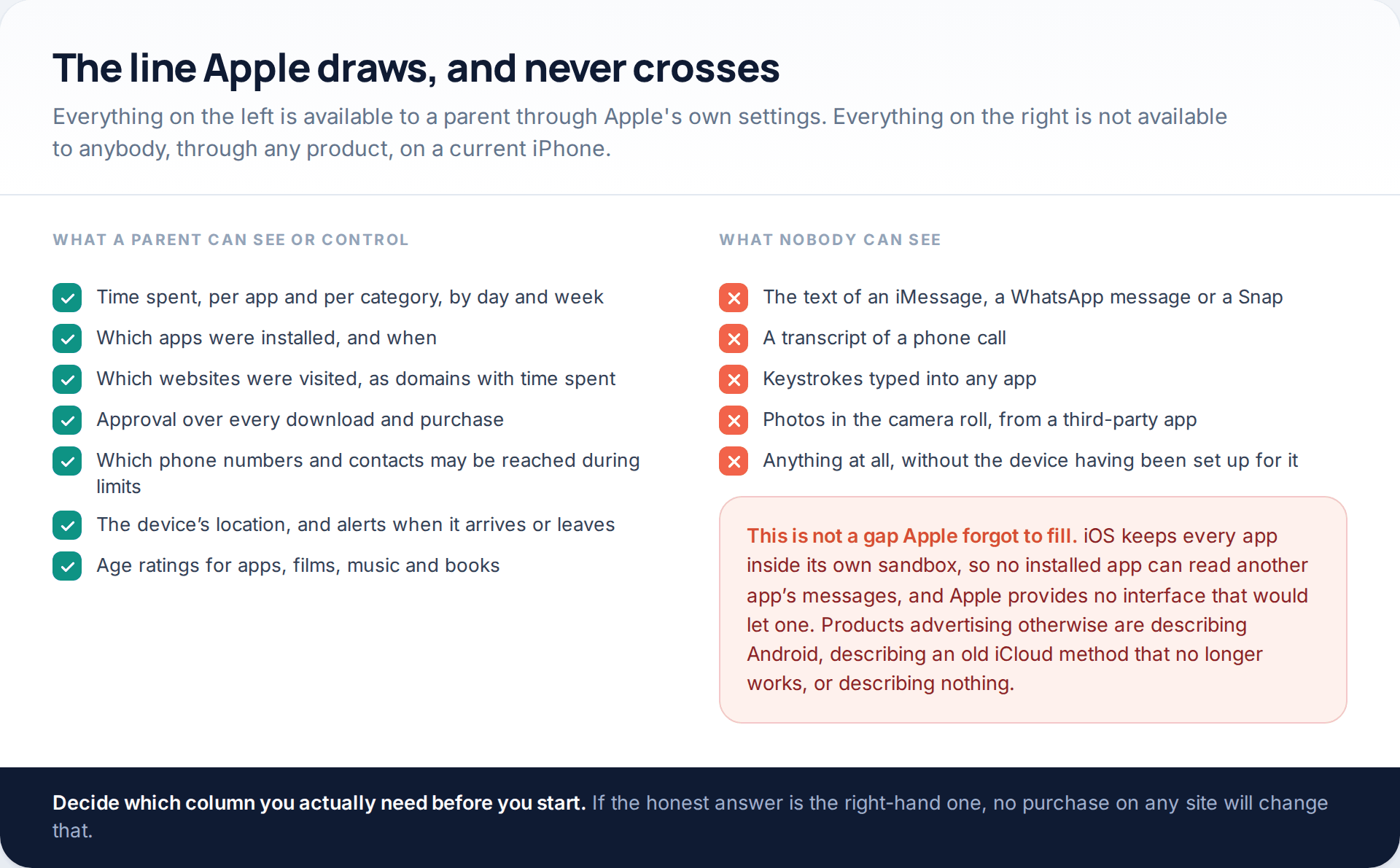
Monitoring a Child’s iPhone Openly: Screen Time, Family Sharing and the Limits
Apple’s monitor iPhone parental controls are better than their reputation and narrower than most advertising implies. Through Family Sharing and…
7 Best Free Hidden Spy Apps for Android (100% Undetectable)
Spying app makes our life easier as we don’t have to worry about our kids and online safety constantly. There…

How to Spy on Text Messages Without Installing Software
Are you wondering how to spy on text messages without installing software on the target phone? If yes, let us…
Monitoring your child can see.
Location, screen-time budgets, routines, app and website blocking and the alerts that matter, run from any browser and visible on the phone. Pair an Android phone in about fifteen minutes.