Kik and Your Child: The Safety Settings and the Four Risks to Watch
 By GuestSpy Editor · Founder and editorPublished September 7, 2020Updated October 5, 202611 min read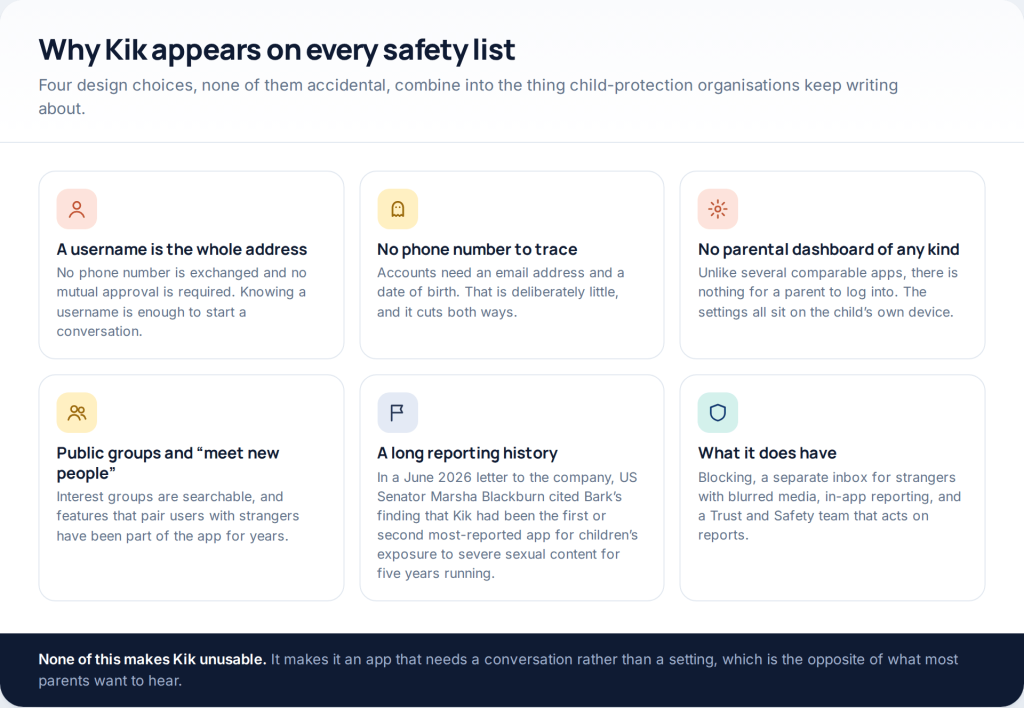
Kik safety for parents is unusual in one specific way: there is no parental dashboard, no invitation, no parent account. Everything Kik gives you sits on your child’s phone — a separate inbox for strangers with blurred images, a contact setting, blocking and reporting. The rest is a conversation, and this page covers both halves honestly.
This page used to be called “four ways for a free Kik hack”. There were not four ways, and there were not any. What follows is the version a parent can actually use: what the app does, what its settings reach, how to tell whether it is installed, and what to do if something has already gone wrong.
Why Kik keeps appearing on safety lists
Kik is a messaging app built around usernames rather than phone numbers. You create an account with an email address and a date of birth, you pick a username, and from then on anyone who knows that username can message you. There is no friend request, no mutual approval and no number exchanged.
That design has obvious appeal for a teenager — it is the app you can use without handing out your mobile number — and it is also precisely what makes it a recurring subject in child-protection work. In a June 2026 letter to the company, US Senator Marsha Blackburn cited Bark’s finding that Kik had been the first or second most-reported app for children’s exposure to severe sexual content for five years running, and described a test account presenting as a twelve-year-old receiving unsolicited sexual messages within minutes.
None of which means every Kik user is in danger. It means the app’s structure removes the friction that other apps use as a safety layer, and that the remaining protection is mostly behavioural. That is a worse answer than “turn on this setting”, and it is the accurate one.
What the “four ways” pages were actually doing
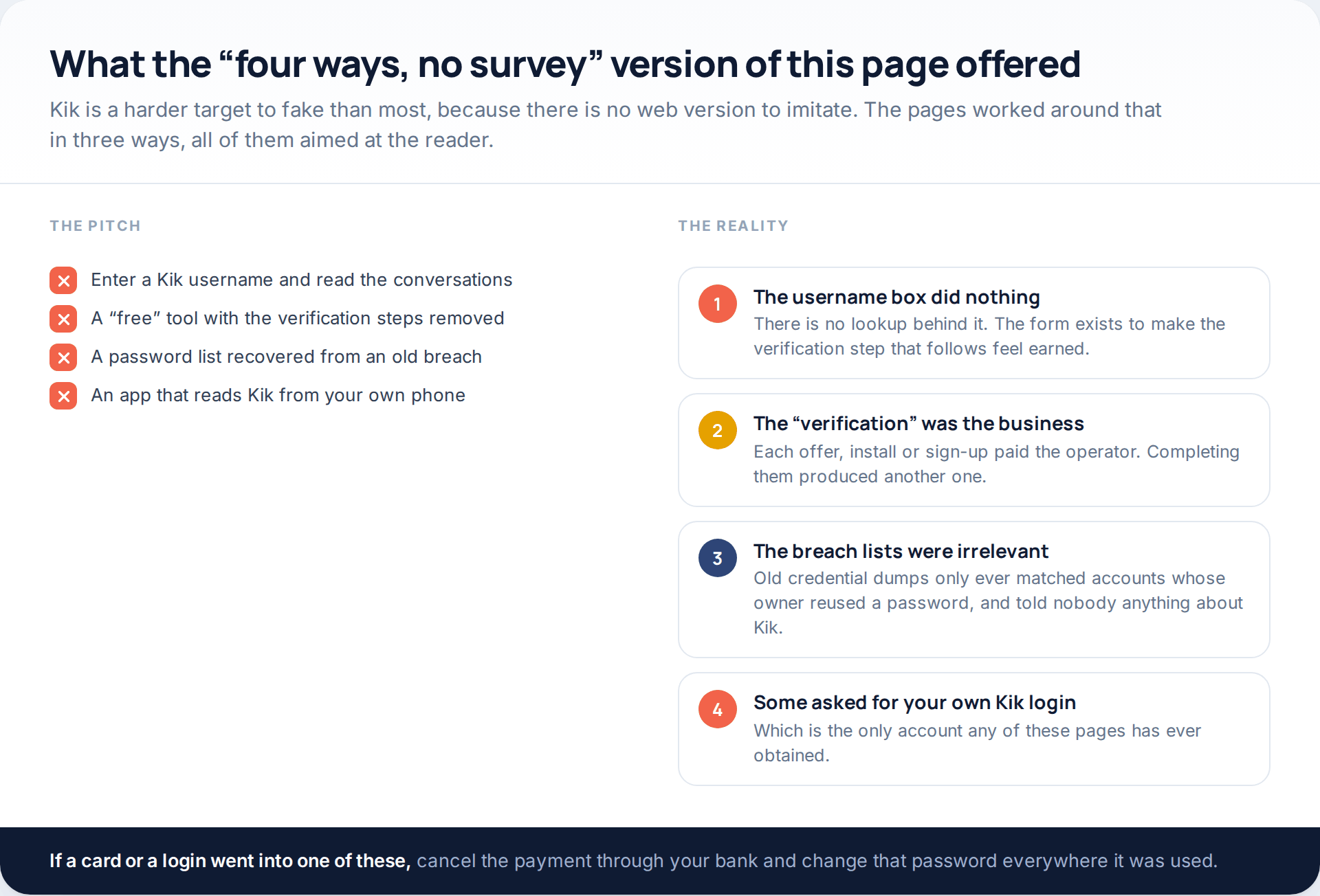
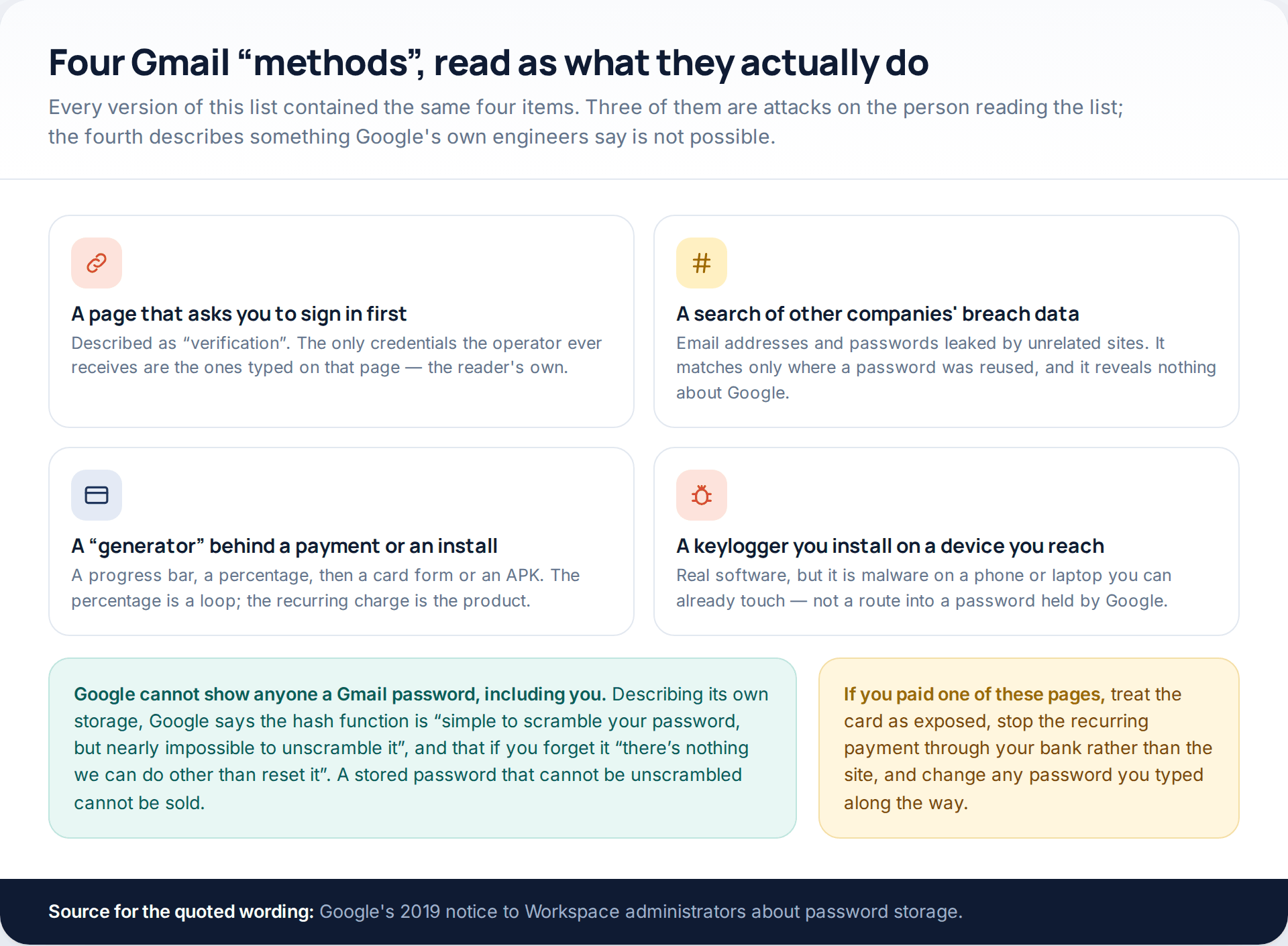
The username box on those pages was decoration. There is no lookup behind it, because Kik does not expose conversations to anyone outside the app, and a website with no credentials cannot ask it to. The box existed so that the human-verification step that followed felt like the last obstacle rather than the entire product.
Behind that step were app installs, sign-ups and offers, each paying the operator a small amount, arranged in a chain with no end. Some versions asked for the visitor’s own Kik login first, which is the only account any of those pages has ever obtained. A few sold access to old credential dumps — lists of email addresses and passwords leaked by unrelated companies years earlier, useful only against someone who reused a password, and uninformative about Kik.
If you went through one of these, treat any password you typed as exposed and change it wherever it was used, starting with your email. If card details went in, cancel the recurring payment through your bank rather than through the site.
The protection that works without being switched on
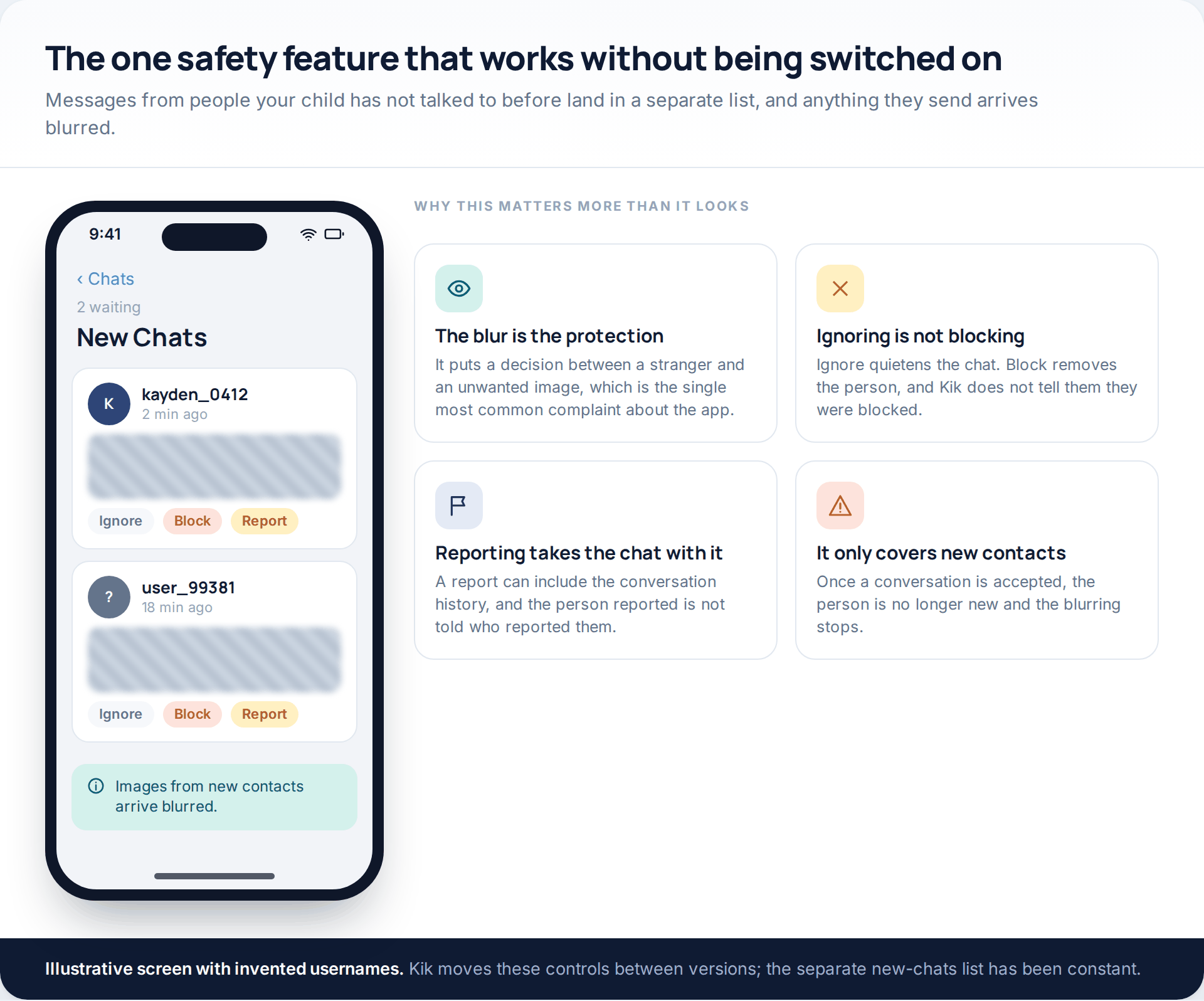
Kik separates messages from people your child has not chatted with before into their own list, and blurs any images or videos those accounts send. From there the options are to ignore, block or report. It is on by default, which makes it the most reliable protection in the app.
Two things are worth knowing about it. Ignore and block are different: ignoring quietens a chat, blocking removes the person entirely, and Kik does not notify someone that they have been blocked. And the separation only applies to new contacts — once a conversation has been accepted, that person is no longer new and their images arrive normally.
Reporting is more useful than it sounds. A report can carry the chat history with it, and Kik states the reported person is not told who reported them. For a teenager worried about retaliation, that detail is worth saying out loud.
What Kik’s own settings do
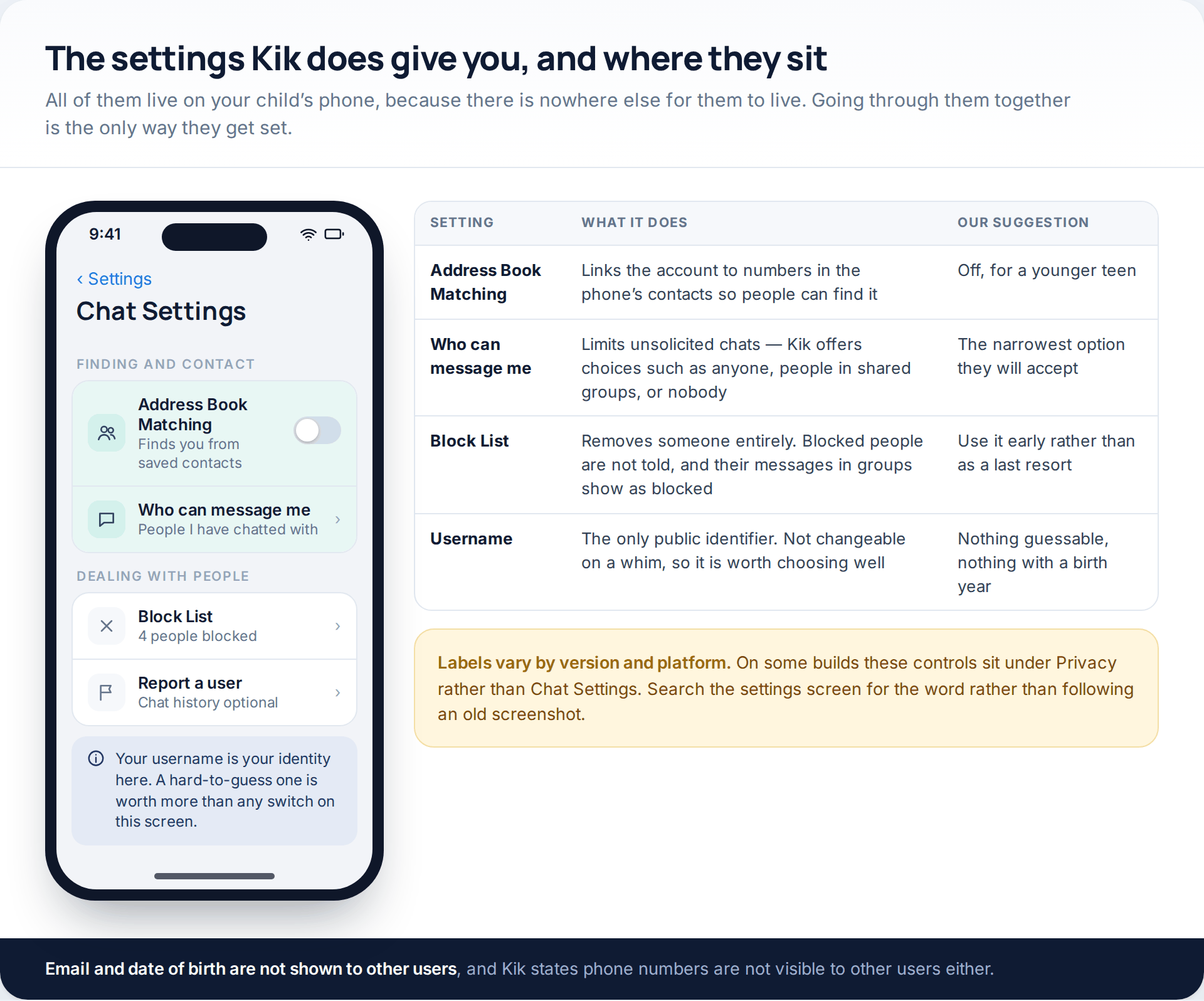
The useful controls are few enough to list. Address book matching connects the account to numbers saved in the phone’s contacts so that people can find it; for a younger teenager, off is the sensible position. A contact setting governs who can message at all, with options such as anyone, people in shared groups, or nobody — pick the narrowest one your child will accept rather than the narrowest one that exists. The block list is where blocked accounts live and can be reversed. And the username itself, which is the only public identifier, is worth choosing to be unguessable: Kik’s own advice is to avoid anything easy to work out, and a birth year in a username is an invitation.
Labels move between versions and platforms, and on some builds these sit under Privacy rather than Chat Settings. Search the settings screen for the word rather than hunting for a screenshot’s exact wording. Kik states that email addresses, dates of birth and phone numbers are not shown to other users.
The four risks, and what reduces each
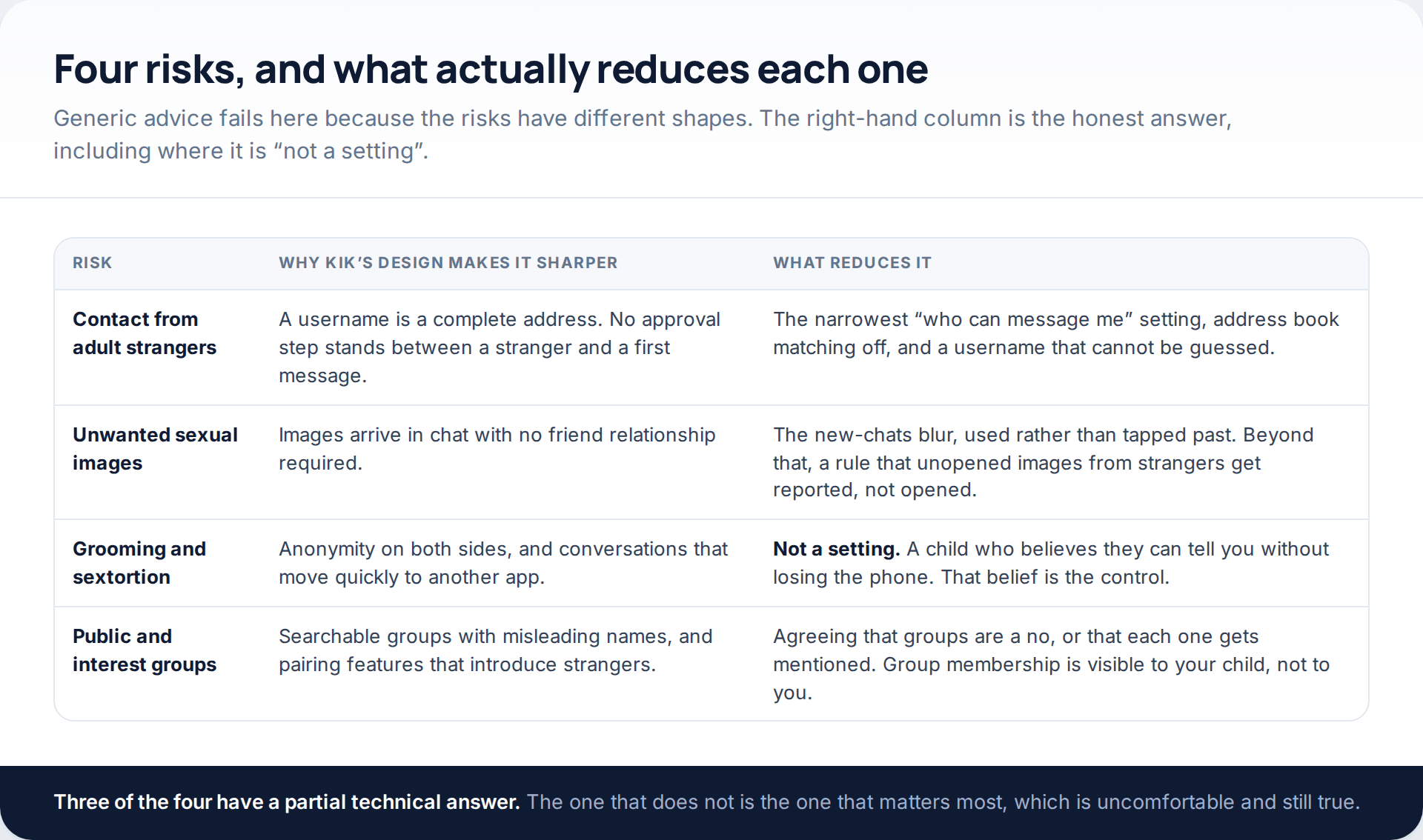
The honest summary is in the third column. Contact settings and address book matching reduce the volume of stranger contact. The new-chats blur reduces unwanted images, if it is used rather than tapped past. Group exposure is reduced by an agreement about groups, because group membership is not visible to you.
Grooming and sextortion have no setting. What reduces them is a child who believes they can tell you something has happened without losing their phone, and who knows that paying someone never ends it. If you take one thing from this page, make it that sentence rather than any switch described above.
The age rule, and why it is not a control
Kik’s stated minimum age has moved. Older parent guidance, including ConnectSafely’s long-running Kik guide, describes a minimum of 13 with a birthday collected at sign-up. More recent guidance, including Internet Matters and Australia’s eSafety Commissioner, records the platform as stating 18 and over, a change associated with age-assurance obligations under the UK’s Online Safety Act.
In practice, what matters is enforcement rather than the number. The Blackburn letter of June 2026 describes Kik as a platform that “purports to be an 18+ platform” while lacking age verification, and that mismatch is the operative fact. A stated age rule with no verification behind it is a terms-of-service position, not a safety control, and it should not change what you do.
How to tell whether your child uses it
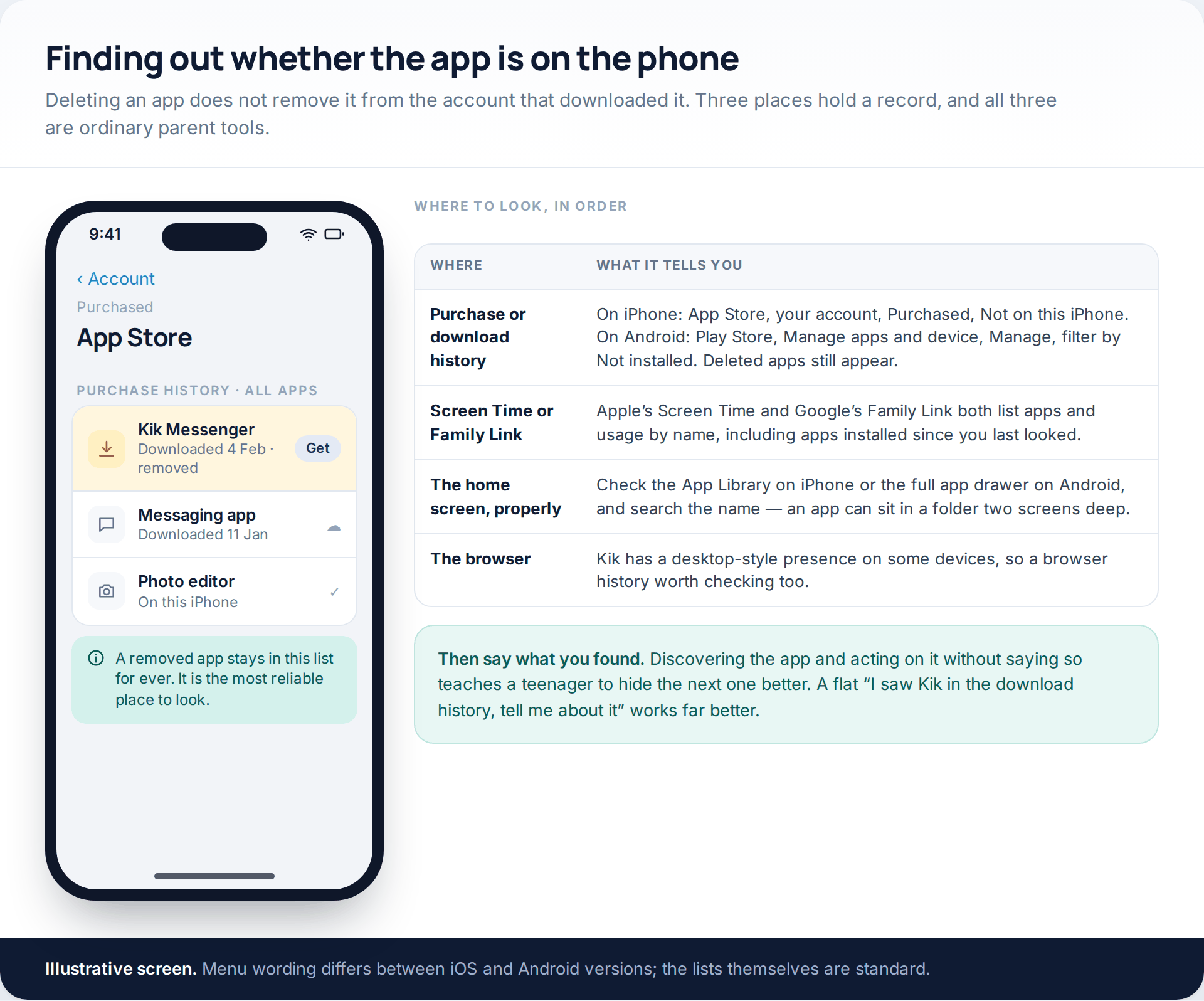
Four places hold a record, and none of them requires anything unusual. Download history is the strongest: on iPhone, App Store, your account, Purchased, then Not on this iPhone; on Android, Play Store, Manage apps and device, Manage, then filter to apps that are not installed. Deleting an app does not remove it from this list.
Screen Time on iPhone and Family Link on Android both list apps by name with usage, and will show an app installed since you last looked. The App Library or app drawer catches an icon hidden in a folder — search the name rather than scrolling. And the browser history is worth a glance, since app pages get visited before apps get installed.
Then say what you found. Acting on a discovery without mentioning it teaches a teenager to hide the next app more carefully, which is the opposite of the outcome you want. “I saw Kik in the download history — tell me about it” is a better opening than it sounds, and it is one we have written about more generally in what to do when you find something you were not expecting.
No parental dashboard: what to do instead
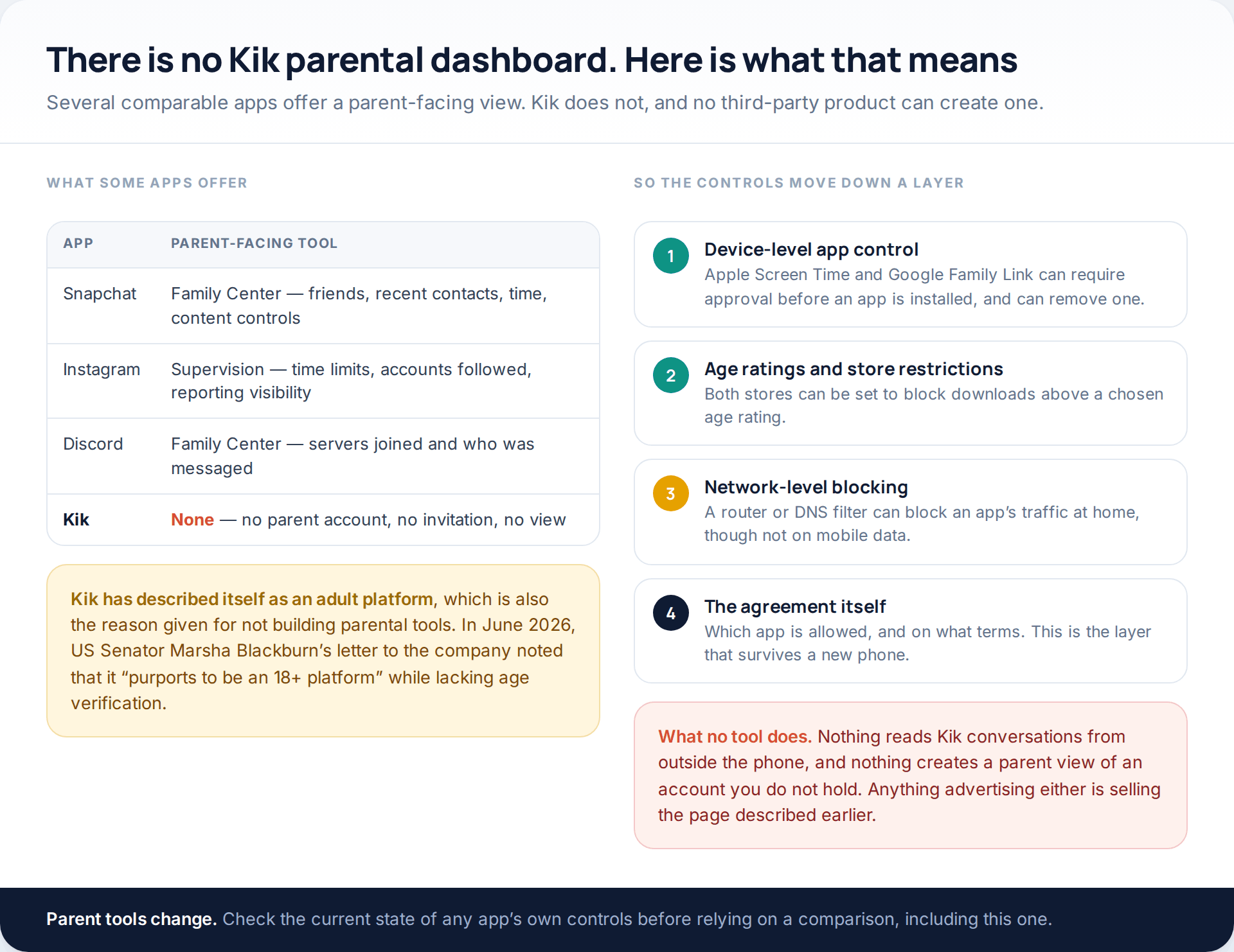
Snapchat has Family Center, Instagram has Supervision, Discord has a Family Center. Kik has nothing comparable: no parent account, no invitation, no view. The company’s position has been that it is an adult platform, which is also the reason given for not building parent tools.
So the controls move to the device. Apple’s Screen Time and Google’s Family Link can both require your approval before any app is installed, and can remove one that is already there. Both stores can be restricted by age rating. A router or DNS filter can block an app at home, though not on mobile data, and the practicalities of doing that across a household are covered in our guide to blocking apps and sites at device and network level.
What no product does is read Kik conversations from outside the phone, or create a parent view of an account you do not hold. Anything advertising either is the page described in the second section.
The conversation
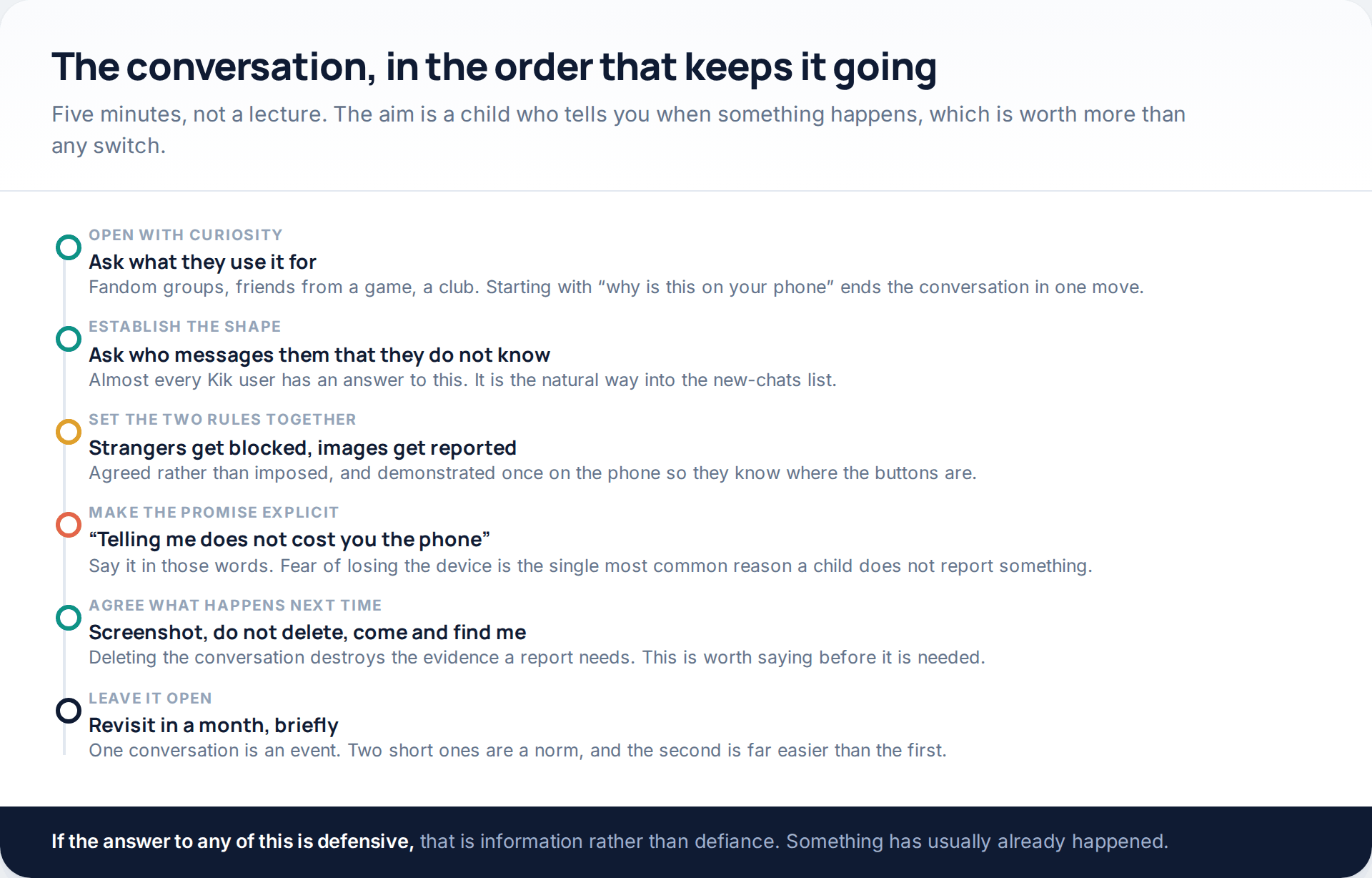
Five minutes beats a lecture, and curiosity beats interrogation. Ask what they use it for — most answers are a fandom group, friends from a game, or a club — and then ask who messages them that they do not know. Almost every Kik user has an answer to that second question, and it leads naturally to the new-chats list and the block and report buttons, which is where you want to end up.
Then say the sentence that matters: telling me does not cost you the phone. Fear of losing the device is the most common reason a child keeps something quiet, and the promise only works if you keep it the first time it is tested.
If something has already happened
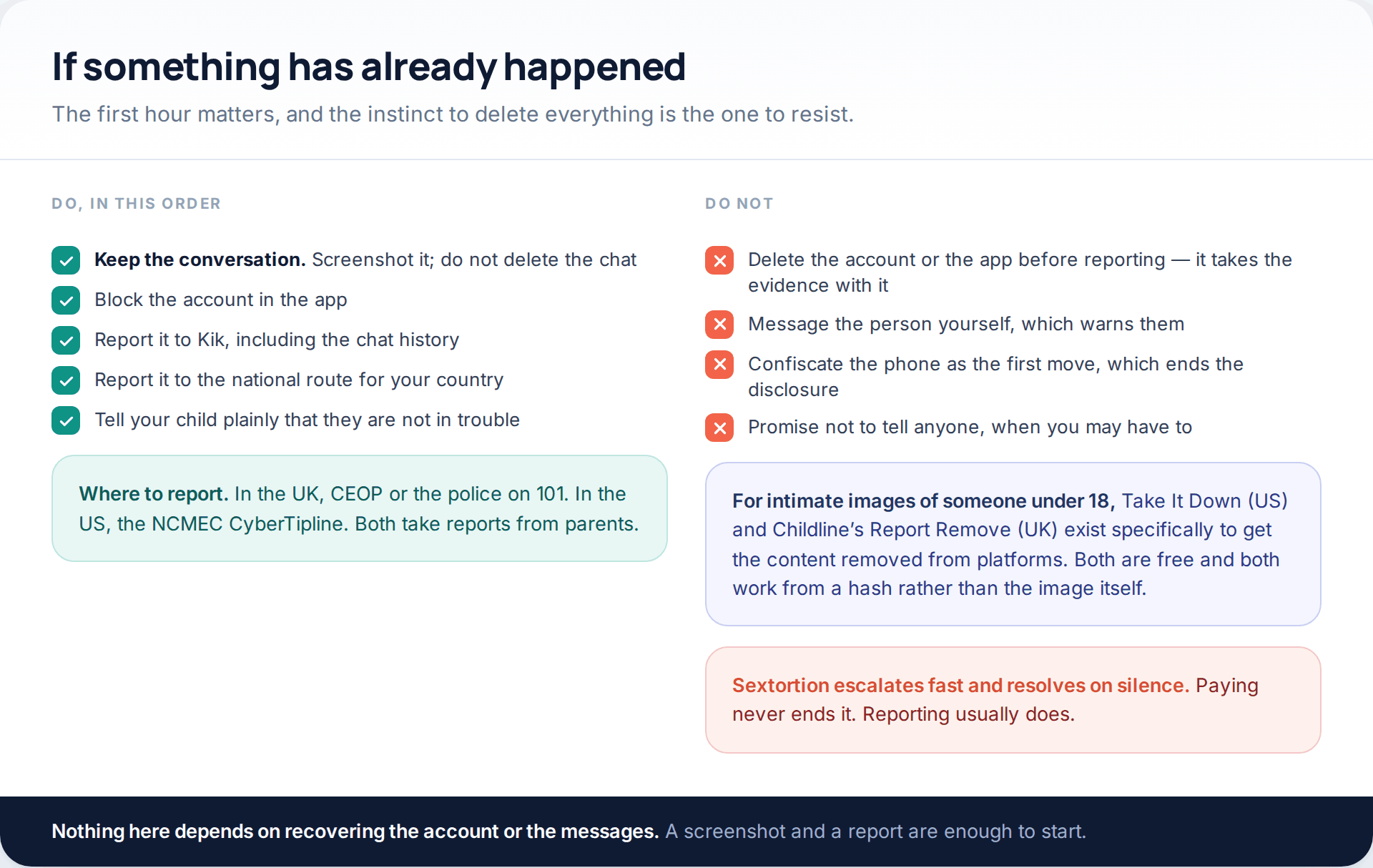
Keep the conversation. Screenshot it, block the account, report it to Kik with the chat history attached, and then report it to the national route: CEOP or 101 in the UK, the NCMEC CyberTipline in the US. For intimate images of someone under 18, Take It Down in the US and Childline’s Report Remove in the UK exist to get content taken off platforms, and both are free.
And tell your child, early and clearly, that they are not in trouble. Sextortion in particular escalates on silence and resolves on reporting; paying never ends it, and the shame that stops a teenager speaking up is the mechanism the whole thing runs on.
How this page was put together
The description of Kik’s features and settings here draws on current parent-facing guidance from Australia’s eSafety Commissioner, Internet Matters, ConnectSafely, Webwise and Thorn, checked in October 2026. We could not read Kik’s own help and community standards pages directly while preparing this, so every setting label is described as the safety organisations record it, with a note that wording varies by version and platform — treat the names as a guide to what to search for rather than an exact menu path.
The two sourced claims are attributed in the text: the reporting figure comes from Bark, as cited in US Senator Marsha Blackburn’s letter to Kik of June 2026, and the characterisation of Kik as a platform that presents itself as 18 and over while lacking age verification comes from the same letter. We have given no figures of our own, because there are none worth quoting, and we have not named or tested any product claiming to read Kik messages.
If the broader question is which messaging apps are reasonable at which age, rather than this one specifically, that is covered better in our guide to matching oversight to a child’s age.
Common questions
Does Kik have parental controls?
No. There is no parent account, no dashboard and no supervision feature of the kind Snapchat, Instagram and Discord offer. The controls that exist — contact settings, blocking, reporting, address book matching — all sit on your child’s own device and are set there.
How old do you have to be to use Kik?
The stated minimum has changed. Older guidance records 13; more recent guidance, including from eSafety and Internet Matters, records Kik stating 18 and over. Since there is no meaningful age verification either way, the number should not change how you approach it.
Can I read my child’s Kik messages?
Not from outside the phone. Kik conversations are not exposed to any account-level export or parent view, and no third-party service can produce one. What you can do is look at the phone together, with your child present and aware, which is also the only version that does not damage the relationship.
Can strangers message my child on Kik without permission?
Yes, if they know the username, which is the whole design. Those messages land in a separate new-chats list with any images blurred, and the contact setting can narrow who is able to start a conversation at all. The username itself being hard to guess does more than either.
Does Kik tell someone when they have been blocked?
No. Blocked people are not notified, and in group chats their messages appear to your child as blocked rather than disappearing in a way that signals what happened. That makes blocking a lower-risk action than teenagers usually assume.
Should I just delete the app?
Sometimes, and rarely as the first move. Deleting it without a conversation usually produces a replacement app you do not know about, and if something has already happened it destroys the evidence a report needs. Talk first, report if needed, then decide about the app.
My child says everyone uses it for a fandom group. Is that true?
Often, yes. Interest groups are a genuine and ordinary use of Kik. The follow-up question is the useful one: are the groups public or invite-only, and has anyone from one of them moved the conversation into a private chat?
Can I stop Kik being installed at all?
Yes, at the device level. Apple’s Screen Time and Google’s Family Link can both require approval before any app is installed and can remove one already there. Store age-rating restrictions achieve something similar, though a determined teenager will find the limits of both.
Using a monitoring app for this? GuestSpy is parental monitoring for Android that stays visible on the child's phone and runs from any browser. If it fits your family, see what the app does.
Related guides
5 Best Security and Network-Testing Apps for Android (Rooted and Not)
The useful security apps for Android are not the ones with “hack” in the title. They are a network scanner,…
Gmail Password Compromised? Four Recovery Routes Google Accepts
If your Gmail password was hacked, there are four routes back and the one that is open to you depends…
Facebook Account Hacked? Every Free Route Back In
If your Facebook account was hacked, five routes lead back in and all of them are free: a device of…
Monitoring your child can see.
Location, screen-time budgets, routines, app and website blocking and the alerts that matter, run from any browser and visible on the phone. Pair an Android phone in about fifteen minutes.