Snapchat Hacked? Five Steps to Get the Account Back
 By GuestSpy Editor · Founder and editorPublished September 3, 2020Updated October 5, 202612 min read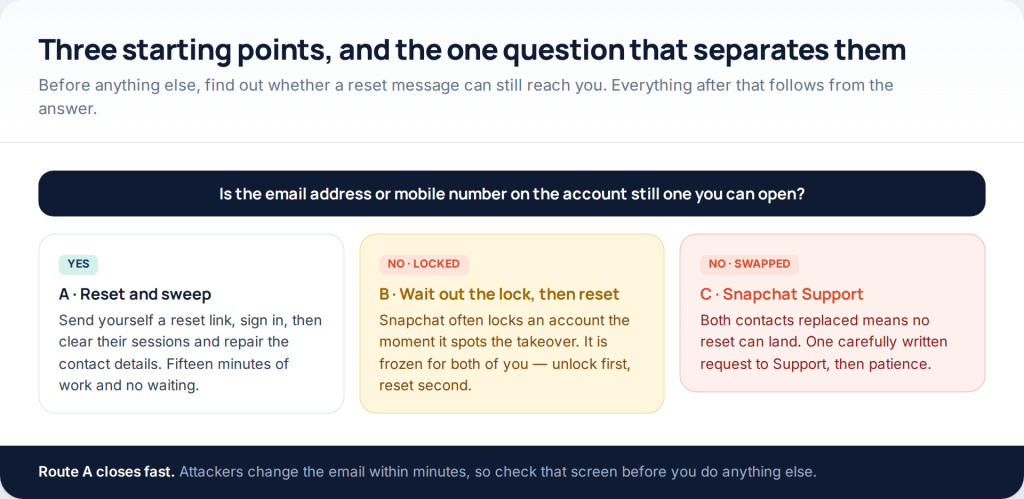
If your Snapchat account was hacked, the first thing to establish is whether a password reset can still reach you. If the email or phone on the account is still yours, you are fifteen minutes from being back in. If both were swapped, the route is Snapchat Support and it takes days. Either way, clearing the attacker’s sessions matters more than the new password.
This page used to be a list of “five ways to hack someone’s Snapchat”. It is now about getting a stolen account back, because that is what people are searching for when they land here, and because none of those five ways existed. The second section explains what was really being sold under that heading.
Which of the three routes is yours
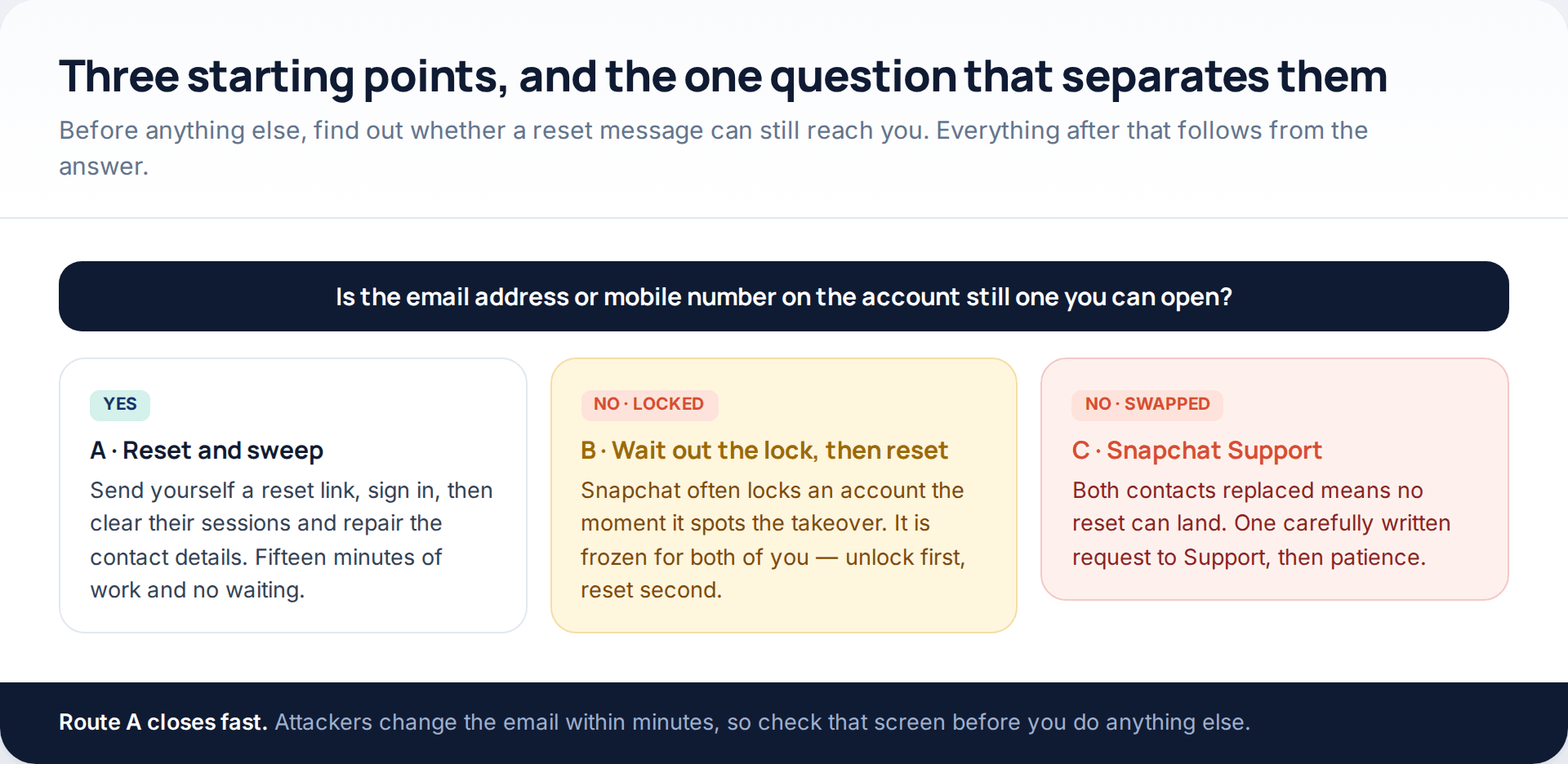
Snapchat recovery has fewer branches than most platforms, because the whole system hangs on one thing: a reset message has to be able to land somewhere you can open. So the first move is not a password change. It is tapping Forgot your password? on the login screen and reading what it offers.
Before that, though, deal with your inbox. If the email address attached to Snapchat uses a password you have used anywhere else, change it now. Someone who can read that inbox can undo every repair you make, and resets, security notices and support replies all arrive there. Our guide to locking down an account after a break-in covers that order across services.
What the “five ways, no survey” pages were actually selling
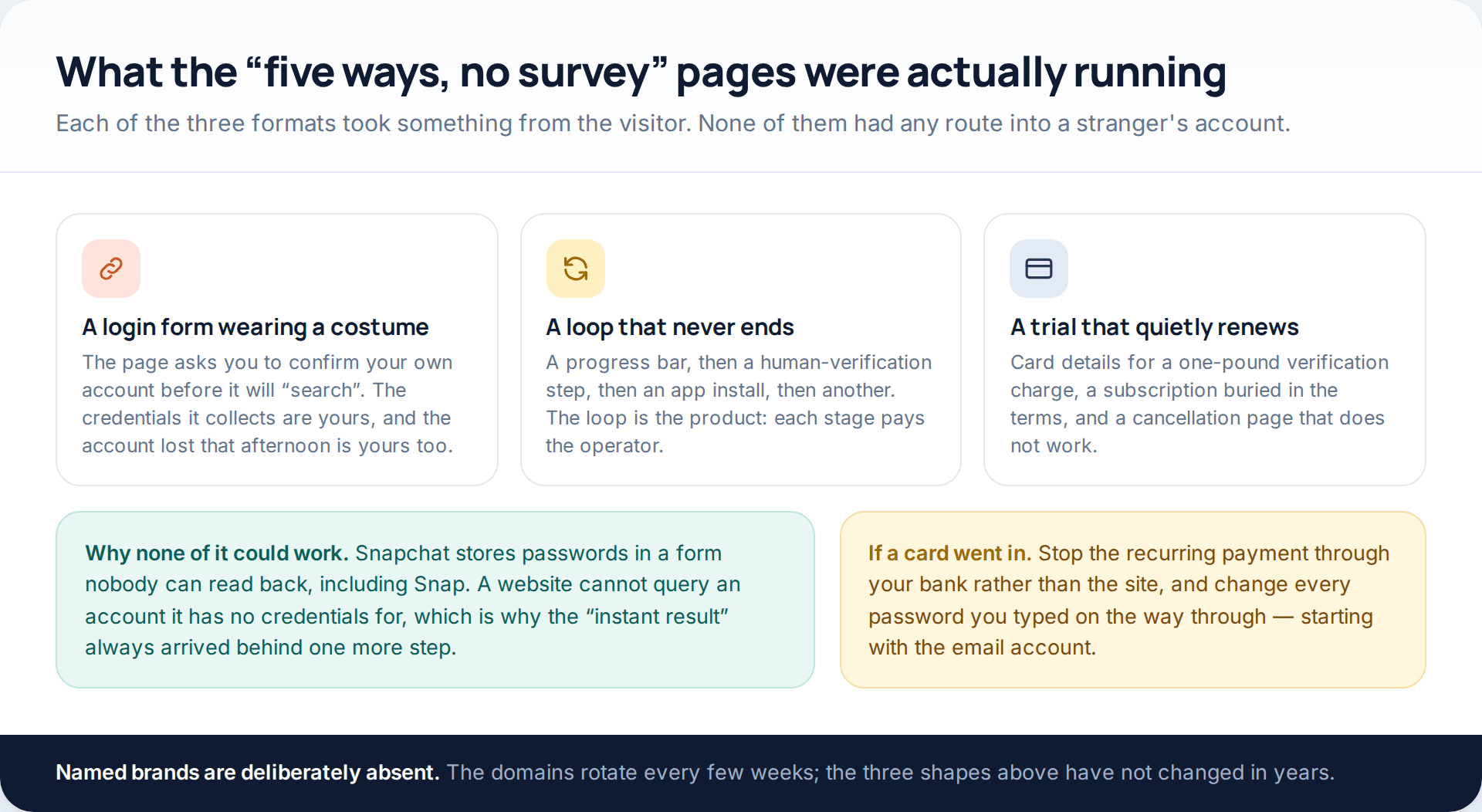
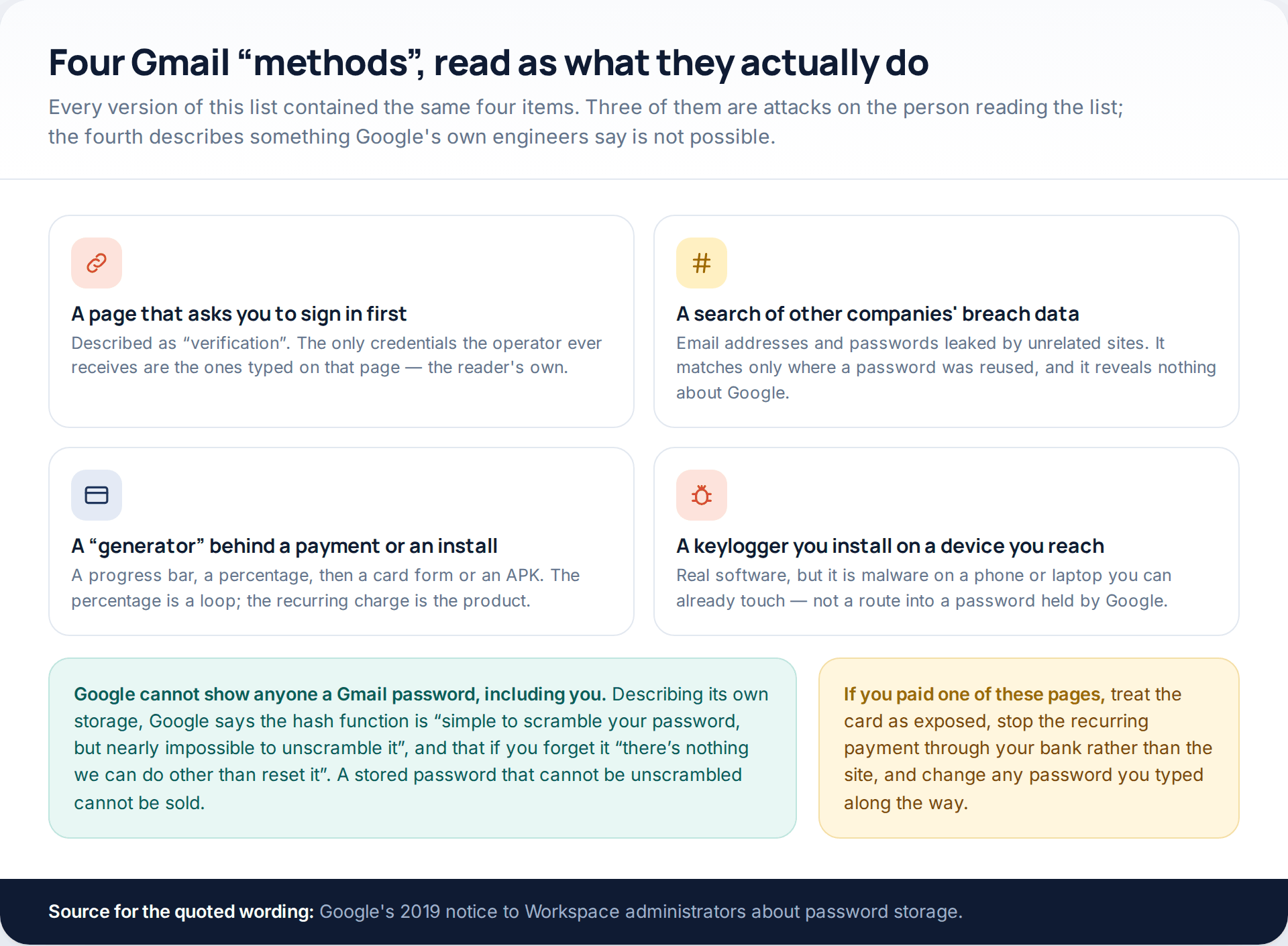
The first format was a login form in disguise. Before it would “search”, it asked you to confirm your own account, and the credentials you typed were the only ones the operator ever had. The second was a verification loop: a progress bar, a human-check step, an app install, another check, each one paying a few pence to whoever built the page, with no result at the end because there was never going to be one. The third took card details for a trivial verification charge and set up a subscription that is far harder to stop than to start.
What none of them could do is ask Snapchat for a password. Snap does not hold passwords in a readable form, and a website with no credentials cannot query an account at all. That is also why a Snapchat account is almost never lost to clever technique — it goes to a reused password, a convincing link, or a login code handed to a friend’s compromised account.
If you entered card details on one of those sites, treat the card as exposed. Cancel the recurring payment through your bank rather than through the site, and change every password you typed along the way — the email account first, because it unlocks everything else.
Step one: reset the password, or find out that you cannot
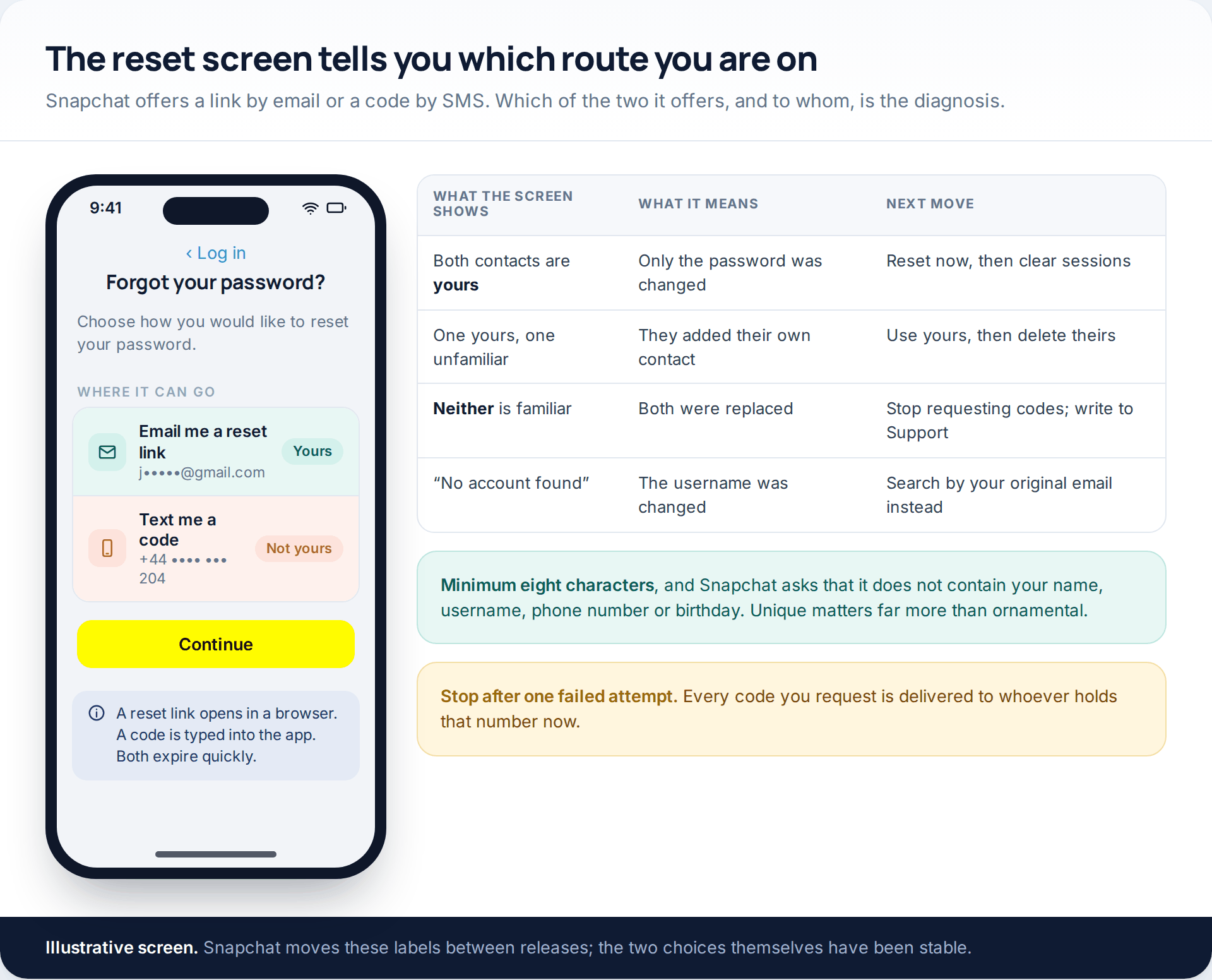
Snapchat gives you two ways through: a reset link sent by email, which opens in a browser and asks for a new password, or a verification code sent by SMS, which signs you in so you can change the password in Settings afterwards. Both work. Which one you are offered depends on what is attached to the account.
The masked contacts beside each option are the useful part. If the address or number shown is yours, reset immediately and move on to sessions. If one of them is unfamiliar, use yours, then delete theirs the moment you are back in — an attacker’s email left on the account keeps receiving codes long after the password changes. If neither is familiar, stop. Every further request delivers a working code to whoever controls that address now, and repeated attempts make the automated checks more cautious, not less.
Snapchat’s own password rule is modest: at least eight characters, and nothing containing your name, username, phone number or birthday. The rule that matters more is that it must not be a password you have used anywhere else.
Step two: if the account is locked, unlock it before anything else
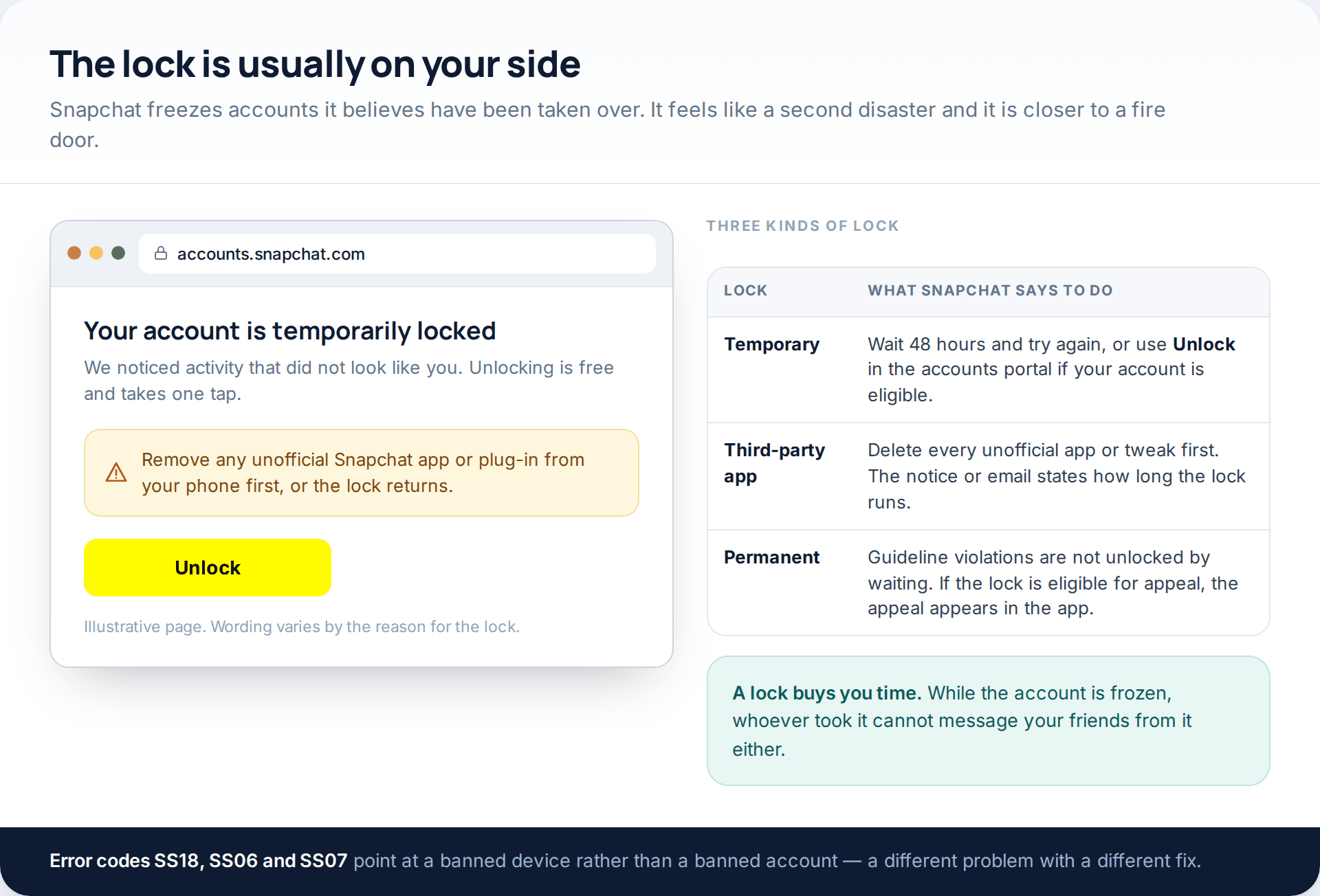
A lot of people discover the takeover because the account stops working for everyone, including the person who took it. Snapchat locks accounts for suspicious activity, for sending large numbers of friend requests quickly, when it detects a compromise, and when it sees an unofficial third-party app in use.
For a plain temporary lock, Snapchat’s instruction is to wait 48 hours and try logging in again. Eligible accounts can also be unlocked straight away by signing in at accounts.snapchat.com and choosing Unlock. If the lock is connected to a third-party app, delete every unofficial Snapchat app or plug-in from the phone first — otherwise the unlock holds for a few minutes and the lock comes back.
Step three: sign their devices out
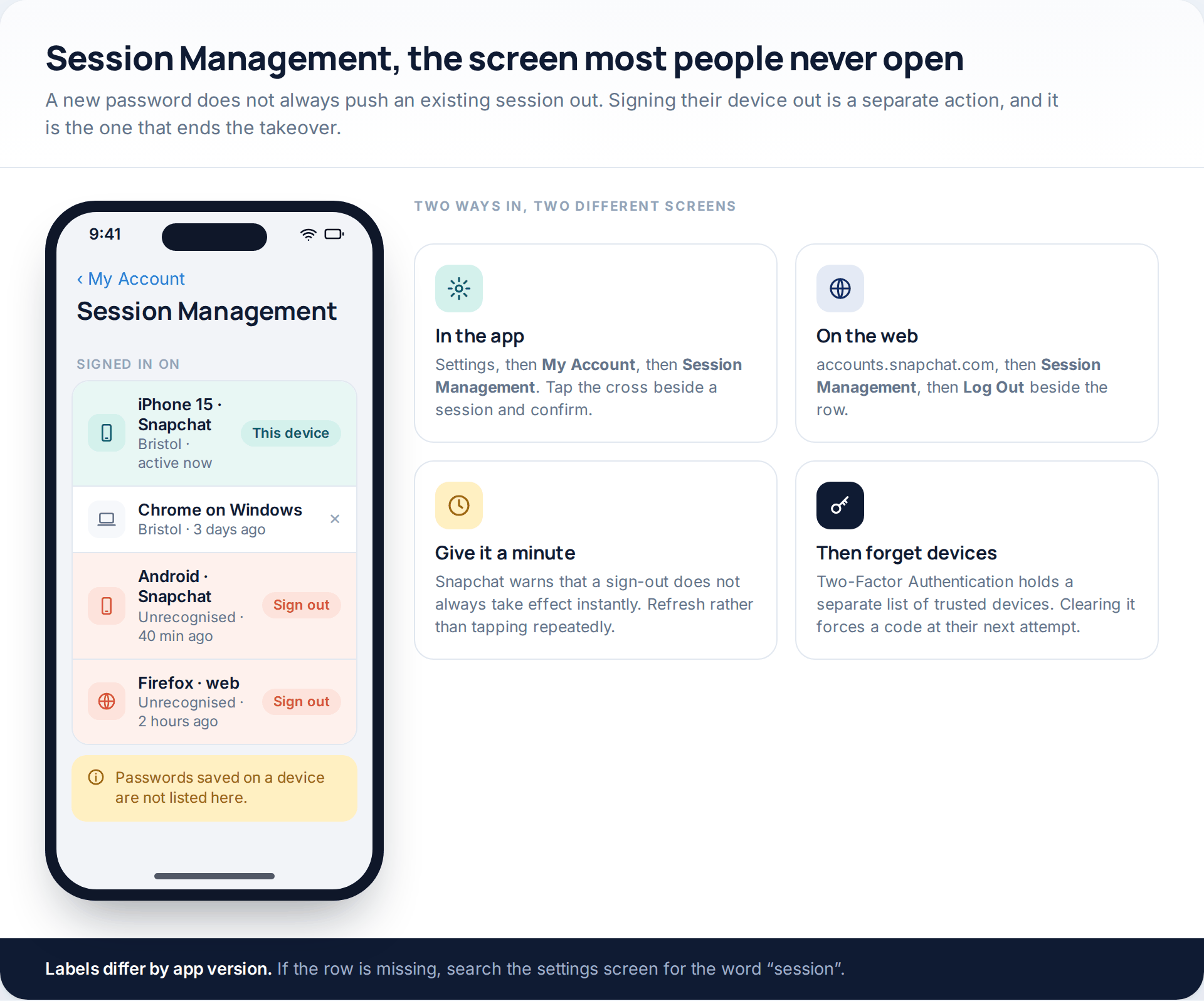
This is the step that is skipped most often, and it is the one that actually ends the takeover. Snapchat keeps a Session Management screen listing every device and browser currently signed in. In the app it sits under Settings, then My Account; on the web it is in the accounts portal. Each row can be signed out individually, with a confirmation, and Snapchat notes that a sign-out does not always take effect the instant you tap it.
Two details are easy to miss. Session Management does not show login details saved in a browser or keychain, so a session signed out from a device that still has your old password stored can be re-established if that password has not changed. And the list of trusted devices — the ones allowed to skip the two-factor code — lives somewhere else entirely, under Two-Factor Authentication, as Forget Devices. Clearing both is the complete version.
Step four: repair two-factor, contacts and the recovery code
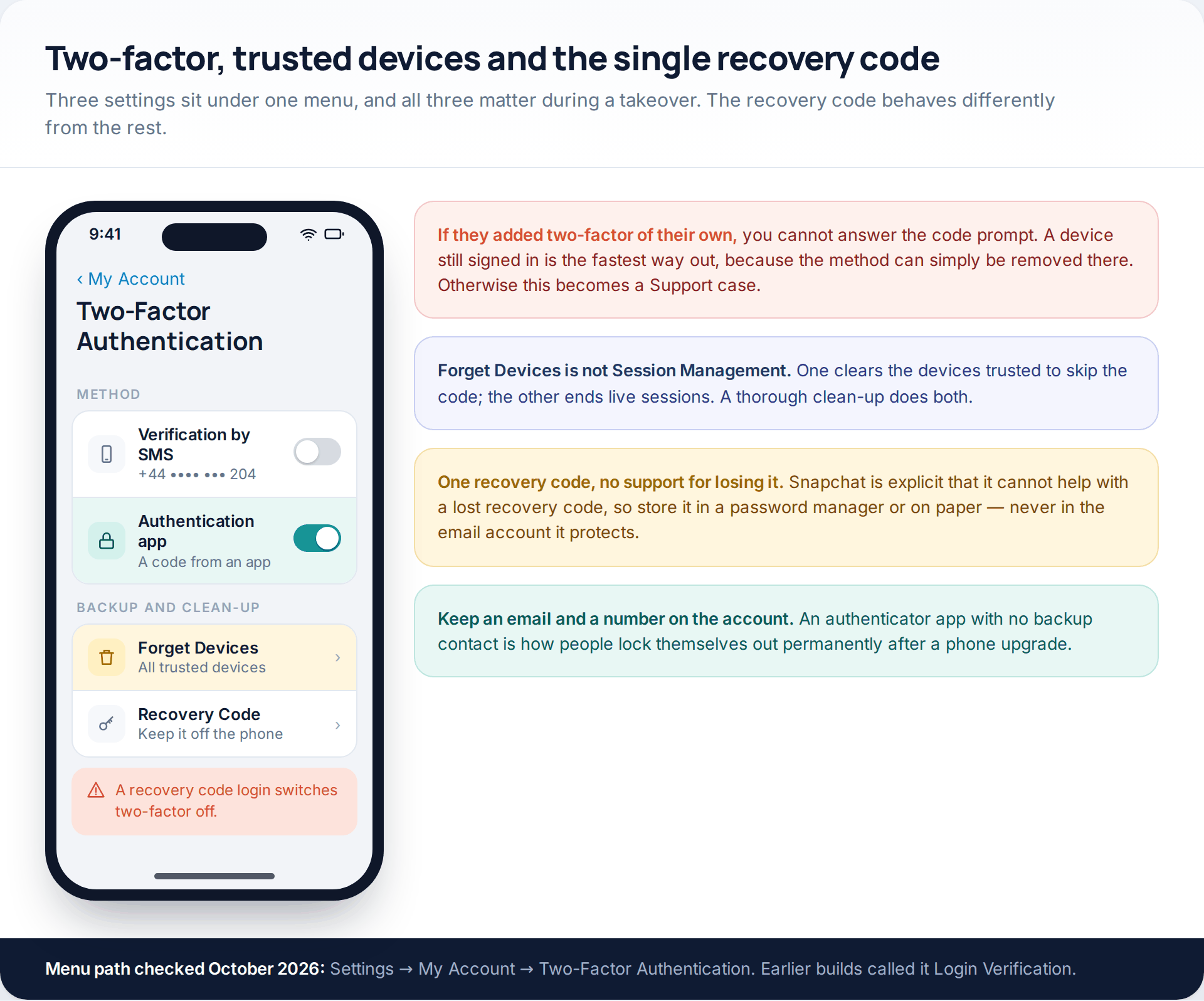
Attackers who get comfortable will add their own two-factor method, which turns a password problem into an identity problem. If that has happened and you have no device still signed in, there is no clever workaround — it becomes a Support case. If you do have a device still signed in, remove their method there first, before you do anything else.
Once two-factor is yours again, generate a Recovery Code and put it somewhere that is not your phone and not your email. Snapchat says plainly that it does not offer support for lost recovery codes. And note the behaviour that catches people out: signing in with a recovery code automatically switches two-factor authentication off. It is a door, not a key — after using one, turn two-factor back on.
Finally, go through the contact details. Remove any email address or phone number you did not add, confirm the ones that are yours are current, and check the display name. Snapchat’s own advice is to review the email and number on the account at least once a year, and to avoid temporary or virtual numbers for them, because a recycled number becomes a recovery route for whoever is given it next.
Step five: when no reset can reach you
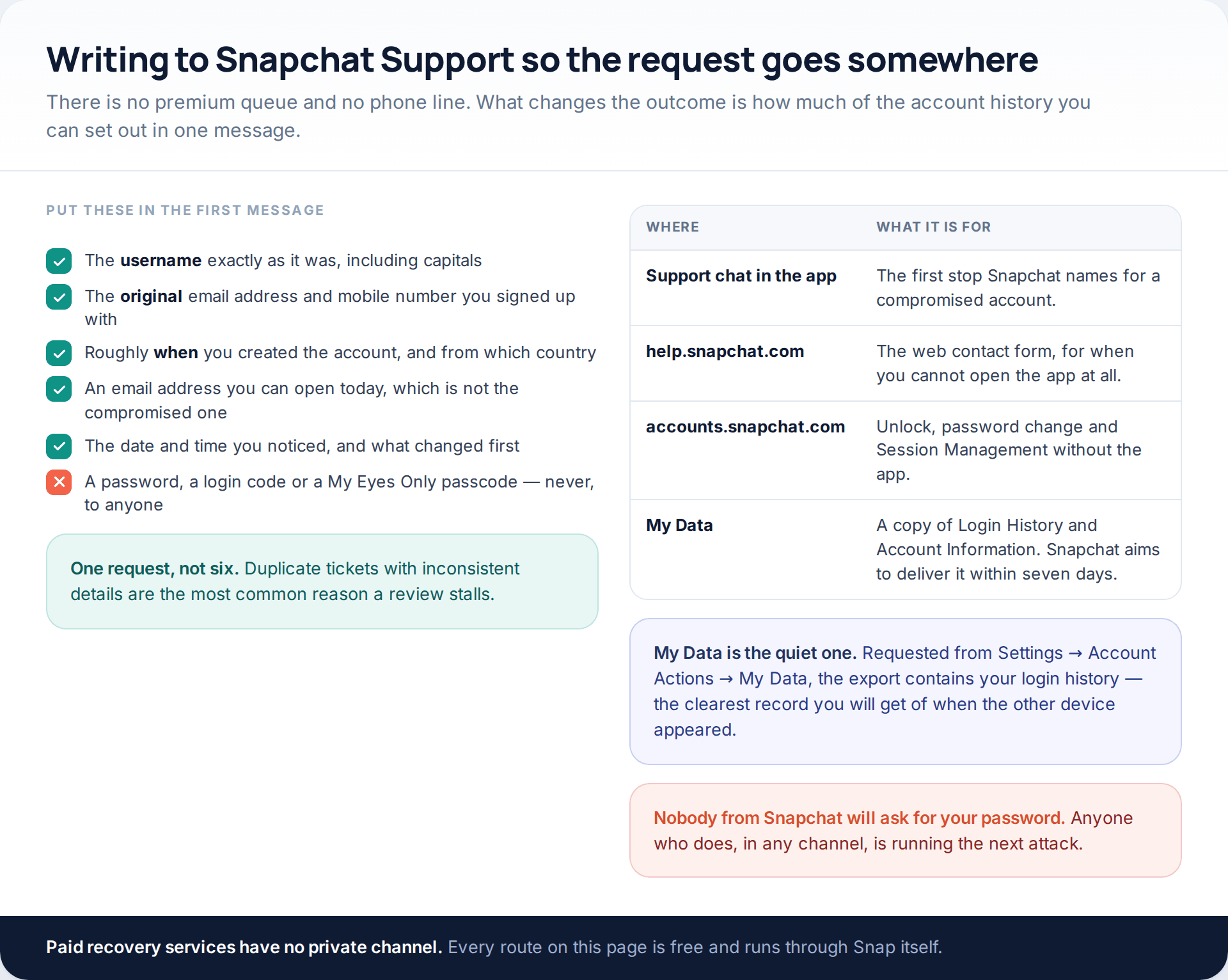
With both contacts replaced there is nowhere for a reset to go, so Snapchat has to establish that the account was yours by other means. The route is the support chat in the app, or the contact form on the help site if the app will not open at all. There is no phone line, no premium queue and no paid shortcut.
What changes the outcome is detail. Give the username exactly as it was, the original email address and mobile number used at sign-up, roughly when and where the account was created, and a contactable address that is not the compromised one. Say what changed first and when you noticed. Then send it once and wait — duplicate tickets with slightly different answers are the commonest reason a case goes round in circles.
One underused option: request your data from Settings, then Account Actions, then My Data. The export includes Login History and Account Information, which is the clearest timeline you will get of when the other device appeared. Snapchat aims to deliver it within seven days, and longer for large downloads.
What you get back, and what is gone
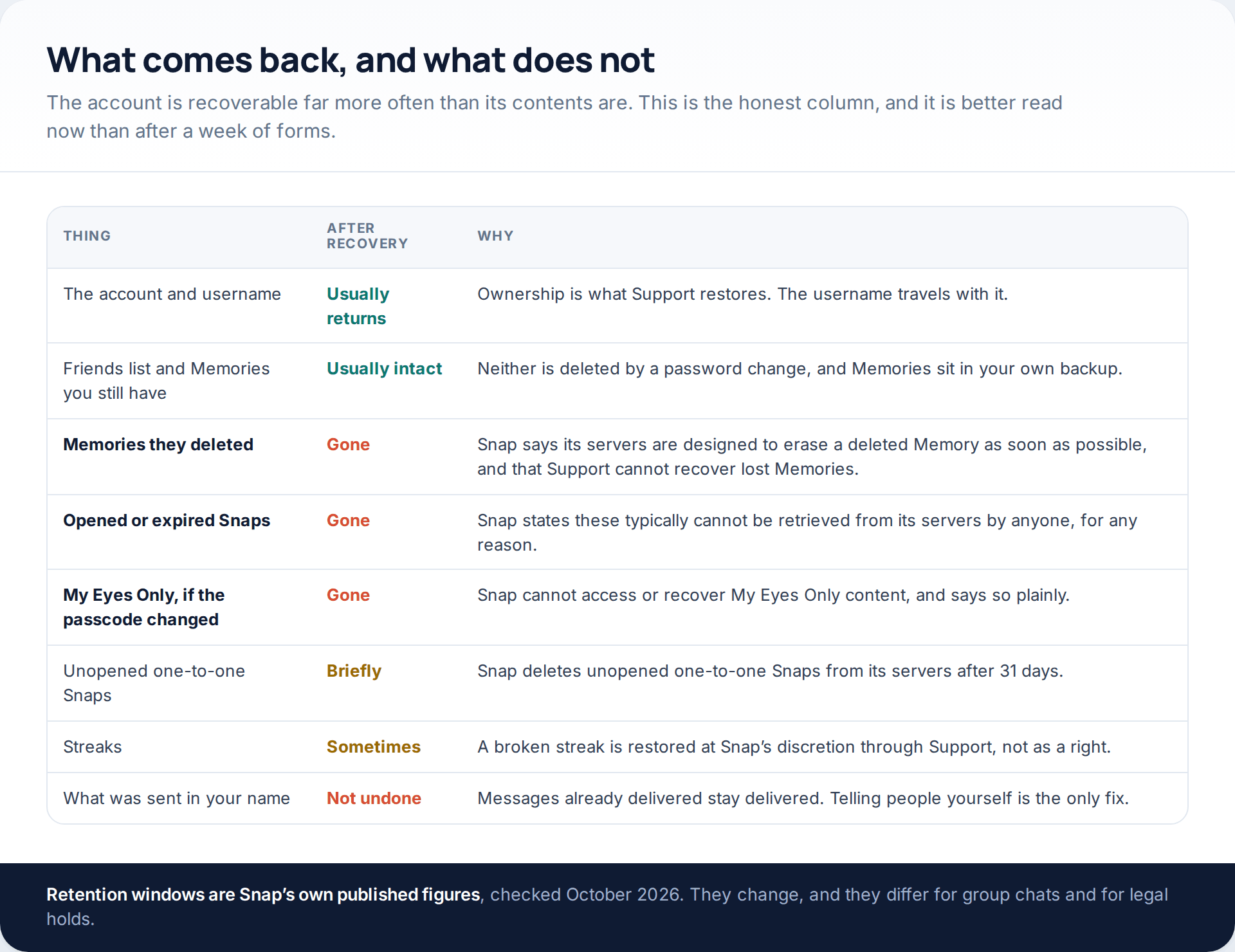
Snapchat is built around deletion, and that architecture does not make an exception for you. Opened or expired Snaps, Snap says, typically cannot be retrieved from its servers by anyone, for any reason. Memories deleted by whoever held the account are erased as soon as possible by design, and Snapchat Support states it cannot recover lost Memories. My Eyes Only is the hardest line of all: Snap cannot access or recover that content, so if the passcode was changed, it is finished.
Streaks sit in a softer category. Snapchat will sometimes restore a broken streak through Support, but it is a goodwill decision rather than an entitlement, and a long queue is not the place to spend your one clear message. Lead with the account; mention the streak at the end if at all.
The first hour, in the right order
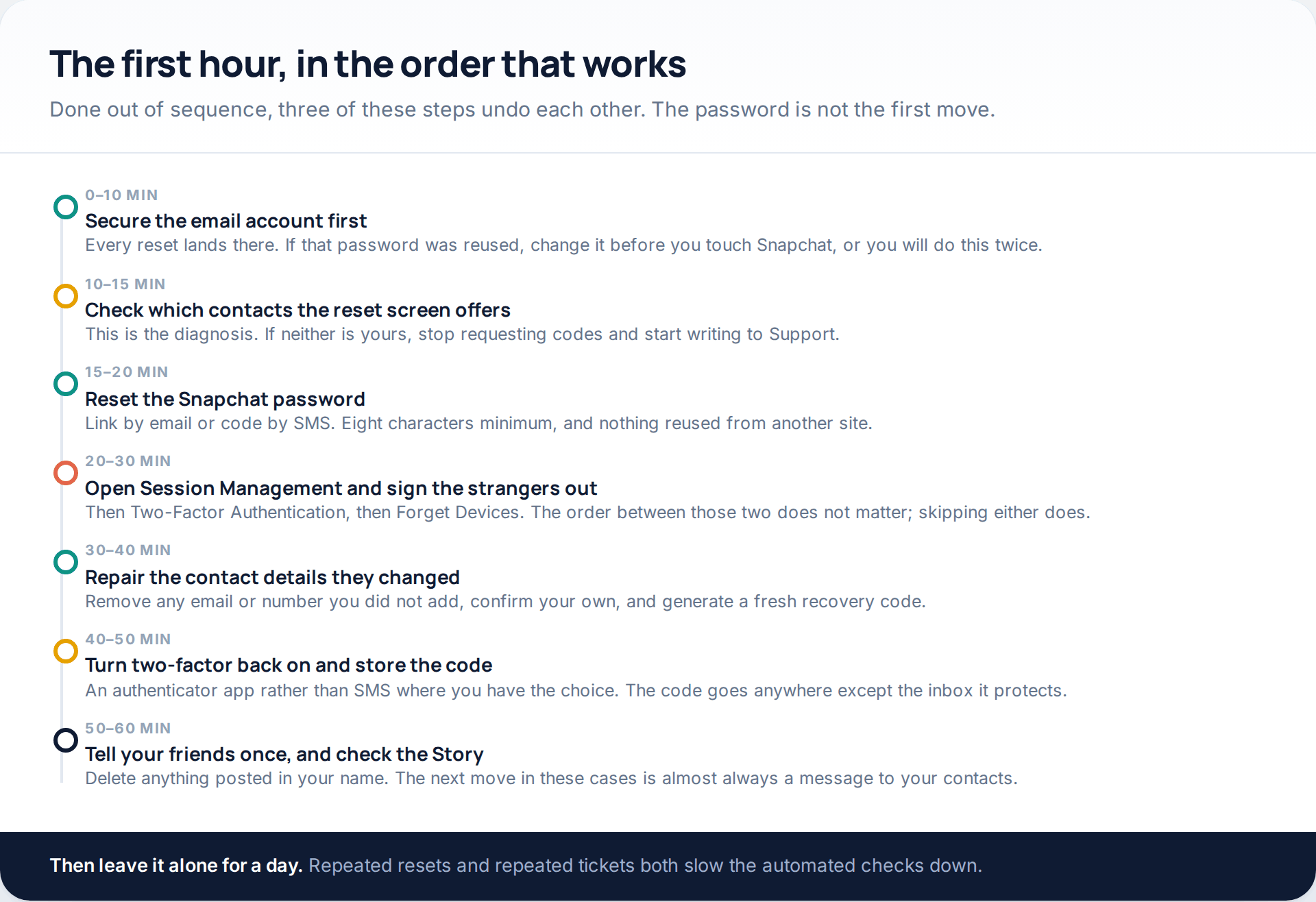
Two sequence errors account for most repeat takeovers. Changing the Snapchat password while the email account is still exposed means the attacker simply resets it again. And clearing sessions after turning two-factor on, rather than before, leaves a signed-in device that skips the code entirely.
Once the hour is done, stop. Leave the account alone for a day rather than refreshing the support thread, and spend the time on the part no setting handles: telling the people who got messages from you. Friends of the victim are the next target in almost every one of these cases, usually with a “can you send me the code I just texted you” message that works because it comes from a name they trust.
Making the second attempt fail
Recovery and prevention are different jobs, and the settings that stop a repeat are not the ones you just used. The short version is an authenticator app rather than SMS, a passkey if your phone supports one, no unofficial Snapchat apps at all, and a glance at Session Management twice a year. We have set all of that out properly, with the menu paths, in the guide to securing a Snapchat account.
One habit is worth more than any of them: never pass on a login code. The most effective takeover technique in circulation needs no software, only a message from an account you already trust, and it collapses the moment the answer is always no.
How this page was put together
Every menu path, label and retention figure here was checked against Snapchat’s own help articles in October 2026 — specifically the pages on compromised accounts, locked accounts, password resets, Session Management, forgetting a linked device, recovery codes, My Eyes Only, Memories and data downloads. Where Snap gives a number, such as the 48-hour temporary lock, the 31-day window for unopened one-to-one Snaps or the seven-day target for a data export, we have used Snap’s figure and said whose it is.
We have not given a timescale for Support replies, because Snapchat publishes none and the figures quoted elsewhere are invented. We have not named any of the sites selling account recovery or “hacking” tools, and we do not recommend one: there is no private channel into Snap, and every route described above is free. Snapchat also renames these screens regularly — Login Verification became Two-Factor Authentication, and Quick Add visibility is now worded as a Find Friends setting — so if a label is not where we describe it, search the settings screen for the same word before assuming the option has gone.
If the worry behind this is not a stranger but someone close who knows your passcode, the fixes are different and the stakes are higher; start with protecting a phone when the risk is someone nearby instead.
Common questions
How long does it take to get a hacked Snapchat account back?
Minutes, if the email or phone on the account is still yours — a reset link or SMS code puts you straight back in. Through Snapchat Support, with both contacts replaced, expect days rather than hours. Snap publishes no target, so anyone quoting you a fixed time is guessing.
Can Snapchat Support see my password or my My Eyes Only passcode?
No, and Snapchat says so directly: never share either with anyone, including Snap itself. Any message asking for your password or a login code is an attack, regardless of which account it appears to come from.
My account is locked. Does that mean I did something wrong?
Not necessarily. Snapchat locks accounts it believes have been compromised, as well as ones using unofficial third-party apps or sending unusual volumes of friend requests. A temporary lock clears after 48 hours, or immediately through the Unlock option in the accounts portal if your account is eligible.
Can I get back Snaps and Memories that were deleted while someone else had the account?
No. Snapchat’s servers are designed to erase a deleted Memory as soon as possible, and Support states it cannot recover lost Memories. Opened or expired Snaps typically cannot be retrieved by anyone. This is the one part of a takeover that recovery does not fix.
Will changing my password sign the other person out?
Not reliably. Open sessions can survive a password change, which is why Session Management exists. Sign out every device you do not recognise, then use Forget Devices under Two-Factor Authentication to clear trusted devices as well.
Someone is messaging my friends from my account. Can I stop it without getting back in?
Not directly. You can warn people from another account or another app, and your friends can block and report the account, but only recovery or a lock removes the attacker’s access. If Snapchat has already locked the account, the messages stop in the meantime.
Is it worth paying a recovery service?
No. There is no private channel into Snap, so a paid service can only submit the same free form you can. A good proportion of them ask for a login code partway through, which hands over the account they claim to be rescuing.
Can I keep my streaks after a takeover?
Sometimes. Snapchat will occasionally restore a broken streak on request, but it is discretionary rather than guaranteed. Deal with the account first and raise the streak afterwards, rather than making it the subject of your support message.
Using a monitoring app for this? GuestSpy is parental monitoring for Android that stays visible on the child's phone and runs from any browser. If it fits your family, see the Text messages & social feature.
Related guides
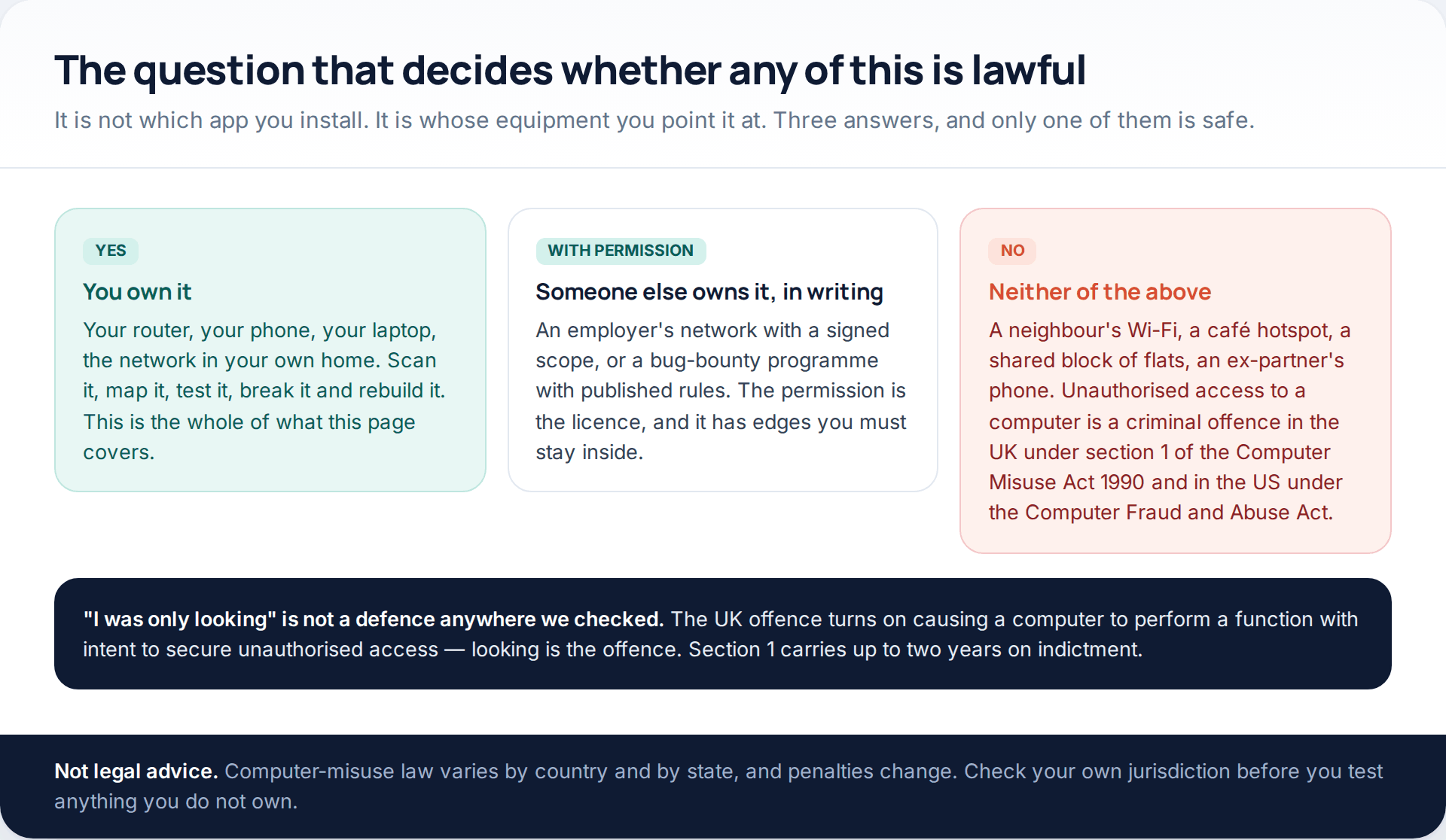
5 Best Security and Network-Testing Apps for Android (Rooted and Not)
The useful security apps for Android are not the ones with “hack” in the title. They are a network scanner,…
Gmail Password Compromised? Four Recovery Routes Google Accepts
If your Gmail password was hacked, there are four routes back and the one that is open to you depends…
Facebook Account Hacked? Every Free Route Back In
If your Facebook account was hacked, five routes lead back in and all of them are free: a device of…
Monitoring your child can see.
Location, screen-time budgets, routines, app and website blocking and the alerts that matter, run from any browser and visible on the phone. Pair an Android phone in about fifteen minutes.