How to Set Up a Family Safety Circle
A family safety circle only works if the people in it actually open it. Plenty of households set one up in an excited ten minutes, add every relative they can think of, and three weeks later nobody has looked at it since — it’s just another notification getting swiped away.
Building a family safety circle that survives past month one is less about the app you pick and more about three decisions: who genuinely belongs in it, whether each relationship should be mutual or one-way, and what routine keeps everyone actually checking in. Get those right and the technology is the easy part.
- What a family safety circle actually is
- Who belongs in it (and who doesn’t)
- Mutual vs one-way sharing
- Setting it up, step by step
- Building check-in routines that stick
- Shared places and a family calendar
- What to agree as a family, out loud
- Managing several kids plus grandparents
- Keeping the circle healthy over time
- Questions families actually ask
What a family safety circle actually is
Strip away the branding and a family safety circle is a small, named group of people who’ve agreed to share some information — usually location, sometimes arrival and departure alerts, occasionally a shared calendar — with each other, on terms each person actually knows.
That last part is what separates a circle from just handing everyone your live location and hoping for the best. A circle has edges: a defined list of members, a defined level of sharing per person, and — ideally — a reason everyone can state in one sentence. “So we know the kids got to school and Grandma Jo got home from her appointment” is a circle with a purpose. “Because the app suggested it” is a circle that gets muted.
Who belongs in it (and who doesn’t)
The instinct when setting one up is to add everyone — grandparents, aunts, the sibling who lives four hours away. Resist it. Every extra person is another notification, another location dot on a busy map, and another relationship whose sharing level you have to think about and maintain.
A workable starting list for most households is small: the parents or partners in the home, any children old enough to carry a phone, and one or two people outside the house who genuinely need day-to-day visibility — commonly a grandparent who does school pickups, or an older relative the family checks on regularly. Extended family who want occasional updates are usually better served by a phone call than a permanent spot in the circle.
A test worth applying to each name
Before adding someone, ask: would I actually look at their location on an ordinary Wednesday? If the honest answer is no, they don’t need to be in the circle — they need an occasional text instead. Circles built on “might as well” rather than “actually useful” are the ones that die.
It also helps to separate “people I love” from “people whose day-to-day movements I need to know about.” A favourite aunt three cities away is very much the first category and rarely the second. Adding her to the circle out of politeness usually means she quietly mutes the notifications within a week, and the circle ends up feeling bigger and less trustworthy than it actually is. A short text every so often does more for that relationship than a location dot she never asked to broadcast.
Mutual vs one-way sharing
This is the decision most families skip, and it’s the one that matters most. Mutual sharing means both people see each other. One-way sharing means only one side is visible. Neither is wrong — but applying the wrong one to a relationship causes real friction.
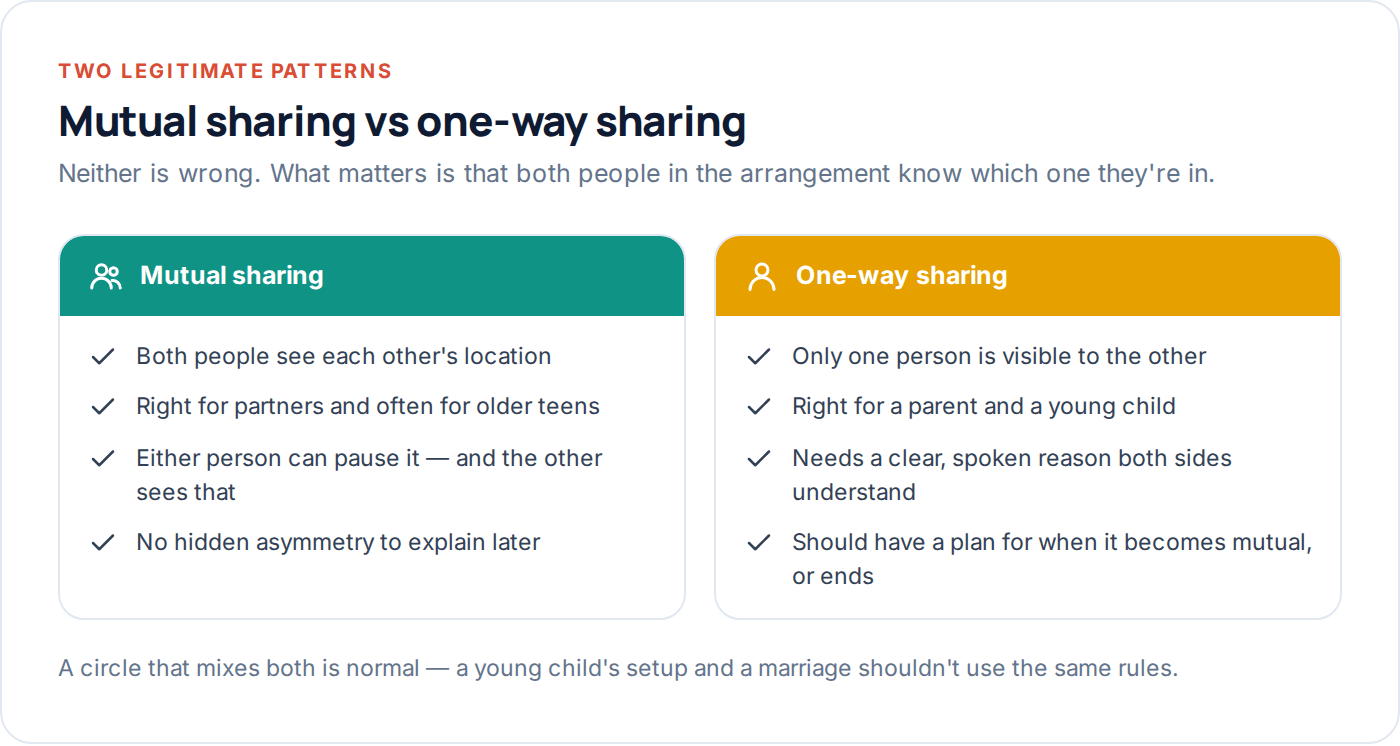
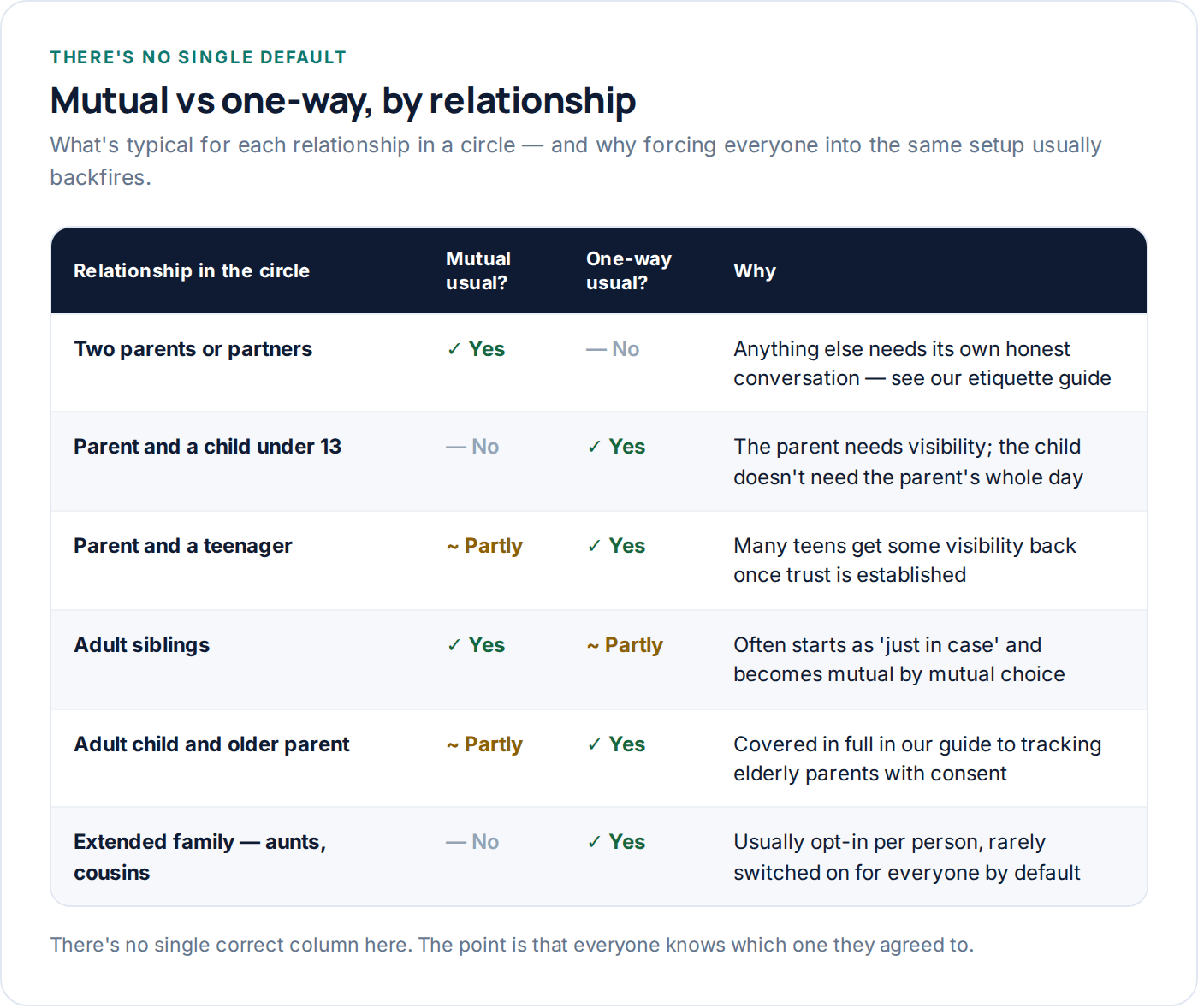
Two adults — partners, co-parents, adult siblings living together — should default to mutual. One-way sharing between two adults, where one person can see the other but not vice versa, is the pattern behind a lot of the etiquette problems we cover in a separate guide on location sharing etiquette: it tends to read as surveillance rather than safety, even when that isn’t the intent.
A parent and a young child is the clean case for one-way: the parent needs visibility, and an eight-year-old doesn’t need to track their parent’s commute. A parent and a teenager sits in between — many families start one-way and move to something closer to mutual as trust builds, which is worth agreeing as a plan rather than leaving unspoken.
Setting it up, step by step
However you build the circle — a dedicated family location app, or the free family-group tools already built into your phones — the sequence that works is the same.
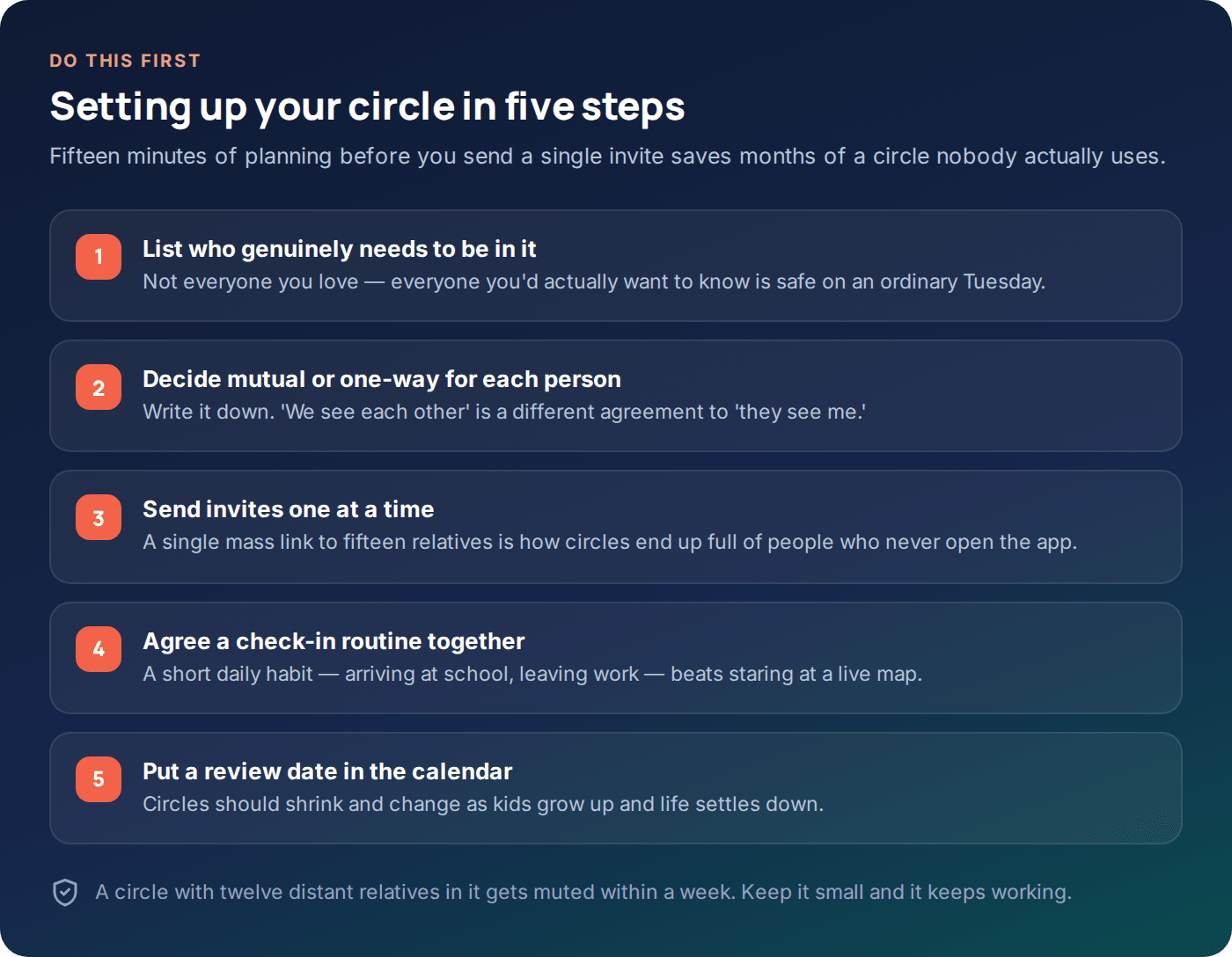
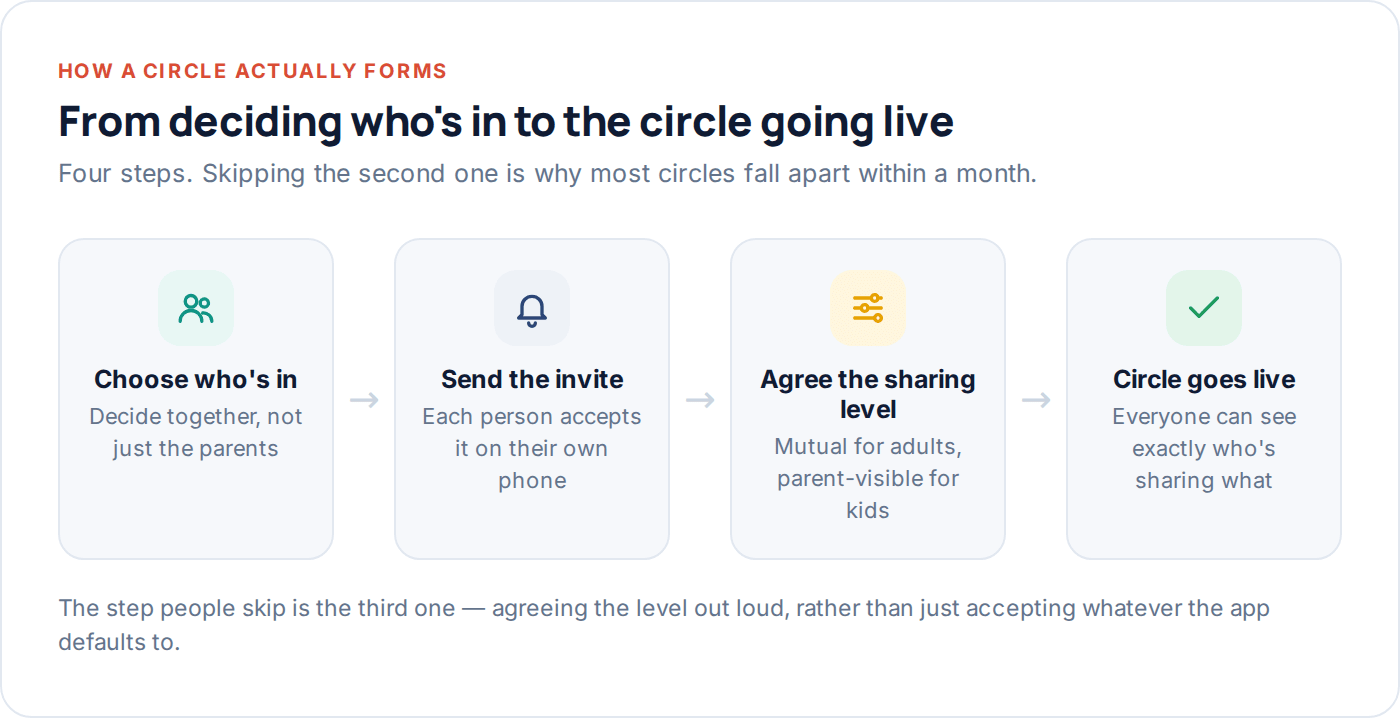
- Decide the list and the sharing level for each person first, before you open any app. Doing this on paper, together, avoids the awkward moment of explaining a setting after the fact.
- Send invites individually, not as one link blasted to everyone. Each person should accept knowingly, on their own phone, and see what they’re agreeing to.
- Check the transparency screen together the first time — most decent family apps have one that lists exactly what’s shared with whom. If yours doesn’t have one, that’s worth treating as a warning sign.
- Turn on arrival and departure alerts for the places that matter — home, school, work — rather than leaving everyone staring at a live-moving dot.
- Set a date to review it, three to six months out. A circle built for an eight-year-old and a toddler needs different settings by the time they’re eleven and five.
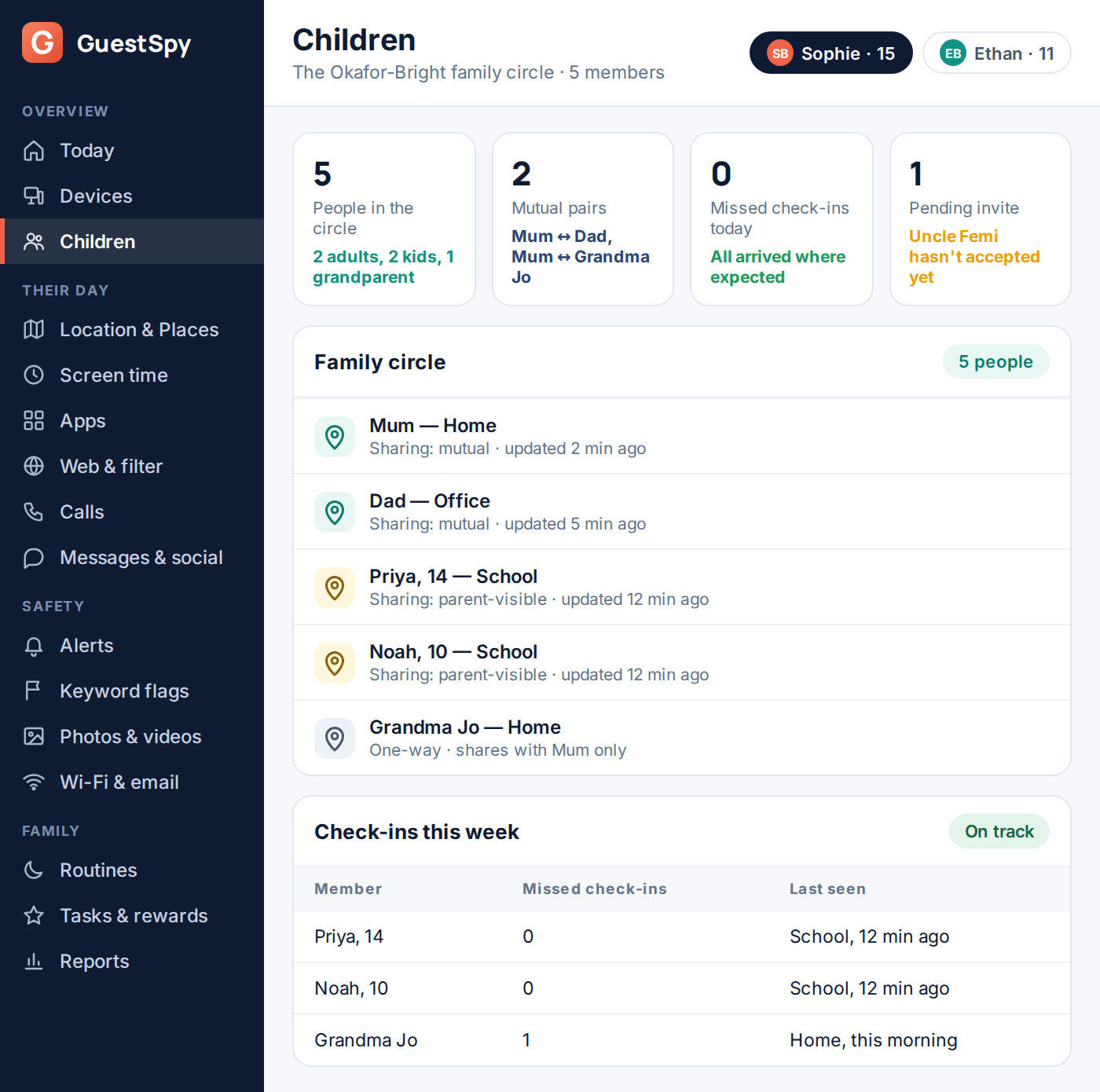
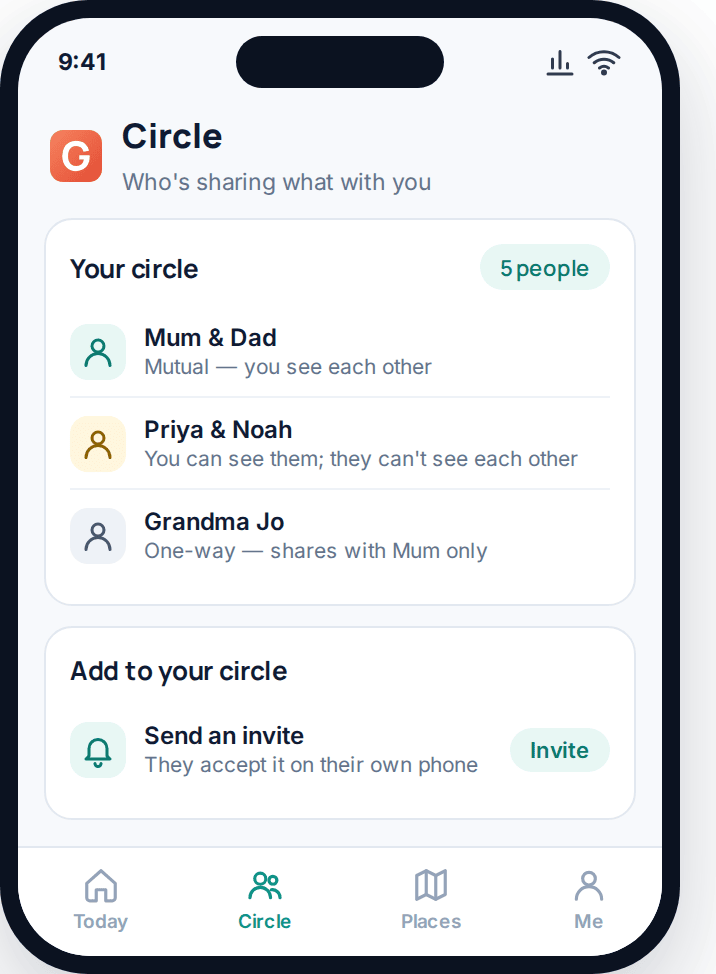
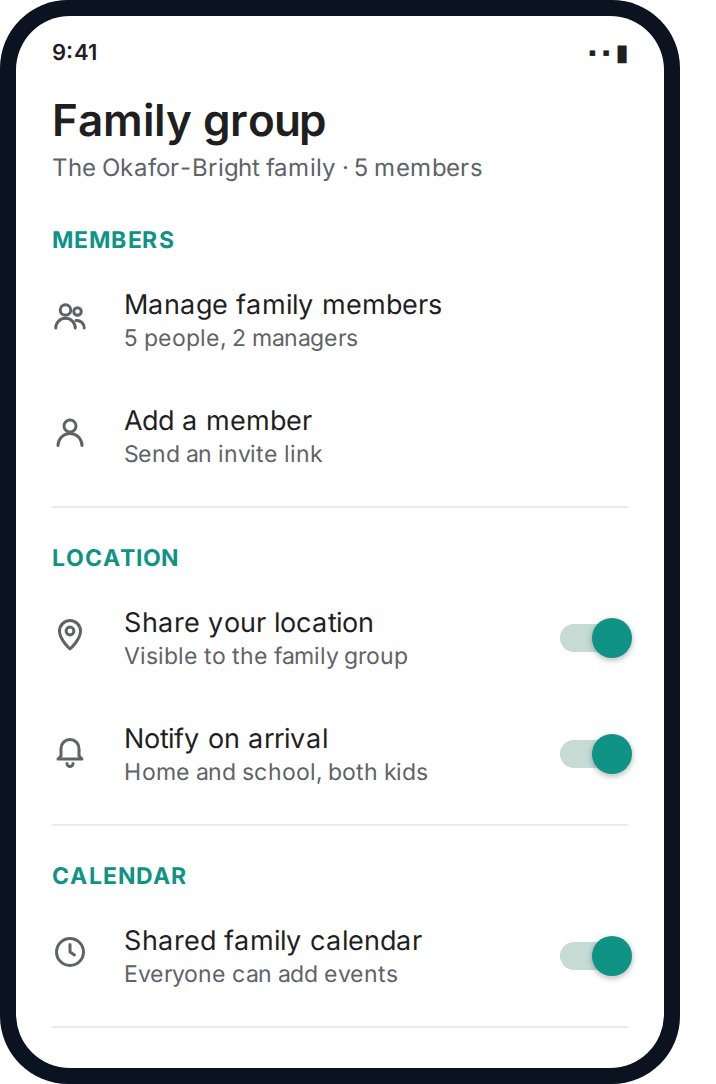
Most phones already include a free family-group feature — Google’s Family group or Apple’s Family Sharing — that covers basic location sharing and a shared calendar at no cost. A dedicated app such as GuestSpy is worth adding on top when you want arrival alerts across several children, a single view for more than one family unit, or check-in routines the built-in tools don’t offer.
Building check-in routines that stick
A live map that everyone glances at all day creates anxiety, not safety, and it fades fast — after the first week, nobody’s really looking. A short, specific check-in routine works far better and lasts much longer.
The routines that survive tend to share three traits: they’re tied to something that was already going to happen (arriving at school, leaving the office), they need no typing, and they have an obvious end point. “Ping when you land” beats “text me every hour” every time, because it asks for one thing at one clear moment instead of ongoing effort.
Arrival alerts
A silent notification when someone reaches a saved place — school, home, a grandparent’s house. No typing required from anyone.
End-of-day check-in
One agreed message or tap each evening — “home and fine” — that closes the loop even on days nothing was flagged.
Travel-only sharing
For older teens or long-distance relatives, turn on live sharing only for actual journeys, not as a permanent background feature.
Whichever pattern you pick, agree it as a household rather than letting it drift into whatever the app happens to do by default. A family that decides together “arrival alerts for school and work, nothing else” ends up with a circle that feels light and useful. A family that never has that conversation ends up with everyone glancing at a live map out of habit, which tends to create more anxiety than it resolves — a parent watching a teenager’s dot move slower than expected on the way home is rarely reassured by watching, and is almost always better off just sending a text.
Shared places and a family calendar
A circle gets more useful, not more invasive, when you add a short list of saved places — home, school, each workplace, a grandparent’s address — rather than relying on raw coordinates nobody can read at a glance. “Arrived at school” means something. A latitude and longitude does not.
A shared family calendar sitting alongside the circle answers a surprising number of “where is everyone” questions before anyone even opens a map — a dentist appointment, a late football practice, a grandparent’s hospital visit. Together, places and a calendar usually explain ninety percent of the “why aren’t they home yet” moments a circle exists to solve.
What to agree as a family, out loud
The single habit that makes circles last is saying the rules out loud, once, together — not assuming everyone understands the same unwritten agreement.
Write it down somewhere everyone can see later, even if it’s just a note in the family group chat. Memory of a five-minute conversation from eight months ago is unreliable; a pinned message is not.
Managing several kids plus grandparents
Circles that span three generations need more structure than a circle of two adults, mostly because the sharing level genuinely differs by person rather than being one setting for everyone.
A practical pattern: children share one-way with both parents. Parents share mutually with each other. A grandparent involved in school pickups shares one-way with the parents, and — separately — the parents check in on the grandparent’s wellbeing rather than raw location, which is a different need entirely and is covered properly in our guide to tracking elderly parents with consent.
Resist merging every generation’s needs into one flat list of “people who can see everyone.” A ten-year-old doesn’t need Grandma’s location, and Grandma very likely doesn’t want the whole extended family watching her every move either — she needs the same say in the arrangement as anyone else in it.
Keeping the circle healthy over time
Circles decay in one of two directions: they get abandoned because nobody finds them useful, or they get resented because someone in it never agreed to what it turned into. Both are avoidable with a small amount of upkeep.
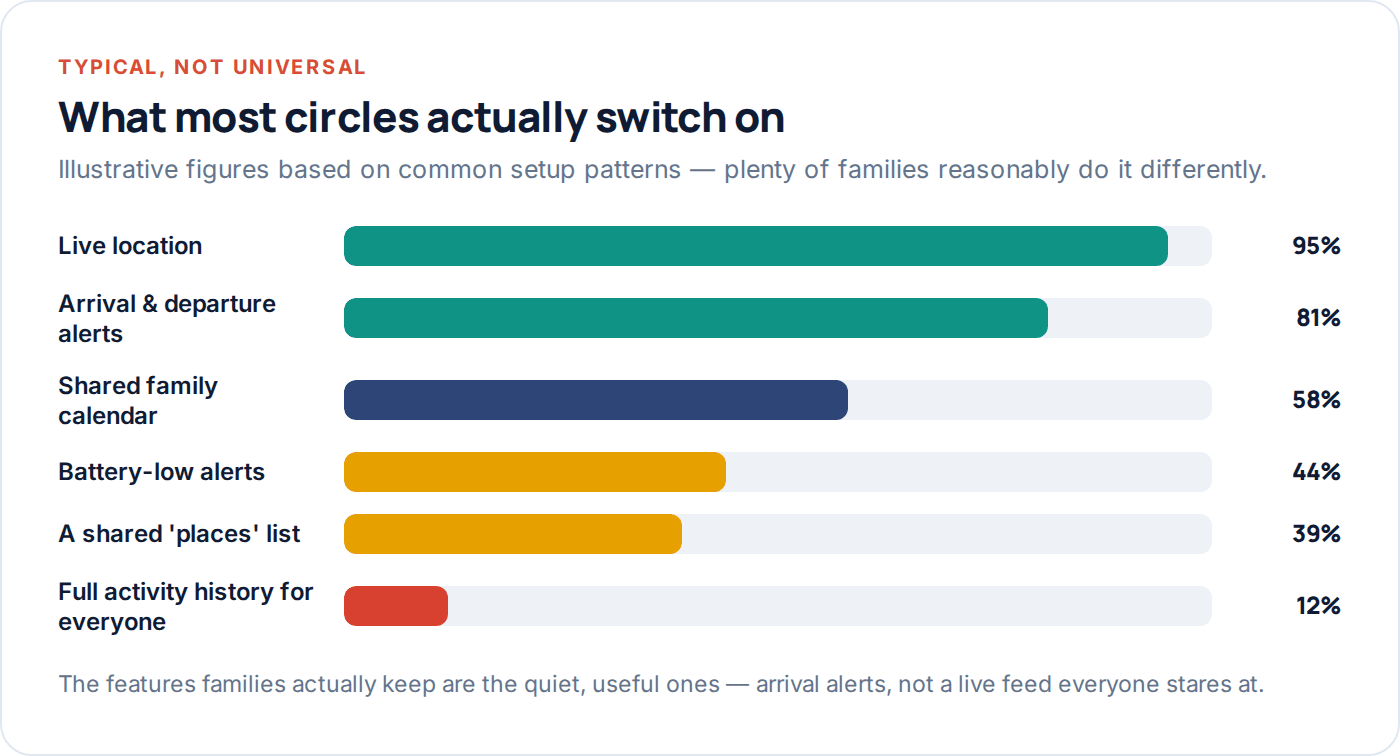
Notice what that chart shows: the features that survive are the quiet, useful ones. A full activity history that everyone can pore over barely gets used at all — it’s noisy, and it invites the kind of over-checking that turns a safety tool into a source of arguments. Arrival alerts and a shared calendar do the actual job with far less friction.
Revisit the circle at the review date you set, remove anyone who’s stopped finding it useful, and be honest if a one-way arrangement should have become mutual, or ended, months ago.
It’s also worth watching for the opposite problem: a circle that’s gone quiet not because it isn’t needed, but because nobody’s checked whether the settings still match real life. Kids change schools, a grandparent moves nearer, a teenager gets their first job with irregular shifts — each of those is a reasonable moment to open the circle back up and ask whether the saved places and alerts still reflect where everyone actually goes. A ten-minute update twice a year keeps a circle relevant instead of letting it slowly become background noise nobody trusts to be accurate.
Questions families actually ask
How many people should be in a family safety circle?
Most workable circles have somewhere between three and six people. Beyond that, engagement tends to drop fast — people stop checking a map crowded with relatives they weren’t that invested in tracking. Keep it to who you’d actually check on an ordinary day.
Should grandparents be in the same circle as the kids?
They can be, but their sharing level is usually different — a grandparent doing school pickups needs visibility into that specific journey, not a permanent spot alongside every child’s daily location. Treat each relationship’s settings separately rather than copying one setup for everyone.
What if someone doesn’t want to join?
Respect it and don’t push — a circle built on reluctant consent causes more problems than it solves. For an adult, that’s the end of the conversation. For a minor child, it’s worth understanding why before deciding how to proceed; sometimes it’s about being asked to agree, not about the sharing itself.
Can I have different circles for different people?
Yes, and it’s often the right approach — one circle for the immediate household, a separate, smaller one-way arrangement for checking on an elderly parent, rather than merging everyone into a single group with mismatched needs.
Do we need a paid app, or is the free family group enough?
For many families, the free family-group tools built into iPhone and Android cover the basics well. A dedicated app earns its place when you want arrival alerts across several children, one view spanning more than one household, or check-in routines the built-in tools don’t offer.
What happens when a teenager wants more privacy?
That’s a normal, healthy request, and it’s worth treating as one rather than a problem to manage around. Our guide on location sharing etiquette covers how to renegotiate a teenager’s sharing level without it feeling like either side is losing.
Where to start this week
Pick the smallest useful version first: the people you’d actually check on, mutual where it should be mutual, one-way where it shouldn’t, and one or two saved places with arrival alerts. That alone solves most of what families set a circle up to solve.
If you want a single dashboard covering more than one child or generation, you can set up GuestSpy’s family circle in a few minutes, and our FAQ has answers to the setup questions that come up most often.
Keep reading
A Beginner’s Guide to Geofencing for Parents
What a geofence actually is, how to choose a radius that doesn't misfire, and how to stop useful alerts turning…
How to Track Elderly Parents’ Location (With Consent)
Capacity, dignity and consent come first. Then the practical part: what to set up, how to involve siblings, and when…
Location Sharing Etiquette for Families and Couples
The unwritten rules of sharing your location with a partner or family: consent, reciprocity, teenagers' right to some privacy, and…