The Complete Guide to Finding a Lost Phone
You pat your pockets, check the sofa, retrace your last twenty minutes, and it isn’t there. Before you do anything else — before you panic, before you tell yourself it’s gone for good — there is a specific, calm order of steps that actually finds most lost phones, and a couple of moves that make things permanently worse if you do them too early.
This guide walks through how to find a lost phone on iPhone and Android, what it actually means when the phone shows as offline or switched off, how Lost Mode and remote erase work, what the police genuinely need from you, and why — even if you’re furious — you should never try to get the phone back from a suspected thief yourself.
- The first five minutes
- Finding an iPhone with Find My
- Finding an Android with Find My Device
- What it means if it’s showing as offline
- Lost Mode: locking it without wiping it
- Protecting your accounts and data first
- Your IMEI number, and why it matters
- What police actually need from you
- Why you should never confront a thief
- Questions people actually ask
The first five minutes
Most lost phones are not stolen. They’re under a car seat, left on a café table, or slipped down the side of a sofa cushion an hour ago. Treat the first five minutes as a search problem, not a security incident, and you’ll save yourself a lot of unnecessary drama.
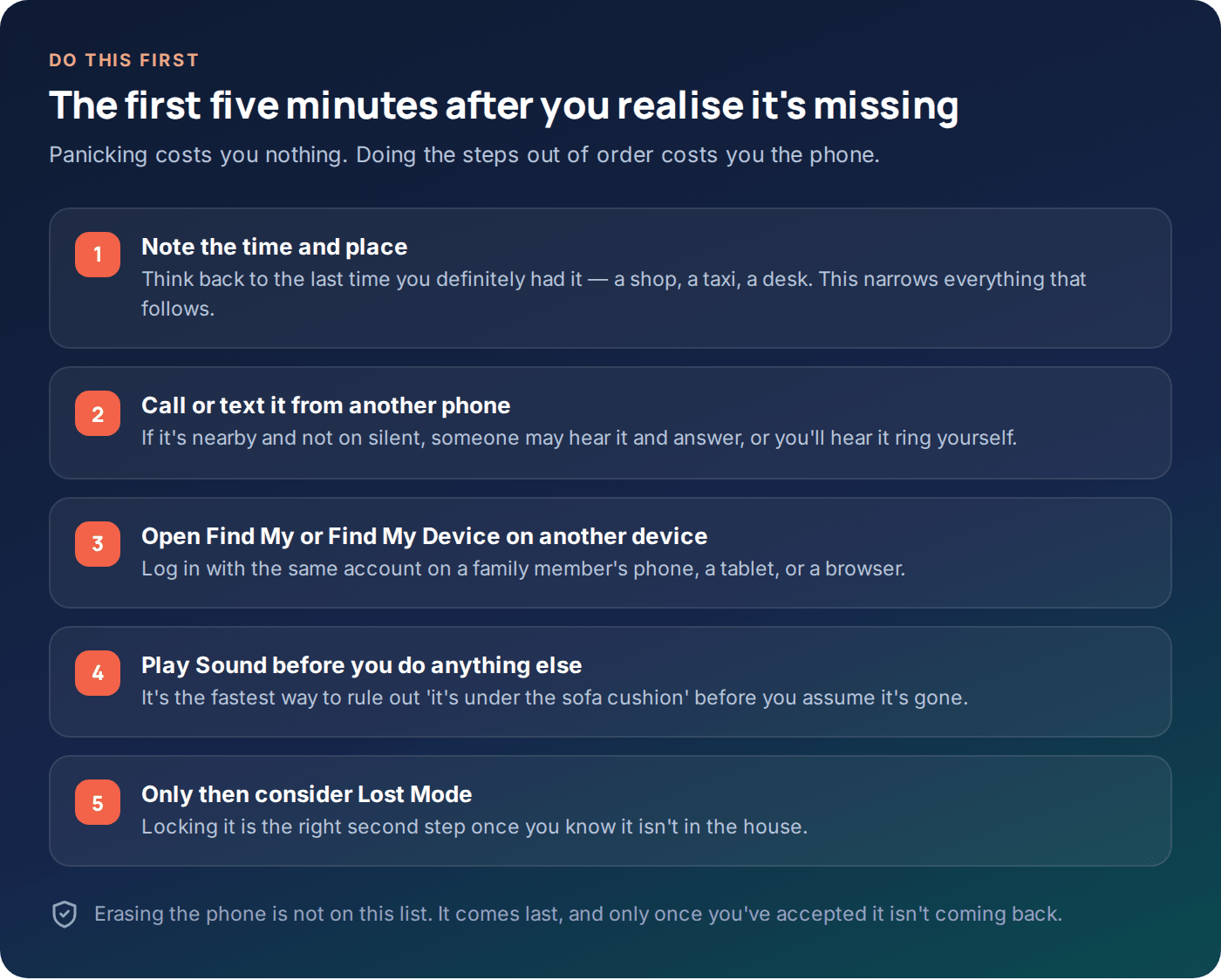
Start by pinning down the last time you definitely had it in your hand — not the last time you think you saw it, the last time you’re certain. That single fact narrows the search area more than anything else you’ll do. Then call or text it from another phone. If it’s nearby and the ringer is on, you’ll hear it. If it goes straight through, someone may have already found it and be waiting for a call.
Use Play Sound before you assume the worst
Both Apple’s Find My and Google’s Find My Device have a “Play Sound” option that makes the phone ring at full volume for about two minutes, even if it’s on silent. This one feature finds more phones than anything else in this guide — people lose phones inside their own homes far more often than they lose them in public. Try this before you touch Lost Mode or think about the police.
Finding an iPhone with Find My
On iPhone, everything runs through Find My, and it only works if it was switched on before the phone went missing. Open Find My on another Apple device, or go to icloud.com/find from any browser and sign in with the same Apple ID.
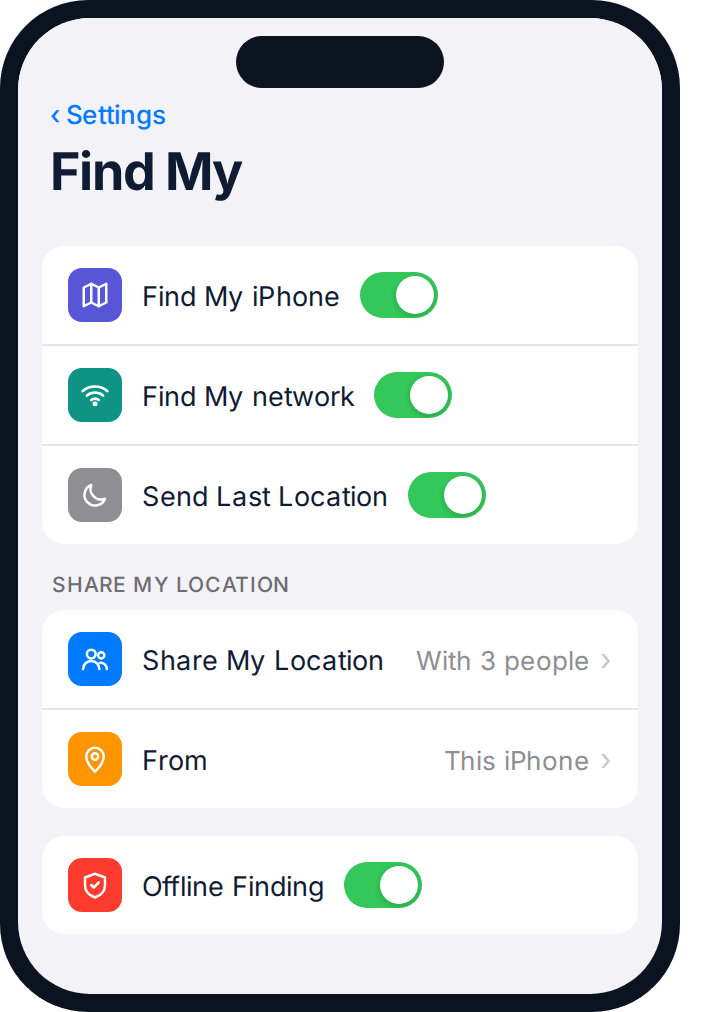
- Check the map first. A precise dot means the phone has a live signal right now. A grey silhouette with an address and a time means you’re looking at a last known location, not a live one.
- Tap Play Sound if the map suggests it’s close by — home, the office, a friend’s car.
- Get Directions if it’s somewhere you don’t recognise, so you can see the route before deciding whether to go.
- Only then consider Mark As Lost (Apple’s name for Lost Mode) — covered in detail below.
If Find My shows “No location found,” that almost always means the phone is off, out of battery, or Find My iPhone was switched off in Settings before it went missing — not that Apple has lost track of it. Skip ahead to the section on what an offline phone actually means.
Finding an Android with Find My Device
Google’s version works the same way in principle. Go to android.com/find on any browser, or open the Find My Device app on another Android phone, and sign in with the Google account the missing phone uses.
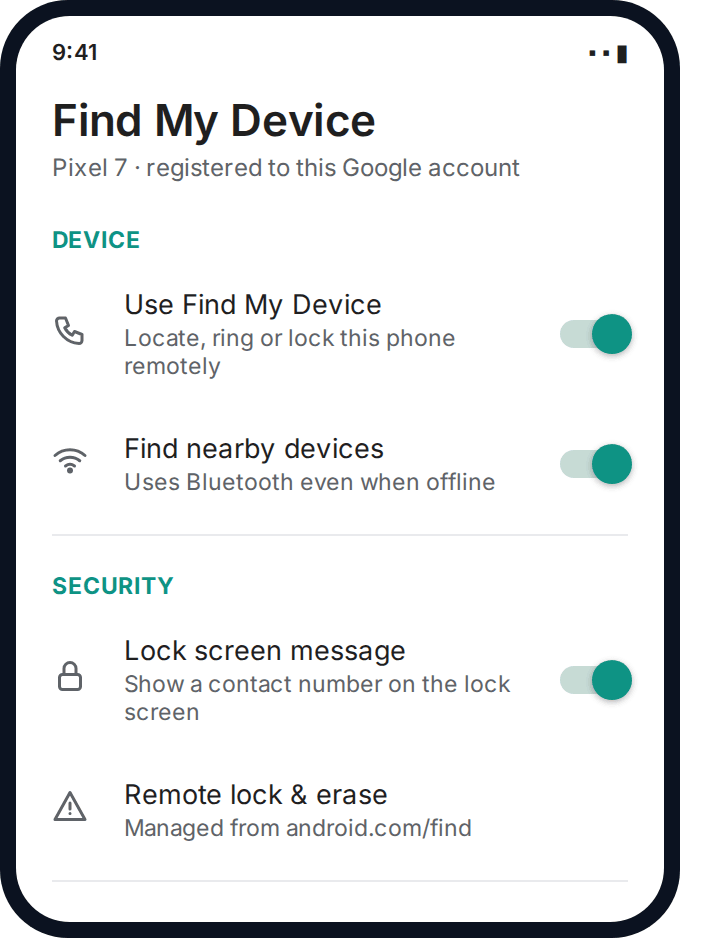
- Read the map and the timestamp together. Android shows “last seen” times explicitly, which is genuinely useful — you always know exactly how stale the location is.
- Play Sound works the same way as on iPhone, full volume for five minutes, overriding silent mode.
- Secure Device locks the screen and lets you add a phone number and message for whoever finds it, without erasing anything.
- Erase Device is the last, irreversible option — see the section below before you touch it.
One practical difference worth knowing: on many Android phones, Find My Device can locate the phone via Bluetooth from nearby Android devices even when it has no mobile signal or Wi-Fi, using Google’s device network. It isn’t guaranteed, but it’s why a phone can sometimes still be found in a dead zone.
What it means if it’s showing as offline
This is the part almost every guide skips, and it changes what you should actually expect. A phone that’s switched off, out of battery, or in aeroplane mode cannot report a new location — full stop. What you’re seeing is the last location it managed to send before it went dark.
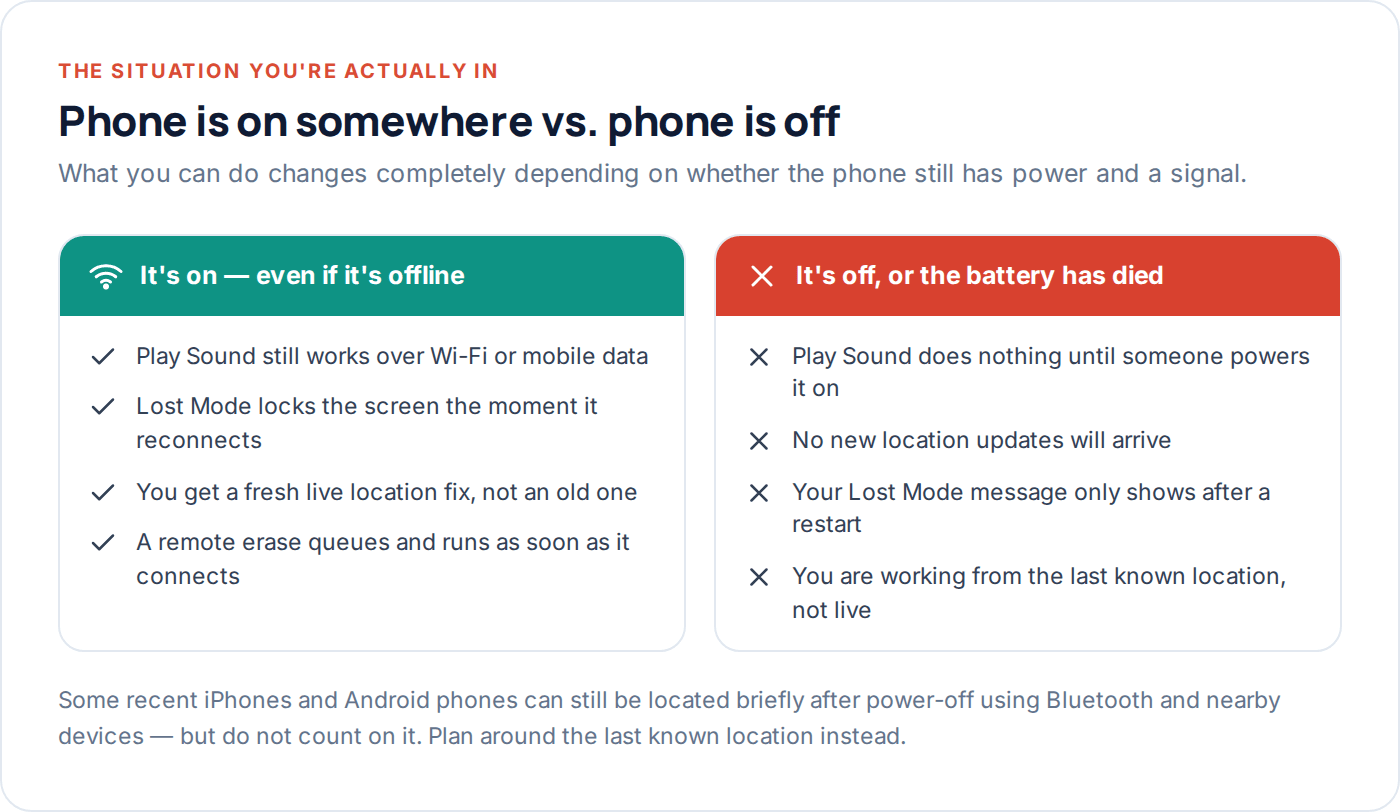
That last location is still useful. If it shows the phone at a specific café at 11:42am and nothing since, you now know two things: roughly where to start looking, and roughly when the battery likely died or someone switched it off. If the last known location is somewhere unfamiliar and the phone was fully charged when you lost it, that combination — an unfamiliar place, plus a phone that shouldn’t have died — is the pattern that suggests theft rather than a dropped phone.
If you already share locations as a family
If your household already uses a family location app such as GuestSpy alongside Find My, its own location history can act as a second data source with its own last-known point and timestamp — sometimes from slightly earlier or later than Apple’s or Google’s own record, which can narrow things down further.
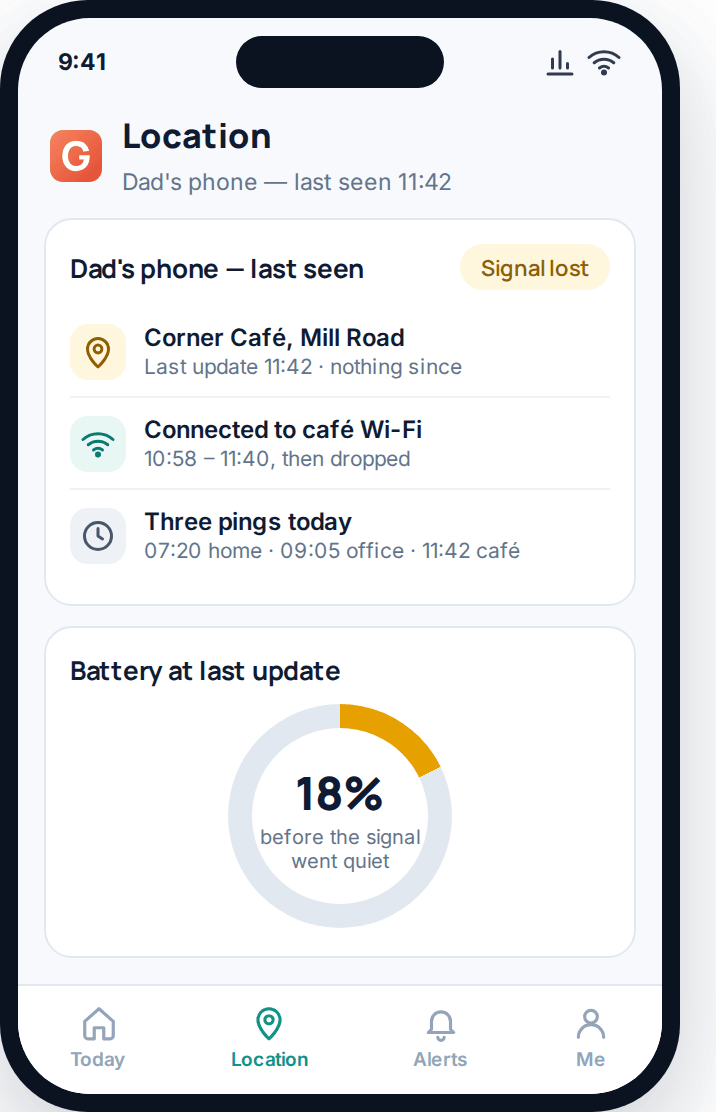
It won’t lock or erase the phone — that’s not what it’s built to do — but a second, independent last-known location is genuinely useful when you’re trying to work out where to actually go and look.
Lost Mode: locking it without wiping it
Lost Mode (Apple calls it Mark As Lost; Google calls it Secure Device) is the step between “I can’t find it” and “I’ve given up.” It locks the screen with a passcode, displays a message and phone number of your choosing on the lock screen, and — on iPhone — disables Apple Pay on that device. Crucially, it does not delete anything.
- Turn it on as soon as you suspect it’s out of your hands, not just out of sight. There’s no downside to locking a phone that’s actually still in your bag.
- Write a message that’s genuinely useful to a stranger — “Found this? Please call [number], reward offered” works far better than a generic warning.
- Leave it on while you decide what to do next. It costs you nothing to leave a lost phone locked for a week while you weigh up options.
- Turn it off the moment you get the phone back, using the same account — it will ask for your passcode, which is expected.
Lost Mode is reversible. Remote erase is not. If you’re not sure which to use, use Lost Mode — you can always erase it later, but you can never un-erase it.
Protecting your accounts and data first
Before you think about getting the phone back, think about what’s on it. A phone is rarely just a phone — it’s usually a signed-in email account, a banking app, and a password manager all in one pocket.
Change the big three
Your email password, your banking app’s password, and your Apple ID or Google account password — from another device, not the missing phone.
Check what auto-logs-in
Anything with biometric unlock is only as safe as the screen lock. If you didn’t have a passcode set, treat every signed-in app as exposed.
Sign out remotely where you can
Many banking and email apps let you end active sessions on other devices from a browser — do this before you decide on Lost Mode versus erase.
This matters more than getting the physical phone back. A phone can be replaced for a few hundred pounds. A drained bank account or a hijacked email address used to reset every other password you own is a much longer problem.
Your IMEI number, and why it matters
Every phone has an IMEI — a 15-digit serial number unique to that specific handset, separate from your phone number or SIM. It’s the single most useful piece of information you can hand to the police or your insurer, because it identifies the physical device even if the SIM is swapped or the phone is factory reset.
Find it now, before you need it, by dialling *#06# on the phone, checking the original box, or looking under Settings → General → About (iPhone) or Settings → About Phone (Android). Write it down somewhere that isn’t the phone itself.
What police actually need from you
If you believe the phone was stolen rather than lost, a police report matters — both for a potential insurance claim and because it puts the IMEI on record, which can flag the device if it’s later switched on and connects to a network.
| What to bring | Why it helps |
|---|---|
| The IMEI number | Uniquely identifies the physical handset, even after a factory reset or SIM swap. |
| A screenshot of the last known location | Gives officers a concrete time and place, rather than “somewhere near the station.” |
| The make, model and colour | Basic but often missed under stress — write it down while you’re calm. |
| Roughly when you last had it | Helps narrow whether this was opportunistic or a targeted theft. |
| Your crime reference number | Needed for most insurance claims, and for reporting the IMEI to your network provider. |
Report the theft to your mobile network too, separately from the police — they can blacklist the IMEI, which stops the phone being used on most networks even if it’s never physically recovered.
Why you should never confront a thief
Live location tracking makes people feel like detectives, and that’s exactly the problem. A pin on a map showing “the phone is at this address right now” is not the same as knowing it’s safe to go there, and it is very much not an invitation to go and get it yourself.
Phones get sold on, moved between addresses, and end up in the hands of people who had nothing to do with the theft. Turning up at a stranger’s door because an app says your phone is inside puts you in a genuinely dangerous, legally murky situation, over an object that’s replaceable. Every police force that publishes advice on this says the same thing: send them the location, don’t go yourself.
If Find My or Find My Device shows a location you believe is where a stolen phone has ended up, that information is exactly what you hand to the police in the report above — not a destination for you to visit.
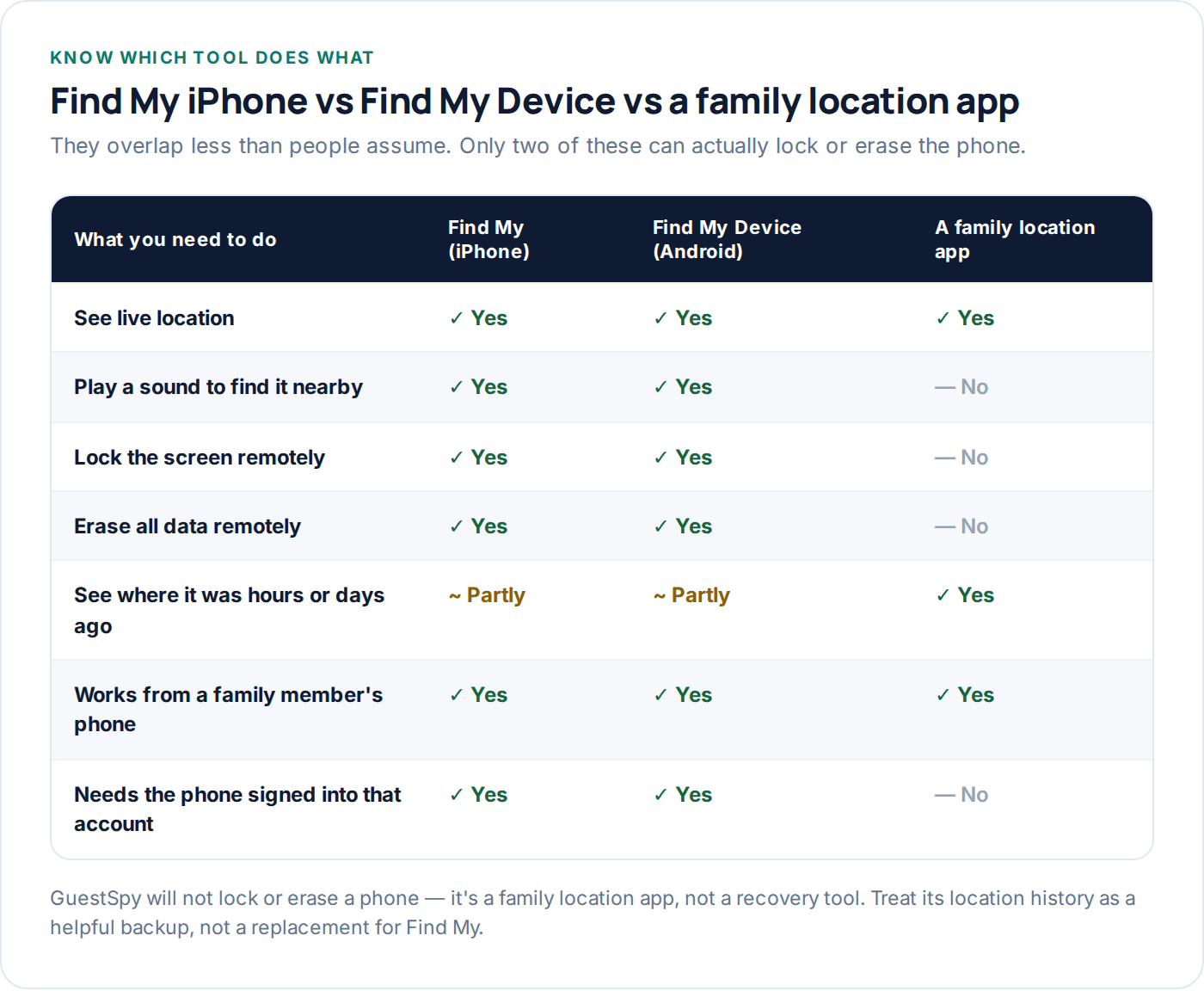
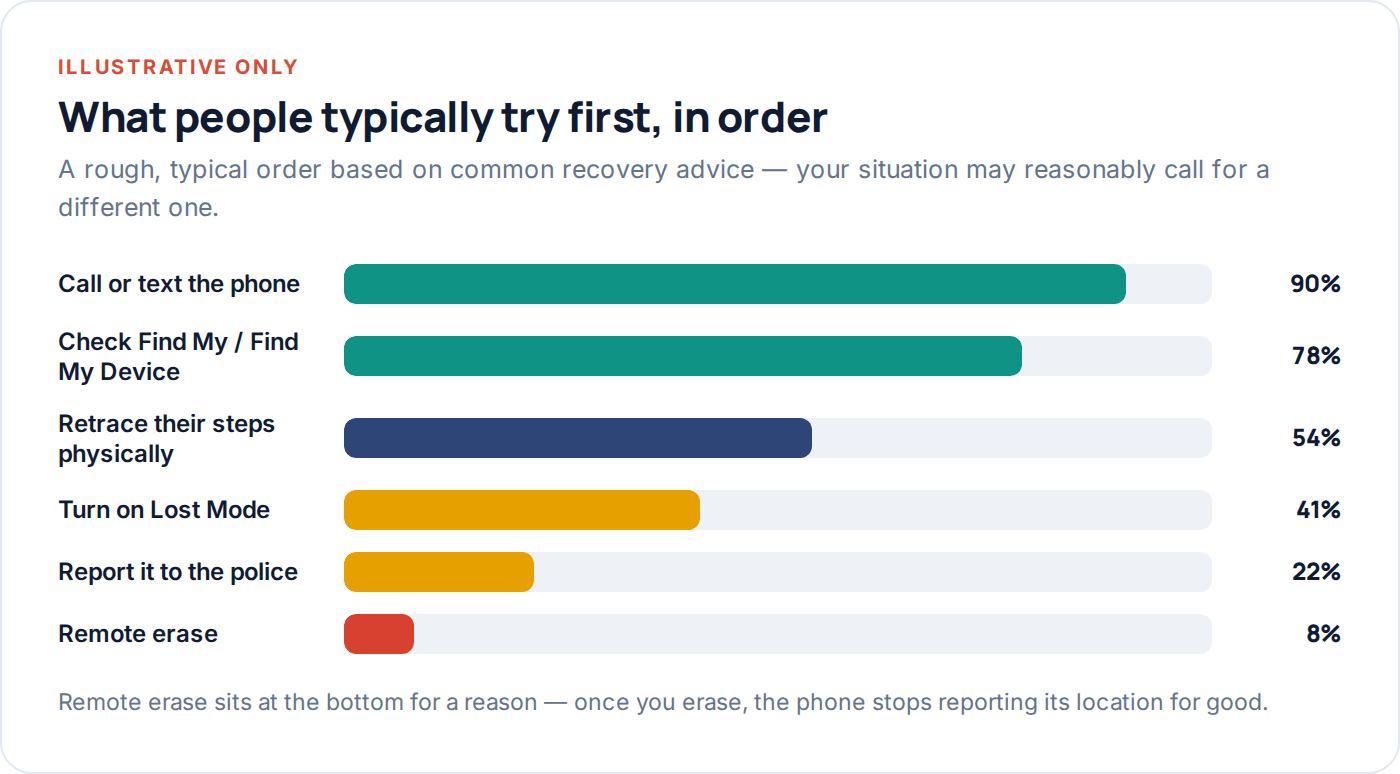
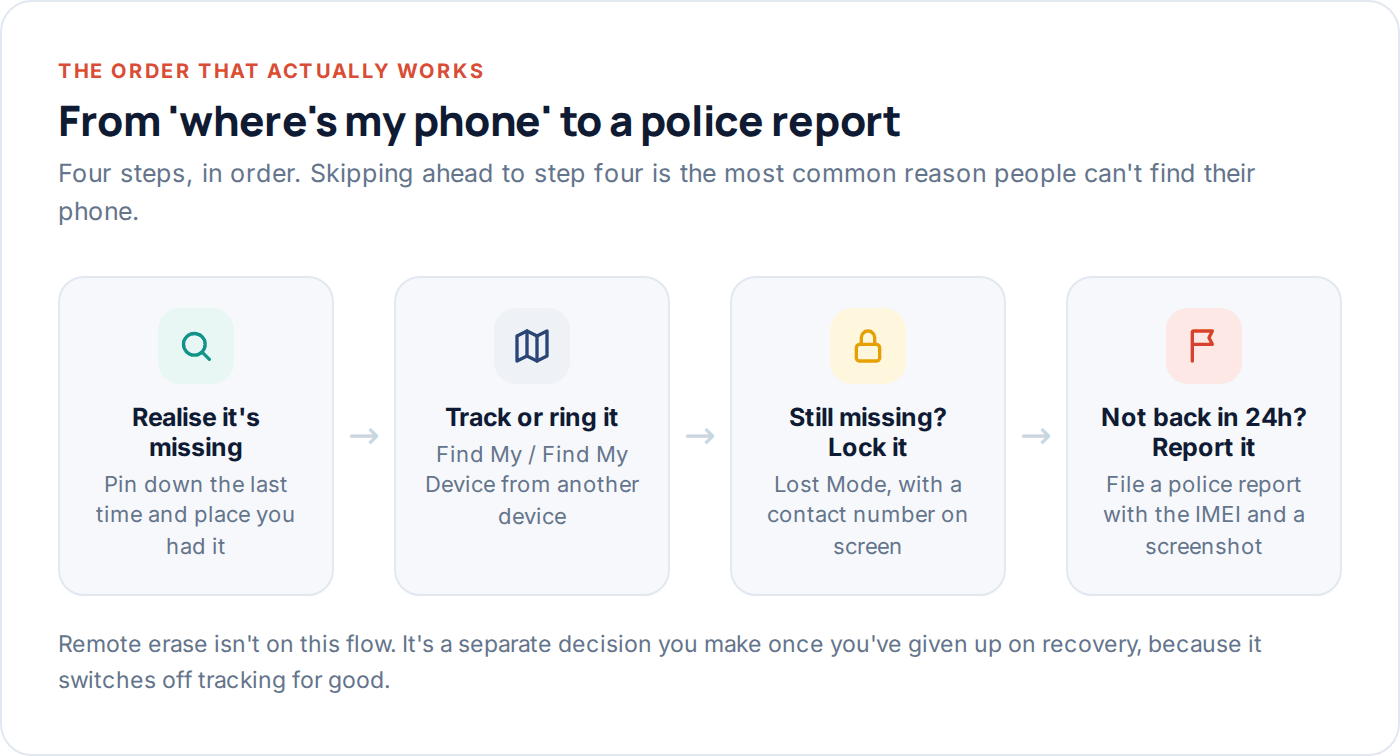
The comparison table and the typical-order chart above are worth returning to once you’ve calmed down: they exist to stop you skipping straight to remote erase or a confrontation when a slower, safer step would have worked just as well.
Questions people actually ask
Can I find my phone if it’s turned off?
Not live, no — a switched-off phone can’t send a new location. You’ll see its last known location before it went dark, which is still genuinely useful for narrowing down where to look or what to tell the police. Some newer phones can occasionally still be briefly located via Bluetooth from nearby devices even when powered off, but don’t rely on it.
Should I erase my phone remotely straight away?
No. Erasing is irreversible and it stops the phone reporting its location, which makes recovery much harder. Use Lost Mode first — it locks the phone and protects your data without giving up on getting it back. Erase only once you’ve genuinely accepted it isn’t coming back.
Does Find My work if the SIM card is removed?
Yes, on iPhone, as long as the phone has Wi-Fi or is near another Apple device using the Find My network. Find My iPhone doesn’t rely on the SIM at all. Android’s Find My Device is similar via Wi-Fi or Google’s device network, though a factory reset will remove the phone from your account on both platforms.
What if the phone was factory reset by whoever has it?
A factory reset by someone who doesn’t know your Apple ID or Google account password should trigger Activation Lock (iPhone) or Factory Reset Protection (Android), which stops the phone being usable without your credentials. It also stops Find My working, so this is exactly the point to switch focus to your IMEI report and insurer instead.
Can a family location app help if Find My isn’t set up?
Sometimes. If a family location app was already installed and running on the phone, it may have its own last-known location and timestamp — useful as a backup, though it can’t lock or erase the device the way Find My or Find My Device can. It’s not a substitute for setting those up properly in the first place.
Is it worth paying for phone insurance after this?
Genuinely depends on the phone’s value and your circumstances — this guide can’t make that call for you. What it can say is that an insurance claim moves far faster with a police crime reference number and your IMEI already in hand, which is exactly what the steps above give you.
Before you need any of this
The single most useful thing you can do today isn’t in the middle of a crisis — it’s checking, right now, that Find My or Find My Device is switched on for every phone in the house, and saving each phone’s IMEI somewhere that isn’t the phone itself. Five minutes now saves an afternoon of panic later.
If your family already shares locations day to day, that habit pays off here too — a household using GuestSpy’s location sharing has a second, independent record of where a phone last was, on top of Apple’s or Google’s own tools. You can set it up in a couple of minutes, and our FAQ covers the setup questions that come up most.
Keep reading

How to Track Elderly Parents’ Location (With Consent)
Capacity, dignity and consent come first. Then the practical part: what to set up, how to involve siblings, and when…
The Complete Guide to GPS Tracking for Families
How your phone actually works out where it is, why the accuracy varies so much, what it costs your battery,…
A Step-by-Step Guide to Setting Up Family Location Sharing
Three ways to set up family location sharing on iPhone and Android, the settings that quietly break each one, and…